
Inspiration
The web is overflowing with information, but understanding it efficiently can be a challenge. I found myself constantly jumping between tabs – selecting text, pasting it into a summarizer, then a translator, then maybe a separate AI chat to ask questions. Not only was this inefficient, but sending potentially sensitive information from webpages to various cloud services always felt a bit uncomfortable. Looking around, there weren't many extensions that combined these AI tools seamlessly within the browser, especially ones focused on privacy. When I learned about Chrome's new built-in AI capabilities – models that could run directly on the device – I saw an opportunity. Initially, I just started building this project to test things out, to see what was possible with these new on-device APIs. What if there was a single, convenient hub right in the browser's side panel that leveraged this private, on-device AI for core tasks, but could also connect to more powerful cloud AI like Gemini when needed? That experimental idea sparked the creation of BIPPO – a Built-in Private Processing hub.
What it does
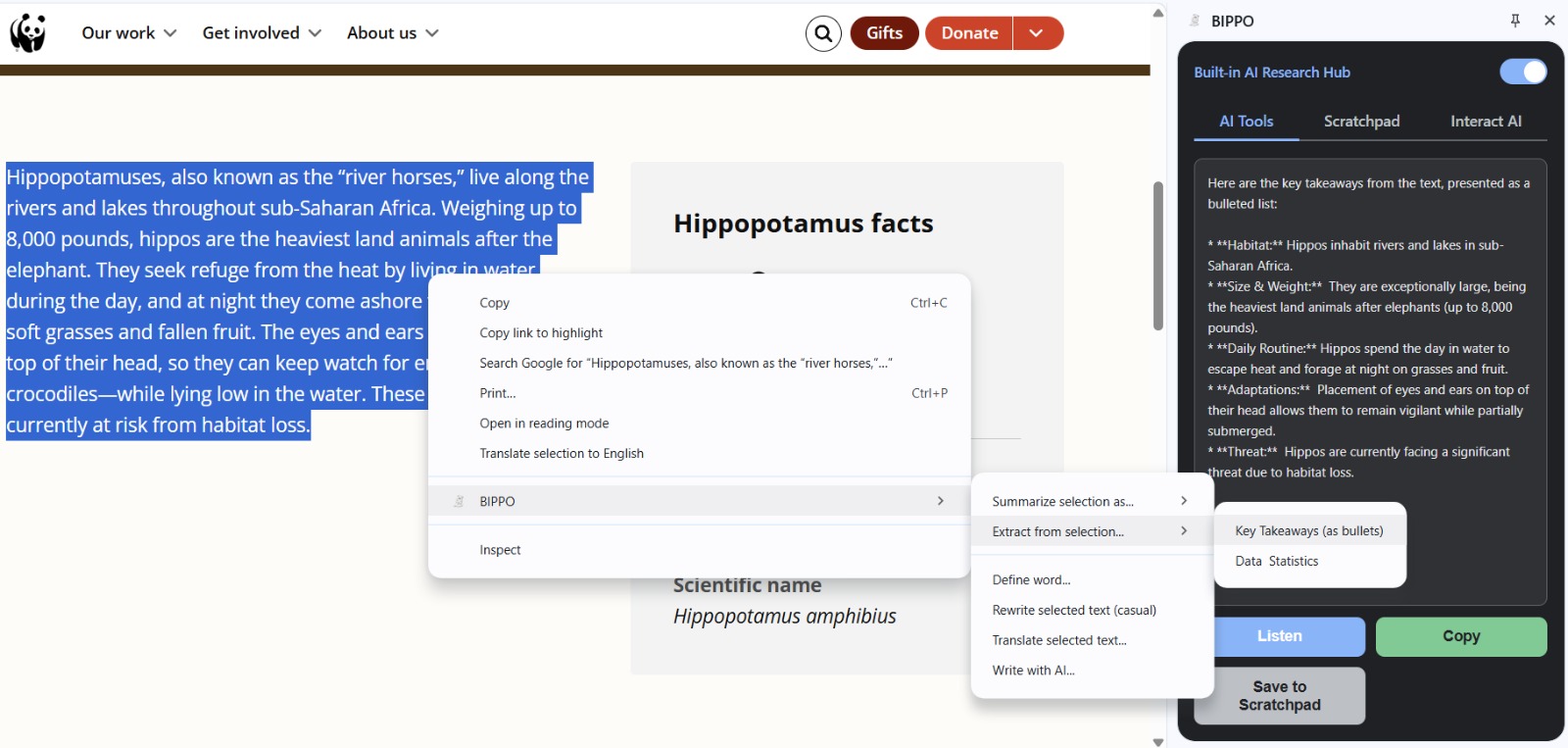
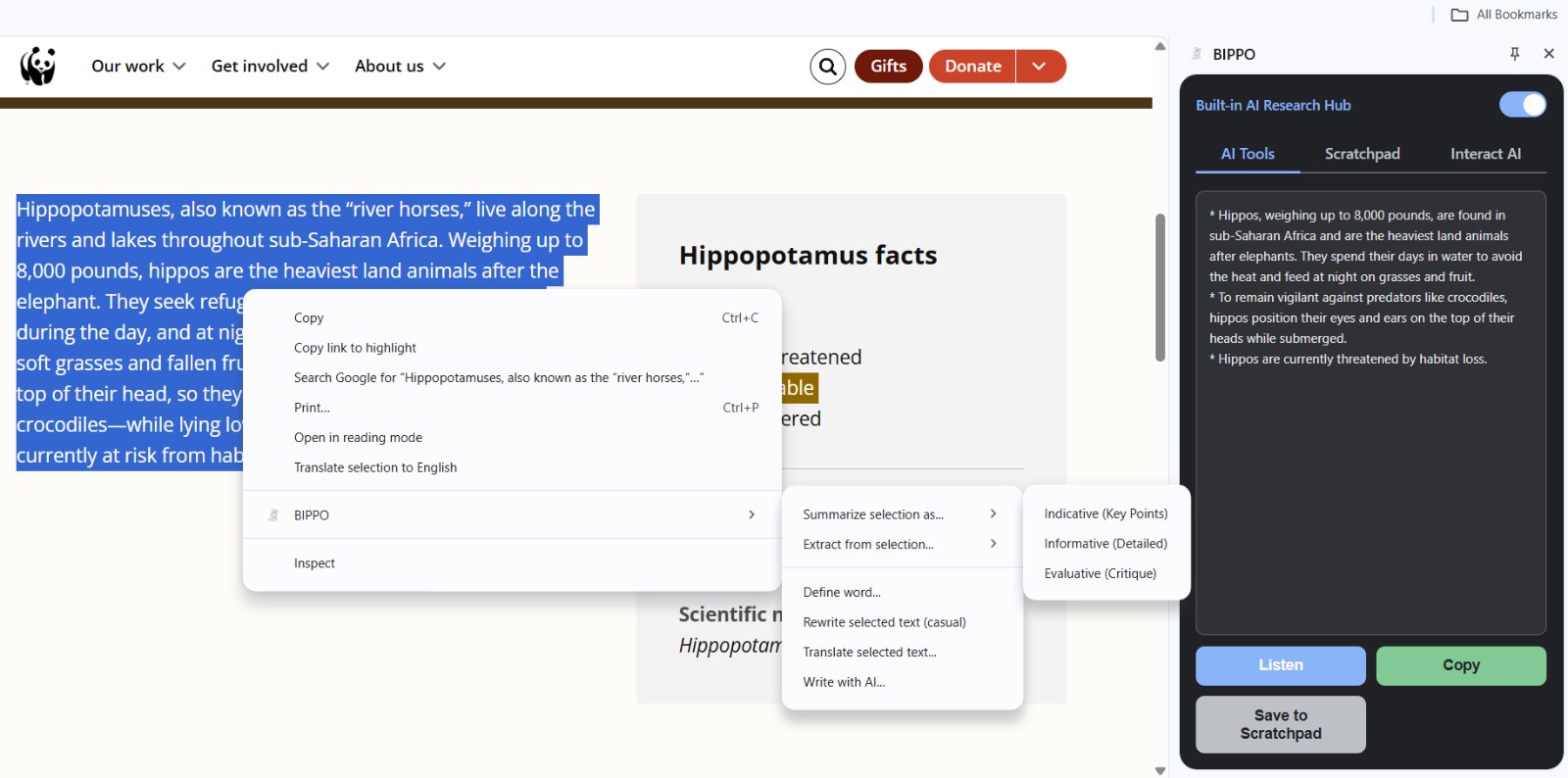
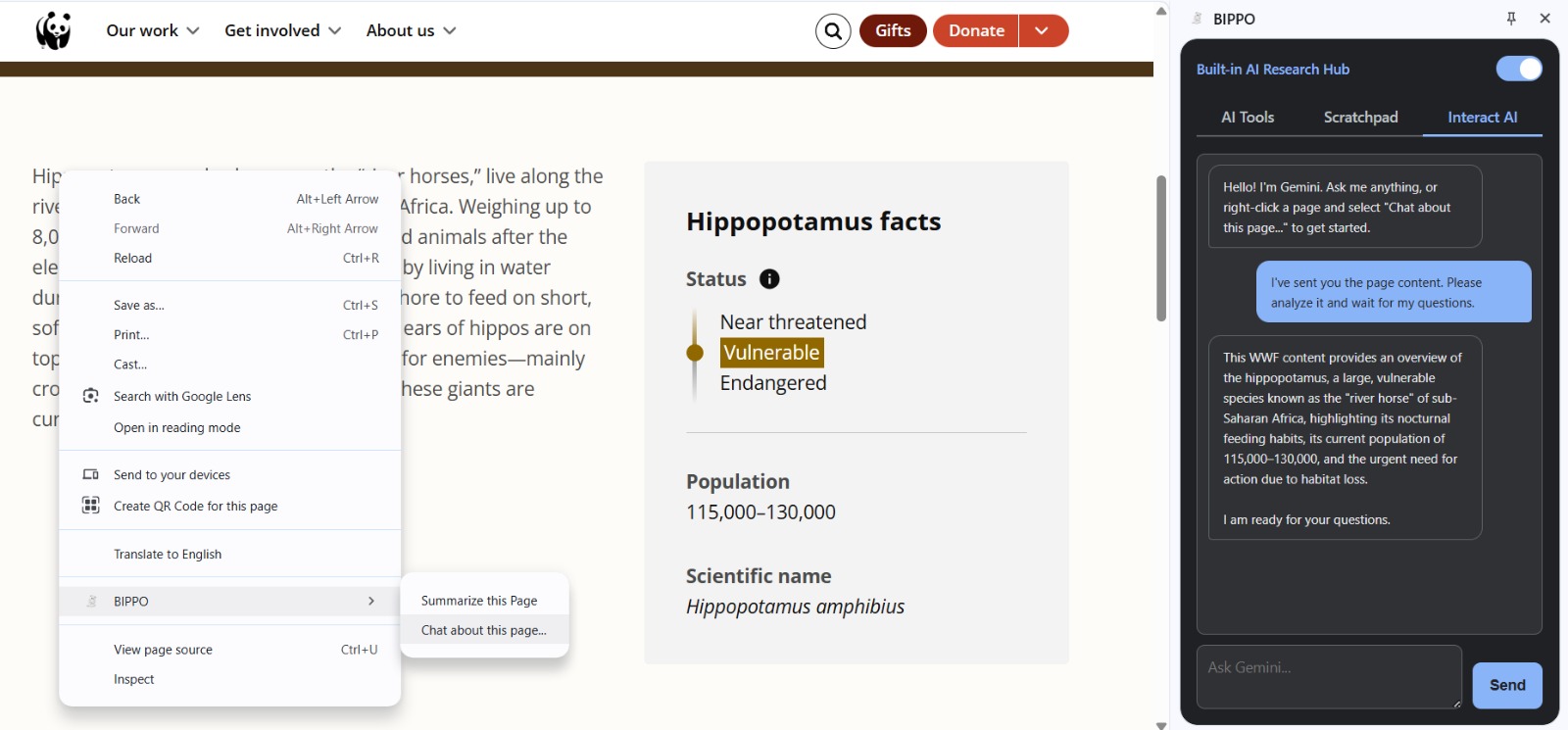
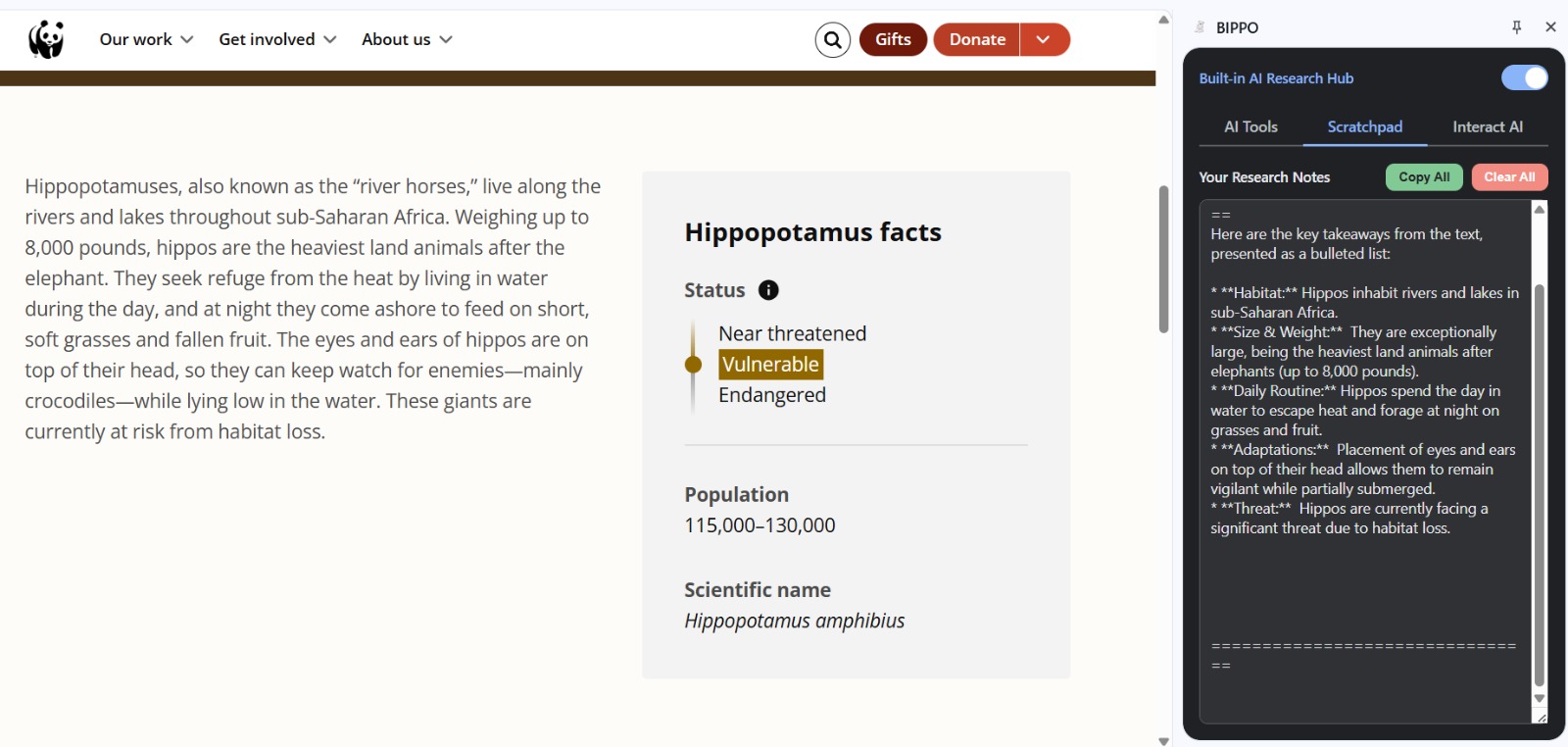
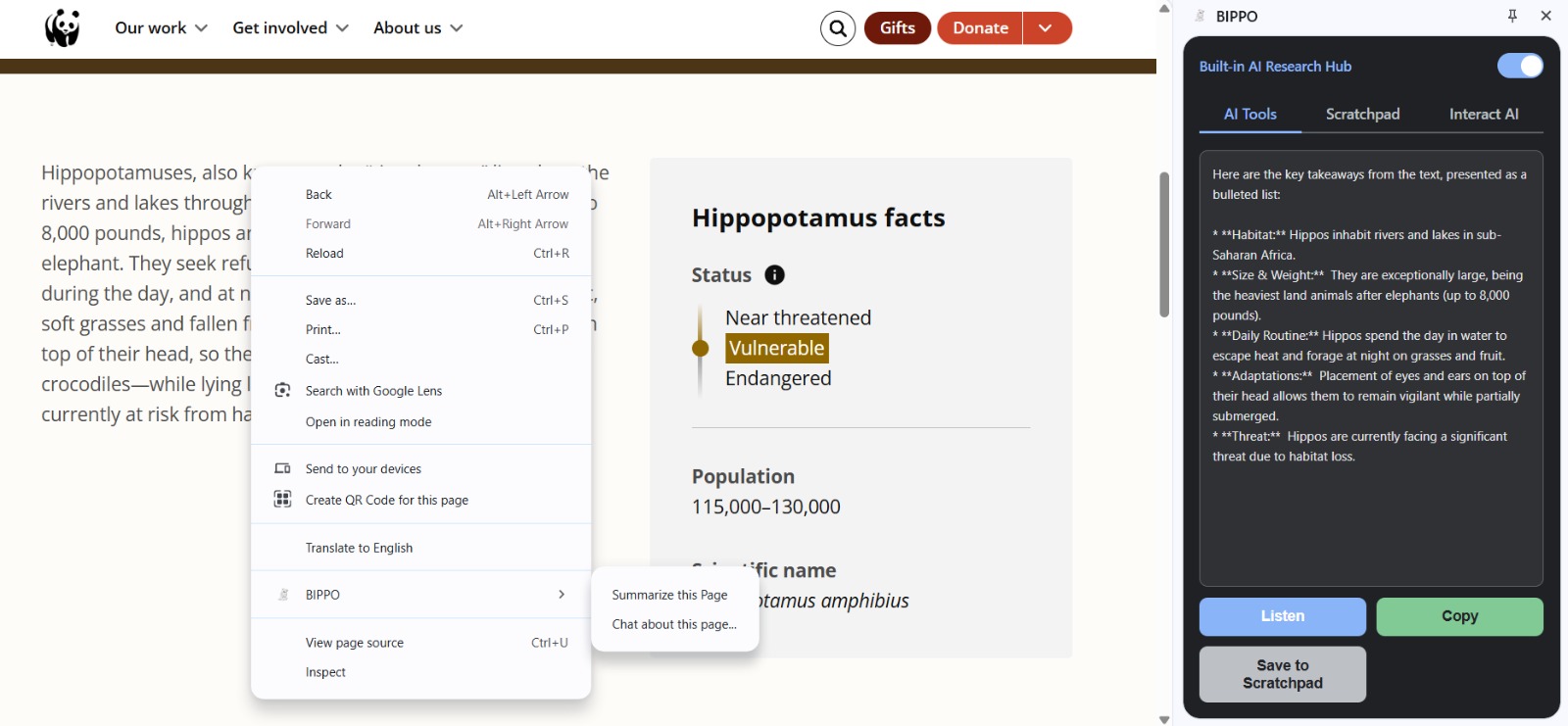
BIPPO is a Chrome extension that acts as a smart research assistant right in your browser's side panel. It integrates powerful AI tools to help you understand and interact with web content more efficiently and privately. Here's what it does: Understands Web Content: Summarize: Instantly get key points or detailed summaries of selected text or even entire webpages using Chrome's privacy-focused built-in AI. Critically Evaluate: Analyze the main points, strengths, and weaknesses of selected text using built-in AI. Define Words: Get quick definitions and example sentences for selected words. Extract Information: Pull out key takeaways or specific data points (like statistics) from selected text. Explain Images: Right-click an image and get a concise explanation of what it depicts using the Gemini API (requires an API key). Transforms Text: Rewrite: Rephrase selected text into a different tone (currently casual) using built-in AI. Translate: Translate selected text between numerous languages, with automatic source language detection, using built-in AI. Interacts and Assists: Interact AI (Chat): Open a chat interface powered by the Gemini API (requires an API key) to ask questions, brainstorm, or discuss topics. Chat About Page: Start an AI chat session automatically seeded with the content of the current webpage, allowing you to ask specific questions about it. Write with AI: Use selected text as a starting point to generate paragraphs, social media posts, emails, explanations, or counterarguments using built-in AI. Organizes and Enhances: Research Scratchpad: Save any generated AI result (summaries, translations, chat responses) to a persistent notepad within the side panel for later reference. Text-to-Speech: Listen to any AI-generated text result read aloud with natural-sounding voices. Light/Dark Mode: Adapts to your system's theme and allows manual toggling. By combining the privacy benefits of on-device AI for core tasks with the power of cloud AI for more complex interactions, BIPPO provides a versatile and secure toolkit for anyone who researches, reads, or writes online.
How we built it
Translator & LanguageDetector: For translation capabilities. Implemented logic (api.js) to handle API availability checks, model downloads (with progress monitoring shown to the user), and input truncation to prevent errors with large texts. Gemini API Integration: Used JavaScript's fetch API to make calls to the Google Generative Language API (Gemini Flash). Implemented functions (api.js) to handle image explanations (converting images to base64) and manage the conversational chat history for the "Interact AI" tab. Included error handling for common API issues (like "model overloaded" or incorrect API keys). Modular JavaScript: The side panel's JavaScript was broken down into logical ES Modules (sidepanel.js controller, ui.js for DOM manipulation, api.js for AI calls, utils.js for helpers) to improve code organization, maintainability, and readability. A shared common/theme.js module handles theme logic for both the side panel and options page. UI/UX: Focused on creating a clean, responsive interface within the side panel, including tabbed navigation, loading indicators, clear error messages, and consistent styling across different components and the options page. Essentially, BIPPO combines the specific functionalities offered by various Chrome Extension APIs with both the on-device AI models and external cloud-based AI, orchestrated through modern JavaScript within the side panel environment.
Challenges we ran into
Development wasn't always smooth sailing: Initial API Struggles: A major early challenge was that our API calls were simply not working at all. After hours of debugging and checking code, it felt like a dead end, and we almost gave up on the core idea. It was only after going through the Chrome extension and built-in AI documentation meticulously once again that we discovered subtle errors in how messages were being sent or how the API expected parameters. Getting that first API call working was a huge breakthrough. Manifest & Loading Errors: Initial struggles with the manifest.json structure and understanding the "Load unpacked" process, especially with nested folders and icon paths. API Limitations: Encountering the "Input is too large" error with the built-in AI models required implementing text truncation logic. We also saw transient errors like "Model overloaded" from the Gemini API. Asynchronous Bugs: Debugging race conditions, like the side panel not being ready to receive messages immediately after opening, required careful use of setTimeout or structuring async calls correctly. Caching Issues: Chrome's aggressive caching sometimes made it difficult to ensure the latest code was running, requiring hard refreshes and clearing extension data. UI Consistency: Making sure the UI updated correctly across different states (loading, showing results, errors) and managing elements like buttons required careful state management code in ui.js. Despite the challenges, building BIPPO has been incredibly rewarding. It evolved from a simple experiment into a genuinely useful tool that respects user privacy while offering powerful AI capabilities directly within the browser workflow.
Accomplishments that we're proud of
Successfully Integrated Privacy-Focused On-Device AI: We harnessed Chrome's built-in AI models (Summarizer, LanguageModel, Rewriter, Translator) to perform core text analysis tasks directly on the user's machine, significantly enhancing privacy by avoiding unnecessary data transmission to external servers. Created a Hybrid AI System: We effectively combined the privacy benefits of on-device AI for common tasks with the advanced capabilities of cloud-based AI (Gemini) for complex features like image explanation and conversational chat, offering users the best of both worlds. Developed a Comprehensive AI Toolkit: BIPPO isn't just one tool; it's a versatile "Research Hub" consolidating numerous AI functions (summarization, translation, rewriting, definition, data extraction, chat, image analysis, text-to-speech) into a single, convenient side panel interface. Achieved True Context Awareness: By integrating content scripts, we enabled features like "Summarize this Page" and "Chat about this page," allowing the extension to understand and interact with the user's current web context. Built a Polished and User-Friendly Interface: We implemented a clean side panel UI using modern CSS (including light/dark modes) and organized features logically with tabs (AI Tools, Scratchpad, Interact AI) for a smooth user experience. Added Valuable Utility Features: Beyond core AI tasks, we incorporated practical tools like the persistent "Research Scratchpad" for saving results and Text-to-Speech functionality for accessibility Overcame Significant Technical Hurdles: We successfully diagnosed and resolved complex issues inherent in extension development, including asynchronous timing problems (race conditions), API input limitations, stubborn browser caching, and initial API integration failures, demonstrating resilience and effective debugging skills. Adopted Modern Development Practices: The extension was built using Manifest V3 and structured with ES Modules, leading to a maintainable, organized, and scalable codebase.
What we learned
This project was a deep dive into several areas: Chrome Extension APIs: Mastering chrome.runtime, chrome.contextMenus, chrome.sidePanel, chrome.storage, chrome.tts, and the messaging system between service workers, content scripts, and side panels. Built-in AI APIs: Understanding the capabilities and limitations (like input size) of Summarizer, LanguageModel, Rewriter, and Translator. Asynchronous JavaScript: Almost every interaction (API calls, storage access, messaging) is asynchronous, requiring extensive use of async/await and Promises. Modern Web Tech: Implementing features using ES Modules, CSS variables for theming, and building a responsive UI. Debugging Extensions: Learning the nuances of debugging service workers, content scripts, and side panels using Chrome DevTools.
What's next for BIPPO-Built-in AI Research Hub
Now that BIPPO has a solid foundation with core AI tools, a scratchpad, chat, and accessibility features, here are some exciting potential directions for future development:
- Enhancing Core AI Features: More Rewriting Tones: Add options beyond "Casual" (e.g., Formal, Professional, Simpler, Expand, Shorten) to the Rewriter, giving users more control over text transformation. Customizable Summaries: Allow users to specify the desired length (e.g., 1 sentence, 3 bullet points, 1 paragraph) for summaries. Language Model Selection (Advanced): Potentially allow users to choose different versions or sizes of the built-in models if Chrome offers this in the future, balancing speed vs. capability. Translation Improvements: Display the detected source language in the UI. Perhaps allow users to override the detected language if needed.
- Expanding Interaction & Context: Deeper Chat Integration: Allow users to select text on the page and send it directly to the "Interact AI" chat with a specific prompt (e.g., "Explain this concept," "Argue against this point"). Enable the "Interact AI" chat to remember context across different pages within a browsing session (more complex). Selective Page Content: Instead of sending the entire page text for "Chat about page," try to identify and send only the main article content (improving on the current getArticleText logic) to reduce token usage and improve focus. PDF Integration: Explore ways to make BIPPO work more effectively inside Chrome's built-in PDF viewer (this can be challenging due to how PDFs are rendered).
- Improving the User Experience & Workflow: Scratchpad Organization: Add features like tagging, searching, or basic formatting (bold, italics) to the scratchpad. Allow exporting notes. Keyboard Shortcuts: Define keyboard shortcuts to quickly trigger common actions (e.g., summarize selection, open side panel). Customizable Context Menus: Allow users to hide/show specific menu items via the Options page to reduce clutter. More TTS Voices/Options: If the chrome.tts API allows, offer selection of different voices or finer control over speed/pitch.
- New Potential Features: Fact-Checking Integration: Add an option to select text and ask the AI (perhaps Gemini via Interact AI) to find sources or check the factual accuracy of a claim. Citation Generation: For selected text or summaries, attempt to generate basic citations (this would likely require cloud AI). Prioritization: Focusing on enhancing the existing AI features (more rewrite tones, customizable summaries) and improving the chat integration would likely provide the most immediate value to users based on the current functionality. Improving the scratchpad would also solidify its role as a "hub."
Built With
- chrome.action
- chrome.contextmenus
- chrome.runtime
- chrome.sidepanel
- chrome.storage
- chrome.tabs
- chrome.tts
- css3
- gemini-api
- html5
- javascript
- manifest-v3
- rewrite-api


Log in or sign up for Devpost to join the conversation.