BIM Control
Inspiration
BIM Control started from a practical problem: controlling CAD software through computer vision is slow and cumbersome.
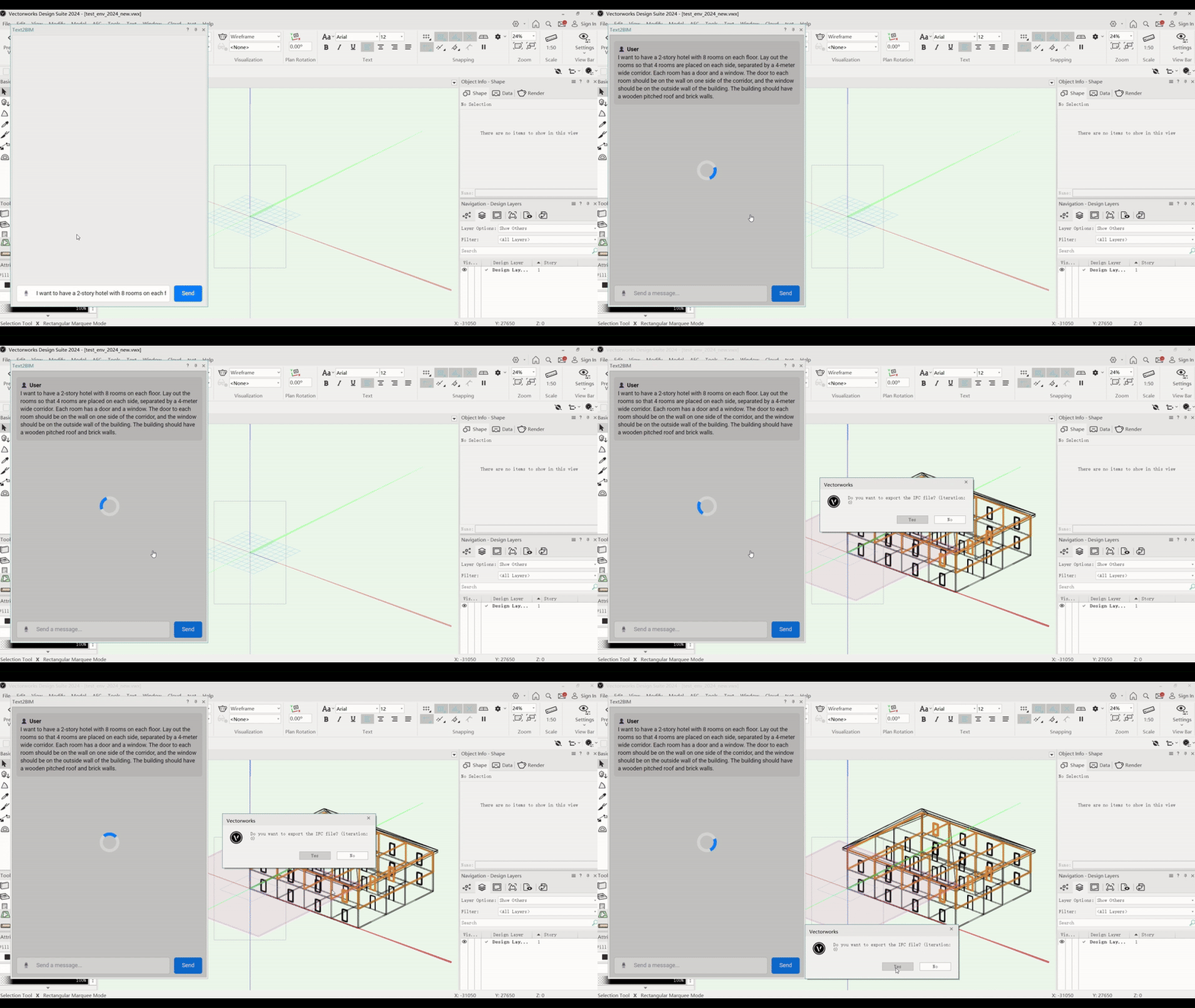
Our first approach combined reasoning models with vision models to control software such as Vectorworks. The agent would inspect the interface, determine which tools it needed, and interact with the application through the UI.
It worked, but it was slow. For many CAD operations, the agent had to repeatedly capture the screen, interpret the interface, reason about the next action, and then execute it. In some cases, this was slower than doing the same operation manually.
That made us question whether computer vision was the right interface between an LLM and CAD software in the first place.
What It Does
BIM Control explores two approaches to controlling CAD software with language models.
The original prototype uses computer vision to understand and interact with the CAD interface.
The newer architecture removes most of this visual interaction. Instead of asking a model to find a tool on screen and click it, we can expose the underlying CAD functions directly to the model.
For example:
- Instead of visually finding the Rectangle Tool, call the corresponding rectangle function through the CAD API.
- Instead of using computer vision to determine which objects are selected, query the document directly.
- Instead of navigating menus and dialogs, pass the required parameters programmatically.
- Use computer vision only when the task actually requires visual information.
This led us to explore a Model Context Protocol (MCP) server for Vectorworks, where CAD operations can be exposed as tools that an LLM can call directly.
How We Built It
Initial Prototype
We first built a computer vision based system for controlling Vectorworks.
The model interpreted the current state of the interface, reasoned about the requested operation, and executed actions through the UI.
Identifying the Bottleneck
Testing showed that the perception and interaction loop introduced significant latency.
A typical operation looked roughly like this:
User request -> reasoning -> screenshot -> vision analysis -> UI action -> CAD
For a single action this can be acceptable. For a CAD workflow containing dozens of operations, the latency quickly becomes a problem.
CAD interfaces also contain many contextual tools, modes, palettes, dialogs, and selection states. This makes visual control less reliable than calling the underlying functions directly.
Changing the Architecture
We therefore started moving toward:
User request -> reasoning -> tool call -> CAD API
The LLM still handles natural language, planning, and reasoning, but deterministic CAD operations are handled directly by the application.
MCP Integration
We began designing an MCP server that can expose Vectorworks functionality as structured tools.
The goal is to map natural language requests to operations such as:
- creating and modifying geometry;
- querying objects and their properties;
- manipulating layers and classes;
- transforming objects;
- reading document state;
- accessing BIM information.
This also gives the model structured information about what operations are available and what parameters each operation requires.
Refactoring BIMgent
The same approach can be applied to BIMgent, our broader BIM agent project.
Parts of BIMgent were originally designed around computer vision and UI control. We can replace those components with direct API calls where the CAD application already provides the required functionality.
Challenges
CAD UI Complexity
CAD interfaces are difficult targets for computer vision based control. Tools change behavior depending on the active mode, selected objects, current view, document state, and other context.
Latency
Vision based control requires repeated observation and reasoning:
observe -> interpret -> reason -> act -> observe
That overhead becomes significant when a task contains many CAD operations.
Tool Design
Direct API access creates a different problem: deciding how CAD functionality should be exposed to the model.
A request such as:
Create a 4 by 6 meter room with a door centered on the south wall.
needs to be translated into a sequence of precise CAD operations with valid parameters.
Designing those tool schemas is an important part of the MCP implementation.
Existing Code
BIMgent already contains components designed around computer vision and UI simulation. Moving to direct tool calling requires parts of that architecture to be rewritten.
What We Learned
The main lesson from the project was simple:
If a CAD operation is already available through an API, having a model visually rediscover that operation through the UI is usually unnecessary.
Computer vision is still useful when information is only available visually. It is much less useful as an intermediate layer for operations that are already exposed programmatically.
For CAD automation, direct API access has several advantages:
- lower latency;
- more precise operations;
- direct access to model data;
- fewer UI related failure modes;
- easier validation of actions.
The project also changed how we think about the role of the LLM. The model does not need to reproduce every mouse and keyboard action performed by a human designer. It can handle intent and planning while the CAD system handles exact geometric operations.
BIM Control was a Believe Track Runner Up at AugHacks 2025.
What's Next
The next step is to continue implementing the Vectorworks MCP server and use it as a test case for direct LLM control of CAD software.
We also want to investigate the same approach for:
- AutoCAD
- Revit
- Rhino
The longer term goal is to determine how much of the interface between an LLM and CAD software can be standardized.
Instead of implementing completely different agent logic for every application, we could define a common set of higher level CAD operations and map them to application specific APIs:
Natural language -> CAD tools -> application adapter -> CAD software
This would allow much of the reasoning and planning layer to remain independent of the CAD application being controlled.
Built With
- cad
- mcp
- openai
- python

Log in or sign up for Devpost to join the conversation.