Better Content App
Inspiration
The idea for Better Content was inspired by the growing need for efficient and creative ways to enhance various types of content. Whether it’s a story, poem, introduction, or any other form of writing, I wanted to create a tool that makes it easy to add high-quality images and share the final product seamlessly. The goal was to leverage the power of AI to streamline this process, making it accessible for everyone, from casual users to professional content creators.
What it does
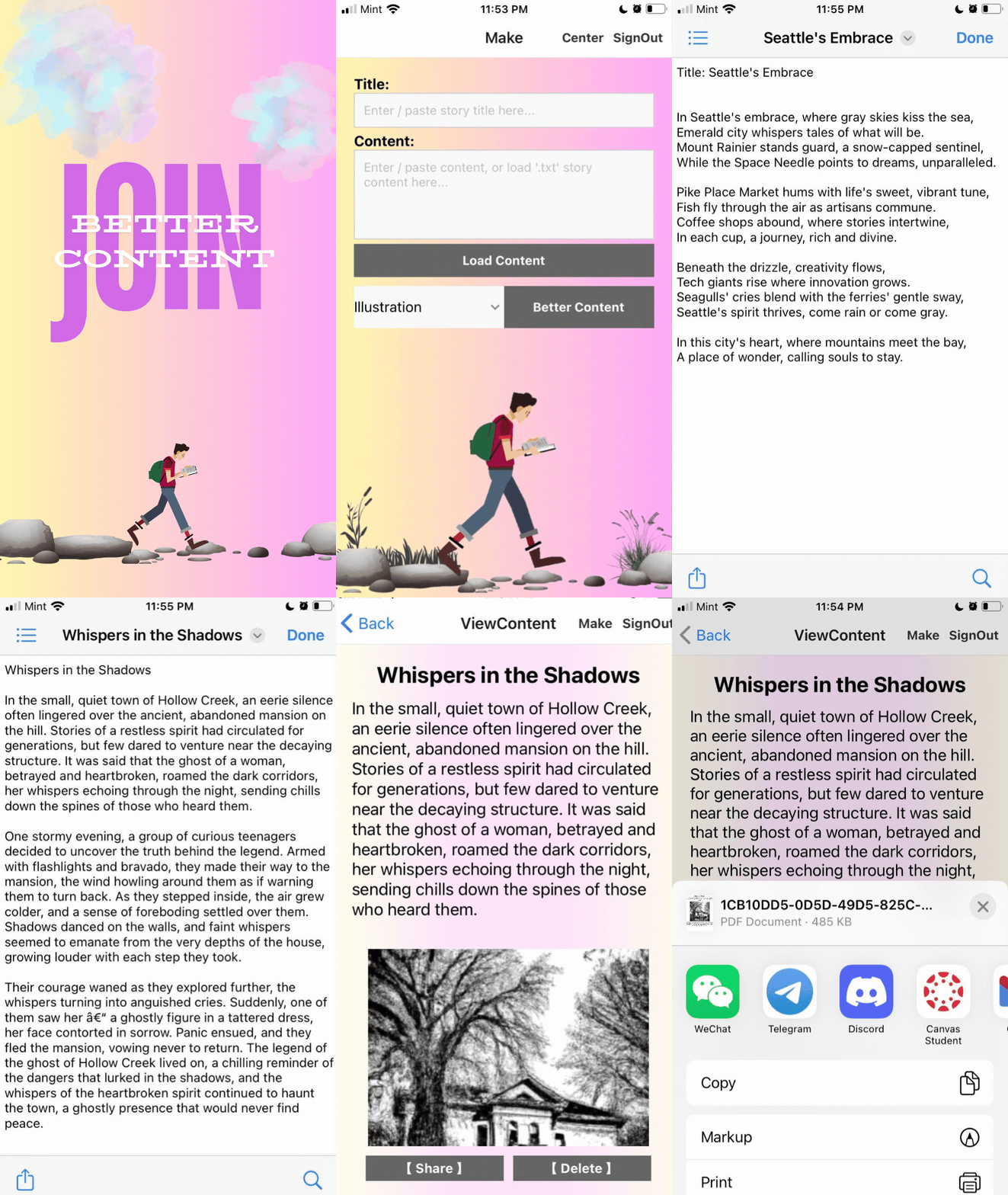
Better Content is a cross-platform mobile application available on both iOS and Android. It helps users decorate their content with high-quality serial images efficiently, thanks to OpenAI's advanced capabilities. The app supports a wide range of content types, including stories, poems, introductions, and more.
Key Features:
Effortless Decoration: Automatically enhance your content with relevant, high-quality images by calling a backend public server, encapsulating OpenAI's “gpt-3.5-turbo-instruct” and “dall-e-2” APIs.
- Efficient content import by loading .txt files from the local device folder to the app.
- Three decoration styles: illustration, historical images, and photos.
- Stable image fetching using Cloudinary to generate permanent public image URLs, solving the issue of temporary URLs from “dall-e-2”.
Robust Security: Utilize a self-created backend public server to avoid exposing OpenAI API keys. Firebase is used for user authorization and file storage to ensure data is secure and accessible from any device using the same account.
- Public server encapsulates OpenAI APIs, using trained prompts to provide high-quality decoration images.
- Firebase Authorization provides user login verification, email confirmation for sign-up, and password reset.
- Firebase Firestore Database stores user files after image decoration, offering secure and efficient data queries across devices.
Data Synchronization: Users can fetch their own saved content from different devices.
Seamless Sharing: Share your decorated content to other apps, save it locally, or print it.
Easy File Management: Users can easily save, delete, and share files locally.
State Management: If interrupted, the text input or decoration style setting is preserved after app reloading, utilizing async-storage, which is a local storage solution in React Native for persisting data asynchronously across app restarts.
Amazing UI:
- Use Canva to create a set of background GIFs or images, enhancing visualization.
- Employ various external libraries to improve user experience, such as local file picking and decoration type selection.
How I built it
Design: Meticulous planning and design to conceptualize the project.
Backend Development: Established a robust server for content summary and image generation using Express with Node.js, enhancing security and efficiency.
Frontend Development: Developed a seamless user experience for both iOS and Android platforms. For this part, I use VS Code with Expo react native to develop.
Prototyping: Used iterative prototyping to refine features and functionalities. Because the OpenAI API is charged by each token, so I use the prototyping prompt to do almost all the frontend effects testing.
User Testing: Conducted extensive user testing to ensure usability and address any issues. This range is not large, I just invite my several friends to use it and give me feedback.
Refinement: Continuously refined the app based on feedback, such as adding the loading function based on their suggestions.
Challenges I ran into
Security: Ensuring OpenAI API keys were not exposed and safeguarding user data.
- Created a public server using Node.js to handle API requests securely.
- Chose Firebase for user data storage due to its cost-effectiveness and excellent support.
Decoration Image Quality: Training the system to generate attractive illustrations based on content and decoration type.
Data Transmission: Efficiently handling data posting and fetching over the internet.
Data Synchronization Management: Designing appropriate data structures and ensuring synchronization across devices and local file systems with Firebase.
Cross-platform Compatibility: Ensuring the app works seamlessly across various mobile devices, requiring extensive testing and adjustments.
UI Design: Creating an intuitive and visually appealing user interface, including learning Canvas for GIF and image creation.
High-Pressure Deadlines: Managing tight project timelines while taking a summer machine learning course, as the project was completed solo during the summer break.
Accomplishments that I'm proud of
Public Story Generator Server: Successfully established a public server encapsulating “gpt-3.5-turbo-instruct” and “dall-e-2” APIs.
Cross-device Data Synchronization: Solved data save and delete synchronization issues using Firebase.
User-Friendly App: Developed a cross-platform mobile app with excellent compatibility and performance.
Automated Content Enhancement: Leveraged AI to automatically generate stunning images that beautifully decorate and enhance content.
What I learned
Security Concerns: The importance of safeguarding sensitive API keys to prevent unauthorized access.
Illustration Generation: Improved my understanding of training AI to produce high-quality and engaging visual content.
Networking: Gained deeper insights into handling data transmission over the internet.
Data Synchronization Management: Learned efficient data storage and retrieval methods for the Expo file system and Firebase.
Cross-platform Compatibility: Overcame challenges of ensuring compatibility and performance across various mobile platforms.
What's next for Better Content
Enhanced Illustration Generation: Further refining the AI model to provide more decoration styles.
Expanded Decoration: Adding text content generation for images and videos to help users attract more followers on social media.
Community Engagement Features: Introducing features like content sharing, commenting, and liking to foster a vibrant community.
Gamification and Rewards: Implementing gamification elements to incentivize user participation, such as earning points for creating and engaging with content, and redeeming them for rewards.
Monetization Strategy: Exploring monetization options, including offering premium content for purchase and providing opportunities for creators to earn income through their content.


Log in or sign up for Devpost to join the conversation.