-
-
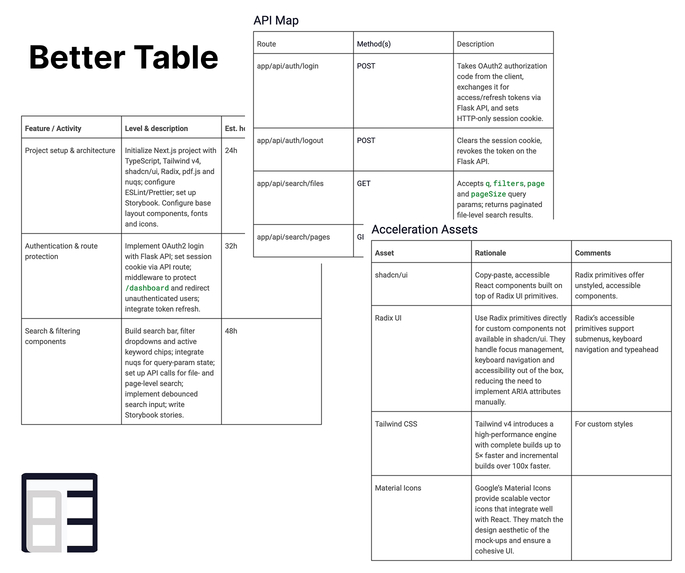
Better Table Example
Inspiration
Confluence tables are the core of planning and documentation, but as needs increase, they become strained:
- Teams want intuitive inline editing instead of complex modal dialogs
- PMs require structure, such as column types and validation, not just individual cells
- Contributors seek speed with keyboard workflows, bulk editing, and seamless copy/paste
- Everyone desires consistency: stable formatting and well-maintained data
Better Table was forged to give your Confluence space the same usability as native tables, but with enhanced editing and formatting features.
What it does
Better Table is a Confluence macro that upgrades native tables with:
- Inline editing that feels instant, with keyboard-first workflows
- Resizing columns with persisted state
- Edit/Publish views
- Column types (text, number, date, select, tags) with validation (in alpha only text)
- Smart formatting (quick styles, alignment, auto-fit, sticky header) - not available in alpha
- Bulk actions (multi-select rows/columns, clear, move, duplicate) - not available in alpha
- Data operations (copy/paste, CSV import, simple export) - not available in alpha
- Templates (starter structures: Roadmap, Backlog, Inventory, Decision Log) - not available in alpha
- Accessibility and performance improvements for large datasets
It looks and behaves like a "native" table - just faster, more intelligent (I hope), and more resilient.
How we built it
- Platform: Atlassian Forge (UI Kit + Custom UI), designed to run natively inside Confluence
- UI: UI Kit components provides bridge to Custom UI
- Custom UI: use Atlassian Design System
- Data: Forge Key-Value Store API for table state
- API calls: prefer
asUser()where user-context is required; minimized scopes for security - Frontend:
view.getContext()via@forge/bridgefor simple product calls from the UI - Backend: lightweight resolvers for storage persistence and permission-checked operations
- Performance: careful re-render control and efficient state diffs for large tables
- Packaging: icons and assets served via declared resources to ensure predictable bundling (Vite)
Challenges we ran into
- UI Kit constraints: there's no "Table" component -
DynamicTable+InlineEditwasn't ready for my needs. So I rebuilt the table with performance and accessibility in mind - Asset packaging: Confluence macro icons must be a path relative to a declared resource (or an absolute URL). Caching and packaging nuances made this trickier than expected
- Data modeling: balancing freeform editing with typed columns and validation, without bloating storage writes or hurting responsiveness (already found what to improve)
- Keyboard flows: supporting intuitive cell navigation, selection, and batch edits within UI Kit's event model
- Confluence context: ensuring the macro behaves predictably across pages, versions, and editing contexts
Accomplishments that we're proud of
- Native-feeling inline edit experience that "just works" for everyday users
- Structured columns
- Performance that supports larger tables with smooth editing
- Minimal permissions and a secure storage strategy aligned with Forge best practices
- An architecture that is maintainable and comfortably fits within Forge's constraints
What we learned
- In Forge, "simple" wins: data and UI decisions that align with the platform's core principles reduce surprises
- Macro icons must be served from declared resources
- Validate early: test UI Kit behavior and data structures in small, end-to-end segments before finalizing patterns
- Use unit tests and Storybook to streamline development and speed up delivery
- Be explicit with scopes and context: prefer
asUser()for user-backed actions and maintain strict permissions
What's next for Better Table
- Advanced column types and behaviors
- Formulas (basic computed fields)
- Conditional formatting
- Rich select/multi-select with color tags
- Data import/export
- CSV/JSON/XLSX import/export with type-aware mapping
- Templates gallery with one-click apply and override
- Collaboration & guardrails
- Soft locks/conflict awareness
- Row-level operations with undo/redo
- Automations and integrations
- Jira issue sync: create/edit issues from rows, link statuses
- Confluence actions: turn a row into a page
- Usability and polish
- Keyboard shortcuts quick reference
- Localization and improved accessibility
- Mobile-friendly editing state
Built With
- atlaskit
- atlassian-design-system
- claudecode
- compiledcssinjs
- customui
- eslint
- forge
- prettier
- react
- rovodevcli
- storybook
- typescript
- uikit
- vite
- warp

Log in or sign up for Devpost to join the conversation.