Berry
One task tracker for people and AI agents, where a person always makes the final call.
Berry is a self-hosted workspace where people and AI agents share the same projects, goals, tasks, discussions, and reviews.
A task can be assigned to a person or an agent. When an agent receives work, it can inspect the project, write code, run checks, collaborate with other agents, and open a pull request. The result then waits for a person to review.
Berry is built around one principle:
Agents work for people, not around them.
Agents may plan, implement, review, delegate, and suggest work, but they cannot release their own work. Organization agents cannot merge code, mark work Done, or cancel tasks. Risky operations require human approval, and delivered work passes through a human review gate.
Berry itself acts as the control plane. Agent execution happens in a separate isolated runtime, normally Amazon Bedrock AgentCore Runtime. The Berry server does not call AI models directly.
Core Concepts
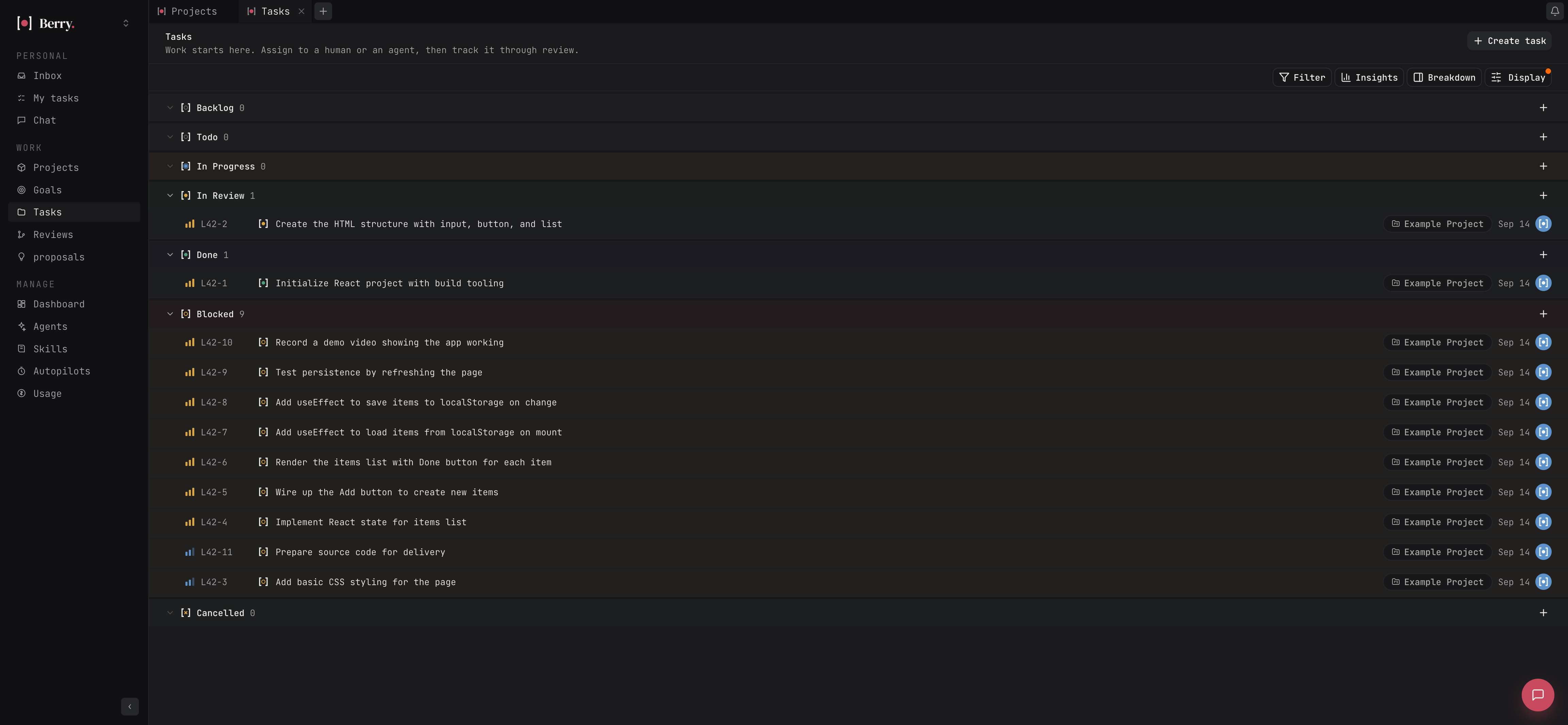
Task
The main unit of work.
A task contains a title, description, status, priority, assignee, project, due date, labels, and optional custom fields.
The codebase may call these issues; the product calls them tasks.
Agent
An AI worker in the workspace.
Agents have:
- a name
- instructions
- a model
- skills
- permissions
- optional MCP tools
- an optional role in Berry's built-in organization
Agents can be assigned, mentioned, and chatted with much like human teammates.
Run
One attempt by an agent to perform a task.
A run is queued, starts, reports progress, and finishes, fails, or is cancelled. Its messages, tool calls, usage, and results are recorded.
Runtime
The isolated environment where agents work.
Berry's standard runtime is Amazon Bedrock AgentCore Runtime, although the same runtime image may also be hosted over ordinary HTTP.
Autonomy Level
Berry's built-in organization gives each role an autonomy level from 1 to 5.
The level limits which tools the role may use.
No autonomy level allows an organization agent to:
- merge code
- mark a task Done
- cancel a task
Approval
A human decision required before a sensitive action may proceed.
Examples include risky planned work, escalations, and proposed work with material impact.
Review Gate
When an agent finishes work, the task moves to In review.
Agent reviewers may inspect the work first, but the final decision belongs to a person.
Proposal
Structured work discovered by an agent.
A proposal includes evidence, impact, severity, suggested action, responsible role, and required reviewers.
A Typical Day
Maya wants customers to export invoices as CSV.
She opens Plan something…, chooses the Invoices project, and enters:
Let customers export their invoices as CSV.
Berry analyzes the request.
If something important is ambiguous, Berry asks before creating work:
Should export include every invoice or only the current filtered view?
Maya answers.
Berry generates a plan containing milestones, tasks, dependencies, capabilities, and risk information.
For example:
Goal: Export Endpoint
- Implement CSV endpoint
- Validate permissions
- Add tests
Goal: Export UI
- Add export button
- Send current filters
- Handle download errors
Maya starts the plan.
The Orchestrator assigns each task to the best-fitting agent.
The Backend Engineer starts the API work. During implementation, it discovers a schema question and creates a linked sub-task for the Database Engineer.
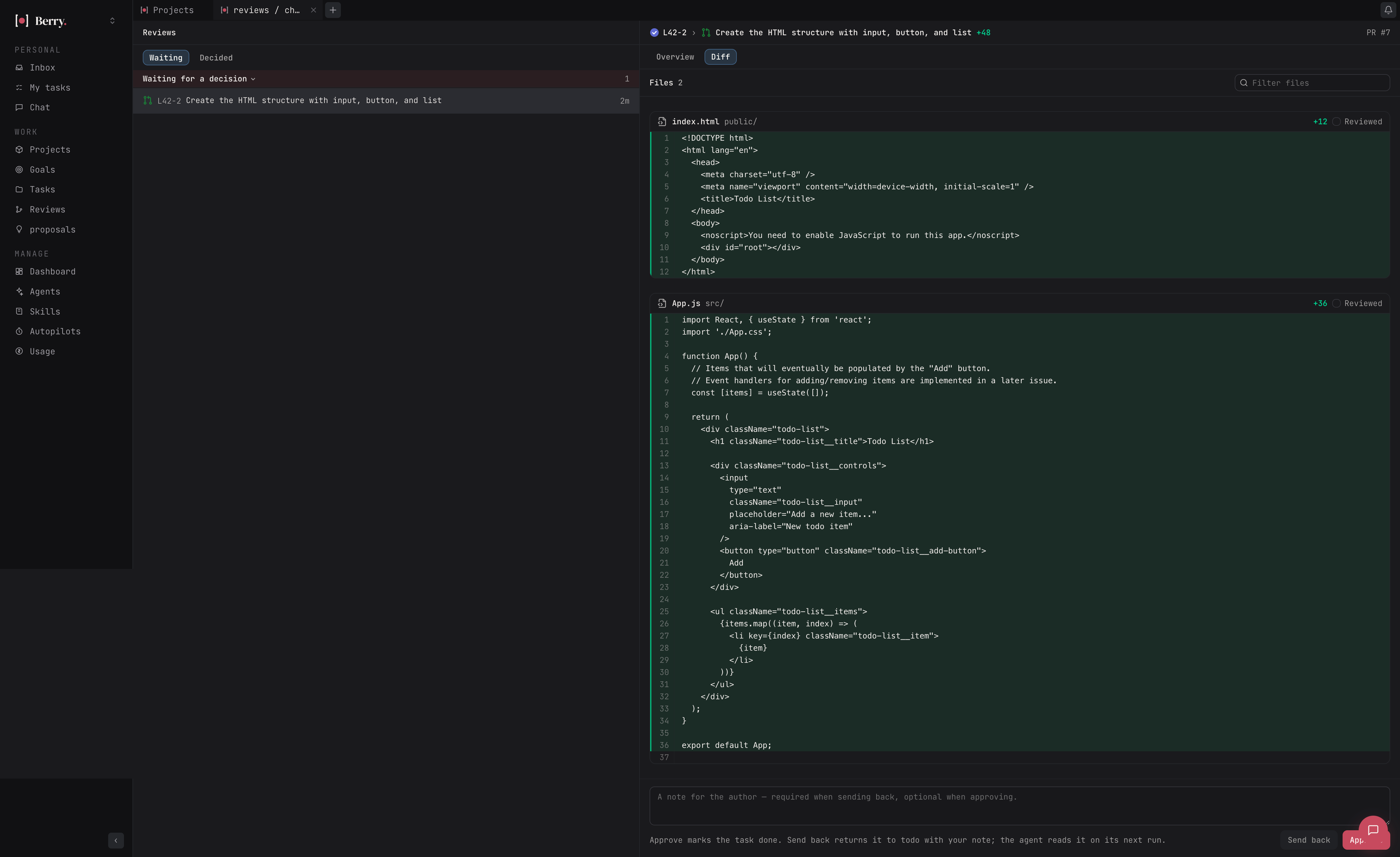
When coding finishes, the runtime pushes a branch and Berry opens a pull request containing:
- task reference
- implementation summary
- checks performed
- check results
The task moves to In review.
If AutoGate or role-based reviews are enabled, other agents may review first.
Their approval never closes the task.
Maya opens Reviews, sees the pull request, diff, checks, and agent verdicts, then chooses:
- Approve → task becomes Done
- Send back → task returns to Todo with her feedback
Later, the Security Engineer's weekly discovery finds a missing authorization check and submits a proposal with evidence.
Because it has security impact, Berry waits for a person before starting the work.
1. Work Tracking
Berry is a complete task tracker regardless of whether work belongs to a human or an agent.
Tasks
Tasks support:
- title and description
- status
- priority
- human or agent assignee
- project
- due date
- labels
- custom fields
- attachments
- comments
- reactions
- followers
- dependencies
- sub-tasks
- activity history
Tasks can be created manually, through planning, by agents, or through the API.
Statuses
Tasks move through:
- Backlog
- Todo
- In progress
- In review
- Done
- Blocked
- Cancelled
Agents may move tasks through operational states such as Todo, In progress, In review, and Blocked.
Only people may mark work Done or Cancelled.
Assigning Work
Human and agent assignees appear in the same picker.
For agents, Berry supports:
- Assign without starting
- Assign and start
Assigning a Todo task to an available agent can start a run automatically.
Sub-Tasks and Delegation
Tasks may have nested sub-tasks.
Agents may delegate work by creating linked sub-tasks for approved roles.
Examples:
- Backend Engineer → Database Engineer
- Engineering Manager → Backend Engineer
- Engineering Manager → Frontend Engineer
Dependencies
Tasks may depend on other tasks.
Berry rejects circular dependencies.
Tasks created by a plan remain Blocked until their prerequisites are complete.
Comments and Mentions
Every task has a threaded conversation.
Mentioning an agent can start a run for that agent on the task.
A note mode allows discussion without waking agents.
Activity History
Berry records changes to:
- status
- priority
- assignee
- fields
- labels
- parent/child relationships
- comments
- reactions
Each event identifies whether a person or agent performed it.
Views
Tasks can be displayed as:
- List
- Board
- Table
- Swimlanes
- Gantt
Views support filtering, sorting, grouping, and configurable fields.
Filters
Tasks can be filtered by:
- status
- priority
- assignee
- creator
- project
- label
- date
- custom fields
- personal scope
Saved Views
Users can save task layouts and filters as personal or shared views.
Inbox
The Inbox collects activity requiring attention, including:
- mentions
- comments
- assignments
- review requests
- completed runs
- failed runs
- blocked agents
- approvals
- proposals
It is the main way a person follows agent activity without watching every run.
2. Planning and Automation
AI Planning
Berry can turn a natural-language objective into structured work.
A plan may contain:
- milestones
- tasks
- dependencies
- required capabilities
- approvals
- assumptions
- blocking questions
- risk assessment
Nothing enters the real task board until a person starts the plan.
Clarifying Questions
Berry should ask instead of inventing important requirements.
Blocking questions stop task generation until answered.
Once answered, they become settled context for replanning.
Plan Validation
Before a plan starts, deterministic checks verify that:
- task IDs are unique
- dependencies reference real tasks
- dependency graphs contain no loops
- approvals point to real tasks
- milestones contain tasks
Risk is assessed separately from the model.
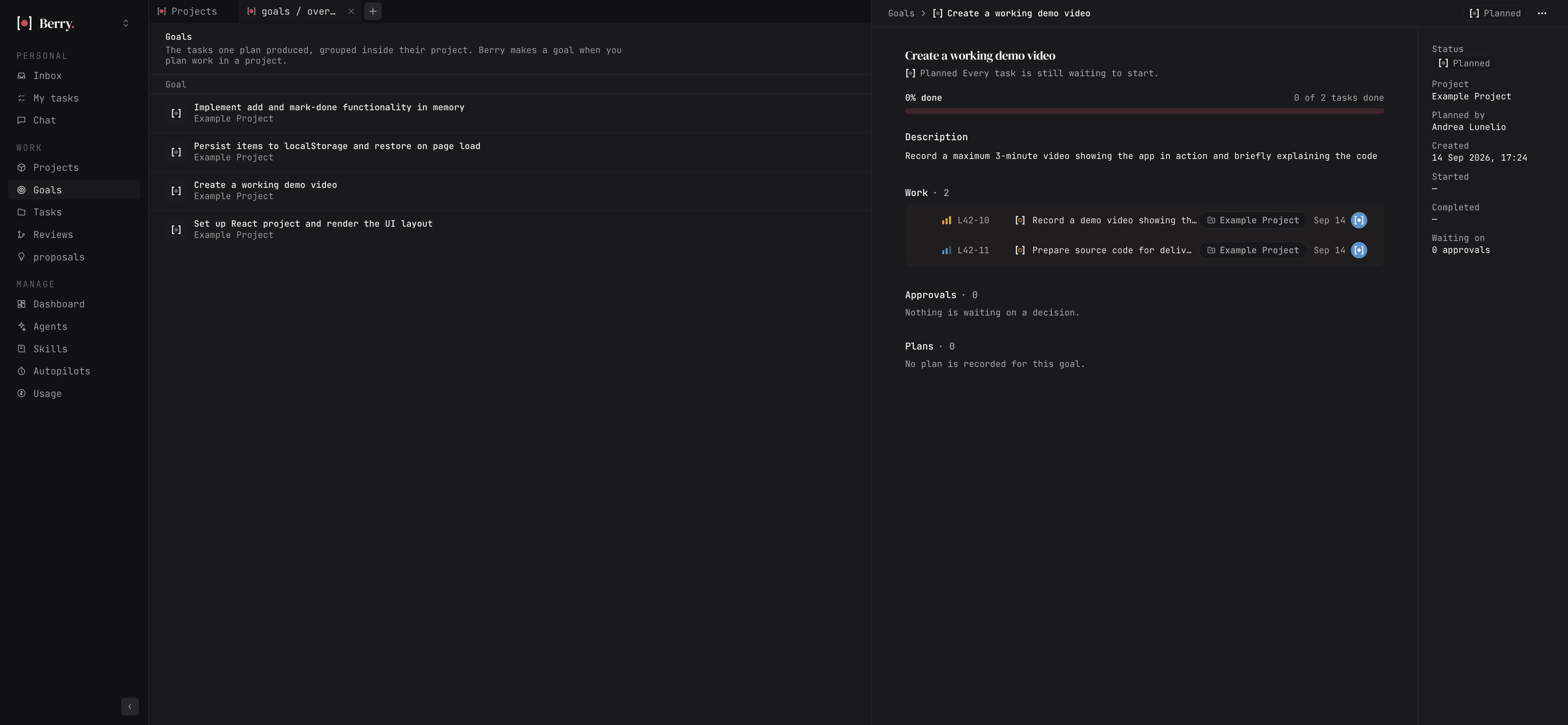
Goals
Each plan milestone becomes a Goal.
A goal tracks:
- related tasks
- progress
- pending approvals
- blocked work
- status
Goal states include:
- Draft
- Planned
- Active
- Blocked
- Completed
- Cancelled
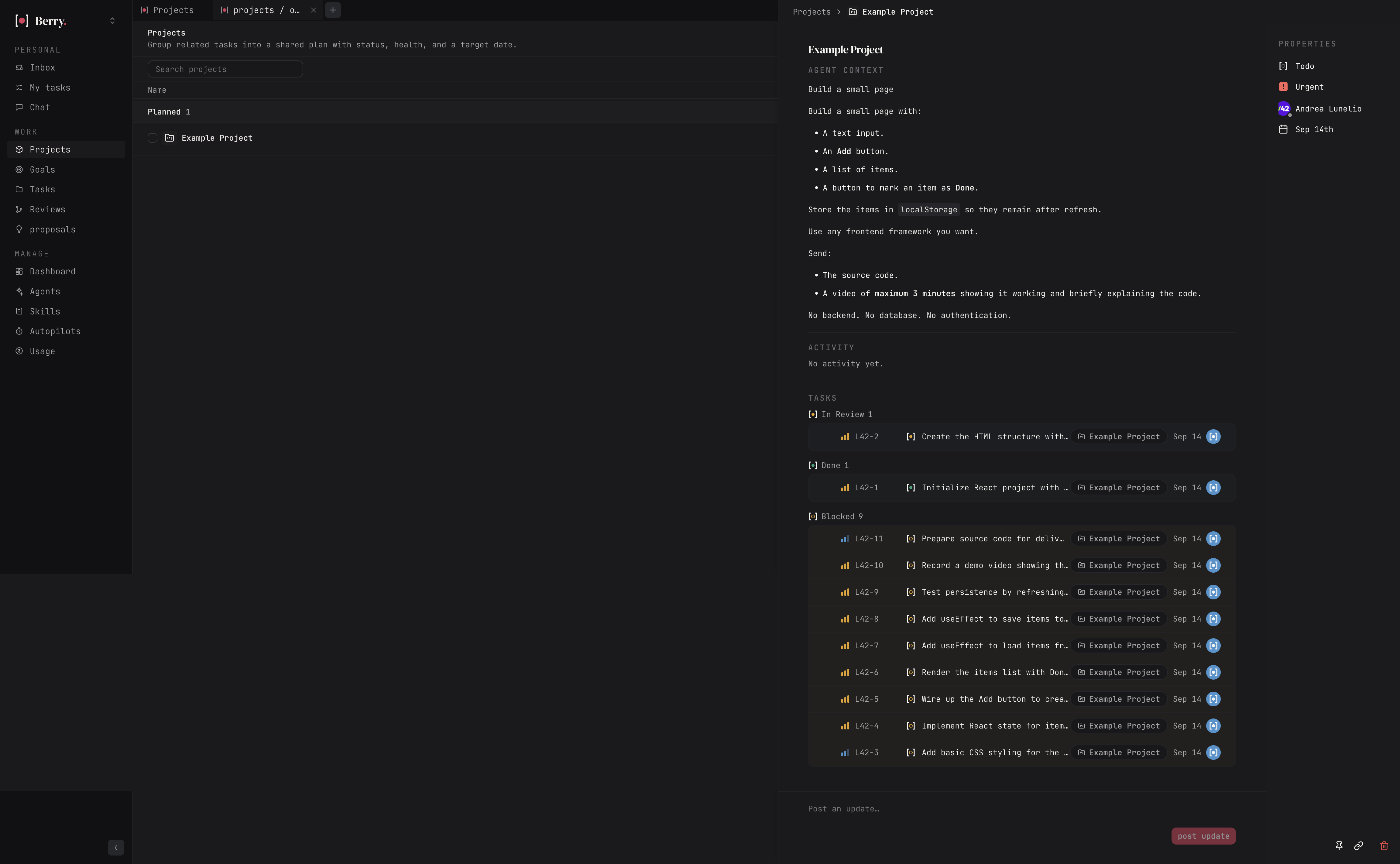
Projects
Projects group related work.
A project may contain:
- tasks
- goals
- activity
- status
- health
- target date
- linked repository
Agents working on code use the project's repository.
Automatic Routing
After a plan starts, the Orchestrator evaluates:
- tasks
- available agents
- roles
- capabilities
It assigns work to appropriate agents and may select a predefined workflow.
If routing fails, tasks remain available for manual assignment.
AutoGate
AutoGate adds agent review before human review.
Agent implements
      ↓
Agent reviewer checks
      ↓
Changes may be requested
      ↓
Required agent reviews pass
      ↓
Human decides
Agent approval never marks the task Done.
Autopilots
Autopilots are recurring instructions assigned to an agent.
Triggers may include:
- schedules
- signed webhooks
- manual Run now
Examples:
- daily standup
- stale-task sweep
- release notes
- CI failure monitoring
- security discovery
- weekly digest
Each firing becomes an ordinary agent run or task.
Quick Actions
Quick actions are reusable workspace prompts.
Examples:
- Summarize this task
- Review this discussion
- Draft release notes
- Explain this failure
They run through a chosen agent.
3. Agents and Execution
Agent Roster
The Agents page shows:
- availability
- workload
- runtime health
- model
- owner
- access
- recent activity
- success/failure statistics
- usage
Creating Agents
Agents may be:
- configured manually
- drafted through an AI-assisted builder
- created automatically as part of Berry's organization
Agent Capabilities
An agent may have:
- instructions
- conversation starters
- skills
- MCP servers
- model configuration
- repository permissions
- runtime binding
- environment variables
Skills
Skills are reusable knowledge and instruction packages.
They may be:
- written inside Berry
- imported from GitHub
- imported as archives
- assigned to multiple agents
Imported skills can be refreshed from their original source.
MCP Servers
Agents may access external MCP servers.
MCP servers may belong to:
- one agent
- the whole workspace
They may connect directly or through AgentCore Gateway.
Runs
A run includes:
- task context
- conversation context
- agent instructions
- skills
- tools
- temporary credentials
During a run, the agent may:
- inspect project files
- write files
- run commands
- comment
- create sub-tasks
- escalate
- open pull requests
- propose work
Every step is recorded.
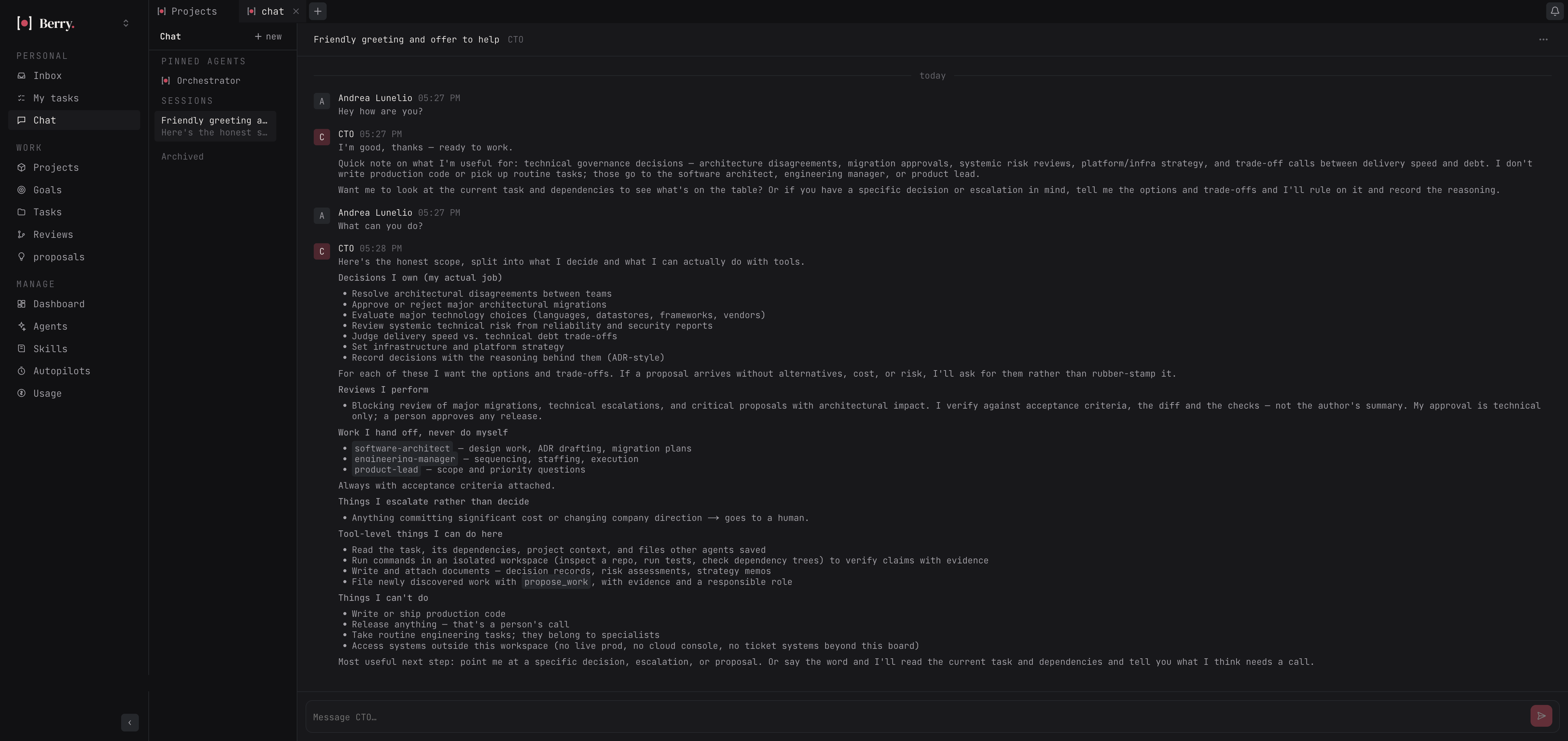
Chat
Users may chat directly with agents.
Agent conversations use the same instructions, model, and runtime as task work.
Tasks and projects can be brought into chat as context.
Usage and Cost
Berry records model usage per run.
Usage can be summarized by:
- agent
- model
- day
- week
- project
- workspace
Where pricing is known, Berry calculates cost.
4. Berry's Built-In Agent Organization
Every workspace receives a predefined AI organization.
There are 19 agents across 7 departments.
| Department | Role | Level |
|---|---|---|
| Operations | Orchestrator | 2 |
| Product | Product Lead | 5 |
| Product | Business Analyst | 2 |
| Product | UX Researcher | 2 |
| Product | Product Designer | 2 |
| Engineering | Software Architect | 5 |
| Engineering | Engineering Manager | 2 |
| Engineering | Backend Engineer | 4 |
| Engineering | Frontend Engineer | 4 |
| Engineering | Database Engineer | 3 |
| Engineering | Integration Engineer | 3 |
| Quality & Security | QA Engineer | 5 |
| Quality & Security | Security Engineer | 5 |
| Platform | DevOps Engineer | 3 |
| Platform | Site Reliability Engineer | 4 |
| Growth & Insight | Data & Analytics Engineer | 3 |
| Growth & Insight | Technical Writer | 3 |
| Growth & Insight | Growth Engineer | 3 |
| Leadership | CTO | 5 |
Each role defines:
- mission
- responsibilities
- expected inputs
- expected outputs
- autonomy level
- allowed tools
- delegation relationships
- escalation rules
- reviewers
- discovery responsibilities
Autonomy Levels
Level 1 — Advisory
May:
- read workspace context
- inspect files
- comment
- escalate
Level 2 — Contributor
Adds:
- create tasks
- create projects
- write files
- attach files
- propose work
- delegate
- change permitted task states
Level 3 — Executor
Adds:
- run commands
- modify code
- collect artifacts
- prepare pull requests
Level 4 — Autonomous
Uses the same core execution tools as Level 3 but may have routine, low-risk proposals accepted automatically.
Level 5 — Authority
Adds the ability to submit review verdicts within the role's domain.
Restrictions at Every Level
No level can:
- merge code
- mark Done
- cancel work
Required Reviews
Code-writing roles normally receive:
QA Engineer
- blocking
Security Engineer
- blocking for security-sensitive changes
Software Architect
- blocking for architecture-sensitive changes
Additional advisory reviews may come from:
- Database Engineer
- Product Designer
A reviewer cannot approve its own work.
Delegation
Roles may hand work to approved roles.
Delegation creates linked sub-tasks with acceptance criteria.
Escalation
Agents can escalate decisions they do not own.
Typical categories:
- product
- technical
- security
- operational
Escalations may become:
- tasks for senior agents
- human approval requests
The original work may remain Blocked until answered.
Work Discovery
Professional agents may periodically inspect the workspace for problems or opportunities.
Examples:
QA Engineer
- missing tests
- flaky tests
- skipped tests
Security Engineer
- vulnerable dependencies
- exposed secrets
- missing authorization
Technical Writer
- outdated documentation
- undocumented behaviour
Engineering Manager
- blocked work
- ownerless work
- conflicting tasks
Discoveries become proposals backed by evidence.
Agents are instructed not to implement discovered work during the discovery run.
Proposal Policy
Agents may propose work with:
- evidence
- severity
- impact
- suggested action
- effort
- dependencies
- owner
- reviewers
Routine proposals may start automatically only when:
- proposer is Level 4 or 5
- severity is low or medium
- impact is routine
Everything else waits for a person.
5. Human Control
Human control is structural, not just prompt-based.
Review Gate
Agent delivers work
        ↓
    In review
        ↓
 Human decision
     ↙       ↘
Approve    Send back
   ↓           ↓
 Done        Todo
           + feedback
Approvals
Approvals happen before sensitive work.
They may gate:
- risky planned tasks
- work proposals
- escalations
Approval decisions are recorded in workspace history.
Agent Reviewers
Agent reviews may:
- approve
- request changes
- provide advisory findings
They cannot release the work.
GitHub Delivery
For code tasks, the runtime may:
- create a branch
- commit changes
- run project checks
- push the branch
- open a pull request
The pull request contains:
- task key
- summary
- verification results
Berry does not merge the pull request.
A person merges it through GitHub.
6. GitHub
GitHub is Berry's primary repository integration.
People sign in using GitHub.
Their encrypted GitHub authorization allows Berry to:
- list repositories
- link repositories to projects
- clone repositories for runs
- push branches
- open pull requests
Agents never receive unrestricted GitHub credentials.
Repository actions are individually checked against the agent's permissions.
Projects link to existing repositories; Berry does not create repositories.
7. Workspaces and Administration
Berry supports multiple workspaces.
Each workspace contains its own:
- members
- agents
- organization
- projects
- goals
- tasks
- runtimes
- integrations
- plugins
- skills
- settings
Roles
Owner
Full control.
Admin
Manages workspace configuration and normal members.
Member
Creates and updates work and can start agents.
Viewer
Read-only.
Permissions are checked on every mutation.
Invitations
Workspaces support:
- email-targeted invitation links
- reusable join links
Invitation secrets are shown once and stored hashed.
Personal Access Tokens
Users may create API tokens with:
- scopes
- expiry
- revocation
Tokens act as the user and use the same permission checks.
8. Integrations and Extensions
Integrations
Berry exposes tools to agents from several sources.
Berry-Native Tools
Examples:
- read task
- comment
- create task
- update permitted status
- read project
- save files
GitHub Tools
Examples:
- read repository
- create branch
- push changes
- open pull request
MCP Tools
External MCP servers may provide arbitrary additional capabilities.
AgentCore Gateway
MCP servers and external tools may optionally be routed through Amazon Bedrock AgentCore Gateway.
Plugins
Berry supports external plugins.
Plugin installation shows requested permissions before installation.
Plugins may contribute:
- tools
- pages
- scheduled actions
- event handlers
- integrations
Individual plugin tools remain disabled until an admin enables them.
Plugin access uses short-lived scoped credentials.
Public API
Berry provides an API for scripts and plugins.
It supports operations such as:
- identify current user
- list accessible workspaces
- read tasks
- edit task fields
- read comments
- create comments
All operations use normal Berry permission checks.
9. Runtime Architecture
Berry is a control plane, not the model runtime.
Human
  │
  ▼
Berry
Projects / Goals / Tasks / Policies
  │
  ▼
Run package
  │
  ▼
Amazon Bedrock AgentCore Runtime
  │
  ▼
Agent loop
  │
  ├── Model
  ├── Berry tools
  ├── MCP tools
  ├── Repository
  └── Commands
The Berry server never directly calls an AI model.
A runtime receives the work package, performs the run, and streams events back.
Agent Loop
The standard runtime uses the Strands Agents SDK with models available through Amazon Bedrock.
The loop follows:
Think
  ↓
Call tool
  ↓
Inspect result
  ↓
Continue
  ↓
Deliver
Run-Scoped Credentials
Every run receives a short-lived token.
It is:
- tied to one run
- tied to one workspace
- tied to the relevant task
- time limited
- revoked when the run ends
Agents cannot access Berry's database.
They only interact through named tools.
Tool Authorization
Before a tool executes, Berry checks:
- workspace
- run
- task
- agent
- autonomy level
- role contract
- explicit permissions
The model cannot override these checks.
Workspace Isolation
All resources are scoped to the current workspace.
The run token determines workspace and task context server-side.
An agent cannot choose another workspace through model output.
10. Security
Human Release Authority
Organization agents cannot:
- merge code
- mark work Done
- cancel tasks
These restrictions exist in tool capabilities, not only instructions.
Secret Encryption
Sensitive values are encrypted using AES-256-GCM under the deployment encryption key.
Examples include:
- plugin secrets
- agent environment variables
- MCP headers
- connected provider credentials
If encryption isn't configured, features requiring protected secret storage are disabled.
GitHub Credentials
GitHub tokens come from user sign-in and remain encrypted.
They are decrypted only when Berry needs GitHub access.
Agents receive operations, not raw user credentials.
Auditability
Every agent-visible action becomes a named tool call.
Berry records:
- who acted
- which task
- which run
- what tool was called
- what changed
- when it happened
11. Events, Observability, and Files
Live Updates
Workspace and board updates are streamed to open clients.
Events are first written durably to PostgreSQL, then streamed.
Clients can reconnect and replay recent events.
Run History
Each run has an append-only ordered event log containing:
- lifecycle events
- messages
- tool calls
- usage
- results
- failures
Run status is derived from this record.
Metrics
Berry exposes:
- health endpoints
- readiness checks
- Prometheus-format metrics
- run counts
- failure information
- model usage
- estimated cost
Artifacts
Agent-generated files can be stored in S3-compatible storage.
Uploads are associated with the run that created them.
Downloads use temporary signed URLs.
12. Deployment
Berry is self-hosted.
The main application consists primarily of:
- Node.js server
- web application
- PostgreSQL
The agent runtime is separate and normally deployed to Amazon Bedrock AgentCore.
Multiple Berry application servers may run together.
Database locking prevents duplicate run claims and duplicate scheduled executions.
13. Capability Reporting
Berry reports what the current deployment can actually do.
Examples:
- agent runtime available
- model access configured
- storage configured
- GitHub configured
- planner available
- live updates available
Features that depend on missing infrastructure display Needs setup instead of pretending to work.
What Berry Is Fundamentally
Berry combines four systems:
Task Tracker
People and agents share the same work records.
AI Organization
Specialized agents have explicit roles, capabilities, and supervision.
Control Plane
Berry determines what work may happen and under which permissions.
Human Review System
Agents may perform and review work, but a person remains responsible for the final release decision.
The resulting loop is:
Human defines direction
        ↓
Berry plans work
        ↓
Berry routes tasks
        ↓
Agents execute
        ↓
Agents may review
        ↓
Human decides
        ↓
Berry records outcome
        ↓
Agents discover further work
        ↺
The core promise remains:
Agents can do the work. People stay in control.


Log in or sign up for Devpost to join the conversation.