Inspiration
College already comes with enough homework. Keeping track of the homework shouldn't become another assignment.
At USC, our coursework is scattered across Brightspace, Gradescope, and Piazza. Finding an assignment, checking deadlines, understanding instructions, and submitting work often means navigating multiple websites.
And when we turn to AI for help, we have to manually copy information from those platforms into another conversation.
We asked ourselves: What if everything could happen through a single text message?
That's why we built Benni — your coursework, one conversation.
No new app to learn-just text Benni like you would a friend.
What it does
Benni is an AI-powered iMessage agent that connects to your university coursework and helps you manage assignments, understand concepts, and complete everyday academic workflows.
1. Your entire academic life, one conversation.
Ask Benni:
- "What's due this week?"
- "What did my professor say about the homework?"
- "What's my grade in that class?"
- "Find my calculus assignment."
Benni connects to Brightspace, Gradescope, and Piazza to retrieve relevant coursework, deadlines, grades, and discussions.
It understands conversational context, course nicknames, and follow-up questions, so students don't have to repeat themselves.
2. An AI tutor that goes beyond text.
Benni doesn't just explain concepts. It can create interactive visualizations, coding demonstrations, and personalized study guides.
Struggling to understand a mathematical surface? Ask Benni to visualize it, then rotate and explore the resulting 3D model on your phone.
Benni can also remember difficult topics and organize them into study materials for later review.
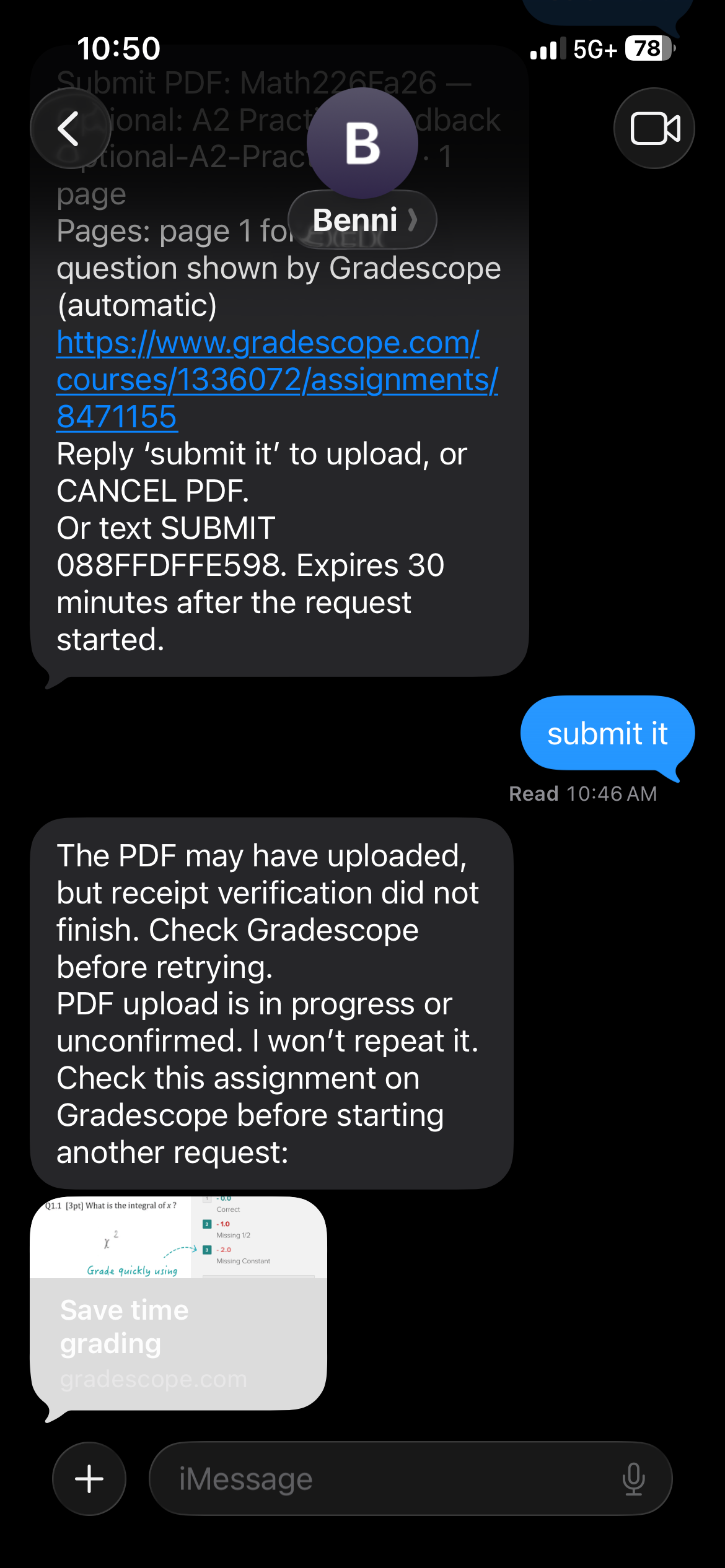
3. Create PDFs and submit supported assignments directly through iMessage.
Benni can turn notes and permitted coursework into downloadable PDFs, deliver them through iMessage, and help students submit them.
We tested an actual Gradescope PDF submission through our conversational workflow, including file verification and submission receipt confirmation.
We also implemented a Brightspace submission workflow, although its upload adapter still requires live validation.
4. Designed around how students already communicate.
Instead of asking students to download another productivity app, Benni meets them where they already are: their messages.
The experience is conversational, context-aware, and accessible from a familiar interface.
How we built it
Benni is powered by a Python backend and the OpenAI API, with specialized AI components for orchestration, campus integrations, tutoring, document generation, and interactive visualizations.
Our architecture includes:
- OpenAI API: Interprets natural language, manages conversational context, and coordinates specialized tools.
- Sendblue: Connects iMessage to our backend through webhooks, enabling two-way conversations and file attachments.
- Brightspace, Gradescope, and Piazza: Provide access to connected coursework, assignments, and academic information.
- Playwright: Automates supported browser interactions and assignment-submission workflows.
- SQLite: Maintains conversation context, workflow state, and submission records.
- Three.js, D3.js, and Plotly: Power interactive visualizations for mathematical and technical concepts.
- Chromium: Renders generated documents into downloadable PDFs.
- E2B: Provides an optional isolated environment for code execution.
- ngrok: Exposes our local development server for real iMessage testing.
One particularly important engineering decision was ensuring that Benni never confuses an AI-generated response with a successfully completed action.
When submitting coursework, Benni tracks the exact file and destination, checks the upload, and verifies completion using a new submission receipt.
Challenges we ran into
Making complex workflows feel effortless.
Students naturally say things like "submit that one" or "turn it into a PDF."
For Benni to respond correctly, it must understand the conversation, remember which assignment is being discussed, and preserve the correct file throughout the workflow.
Reliably interacting with university platforms.
Brightspace and Gradescope have different authentication systems, layouts, and submission procedures.
We had to account for ambiguous assignment names, multiple upload fields, interrupted requests, and duplicate webhook events.
Building an AI that can take actions safely.
It wasn't enough for Benni to say an assignment was submitted. We needed to verify that the correct document reached the intended destination.
We implemented persistent action tracking, file validation, duplicate-request handling, and receipt verification to improve reliability.
Accomplishments that we're proud of
We're particularly proud that Benni goes beyond being another AI chatbot.
We connected a real Gradescope account and successfully tested an actual PDF submission through an iMessage conversation.
We also built:
- Real integrations with university coursework platforms.
- Context-aware assignment identification and follow-up conversations.
- AI-powered explanations and interactive study visualizations.
- PDF creation and delivery directly through iMessage.
- Personalized study-guide functionality.
- An implemented Brightspace submission pathway awaiting live validation.
- Automated tests covering successful workflows, ambiguous requests, errors, and duplicate actions.
All of this is accessible through a familiar messaging experience.
What we learned
Building an AI assistant that actually does things is fundamentally different from building a chatbot.
The difficult part isn't simply generating intelligent responses. It's connecting real systems, understanding user intent, maintaining context, executing actions reliably, and verifying the results.
We learned how important application state, reliable integrations, and careful error handling become when AI moves from answering questions to completing real workflows.
We also realized that the best interface isn't necessarily a new interface.
Sometimes the most useful product is one that integrates directly into something people already use every day.
What's next for Benni
Our long-term vision is simple: Every USC student should have a personal academic assistant accessible through a text message.
Our next steps are to:
- Validate Brightspace submissions across more real course layouts.
- Simplify account connections and deploy a persistent, reliable service.
- Expand support for USC-specific academic resources and services.
- Improve personalized tutoring, study guides, and interactive learning tools.
- Introduce live voice conversations so students can call Benni, not just text it.
We designed Benni with practical campus adoption in mind. Its messaging interface minimizes onboarding friction, while its modular integrations allow additional university services to be supported over time.
Benni defaults to guided learning, supports more complete assistance when course rules permit it, and does not automate quizzes or exams.
Our ultimate goal is to work with USC Student Government and campus partners to make Benni available to more students.
Students should spend their time learning, building, and enjoying college — not navigating websites to find their homework.
That's the future we're building with Benni.

