-
-
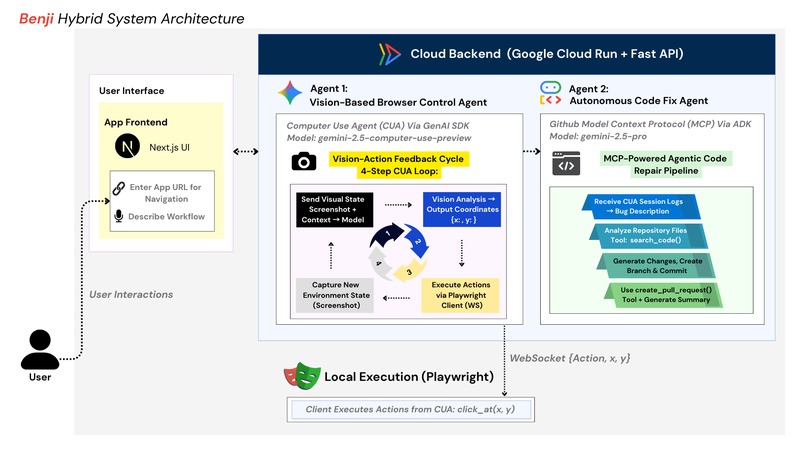
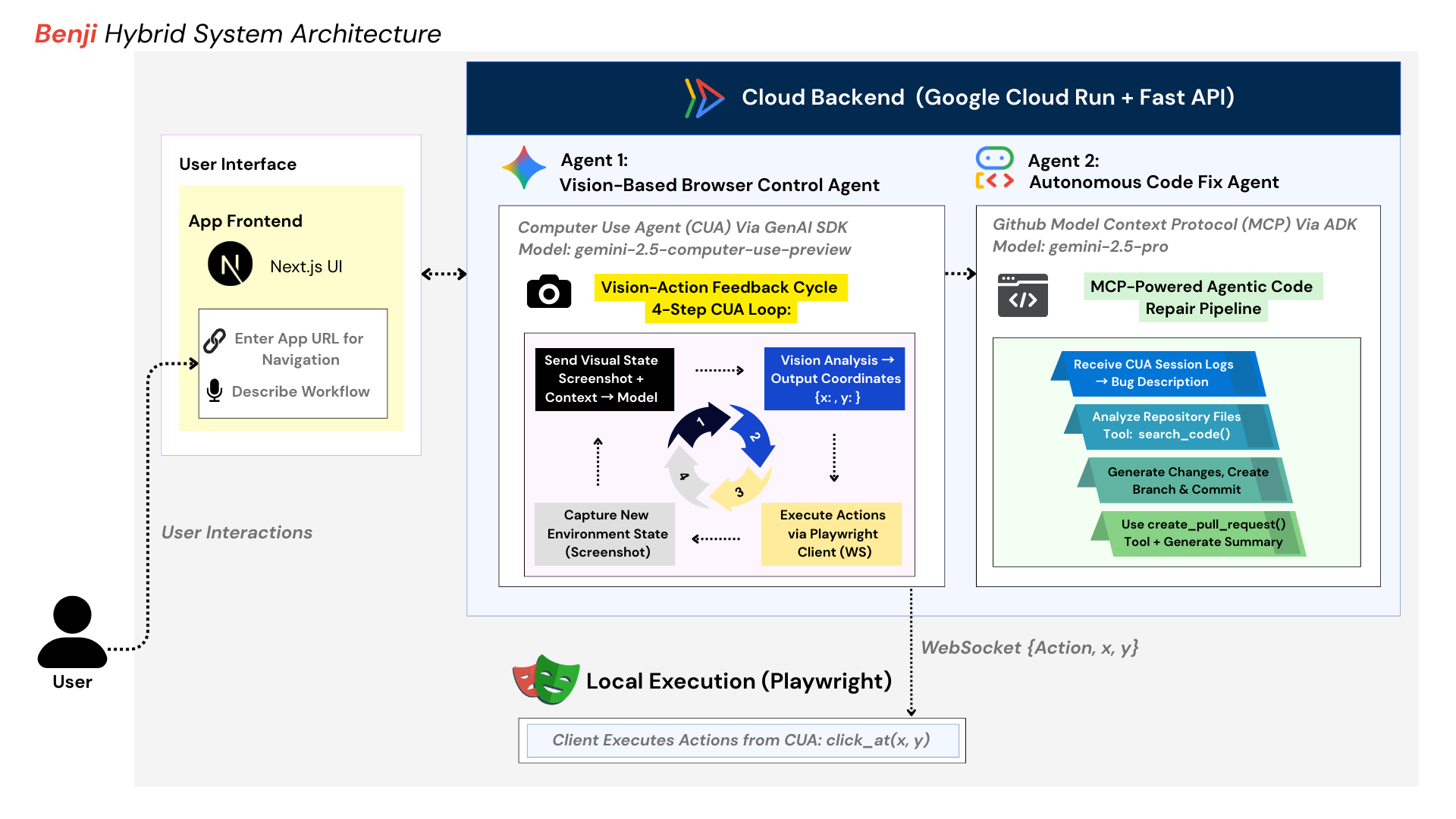
Architecture Diagram: Hybrid Multi-Agent Architecture with Agents deployed on Google Cloud Run
-

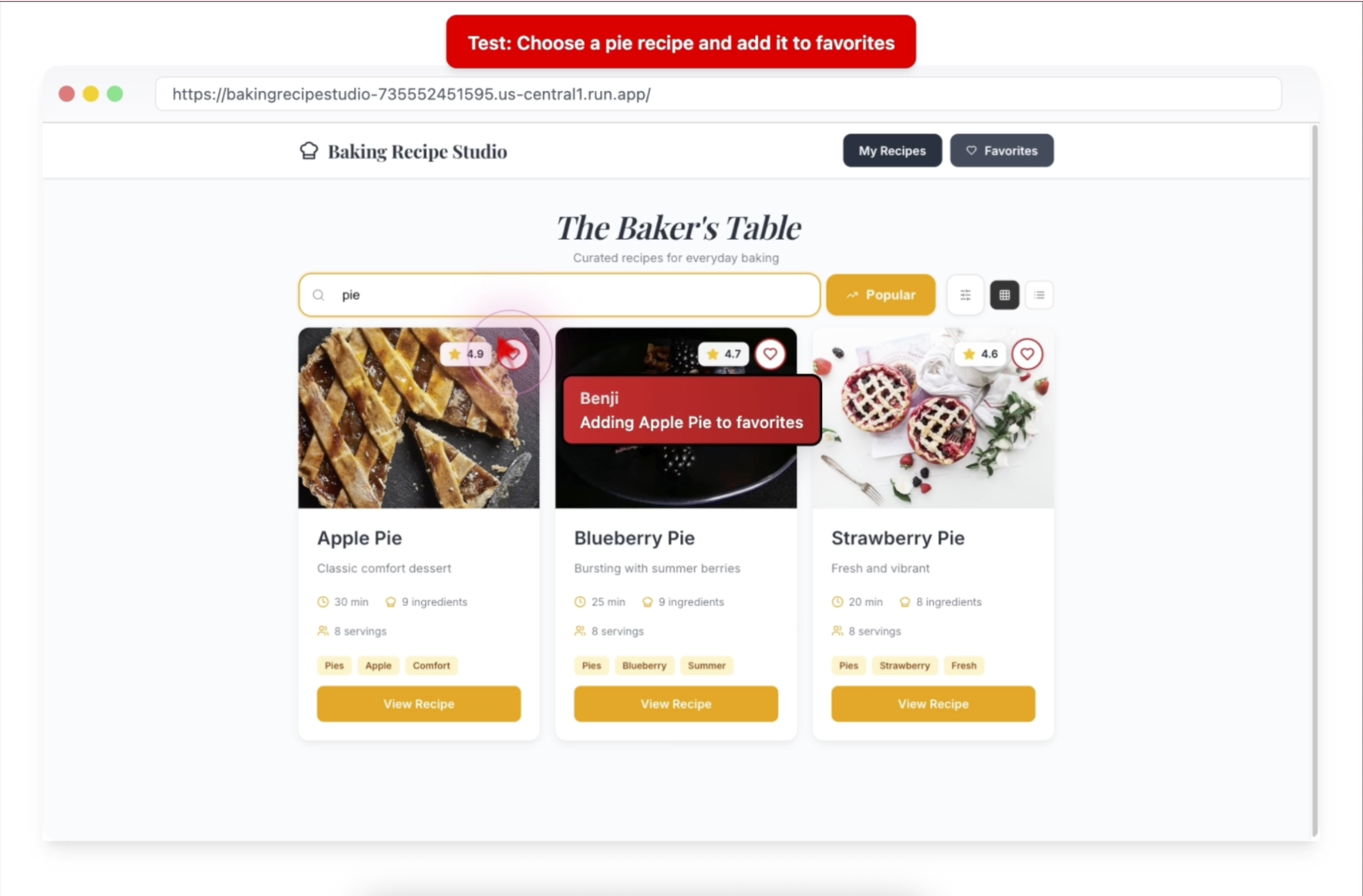
Demo of Agent Navigation
-
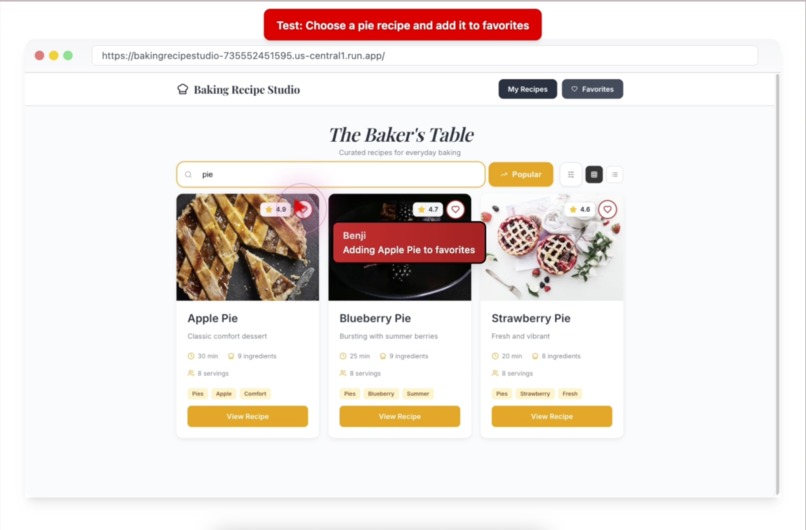
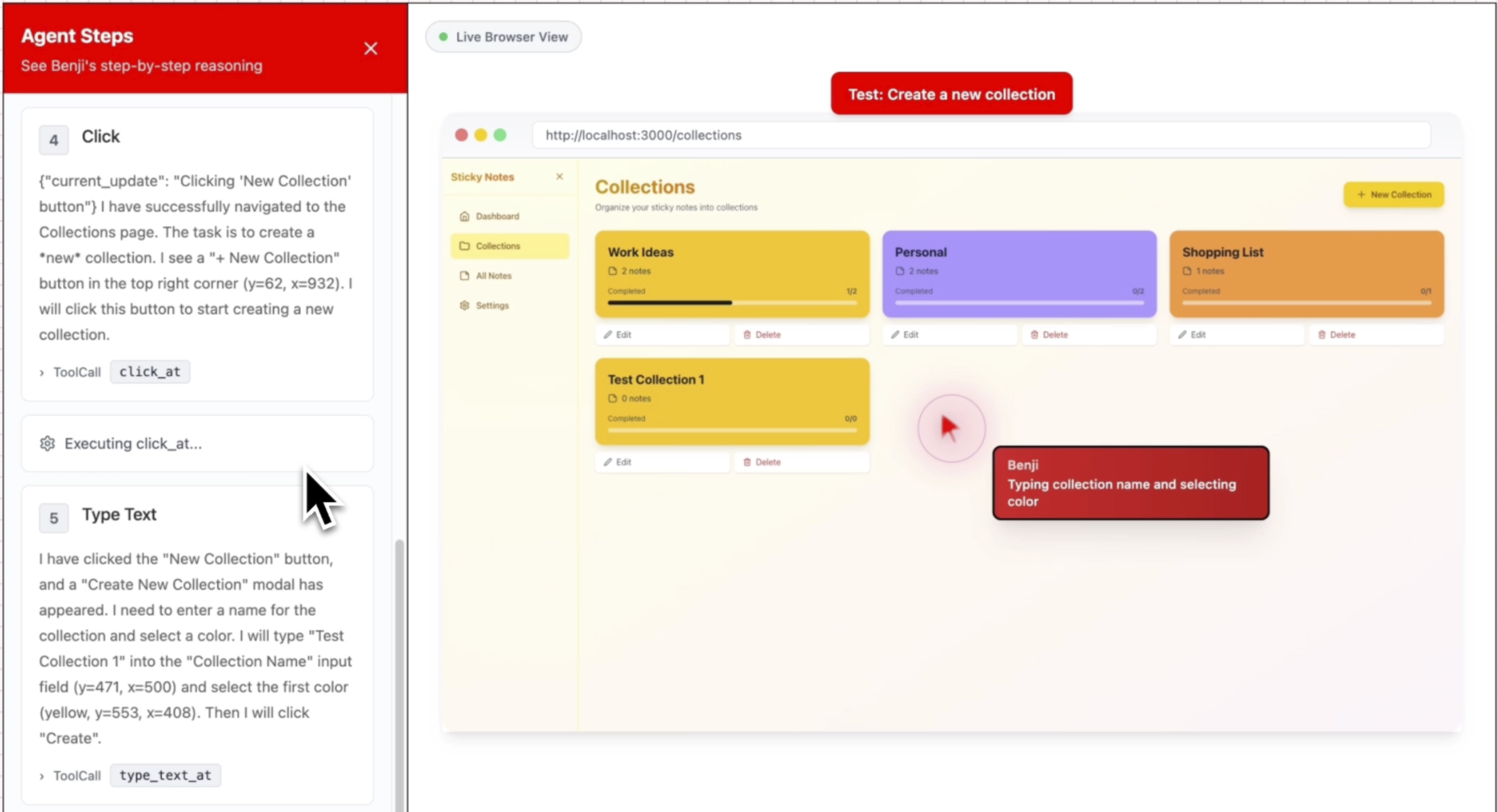
Demo of Agent Navigation
-
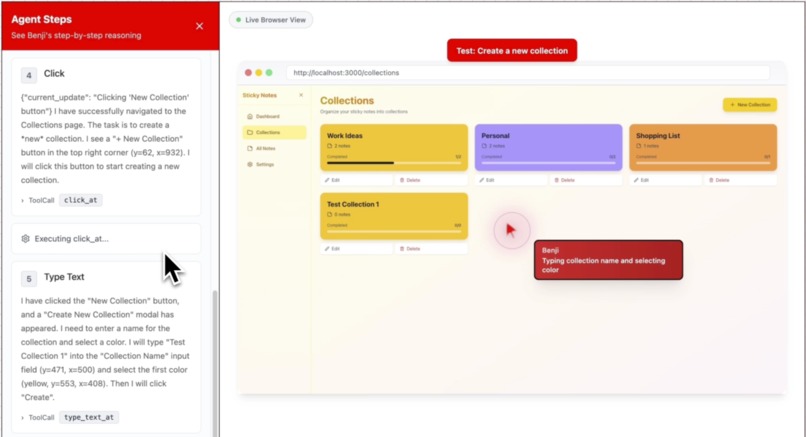
Demo of Agent Navigation
-
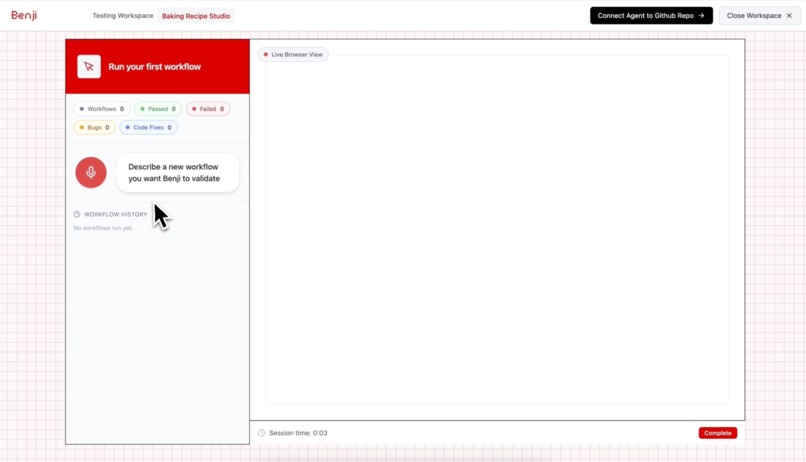
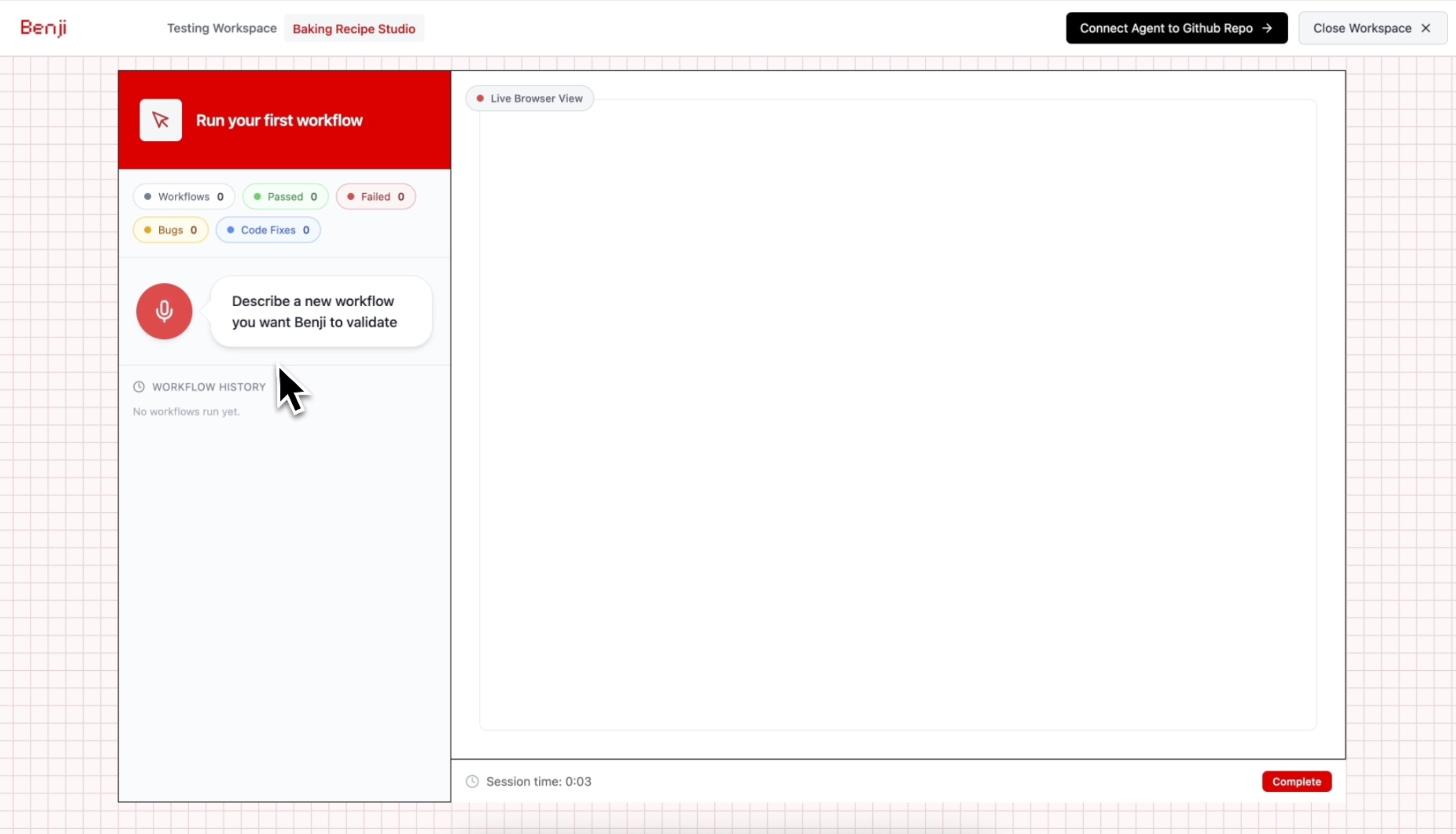
Benji App Workspace

Inspiration
More people are building apps today than ever before. Hobby developers are shipping side projects, small teams are iterating quickly on new ideas and even at incredible hackathons like this one, people around the world are building & shipping apps faster than ever. But making sure the experience actually works for real users is still one of the hardest parts of building high quality apps that people love. Workflows can break in subtle ways that are easy to miss until real users run into pesky bugs.
We believe that if building software has become far more accessible with AI agents, then testing should be just as accessible. Manual testing is time consuming and repetitive, and scripted tests are often brittle. A simple UI change can break an entire test suite even when the core logic is still correct. For many developers, especially indie hackers and small teams, comprehensive QA is simply not realistic. We want developers to have a more practical way to describe real workflows in plain language, run them autonomously, and catch meaningful issues without spending hours clicking through the same flows again and again.
What is Benji + How it works
That’s why we built Benji, your AI teammate for the interface layer. With AI becoming more multimodal than ever, we decided to leverage Gemini's multimodal ability to confidently see interfaces and make decisions in real time, exactly the way a real user would. Benji is an autonomous agent that can truly see your app, understand natural language user intent, and navigate the interface like a real user. Just talk and describe a workflow in plain English, and Benji can click, type, move through screens, and test the app experience in real time. By combining multimodal vision with live reasoning, Benji does more than follow fixed scripts. It understands what is happening on screen, adapts to the UI as it changes, and helps uncover meaningful bugs way faster than traditional testing.
Under the hood, Benji runs on a coordinated two-agent system that connects live visual testing with autonomous code fixes. The first agent is the Computer Use Agent, powered by Gemini 2.5 Computer Use, which observes the live application through screenshots, reasons visually about the current state of the interface, and outputs executable actions to interact with it. This creates a continuous Vision Action Feedback Cycle where Benji sees the screen, decides what to do next based on the user’s intent, acts on the interface, captures the updated state, and continues. When a bug is detected, the second agent takes over: the GitHub MCP Agent, built with Google ADK and the Model Context Protocol (MCP), which investigates the issue, generates a fix, and opens a pull request autonomously. Benji does not just report issues. It helps turn them into actionable fixes developers can immediately review and merge. This gives developers a faster and easier way to test, fix, and ship with confidence.
| Layer | System Element | Description |
|---|---|---|
| User Input | App URL + Workflow Prompt | The developer provides the target application and describes the workflow in natural language. |
| Agent 1 | Computer Use Agent (Gemini 2.5 Computer Use) | Visually inspects the live application through screenshots, reasons about the current UI state, and generates the next executable action. |
| Interaction Loop | Vision-Action Feedback Cycle | Benji repeatedly captures the screen, analyzes the state, performs an action, and captures the updated result to continue multi-step reasoning. |
| Execution Layer | Playwright Local Client | Executes the CUA’s coordinate-based actions in the browser and streams updated screenshots back to the backend. |
| Agent 2 | GitHub MCP Agent (Google ADK + MCP + Gemini 2.5 Pro) | When a workflow breaks, this agent investigates the repository, generates a fix, and opens a pull request autonomously. |
Key Components of Benji's Hybrid Architecture
We built Benji as a hybrid multi-agent system that combines cloud-hosted AI reasoning with local browser execution. The system is designed around two specialized agents working together: the Vision-Based Computer Use Agent (CUA) for live visual UI testing and the Autonomous Code Fix Agent for automated bug remediation.

Figure 1. Hybrid Multi-Agent Architecture with agents deployed on Google Cloud Run
1. Vision-Action Feedback Cycle: The Multimodal Computer Use Agent (Not Walking the DOM!)
At the heart of Benji is a continuous Vision-Action feedback loop that allows the agent to test applications through pure visual understanding. The backend captures a full-page screenshot and sends it with workflow context to Gemini 2.5 Computer Use. The model visually analyzes the interface, determines the next step, and outputs precise coordinate-based actions such as clicking, typing, scrolling, or navigation. These commands are executed in a real browser through the Playwright client, which then captures a fresh screenshot and returns it to the backend. This is the "live" factor that makes Benji fundamentally different from traditional testing tools. The agent doesn't just analyze static screenshots—it continuously observes, acts, and adapts in real-time as the application responds to its interactions.
This cycle repeats until the workflow is complete or a bug is detected, with each step taking roughly 2 to 3 seconds, making Benji feel truly live and responsive. We designed it as a pure vision-based system so the agent interacts the way a real user would, seeing what users see instead of depending on brittle DOM structure or element selectors. Unlike traditional UI testing tools that rely on CSS selectors, XPath, or accessibility IDs, Benji’s Vision Action Feedback Cycle is resilient to UI refactors. If a button moves, changes color, or appears slightly differently, the model can still recognize it visually and adapt its actions in real time.

Figure 2. Agent Using a Perception-to-Action Loop for Multi-Step Reasoning.
2. Autonomous Code Fix Agent: GitHub MCP Integration
When the CUA detects a bug, Benji does not stop at reporting it. It automatically invokes a second agent, the GitHub MCP Agent, which uses Google ADK and the Model Context Protocol (MCP) to analyze the failure and turn it into an actionable pull request without human intervention.
The agent receives the full test session logs, including screenshots, actions, and bug context, then explores the repository using MCP GitHub tools such as list_files() and read_file(). It identifies the relevant files, reads the source code, reasons about the root cause, and generates a fix using Gemini 2.5 Pro. From there, it creates a new branch, commits the changes, pushes them to GitHub, and uses create_pull_request() to open a PR with a clear summary of what broke, what was fixed, and why. This turns Benji into more than a testing agent. It becomes an autonomous engineering teammate that helps developers fix and ship with confidence.
3. Playwright Local Client: Coordinate-Based Browser Control
We wrote custom Playwright functions that translate the CUA’s coordinate-based commands into real browser actions. When the backend sends click_at(x=450, y=320), the Playwright client converts these pixel coordinates into a precise click event at that exact screen position. Similarly, type_text_at(text="projectname", x=300, y=200) first clicks at the coordinates to focus the input field, then types the text.
After each action executes, the client captures a full-page screenshot and streams it back to the backend, completing the Vision Action Feedback Cycle. This coordinate-driven approach allows the vision model to interact with any UI element visually, without relying on CSS selectors or DOM queries, making the system far more robust to UI changes.
Try it out!
You can set up Benji by following the deployment guide in our GitHub repository.
Setup Overview:
- Deploy the backend to Google Cloud Run using our automated
deploy.shscript - Run the Playwright client locally to connect to your Cloud Run backend
- Launch the Next.js frontend workspace
- Speak a test workflow in natural language and watch Benji navigate your app live
Challenges We Faced
One of the key challenges we faced was building a stable Vision-Action feedback loop that could correctly recognize when a workflow had actually failed, instead of repeatedly retrying actions or trying to recover from an error state. To improve this, we spent significant effort on grounding the agent’s reasoning with stronger workflow context, clearer failure signals, and reusable bug knowledge patterns so Benji could better identify real workflow breakages and trigger code-fix actions more reliably.
Accessibility-Aware User Experiences + What's Next for Benji
We strongly believe in the value an agent like Benji can bring to making software testing more accessible. But just as importantly, we think testing should go beyond only catching broken workflows. Many apps technically 'work', but still create frustrating experiences for different types of people because the UI is hard to read, confusing to navigate, or not designed with accessibility in mind.
Looking ahead, we want Benji to simulate more diverse real-world user scenarios, including low-vision experiences, accessibility needs, and workflows that may be confusing for elderly users, first-time users, or people who interact with products differently. We see real value in AI agents helping surface issues that developers may unintentionally overlook, such as poor visual hierarchy, unclear interaction patterns, inaccessible flows, or tasks that require too much cognitive effort. On the technical side, we also want to support large-scale parallel execution, allowing Benji to plan and run hundreds of workflow tests at once across different flows and user conditions. This would help developers test more, learn faster, and ship stronger product experiences!
Built With
- agent-development-kit
- cloud-run
- fast-api
- gemini-2.5-pro
- gemini-computer-use
- gemini-multimodal-vision
- gen-ai-sdk
- github-mcp-tool
- model-context-protocol
- next-js
- playwright
- python
- serverless-agent-orchestration
- ui-navigator
- websockets


Log in or sign up for Devpost to join the conversation.