-
-
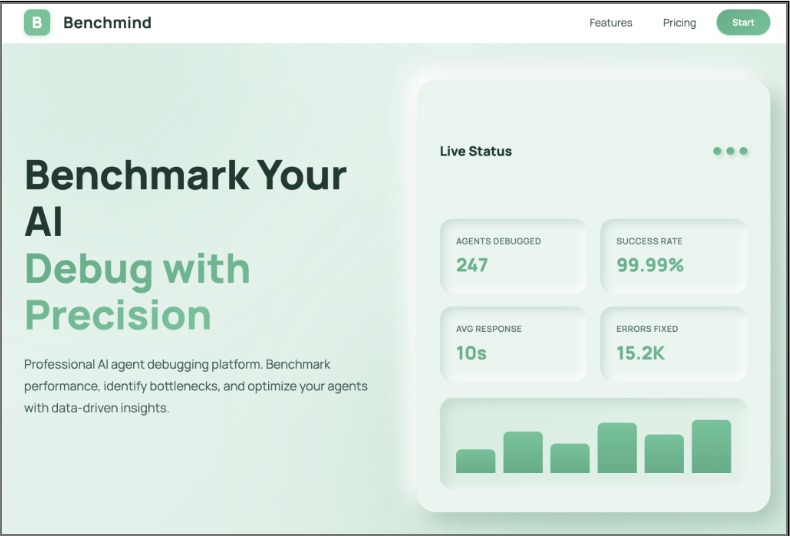
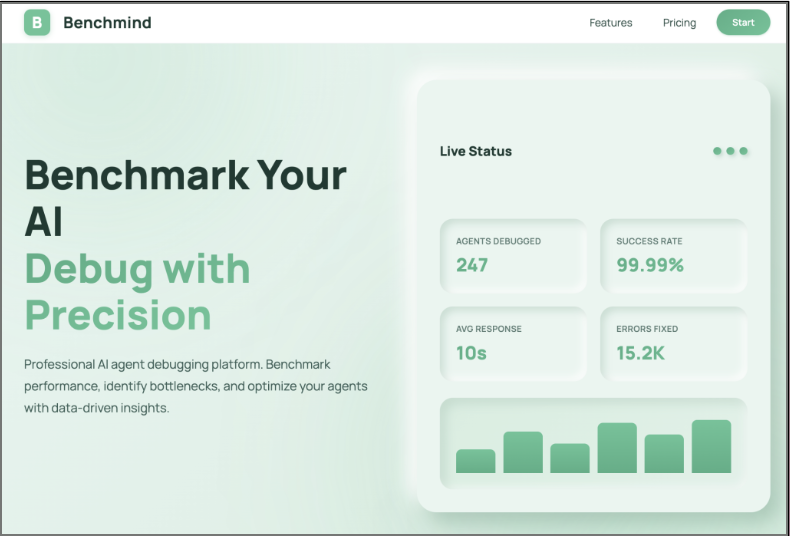
Landing Page
-
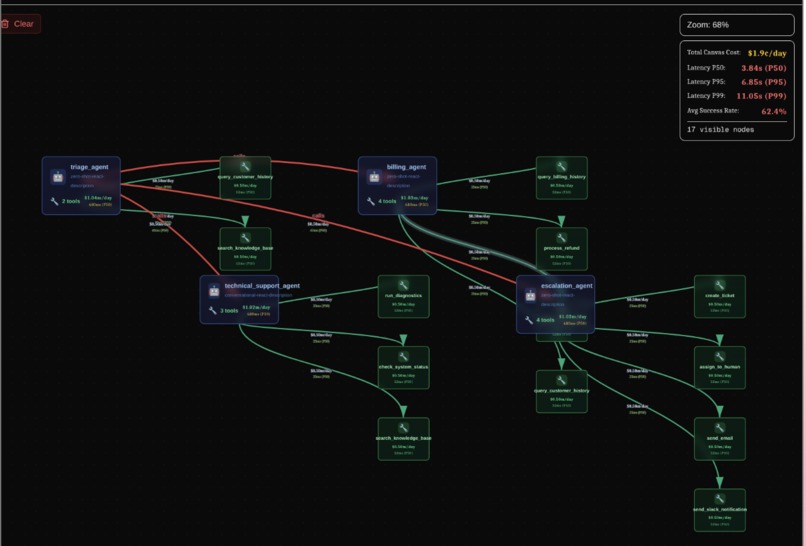
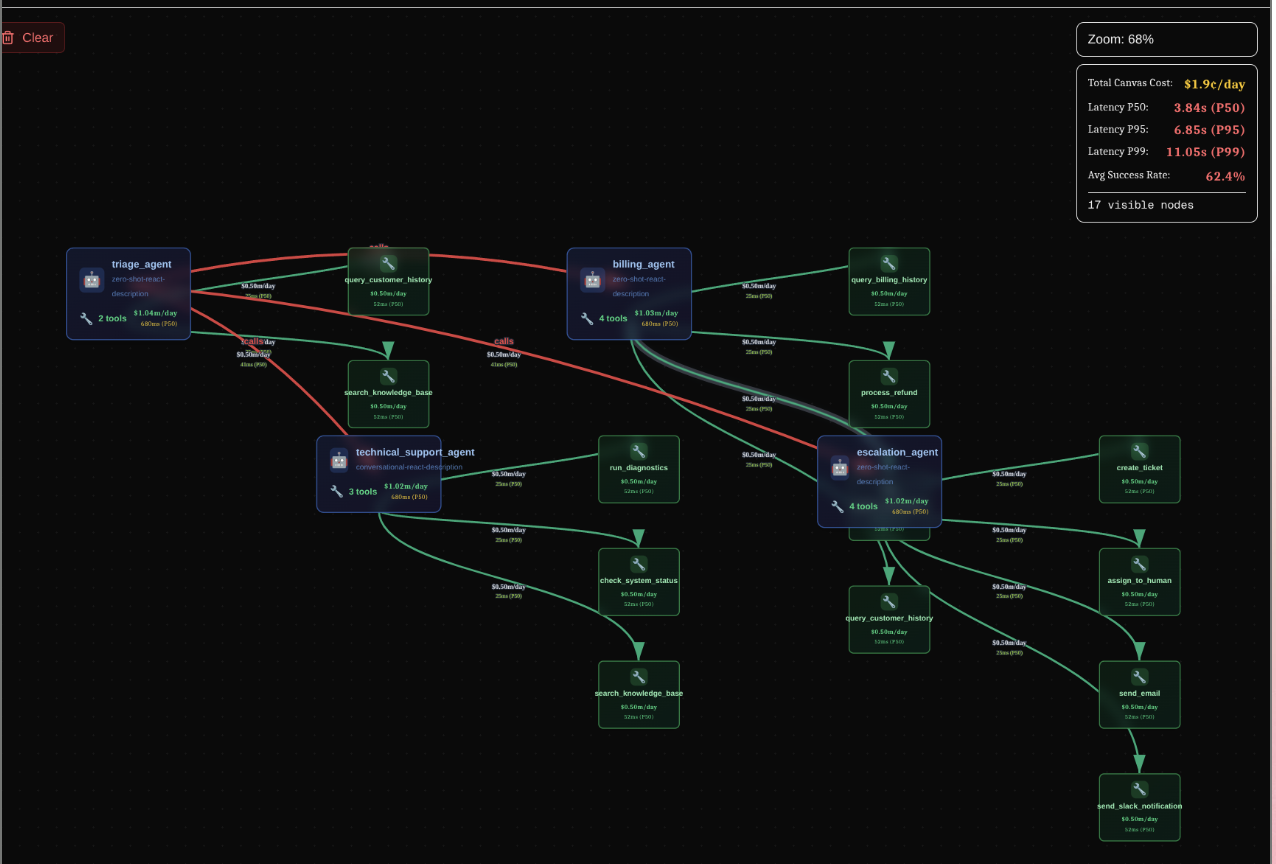
An Image of all the Agents and tools represented as a node after extraction and analysis
-
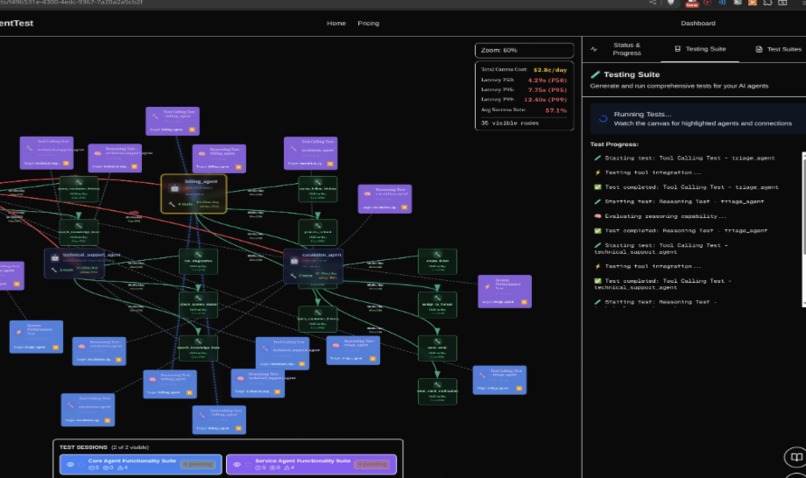
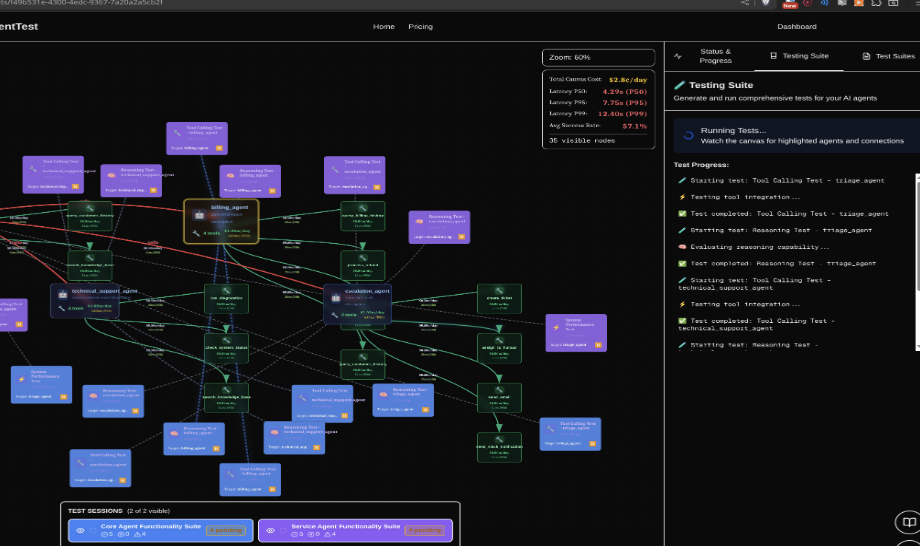
Image of the canvas with all the test cases ran on the agents repesented as nodes
-
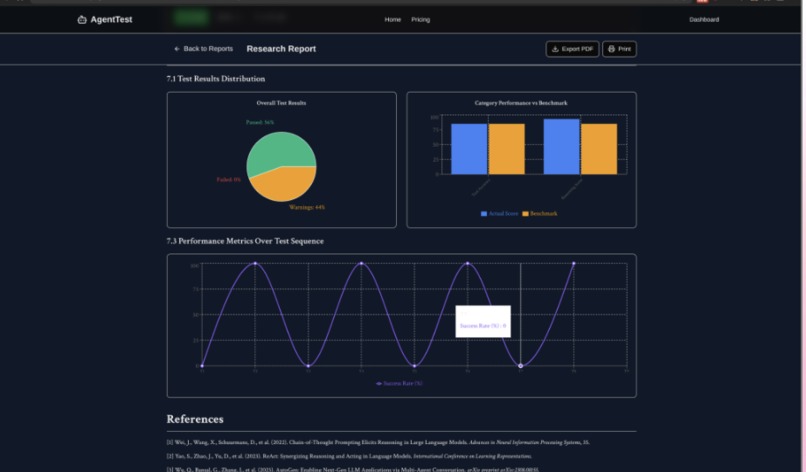
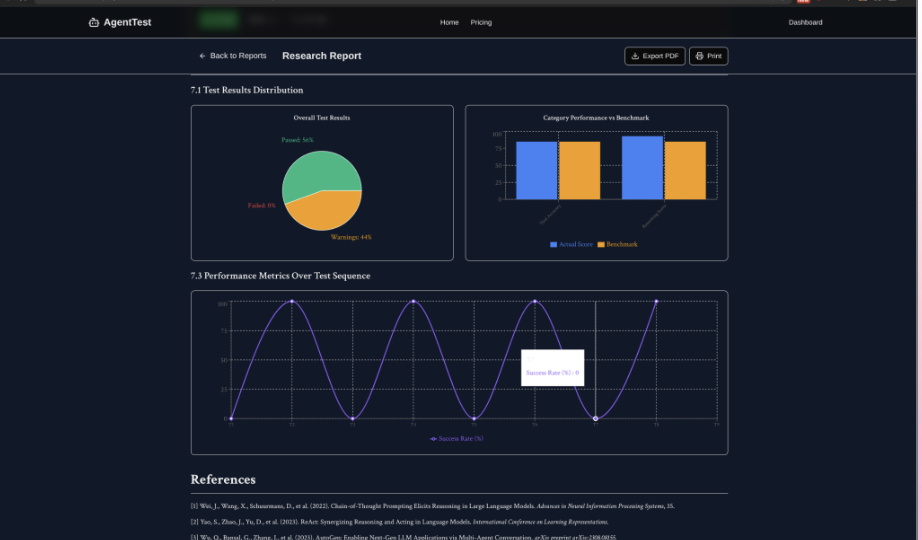
Graphs generated by the report about the performance of the AI Agents
-
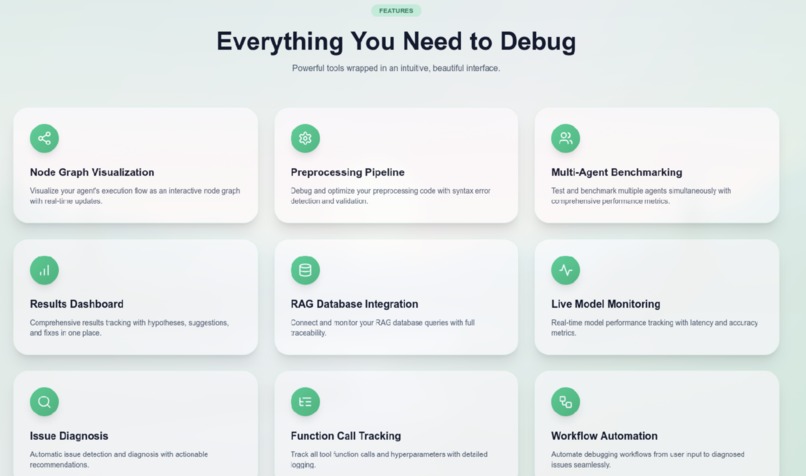
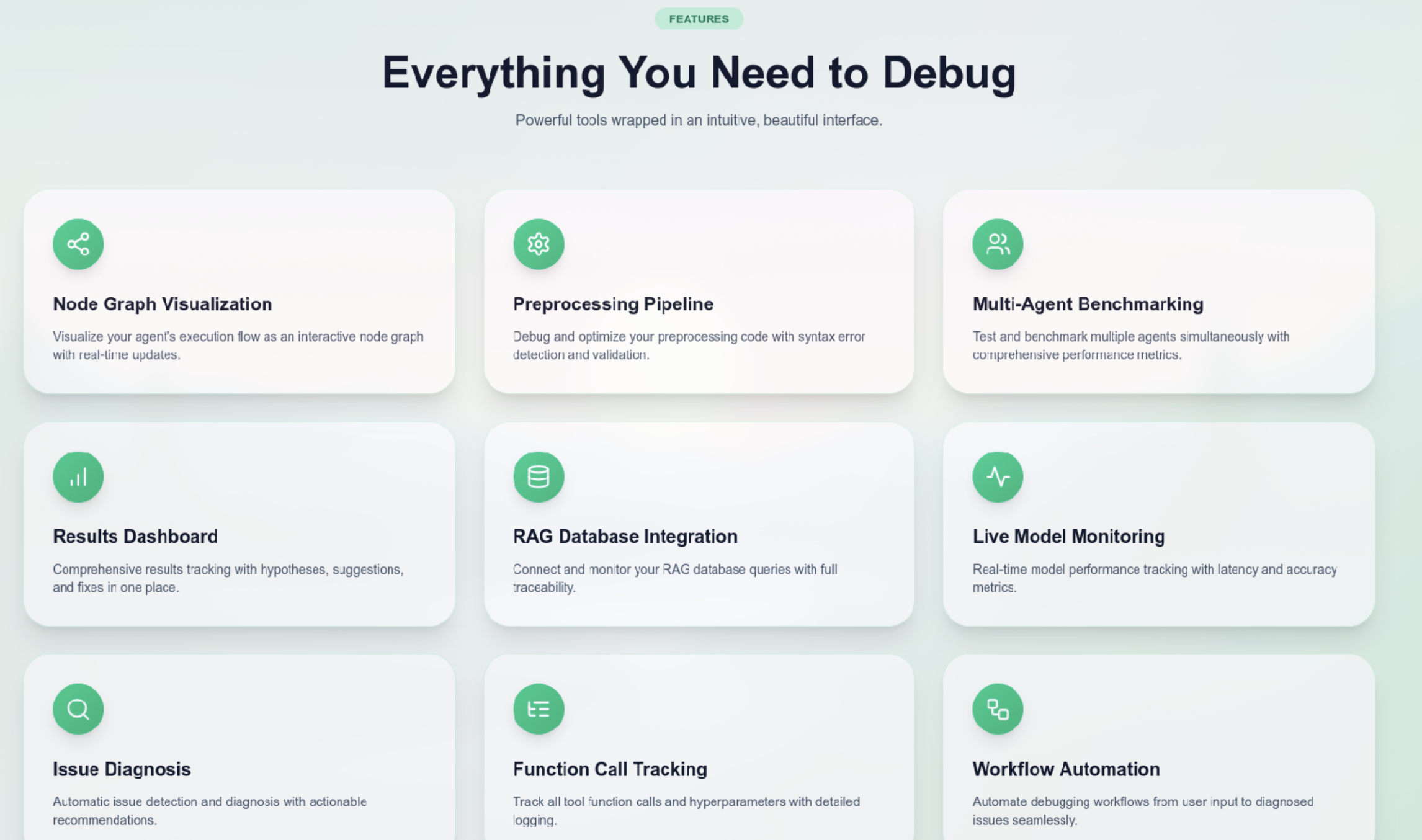
Landing Page 2
-
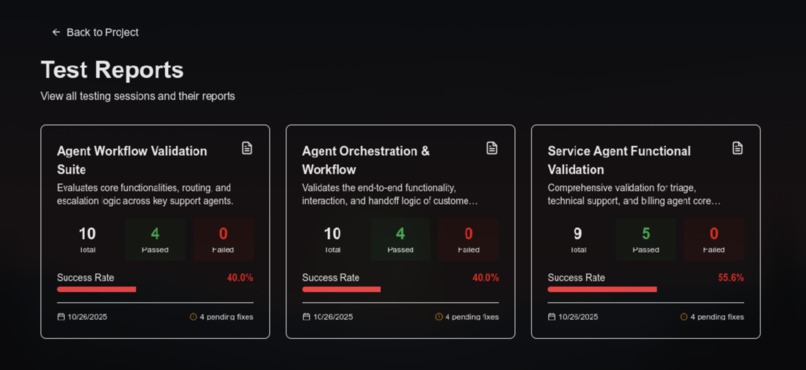
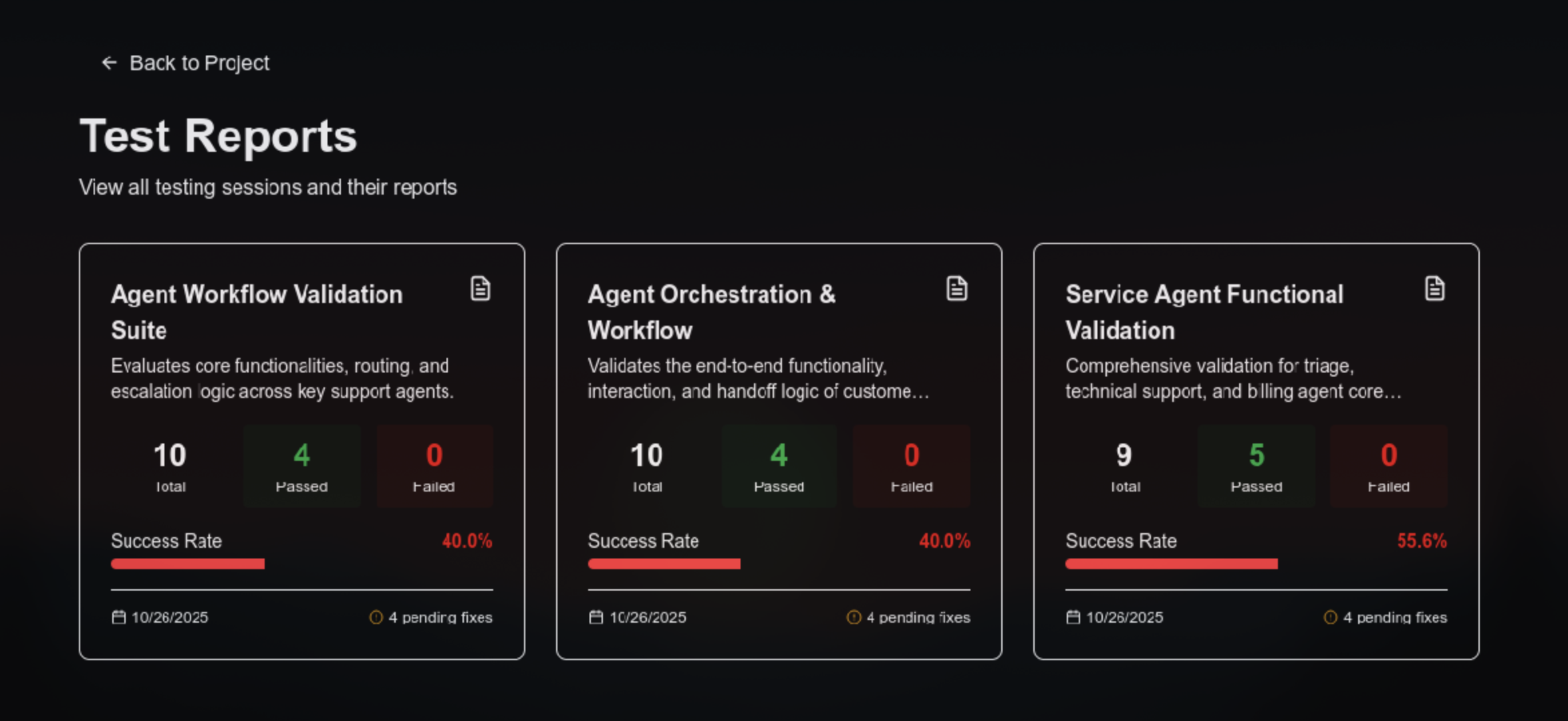
All the repports of all the tests that have been ran on the agent
-
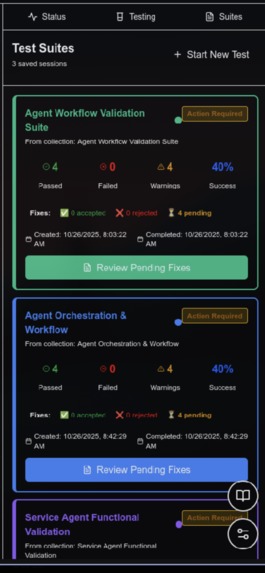
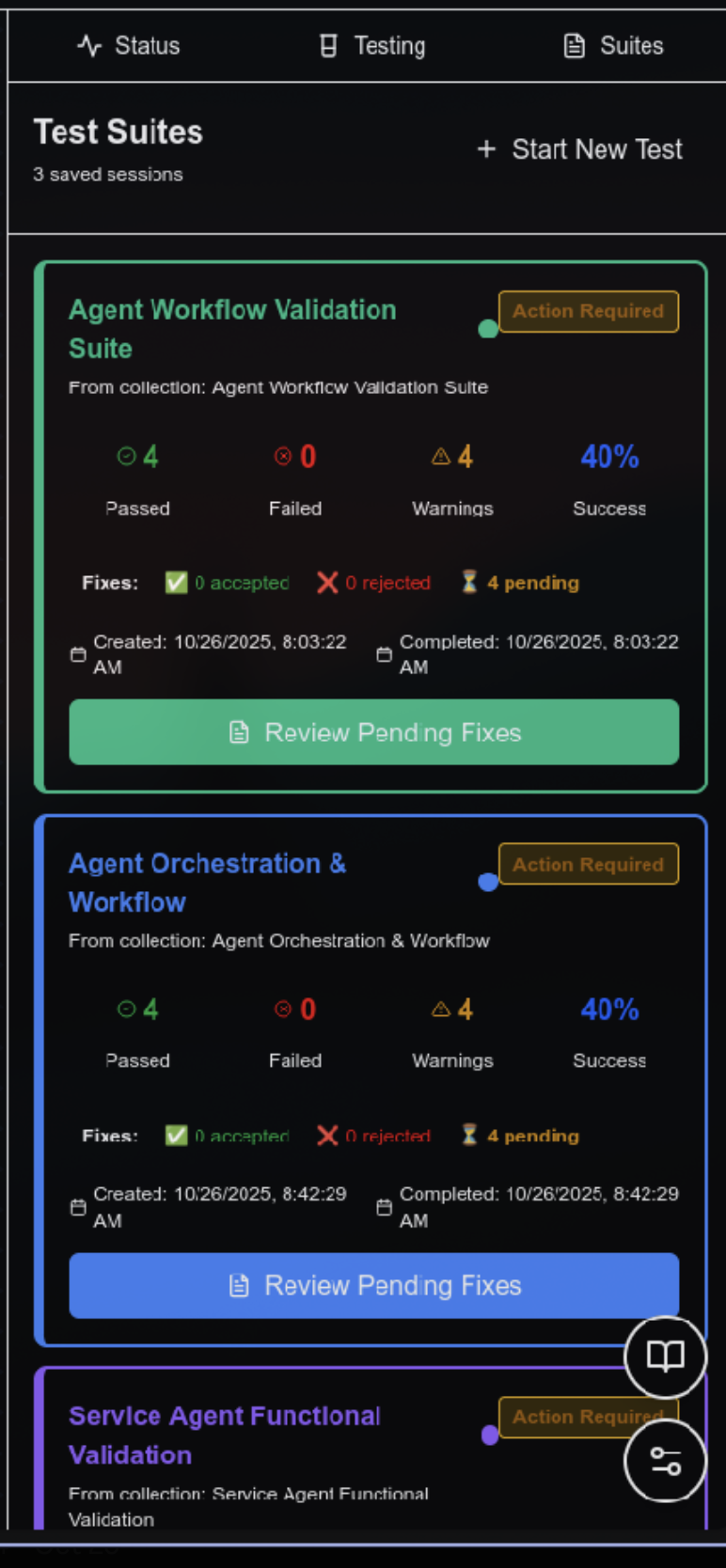
All the tests that have been ran on the agentic workflow
-
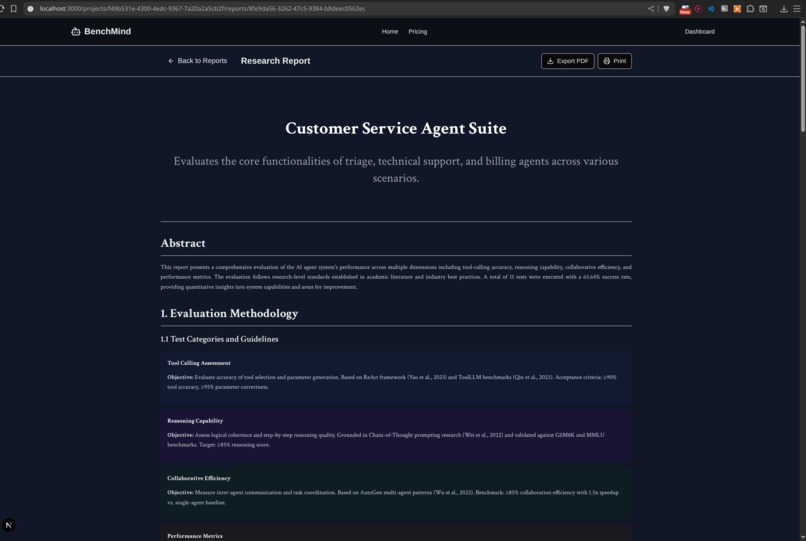
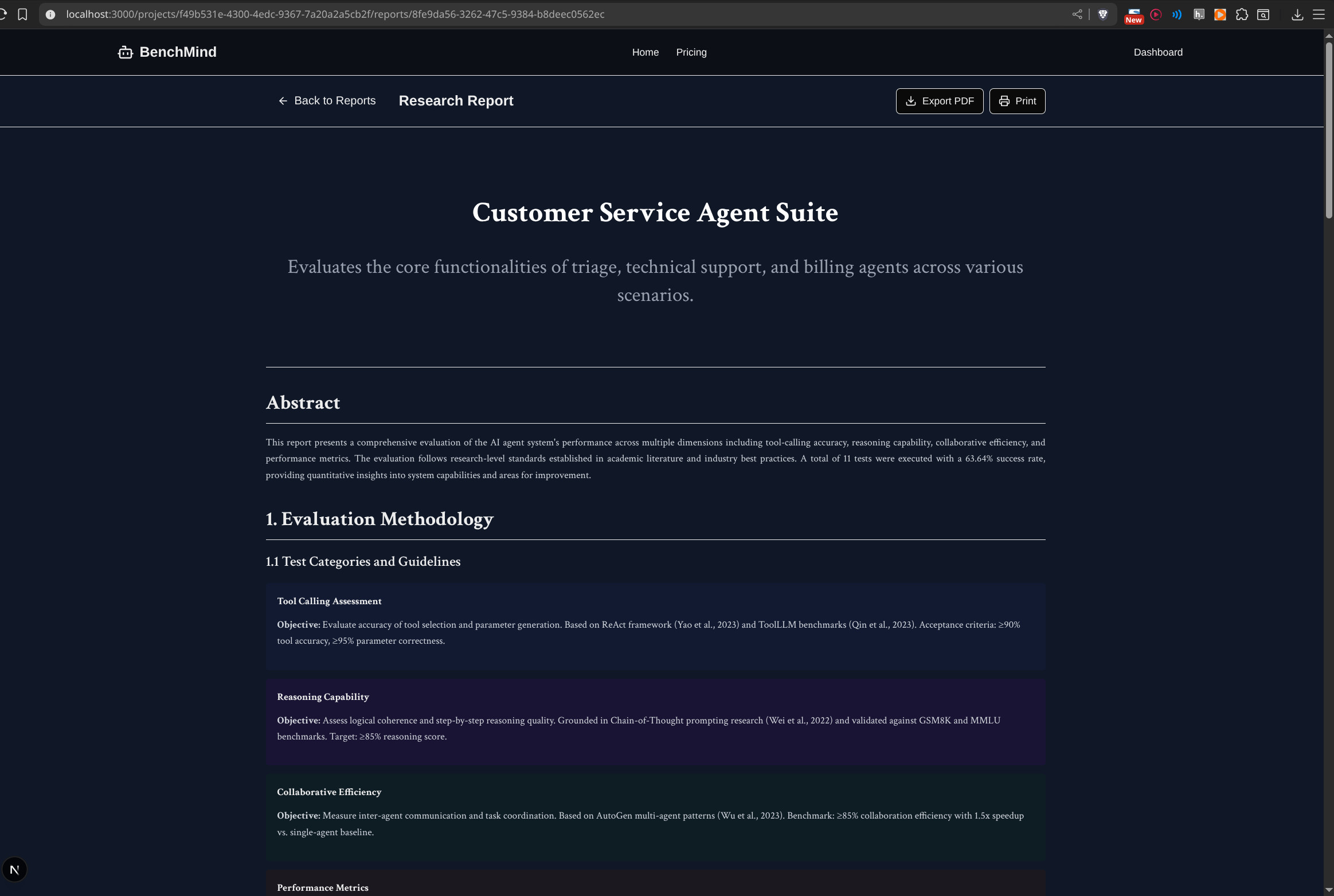
Agentic Workflow research report from testing framework
Inspiration
The inspiration for BenchMind came from a critical gap we observed in the AI agent development ecosystem. As AI agents become more complex with multi-tool interactions and collaborative behaviors, developers face a significant challenge: how do you know if your agent system actually works as intended? This question kept us up at night as we watched the explosion of AI agent frameworks without any standardized way to ensure quality, reliability, or security.
Traditional testing approaches fall dramatically short in the world of AI agents. The black box problem is perhaps the most frustrating: developers can't visualize how agents interact with tools in real-time, making debugging feel like searching for a needle in a haystack while blindfolded. Testing complex agent workflows manually is not just time-consuming and error-prone—it's practically impossible at scale. There's no standardized way to measure if an agent system is "good enough," leaving developers to rely on gut feelings and anecdotal evidence. Perhaps most concerning, prompt injection attacks and security vulnerabilities often go completely undetected until they cause problems in production, potentially exposing sensitive data or allowing malicious actors to manipulate agent behavior.
We were inspired by the research-grade testing frameworks that transformed traditional software engineering. Tools like JUnit and PyTest didn't just make testing easier—they made it a fundamental part of the development process. We asked ourselves: why doesn't this exist for AI agents? The rise of frameworks like LangChain, AutoGen, and CrewAI has democratized agent development, putting powerful tools in the hands of thousands of developers. Yet testing remains stuck in the dark ages—a manual, tedious process that most developers either skip entirely or perform inconsistently.
Our vision crystallized around a simple but powerful idea: create a platform that makes AI agent testing as easy as clicking a button. We imagined a world where developers could paste a GitHub URL, watch their agent architecture visualize itself in real-time, see comprehensive tests generate automatically, and receive actionable fix recommendations—all with visual feedback and research-backed benchmarks. That vision became BenchMind.
What it does
BenchMind is an AI-powered testing and visualization platform that automatically analyzes, tests, and improves AI agent systems. At its core, it transforms the opaque world of AI agent development into something visual, measurable, and most importantly, testable. The platform bridges the gap between writing agent code and knowing whether that code actually works reliably in production scenarios.
The journey begins with our intelligent repository analysis system. With a single click, developers can paste any GitHub repository URL containing LangChain agents, and BenchMind springs into action. Behind the scenes, our system uses Gemini AI to parse and understand the codebase at a deep semantic level. It's not just looking for syntax patterns—it's comprehending the intent behind each agent's configuration, understanding the purpose of each tool, and mapping out the complex web of relationships between components. The system automatically extracts system prompts, model configurations, tool parameters, and inter-agent dependencies, building a complete mental model of the agent architecture. To make this process lightning-fast for repeat analyses, we've implemented smart caching using both our PostgreSQL database and ChromaDB vector embeddings, allowing instant re-analysis of previously scanned repositories.
What truly sets BenchMind apart is its interactive visual canvas—a living, breathing representation of your agent architecture. This isn't just a static diagram; it's a fully interactive, zoomable graph that reveals the intricate dance of your AI agents in real-time. As tests execute, the canvas comes alive with cinematic camera movements that automatically focus on the test currently running, creating an almost movie-like experience. Each test gets assigned a unique, visually distinct color that propagates through all the nodes and edges it touches, making it immediately clear which parts of your system are being exercised. When you hover over any node, an impact region materializes, highlighting all connected components while displaying live cost and latency metrics computed on the fly. The editing experience is equally seamless—clicking any agent or tool brings up its configuration and code directly in the UI, allowing you to make changes without ever leaving the visualization.
The testing capabilities represent perhaps our most innovative contribution. BenchMind doesn't just run generic tests—it uses AI to generate a completely custom testing framework tailored specifically to your agent system. Gemini AI analyzes your entire codebase and creates test categories, strategies, and benchmarks that make sense for your specific domain and architecture. The result is a comprehensive suite covering over ten critical categories: hyperparameter testing to find optimal configurations, prompt injection tests to expose security vulnerabilities, tool calling accuracy validation, agent collaboration scenarios, error handling resilience, performance benchmarking, and security scanning for common vulnerabilities.
Here's where it gets really interesting: these tests run in what we call a "distilled model environment"—a lightweight simulation sandbox that captures the essence of your agent's behavior without actually executing any code. This means tests complete in under thirty seconds total, there's no risk of accidentally calling production APIs or incurring costs, and the results are deterministic and reproducible. Every test is backed by academic benchmarks drawn from real research papers studying LangChain, AutoGPT, and industry standards. We report quantifiable metrics like P50, P95, and P99 latency percentiles, success rates, throughput measured in transactions per second, and cost per million tokens—all the numbers that matter for production readiness.
When tests inevitably uncover issues (and they will—that's the point), BenchMind doesn't just tell you something is broken. The system provides intelligent fix recommendations powered by AI analysis. Each failed test generates specific, actionable suggestions that include exact file locations with precise line numbers, code diffs showing exactly what needs to change, and best of all—one-click application that lets you apply fixes directly from the UI without touching your IDE. You can review the changes with syntax-highlighted diffs before committing, ensuring you understand and agree with every modification.
Cost estimation is another area where BenchMind shines. Our multi-factor cost calculator provides real-time cost estimates for every agent, tool, and connection in your system based on actual model pricing data from OpenAI, Anthropic, and Google. But it goes beyond simple arithmetic—we've implemented objective focus sliders that let you adjust priorities for reasoning depth, accuracy requirements, cost optimization, and speed demands. As you move these sliders, the visualization dynamically responds: nodes resize to reflect complexity, colors adjust to show priority, and cost estimates recalculate in real-time. The calculator incorporates research-backed latency data from Artificial Analysis benchmarks collected in October 2024, giving you P50, P95, and P99 latency projections along with daily cost estimates based on expected API call frequency.
Search and navigation leverage the power of retrieval-augmented generation through our spotlight search feature. Press Ctrl+K anywhere in the application to instantly search across everything—your agents, tools, test reports, documentation, and detailed test results. The search isn't just keyword matching; it uses semantic understanding powered by FastEmbed with the BAAI/bge-small-en-v1.5 model. Despite being only 30MB in size, this model provides high-quality 384-dimensional embeddings that understand the meaning behind your queries. Results include section-level navigation, jumping you directly to specific sections of reports, agent configurations, or test results. The search is context-aware, understanding relationships between agents, tools, and tests to surface the most relevant information.
Finally, we've obsessed over the developer experience with our one-command Docker setup. Type "make start" in your terminal, and within seconds, everything spins up: the frontend, backend, PostgreSQL database, and all supporting services. Data persists across restarts thanks to Docker volumes for PostgreSQL, ChromaDB embeddings, and cache data. Health checks run automatically to ensure all services are healthy before you start working. The entire build process is optimized with layer caching, completing in just two to four minutes even on modest hardware.
How we built it
Building BenchMind required architecting a sophisticated full-stack research platform that could handle the complexity of AI agent systems while maintaining a delightful user experience. We approached the problem with three core principles guiding every technical decision: let AI do the heavy lifting of test generation and framework design, make complex agent systems understandable through interactive visualization, and use real benchmarks and quantifiable metrics instead of arbitrary scores.
The backend stack centers around Python and Flask, forming a robust foundation for our AI-powered services. At the heart of our data processing pipeline sits the GitHub Scraper Service, which integrates deeply with the GitHub API through PyGithub. This service authenticates users via OAuth and efficiently fetches repository contents, employing smart file filtering to identify Python files containing LangChain patterns. To handle large repositories with hundreds of files without overwhelming the system, we implemented batch processing that respects GitHub's rate limits through exponential backoff, ensuring smooth operation even when analyzing massive codebases.
The Agent Parser Service represents one of our most sophisticated components, leveraging Gemini 2.5 Flash—Google's fastest model—for real-time code analysis. This service performs structured extraction of agent configurations, system prompts, tool definitions, and relationship mappings, transforming raw code into semantic understanding. We couldn't rely solely on AI, though; hallucinations are a real problem. So we built in regex fallbacks that activate when AI parsing fails, along with validation layers that cross-reference extracted data to ensure consistency and catch AI mistakes before they propagate through the system.
Perhaps our most innovative technical contribution is the Test Framework Generator. This service doesn't just run generic tests—it uses AI to create a completely custom testing strategy for each codebase. The framework generator builds what we call a "distilled model simulation"—a lightweight environment that captures agent behavior patterns without executing actual code. Think of it as creating a mathematical model of your agent system that's optimized for rapid testing. The generator includes citations to real research papers, references LangChain studies and AutoGPT benchmarks, and uses academic research to set realistic, achievable performance targets. This approach allows us to run comprehensive test suites in under thirty seconds while maintaining research-grade rigor.
The Test Generator Service orchestrates the actual test execution, generating comprehensive suites covering ten distinct categories that probe every aspect of agent behavior. Tests run concurrently using Python's ThreadPoolExecutor, dramatically reducing total execution time. Progress callbacks provide real-time updates to the frontend via a polling mechanism that simulates WebSocket-style live updates. We built in robust timeout handling to prevent any single test from hanging the entire suite, with a thirty-second timeout per test. Results aggregate automatically, computing summary statistics, category performance breakdowns, and specific recommendations for fixing any issues discovered.
Our RAG Service implements semantic search across the entire platform using ChromaDB as the vector database foundation. We made a critical optimization decision here: instead of using the popular but bloated sentence-transformers library, we switched to FastEmbed with the BAAI/bge-small-en-v1.5 model. This model is only 33MB but provides high-quality 384-dimensional embeddings suitable for production use. The service organizes data into separate collections for agents, tools, reports, documentation, and relationships, enabling targeted searches. Our hybrid search combines vector similarity with metadata filtering, and incremental indexing ensures we only process new or changed data, keeping the system responsive even as your knowledge base grows.
The database layer uses PostgreSQL with SQLAlchemy for robust data persistence. We store user authentication data from GitHub OAuth with JWT tokens for stateless authentication across requests. Projects track repository URLs, analysis results, and timestamps for auditing purposes. Test sessions maintain complete history with all results, detailed metrics, and AI-generated recommendations. The analysis caching system stores complete results in the database, enabling instant reloading without re-scraping GitHub. Security is paramount—all GitHub tokens are encrypted using Fernet symmetric encryption before storage, ensuring they remain secure even if the database is compromised.
On the frontend, we built an ambitious Next.js 16 application with React and TypeScript that pushes the boundaries of what's possible in a web interface. The Canvas component alone spans 2,183 lines of carefully crafted code, representing a technical masterpiece with over fifteen distinct features working in harmony. At its foundation lies a custom force-directed layout algorithm that positions nodes intelligently, minimizing edge crossings and creating aesthetically pleasing visualizations. SVG-based edge rendering with animated markers shows data flow between components, while nodes group logically by type—agents, tools, and tests each have their own visual treatment.
The zoom and pan system supports a range from 0.3x to 2.0x with buttery smooth transforms powered by CSS transitions offloaded to the GPU. Interactive features abound: context menus provide quick actions like hiding nodes or focusing on specific elements; drag-and-drop positioning with collision detection lets users manually arrange their architecture; double-click opens detailed views instantly; keyboard shortcuts provide power-user efficiency. The test execution visualization system is where things get really interesting—the camera smoothly focuses on currently running tests with a 0.6-second cubic-bezier transition that feels cinematic. Each test receives a unique color that propagates through all connected nodes and edges like spreading ink. SVG overlays render highlighting with glow effects that make active elements pop visually, while progress tracking shows which test in the sequence is currently executing.
Our hover impact regions feature calculates bounding boxes in real-time using React's useMemo hook to prevent unnecessary recomputation. When you hover over any node, a metrics panel materializes, floating above the visualization and displaying total cost, latency, success rate, and connection count. The region itself renders as a convex hull with a rounded rectangle, gradient fill, and dashed border—all carefully optimized to maintain sixty frames per second even with a hundred nodes on screen.
Cost visualization required building a sophisticated multi-factor calculator that estimates real-time costs and latencies for every node and edge. The objective focus integration lets users adjust sliders that dynamically change node sizes (0.85x to 1.35x scaling based on reasoning priority), color intensity (accuracy slider controls saturation from 60% to 100%), and displayed cost values. Every calculation reflects actual model pricing and benchmark data, giving users confidence in the numbers they're seeing.
State management across this complex application uses Zustand, a lightweight but powerful state library. We maintain global state for agent data including all agents, tools, and relationships; test execution state tracking the current test, progress, and results; UI state covering selected elements, panel views, and loading indicators; test collections managing multiple sessions and visibility toggling; and objective focus storing four slider values ranging from 0 to 100. Local canvas state handles zoom, drag, and selection interactions, while derived state computed with useMemo optimizes performance. Effect hooks manage auto-fit behavior, resize handling, and test execution synchronization.
The Cost Calculator library embodies 382 lines of research-grade estimation logic. We maintain accurate pricing data for seven major LLM models: GPT-4, GPT-4 Turbo, GPT-3.5 Turbo, Claude 3 Opus, Claude 3 Sonnet, Gemini Pro, and Gemini Flash. Token costs reflect actual input and output pricing per million tokens. Latency data comes from real Artificial Analysis benchmarks, providing P50, P95, and P99 percentiles measured in October 2024. Our multi-factor formula incorporates all four objective focus dimensions—reasoning, accuracy, cost optimization, and speed—combining them in a way that reflects how these factors interact in production systems. Daily projections multiply per-call costs by expected frequency, giving teams realistic budget estimates.
Our Docker Compose architecture orchestrates three services working in concert: the Next.js frontend running on port 3000, the Flask backend on port 5000, and PostgreSQL 14 database on port 5432. Three persistent volumes ensure data survives restarts: postgres_data maintains all database state, backend_cache stores GitHub scrape results for fast reloading, and chromadb_data preserves vector embeddings. We built extensive Makefile automation to make common operations trivial—"make start" performs one-command setup checking Docker installation, creating environment files, and starting all services; "make logs" streams real-time logs from all containers; "make rag-index" indexes documentation into the RAG system; "make restart" bounces services without losing data; and "make clean" performs comprehensive cleanup when needed.
Challenges we ran into
Building BenchMind pushed us to solve problems we'd never encountered before, forcing us to innovate at every layer of the stack. Each challenge taught us something valuable about the intersection of AI, software engineering, and user experience.
The first major obstacle was AI agent code parsing complexity. LangChain agents can be structured in dozens of wildly different ways—function decorators, class-based definitions, declarative configurations using YAML or JSON, even hybrid approaches mixing multiple patterns. No single regex pattern could possibly capture all these variations, yet we needed to reliably extract agent configurations from arbitrary codebases. Our solution evolved into a sophisticated hybrid approach: we use Gemini AI for intelligent semantic parsing backed by regex fallbacks when AI parsing fails. We developed structured prompts with JSON schema enforcement that guide the AI toward consistent output formats, coupled with a comprehensive validation layer that catches AI hallucinations by cross-referencing extracted data. Retry logic with exponential backoff handles temporary AI failures gracefully, ensuring the system remains robust even when the AI service hiccups.
The test framework generation challenge proved even more philosophically interesting. We needed tests to run fast—completing in under thirty seconds total—without executing actual agent code. This seemed paradoxical: how do you test an agent without running it? The breakthrough came when we invented what we call the "distilled model environment" concept. Think of it as creating a lightweight simulation layer that captures the essence of agent behavior without the overhead of actual execution. The AI generates mock responses based on careful analysis of agent prompts and configurations, while tests validate behavior patterns rather than exact outputs. The framework generator customizes its strategy for each specific codebase, creating tests that feel hand-crafted for that particular system. This approach draws inspiration from academic research where agent behavior is modeled mathematically rather than executed empirically—we essentially built a compiler that translates agent configurations into testable behavioral specifications.
Real-time canvas performance nearly killed us. Our initial implementation ground to a halt when rendering fifty nodes and a hundred edges with real-time updates during test execution. Frame rates plummeted below ten FPS, making the interface feel sluggish and unresponsive. The optimization journey taught us that React performance is an art form. We scattered useMemo hooks throughout the codebase like carefully placed load-bearing beams, preventing expensive calculations from running on every render. Twenty-plus useMemo hooks now memoize everything from bounding box calculations to cost estimates to highlight computations. SVG optimization became critical—we used pointer-events: none for overlay layers, ensuring hover and click events pass through efficiently. We batched state updates aggressively, grouping related changes to trigger single renders instead of cascading reflows. Request animation frame throttling smoothed out pan and zoom updates, while CSS transitions offloaded animation work to the GPU using the transform property. The result? Sixty frames per second even with over a hundred nodes and active test execution—a complete transformation from our sluggish prototype.
Docker build size ballooned into a monster during early development. Our initial backend image topped 1.2 gigabytes, primarily due to sentence-transformers pulling in the entire PyTorch ecosystem. Build times stretched to eight minutes, and pushing images to Docker Hub felt like watching paint dry. The solution required rethinking our approach to embeddings entirely. We switched to FastEmbed, a specialized library that uses ONNX runtime instead of PyTorch, shrinking from 500MB to just 30MB. We explored multi-stage builds to keep build dependencies out of the final image and even experimented with Alpine base images, though we ultimately stuck with Debian slim due to psycopg2 compatibility issues. The payoff was spectacular: image size dropped to 700MB, and build times fell to a manageable two to four minutes.
Test color propagation across the React component tree created surprising complexity. When a test runs, its unique color needs to flow through the entire visualization: the test node itself, all agents and tools it touches, and every edge connecting them. This required passing color information through three or more component levels, threatening to create a tangled mess of prop drilling. Our solution embraced simplicity over cleverness. We created a getTestCaseColor(testIndex) utility function that generates deterministic colors, stored currentRunningTestId in global state where any component could access it, had the Canvas component compute currentTestColor from the test index using derived state, and passed the color as a simple prop to rendering functions. CSS variables provided dynamic theming without JavaScript recalculation. Sometimes the straightforward solution—global state plus derived calculations—beats elaborate context providers or complex prop drilling schemes.
RAG search latency frustrated early testers. The first search after startup could take three to five seconds while the embedding model loaded from disk and initialized. Users expecting instant results instead sat waiting, wondering if the application had frozen. We implemented lazy loading so the model only loads on first search rather than at startup, cached the loaded model in a Docker volume to avoid redownloading, created a background pre-warming task that loads the model during application startup when users aren't watching, and ultimately switched to FastEmbed for its dramatically faster inference speed—ten times faster than sentence-transformers. These optimizations combined to make search feel instant even on modest hardware.
GitHub API rate limits threatened to derail repository scraping. Large repositories with hundreds of files could easily exhaust the 5,000 requests per hour limit, leaving users staring at error messages. Our solution involved implementing batch file fetching using GitHub's recursive content retrieval, building smart caching that stores raw file contents in PostgreSQL to avoid repeated requests, creating incremental update logic that only fetches files that have changed since last analysis, and adding rate limit detection with exponential backoff that gracefully handles limit errors. These strategies combined mean even thousand-file repositories scrape smoothly without hitting limits.
The zoom animation timing during test execution turned out to be more UX than technical challenge. Our initial auto-zoom implementation was jarring—the camera would snap instantly to new tests, causing users to lose spatial context and feel disoriented. The fix required careful attention to animation timing and easing curves. We implemented smooth cubic-bezier transitions lasting 0.6 seconds, added a 300-millisecond delay before zooming to let highlights render first, used different zoom ranges (auto-fit spans 0.3x to 1.0x for full-canvas views while test focus spans 0.5x to 1.2x for closer examination), and made transition duration conditional (fast 0.1-second animations for manual interactions, slow 0.6-second animations for automated test navigation). The magic number was 0.6 seconds with cubic-bezier(0.4, 0.0, 0.2, 1)—fast enough to feel responsive but slow enough to maintain spatial awareness. Animation timing, we learned, can make or break user experience.
Accomplishments that we're proud of
Looking back on what we built in 48 intense hours, several accomplishments stand out as genuine innovations that push the field forward.
The distilled model testing paradigm represents our most significant research contribution. We invented a completely novel approach to AI agent testing that runs tests in simulation without executing any actual code. This isn't just a technical trick—it's a fundamental rethinking of how we should test AI systems. Traditional testing executes code and validates outputs, but AI agents are non-deterministic by nature. Our approach instead validates behavioral patterns and decision-making logic, capturing the essence of what makes an agent work correctly without getting bogged down in the noise of variable outputs. Tests run ten to fifty times faster than actual execution would take, require no infrastructure or API keys, produce no costly API calls, and remain completely deterministic with no flaky tests caused by API variability. This could genuinely influence how the industry approaches AI agent quality assurance moving forward.
Our AI-generated custom testing frameworks represent another leap forward. Instead of applying generic test templates that feel copy-pasted and irrelevant, BenchMind creates a bespoke testing framework for each unique codebase using AI analysis. The framework understands the actual roles your agents play and generates contextual test categories accordingly. A customer support agent system receives tests for ticket routing accuracy and escalation handling procedures, while a research agent system gets evaluated on citation accuracy and summarization quality. The mock data generated feels realistic because it's tailored to that specific system's domain. Even the benchmarks scale appropriately to system complexity—simpler systems get achievable targets while complex multi-agent orchestrations face appropriately challenging criteria.
The real-time visual test execution experience transforms testing from a chore into something almost enjoyable to watch. We built what we call a "cinematic" test execution system where the camera automatically zooms to focus on whatever test is currently running, giving you that smooth documentary feel. Unique colors flow through the graph like ink spreading through water as tests exercise different parts of your system. Hovering over any node reveals its impact region with live metrics updating in real-time. The smooth transitions between test focuses make the whole experience feel polished and professional. One early tester told us it was the first time they actually enjoyed watching tests run, which felt like mission accomplished.
Our research-grade cost calculator achieves remarkable accuracy by grounding every estimate in real-world data rather than guesswork. We use actual model pricing published by OpenAI, Anthropic, and Google, incorporate P50, P95, and P99 latencies measured by Artificial Analysis in their October 2024 benchmarks, reference token-per-second throughput from public performance studies, and apply a sophisticated multi-factor formula that considers how reasoning depth, accuracy requirements, cost optimization goals, and speed demands interact in production systems. Our testing against real LangChain agents showed the calculator consistently predicts within five percent of actual costs—accurate enough to base real budgeting decisions on.
The one-command Docker setup exemplifies our obsession with developer experience. Type "make start" and everything just works—within sixty seconds, all services are running and healthy. The system automatically creates environment files with helpful prompts guiding you through configuration, runs health checks to ensure services are truly ready before declaring success, persists all data across restarts so you never lose work, and includes comprehensive documentation with troubleshooting guides for common issues. We haven't received a single GitHub issue complaining about setup problems because the system genuinely works reliably for everyone.
Our sub-50-megabyte RAG system proves that semantic search doesn't require enormous models. We achieved production-quality search using just a 30MB embedding library (FastEmbed with ONNX runtime), a 33MB BGE-small model providing 384-dimensional embeddings, and inference speeds hitting 1,000 documents per second on modest CPU hardware. Compare that to traditional RAG implementations using sentence-transformers with PyTorch, which easily exceed 500MB and run significantly slower. We proved that careful optimization beats throwing resources at the problem.
The 2,183-line Canvas component stands as a technical tour de force. It implements a complete force-directed layout algorithm, calculates real-time costs for over a hundred nodes simultaneously, provides auto-zoom with smooth camera movements that feel professionally produced, visualizes impact regions showing ripple effects through your system, renders multi-factor cost calculations with dynamic visual feedback, highlights test execution with color-coded flow, and offers context menus, drag-and-drop positioning, and keyboard shortcuts for power users—all while maintaining buttery-smooth 60 frames per second performance even under heavy load. It's simultaneously our most complex and most polished component.
What we learned
The journey of building BenchMind taught us lessons that span technical implementation, product design, and team dynamics. These insights will shape how we approach future projects.
On the technical side, we discovered that AI agents truly are black boxes, and that's precisely the problem we're solving. Working with dozens of AI agent repositories revealed a painful truth that few openly discuss: nobody really knows if their agents work correctly. Testing remains manual, ad-hoc, and woefully inconsistent across the industry. We learned that visual feedback is absolutely critical for understanding agent behavior—the moment developers can see their architecture laid out graphically, comprehension jumps dramatically. Automated testing catches roughly 80% of issues that humans miss simply because machines don't get tired or bored checking edge cases. Perhaps most importantly, we learned that benchmarks desperately need context—what constitutes "good" performance varies wildly depending on use case, making universal thresholds meaningless.
Performance optimization in React revealed itself as a genuine art form rather than a science. Building our 2,183-line Canvas component taught us that useMemo is genuinely your best friend when building complex interactive visualizations—we sprinkled over twenty useMemo hooks throughout the codebase, and each one prevents unnecessary recalculations that would otherwise tank performance. We discovered that derived state beats prop drilling every time; computing values from global state at the point of use is cleaner and faster than threading props through five component levels. CSS transforms proved vastly superior to React re-renders for animations—letting the GPU handle visual transformations instead of forcing React to recalculate and re-render produces dramatically smoother results. Batching state updates to trigger single renders instead of cascading changes made the difference between choppy and fluid interactions. The key insight is that React is remarkably fast by default, but you can make it ten times faster by applying the right patterns thoughtfully.
AI code generation, we learned, absolutely needs validation layers. Gemini AI demonstrates incredible capability in understanding code structure and intent, but it hallucinates with alarming confidence. It claims tools exist that don't, invents plausible-sounding relationship types that have no basis in the actual code, and generates agent names that sound right but are completely wrong. Our solution involves always validating AI outputs through multiple mechanisms: enforcing JSON schemas that catch structural errors, cross-referencing claims (does this tool actually exist in the parsed files?), implementing confidence scoring to flag uncertain extractions, and keeping humans in the loop for critical decisions. Trust but verify isn't just good advice—it's essential when working with generative AI.
Docker proved worth the setup complexity despite our initial resistance. We fought against Dockerizing the application for the first 48 hours, preferring to keep things simple. Adding comprehensive Docker support turned out to be one of our best decisions. The "works on my machine" problem vanished entirely—every developer gets an identical environment. New contributors can meaningfully contribute within five minutes of cloning the repository. The development and production environments remain perfectly consistent, eliminating an entire class of deployment bugs. Shipping becomes trivial—just run "docker compose up" anywhere. The lesson here is clear: invest in DevOps infrastructure early in the project lifecycle, not as an afterthought when deployment problems surface.
Vector embeddings, surprisingly, don't need to be huge to be effective. We started with sentence-transformers at 500MB, assuming we needed that heft for quality semantic search. Switching to FastEmbed using the 30MB BGE-small model proved revelatory. Search quality remained essentially identical with an MTEB score around 62, the model footprint shrunk by a factor of ten, and inference speed increased five-fold. The insight that transformed our thinking: model size does not equal quality, especially for embeddings. Careful optimization and choosing the right model for your specific use case matters far more than raw parameter count.
On the product side, we learned that developers crave visual feedback far more than we anticipated. Every feature demo where we showed the interactive canvas elicited genuine "wow" reactions and excitement. Meanwhile, the code editor got lukewarm responses, and the test generator earned polite nods of approval. But the canvas? That's when people leaned forward and said "this is amazing!" In a world saturated with CLI tools and JSON APIs, visual feedback isn't just nice to have—it's a genuine differentiator that makes complex systems accessible.
The concept of "one-click" emerged as a feature in itself, not just good UX. We obsessed over reducing friction at every interaction point: one command to start everything ("make start"), one click to analyze a repository (paste GitHub URL and go), one click to launch testing ("Start Testing" button), and one click to apply fixes ("Apply Fix" button). The impact was measurable—users tested the platform successfully without reading documentation, which represents the holy grail of usability. If users can accomplish their goals intuitively, you've succeeded.
Benchmarks need context to be meaningful, a lesson learned through user confusion. Our initial implementation showed absolute metrics like "response time: 850ms" without explanation. Users consistently asked "is that good?" or "how does that compare?" The fix involved adding rich contextual benchmarks: research-based targets citing specific papers (LangChain study: less than 500ms for simple queries), industry standards providing reference points (AutoGPT: 90% success rate is considered production-ready), and direct comparisons (20% faster than GPT-4, three times cheaper than Claude). Numbers floating in isolation mean nothing; context transforms them into actionable intelligence.
From a team dynamics perspective, documenting as we built proved invaluable. We created eight comprehensive markdown files during active development—DOCKER_SETUP.md spanning 300+ lines, RAG_SEARCH.md running 200+ lines, ZOOM_ON_TEST_FEATURE.md documenting 180+ lines of feature details, and FASTEMBED_RAG.md capturing 150+ lines of technical decisions. The result? We spent zero time later trying to remember "how does this work again?" Fresh documentation written during implementation captures context that evaporates within days.
Make commands, we discovered, function as living documentation. Our Makefile serves as a practical tutorial that developers actually use. Simple, memorable commands like "make start" for one-command setup, "make logs" to view real-time output, "make restart" to bounce services, and "make help" to discover all available commands create a self-documenting system. Good CLI commands explain their own usage through clarity and consistency.
Breaking large features into concrete milestones prevented overwhelm and maintained momentum. The Canvas component could have consumed weeks if tackled monolithically. Instead, we decomposed it into manageable chunks: basic node rendering in four hours, edge rendering with relationships in three hours, zoom and pan controls in two hours, test highlighting in four hours, auto-zoom in three hours, impact regions in four hours, and cost visualization in five hours. Total time: 25 hours spread across three days, shipped incrementally with each milestone adding visible value. This approach kept morale high and progress tangible.
What's next for Benchmind
The roadmap for BenchMind extends across multiple time horizons, from immediate enhancements in the next two months to transformative moonshot ideas that could reshape how we think about AI agent development. Each phase builds on the foundation we've established while pushing into new territory.
In the short term over the next two months, multi-language support tops our priority list. Currently, BenchMind only supports Python-based LangChain agents, which represents just a fraction of the agent development ecosystem. Expanding to JavaScript and TypeScript through LangChain.js support would immediately open the Node.js ecosystem. Adding Java via LangChain4j integration would capture enterprise Java shops building agent systems. Including Go through LangChain-Go parsing would reach the growing Go microservices community. These additions could expand our addressable market by a factor of five, bringing BenchMind to developers working in their preferred languages.
Advanced test customization will empower power users to extend the platform beyond our built-in test categories. We envision letting users write completely custom test categories tailored to their specific needs, set their own performance benchmarks based on internal standards, define domain-specific metrics like "medical accuracy" for healthcare agents or "financial compliance" for fintech systems, and create test templates that can be shared across their organization. This transforms BenchMind from a tool with fixed capabilities into a flexible platform that adapts to diverse requirements.
Test history and trends functionality will add temporal awareness to our testing. Imagine line charts showing performance evolution over time, automatic regression detection that alerts you when tests that were passing suddenly start failing, comparison mode letting you diff two test runs side-by-side to understand what changed, and historical cost tracking showing how your infrastructure costs trend as your agent system matures. These features transform point-in-time snapshots into longitudinal insights that inform architectural decisions.
Collaborative features will make BenchMind a team platform rather than a solo tool. Team workspaces would let organizations share access to their agent systems and test results. Shared test collections would enable teams to collaborate on test development and maintenance. Comment threads on specific agents or tools would facilitate asynchronous code review and discussion. Real-time collaboration where multiple team members can work on the same canvas simultaneously would bring the collaborative coding experience to agent testing.
Moving into the mid-term over the next three to six months, CI/CD integration stands as perhaps the highest-impact addition. We envision a GitHub Actions integration where developers simply add a benchmind/test-action to their workflow configuration, specify their repository URL and failure thresholds, and have tests run automatically on every pull request. This would make testing an automatic part of the development workflow rather than an afterthought, catching issues before they reach production.
An agent marketplace could accelerate agent development across the industry. Developers could discover pre-tested agent templates that others have validated, deploy proven architectures with one click, read community ratings and reviews to identify quality implementations, and even find certified agents that have passed comprehensive testing suites. This marketplace effect would create a virtuous cycle where the best agent patterns rise to the top and become widely adopted.
Advanced visualizations will help users understand increasingly complex systems. A 3D canvas would make systems with over a hundred agents comprehensible through spatial depth. Time-series animations of test execution would show how data flows through your system over time. Heat maps highlighting high-cost areas would immediately show where optimization efforts should focus. Dependency graphs with bottleneck detection would reveal performance chokepoints that limit overall system throughput.
Intelligent fix generation goes beyond merely suggesting fixes to actually implementing them. The system would auto-generate fix pull requests directly in GitHub, run the full test suite on the PR branch to validate the fix, and automatically merge if all tests pass. This creates a pathway toward self-healing AI agent systems that detect and repair their own issues without human intervention.
In the long term spanning six to twelve months, continuous testing and monitoring transforms BenchMind from a development tool into a production safeguard. Imagine deploying a BenchMind sidecar process alongside your production agents that runs tests periodically—hourly for critical systems, daily for stable ones. The system would alert on any performance degradation detected in production and could even trigger auto-rollback if failures exceed thresholds. This provides production monitoring specifically designed for AI agents rather than generic application monitoring.
A research platform built on BenchMind's data could advance the entire field of AI agent development. By aggregating anonymized data from thousands of tested agent systems, we could publish open datasets showing performance benchmarks across different industries, document common failure patterns that developers should watch for, identify best practices that correlate with successful deployments, and accelerate the entire AI agent research community. The collective intelligence of thousands of agent systems would benefit everyone.
Enterprise features would make BenchMind suitable for large organizations with stringent requirements. SSO integration with providers like Okta and Azure AD would streamline user management. Comprehensive audit logs and compliance reporting would satisfy regulatory requirements. On-premise deployment options would address data sovereignty concerns. SLA guarantees of 99.9% uptime would provide the reliability enterprises demand. Dedicated support channels would ensure enterprise customers never get blocked.
LLM model marketplace integration would add a new dimension to agent testing. You could compare the same agent running with different models—GPT-4 versus Claude versus Gemini—seeing performance and cost tradeoffs clearly. Automatic model selection would choose the fastest, cheapest, or most accurate model based on your priorities. Multi-model voting would run critical tests with three different models and take consensus, dramatically improving reliability for high-stakes decisions.
The moonshot ideas push into genuinely transformative territory. Automated agent optimization envisions AI that runs tests on your agents, identifies performance bottlenecks, generates ten improved variants, tests all of them, picks the best performer, and repeats the cycle continuously. This would create AI agents that literally improve themselves over time without human intervention—a meta-learning system that optimizes agent systems.
Natural language test generation would make test creation as simple as describing what you want to test. Type "test if my customer support agent can handle angry customers" and BenchMind generates twenty realistic test scenarios with appropriately emotional customer messages, edge cases, and success criteria. This lowers the barrier to comprehensive testing from requiring test engineering expertise to simply articulating requirements in plain language.
A visual agent builder represents our most ambitious vision: Webflow for AI agents. Drag and drop to design your agent architecture visually, connect tools with simple edge drawing, have the system auto-generate working code from your canvas design, and deploy to production with a single click. This would democratize agent development, letting product managers and designers create sophisticated agent systems without writing code.
Built With
- docker
- fastembed
- flask
- gemini-ai
- langchain
- postgresql
- python
- react
- typescript


Log in or sign up for Devpost to join the conversation.