-
-
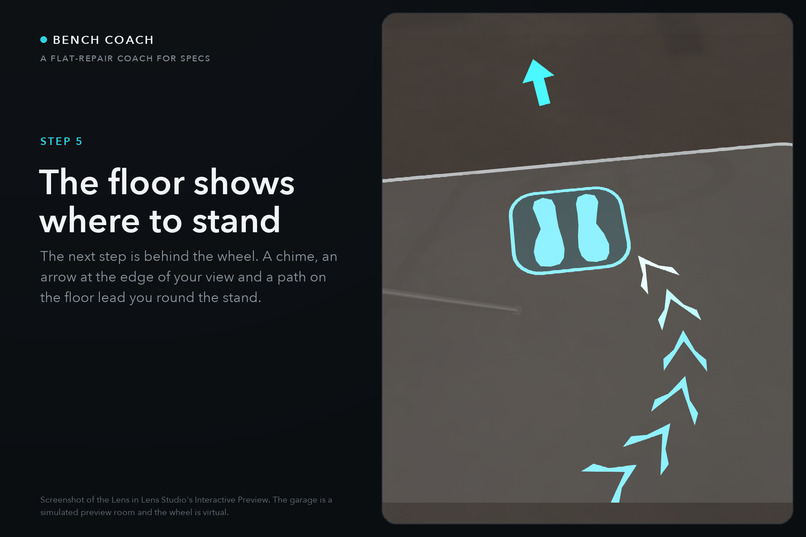
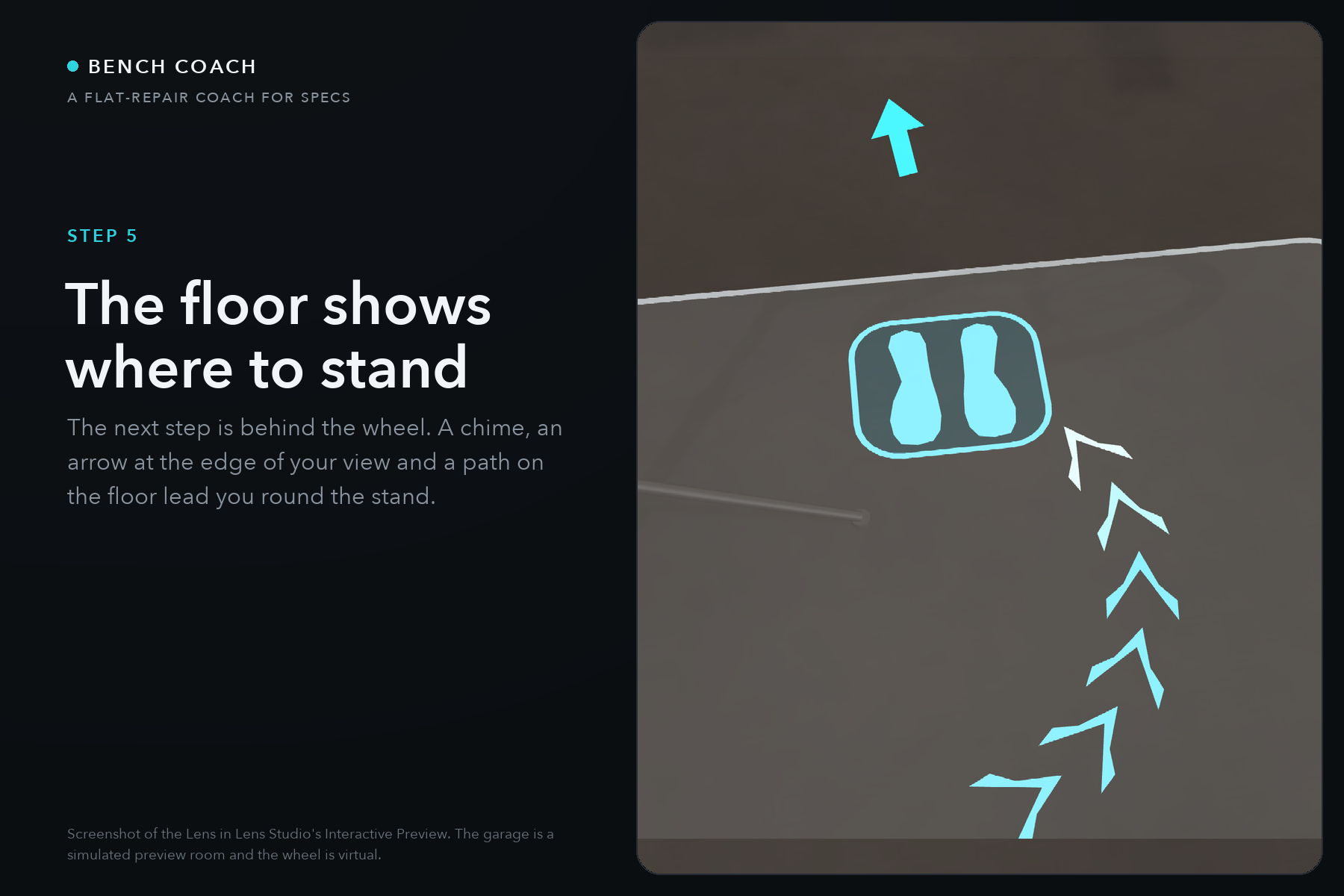
The far-side cue: a chime from behind the wheel, an arrow at the edge of view, a path on the floor. The garage is a simulated preview room.
-
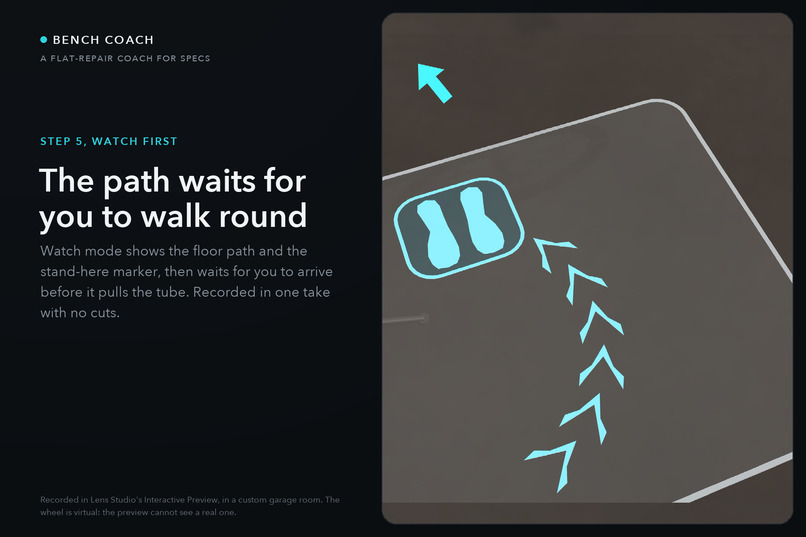
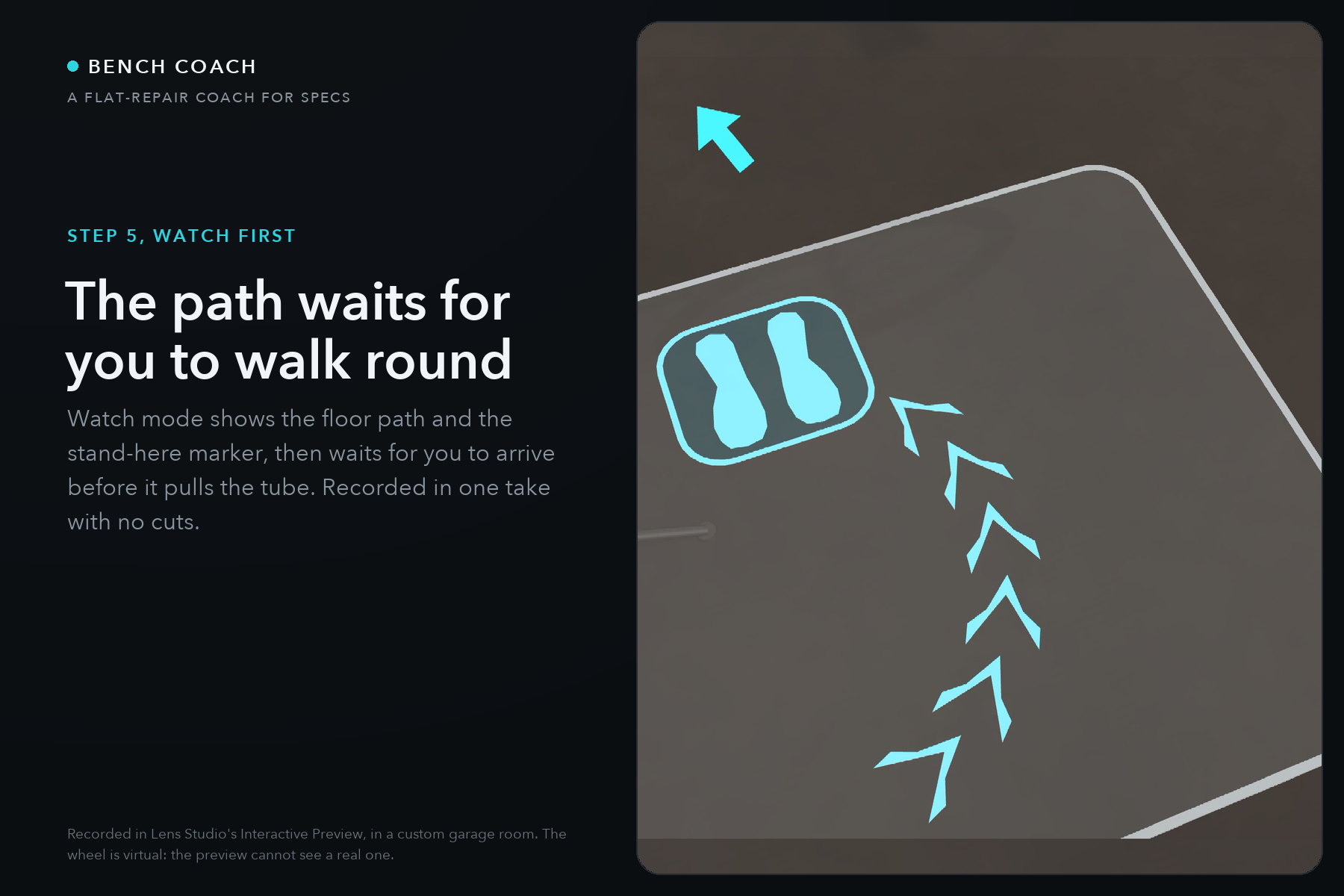
Step 5 in Watch first: the floor path and the stand-here marker behind the wheel. Lens Studio Interactive Preview; the wheel is virtual.
-
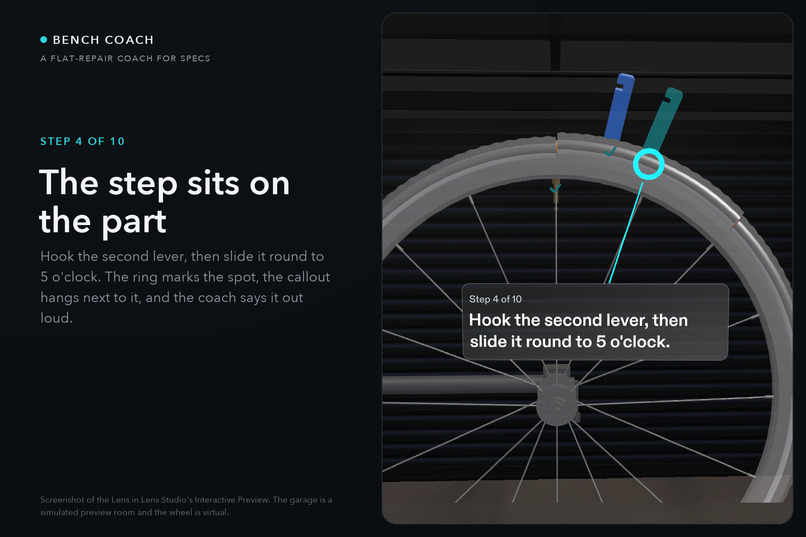
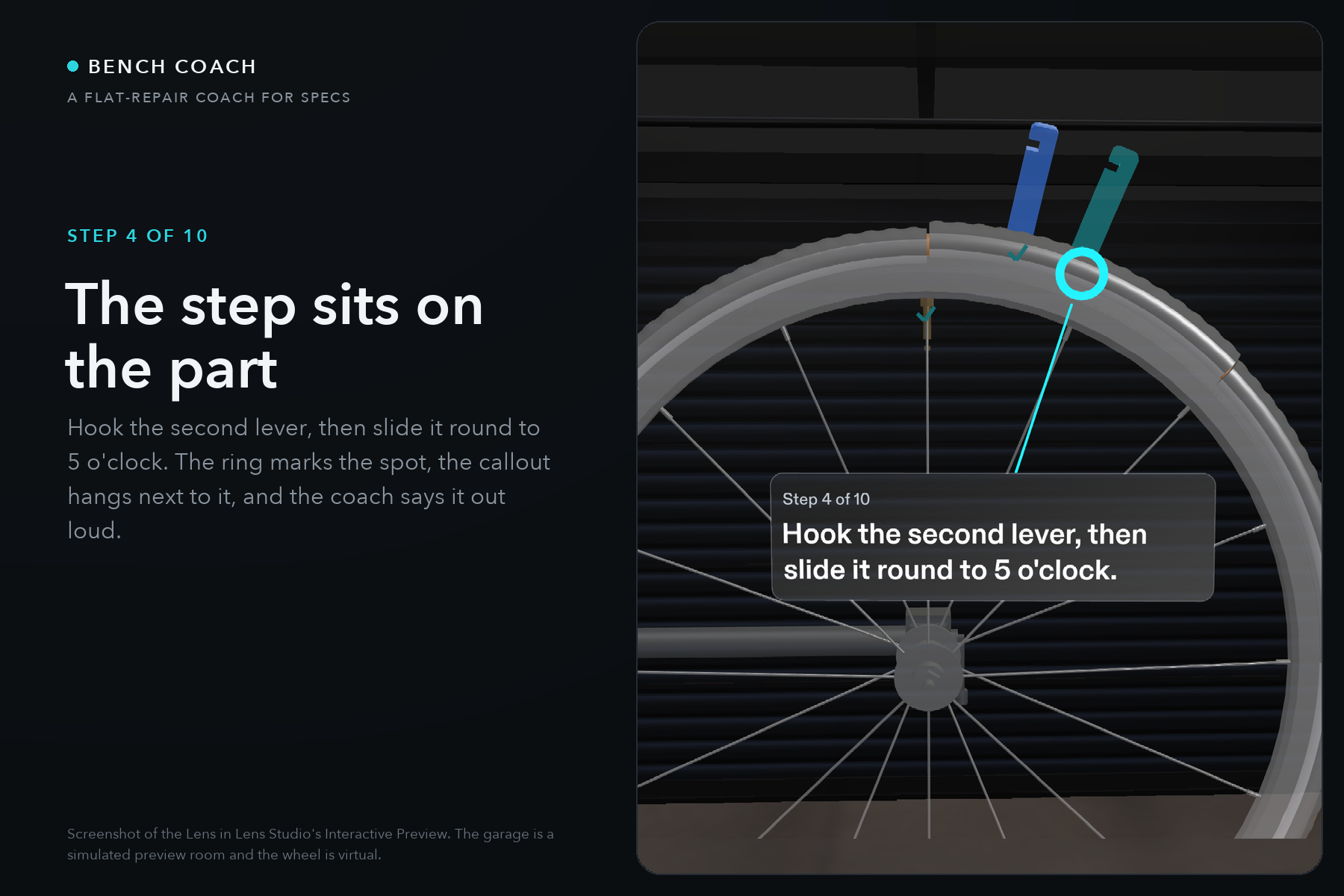
Step 4: the second lever on the rim with its ring and callout. Every instruction sits on the part it is about. Interactive Preview.
-
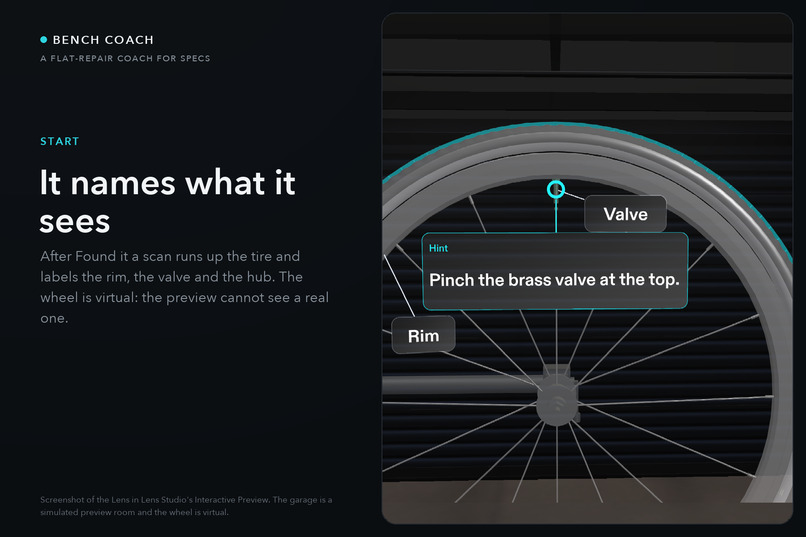
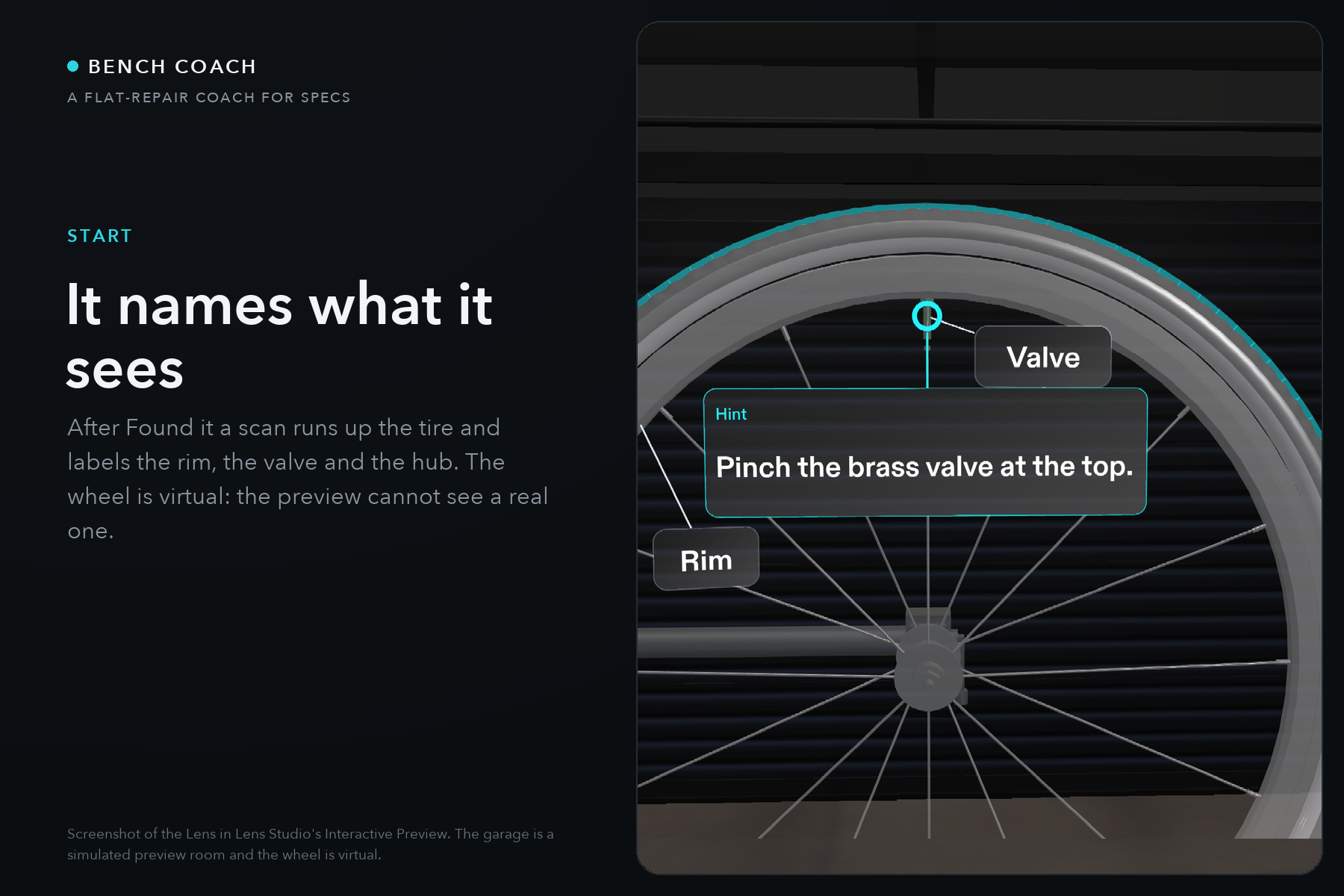
After Found it a scan runs up the tire and names the rim, valve and hub. The preview cannot see a real wheel, so a pinch stands one in.
-
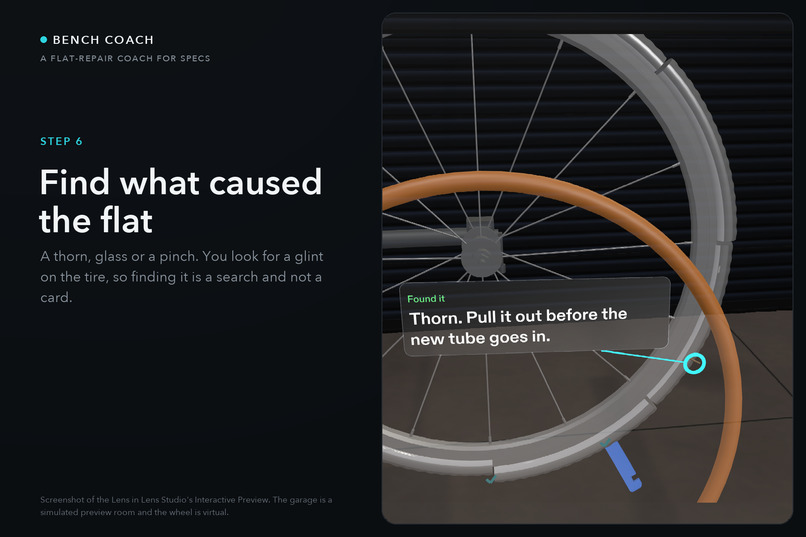
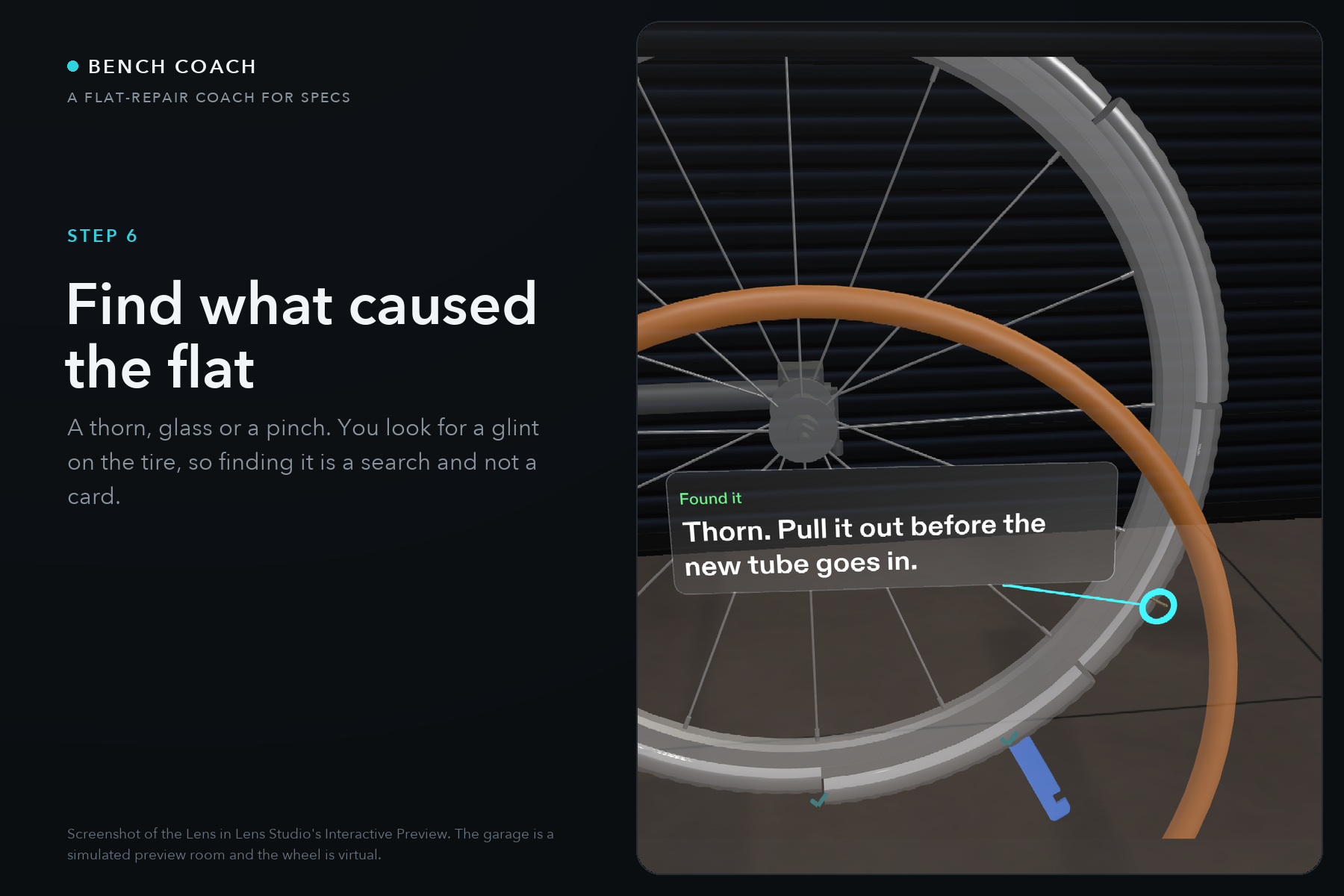
Step 6: find what caused the flat. A thorn this time; it can also be glass or a pinch. Finding the cause is a search, not a card.
-
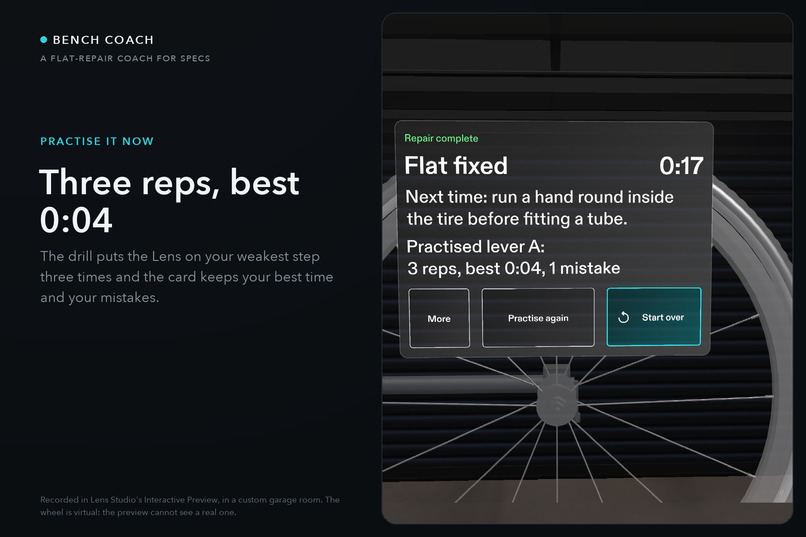
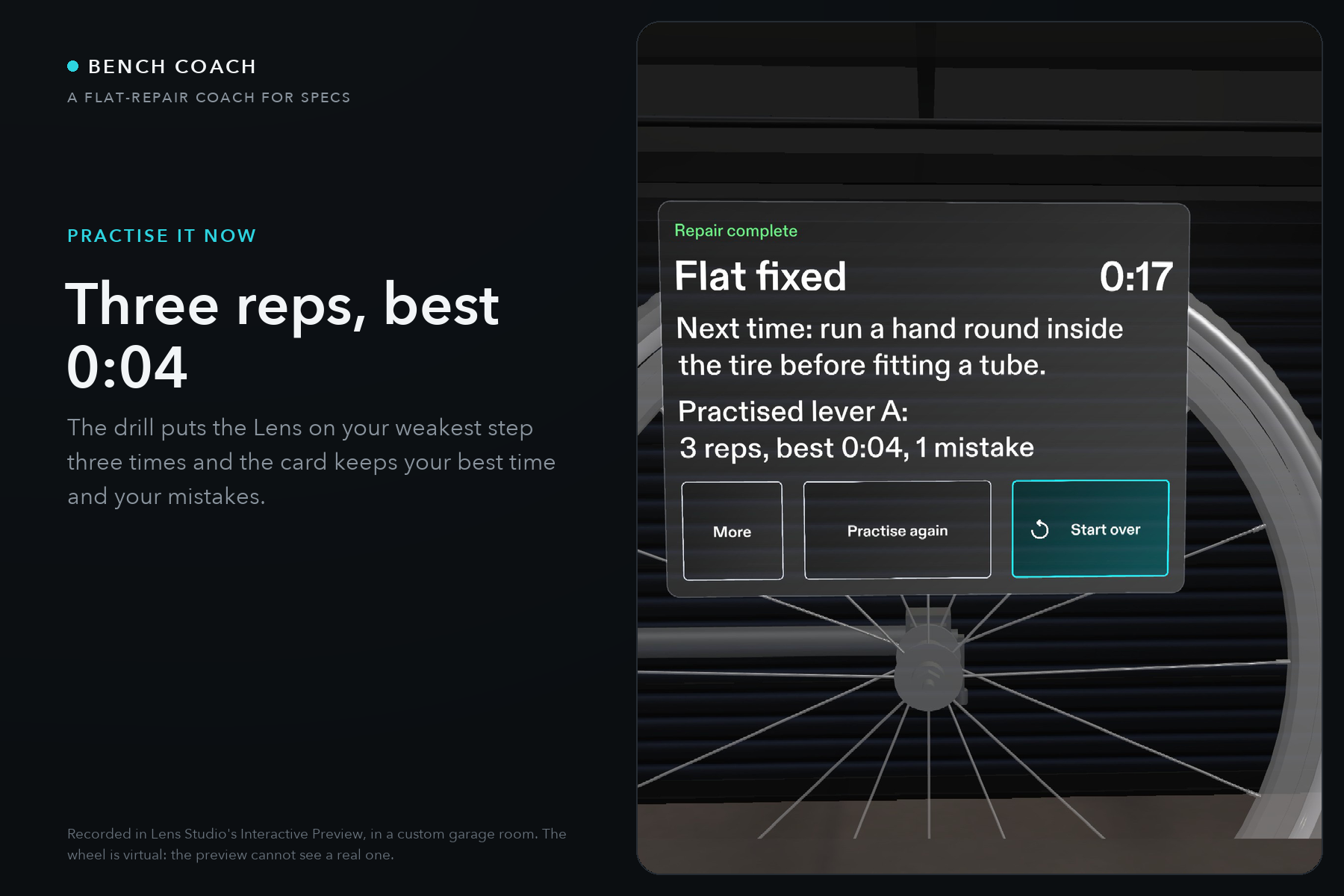
After the drill: three reps of lever A, best 0:04. Practise is one optional button on the Finish card.
-
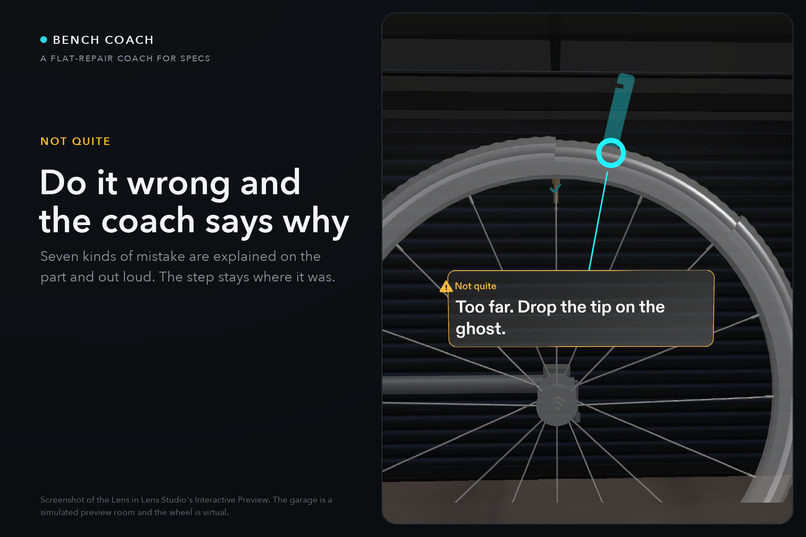
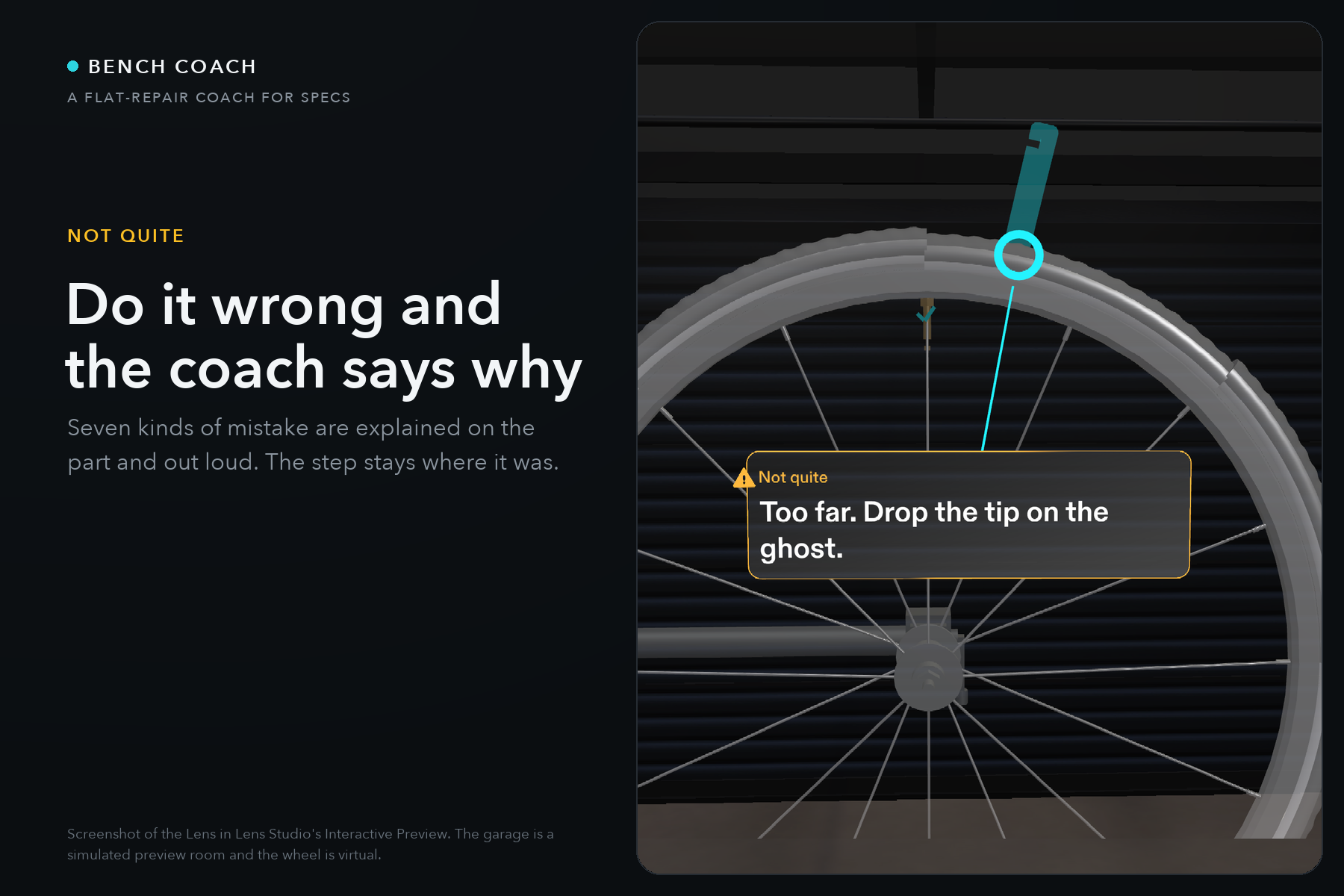
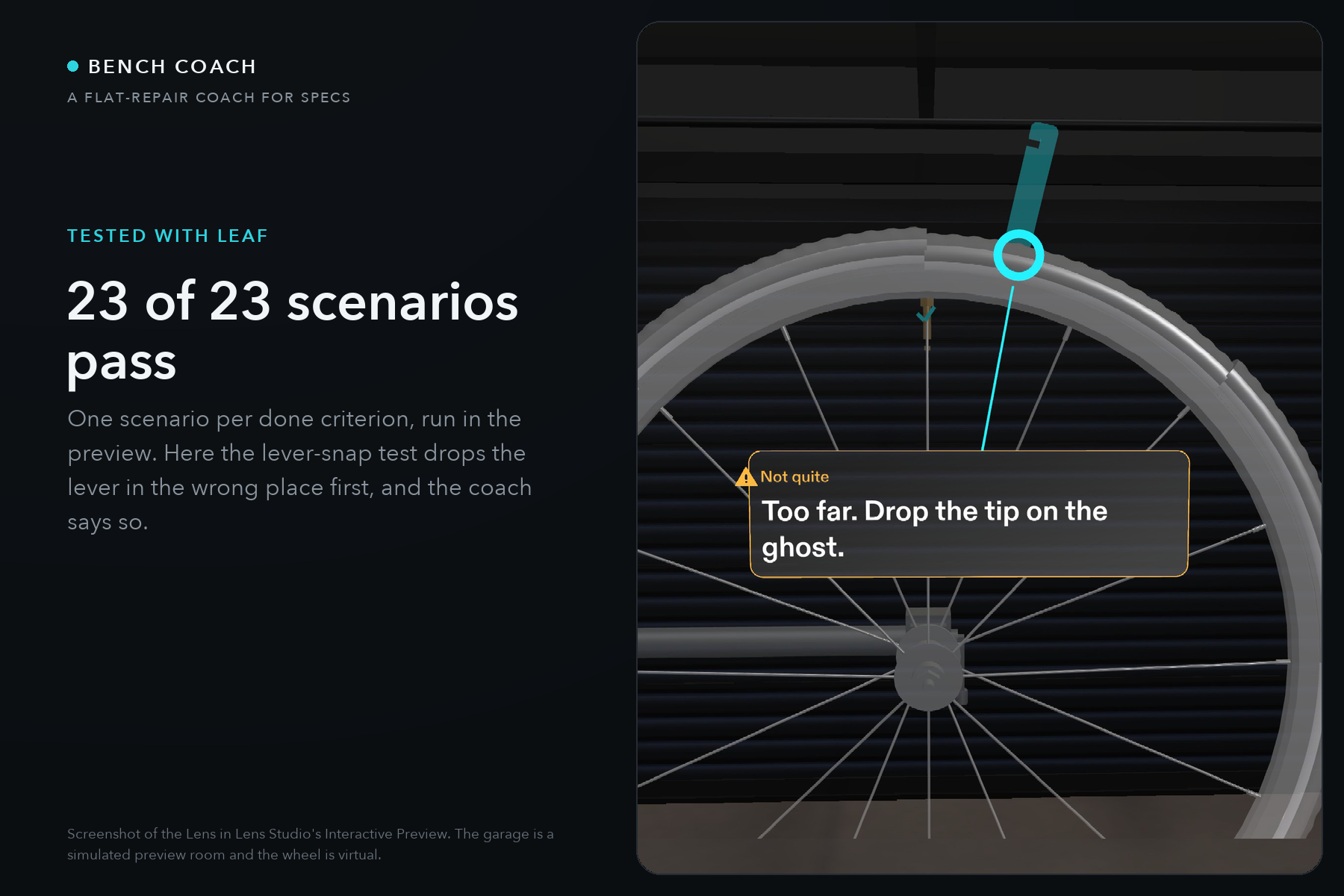
Do it wrong and the coach says why: the amber Not quite after a lever dropped too far from the ghost. The step stays where it was.
-
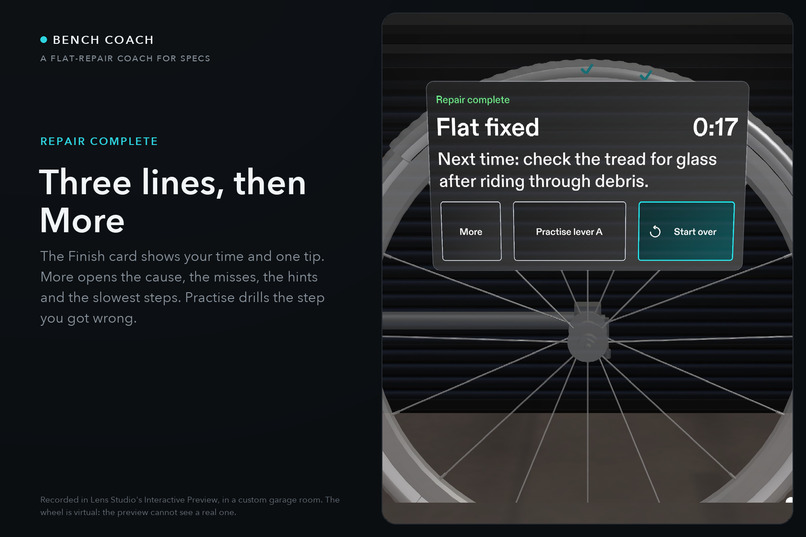
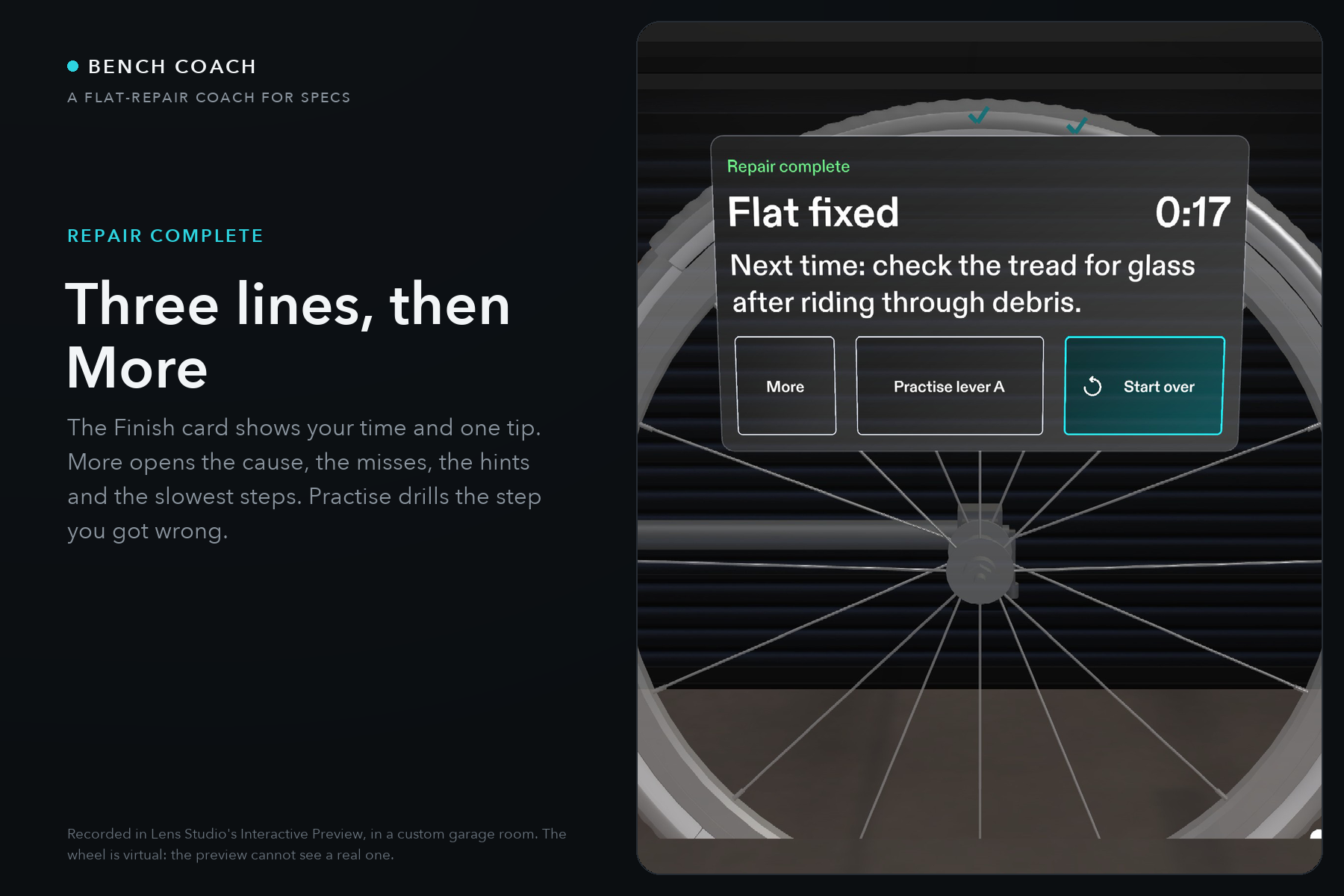
The Finish card: time, one tip for next time, More, Practise and Start over. Three lines by default, after the judges' Nov 5 rule.
-
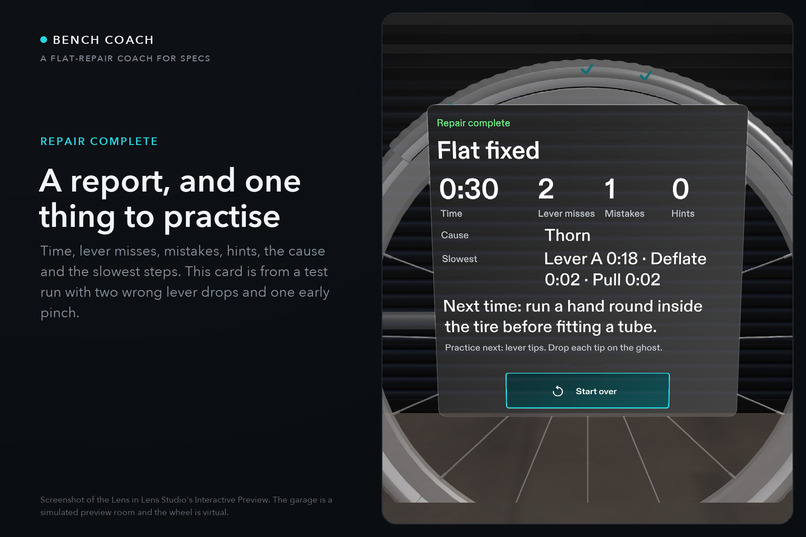
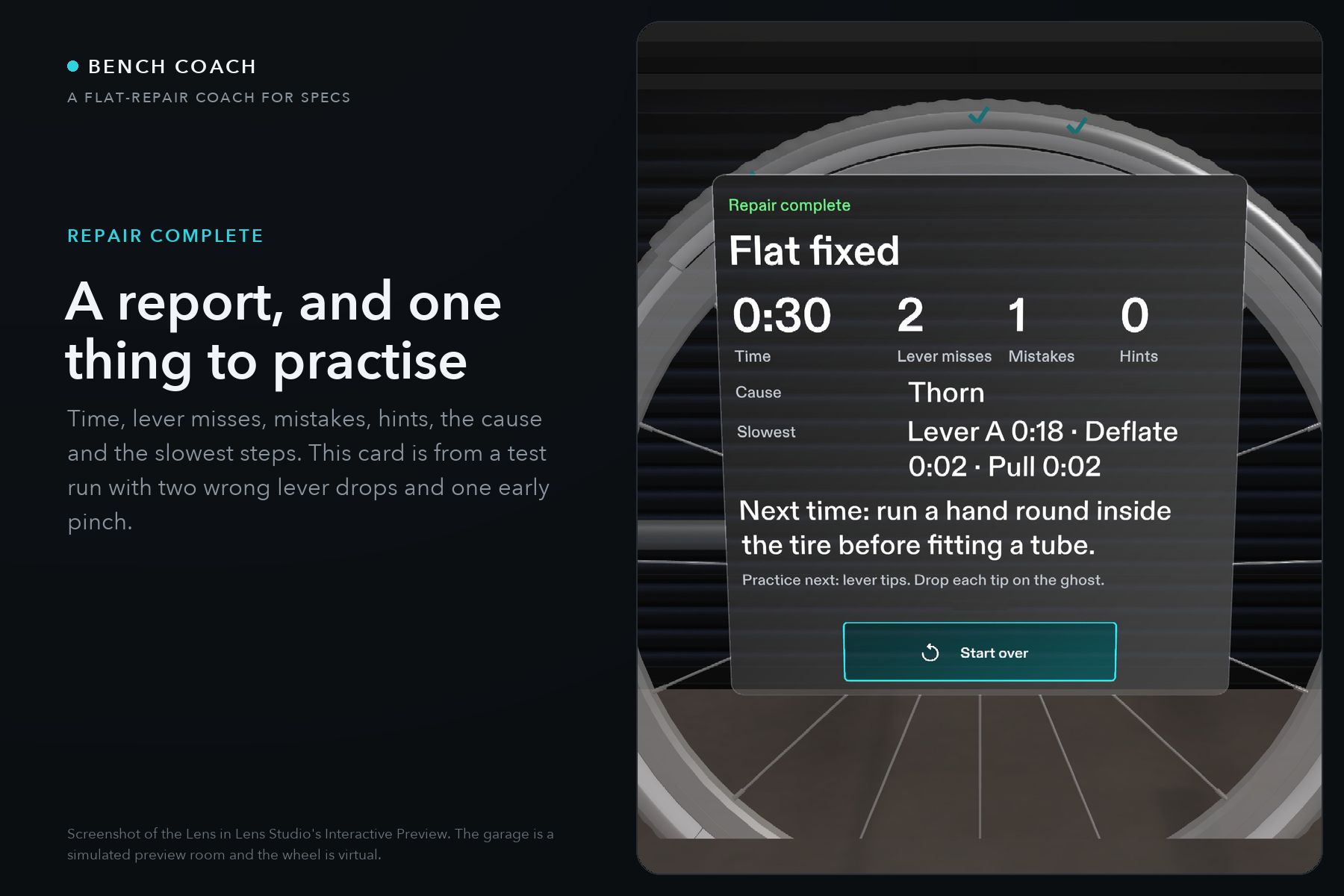
The report behind More, from a test run with two wrong lever drops and one early pinch: counts, cause, slowest steps and the tip.
-
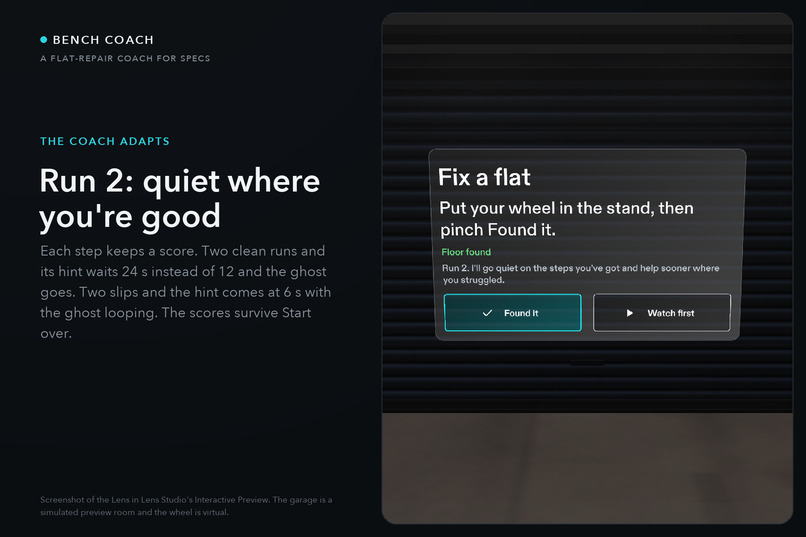
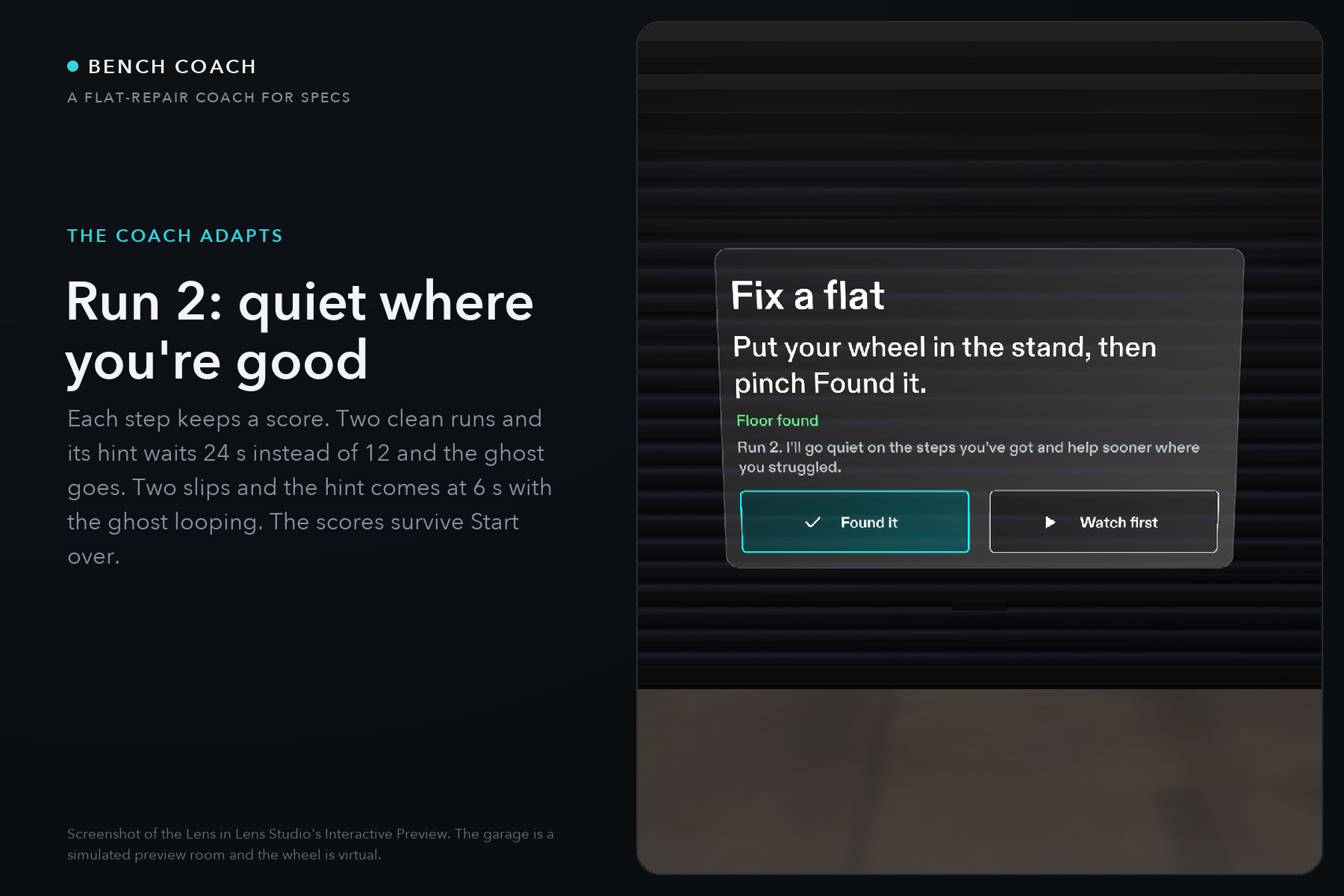
Run 2: the coach goes quiet on the steps you have and helps sooner where you slipped. A score per step, kept across runs.
-
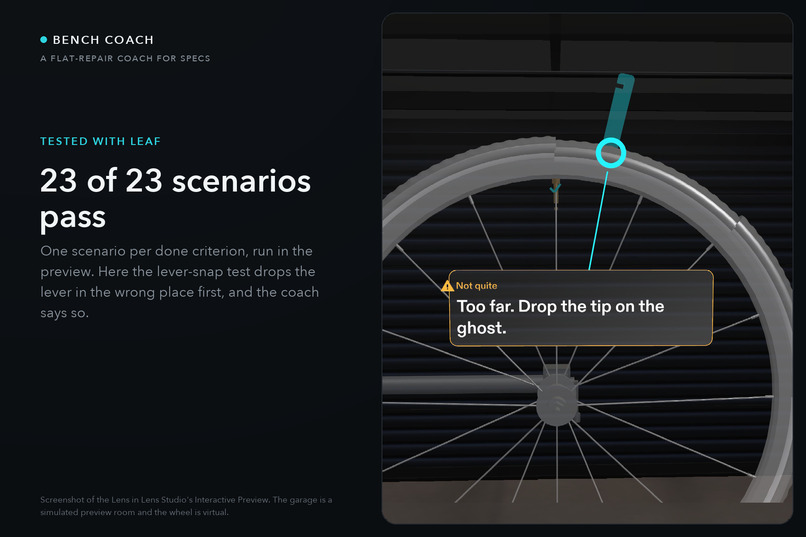
The lever-snap scenario at its wrong drop, with the amber callout. 23 LEAF scenarios drive the Lens in the preview, all passing.
-
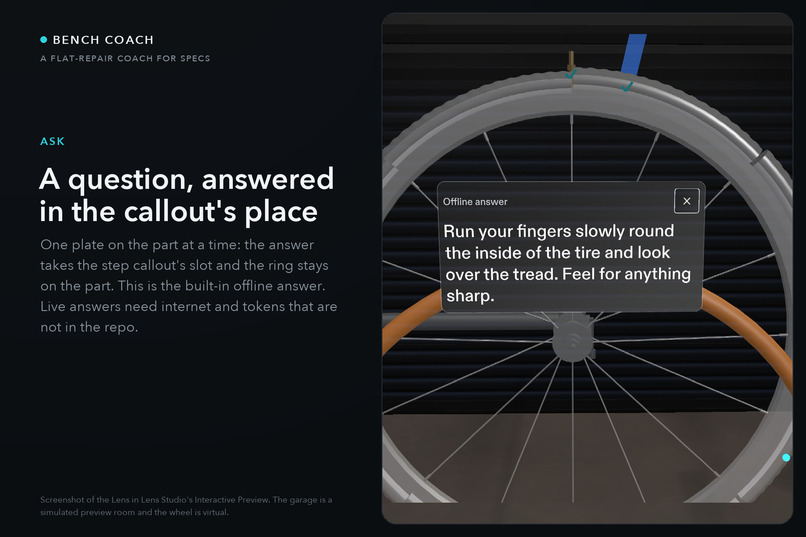
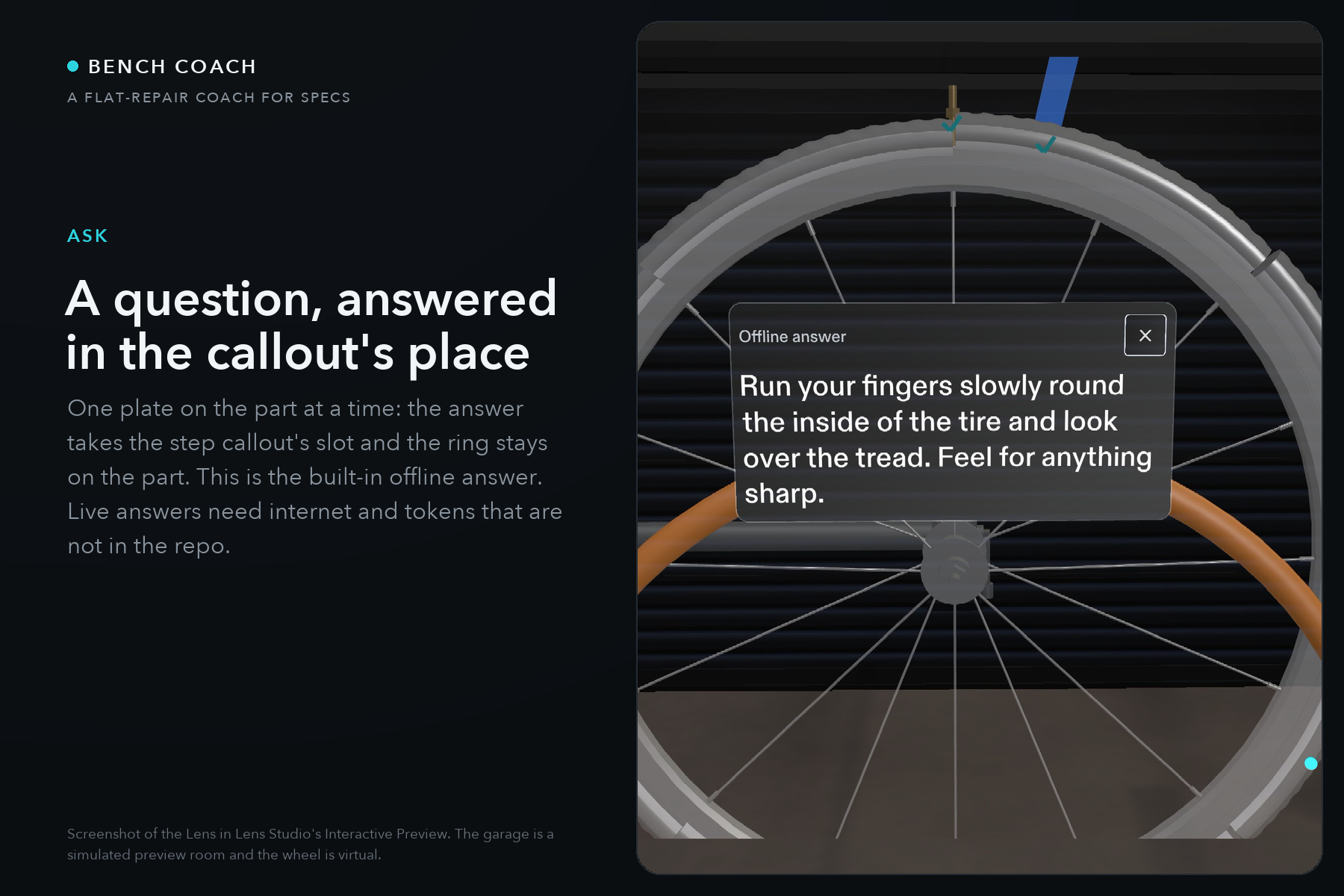
Ask: the answer takes the step callout's place, one plate on the part at a time. The built-in offline answer; live answers need internet.
-
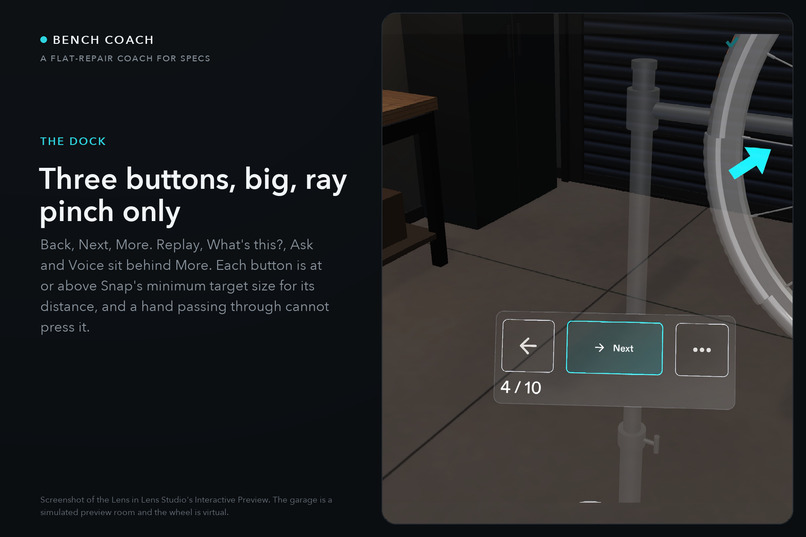
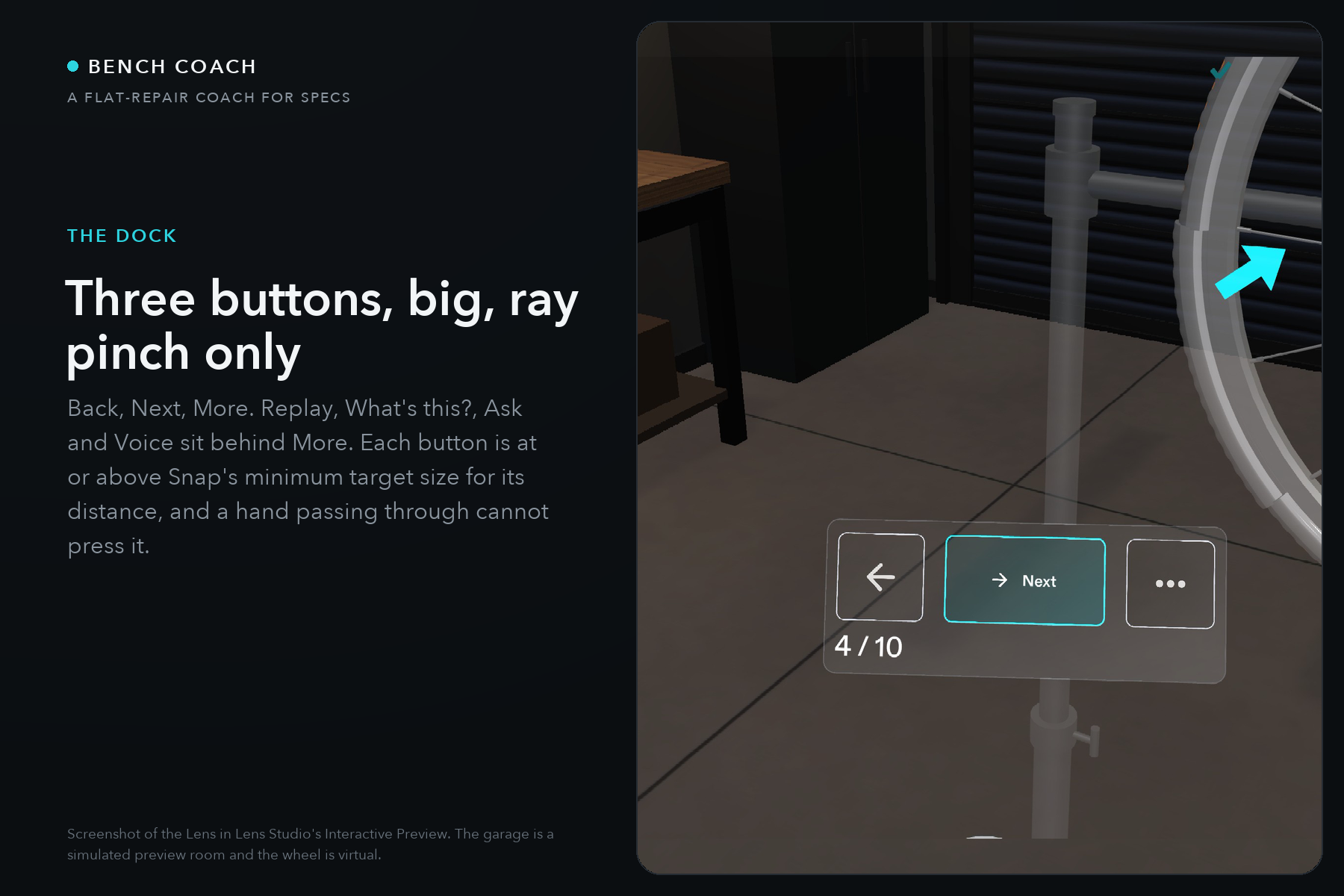
The dock: Back, Next, More, each at or above Snap's minimum target size, ray pinch only. Replay, What's this?, Ask and Voice sit behind More
Bench Coach: the repair, on the part
The step sits on the part. The coach says it out loud. The floor shows where to stand. Your hands stay on the wheel.
See it in 30 seconds: the video has the Lens on screen from 0:09, and 0:28 to 1:19 is one take with no cuts: real input to the preview, sent through the Lens Studio MCP's gesture tool with the cursor dot visible (not a person at the mouse), shown at 1.25x: Found it, the valve, the beads, lever A from the tray onto the ghost, with the coach's own voice. The far side at 1:26 is Watch first driving the walk. 23 of 23 LEAF scenarios pass. The repo has the Lens Studio project, the tests, the design brief and 37 dated build notes.
The Lens decides every step. The AI only answers questions, next to the part, and cannot move the repair. The step order, what counts as done, every mistake and every spoken line are plain TypeScript. Gemini is asked one question at a time and its answer is text beside the part; offline it falls back to a built-in answer tagged "Offline answer".
Inspiration
Bench Coach is for a home cyclist with a flat and no one to ask, doing it for the first time: put the glasses on, do the repair once with the coach, get on with your day. Fixing a flat is easy once someone has shown you. Without that someone you learn it from a video on a phone propped on the bench. You scrub it with a greasy thumb and turn the video's camera angle into your own wheel in your head. One step is on the far side of the wheel, where a screen on the bench cannot follow you.
The numbers say the same. In Cycling UK's figures 47% of adults can't fix a flat (Cycling Plus, October 2022), and a Halfords survey of 4,500 adults found 41% lacking basic bike maintenance skills such as puncture repair (reported here). Shops charge for the ten minutes: mechanics on r/BikeMechanics quote £15 to £30 in London and about $50 in Switzerland for a puncture.
What it does
Bench Coach stands a repair stand and a wheel in front of you and coaches the whole repair in 10 steps: let the air out, loosen the bead, lever it off, pull the tube, find the cause, fit the new tube, seat the bead, pump. Each step puts one ring and one short callout on the part it is about, shows a ghost of the tool where it goes, and says the step out loud. The wheel changes as you work: the bead lifts, the lever stays hooked, the tube comes out. Do a step wrong and the coach says why. When the next step is behind the wheel, a chime, an arrow at the edge of your view and a path on the floor lead you round the stand.
The journey: the first run is on the virtual wheel in the stand, the trainer, because the preview cannot see a real one; on Specs the same callouts, path and voice are designed to sit on your own wheel once the glasses can find it. Bench Coach is a step table and an engine (StepDefinitions.ts holds the ten steps, RepairManager.ts runs them), so a second job is a new table and its parts. Lesson two, planned and not built: a jump start, where the next step is on the other car.
One honest note: the Lens Studio preview cannot see a real wheel, so the wheel and the stand are virtual and a Found it pinch places them. Everything shown is that preview; the Lens has not run on Specs yet. The first nine seconds of the video are a labelled AI-generated clip of the problem, and the Lens is on screen from 0:09.
| Step | You | The Lens |
|---|---|---|
| Start | Look down, then pinch Found it | Finds the floor, stands the wheel on it, and a scan runs up the tire and names the rim, valve and hub |
| 1 and 2 | Pinch the valve, push the lit beads in | The valve hisses, each bead drops toward the middle of the rim |
| 3 | Grab the first lever from the tray, drop it on the ghost | It snaps in and lifts the bead. Dropped too far away, it goes back to the tray and the coach says why |
| 4 | Hook the second lever and slide it round to 5 o'clock | The bead peels off behind the lever |
| 5 | Walk round the stand, pull the tube end | Chime from the far side, edge arrow, floor path, a stand-here marker. The tube comes out piece by piece |
| 6 | Look for the glint on the tire and pinch it | Shows the cause: a thorn, glass or a pinch |
| 7 | Read the halfway card | Time so far and the cause |
| 8 to 10 | Feed the new tube in from the valve, seat the bead, hold the valve to pump | The tube goes in, the bead seats, the tire fills |
| Finish | Read the card | Time, lever misses, mistakes, hints, slowest steps and one thing to practise |
Also in the Lens: What's this? (pinch any part for its name and one fact), Ask (three questions per step, answered in the callout's place beside the part), Watch first (the Lens plays the whole repair by itself, and at step 5 it waits for you to walk round), Practise it now (optional: the Finish card names your weakest step, and one button drills it three times for anyone who wants it), and a Voice switch.
The coach adapts. Each of the ten steps keeps a score from 0 to 1, starting at 0.5. When you finish a step the score moves 40% of the way toward a target: 1 for a clean step inside its par time, 0.5 for one slip (a lever miss, a mistake or a hint) or a slow one, 0 for two or more slips. Above 0.75 the step is yours: the hint waits 24 s instead of 12, the ghost lever shows the motion once and goes, and the hint is shown but not spoken. At 0.35 or below the step needs help: the hint comes at 6 s, the ghost loops until the lever is placed, and the hint is spoken. The scores and a run count live in the Lens's persistent store, so the second run's start card says "Run 2. I'll go quiet on the steps you've got and help sooner where you struggled," and the More view of the Finish card reads, for example, "Coach memory: lever A needs help; deflate and loosen are yours." The steps never change, only how much the coach helps. It is a score and a rule; nothing is trained.
Test run of 2026-11-07: 23 of 23 LEAF scenarios passed in the Garage preview room (ask-coach-fallback on its second run; its first tap hung before the Lens changed). The 2026-11-06 run of the first 22 also passed in Sunlit Room.
How we built it
The Lens is 50 TypeScript files in Assets/BenchCoach/Scripts/ and 23 LEAF scenarios in Assets/BenchCoach/Tests/, plus a jump-to-step helper that puts the Lens on any step.
StepDefinitions.tsholds the 10 steps in one place: the text, the spoken line, the mistakes, the causes and the part facts.RepairManager.tsowns the step state. Back undoes a step exactly, and any step can be entered with the state of the steps before it.TorusArc.tsandMeshKit.tsbuild the tire beads and the tube as meshes in code, so each piece can lift, peel and deflate.LeverPlacement.ts,RimDrag.ts,TubePull.tsandTubeFit.tsare the hand work: the snap on the ghost, the drag round the rim, the pull and the refit.FloorLevel.tsfinds the floor with World Query andWorkspaceAnchor.tsplaces the stand in front of where you started.EdgeHint.tsandFloorPath.tsare the far-side cue.UIHelpers.tsis the design system (type roles, colours, plates). Every callout, card and button is built from it.CoachFeedback.ts,IdleHint.tsandPartInfo.tsare mistakes, hints and What's this?.VoiceCoach.tsplays the 30 recorded lines andBenchCoachAudio.tsthe 9 sound cues.RepairDirector.tsandWatchPlan.tsare Watch first.RunStats.tsfeeds the Finish card.AskCoach.tsbuilds the Gemini prompt from the live state (the step, the instruction on screen, the part, mistakes and hints so far) and shows the answer in the callout's slot; offline it shows the built-in answer tagged "Offline answer".AdaptiveCoach.tskeeps the per-step scores, moves each toward its reward target when the step is done, stores them withpersistentStorageSystem, and on entering a step sets the hint delay, the ghost and whether the hint is spoken. The par times are theparSeccolumn inStepDefinitions.ts.
How CLAD and the Lens Studio MCP were used: every build pass was a Claude Code session started in the project folder with Lens Studio open. The agent worked only through the Lens Studio MCP tools and the CLAD skills: scene edits, TypeScript compiles, preview captures, simulated hands and LEAF runs, one call at a time. Each pass ended with a full LEAF sweep and a dated entry in devpost/design-notes.md saying what changed, what was checked and what was left over. There are 37 entries. Each pass's report was checked against its commits and tool results before anything was pushed. devpost/build-log.md is generated from the session transcripts on one machine: 22 sessions and 3406 Lens Studio MCP calls, of which 1005 were LEAF runs.
How the Devpost skill pack helped
The skill pack's plan-lens interview asks seven questions, and we answered them in writing on Oct 22, before the first build: the idea, the one moment, product or overlay, where things live, hands, when things show, and done. The answers are devpost/design-brief.md. Three of the pack's rules decided the Lens. Its preview limits say the preview cannot see a real thing and the mouse cannot make a gesture, so the wheel became a virtual stand-in placed by one pinch, said out loud in the video, and every interaction became a pinch, a grab, a drop or a drag. Its one-spatial-moment rule picked the far side of the wheel over everything else, and that is the shot the video is built around. Its rule that every done criterion must be checkable in the preview became the LEAF suite: five scenarios on Oct 23, 23 by Nov 7, one per criterion, and each build pass since has ended with the same question, which test proves it. CLAD then built from the brief through the Lens Studio MCP, and the brief's "After the build" checklist is where the "logic proven, feel unproven" split on the page and in the video comes from. The brief ends with a section on what the build changed, because most of what is in the Lens today was not in the plan.
How we meet each criterion
| Criterion | What the judges ask | What runs |
|---|---|---|
| Design | "Is it a complete, coherent product experience rather than a technical proof of concept?" | The whole repair from the start card to the Finish card, tube out and new tube in. One design system for every callout and card, one plate on the part at a time, three dock buttons. A spoken coach, mistakes explained, a compact report at the end with one tip for next time, the rest behind More, and an optional drill for the step you got wrong. On the second run the coach goes quiet on the steps you have down and helps sooner where you slipped |
| Technical implementation | "How well is it built, and how well does it use CLAD, Lens Studio, and the Lens Studio MCP?" | 23 LEAF scenarios, one per done criterion, all passing. Built and recorded in 36 written-up passes through the MCP, 3406 MCP calls on one machine alone. Meshes built in code, World Query for the floor, Remote Service Gateway for Ask, persistent storage for the coach's per-step scores |
| Innovation / idea | "How creative and novel is the concept?" | The step you cannot see makes you walk: chime, edge arrow, floor path. The wheel model changes under your hands. Finding the cause is a search, not a card. The report names your weakest step and, if you want, drills it until it is yours. The coach keeps a score per step and, next run, helps less where you are good and sooner where you are not. We found no flat-repair coach on glasses; the closest things were phone apps and a car-tire AR tutorial |
| Presentation | "Does the video show it working end to end?" | A nine-second clip states the problem, then the Lens Studio preview is on screen from 0:09 to the end, 51 seconds of it one take with no cuts (real input sent to the preview through the gesture tool, cursor visible, 1.25x), then Watch first for the walk round the stand at real speed. The video says on every shot what drives it, what is sped up and what only real glasses could prove; no shot is a person at the mouse, and the sound is rebuilt from the Lens's log |
Challenges we ran into
- Buttons fired when a hand passed through them. Reaching for the wheel pressed Next. Every button now answers only a ray pinch, and the
control-barscenario checks it. - The floor was a guess. In one preview room the floor finder picked a table top, and the stand floated.
FloorLevel.tsnow takes the lowest wide level it has seen, and a lower level found later moves the stand, the mat and the path down together. - Dark colours vanish on an additive display. A black tire is invisible on Specs. The tire is mid grey with light lines, cues are bright cyan, and nothing in the Lens is near black.
- The text was too small. From the working pose a body line was less than half the height it needed. The type scale went up in one place,
UIHelpers.ts, and theui-layoutscenario now fails if any line is too small or crosses its plate. - A callout seen edge-on. On the far side you look down at the callout, and a callout that only turned left and right lost much of its height. That one now tilts to face you.
- Two plates on the part. The Ask answer sat under the step callout, two plates over the tire at once. Now the step plate hides while Ask is open, its ring stays, and the chips and the answer take its slot.
- Too much on screen for busy hands. Four dock buttons, a progress rail that repeated the callout's "Step 4 of 10", a Watching badge that stayed for a whole run. Replay moved behind More (three big buttons), the rail shows on the cards only, the badge shows for 3 s.
- The end screen was a wall of text. At the Nov 5 live review the judges marked a dense end screen on another project down as "a website on your face". Ours, recorded that day, was the same pattern: time, three counters, cause, slowest steps, tip, practice line, button. The Finish card is now three lines and one tip, with the rest behind More, and the video shows both cards side by side.
- The agent's report and the log disagreed. In one pass the agent changed code after its test sweep. Since then we check each pass's report against the tool results before pushing.
- Lens Studio quit in the middle of test sweeps more than once. The agent saves the project before every LEAF run and runs one scenario per call, so a pass can pick up where it stopped.
Accomplishments that we're proud of
- 23 of 23 LEAF scenarios pass, including checks for text size, overlap, when the coach speaks and what the coach remembers; the first 22 also pass in a second preview room.
- The judges' Nov 5 rule was applied before the deadline: the Finish card went from a wall of text to three lines and one tip, and the video shows the before and the after.
- The whole repair works in both directions: tube out and new tube in, with 7 kinds of mistake explained on the part and out loud.
- The video is recorded in a garage we built as a custom Interactive Preview room, so the Lens is seen in the place it is for.
What we learned
Three rules we would take to the next build, each from a moment in this one.
- Plan in centimetres, then let the tests hold the plan. The brief's five done criteria became the first five LEAF scenarios, and every feature after that had to bring its own before it counted as built. That is what let a floor change on Oct 28 and a UI rewrite on Nov 1 land without breaking the repair; the suite is 23 now and the brief's last section, what the build changed, is the clearest record we have.
- A report can be wrong; a failed scenario cannot. In one pass the agent changed code after its sweep and reported the earlier result. Since then every pass's report is checked against the tool results and the commits before anything is pushed, and the build log is generated from the transcripts, not written.
- The judges' rules are measurable, so measure them. "A website on your face" became a line count on the Finish card. "Big buttons" became degrees on the collider in the
ui-layoutscenario. "Show it only when needed" became a 12-second idle timer and an on-demand menu. On an additive display "dark means invisible" became a mid grey wheel and no signal by colour alone. Each one is a test now, not an opinion.
What's next
Evidence first, then features. Run it on Specs and measure what the preview cannot: whether the callouts read against a real tire, how a lever feels in the hand, the voice level in a workshop. Replace the Found it pinch with finding a real wheel, keeping the callouts where they are. Then lesson two, a jump start: the same engine, a new step table, and the walk is between two cars. (The halfway card names brake pads as a next skill; the jump start is the better fit for the far-side moment.)
Try it
- Install Lens Studio 5.24.1 or newer and Git LFS, then clone the repo.
- Open
Specs Base Template.esproj. - In the Preview panel pick the Specs device and Interactive Preview.
- Look down at the floor until the start card says "Floor found", then click Found it, or Watch first to see the whole repair. Move with W, A, S and D; a click is a pinch.
Test it
The tests run inside Lens Studio against the live preview. Open the LEAF panel: it lists the 23 scenarios and jump-to-step. Run them one at a time; each resets the Lens, drives it with simulated pinches, grabs and drags, and reports pass or fail with its assertions. Two minutes to spare: run start (the wheel appears and step 1's ring is on the valve), lever-snap (a lever dropped 10 cm off the ghost goes back to the tray) and floor-path (the arrows and the stand-here marker on step 5). To put the Lens on any step by hand, run jump-to-step with its step input. The README's "Test it" section has the full list and what each scenario proves.
Built With
- clad
- claude-code
- elevenlabs
- gemini
- git-lfs
- leaf
- lens-studio
- lens-studio-mcp
- python
- remote-service-gateway
- specs
- spectacles
- spectacles-interaction-kit
- spectacles-ui-kit
- typescript
- world-query
