Inspiration
As UW–Madison students, a lot of our attention goes to managing school instead of learning. Requirements are spread across Canvas, syllabus PDFs, course websites, Piazza, Gradescope, textbooks and email, and because none of them talk to each other, finishing an assignment, planning the week or studying for an exam means hunting through all of them.
Tools like NotebookLM are a great start for turning sources into study materials, but setting up a notebook means the same scramble through every system that we're trying to avoid. Additionally the chatbot often does not have enough training to truly know our courses, our professors' expectations, or what each instructor's AI policy allows, so every question starts with re-explaining the class.
We wanted a workspace that already knows your classes: what matters now, which materials you need, and how to practice for your professor's expectations.
So our thesis was to stop managing school and start learning.
What it does
My Magic UW is a desktop app for UW–Madison students. You sign in to UW once, typing your NetID and approving Duo yourself, and the app assembles a comprehensive dashboard that manages your entire semester:
- Basic Canvas Dashboard Functionality: Courses, Assignments, Grades, Email and Calendar are all automatically uploaded into the application so you don’t lose any of the feature you already have
- Agentic Computer Use: Chat/Voice bulb follows you from page to page enabling you to navigate through the entire platform in one prompt audio or text.
- Multiple Source Pullup: Our advanced data model understands all of the different sources required to complete an assignment, essay, or lab. When you access an assignment on My Magic UW all sources are one click away and open simultaneously.
- Follows your course's AI policy: The app reads each course's AI rules and sticks to them. It'll point you to the right readings, build study tools, and help you check your work. It won't do the assignment for you.
- Creates Study Artifacts: Having all vital sources loaded locally allows you to create study artifacts locally (Flashcards, Podcasts, Quizzes, Lecture Digests, Practice Exams, Concept Maps) without having to search through sources.
- BONUS: Preloaded data allows us to preemptively generate these artifacts allowing students to log on and have refreshers in any format already created for them for each class.
- My UW data: enrollment, holds and degree-audit progress. Parts it couldn't read are never counted as met.
How we Built it
Single Source of Data:
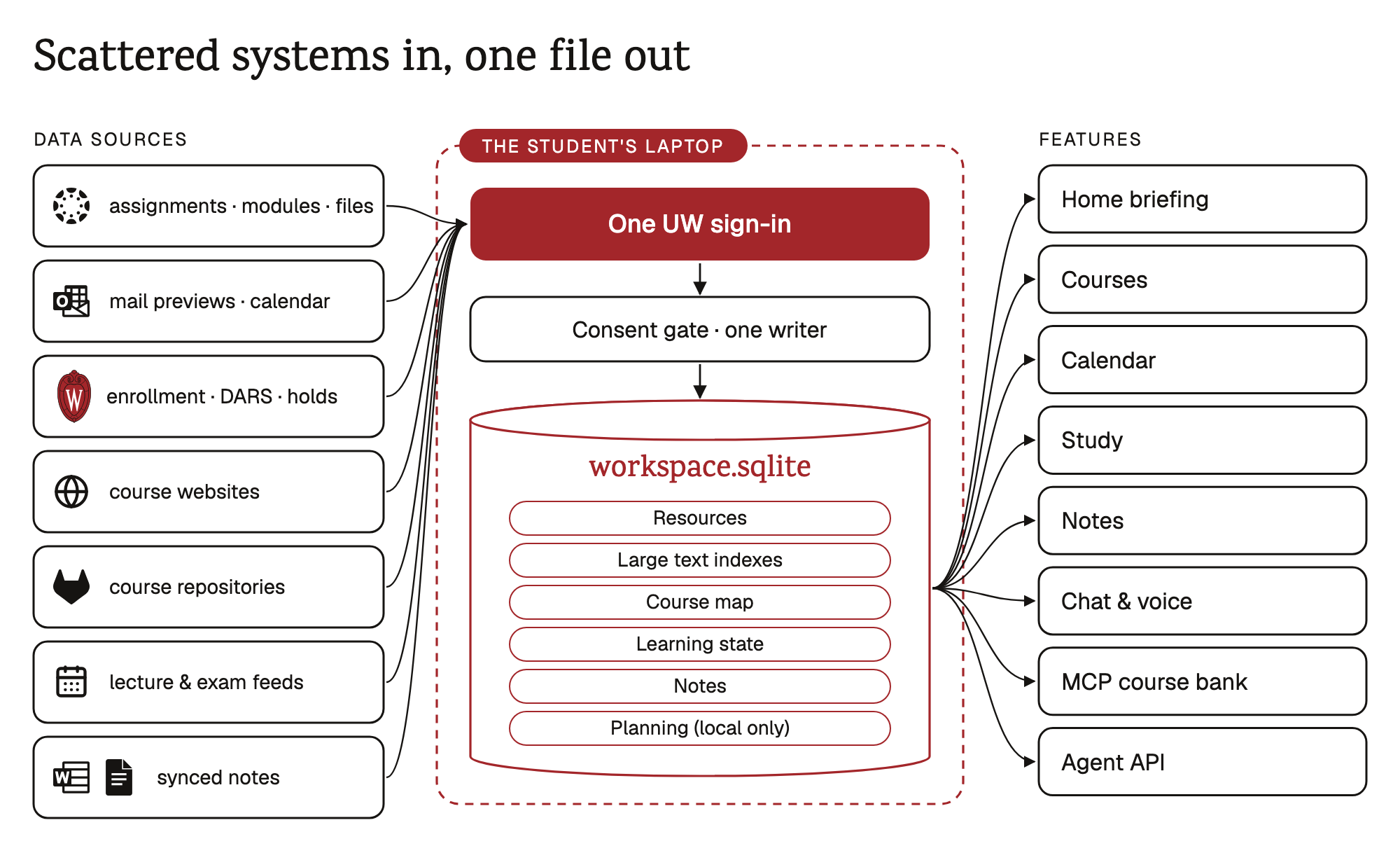
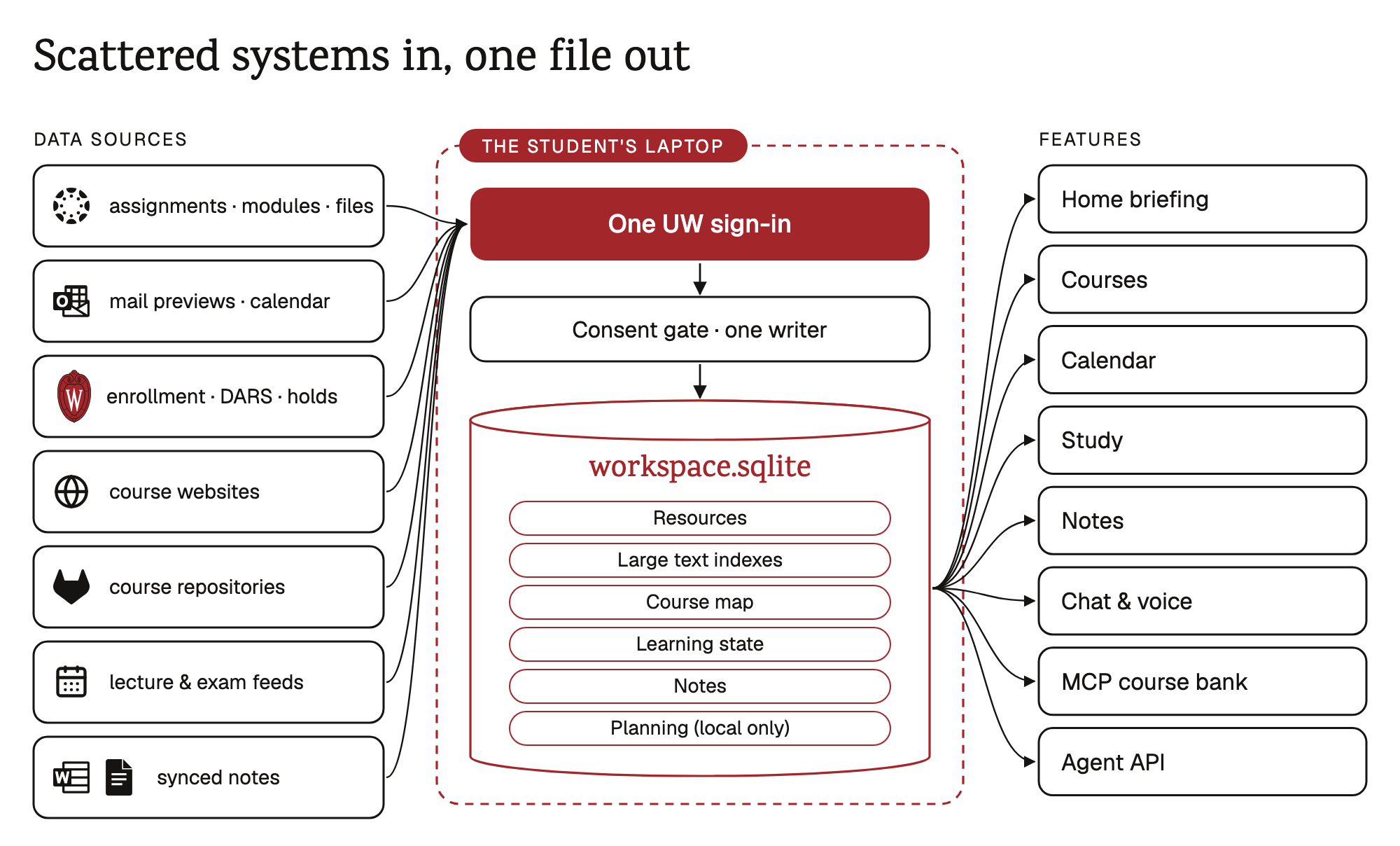
Everything above rests on one decision: one SQLite file on the student's computer, with exactly one writer.
A background worker inventories every place each course keeps content, reads what your own sign-in can already read, and writes it into workspace.sqlite as:
- resources, with every version kept, so 'what changed since yesterday' is just a lookup;
- passages with exact character offsets and a full-text index, so any quote can be traced to the exact place it came from;
- a course map built by code: what role each material plays, which dates and topics it mentions, what each assignment references, and which assessments each lecture covers;
- learning state: cards, reviews, attempts and topic states;
- planning records, which stay on the laptop and are never sent to any AI.
Every screen in the app reads from that same file, and so do two things we built for other people. A read-only MCP course bank lets a student's own Claude or Codex answer questions about their courses outside our app, and the student can grant or revoke that access per tool. A versioned Agent API, used inside the app today, will let other Badger developers build study tools on the same data. Every fact lives in the database. Models read from it and draft things, but they never hold the record themselves. (architecture · data platform)
We chose this because every alternative we sketched produced a second, drifting copy of the truth. That could be a chatbot's context window, a vector store that goes stale or a per-feature cache. With one store and one writer, a deadline change lands once and Home, Calendar, Study and Chat all see it at the same moment.
Code, Jev, then the LLM: three layers for turning sources into knowledge
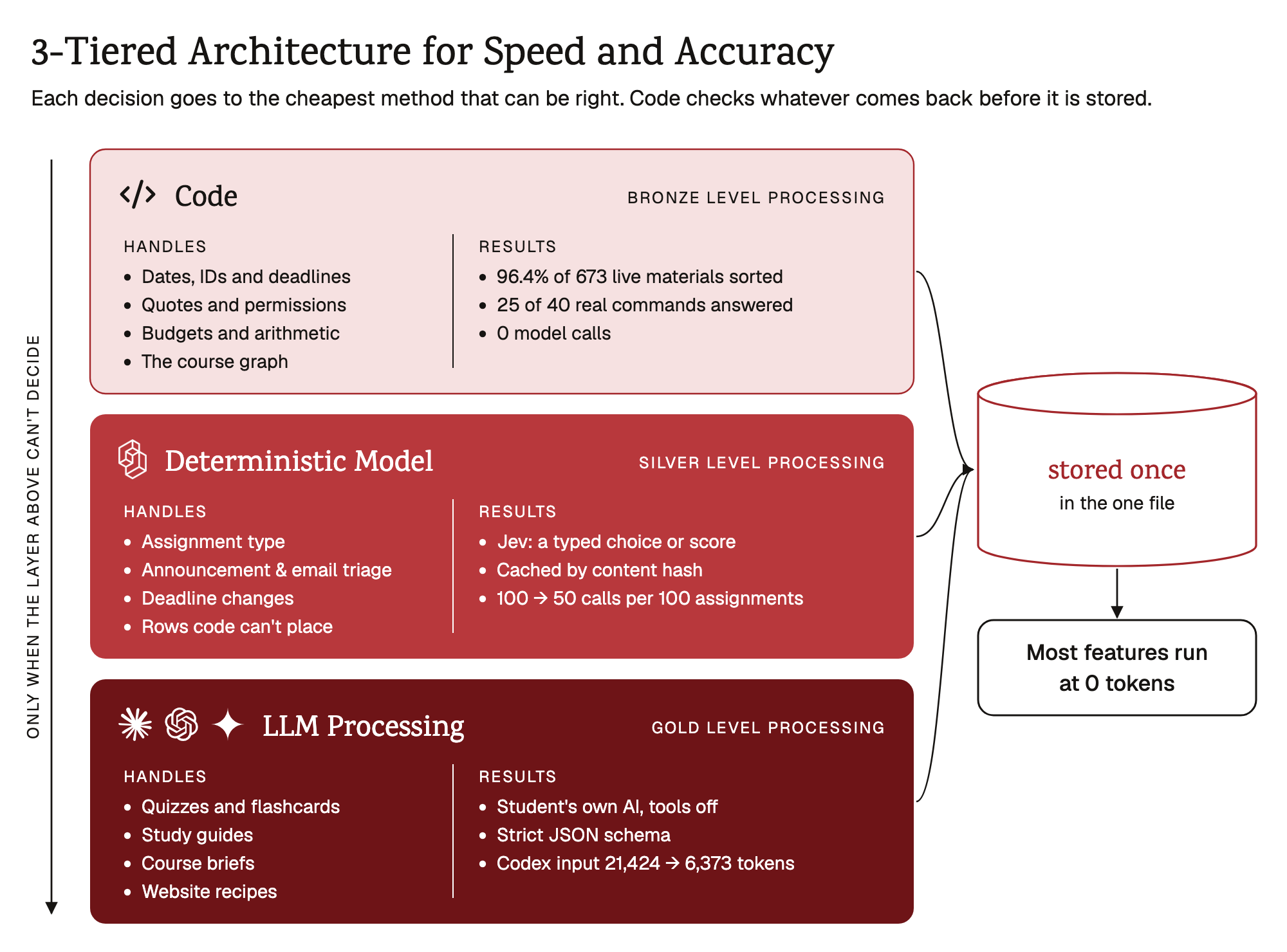
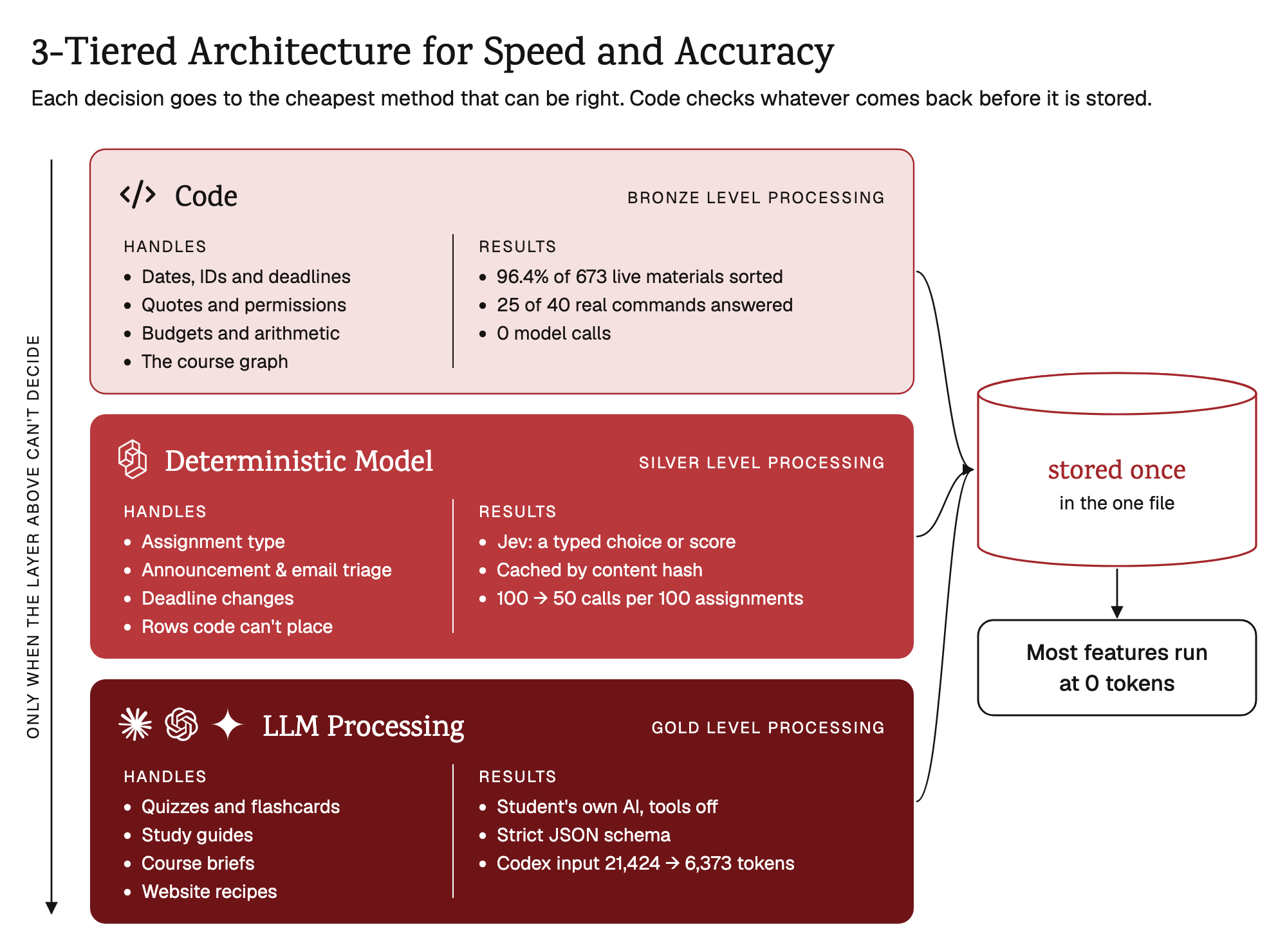
Raw pages aren't knowledge. Our rule for processing them is AI writes, code decides. Every decision goes to the cheapest method that can be right:
- Code handles anything with one right answer: dates, IDs, permissions, budgets, arithmetic and quotes. It sorted 96.4% of 673 materials on a real account into roles with no model at all. Our intent router answered 25 of 40 real commands in code, all 25 correctly, with zero model calls.
- Jev handles small typed judgments that code can't settle, such as what kind of assignment is this? or does this announcement change a deadline? Jev is TypeSafe's hosted judgment model. It returns a choice or a score, never free text, and each judgment is cached by content hash, so a grade change costs nothing. Deciding the obvious cases in code first halved Jev calls on a 100-assignment course.
- The student's own AI (the Claude Code or Codex they already pay for) runs only where language has to be read or written: quizzes, flashcards, study guides, the course brief. Each run is one call, spawned with tools off and a strict JSON schema, and course text is framed as untrusted data. Running the student's client in "instant mode" cut Codex's input from 21,424 to 6,373 tokens per call.
Whatever comes back, code checks it before it's stored. Every quote must match a stored passage exactly, and every date, number and ID must resolve. Failed items are dropped rather than shown. That check is what keeps the model from becoming a second source of truth.
Learning material that's ready when you are
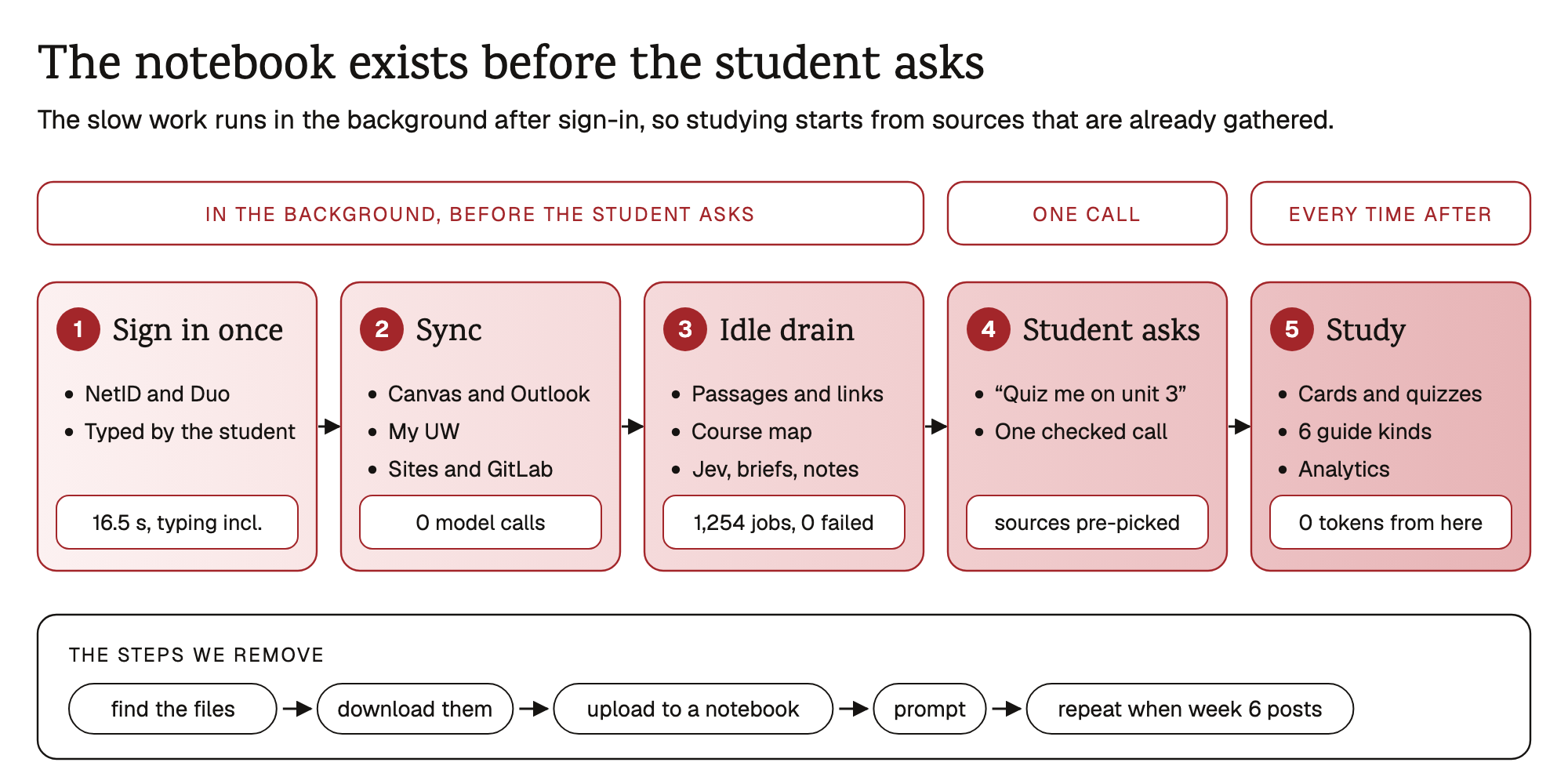
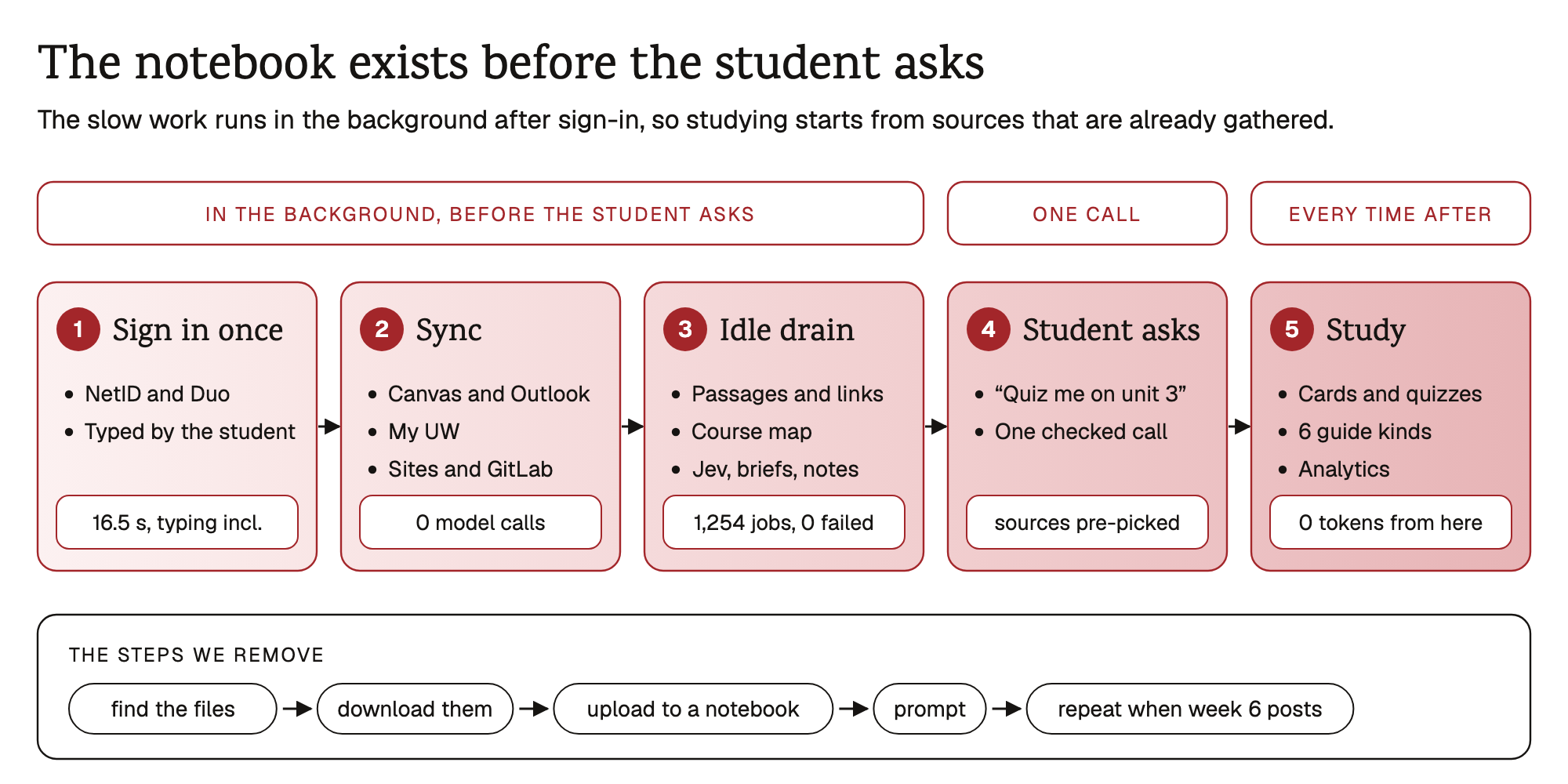
The slow work happens in the background. Sync makes zero model calls. When it finishes, a single idle job drain splits materials into passages, links assignments to what they reference, builds the course map, asks Jev its small questions, writes each course's brief and scaffolds your lecture notes. On one live account with six real courses, that pipeline ran 1,254 jobs in 12.8 seconds with zero failures, and our agenda matched Canvas's own to-do list with 0 missing and 0 duplicates. It works in small idle slices and never runs during a sync.
So when you say "quiz me on unit 3," nobody has to go looking for sources. The relevant passages are already selected, and the quiz is one checked call away. After that it's cached by content hash: reviewing cards, taking the quiz and reading the guide all run on stored artifacts at 0 tokens. You get NotebookLM-style artifacts without having to build the notebook yourself.
A purpose-built agent that navigates and finds, not one that answers for you
We didn't want a general chatbot bolted onto a dashboard. The assistant in My Magic UW is purpose-built for three jobs.
- Navigate. Say "open my AI-assisted coding course's next assignment." On-device Whisper transcribes you, the intent router resolves the course and item from what's in the database, and the app takes you there. Code does the resolving, so there's no model guess about which course you meant. Voice is in a local trial on main.
- Understand course websites. Many UW professors run their own sites. The agent learns each site's layout once, with one model call over a pruned outline. It turns that into a recipe, and code validates the recipe and then replays it at 0 tokens on every later visit. On a live account, code sorted 73 of 77 course-site pairs before a single fetch or model call.
- Pull sources, not answers. Ask a question and you get the course's own words, quoted and cited. Chat shows "What Magic read" for every reply and never widens scope to fake a course-wide answer.
Safety holds this together. Only the main process touches your sessions. Every network path is blocked until you consent, and every send leaves a receipt. Known names are scrubbed before anything is sent to a hosted model. (privacy · egress gate)
Challenges we ran into
The hardest part wasn't the AI. Most of our time went into getting data out of school systems. Our worst bug: every Canvas file download failed, all 386. The cause was one setting in how our app handled redirects, and no model was involved.
- Signing in safely. We never automate Duo or touch your passwords. You sign in yourself, in the app's own window.
- Students' AI can do more than chat. Claude and Codex can run commands, and a review found one still could inside our app. Now the app shuts it down the moment it tries.
- Deadlines disagree. Canvas, the syllabus and the lock time can all say different things. We show every date with its source instead of guessing.
- Our own check had a hole. It proved a quote was real, but not that the answer matched it. An answer could cite "October 14" and say October 21. See our Break Card.
Accomplishments that we're proud of (benchmarking section)
- It works on a real student's semester. On one live account with six real courses, it ran 1,254 background jobs in under 13 seconds with zero failures. Code alone sorted 96.4% of 673 course materials, it found all 175 links buried in course pages, and our to-do list matched Canvas's own exactly: nothing missing, nothing doubled.
- Cheap to run, and we're upfront about it. We estimate about $2 per student per semester, and 55% of everyday actions use no models at all, compared with about 1% for a typical AI study tool. On a small course, a typical tool that uses caching is actually a bit cheaper ($1.71 vs. our $1.91), and we'd rather say so. The gap opens as courses grow: with a lot of course material, the typical tool costs $6.98 while we stay around $2. (semester model, estimated on test data, $0 spent)
- Fast where it matters. Search went from 197 ms to under 5 ms. On a real account, the first screen went from 27 seconds to 2, and reopening the app went from 70 seconds to under 3.
- Private from the start. Nothing leaves your laptop before you agree. We confirmed that with a test and in a live run. When we planted 14 fake personal details, none got through to the AI, and none of the actual course content was changed.
- Almost 2,000 automated tests, and an MIT-licensed codebase other students can build on.
What we learned
- We tried to build too much: Notes sync, a GPA calculator, voice, analytics, exam prep: a lot of it is still sitting on branches. Next time we'd pick fewer features and finish them.
- Let the database remember facts, not the AI. Once the AI couldn't hold due dates, a made-up deadline became something we could catch.
- Our own checks had holes. Ours proved a quote existed, but not that the answer matched it. Now we ask what a check really proves.
- A lot of questions don't need AI. "What do I need on the final for a B?" failed when we sent it to the model. It's just math.
- Agents made us fast and messy. We had 90+ branches in under a day. Short handoff notes saved us.
- "It works" means three things. Passing tests, working in the app, and working on a real account. Our first screen passed its tests and took 27 seconds on a real account.
- Honesty is harder than it sounds. A typical AI tool beat us on cost for small courses. We kept that in, and it made our other numbers more believable.
Our Break Card: checked quotes, unchecked sentences
What broke. Our rule is "AI writes, code decides." When the AI answers a question, it has to cite a quote from your course materials, and code checks that the quote is real. But the code never checked that the answer actually said what the quote says. So an answer could cite "The midterm exam is on October 14" and tell you "Your midterm is on Oct 21." The real citation made the wrong date look more trustworthy.
It wasn't the only one. When we went looking for the same mistake, where a check proved the evidence but not the conclusion, we found three more:
- Any email that mentioned a course code got labeled "Course staff," no matter who sent it.
- An unknown sender could be bumped straight to "urgent."
- A link a student posted in a discussion could be treated as the official course site.
How often. We built 60 test cases for each problem. Before the fix, every one of the four got through all 60 times. After, zero did, and the fix didn't wrongly reject any correct answers. These were generated test cases, not a live AI or real course data.
What we did.
- If an answer's date, number or name doesn't appear in its quote, the app shows the quote instead of the answer.
- Only known staff addresses can be marked "Course staff" or urgent.
- A link that only appears in a discussion is never treated as the course site.
What we learned. A real citation on a wrong answer is worse than no citation. Now, whenever code "confirms" something, we ask what it actually proved.
Full Break Card https://github.com/benverhaalen/magic-uw/blob/main/docs/break-card.pdf
What's next for My Magic UW
- A DoIT pilot, done properly. Right now the app reads through each student's own sign-in. Next is official Canvas and Microsoft 365 access from the university, then a pilot with students outside CS: nursing, humanities, business, math. Their courses are organized very differently, and we want to prove the app holds up. We'd love to build this with DoIT. No partnership exists yet; this is what we'd propose.
- Ship it. Move our AI service onto a real server, confirm UW sign-in on more real accounts, test on Windows, and make proper Mac and Windows installers. An iPhone app comes later.
- Bring your own AI, the right way. Connect ChatGPT, Claude and Gemini in whatever ways each company allows. The local model stays the default, with no account needed.
- Cite the exact page. Point answers and practice to the specific page of a PDF or slide deck, not just the file.
- Measure before we claim. Compare against tools like NotebookLM using questions written in advance, and report where they beat us.
- Beyond the app. Let other UW students build their own study tools on the same course data.
Built With
- claude
- electron
- gemini
- gitlab
- instructure-canvas
- mcp
- ollama
- openai
- outlook
- react
- typescript

Log in or sign up for Devpost to join the conversation.