-
-
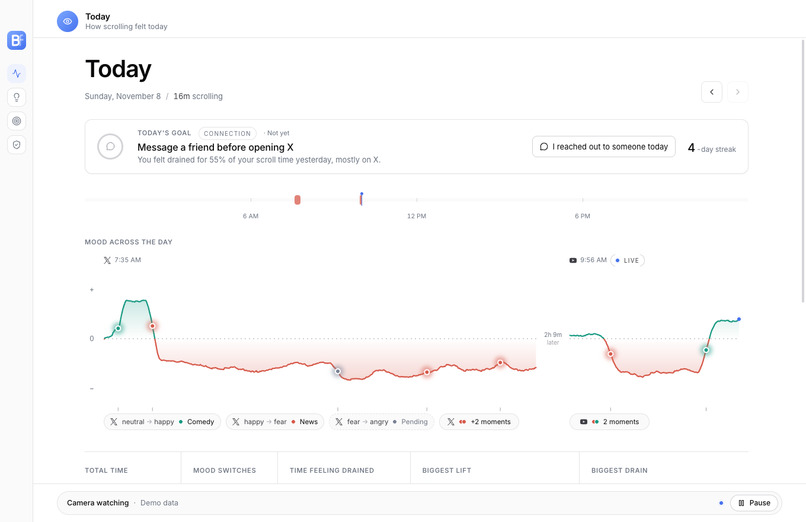
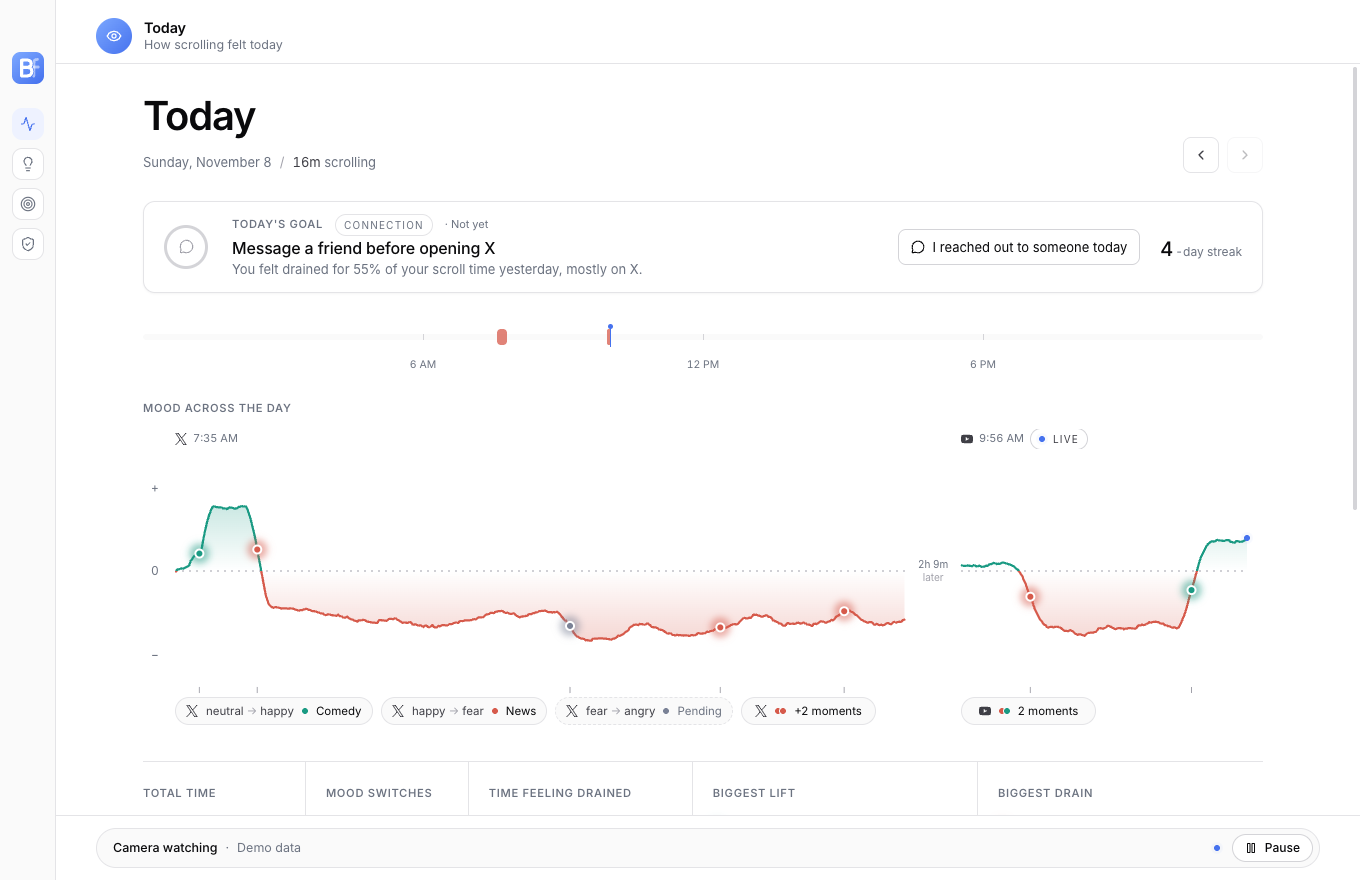
Today Page
-
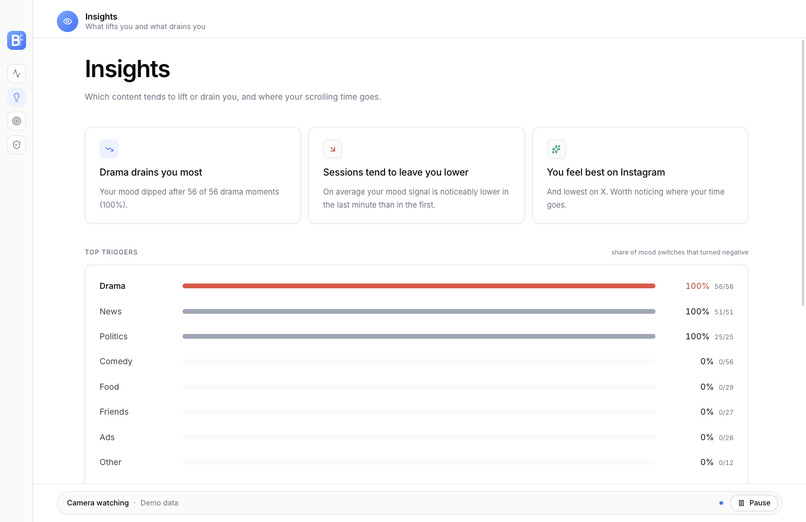
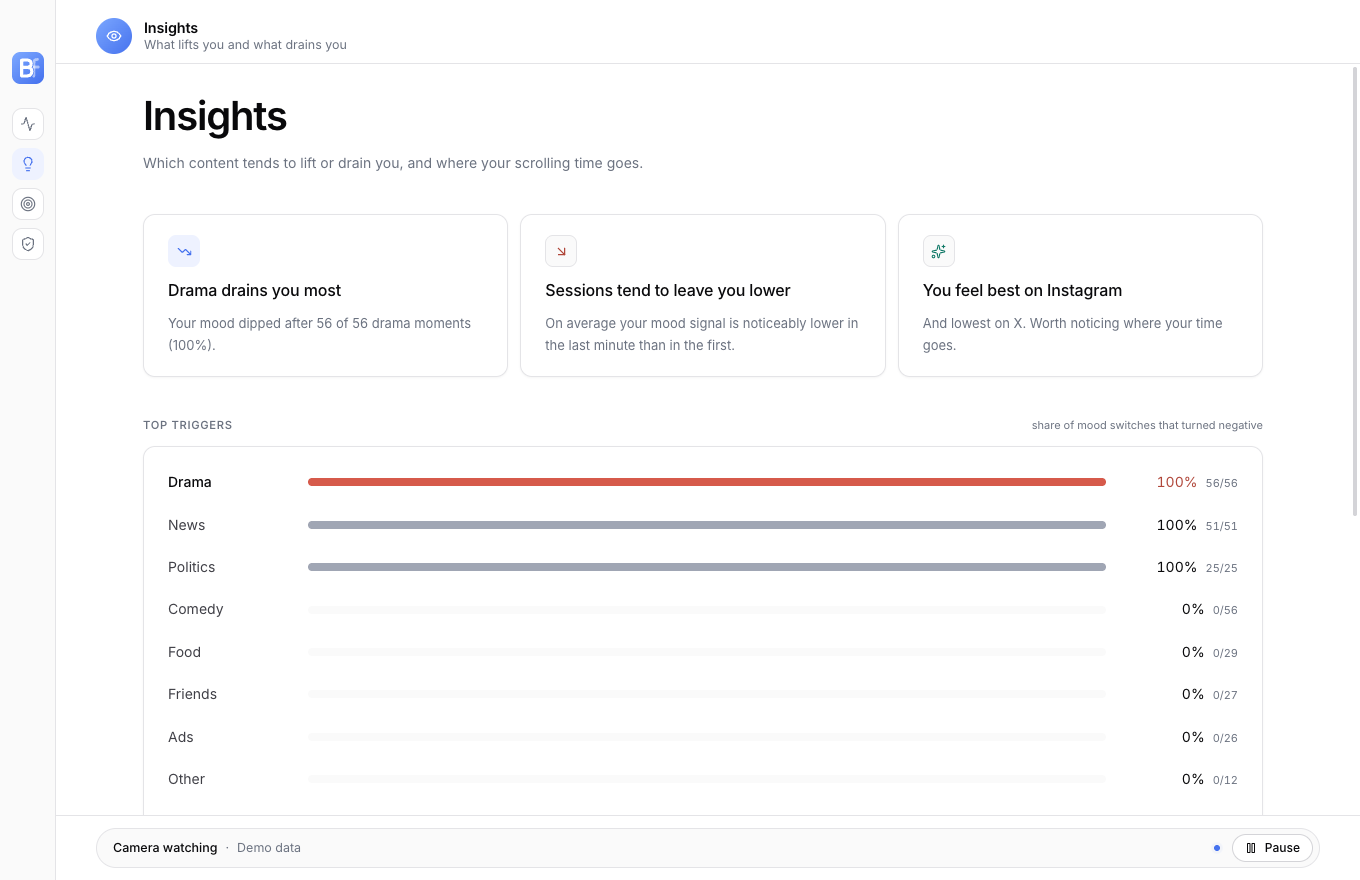
Insights Page
-
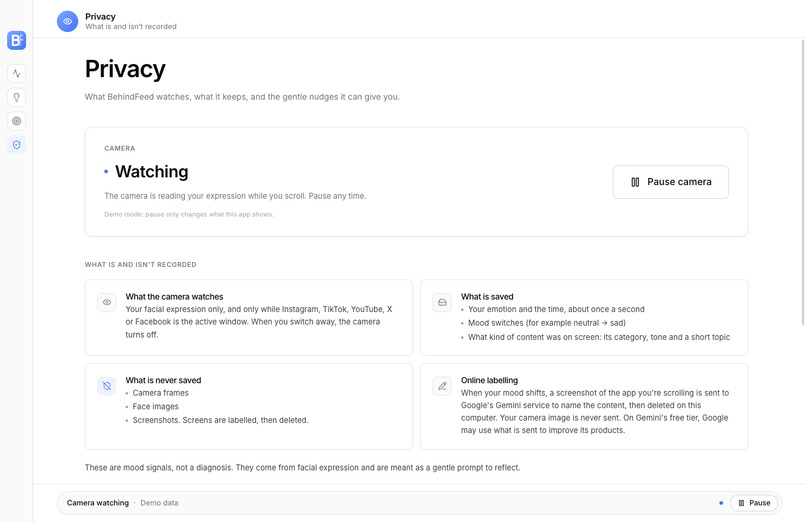
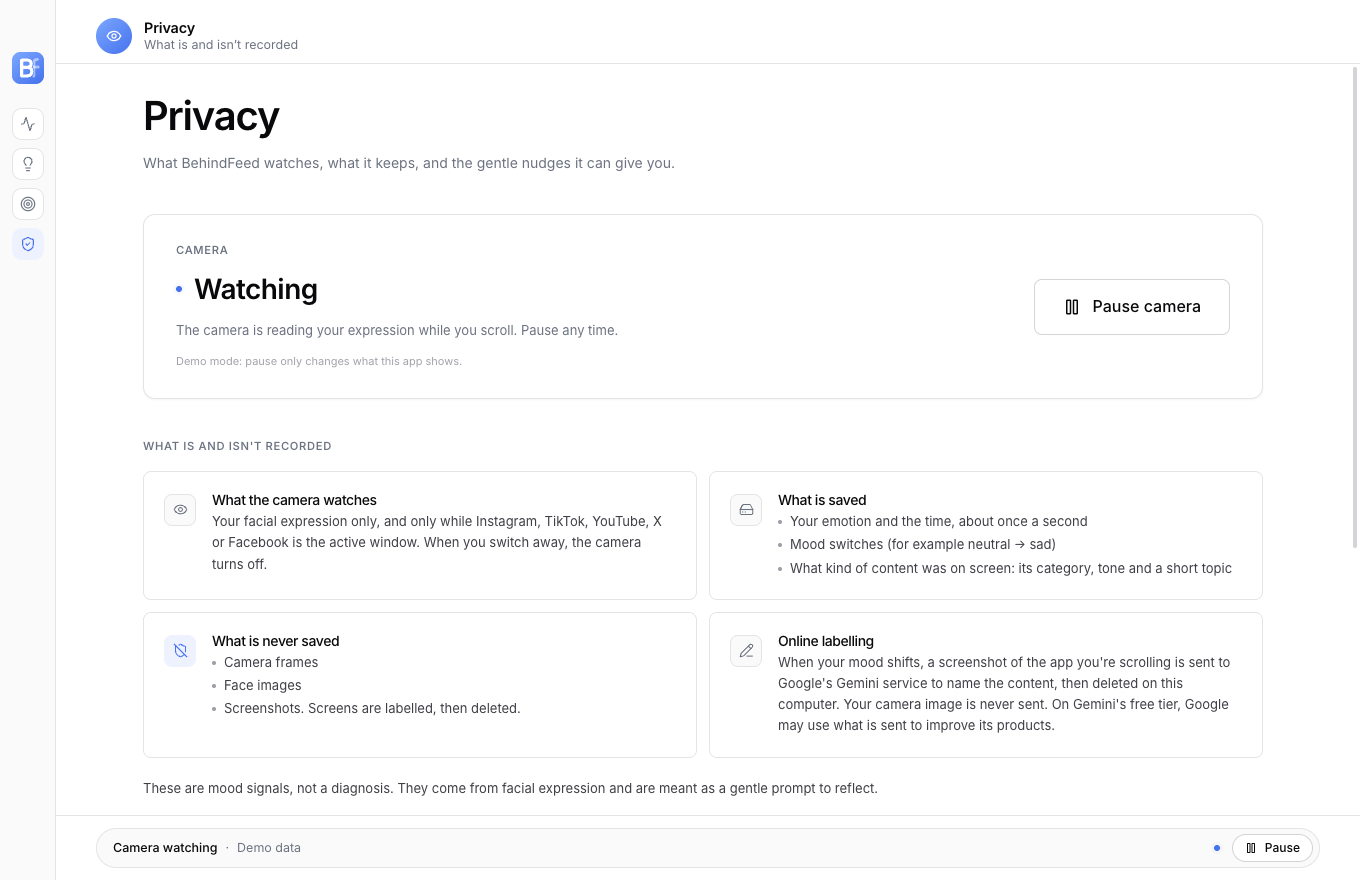
Privacy Page
-
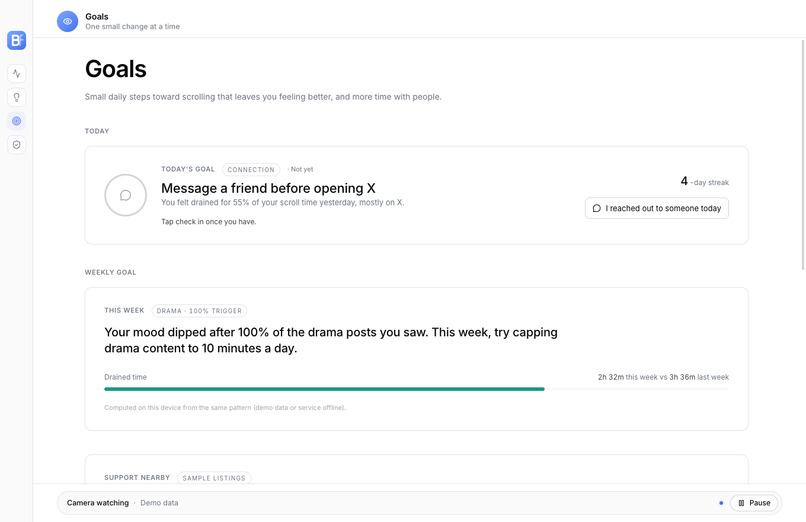
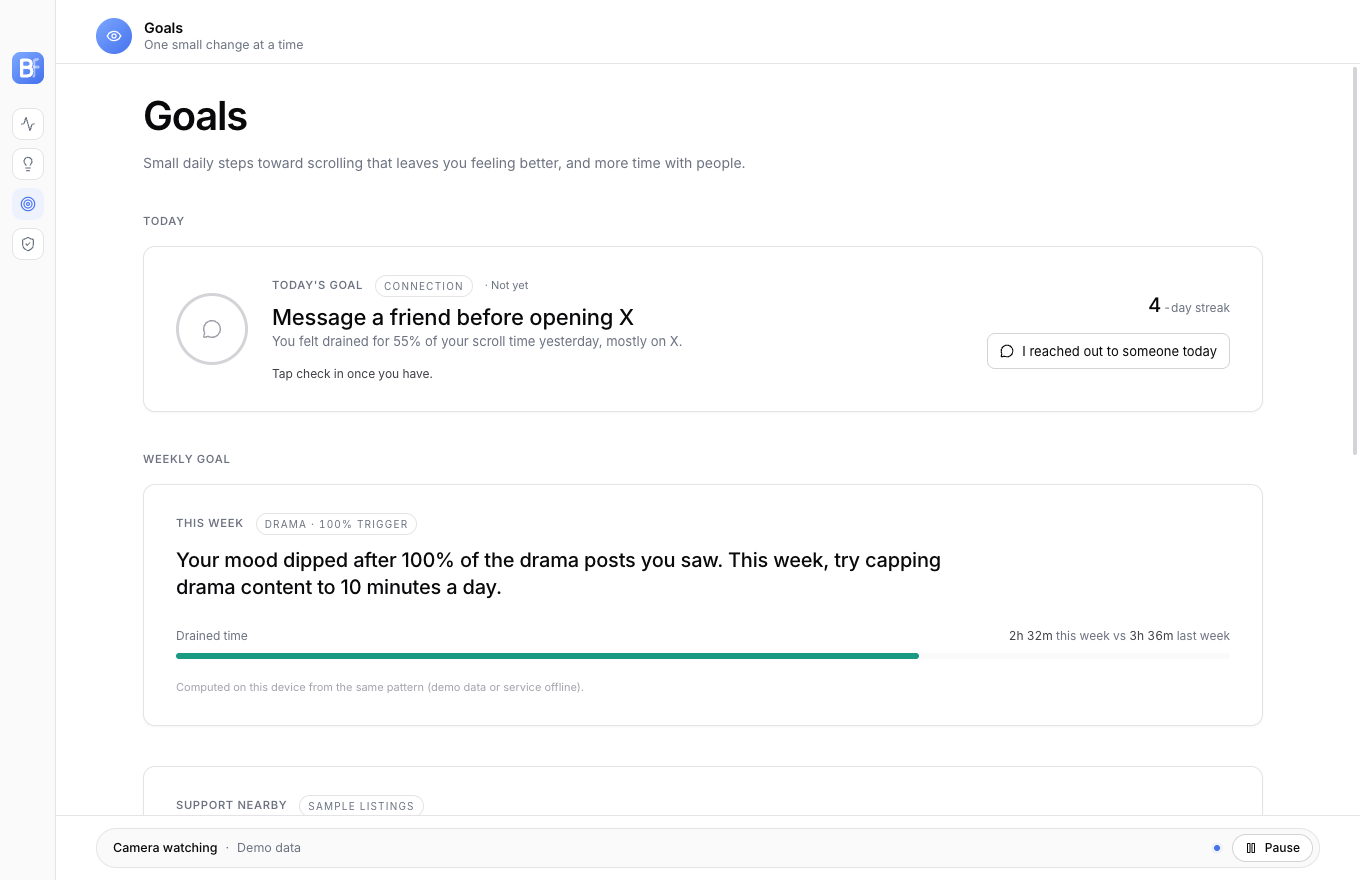
Goals Page
Inspiration
Canadians spend hours a day on social media, and most of that time is scrolling without noticing what it does to how we feel. Among Canadian teens, every extra hour of daily social media use comes with 15% higher odds of moderate-to-severe depression (University of Alberta / COMPASS study). Only 14% of Canadian youth stayed within screen-time guidelines in both 2019 and 2023, and that group reported better mental health and life satisfaction (Statistics Canada). The problem isn’t that people don’t care. It’s that the effect is invisible: you close the app feeling a bit worse and can’t say why. We wanted to make that drift visible, scroll by scroll, without judging anyone and without recording their face.
What it does
BehindFeed is a desktop app for doomscrollers. When Instagram, TikTok, YouTube, X or Facebook is the window in front, the camera turns on and reads your facial expression about once a second. When your mood shifts and holds for two seconds, BehindFeed notes it, captures what was on screen at that moment, and labels the content: its category (news, comedy, drama, friends…), its tone and a short topic. Switch away, and the camera turns off. The dashboard then shows what scrolling did to you:
- Today: a mood line across all of today’s scrolling, with each mood switch tagged by the content that caused it (“neutral → sad · News”).
- Session report: one session minute by minute, with every moment and what was on screen.
- Insights: which content tends to drain you (“Drama drains you most: your mood dipped after 56 of 56 drama moments”), and how you feel on each platform.
- Goals: one small daily goal picked from yesterday’s pattern (“Message a friend before opening X”), a weekly goal with progress, and a streak.
- Gentle nudges: after five minutes of draining content, a quiet notification suggests reaching out to someone instead.
- Support nearby: in a heavily draining week, the Goals page lists real Calgary and Alberta support services (Distress Centre Calgary, 211 Alberta, 9-8-8).
Private and in your control by design
- Never saved: camera frames and face images. Your face is read in memory on your device and turned into an emotion label and a number.
- No screen recording: the screen is captured only at a mood switch, and only the window in front. BehindFeed’s own windows are always blacked out. Screenshots are sent to Google Gemini for the content label, then dropped.
- Stored on your computer only: text and numbers in a local database.
- The camera only runs while a social site is in front. You can pause it from any page with one click; it turns off within a second.
- Informed first: a first-launch screen explains exactly what is and isn’t recorded before anything starts.
- Mood signals, not a diagnosis: the app says so wherever it shows a result.
How we built it
Face (computer vision):
- The webcam feed goes through YuNet face detection, the MediaPipe face landmarker (smiles, raised brows) and HSEmotion, an ONNX emotion model that also gives a positive-to-negative mood score.
- A short personal baseline calibrates to your resting face.
- A mood switch is recorded when a new mood holds for two seconds.
Screen: at each mood switch, a few frames of the front window are captured in memory and sent to Google Gemini, which returns category, tone and topic as structured data.
Backend:
- FastAPI with SQLite on your own computer. It collects the emotion, switch and label events, works out insights and goals, and serves the dashboard.
- A detector tracks which app or browser tab is in front and starts and ends scroll sessions automatically. On macOS it reads the Safari or Chrome tab through AppleScript.
Dashboard: Electron + React + TypeScript, Tailwind and Motion, with a custom d3 mood ribbon for the timelines.
One install, no setup:
- The Python half (backend, camera, models) is packed into a single program with PyInstaller and bundled into the app with electron-builder: a .dmg for macOS and a .exe installer for Windows.
- GitHub Actions builds both, self-tests the models and attaches them to a GitHub Release.
Landing page: Astro on AWS Amplify. Downloads are behind an Auth0 login: click Download, sign in, and your installer starts.
Challenges we ran into
- Shipping machine learning as an ordinary app. MediaPipe, OpenCV, ONNX Runtime and a web server don’t naturally fit in one installer. We packaged them into one program that the app starts and stops itself, so a user never sees Python, a terminal or a setup step.
- Clean shutdown. Quitting the app at first left the camera process running in the background. We had to make sure the camera always turned off when the app quit.
- Knowing what’s on screen without invasive permissions. On macOS we read the browser’s current tab instead of asking for full Accessibility access, and matched it to the five platforms.
- Privacy versus usefulness. We had to decide exactly what to keep: emotions and labels as text, never images. Then we built the pipeline so screenshots never touch the disk and BehindFeed’s own windows can’t be captured.
- Unsigned apps on macOS. Without a paid Apple certificate, macOS forgets permissions after every rebuild and quietly returns black screenshots. We learned to spot and reset this.
- Integration under time pressure. Four people, four parts (face, screen, backend, dashboard), joined by a written contract of four event formats, so each part could be built and tested on its own and connected late at night.
Accomplishments that we're proud of
- A complete loop that runs on a real laptop: scroll Instagram, your expression shifts, the content is labelled, and the dashboard shows it live within seconds.
- A downloadable app for macOS and Windows with the models bundled. Download, install, scroll.
- Privacy built into how it works: no frames, faces or screenshots are ever stored.
- A calm, readable dashboard that shows patterns instead of shaming you for screen time.
What we learned
- Showing people their own pattern (“drama drains you, comedy lifts you”) is more useful than a screen-time limit.
- Agreeing on the data formats first is what let four people build four parts in parallel and still have them fit.
- Keeping AI in a narrow role (label the content at one moment) made it reliable and easy to explain.
- Packaging and permissions take as long as the features. “It works on my machine” is a long way from “download and it just works”.
What's next for BehindFeed
- Code-signed, notarized installers, so there are no security warnings.
- Labelling the content on the device, so screenshots never leave the computer.
- Turning the hidden Scroll Circle feature back on: a small group of friends sharing goals and streaks (never moods or content).
- A study with students over a term: does seeing their pattern change what they scroll and how they feel?
AI disclosure
Building it: we used Claude Code (Anthropic) as a coding assistant throughout the project, mainly for packaging the desktop app, the release pipeline, the dashboard redesign and the landing page login. We made the product decisions: the idea, what is and isn’t recorded, the privacy rules, the metrics and the design direction.
Inside the product: Google Gemini labels the content on screen at a mood switch (category, tone, topic). The emotion reading uses on-device models (YuNet, MediaPipe, HSEmotion), not a cloud AI.
Team: Raad (computer vision, face) · Giresh (computer vision, screen) · Allen (backend, packaging, landing) · Ahmad Cheema (frontend)
