-
-
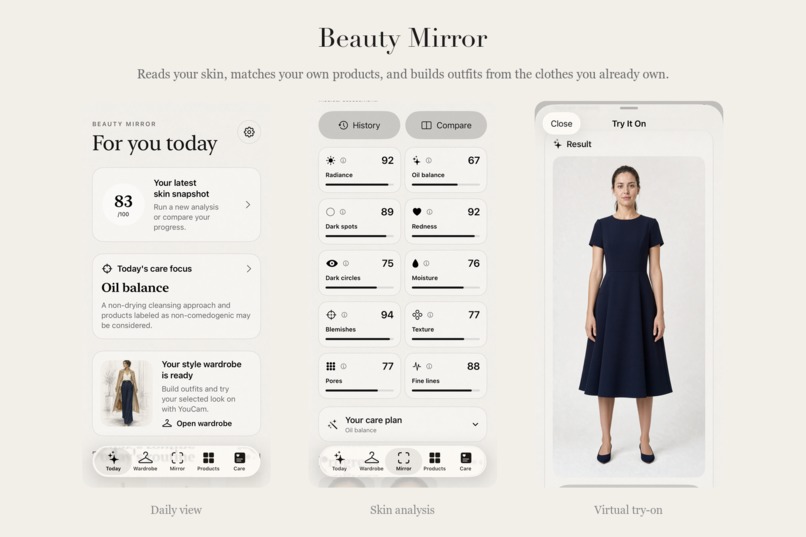
Skin analysis, your own products and your own wardrobe, in one daily loop.
-
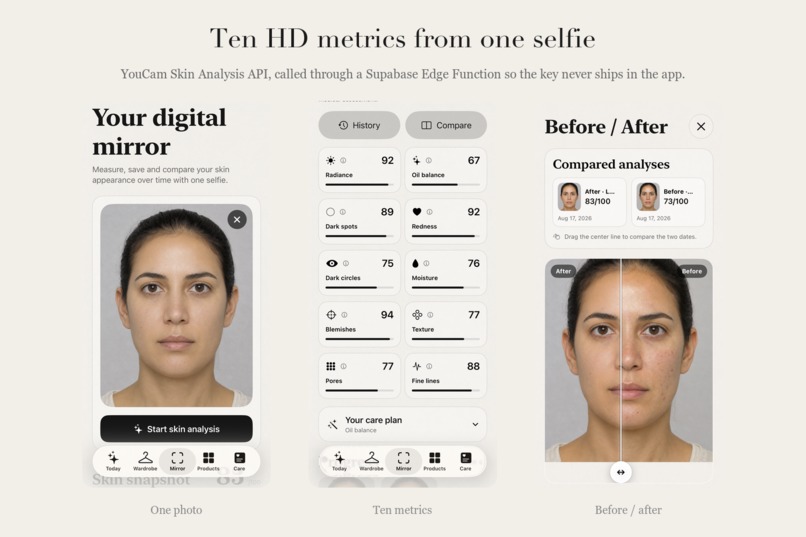
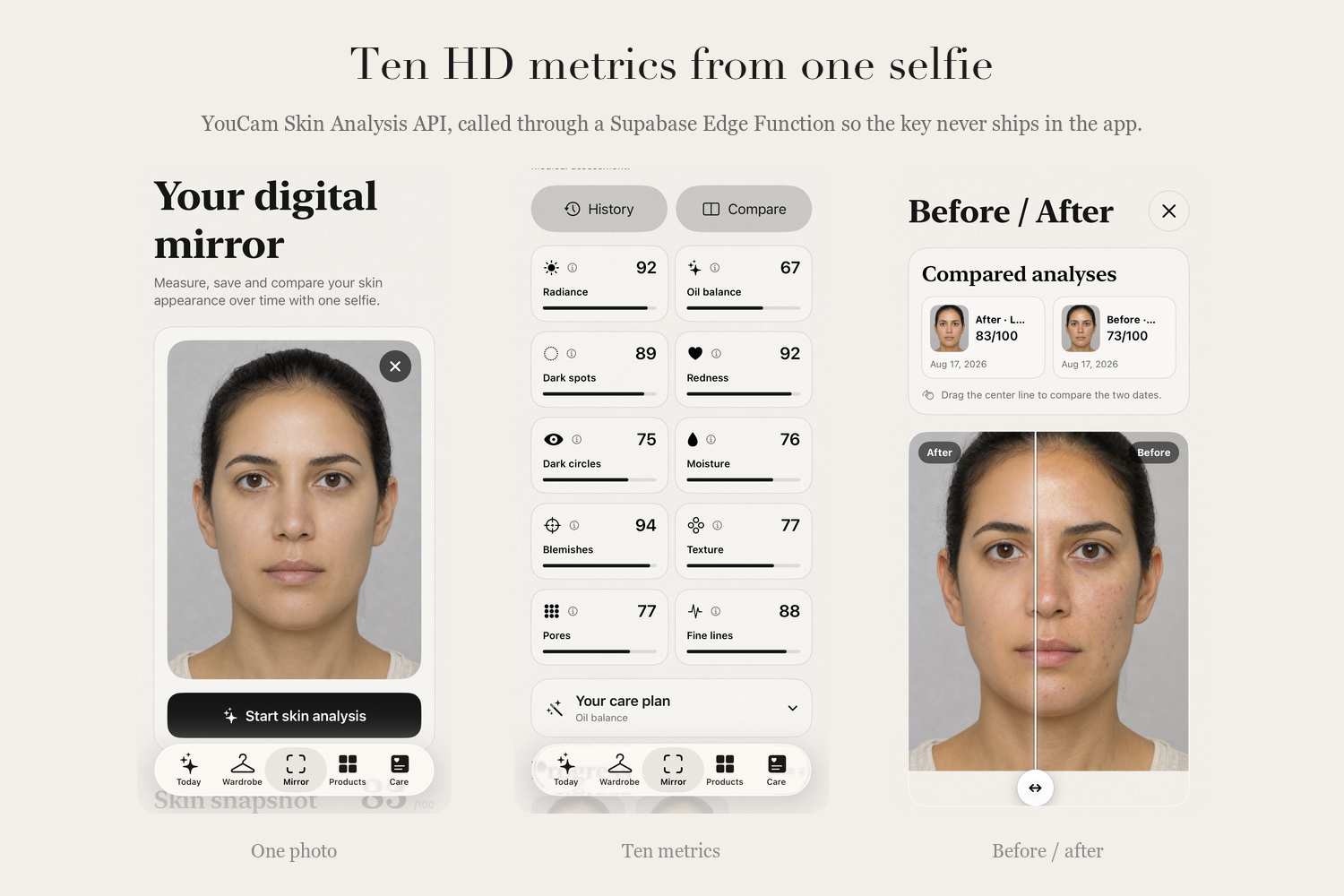
One selfie, ten HD metrics from the YouCam Skin Analysis API, saved and compared over time.
-
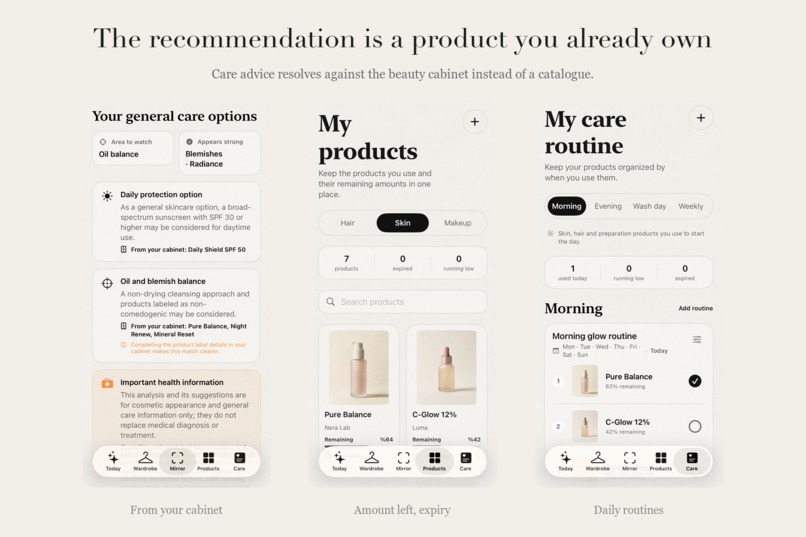
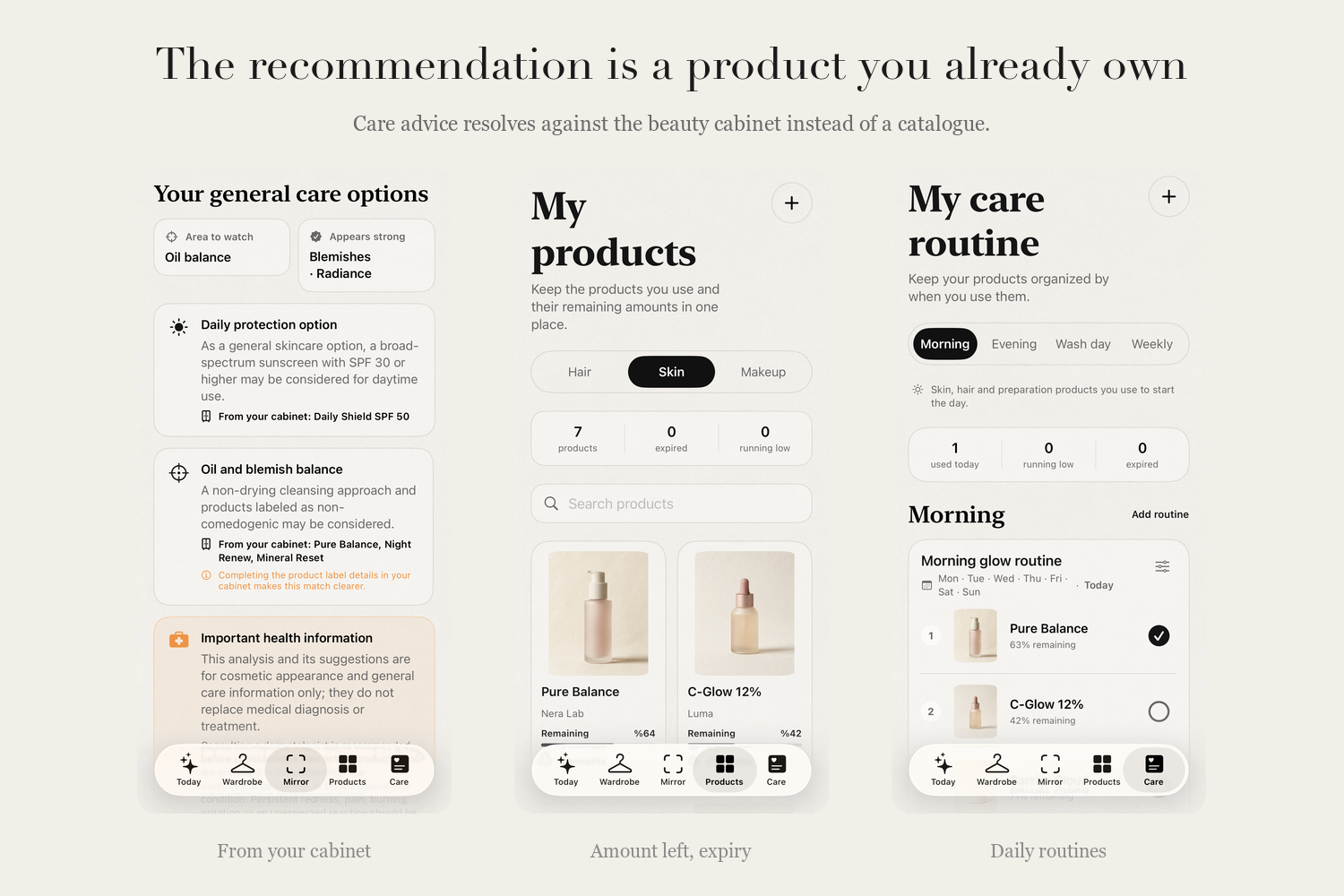
The care focus becomes a need, and the need resolves against products already in the cabinet.
-
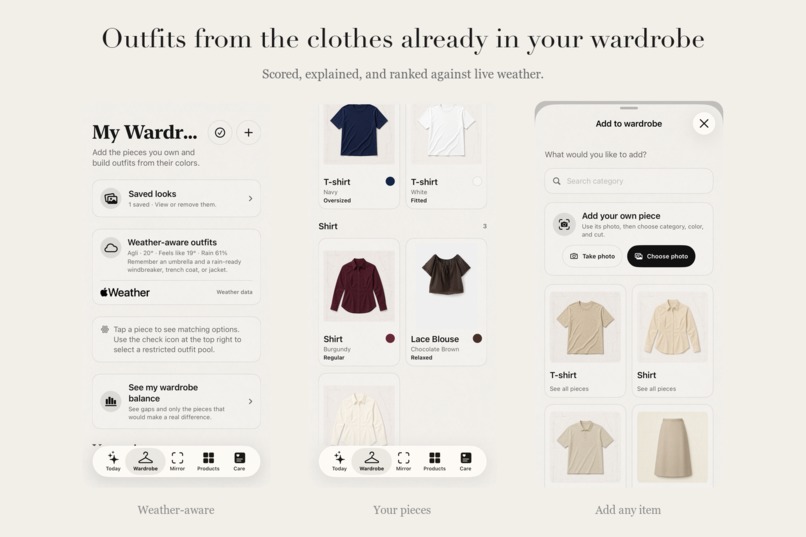
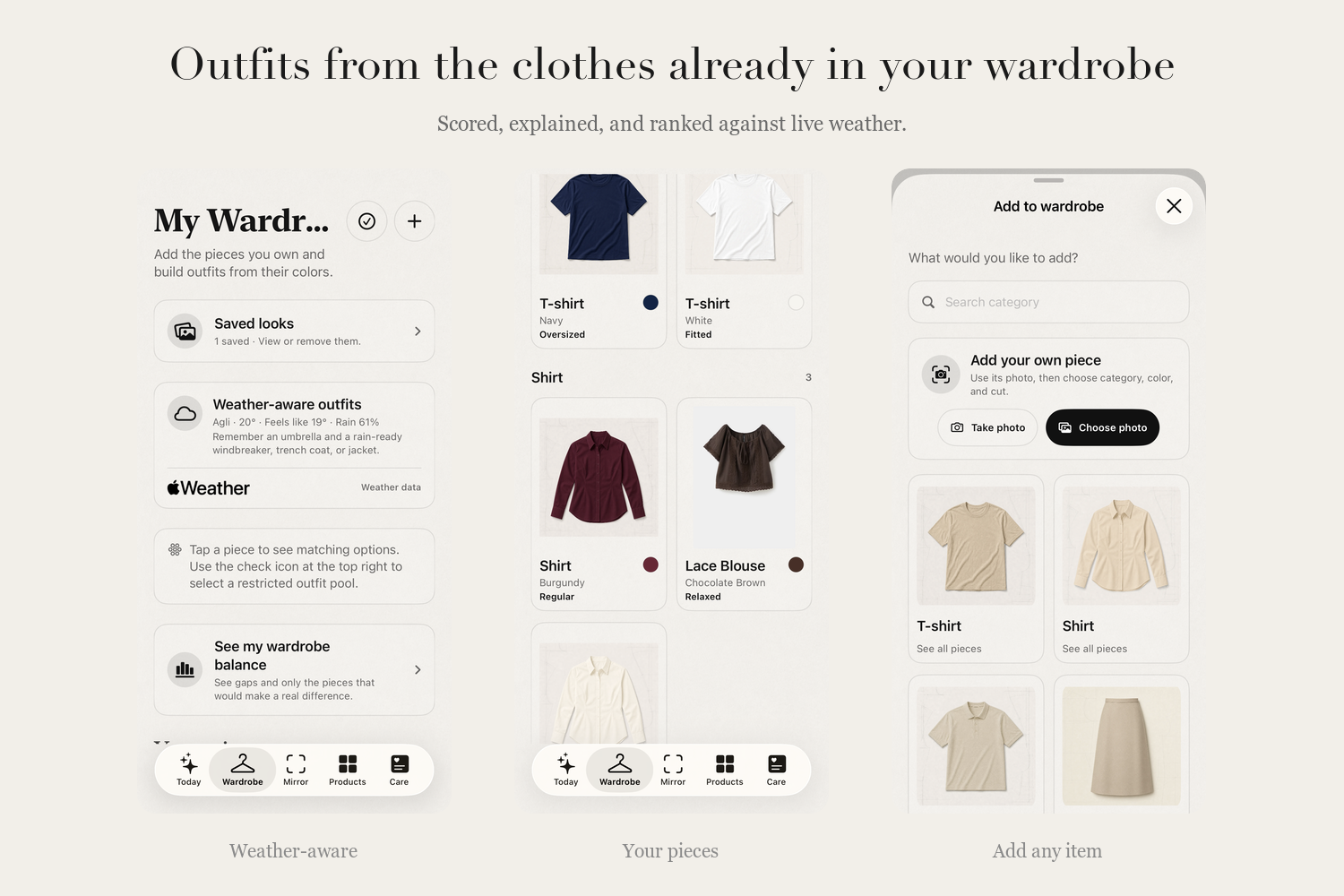
Outfits built only from clothes the user owns, scored with a reason and ranked against live weather.
-
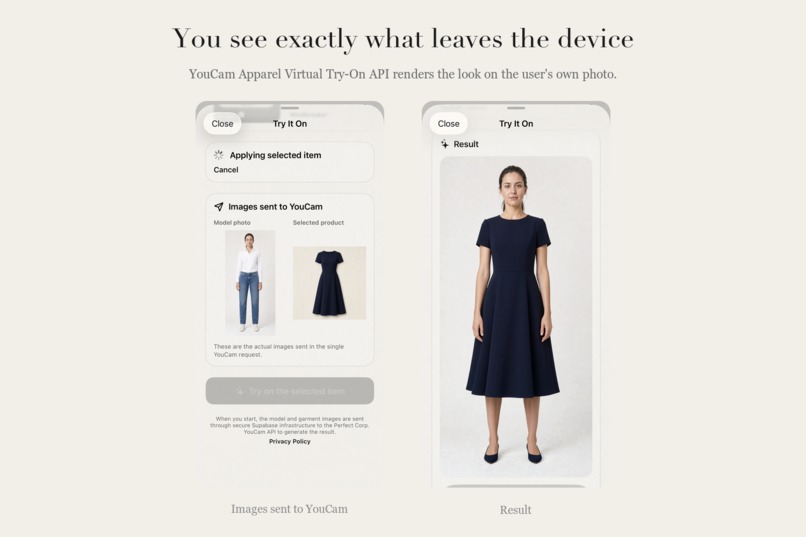
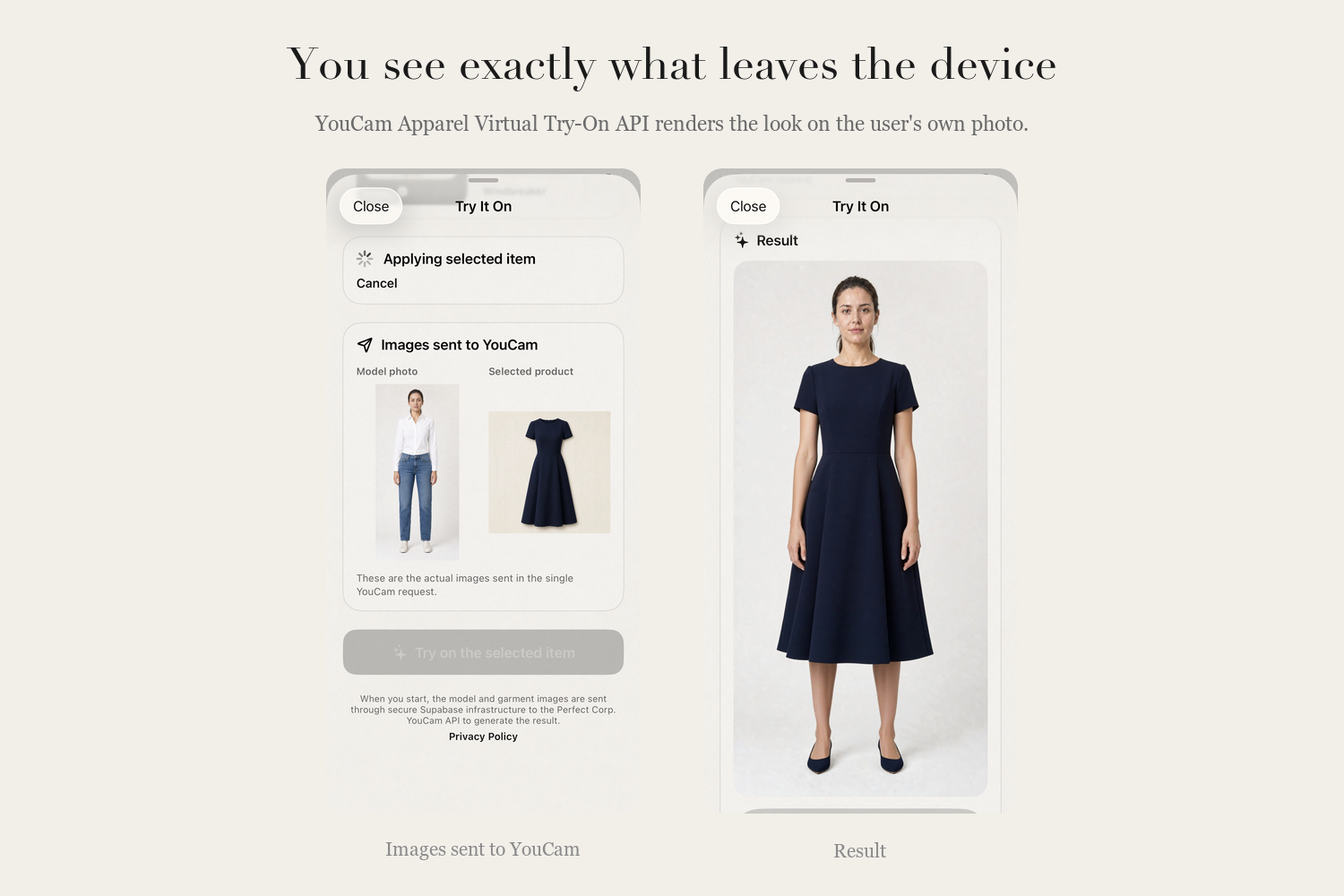
The app shows exactly which images are sent to the YouCam Apparel Virtual Try-On API.
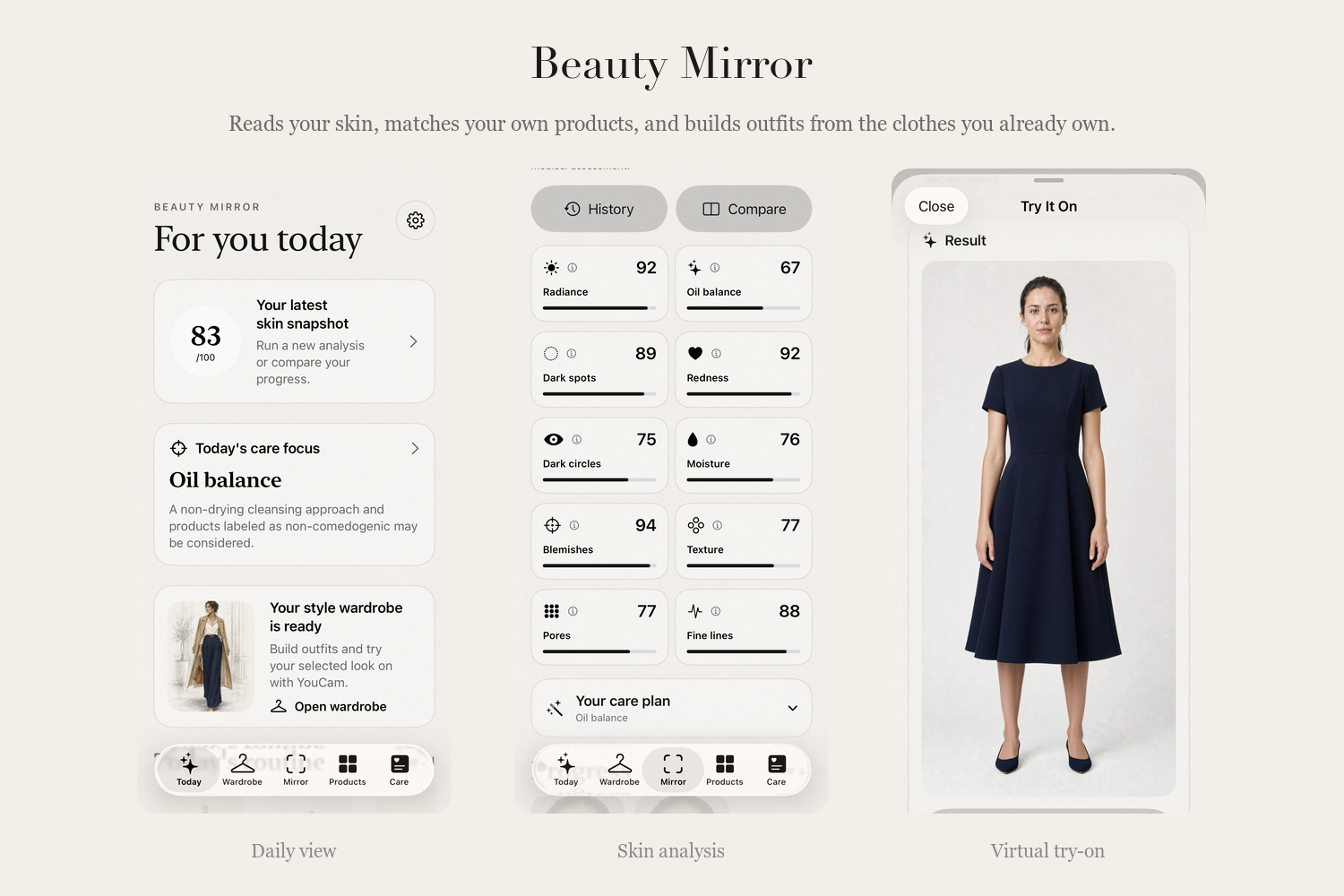
Inspiration
Most beauty apps we tried ended up in the same place: a catalogue. Scan your face, get a score, receive a product to buy. The measurement was never the point — it was the justification for a purchase.
What felt missing was the step in between. A skin measurement doesn't have to name a brand. It can name the need. And more often than not, the answer to that need is already sitting at home, inside a half-used serum or a moisturiser that got pushed to the back of the shelf months ago.
We built Beauty Mirror to add that step. What comes out of the YouCam analysis doesn't go looking for a storefront. It looks in the user's own cabinet first.
What it does
Beauty Mirror is a native iOS app, distributed through TestFlight. It connects what your skin needs with what you already have.
AI Skin Check. One photo is analysed across ten HD metrics: moisture, radiance, texture, pores, oiliness, redness, blemishes, dark circles, dark spots and fine lines. Every analysis is stored on the device, so measurements can be compared over time rather than read once and forgotten.
The need first, then the match. Beauty Mirror reads the weakest metrics and sets a care focus for the day. It then turns that focus into a definition of a need — which kind of product, and which property matters. A broad-spectrum sunscreen at SPF 30 or above for daytime, say, or a non-drying cleansing approach and non-comedogenic products where oil balance is the concern.
Only then does it look at your cabinet. If you already own something that fits, it names it. If you don't, the need simply stands, and you decide for yourself now that you know what to look for. The app doesn't tell you where to buy it and doesn't send you anywhere. That part is yours.
The beauty cabinet. Your skincare, haircare and makeup products live in the app with how much is left, when each was opened and when it expires. What is running low or about to turn surfaces on its own. Nothing gets forgotten at the back, and nothing gets bought twice.
Care routines. Morning, evening, hair-wash day and weekly plans, with products checked off as they are used, so a routine becomes something you can actually see.
Style and virtual try-on. The same logic carries over to the wardrobe. Beauty Mirror builds outfits from the clothes you already own, weighing body proportions, skin tone, hair and eye colour, the season and the day's weather. It scores each outfit and explains why it works. Any look you like can be rendered on your own photo with the YouCam Apparel Virtual Try-On API.
You can also add a photo of something you liked in a store. The app will show you how that piece sits with the rest of your wardrobe and let you try it on before you commit. So this isn't an app against shopping — it's an app for knowing what you're shopping for.
Beauty Mirror runs in Turkish and English. It tracks cosmetic appearance and is not a medical product.
How we built it
A native SwiftUI app for iOS 17 and later.
Neither YouCam API is called from the device. Both go through Supabase Edge Functions, which means the YouCam API key lives only in a server-side secret and never ships inside the app bundle.
Skin Analysis (s2s/v2.1) — the Edge Function registers the selfie, uploads it to the signed URL YouCam returns, starts the task with all ten hd_* actions and polls until it completes. The scores come back and are flattened into something compact the app can render and store. Before any of that, the client resizes and re-encodes the photo, satisfying YouCam's 1080-pixel short-side requirement for HD analysis and the 10 MB ceiling while the image is still on the phone.
Apparel Virtual Try-On (s2s/v2.0) — the same proxy pattern, applying the chosen garment to the user's own photo.
Scores and analysis photos are kept in the app's Application Support directory on the device. A photo is transmitted only after the user has explicitly started an analysis or a try-on.
The outfit engine runs entirely inside the app. Colours are scored in pairs, the outfit gets a single compatibility percentage, the weakest pair — the one dragging that number down — is flagged, and structural conflicts are blocked outright. The day's weather from WeatherKit re-ranks the results, and if an outfit is missing an outer layer, the most suitable one in the wardrobe is added.
Underneath both engines sit rule tables we assembled by hand. On the skin side: which measurement implies which kind of product, and when a given property actually matters. On the wardrobe side: pairwise colour scores, how skin tone sits with hair and eye colour, how a cut reads against body proportions, which categories belong to which season, and how weather shifts those weights. None of it was derived from a model. We read through hundreds of health, beauty and fashion sources, pulled out what they agreed on, discarded what they contradicted each other on, and built the tables from what was left. The code is the layer that applies those rules — every number the app shows has something read behind it.
Challenges we ran into
Getting HD skin analysis to work reliably meant solving image preparation on the client. Front-camera selfies routinely fall under the short-side limit once they've been cropped, and resizing them had to keep enough quality for the HD models to return scores worth showing.
The harder problem was interpretation. Ten raw metrics mean nothing to an ordinary user. We had to decide which one deserves attention today, say it in plain language, turn it into a definition of a need, and connect that definition to the products someone actually owns. Most of the product work went into that layer.
The case where nothing matches had to be designed too. If the cabinet holds no suitable product, the app doesn't come back empty. It leaves the need stated. The user knows what they're looking for, and the rest is up to them.
On the wardrobe side the difficulty was a different shape entirely. An outfit has to be wearable before it can be scored. The engine must never put two pairs of shoes, two bottoms, or a separate top over a dress into the same outfit, so we wrote a structural validation layer for it. Then a second problem appeared: a wardrobe often can't complete an outfit at all. If there's no in-season piece to finish the top, bottom and shoes chain for summer, the app shouldn't invent something — it should say what's missing.
Weather added a third layer. When it's cold or wet, an outer layer has to enter the outfit, but that piece has to be one the user owns, it has to keep the outfit structurally valid, and it can't wreck the colour harmony. The engine picks the piece that satisfies all three, and leaves the outfit alone when nothing does.
None of that was the longest part of the work, though. The longest part wasn't code at all — it was the knowledge sitting behind these engines, and the reading it took to turn it into rules we could defend.
Accomplishments that we're proud of
This is a native iOS app, not a web demo. A real device, a real front camera, on-device storage, TestFlight distribution, a privacy policy, two languages and a medical disclaimer. It behaves like something a person could install today.
We also closed the distance between measuring and doing. Beauty Mirror doesn't hand over a score and stop. It ties that score to a need, and the need — whenever possible — to a product the user already owns. Without pointing anyone at a store.
What we learned
The value of a beauty API isn't in the score it returns. It's in what you attach to the score. YouCam gave us clinically-styled measurements in seconds; the difference between an interesting demo and something people keep opening came from turning those numbers into one clear thing to do today.
What's next for Beauty Mirror
Four things in the near term. Trend detection across the analysis history, so the app can tell a user which product tracks with which improvement. Reminders driven by expiry dates and gaps in a routine. For a need with no match in the cabinet, letting the user add the product from a source of their own choosing and see how it fits. And a deeper wardrobe analysis: how many new outfits a single added piece would unlock.
The larger goal is to bring every YouCam API into one app. Skin analysis and apparel try-on are a starting point; shade matching, makeup try-on, hair colour and accessory try-on all belong to the same daily loop. To a user these aren't separate features. They're different faces of one question: how do I want to look today, and what do I already have for it.
That's also why we believe in this project. Beauty Mirror isn't a skin analysis app. It's a demonstration that an analysis result can be made genuinely useful. Most apps in this category hand over the measurement and stop there. We tied the measurement to a need, the need to a cabinet and a wardrobe, and from there to the decision someone makes in front of the mirror that morning. The power of the YouCam APIs shows up after the measurement, not in it — and we see this hackathon as a good place to show that.
A request for the YouCam API
There is one real limit we ran into, and we'd rather leave it here as a request than leave it unsaid.
Beauty Mirror composes an outfit as a whole: top, bottom, shoes, and an outer layer when the weather calls for one, all scored against each other with the reasoning spelled out. But Apparel Virtual Try-On currently applies a single garment per request, and shoes and accessories can't be sent at all. So the user never gets to see the outfit the app recommended on their own photo — only the one piece they picked from it. We had to say as much inside the app.
Being able to apply several garments in one request — a shirt, trousers and shoes on the same model photo — would make the API considerably more meaningful for any app that composes outfits rather than showing them one at a time. On our side the engine already decides what goes together. The only thing missing is being able to show that decision as a single image. And that is exactly where a purchase decision gets made: not when someone sees a garment, but when they see the whole look.
Built With
- apparel-virtual-try-on
- deno
- edge-functions
- ios
- perfect-corp
- skin-analysis-api
- supabase
- swift
- swiftui
- typescript
- youcam-api

Log in or sign up for Devpost to join the conversation.