Inspiration
We're a group of college friends living in an apartment who love music and experimenting with DJing. We've spent plenty of time messing around with online DJ websites, layering instrumentals, mixing vocals from different songs, and trying to find the perfect transitions.
But while these websites made DJing accessible, we kept running into the limitations of controlling everything with a mouse and keyboard. Mixing multiple elements at once felt awkward, and we wanted more freedom to experiment with individual parts of a song.
As college students, we also don't exactly have the budget or space for a professional DJ setup. So we started thinking:
What if we could take the accessibility of browser-based DJ software and combine it with the physical experience of using real DJ equipment, without actually needing any?
That's where BeatDrop came from. We wanted to build something that would let us do more than just click buttons and move sliders. We wanted to actually reach into the music and mix it with our hands.
Live demo
- Open the DJ board: https://beatdrop-web.onrender.com/
- To use the webcam controls at the same time, also open https://beatdrop-web.onrender.com/spatial
What it does
BeatDrop turns your laptop and webcam into a fully-fledged DJ setup without expensive equipment. By incorporating hand manipulation and keyboard controllers, we add multiple modes to mix music, increasing the potential for crazy drops, transitions, and mashups.
Whether you're making mashups with friends in your apartment, practicing transitions, or experimenting with your favorite songs, BeatDrop gives you the tools to mix music in a more interactive way.
01 / Dual-Deck DJ Mixing
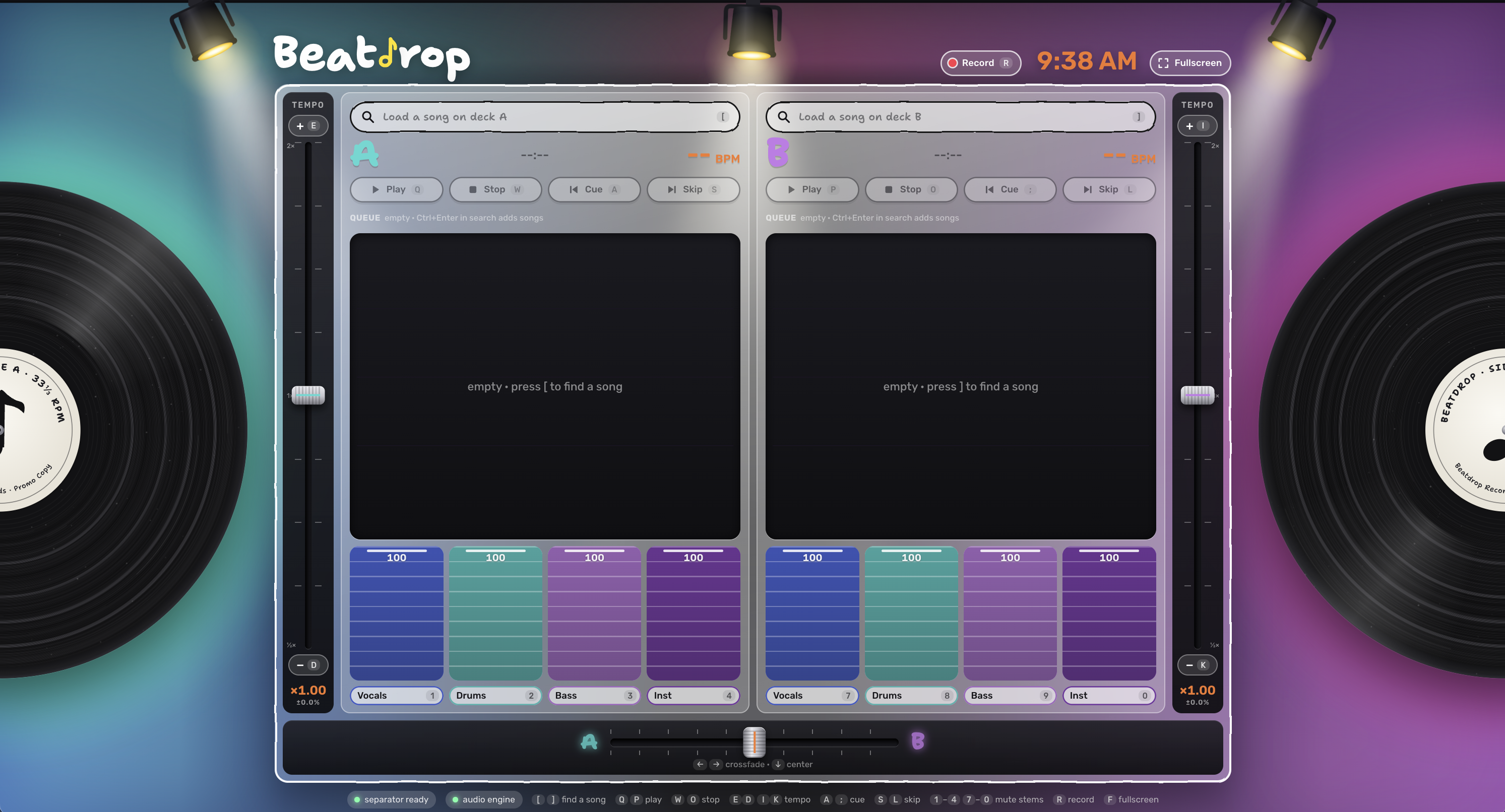
BeatDrop provides a traditional DJ interface where users can load two songs, control playback, adjust volume and tempo, and transition between tracks using a crossfader.
It brings the essential features of a physical DJ controller to your computer, making it easy to experiment with mixing different songs. It converts all the keys of your computer into controllers on a DJ board, removing the limitation of only being able to use use cursor on other mixing sites.
02 / Spatial Audio Visualization
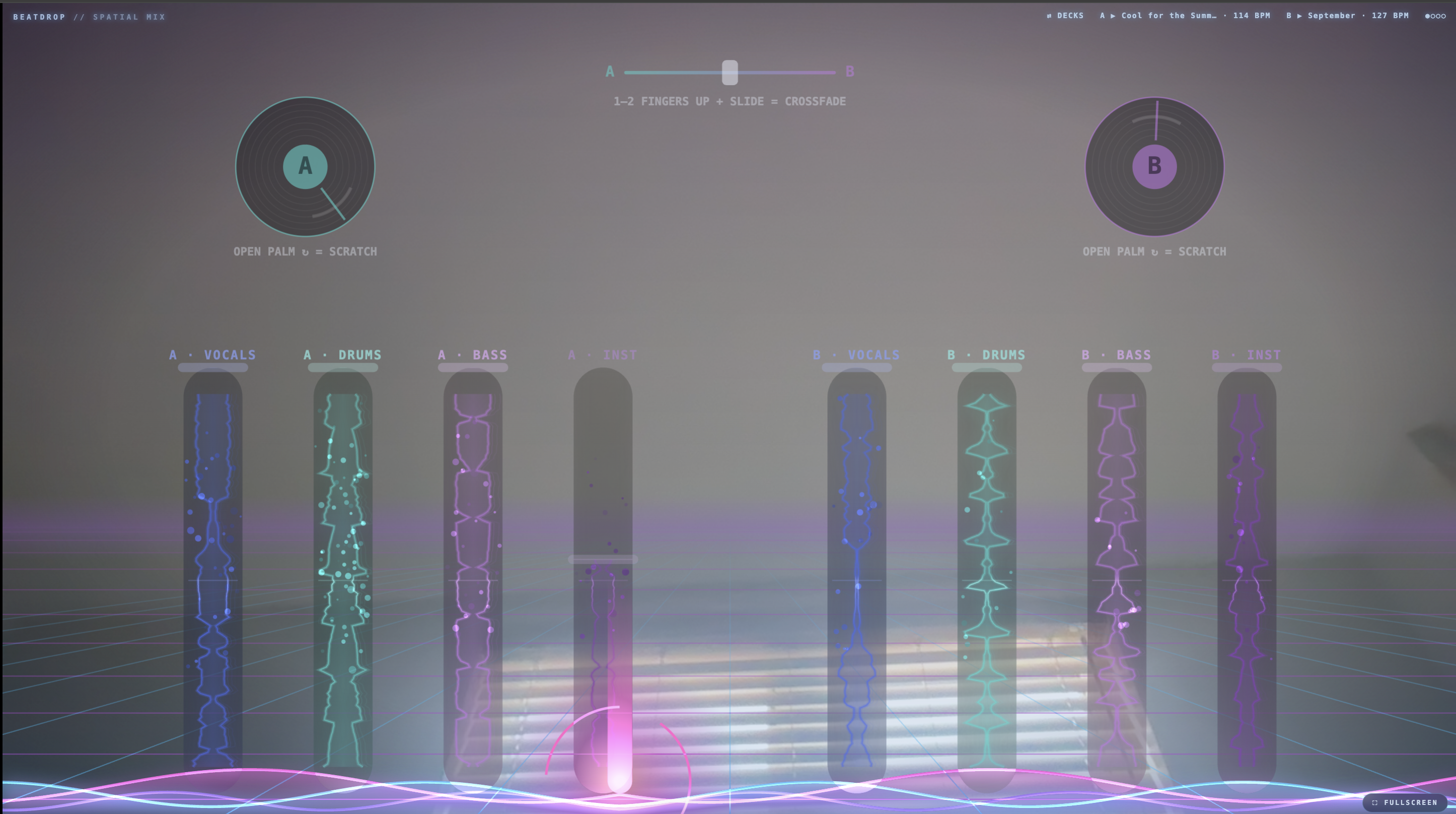
On a second screen, BeatDrop uses your webcam to display interactive waveforms and discs, representing different parts of a song.
These colorful waveforms and beats appear alongside your hands, allowing you to see and interact with the individual sounds you're mixing.
03 / Real-Time Hand Gesture Recognition
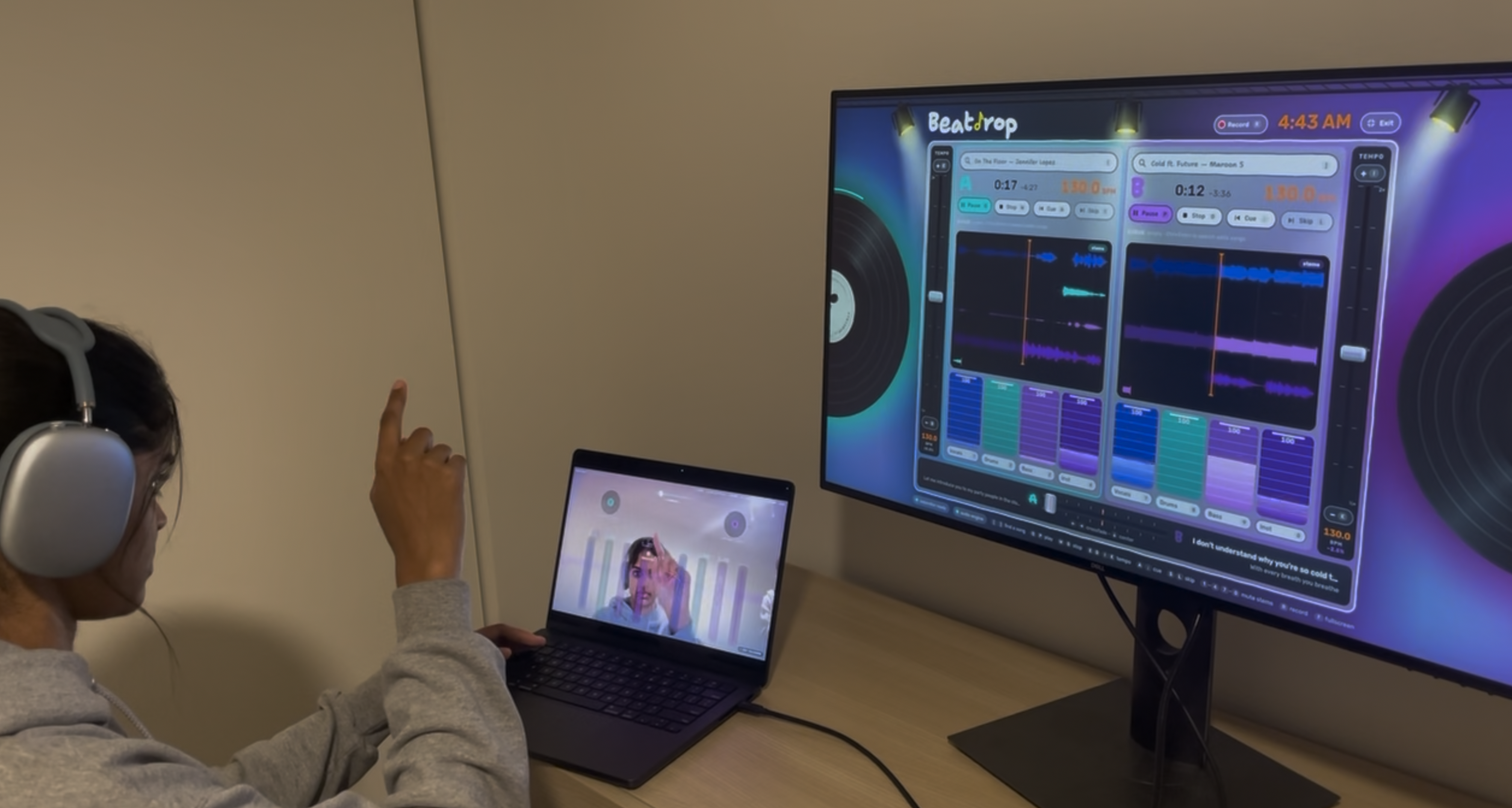
Using MediaPipe, BeatDrop tracks your hands through your webcam and translates your movements into DJ controls.
You can edit wave forms, crossfade, scratch discs, drop beats, and control multiple audio components simultaneously.
By incorporating hand manipulation, we add another modality alongside a keyboard to mix music, increasing the potential for crazy drops, transitions, and mashups.
Raise your hand to build tension. Bring it down to trigger the beat drop.
04 / Personalized Gesture Calibration with Perceptron AI
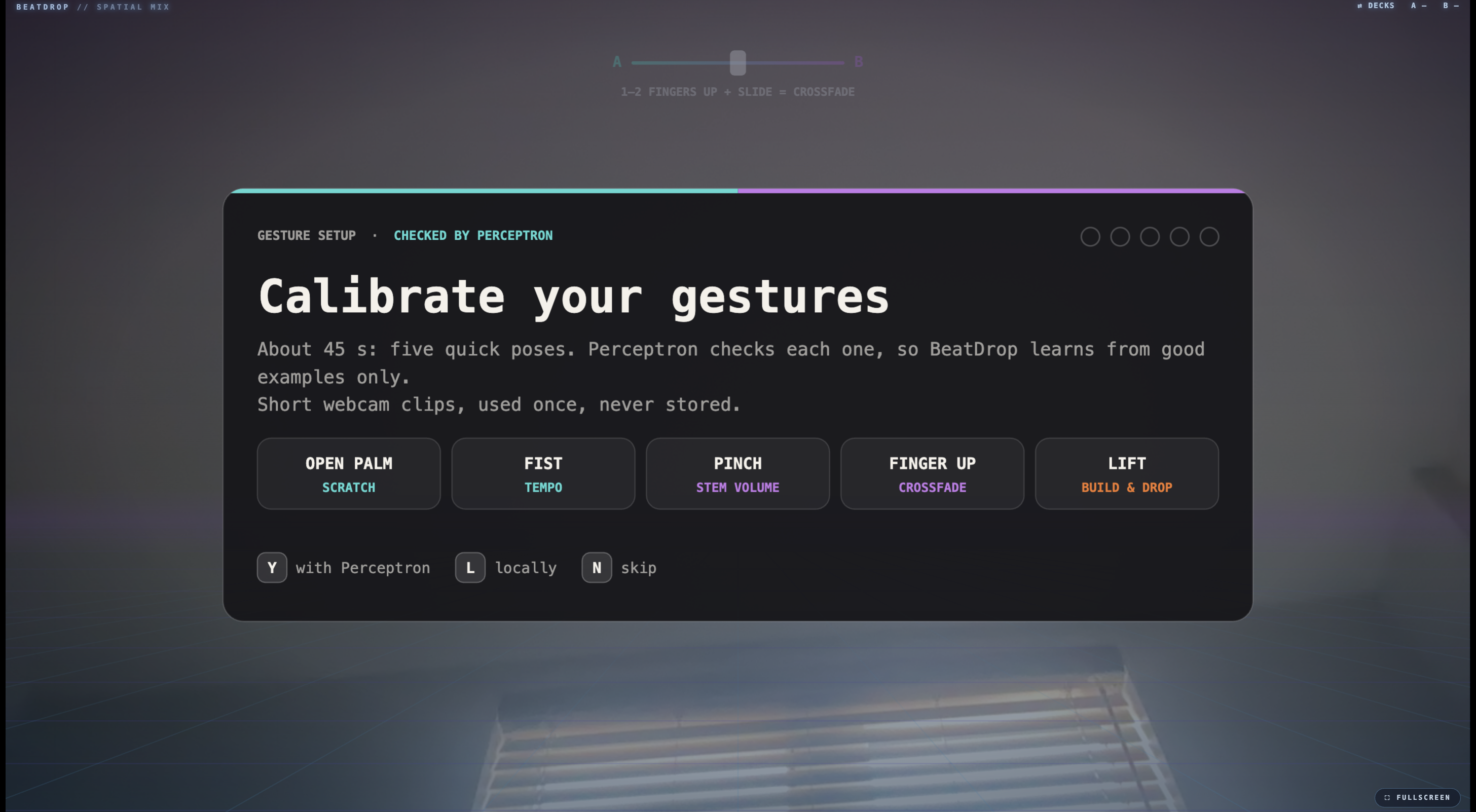
Everyone moves their hands differently, so BeatDrop is designed to adapt its gesture controls to each user.
During an optional calibration process, users demonstrate gestures such as pinching, stretching, and triggering a drop.
Perceptron AI analyzes these demonstrations to help identify whether the gestures are performed clearly, while MediaPipe records the precise positions of the user's hands.
BeatDrop uses this information to adjust its gesture recognition settings for each person.
Once calibration is complete, gesture recognition runs locally to keep interactions responsive without requiring an AI request for every movement.
05 / AI-Powered Stem Separation
BeatDrop uses Demucs to separate songs into individual audio components:
- Vocals
- Drums
- Bass
- Other instruments
This allows users to isolate specific sounds and combine elements from different tracks. For example, you can play the vocals from one song over the instrumental of another to create your own mashup.
06 / Built-In Song Queue
BeatDrop lets users build a queue straight from the search bar, so the next song is ready before the current one ends.
Search for a track, add it, and it appears in the queue right away. Users can line up several songs in advance and keep mixing without stopping to look for what’s next.
When it’s time to move on, users can skip directly to the next song in the queue, and BeatDrop will load it and start playing automatically. This keeps the energy going and makes longer sessions with friends feel more like a real DJ set.
07 / Synchronized Dual-Screen Interface
BeatDrop connects the traditional DJ mixer and the gesture-controlled interface to the same audio system.
Users can make precise adjustments through the standard controls on one screen and manipulate individual sounds with their hands on the other.
Two interfaces. One synchronized mix.
Together, these features make BeatDrop a more accessible and interactive way to DJ. Our goal is to let anyone with a computer and webcam experiment with music, create mashups, and enjoy DJing with friends.
How we built it
We started with a laptop, a webcam, and the slightly ambitious idea that we could build our own DJ setup in a weekend.
The plan was simple: take everything we loved about mixing music online and make it feel like we were actually standing behind a DJ booth.
First, we built the mixer.
Using the Web Audio API, we created a two-deck workstation where users can load songs, adjust tempos and volumes, and transition between tracks.
We then integrated Demucs to separate songs into vocals, drums, bass, and instruments, giving us the freedom to create mashups beyond simply playing two songs together.
Then we decided clicking buttons wasn't enough.
We used MediaPipe to track our hands through a webcam and built a second interface with floating waveforms that respond to gestures.
Suddenly, we were grabbing sounds, stretching waveforms, and triggering drops by moving our hands around. We spent a surprising amount of time waving at our computers trying to get everything just right.
Next, we brought in Perceptron AI.
Since everyone gestures a little differently, we designed a crucial calibration process where Perceptron evaluates gesture demonstrations and MediaPipe captures hand positions.
These measurements help personalize gesture detection while keeping the actual mixing controls fast and responsive.
The final challenge was making everything work together.
We connected both screens to the same audio system so that traditional controls and hand gestures could manipulate the same mix.
That meant plenty of debugging sessions where the visuals looked amazing but the audio had other plans.
Somewhere between testing hand gestures, replaying the same songs dozens of times, and accidentally triggering beat drops, our little apartment DJ experiment started feeling like a real workstation.
Challenges we ran into
01 / Spotify and Audio Access
We initially wanted users to connect their Spotify playlists directly to BeatDrop.
However, Spotify protects its audio streams, so even though we could access track titles and artist information, we couldn't retrieve the raw audio needed for waveform generation or AI stem separation.
We eventually ended up purchasing songs individually just to test our own DJ app!
02 / Synchronizing Audio Stems
After using Demucs to separate songs into vocals, drums, bass, and instruments, we needed all four components to play together without drifting apart.
We also had to keep both DJ decks synchronized with the spatial interface, so manipulating a waveform actually changed what you heard.
03 / Reliable Hand Gesture Recognition
MediaPipe tracks 21 landmarks on each hand, but knowing where someone's fingers are isn't the same as knowing what they're trying to do.
A pinch might mean someone wants to grab a waveform, or it might just be a natural hand movement. Different hand sizes, camera distances, and movement styles made fixed gesture thresholds difficult to rely on.
This is where Perceptron AI came in.
We designed a personalized calibration process that combines MediaPipe's precise hand coordinates with Perceptron's visual reasoning. During calibration, users demonstrate gestures such as grabbing, stretching, and triggering a drop.
Perceptron helps evaluate whether those demonstrations clearly represent the intended actions, rather than relying entirely on distances between fingers.
We can then use the validated demonstrations to adjust gesture thresholds for each user.
Importantly, Perceptron doesn't need to process every movement during a performance. Once calibration is complete, MediaPipe and our local gesture recognition logic handle the real-time controls, avoiding the latency of making an AI request for every frame.
04 / Connecting Both Screens
The traditional mixer and spatial interface needed to share the same audio state.
A volume change made with a hand gesture had to affect the actual sound and stay consistent with the controls on the other screen.
We also had to keep the animated waveforms responsive while continuously processing webcam input.
Accomplishments that we're proud of
Our favorite accomplishment is how much life and music BeatDrop brought into our apartment.
Our weekend was full of singing along to songs, testing ridiculous mashups, and calling everyone over whenever a new feature finally worked.
We're especially proud of turning hand movements into meaningful musical controls. Seeing a waveform respond when we reached toward it was exciting, but hearing the music change alongside it was even better.
We're also proud of designing gesture controls that can adapt to different people. Combining MediaPipe with Perceptron AI gave us a way to explore personalized interactions rather than expecting everyone to perform gestures exactly the same way.
More than anything, we built something we'd genuinely want to use together.
What we learned
Hand tracking isn't the same as gesture understanding.
MediaPipe provides detailed information about finger positions, but translating those coordinates into intentional actions requires additional logic.
Working with Perceptron AI helped us explore how visual reasoning could distinguish clear gesture demonstrations from ambiguous ones and make calibration more adaptable to different users.
Real-time systems need different approaches for different tasks.
AI-based visual reasoning can be useful during calibration, but sending every webcam frame to an external model would introduce unnecessary latency.
Separating AI-assisted setup from fast, local gesture recognition helped us design a more practical approach.
Audio synchronization matters more than we expected.
A mix can look perfectly synchronized on screen and still sound wrong if the audio isn't aligned. Working with multiple stems and DJ decks taught us how important precise playback timing is.
And finally, we learned how much fun it is to build something around a shared passion.
BeatDrop brought together audio engineering, computer vision, AI, and our love of music, with plenty of singing and questionable dance moves along the way.
What's next for BeatDrop
We're definitely not done with BeatDrop! We built it because we wanted a DJ setup we could actually use in our apartment, and we already have plenty of ideas for making it better.
01 / AI-Powered Song Transition Recommendations
One of our favorite parts of DJing is discovering unexpected transitions between songs, but finding the right combination and knowing exactly when to bring in the next track takes a lot of trial and error.
We want to build a recommendation system that analyzes key musical checkpoints, such as choruses, pre-choruses, and outros, and compares their BPM and vocal tone with sections of other songs.
Rather than simply recommending what to play next, BeatDrop would suggest specific moments in two songs that could transition well together.
Users could select a recommendation, and BeatDrop would automatically queue the next track and play the transition at the recommended checkpoint.
02 / Expanding Our Music Library
Our biggest priority is making more songs available without having to purchase and upload each one individually.
We'd love to explore Spotify API integration for playlist discovery and track management, while finding a compatible way to access the audio needed for mixing and stem separation.
03 / Reordering and Organizing Tracks
We want to introduce a proper song queue where users can rearrange tracks, plan transitions, and prepare sets ahead of time.
This would make BeatDrop useful for longer DJ sessions rather than just mixing two songs at once.
04 / Independent Tempo Control for Audio Stems
We want to let DJs change the tempo of vocals, drums, bass, and instruments independently, opening up more possibilities for creative mashups and unexpected remixes.
Ultimately, we want BeatDrop to become something we can pull up whenever our friends come over, connect to a speaker, and turn our apartment into a DJ booth.
Where BeatDrop is headed as a business:
Today, BeatDrop helps amateur DJs practice mixing without having to pay for an entire set up. Next, we want it to help you decide what to play and when to play it. We plan to use All-In-One (allin1), an open-source music structure analysis model, to map each song’s beats, downbeats, tempo, and sections like intros, choruses, bridges, and outros. With that structure, BeatDrop can do two things:
1) Smart queue recommendations: suggest songs to add to the queue based on tempo, energy, and how well they fit what’s already playing. 2) Transition recommendations: find specific moments in two songs that line up well, such as one track’s outro and another’s chorus, and queue the transition automatically.
Our goal is to turn any library of songs into AI-powered mixtapes, with every track and transition chosen and timed for you, ready to perform as-is or refine with your hands. From a pile of songs to a finished set, with AI that understands how music is mixed.
Built With
- css
- demucs
- html
- mediapipe
- node.js
- perceptron
- python
- typescript


Log in or sign up for Devpost to join the conversation.