-
-
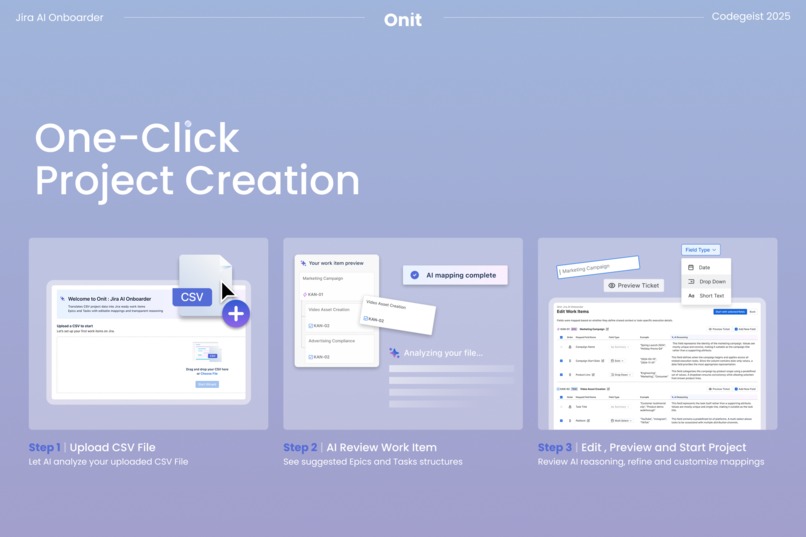
Onit's Step-by-Step Onboarding Flow
-
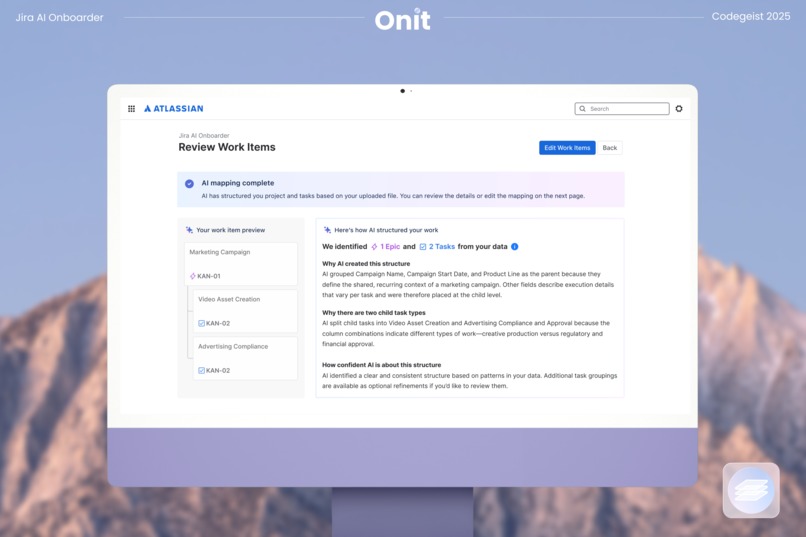
AI Structure
-
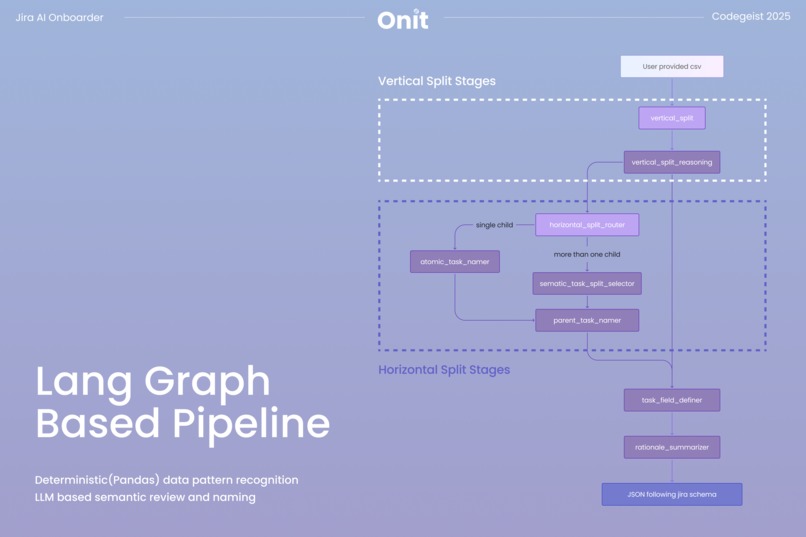
Lang Graph Based Pipeline
-
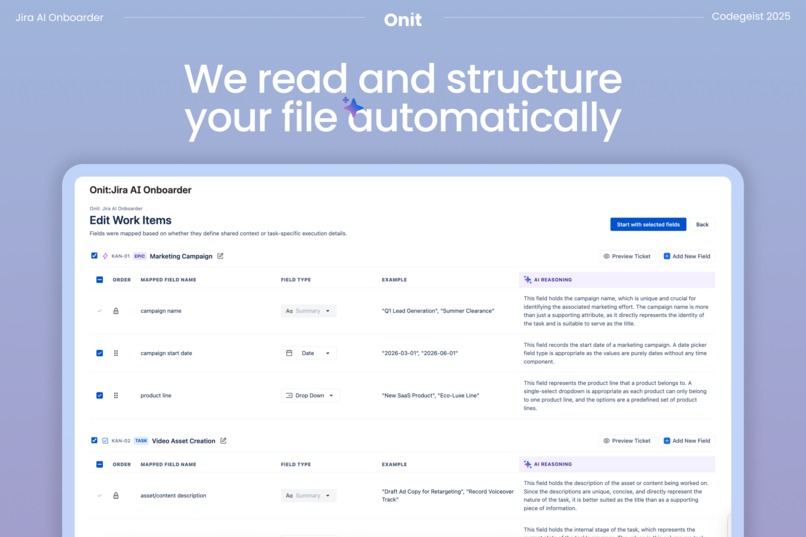
See AI Reasoning and Customize
-
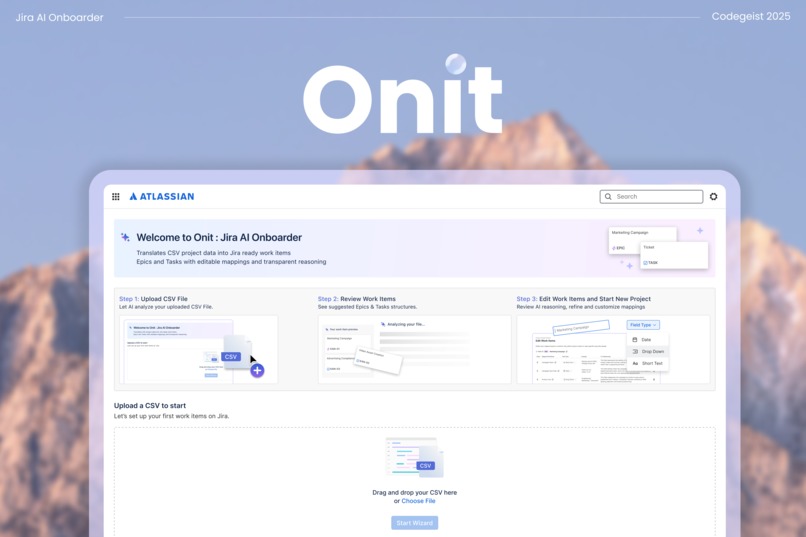
Onit: Jira AI Onboarder
Inspiration
Many business teams take longer to see value from Jira because getting started often requires familiarity with its work-item structure. For software teams, this learning curve is often absorbed informally, as engineers learn Jira through teammates who already use it in their daily workflow.
Business teams are in a different position. Their work is often managed in spreadsheets. When these teams are asked to consider adopting Jira, the transition can introduce duplicated effort. Existing work needs to be reorganized, structures must be recreated manually, and time is spent learning the tool before any value becomes visible.
At moments when speed matters most, Jira can feel like added overhead rather than a source of leverage. That gap is where Onit starts.
What it does 🪄
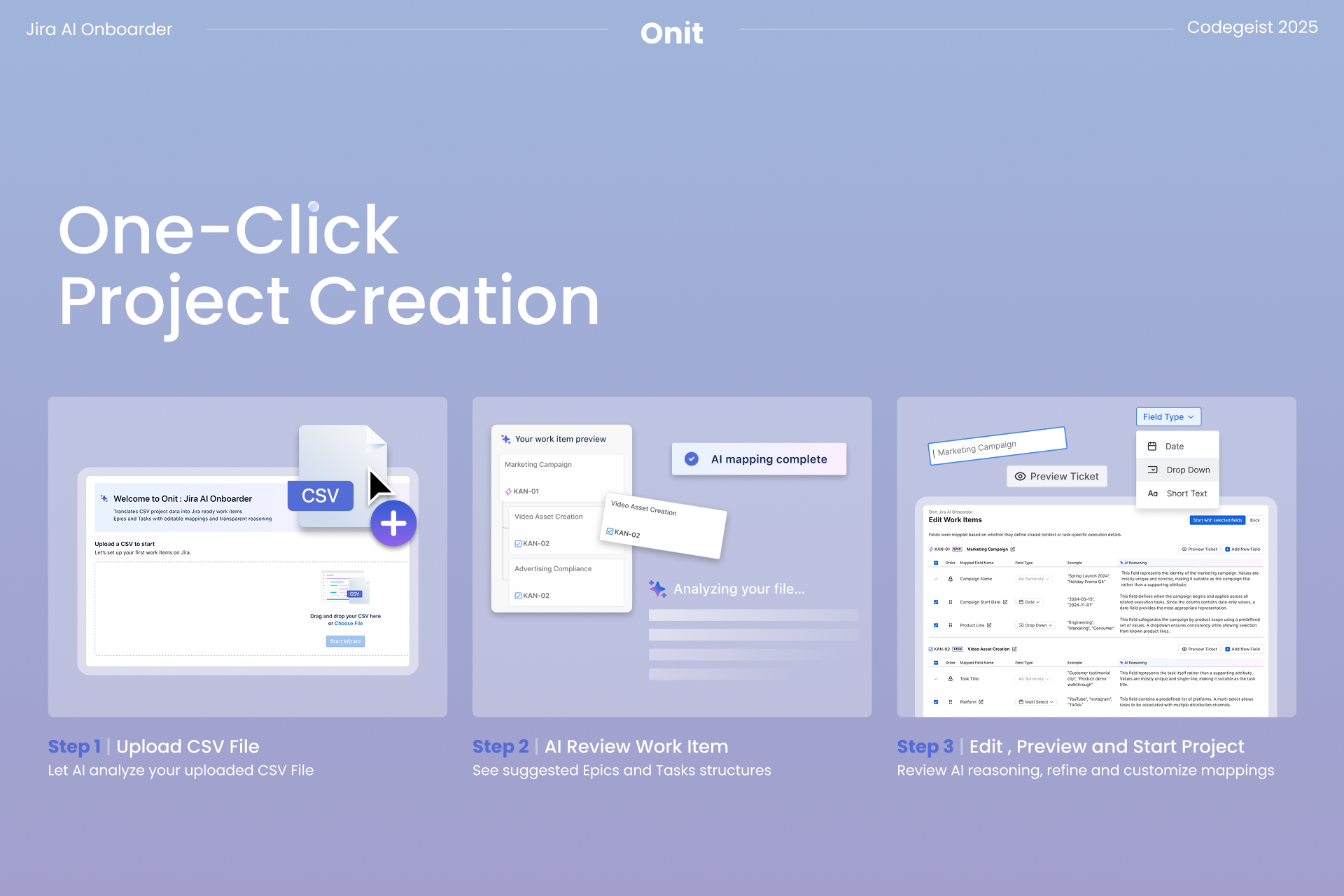
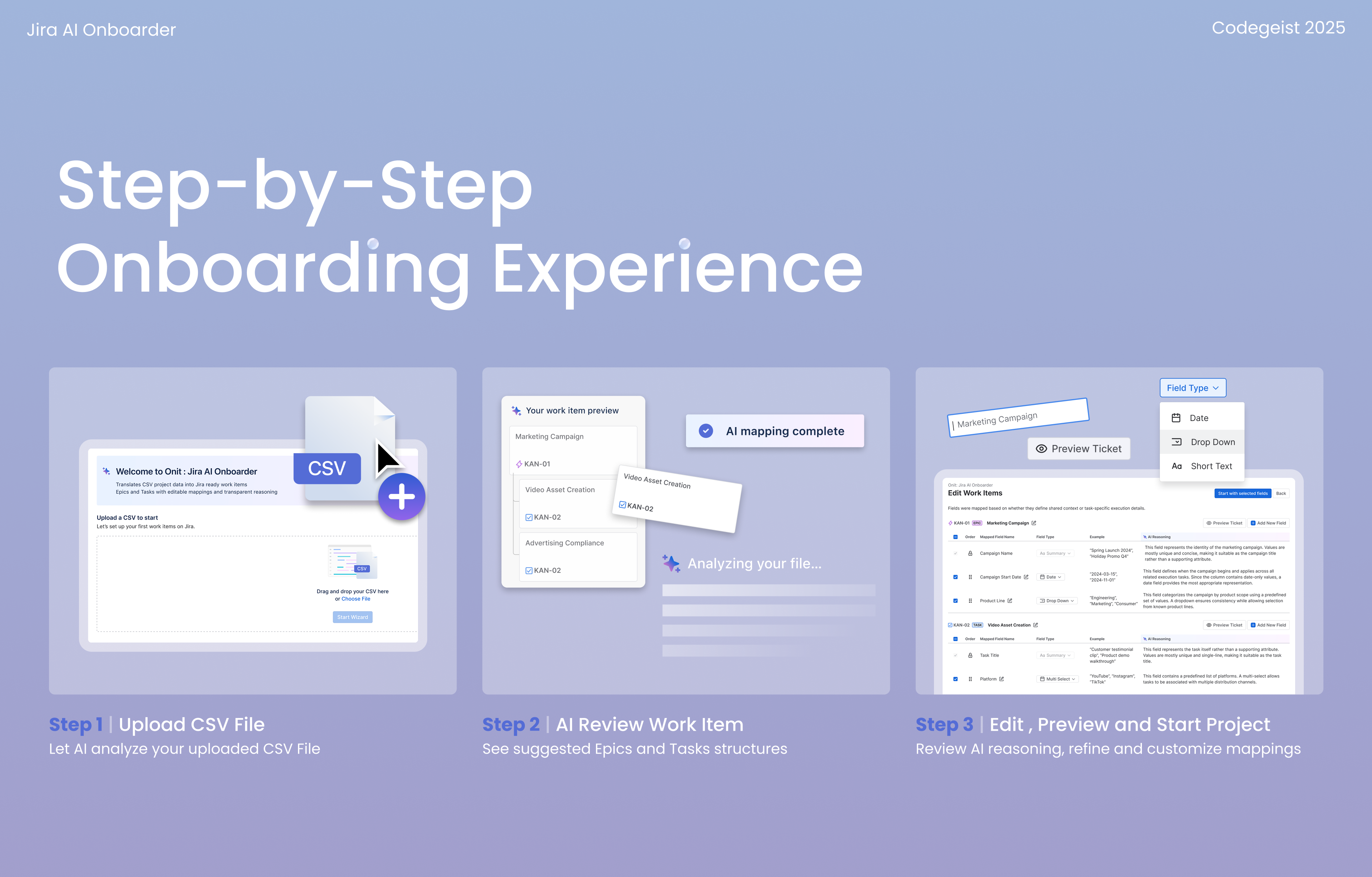
We designed a step-by-step onboarding experience so that:
- With a single file upload, Onit converts existing spreadsheets into a structured Jira workspace, eliminating manual setup.
- The experience is personalized to explain Jira’s work-item logic in language business teams already use, helping users stay engaged and oriented throughout the process.
- It feels intuitive even for non-technical users, helping them understand Jira’s basic structure and value before creating their first project.
Here are the core features :

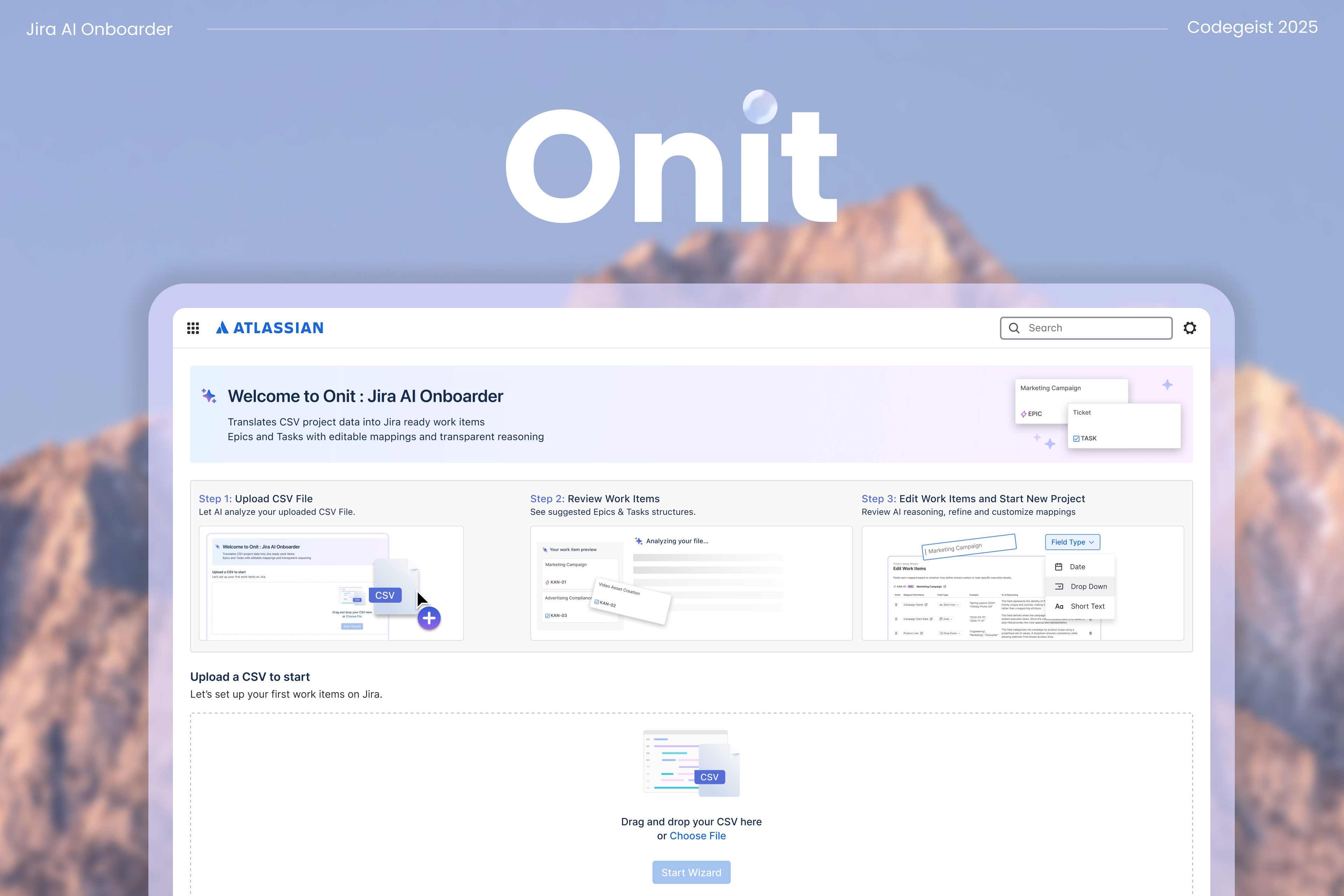
1. Upload a CSV
Start by uploading the spreadsheet your team already uses. Onit treats your CSV as real project data, not just rows and columns. It looks for signals like naming patterns, dependencies, and field context to understand what your work represents and how it should be structured in Jira.
2. View your customized Jira project structure
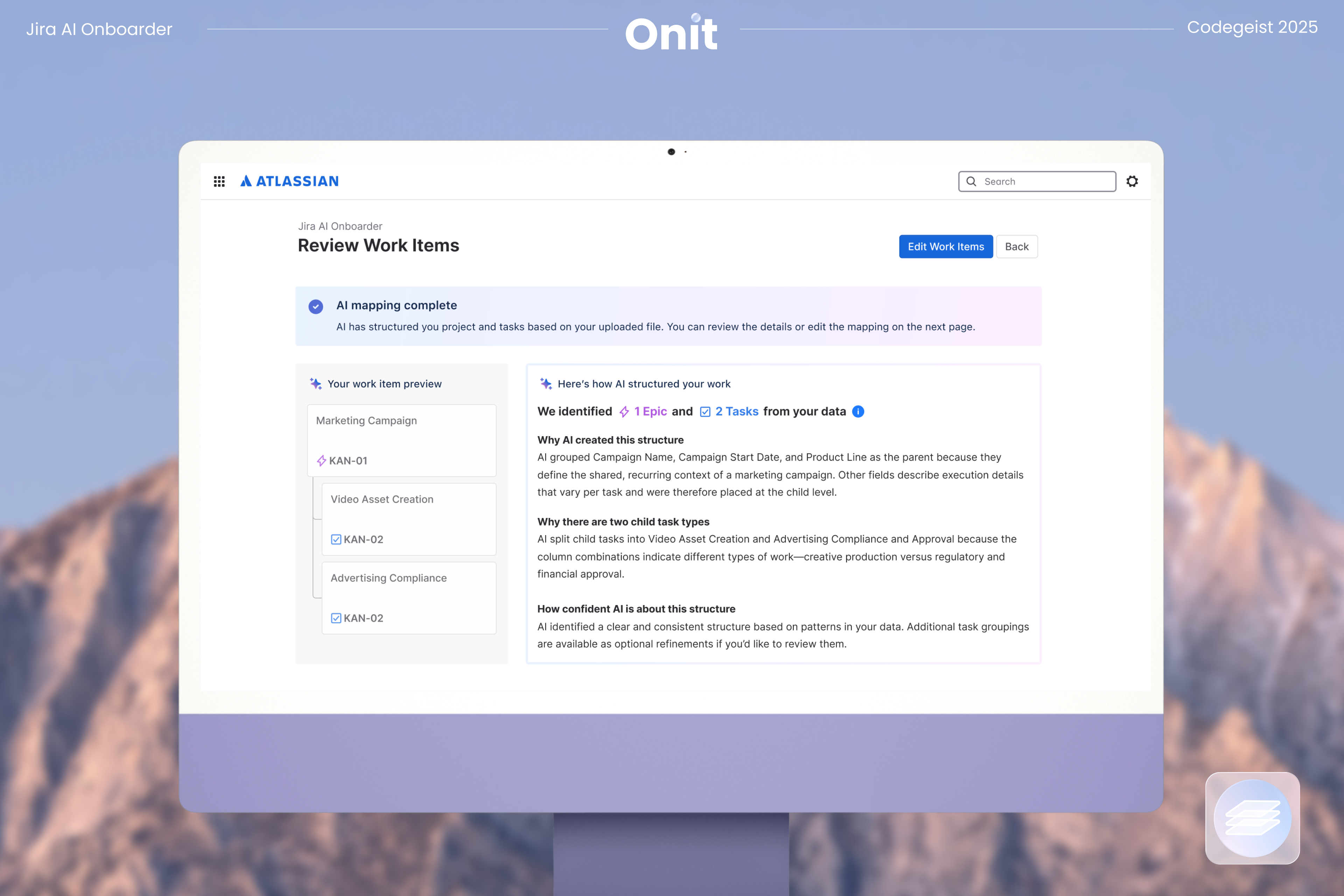
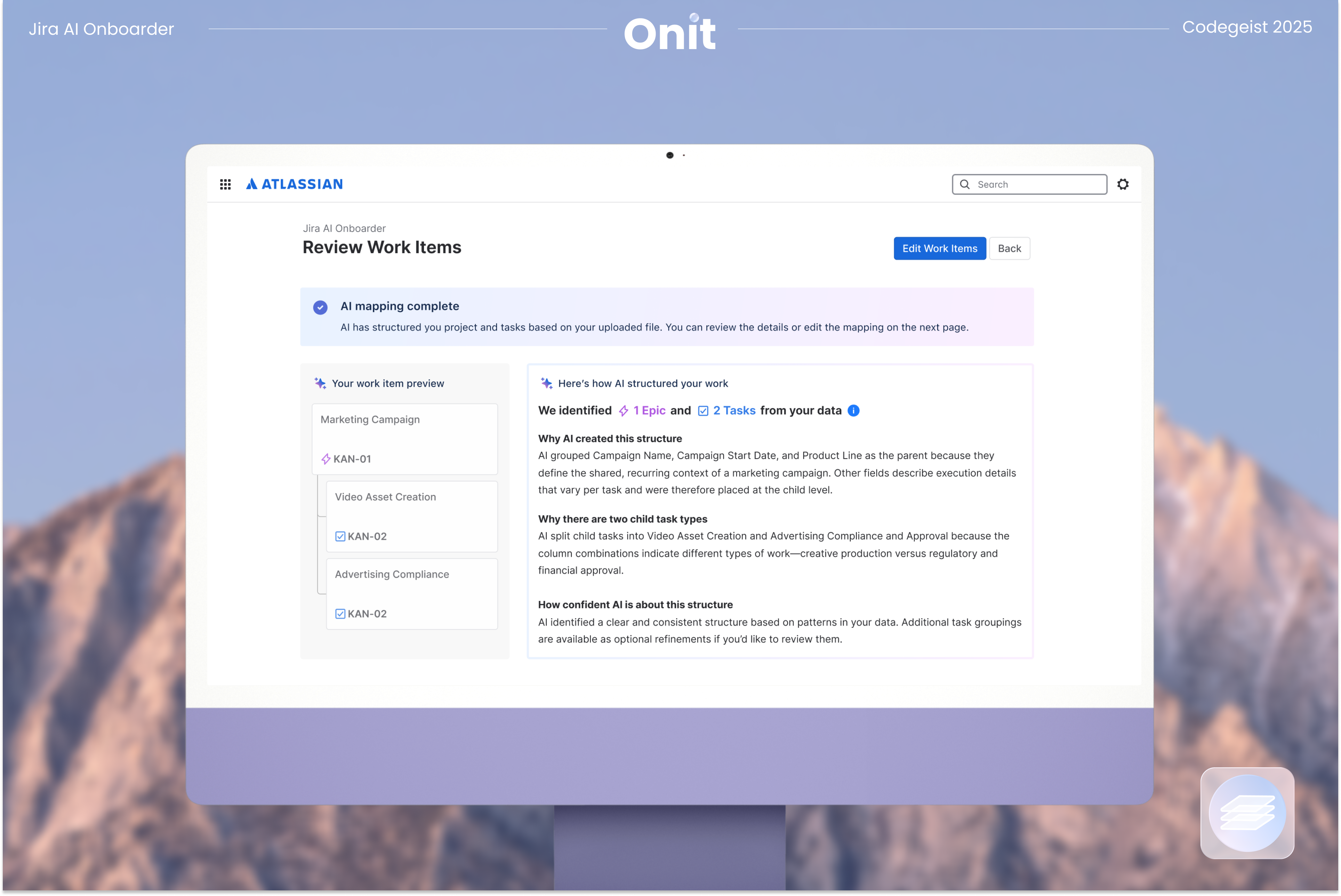
After uploading, Onit generates a first draft of your Jira structure. This includes suggested issue types, epic and task hierarchy, and recommended field mappings. Instead of applying a generic template, the draft is derived from your data so the resulting workspace matches how your team actually plans and tracks work.
Onit makes its configuration reasoning visible step by step, so users can understand how the structure was inferred. This is especially helpful for first-time users because the experience teaches Jira basics through the project they already know, rather than forcing a separate learning curve before they can begin.
3. Review and adjust
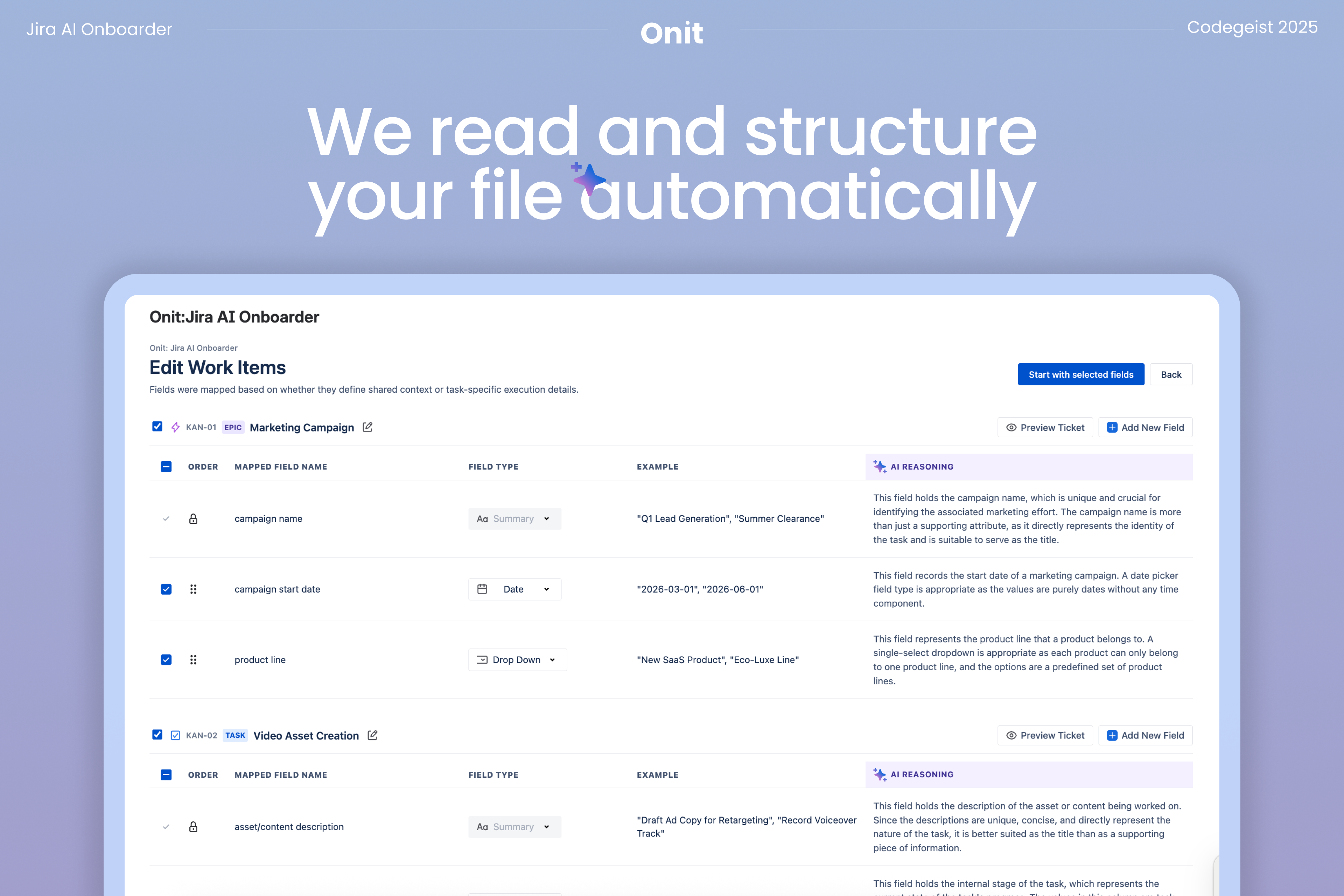
Before anything is created in Jira, users can review and refine the proposed structure. You can confirm the hierarchy, adjust field names or types, and make changes where your team’s workflow differs from the initial draft. This review step ensures users stay in control and prevents errors from being locked into the workspace.
How we built it 🛠️
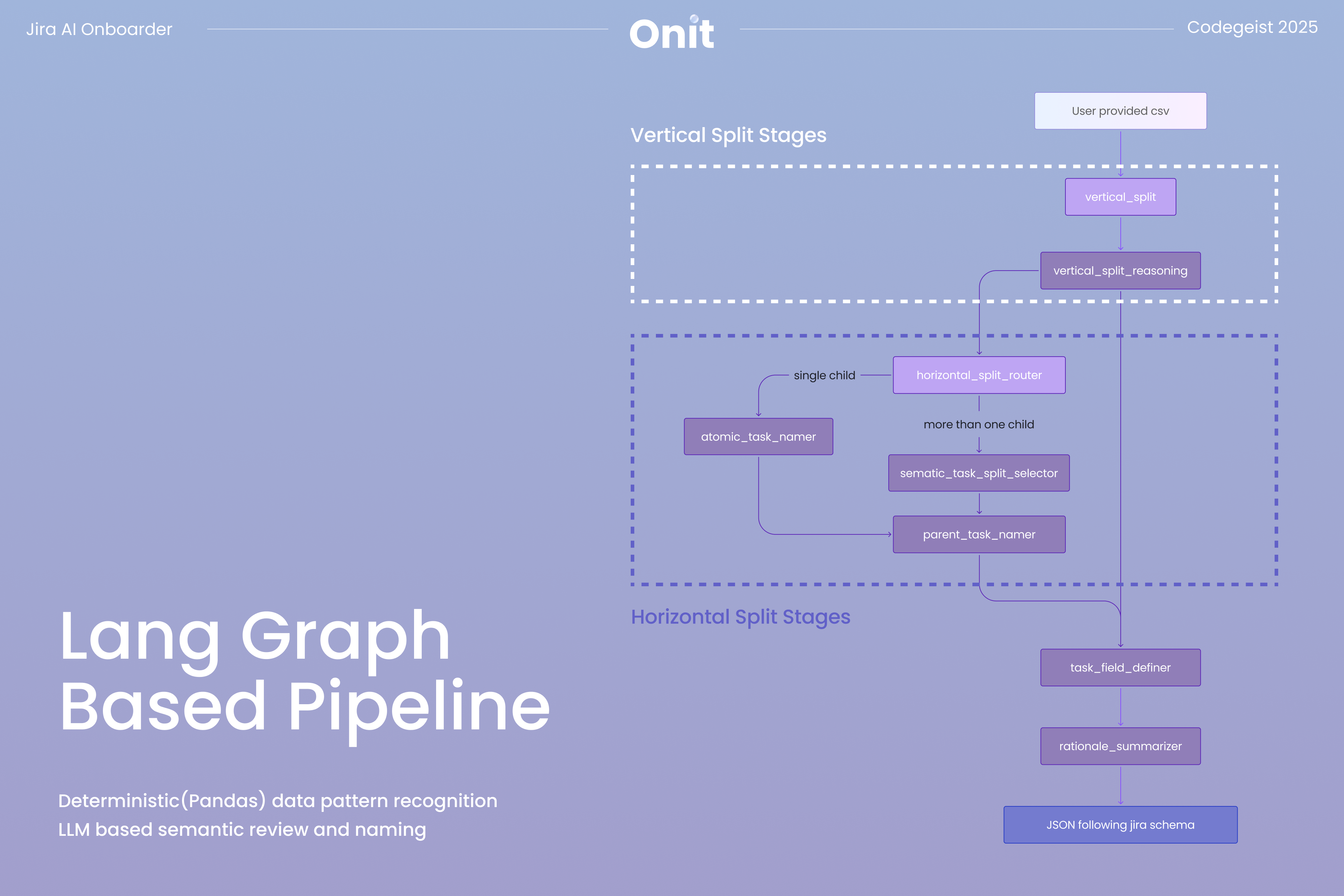
We built a LangGraph-based pipeline that reads raw CSV data and proposes a Jira project structure grounded in how Jira actually works. Instead of treating the CSV as static input, the system reasons about issue types, hierarchies, and field mappings and explains why each decision is made. This allows the generated structure to reflect Jira’s work item model rather than forcing the data into a generic template.
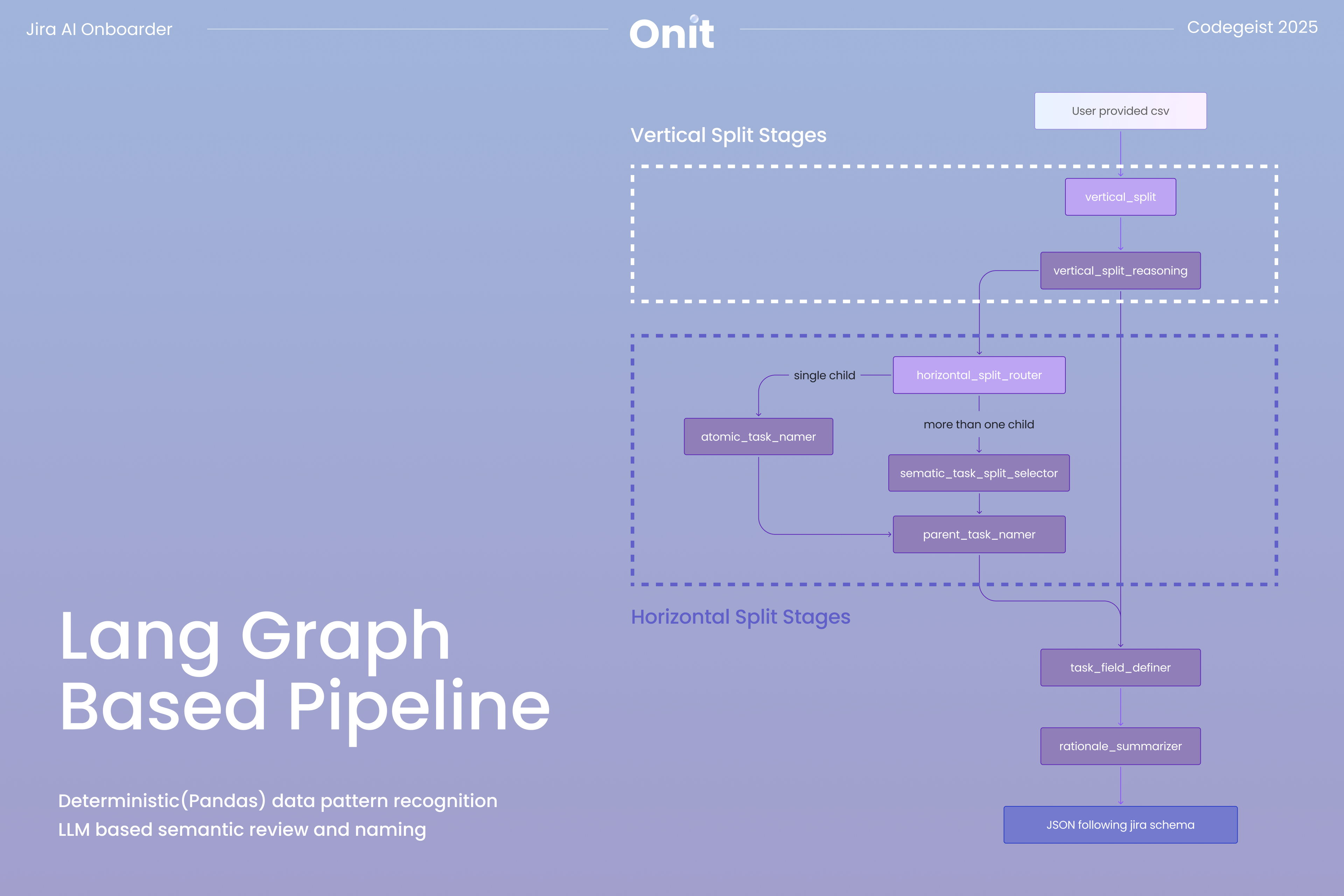
As shown in the diagram below, the pipeline bridges the gap between raw spreadsheet data and Jira’s structural requirements through a two-stage decoding process.
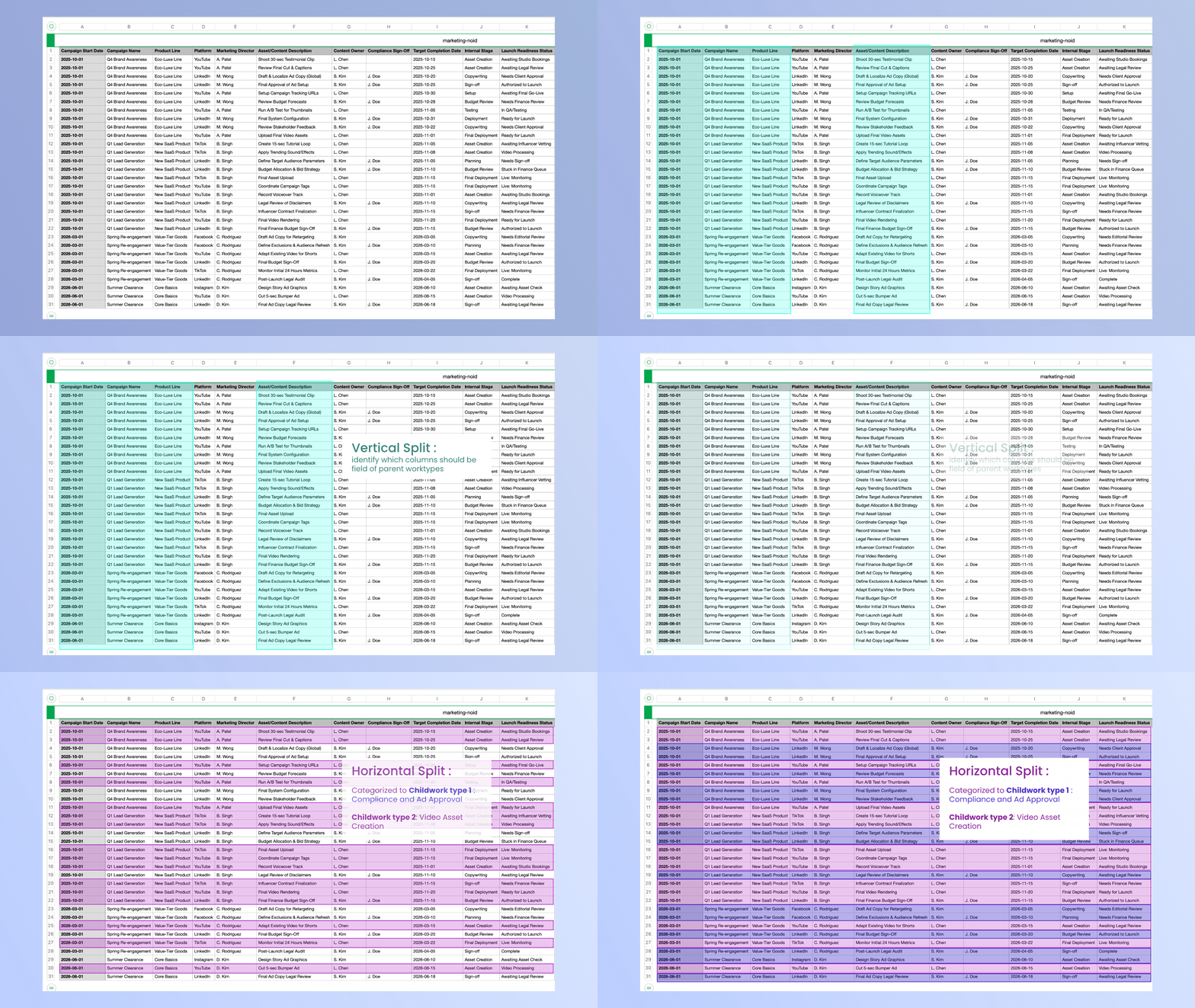
The first stage, the "Vertical Split", focuses on identifying parent-level work. Using deterministic Pandas logic, the system isolates columns with high redundancy that are likely to represent parent entities in the 'vertical_split' node. An LLM validation step then checks whether these groupings reflect meaningful business hierarchies rather than coincidental repetition in the 'vertical_split_reasoning' node. This ensures that proposed parent tasks, such as Epics, are grounded in real project context.
The second stage, the "Horizontal Split", identifies distinct work types within those hierarchies. The system performs a density analysis across rows to detect patterns of populated and empty fields and proposes multiple ways to cluster tasks in the 'horizontal_split_router' node. The LLM then evaluates these candidates, selects the most reasonable split, and interprets each cluster to assign clear, human-readable task labels using either the 'semantic_task_split_selector' or 'atomic_task_namer' node, depending on how many valid proposals are generated.
By combining deterministic analysis with contextual reasoning, the pipeline produces a Jira schema that is both structurally reliable and aligned with the intent behind the original spreadsheet.
Because the Jira setup is difficult to undo once a workspace is created, we designed a user-facing review layer before any API calls are made. This allows teams to inspect, adjust, and validate the inferred hierarchy and fields so the structure matches how they actually plan to work, not just what the system inferred. Once confirmed, the Jira API generates the project and issue structure directly from the validated configuration. This mirrors how Jira is configured in practice while removing the manual and error-prone steps that typically require prior Jira expertise.
Finally, we treated onboarding itself as a core design problem. The experience is broken down step by step with clear visual feedback and plain-language explanations so first-time, non-technical users always understand what is happening and why.
Challenges we ran into 🎯
1. The "Meaning" Gap: LLM-Powered Data Reasoning
Inferring structure from raw CSVs proved surprisingly complex, as formatting inconsistencies often caused deterministic rules to misclassify columns. To solve this, we built a LangGraph-based pipeline that mimics human intuition by "oscillating" between low-level syntax and high-level patterns. Our architecture had to reflect this non-linear process: a "Vertical Split" might suggest a parent structure, but that decision is held in tension until the system "looks across" the horizontal rows to see if the data density supports the theory. This allows the system to constantly refine its structural guesses against the semantic reality of the fields.
2. The Blueprint Bridge: Forge Backend & Project Creation
Once the LLM proposed a structure, we faced the challenge of translating that intent into a functional Jira blueprint while adhering to the Forge platform’s architectural constraints. We developed a custom mapping layer to transform hierarchical JSON output into a coordinated sequence of Forge API calls, utilizing parallel processing to create project components efficiently. To ensure a structurally robust workspace, we architected the logic to establish and validate parent Epics before child tasks are attached. By automatically populating each custom field with the original CSV data, we mirrored professional Jira configuration while eliminating the tedious, manual setup that typically is typically tedious and requires deep platform expertise.
3. The Human-in-the-Loop: A High-Fidelity Frontend
To maximize the user experience, we engineered an interactive Edit Work Items wizard that gives users total agency over the AI's suggestions. Using React Hooks to manage a complex, mutable draft state, we built a seamless drag-and-drop interface that allows users to reorder work items across components without compromising data integrity. Supporting this required a robust handler system for real-time validation, preventing duplicate mappings, and precise CSS viewport calculations to ensure the main content area scrolls independently for a professional, "app-like" feel. By putting this control in the user's hands, we transformed what is traditionally a high-stakes, difficult-to-undo Jira setup into a flexible sandbox. Users can now refine the AI's logic with the precision of a power user before a single issue is ever created.

Accomplishments that we’re proud of ✨
We are proud to have built a tool that turns Jira’s blank starting point into immediate value for business teams. One of our core achievements is the LangGraph-based reasoning pipeline. Rather than forcing spreadsheet data into a generic template, we’ve successfully built a system that reads the intent behind the data and proposes a project hierarchy that reflects how a team actually works. Accurately distinguishing high-level Epics from granular tasks and explaining that reasoning in a transparent way was a major milestone for us.
This philosophy is reflected in our product name, Onit, short for “Onboarding + Initialization”. The name captures our goal of helping teams feel understood from the start and supported as they take their first steps in Jira. Onit is always on-it.
We are also particularly proud of the user-in-the-loop validation layer. Instead of building a black-box system that makes irreversible changes, we designed a high-fidelity editing experience that connects AI inference with human judgment. Within the constraints of the Forge platform, users can review, adjust, and refine their project structure through a drag-and-drop interface, ensuring the final workspace accurately reflects their team’s needs.

What we learned ✍️
The development of Onit gave us deeper insight into both the Jira ecosystem and the cognitive challenges business teams face during digital transformation. We learned that effective onboarding is less about speed and more about reducing uncertainty at the moment structure is introduced.
Through conversations with five business team users, we observed that spreadsheets are rarely just collections of rows and columns. They are shaped by human conventions. Redundant context across rows often signals higher-level groupings. Repeated labels imply shared ownership or scope. Empty cells are frequently used to visually separate sections. Recognizing these patterns showed us that CSV mapping is a meaning-driven problem rather than a purely mechanical one, requiring semantic interpretation rather than simple structural parsing.
On the technical side, working within the constraints of the Forge platform proved to be a rigorous learning process. We developed a strong understanding of how to orchestrate multi-step Jira API interactions while preserving data integrity across a project’s lifecycle. We also learned that effective intelligence should support user judgment, not replace it. Our conversations with users consistently showed that automated proposals are only effective when users remain confident decision-makers.
This insight led us to treat AI transparency as a core system constraint. By exposing the reasoning behind each inference, the system allows users to reason alongside the model rather than blindly accept its output. Together, these learnings shaped Onit into a tool that balances technical sophistication with a human-centered onboarding experience.
What’s next for Onit: Jira AI Onboarder 💡
We believe onboarding should feel like guidance, not another form of task. Our goal has been to meet teams where their work already lives and help them take the first step forward with clarity and control. Looking ahead, we want to continue refining Onit as a thoughtful and dependable entry point into Jira.
What’s next for Onit includes:
- Improving model robustness by adding additional validation and sanity-check steps in the LangGraph pipeline and exploring alternative model configurations.
- Expanding coverage to better handle edge cases and CSV patterns that fall outside our initial assumptions.
- Extending input support beyond a single CSV to include additional formats and multi-file onboarding flows.
- Providing more guided onboarding suggestions, such as workflow design or automation recommendations, based on patterns recognized in project data.
At the end of the day, our goal remains simple. We want fewer teams to feel stuck at the starting line and more teams to experience that small but important moment when Jira finally clicks. If Onit can help make that first step feel a little lighter, we think we are heading in the right direction. :)
Built With
- claude
- forge
- gcp
- javascript
- ngrok
- python
- react


Log in or sign up for Devpost to join the conversation.