
Inspiration
As a React developer, I work daily with CSS frameworks like Tailwind CSS and inline styling libraries. After exploring the available tooling for Baseline, I realized there was no solution that integrates Baseline compatibility data into frameworks like Tailwind, inline CSS, or styled components. So I decided to build a live VS Code extension that integrates the web-features dataset into the various ways developers write CSS in React projects.
What it does
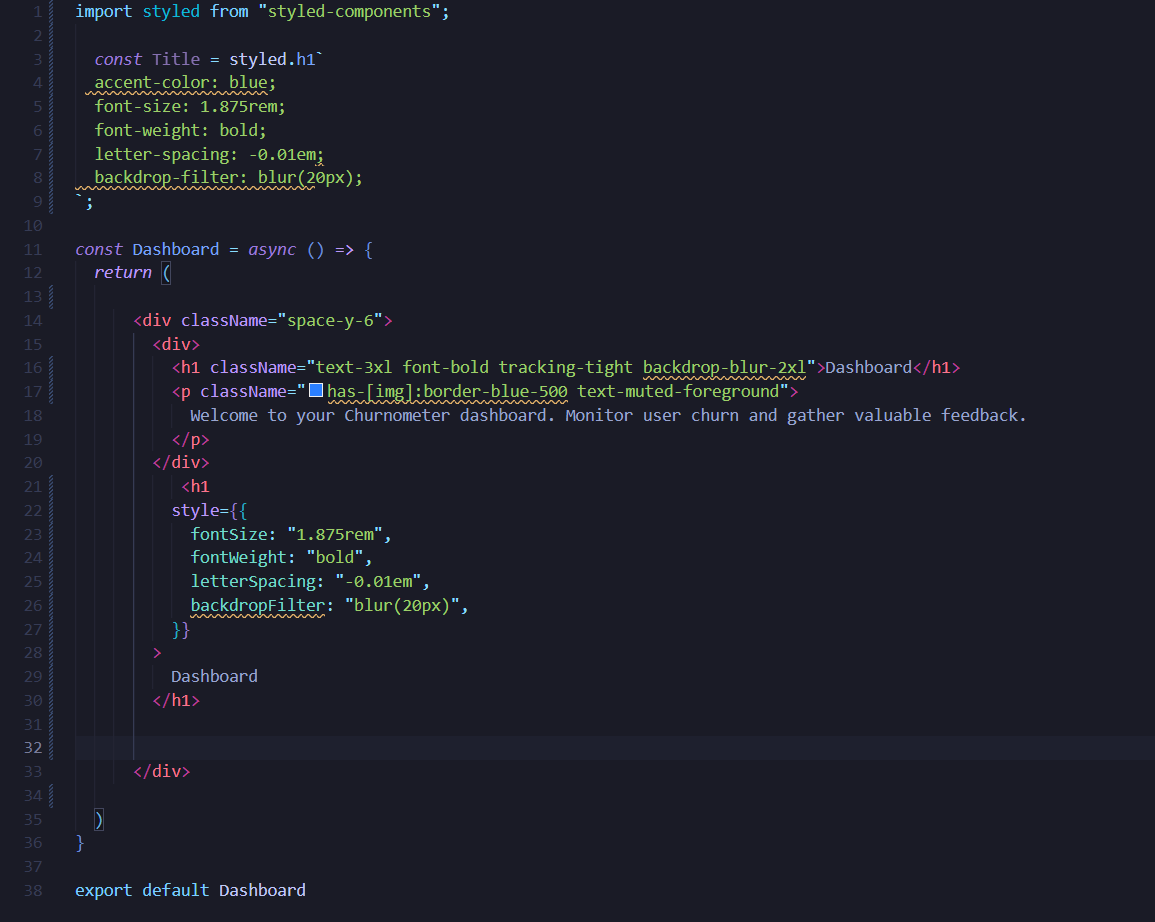
BaselineCode Assistant is a VS Code extension that acts as a real-time compatibility guard. It analyzes your entire codebase, checking every file for compatibility issues against Baseline data. Any incompatibilities found are displayed to the user as diagnostics.
Main Features:
JSX/TSX Parsing for CSS classes: Parses .jsx/.tsx files to analyze compatibility issues within modern styling methods, including Tailwind CSS classes, Styled Components, and inline style props and display diagnostics to users.
Comprehensive Real-time Diagnostics: The extension lints standard HTML, CSS, and JavaScript files, providing instant feedback with diagnostic squiggles.
Workspace-Wide Scanning: Scans your entire project folder for compatibility problems. All findings are aggregated into an interactive view in the sidebar, allowing you to see every issue in one place and click to navigate directly to the problematic code.
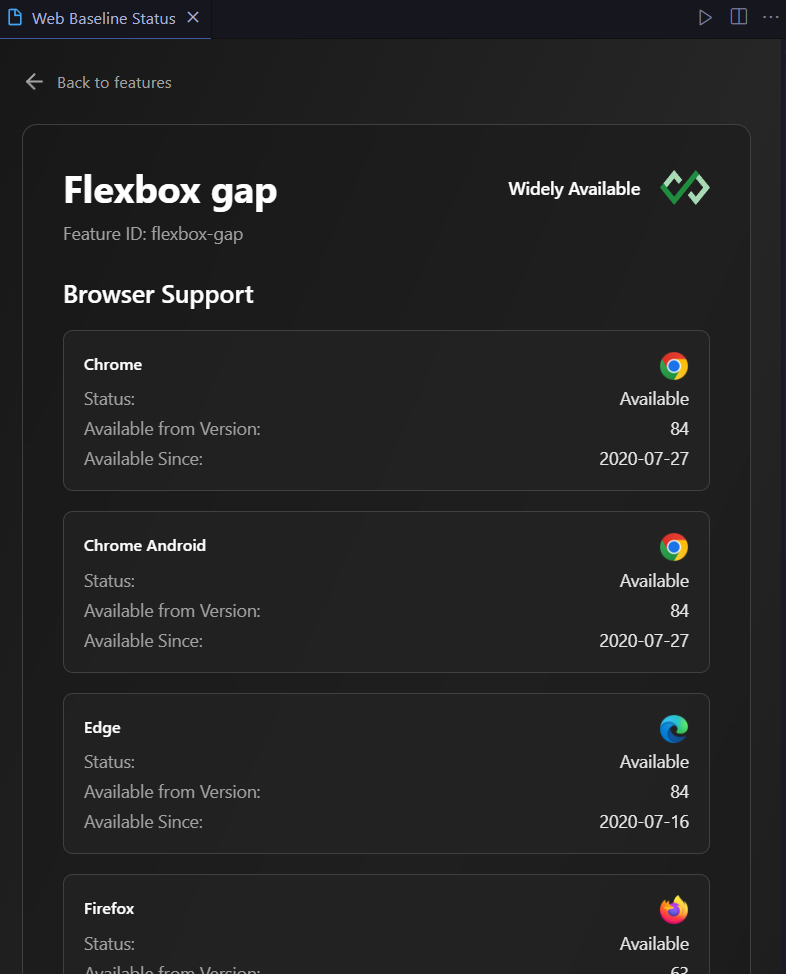
A Informative Sidebar: Need additional info about the feature you want to or planning to use? Just Enter the name of it and get browser compabatibility Information for all while staying inside your IDE, no need to juggle between different websites.
How I built it
The Extension is mainly built from two packages :
1) compute-baseline: which provides CSS diagonstics and broser compatibility data for css classes once they have been parsed from jsx.
2) ESlint : Since Baseline data can be accessed through ESLint integrations already, I utilized it to display diagnostics for standard HTML, CSS, and JavaScript files.
The webview-based sidebar (built with React) uses the Web Dashboard API to fetch Baseline data by either the feature name or featureId.
Tailwind Integration
Tailwind Integration: This step is essentially be broken down into two steps. First is extracting the tailwind class from required files and second is converting tailwind class (eg : bg-red-100) to plain css ones to get the property or selector names (background_color)
1) Extracting the classes from JSX/TSX :- For this I have utilised Babel for parsing the JSX code and coverting it to AST(Abstract Syntax Tree). This helps in clean extraction and improves the accessibility allowing multiples parsers to be written for different framework which can work same core logic used in the app. Once the AST is generated attribute name such as "Classname" for tailwind have been picked up to get the required tailwind text.
2) Converting the tailwind classes to Plain CSS:-
Once the tailwind css class have been generated a html snipped is created if which is used as in intermidiate template.
const htmlContent = `<div class="${classes.join(" ")}"></div>`;
This snippet is passed to Tailwind’s JIT compiler via PostCSS, converting the utility classes into plain CSS. This enables Baseline compatibility checks for the resulting CSS properties and selectors.
Styled component and InlineCSS
Styled Components and inline CSS are extracted similarly via AST traversal. Attributes like style or styled.{component} are detected to retrieve raw CSS content. The resulting CSS is parsed using the css-what library, from which property and selector names are extracted. As of right now only styled-components libarary is supported
Extension Flow and Dashboard
The Generate Baseline Config command generates the baseline eslint config file and .browserlistrc file in users project folder. These files are used by ESlint compiler to geranate the diagonstics based on user broswer specification.
The extension looks has 3 activation function which triggers the AST parsing of document and baseline checker functions.
onDidSaveTextDocument - Runs on saving the document to check for new classes.
onDidChangeActiveTextEditor- On file change.
activeTextEditor - On initial load.
Once the diagnostics have been generated, there is also a Learn More option which directly takes the name of the feature and displays it in webview sidebar for quick browser support checks.
Challenges I ran into
1) The one consistent issue I keep running into was figuring how to integrate modern tooling which uses ESM only packages into vscode extension host which uses traditional CommonJS imports. I had to refactor our code to use dynamic import() expressions and carefully configure our build tools to handle the mixed module types. A lot of time was spent debugging the errors.
2) css-tree integration: Initially I planned to use css-tree for parsing styled components css files since it offers more comprehensive support that css-what (beyond properties and selectors) , but to challenges with integration and certain dependancies errors, it took up a lot of time to debug everything , so i had to settle for css-what.
3) FeatureID mapping for classes: I could not find any reliable source to convert the css-properties or selectors (compact names) to featuresId. Due to this the I had to use the compute-baseline package to get broswer support information for css-properties.
Accomplishments that we're proud of
- Successfully integrating Baseline Web Features with modern styling approaches like TailwindCSS, Styled Components, and inline styles is something never done before and since these frameworks are used by tons of developers, there is a huge scope as well of it.
What I learned
- VScode Extension Development: Developing a vscode extension with diagnostics and webview sidebar
- AST Parsing: Learnt about how AST Parsing works and how JSX syntax is actually parsed into code which are used by compilers.
- Cross Browser Compatibility: Understanding what challenges developers face making their web-app cross browser compatiblite and the available tooling to help in that issue.
What's next for BaslineCode Assistant
- Extending TailwndCSS coverage including custom themes, variants, and arbitrary value classes. This will allow BaselineCode Assistant to accurately analyze even complex, customized Tailwind setups and ensure compatibility across all classes and responsive variants.
- Extending support to multiple JS framework such as Angular and Vue.
- Implementing an automatic polyfill recommendation system. When a compatibility issue is detected, the extension will not only highlight the problem but also suggest relevant polyfills or fallbacks
Built With
- react
- typescript
- vscode

Log in or sign up for Devpost to join the conversation.