-
-
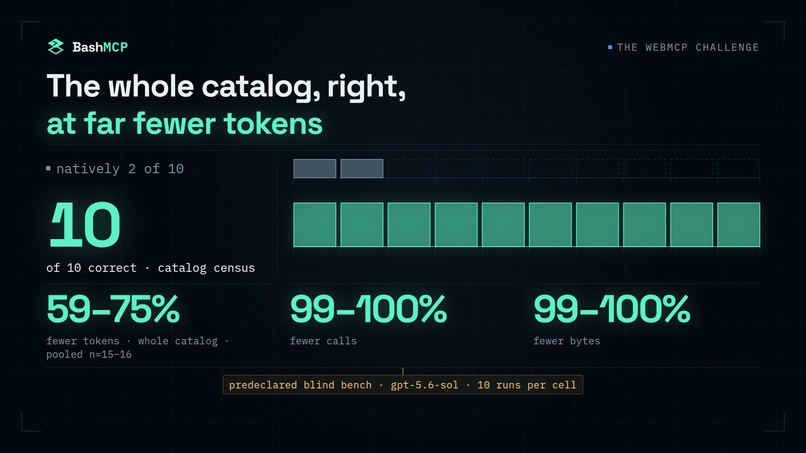
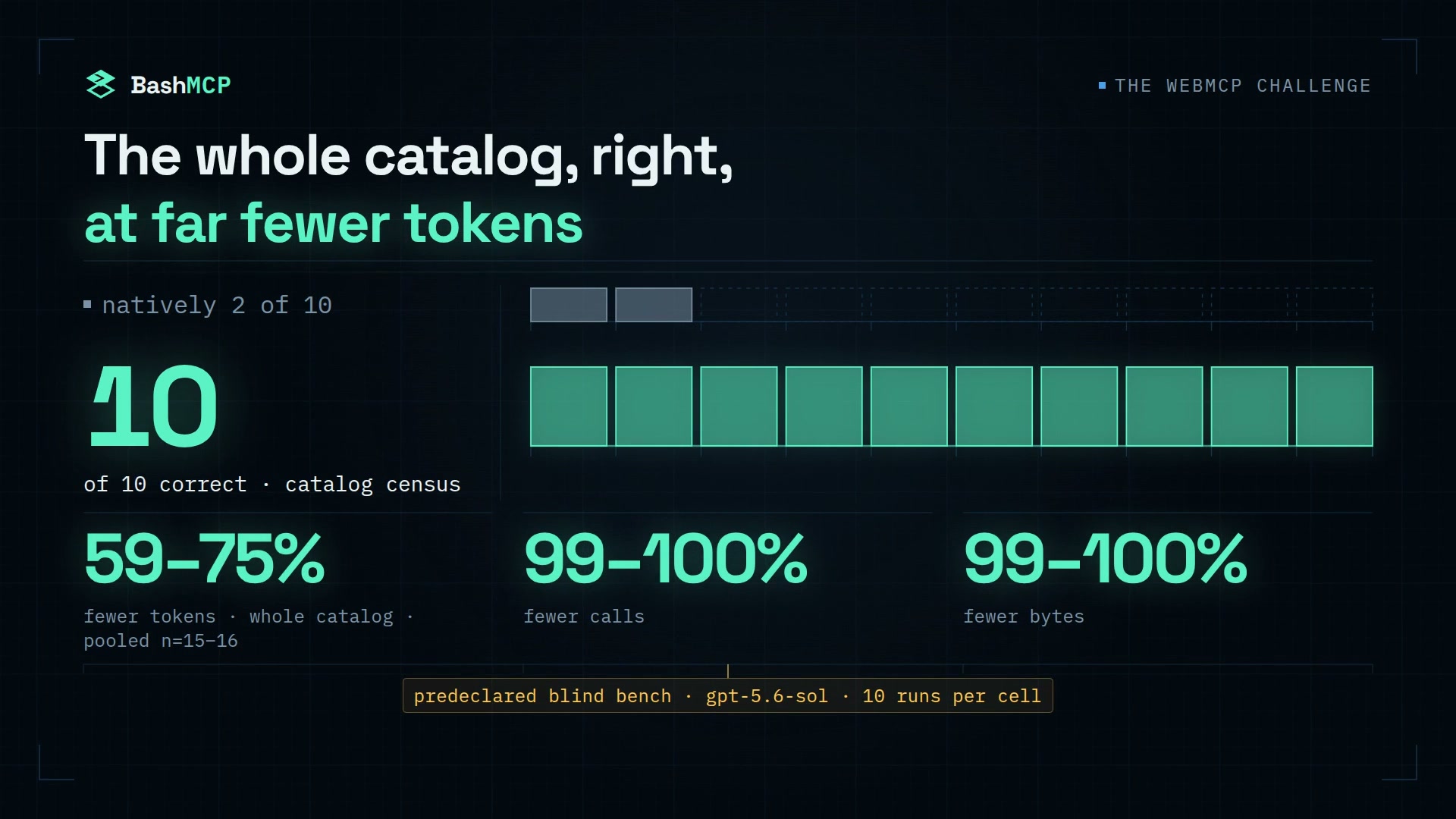
10/10 correct versus 2/10 natively, with 59–75% fewer tokens and 99–100% fewer calls and bytes.
-
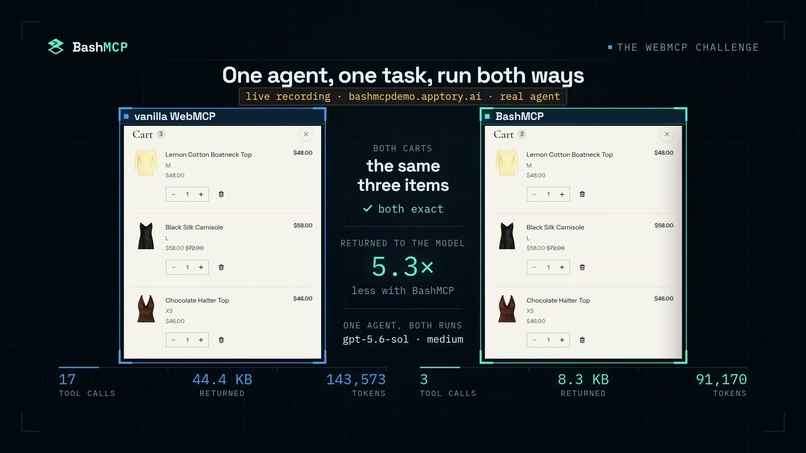
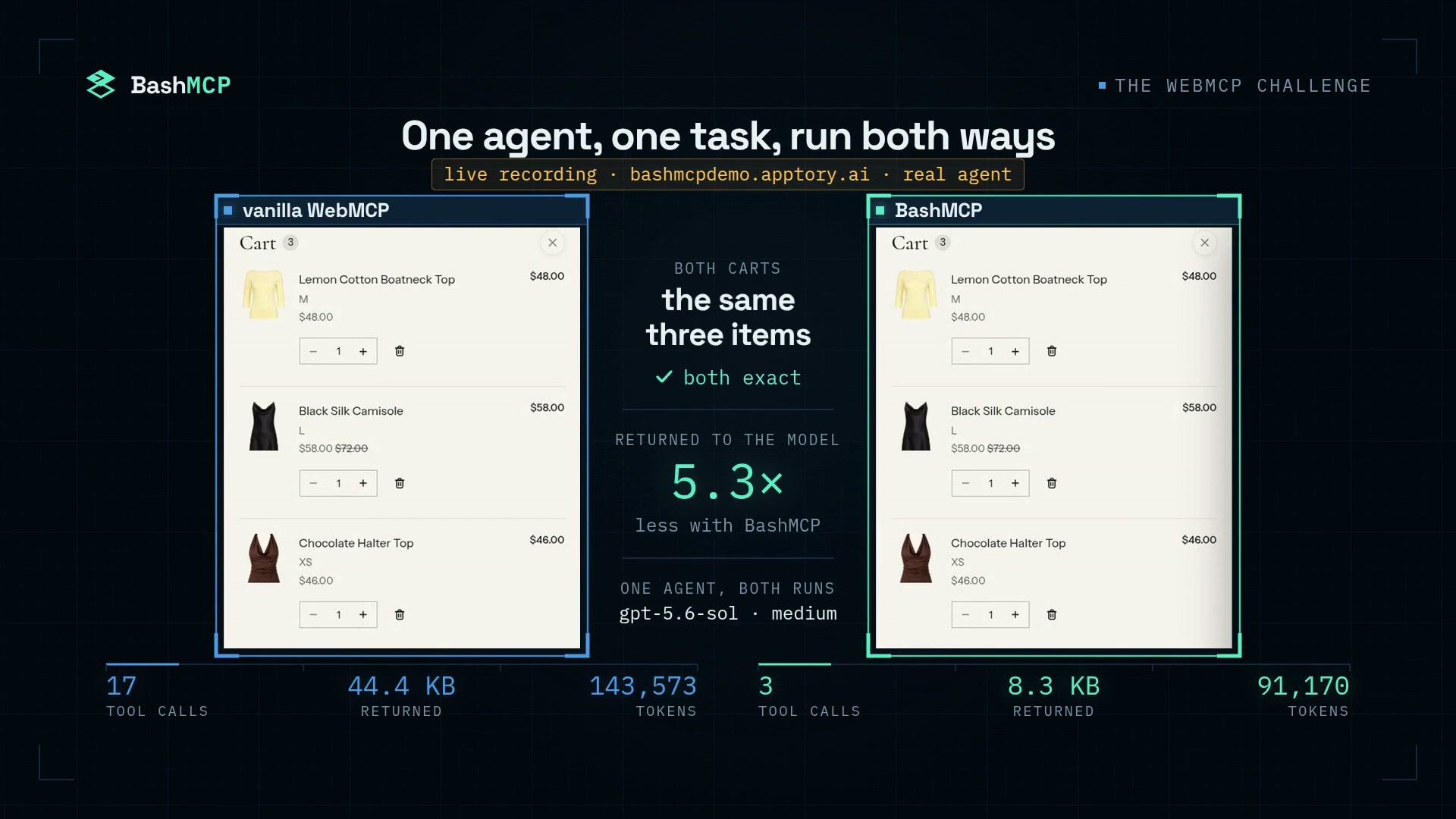
The same real agent and task: both carts correct, with 17 calls natively versus 3 with BashMCP.
-
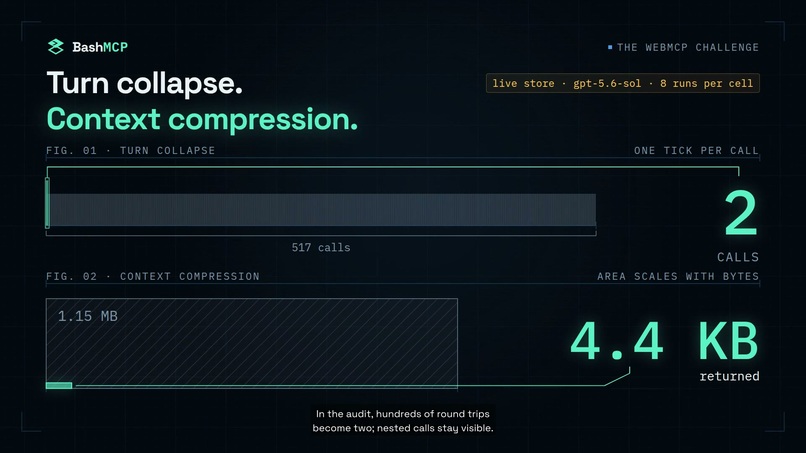
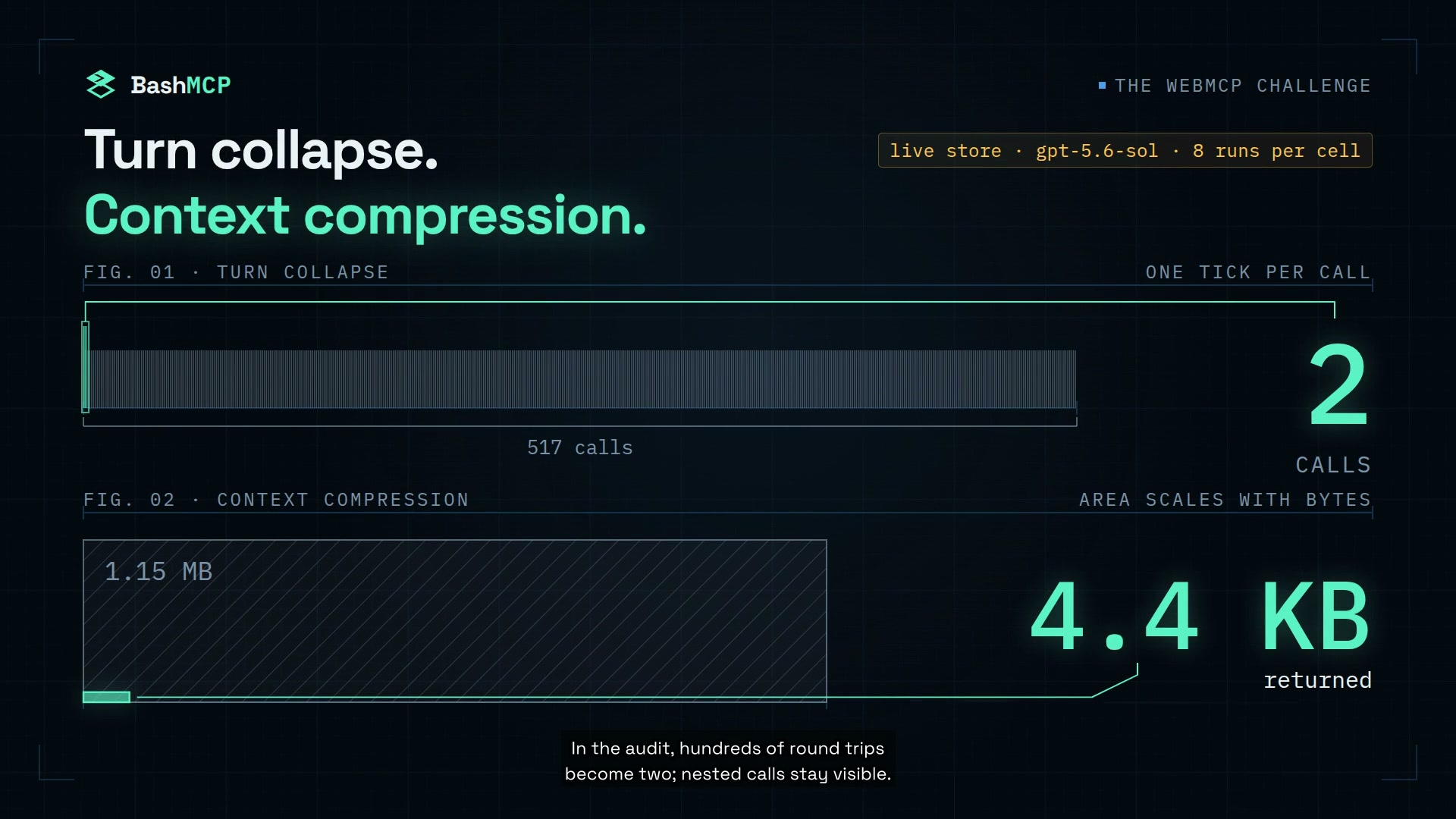
Live-store turn collapse: 517 host-visible calls become 2; 1.15 MB returned becomes 4.4 KB.
-
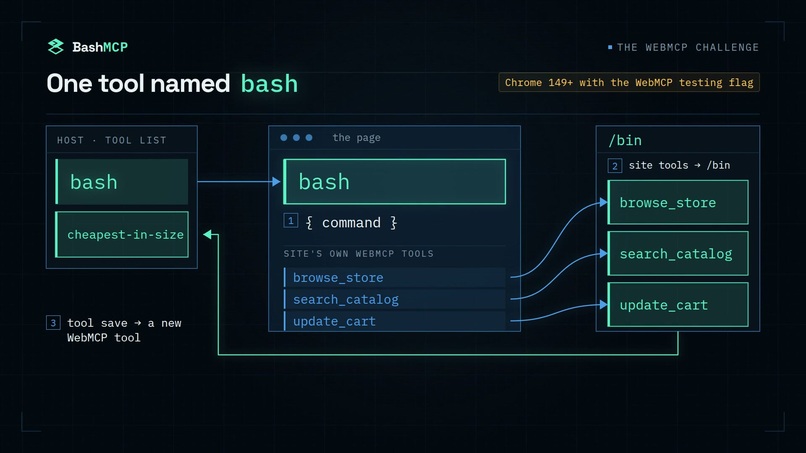
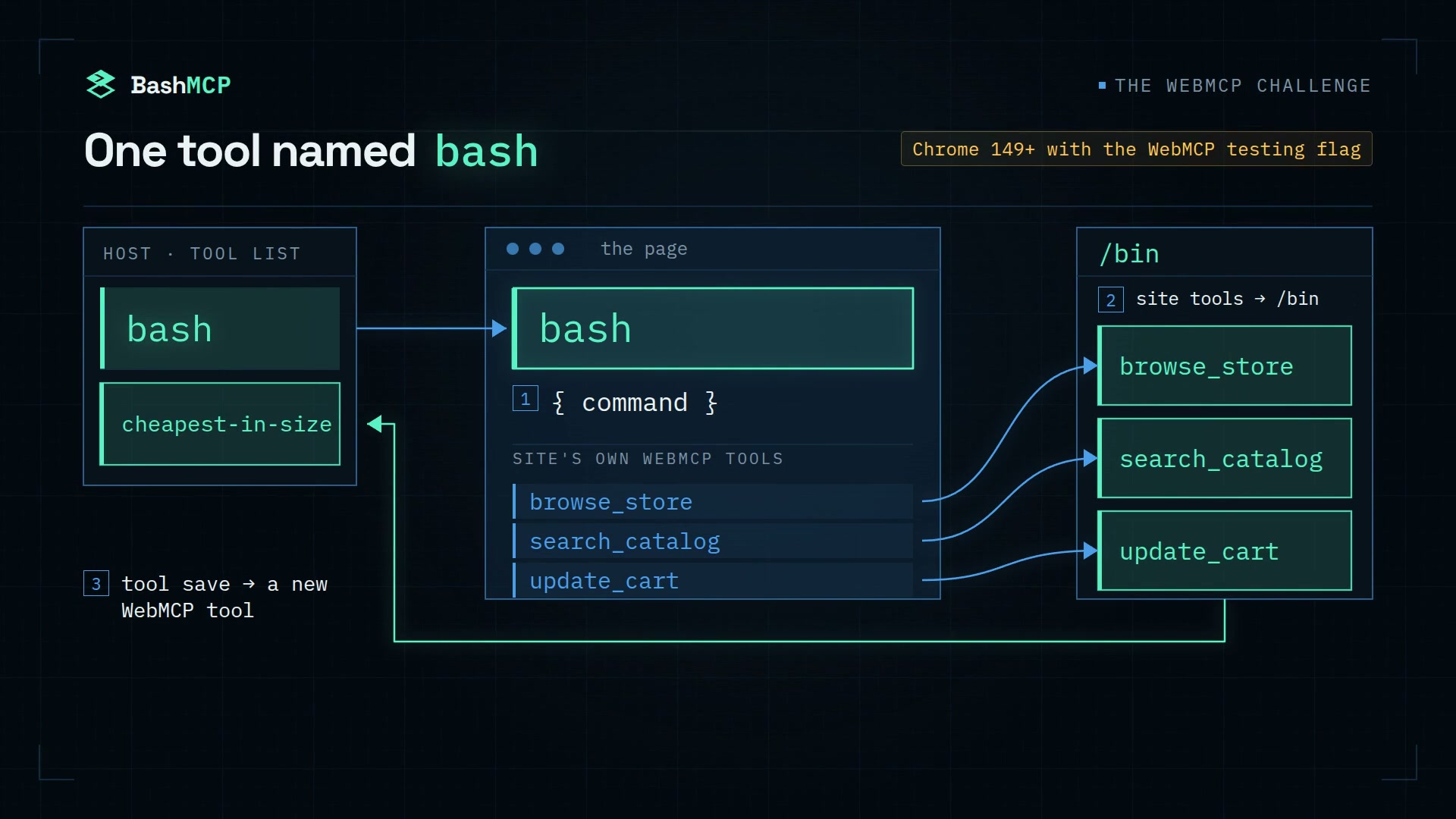
One WebMCP tool named bash compiles site tools into /bin; tool save registers a new WebMCP tool.
-
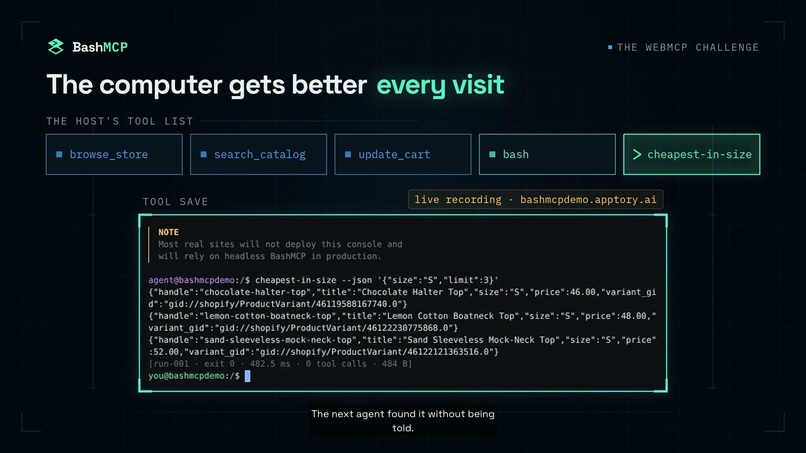
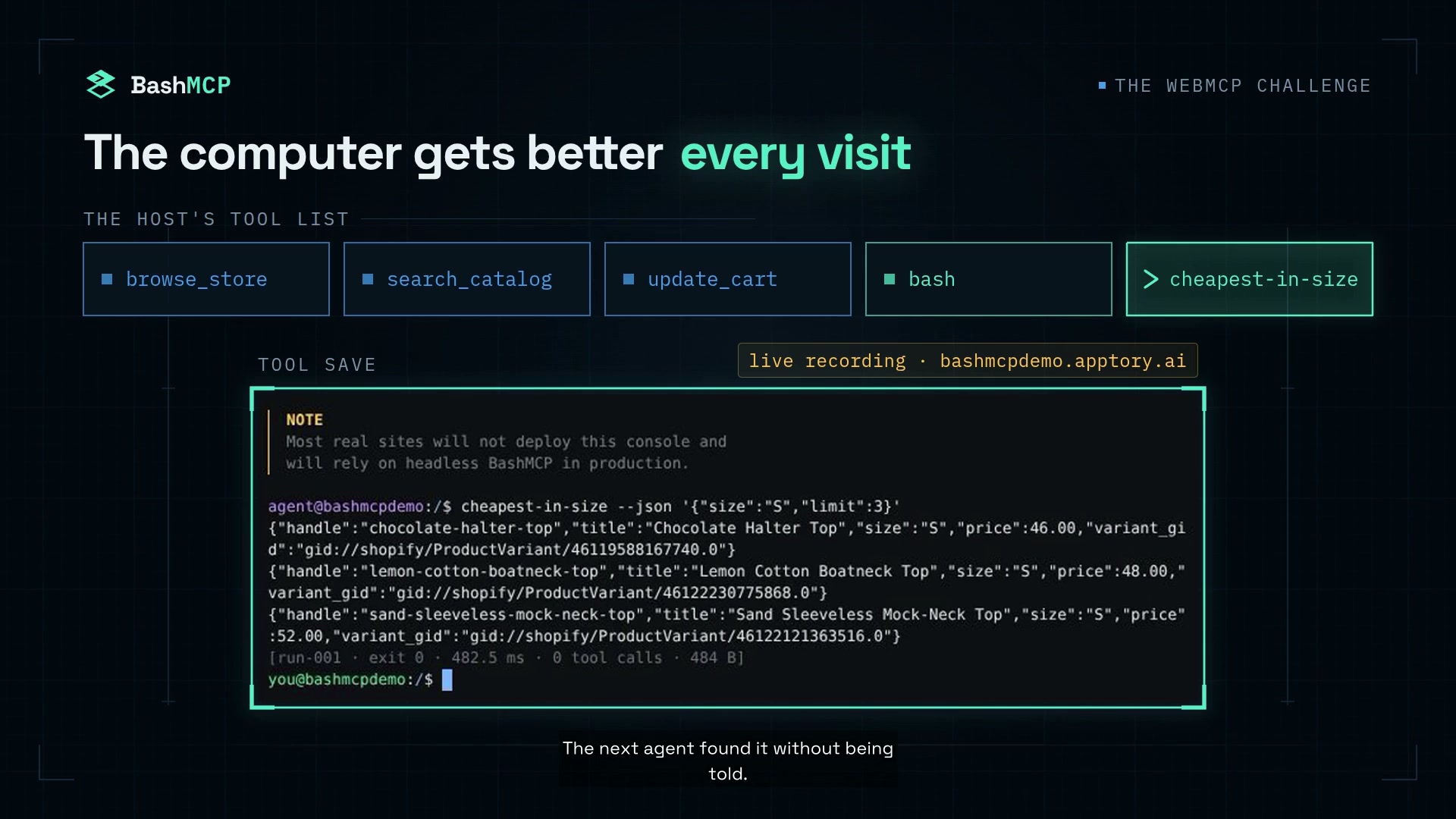
A saved pipeline becomes a WebMCP tool that the next agent finds and runs without being told.
-
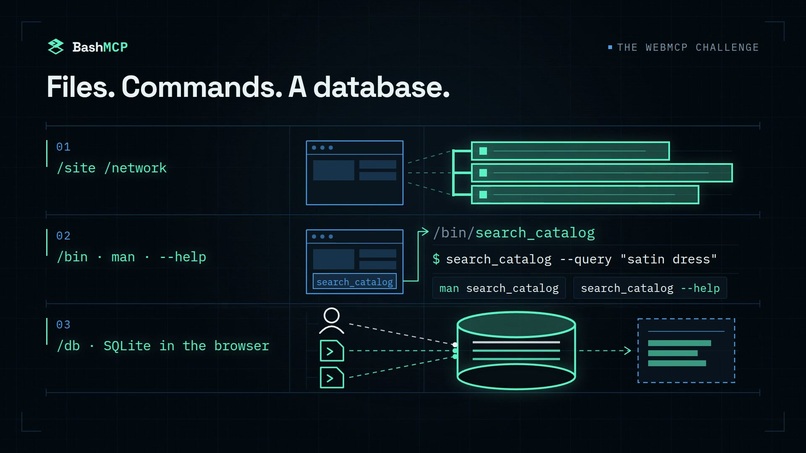
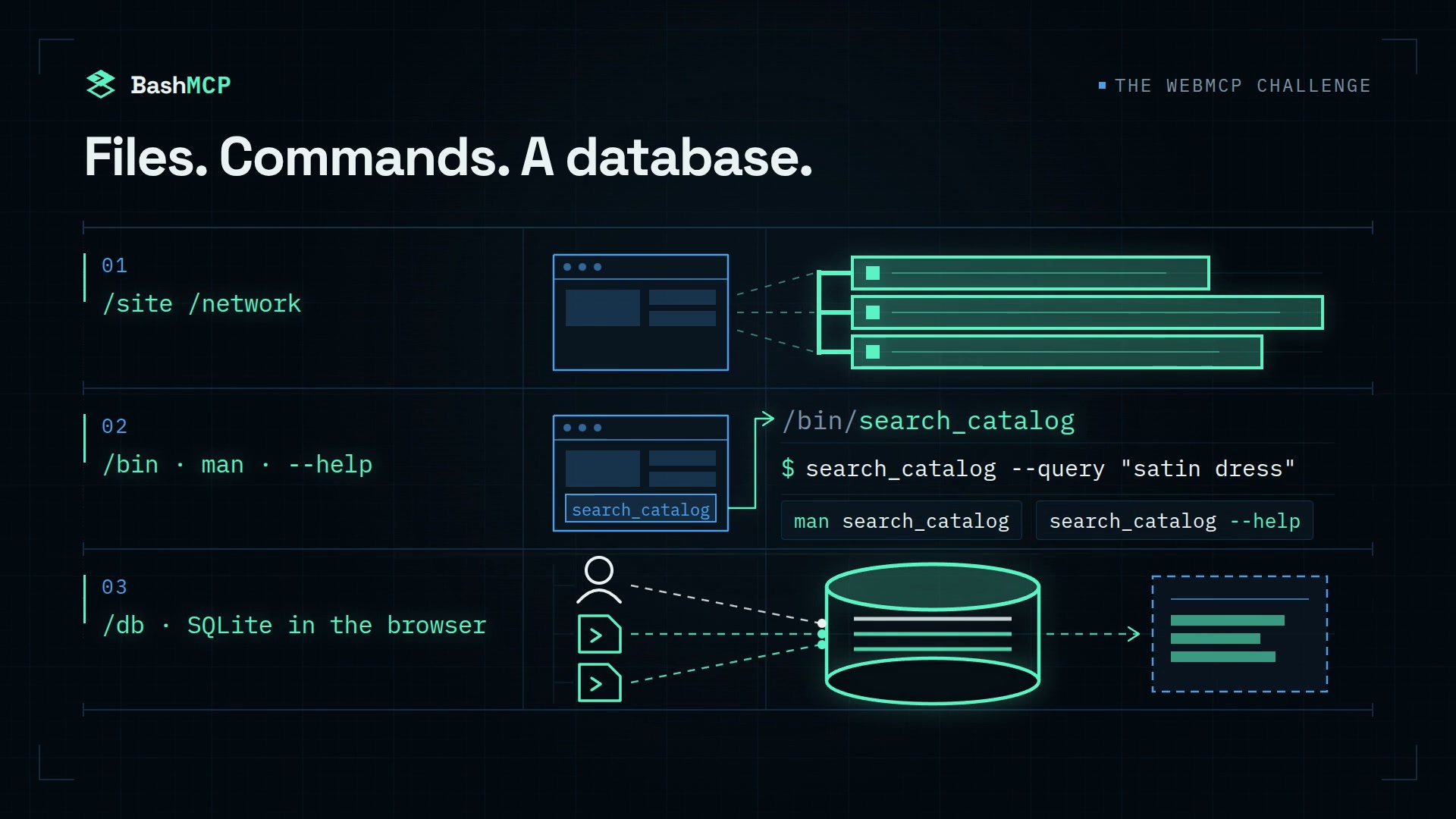
A browser-native computer: site and network files, typed commands with help, and persistent SQLite.
-
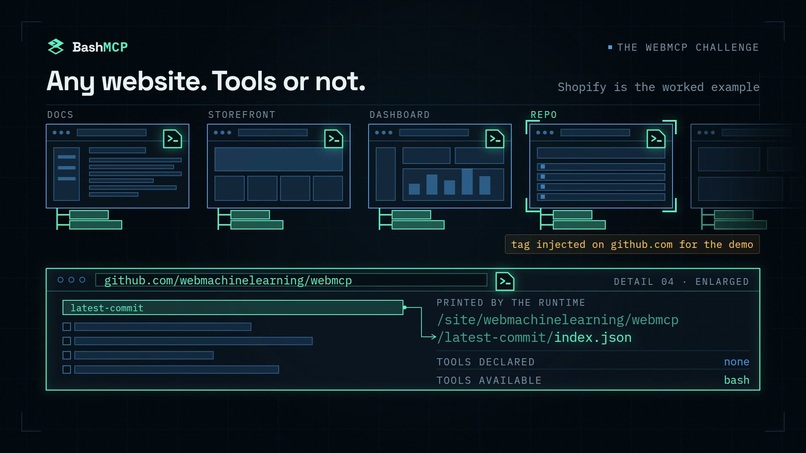
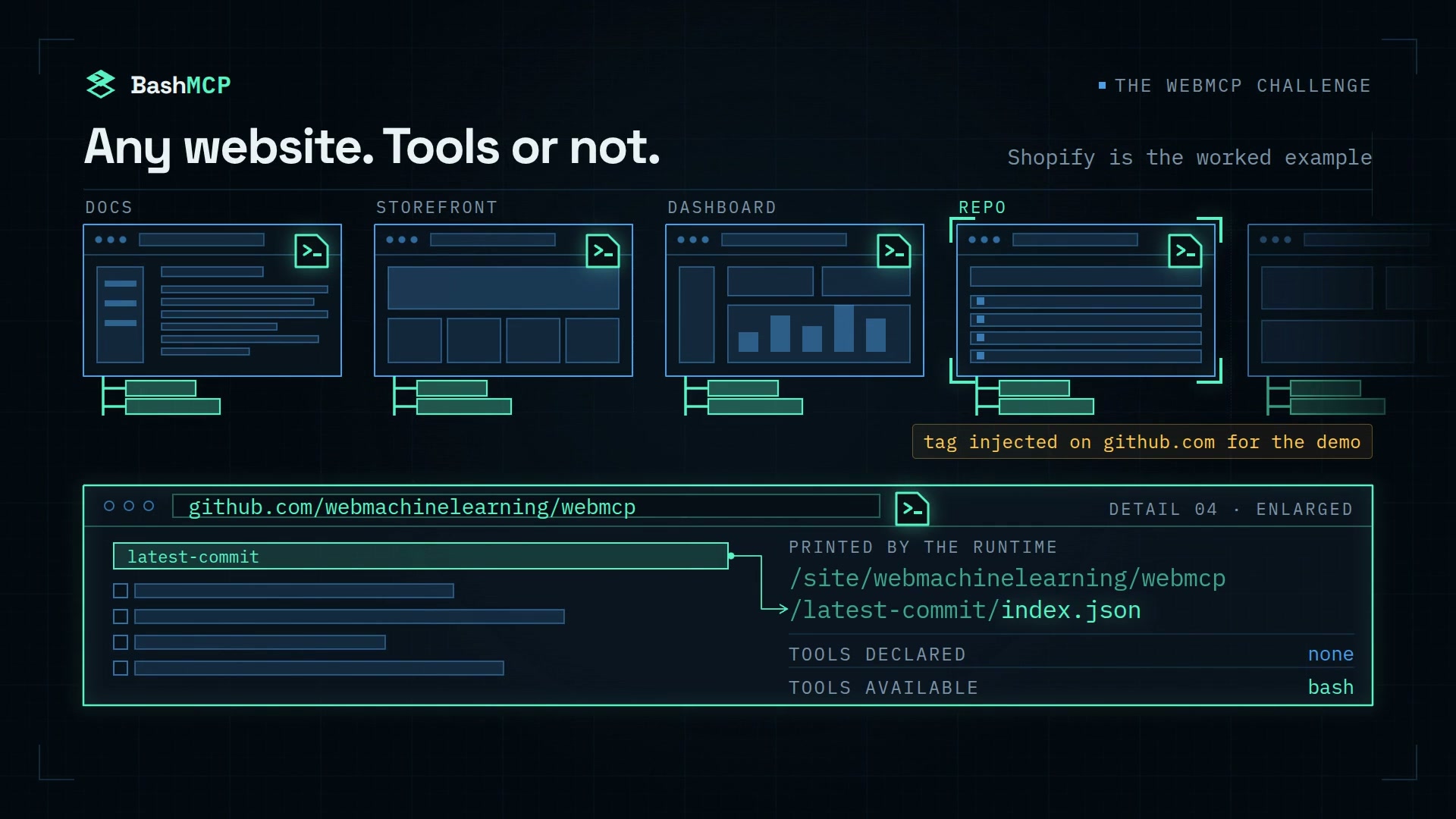
BashMCP runs on any website, with or without existing tools; Shopify is the worked example.
-
BashMCP: a command line inside any website.
-
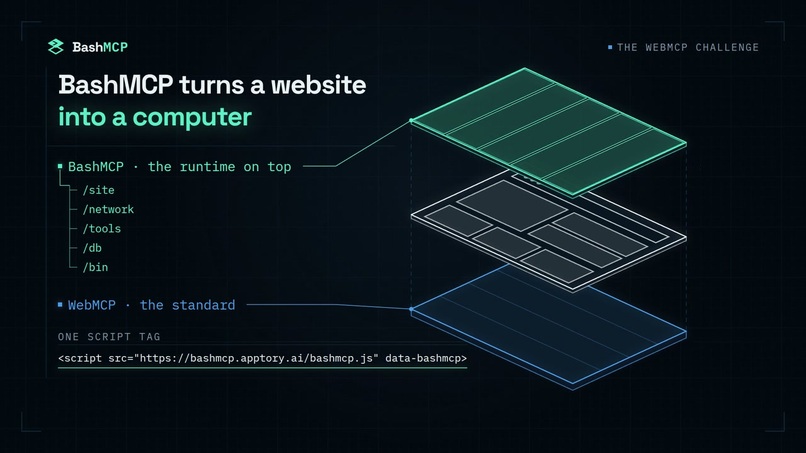
One script tag adds a site-side runtime above the WebMCP standard.
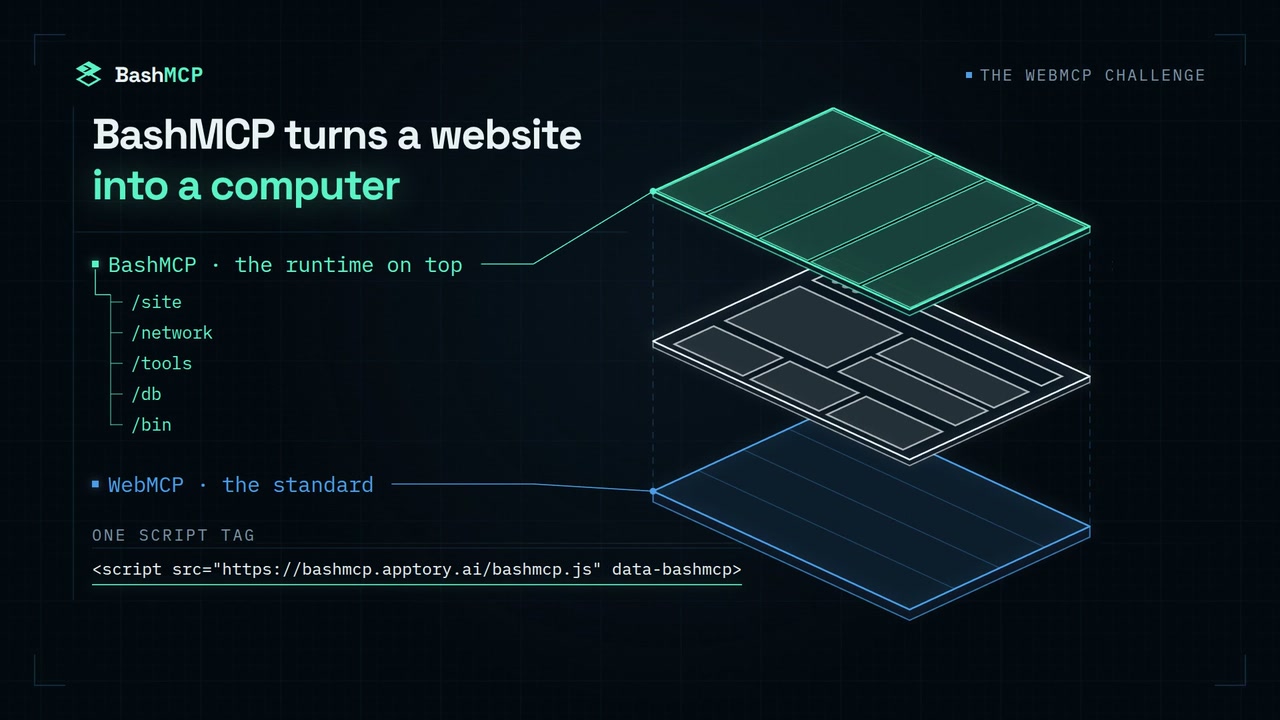
WebMCP makes a website callable. BashMCP makes it a computer, and the computer gets better every visit.
<script src="https://bashmcp.apptory.ai/bashmcp.js" data-bashmcp data-ui="drawer"></script>
That is the whole install.
BashMCP is a site-side WebMCP composition runtime that installs into an existing website and runs inside that page's live session—not a separate browser VM, a hosted sandbox, or a replacement for the site's tools.
One tag boots a sandboxed Unix-like workspace inside the page's own origin. Every WebMCP tool the site already registers compiles into a typed shell command. The page's own network traffic becomes files. An origin-scoped SQLite database persists across tabs and visits. The primary composition entry point registers back into WebMCP as a tool named bash, whose input is { command }—the same string a person would type at a terminal. A separate read-only dom page reader is registered beside it.
On the demo store, an agent composes Shopify's ten existing WebMCP tools with jq, grep, sort, and SQL in one auditable run instead of returning every intermediate result to model context.
Measured with a blind GPT-5.6 Sol agent on a whole-catalog size audit, that turned 2 of 10 correct into 9 of 10, while reducing a native median of 315 model-visible host calls to 2. The person watching sees the same pipeline land in a shared terminal, can rerun or edit it, and can save it as a new WebMCP tool. Fresh agents found and reused such a saved tool unprompted in 14 of 15 measured warm sessions.
Same-origin only. No host shell. Shopify is the worked example, not the boundary.
The numbers first
Same agent, same task, same store, and the same Shopify tools available in both conditions. The prompts never mention bash or prescribe a method. The design and primary metrics were declared before the first benchmark cell ran, exact verifiers read the resulting cart, and every failure is published.
| Task | Site tools alone | Same tools, bash beside them |
What it shows |
|---|---|---|---|
| Whole-catalog size audit, clone, n=10 | 2/10 correct; median 315 calls | 9/10 correct; 2 calls | Local composition can finish work that serial model-visible calls often cannot |
| Whole-catalog category census, clone, n=10 | 2/10 correct | 10/10 correct | The agent chose the shell unprompted in every whole-catalog run |
| Three-step shopper session with a real cart mutation, live store, n=8 | 3/8 correct | 8/8 correct; 41% fewer tokens [23–65%] | Query, ranking, and mutation on the production store |
| Single product lookup, control, n=10 | 10/10 correct | 10/10 correct; 2% more tokens; bash unused in 7/10 |
The shell adds no value where there is nothing to compose |
| Saved tool reused by a fresh agent, n=15 | — | 14/15 found it; 15/15 correct; 67% fewer tokens | The site's tool surface compounds |
| 500-product catalog audit, n=4 | 0/4 completed; up to 1,545 calls | 3/4 completed in 2–4 calls | The benefit increases as the fan-out grows |
A host-visible call is a call the host makes on the model's behalf whose result enters model context. The site tools invoked inside a bash program still execute against the real application, and every nested call remains visible in the run receipt. BashMCP removes repeated model round trips; it does not hide or eliminate the underlying application work.
We make no comparative wall-clock or cost claim. The shell is often slower on a single action, which is why the flat control remains in every results table.
The complete methodology, intervals, provenance, and failure ledger are in docs/results.md.
Why BashMCP is a strong fit for WebMCP
In agent hosts today, broad tasks often become serial tool executions: each result returns to model context before the model decides what to call next.
That is exactly right for one action—add this item to my cart or show me that variant. It becomes expensive and brittle when work spans an entire dataset. Auditing every product, ranking a catalog, or cross-referencing endpoints can require hundreds of model-visible round trips, each adding another payload the model must consume before continuing.
The tools were not the problem. The turns were.
The site's tools remain the correct, authoritative actions. BashMCP never reimplements them. It changes where their composition happens: search, filtering, ranking, joining, and mutation execute as one local program, while only the final answer returns to model context.
A host could add batching or a code interpreter for its own users. A site-installed environment has three different advantages:
- It runs inside the visitor's live session. It can work with the current cart, prices, stock, locale, login state, and the person's own actions without exporting that state into a separate environment.
- Persistence belongs to the origin. Saved tools, history, and the database remain in the site's browser origin and are available on later visits.
- The tool surface ships with the site. Anything the site registers can help compatible agents from multiple hosts, and a developer can promote an agent-authored tool into the site's build for future visitors.
So we asked: What is the most useful thing a site can register through WebMCP?
Our answer was an environment rather than another verb.
A better experience for the agent and the person
For the agent, BashMCP provides a POSIX-shaped environment it already understands: a filesystem to explore, commands with familiar flags, pipes, exit codes, man pages, --help, jq, grep, sort, and SQL.
It does not require a long instruction manual in the tool description. The description points the agent toward cat /README.md, tools, man <command>, and --help; the environment teaches the rest. In every measured whole-catalog run, the agent selected bash without being told to use it while Shopify's ten original tools remained available.
For the person, the developer installation mounts a shared terminal beside the page:
- One transcript.
- Two identities:
you@hostandagent@host. - One command history.
- One filesystem.
- One SQLite database.
You can watch the agent's pipeline land as it runs, press rerun to execute it yourself, arrow back through it, and change one flag.
The Runs, Tools, and Events panels show every call, every byte returned, and a receipt for each run—including runs initiated by an agent host rather than the visible terminal.
On the live store, ChatGPT's in-app browser sees twelve tools: Shopify's ten plus BashMCP's bash and dom. In a verified run, GPT-5.6 Sol discovered bash unprompted, completed a whole-catalog ranking task with one nested update_cart, and independently verified the resulting cart with a top-level get_cart.
What people and agents can do together that was difficult before
When a pipeline works, either the person or the agent can save it:
tool save cheapest-in-size --description "Cheapest in-stock products in a size" \
  --schema '{"type":"object","properties":{"size":{"type":"string"}},"required":["size"]}' < script
The script is stored in the origin's SQLite database and registers as a real WebMCP tool immediately and on later visits. It appears:
- In
tools. - In
man. - As a command in
/bin. - In the agent host's own tool list.
- With the description, JSON Schema, and access level its author declared.
Fresh agents found and reused the saved tool unprompted in 14 of 15 measured warm sessions, and all 15 executions produced the correct answer.
tool export prints the production shipping format, so a developer can promote an emergent tool into the site's data-tools configuration.
The loop is:
A cold agent explores → builds a missing tool → the person inspects, edits, or saves it → a later agent starts with it → the developer ships it to everyone.
A static tool surface cannot do this. BashMCP lets use itself reveal which higher-level tools the site should provide.
The runtime carries no Shopify-specific knowledge. Beyond Shopify's own registered tools, the demo ships no BashMCP-specific catalog adapter or precomputed dataset. A cold agent derives the catalog from the store's own public JSON and uses the site's authoritative WebMCP tools for mutations.
How we implemented WebMCP
Registration out.
document.modelContext.registerTool(...)registersbash, the read-onlydomhelper, and one tool for each saved script. Saved tools retain their author's description, JSON Schema, and declaredreadOnlyHint. Everything BashMCP registers carriesuntrustedContentHint: true.Discovery in. The synchronous loader installs its capture hooks before the site's own scripts register tools. It discovers those registrations and compiles each schema into a typed command with
--help,man, andschema. Required arguments, declared types, and enums are enforced; undeclared flags are rejected for closed schemas.Nested execution. A generated command calls the site's real WebMCP tool from inside the agent's
bashrun. It carries a linkedAbortSignal, and cancellation, access labels, and provenance survive the composition. The receipt names every nested site-tool call.Native and compatible surfaces. One adapter operates over the native
document.modelContextandnavigator.modelContextsurfaces where available and supplies a polyfill elsewhere. It negotiates the live encoding differences between Chrome and ChatGPT once per page without rerunning a tool merely to determine its argument format.The computer underneath. The shell is
@everruns/bashkit-wasm, a Bash interpreter written in Rust and compiled to WebAssembly, withjq,grep,sed,awk,find,sort,xargs, and constrained same-origincurl. SQLite runs throughwa-sqlitein a Worker on an IndexedDB-backed filesystem./siteand/networkare generated from traffic the page itself makes, with no platform-specific catalog knowledge.
The implementation was validated against the production store in Chrome with WebMCP enabled and in ChatGPT's desktop in-app browser on macOS and Linux.
Challenges we ran into and what we learned
The first challenge was timing. BashMCP has to install its registration and network hooks before a site's own scripts begin registering tools, while keeping the synchronous loader small and deferring the shell, SQLite worker, and terminal interface until after parsing.
The second was compatibility. Chrome's experimental surface and ChatGPT's in-app browser expose slightly different argument and schema encodings. The adapter must identify the live format without executing a tool twice, especially when that tool can mutate application state.
The third was preserving WebMCP semantics through composition. A shell pipeline still needs cancellation, access labels, provenance, mutation gating, and an auditable receipt even though several site-tool calls occur beneath one top-level bash invocation.
The final challenge was measurement. Counting only the two outer calls without disclosing the nested work would be misleading, so the benchmark distinguishes model-visible host calls from nested site-tool executions and publishes both. We also included a single-lookup control where BashMCP provides no benefit.
The main lesson was that a shell is not universally better. It is useful for fan-out, aggregation, ranking, joins, and cross-record work. For one simple action, the original site tool remains the better interface.
Trust boundaries
Same-origin networking. The shell's
curlpermits onlyGETandHEADagainst the page's exact origin, rejects redirects, times out after 15 seconds, and caps each response at 4 MiB. There is no host-shell access, backend service, telemetry, or synchronization service.Network projection.
/networkmirrors requests the page already made; it does not generate additional requests and cannot read opaque cross-origin response bodies. Bodies and the total buffer are capped. A site that includes secrets in page-visible traffic must audit that traffic before installing BashMCP on an authenticated origin.Bounded output. Agent stdout is capped at 48 KiB with a visible truncation notice, and receipts report how many bytes were returned.
Declared and enforced writes.
bashis marked mutating because an arbitrary command may call a mutating site tool. Saved tools are read-only unless explicitly created with--write; a nested mutating call from a read-only saved tool throws at runtime. Snapshot-derived prices, inventory, and identifiers are revalidated through live site tools before mutation.Origin-scoped persistence. Saved tools, terminal history, preferences, and
$DBremain in browser storage for that origin.tool rmdeletes a saved tool, and a private window begins with clean storage.
The current user-consent boundary is the host's approval gate on the top-level mutating bash invocation. A finer interaction immediately before an individual nested write is the next trust improvement.
What it costs a page
The synchronous loader is approximately 70 KB gzipped. Its immediate responsibilities are limited to installing the network and WebMCP capture hooks.
The larger components load after the document finishes parsing:
- Shell WebAssembly: approximately 2.7 MB gzipped.
- SQLite worker.
- Developer terminal and panels.
The first visit transfers approximately 2.95 MB before caching. Sites can self-host the build, and data-ui="headless" provides the production installation with only a ledger badge; agent behavior is the same without the developer terminal.
Try it
Live demo: https://bashmcpdemo.apptory.ai/
It is public and requires no login. The label is fictional, nothing ships, and checkout uses Shopify's test gateway.
With an agent
In the ChatGPT desktop app:
- Enable Settings → Browser → Permissions → Enable site tools.
- Open the live store in the in-app browser before sending the prompt.
- Confirm that the Site Tools menu lists twelve tools.
- Give the agent the following task without mentioning
bash:
I have three things for you. First: across this store's whole catalog, which product type has the most products in stock in size S, and how many is that? Second: of that product type, which products in stock in size S are on sale right now? Give me each one's handle and its size-S sale price. Third: add one of the cheapest of those on-sale products to my bag, in that size, and tell me which one you added.
To see the control condition, run the same task in a private window at:
https://bashmcpdemo.apptory.ai/?bashmcp=off
That is the switch used for the native benchmark condition. BashMCP does not load, while Shopify's ten tools remain available.
Without an agent
The terminal is open on desktop. Try:
cat /README.md
tools
ls /site /network
man update_cart
sqlite3 $DB ".tables"
In Chrome with WebMCP testing enabled, DevTools → Application → WebMCP lists the same twelve tools and can invoke them directly.
Built during the submission window
BashMCP is entirely new work. Development began on 2026-09-01 inside the challenge submission period. The runtime, WebMCP adapter, demo storefront integration, benchmark harness, documentation, and film were all built during that window.

Log in or sign up for Devpost to join the conversation.