Inspiration
Web developers face a constant challenge: writing modern code while ensuring it works across all browsers. After encountering numerous production bugs caused by non-Baseline web features that worked perfectly in Chrome but failed in Safari or Firefox, we realized the developer community needed an automated guardian built directly into their development environment. The inspiration came from experiencing firsthand how a single unsupported CSS property or JavaScript API could break an entire user experience for millions of users. We envisioned an IDE extension that would catch these issues during development, not after deployment, and provide intelligent fixes rather than just warnings. The goal was to bridge the gap between modern web development practices and universal browser compatibility, all within the IDE where developers spend their time.
What it does
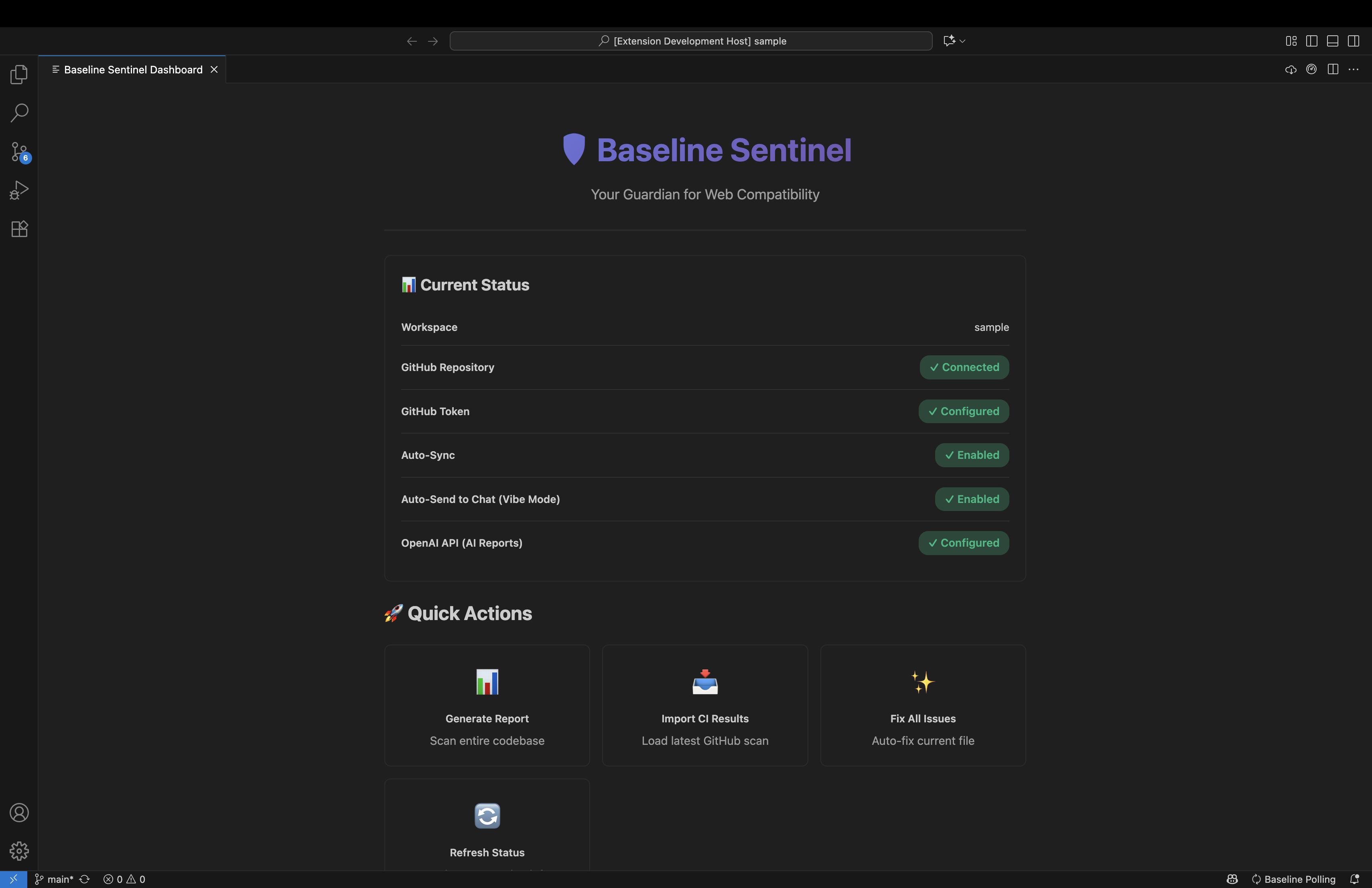
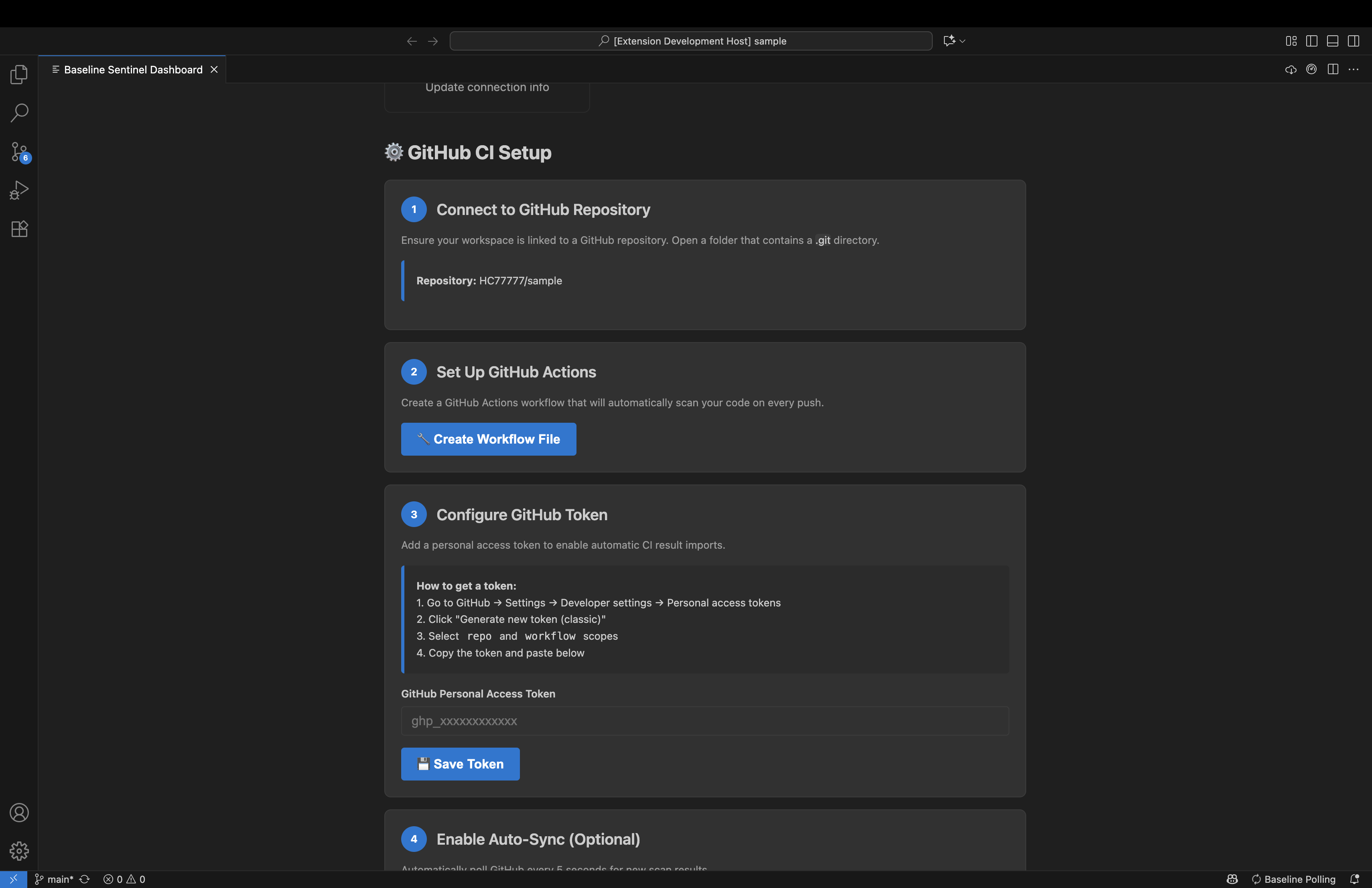
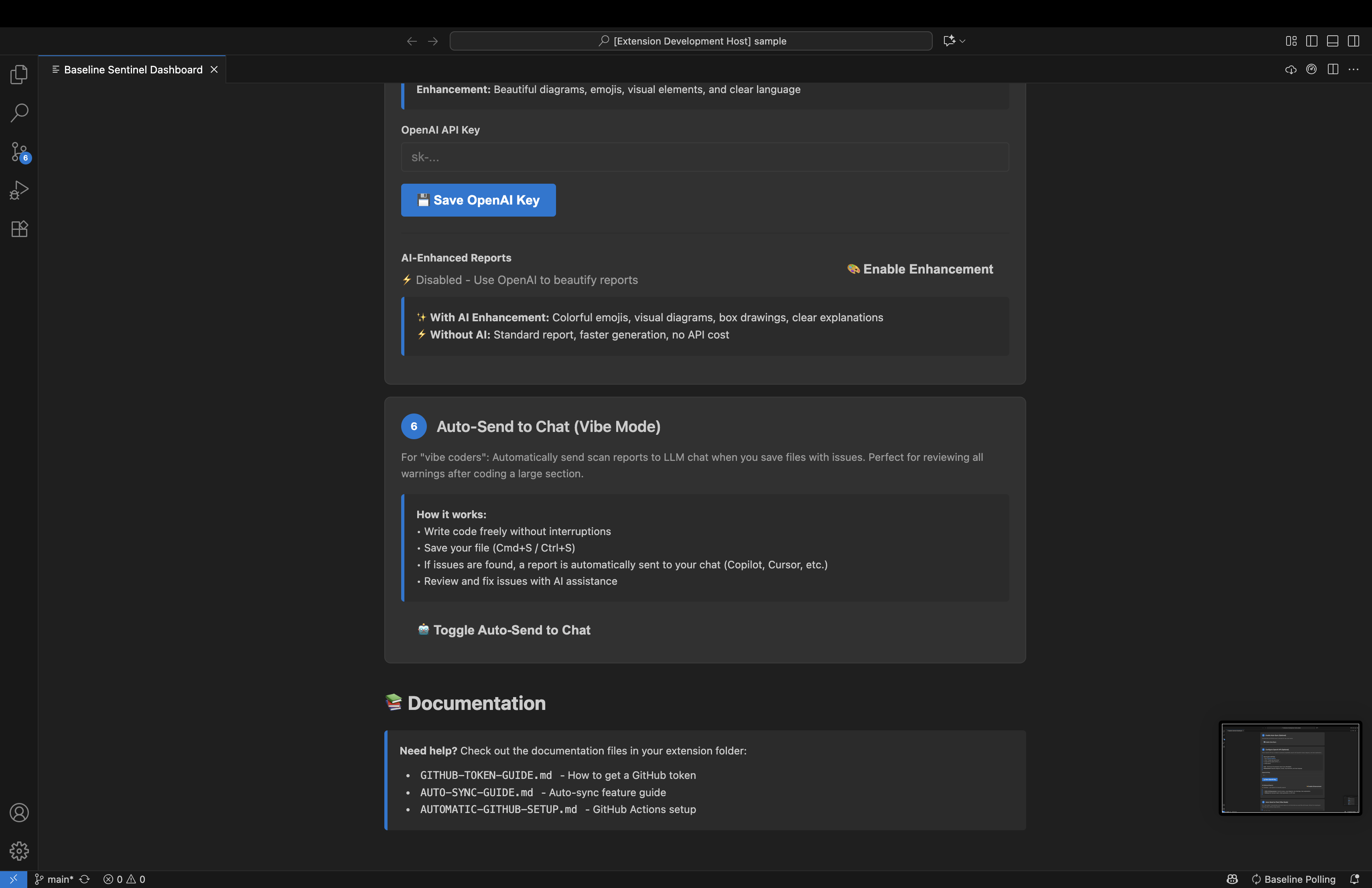
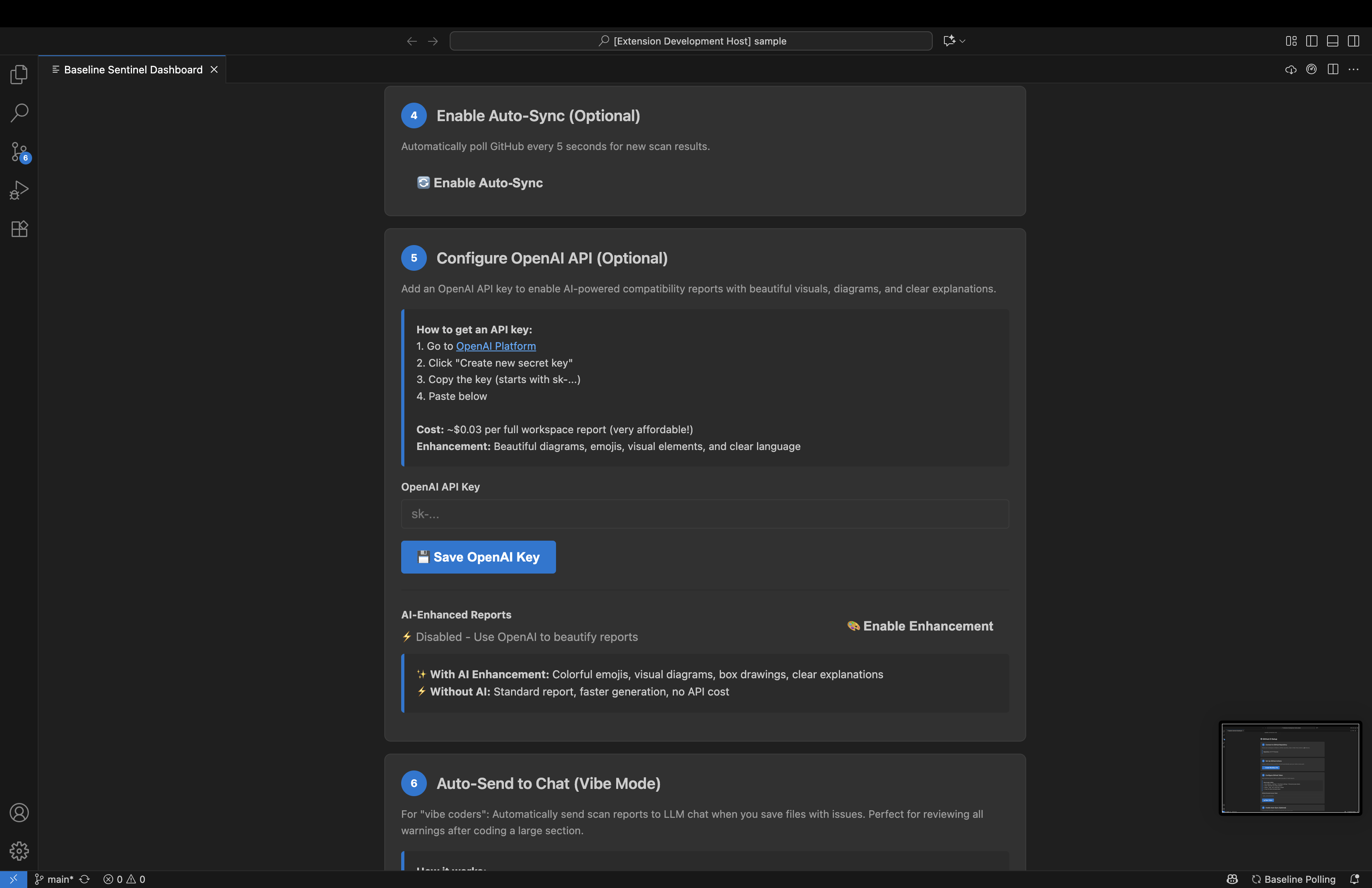
Baseline Sentinel is a comprehensive IDE extension that ensures cross-browser support throughout the entire development lifecycle. As a native editor extension, it provides real-time in-editor warnings for non-Baseline CSS properties, JavaScript APIs, TypeScript features, and HTML elements as developers write code. Every detected issue includes one-click quick fixes with intelligent remediation suggestions including fallback properties, polyfill recommendations, and direct replacements. The Fix All command in the editor title bar applies all available fixes in a single click. Developers can hover over warnings to see rich MDN documentation and suppress intentional uses with linter ignore directives. Beyond the IDE integration, the extension connects seamlessly with GitHub Actions for automated CI/CD scanning, running scheduled weekly scans and push-triggered checks. Results are uploaded as artifacts and posted as pull request comments. The extension's auto-sync polling system monitors GitHub Actions every 5 seconds and provides one-click import of CI results directly into the editor with automatic workspace validation. The Fix All from CI command in the title bar applies all detected fixes instantly. The extension includes an AI-powered reporting system that queries the Web Platform Dashboard API for real-time browser compatibility data and uses GPT-4 Turbo to generate professionally formatted reports with visual diagrams, ASCII art, compatibility scores, executive summaries, risk assessments, and migration guides. The Vibe Coder Mode automatically sends compatibility reports to LLM chat on every file save for instant AI assistance. A custom dashboard panel accessible from the editor title bar provides centralized control over all features including GitHub integration, OpenAI configuration, and manual report generation.
How we built it
We architected Baseline Sentinel as a TypeScript monorepo with three core components: baseline-fixer-core (shared scanning engine), vscode-baseline-sentinel (the IDE extension implementation), and action-baseline-sentinel (CLI tool and GitHub Action). The IDE extension is built using the editor extension APIs. We leveraged diagnostic collections for real-time warnings displayed as squiggly underlines, code action providers for the quick fix lightbulb menu, hover providers for rich tooltips with MDN links, and webview panels for the custom dashboard interface. The extension registers commands that appear in the editor title bar with custom icons and contributes configuration settings accessible through the IDE's settings interface. For parsing, we integrated PostCSS for CSS files, Babel for JavaScript and TypeScript AST traversal, and parse5 for HTML document analysis. The extension implements a 500ms debouncing mechanism using document change listeners to prevent performance issues during rapid typing. The remediation database contains over 50 manually curated fixes covering modern CSS properties like backdrop-filter and container queries, JavaScript APIs like ResizeObserver and Promise.any, deprecated HTML elements, and non-Baseline attributes. For GitHub integration, the extension automates workflow file generation, implements artifact upload and download using the GitHub API with personal access tokens configured through extension settings, and builds a polling system with 5-second intervals using setTimeout recursion. The auto-import functionality validates workspace-repository matching before applying fixes. The AI reporting system makes HTTPS requests to api.webstatus.dev for browser compatibility data and the OpenAI API for GPT-4 Turbo enhancement. We crafted detailed prompts instructing the AI to use emojis strategically, create ASCII diagrams with box-drawing characters, add visual progress bars, and write in clear professional language. The fix application logic handles overlapping ranges through iterative processing, re-fetching diagnostics after each fix to account for line shifts. The extension is configured with proper activation events for supported languages (CSS, JavaScript, TypeScript, HTML), menus for editor title bar buttons with conditional visibility, and contributes multiple commands for different workflows.
Challenges we ran into
The most significant challenge was resolving persistent TypeScript module resolution errors in the monorepo. The Cannot find module baseline-fixer-core error plagued early builds because IDE extensions typically require CommonJS modules, not ES Modules. We had to carefully configure tsconfig.json files across all packages with module: commonjs, moduleResolution: node, composite: true, and declaration: true while ensuring proper project references between the core library and the extension. Implementing the Fix All functionality revealed complex issues with overlapping text ranges. When multiple fixes targeted the same line, the editor would throw Overlapping ranges are not allowed errors. We solved this by switching from batch edits to iterative application using workspace edit APIs, where each fix is applied individually and diagnostics are re-fetched before the next fix, accounting for line number shifts. The OpenAI API integration initially failed with invalid JSON body errors. After extensive debugging, we discovered the Content-Length header was incorrectly set to data.length (character count) instead of Buffer.byteLength(data) (byte count). Multi-byte characters like emojis caused payload truncation, which we fixed by using the proper byte length calculation. Ensuring warnings disappeared immediately after applying quick fixes required careful orchestration within the extension lifecycle. We had to explicitly call updateDiagnostics after every workspace edit operation and implement proper change detection through document change listeners. The GitHub Actions auto-sync polling system required balancing responsiveness with API rate limits while keeping the extension non-intrusive. We experimented with intervals from 2 minutes down to 5 seconds while implementing graceful failure handling for missing repositories and non-intrusive error messaging using the notification API with modal dialogs. HTML scanning proved particularly complex due to embedded CSS and JavaScript. We had to recursively traverse the parse5 AST, detect inline styles and scripts, extract their content, and apply appropriate scanners while maintaining accurate line and column mappings for diagnostic ranges that the editor could properly render. Making the extension UI responsive and non-blocking required understanding asynchronous command execution, progress notifications, and proper status bar item management to indicate active operations without freezing the editor.
Accomplishments that we're proud of
We successfully built a fully functional IDE extension that covers the entire development lifecycle from real-time coding through CI/CD to comprehensive reporting. The extension is production-ready and handles real-world codebases without performance degradation. The over 50 high-quality manual remediations provide practical, tested fixes rather than generic suggestions, all accessible through the editor's native quick fix interface. The seamless GitHub Actions integration with one-click workflow setup, automatic artifact management, and intelligent auto-sync polling creates a truly automated experience where developers simply push code and the extension handles everything else, notifying them when results are ready. The AI-enhanced reporting system produces genuinely professional, visually appealing reports with meaningful insights, all viewable within the editor's markdown preview capabilities. The universal linter ignore directive system provides developers with control while maintaining automated checking. The baseline-disable-next-line comments offer an elegant escape hatch for intentional non-Baseline usage. The custom dashboard webview consolidates all configuration and actions into an intuitive interface accessible from the editor title bar, making complex features accessible to developers of all skill levels without leaving the IDE. The Vibe Coder Mode represents an innovative approach to developer assistance, automatically sending compatibility context to the integrated LLM chat for instant AI-powered guidance without interrupting workflow. The extension integrates naturally with the IDE's existing UI patterns, using familiar elements like diagnostic squiggles, lightbulb menus, hover tooltips, title bar buttons, and webview panels, making it feel like a native part of the editor.
What we learned
We gained deep expertise in IDE extension development including the extension API lifecycle, proper activation events, command registration, diagnostic management, and UI contribution points. Understanding how to create non-blocking asynchronous operations within the extension host was crucial for maintaining editor responsiveness. TypeScript monorepo configuration and the nuances of module resolution across different package types proved essential. We learned that IDE extensions must use CommonJS modules and how to properly configure project references between packages. The extension API revealed itself to be both powerful and particular. We learned the importance of proper diagnostic range management, the distinction between synchronous and asynchronous command execution, how to create modal and non-modal notifications, and the proper use of progress indicators and status bar items. AST traversal and parsing taught us how different tools handle source code. PostCSS provides a clean declarative structure for CSS, while Babel requires careful visitor pattern implementation for JavaScript. Parse5's HTML parsing necessitates recursive tree traversal with state management. Working with external APIs like the Web Platform Dashboard and OpenAI from within an IDE extension showed us the importance of robust error handling, proper content encoding, graceful degradation, and user feedback through notifications. GitHub Actions integration taught us about workflow triggers, artifact lifecycle management, and the GitHub API's authentication and rate limiting. We learned to balance automation with user control, providing both scheduled execution and manual triggers. The iterative fix application approach taught us that sometimes sequential processing is more reliable than batch operations, especially when dealing with mutable text documents in the editor model where changes affect subsequent operations. We discovered that developer experience matters as much as technical capability. Features like persistent notifications, workspace validation, title bar buttons with appropriate icons, and non-intrusive error handling make the difference between an extension that works and an extension developers actually use daily.
What's next for Baseline Sentinel
We plan to publish the extension to multiple IDE marketplaces, making it available to millions of developers worldwide with proper versioning, automatic updates, and telemetry for usage analytics. Language support expansion will include modern frameworks like React, Vue, and Angular with component-specific compatibility checking for JSX/TSX syntax and framework-specific APIs, all integrated into the extension's diagnostic system. Enhanced AI capabilities within the extension will include conversational fix suggestions where developers can ask questions about specific warnings through the integrated chat, automatic fix prioritization based on project context and target browser matrix, and learning from user feedback to improve remediation suggestions over time. The remediation database will grow to cover emerging web standards, progressive web app features, and CSS Grid and Flexbox edge cases. We will implement community contribution systems through the extension's UI allowing developers to submit and vote on remediations. Advanced reporting features will include interactive webview dashboards with drill-down capabilities, historical compatibility tracking showing improvement over time displayed in the extension's sidebar, and team-wide compatibility metrics for organizations. Browser testing integration will connect the extension with tools like BrowserStack or Sauce Labs to validate fixes in actual browser environments and provide real-world compatibility verification beyond static analysis, all triggered from within the IDE. Performance optimization will focus on incremental scanning for large files, background processing for workspace-wide analysis using extension host workers, and caching strategies for frequently scanned code patterns to maintain editor responsiveness. Custom rulesets configurable through extension settings will allow teams to define their own browser support targets, configure severity levels for specific features, and create organization-specific remediation guidelines. Plugin ecosystem development will enable third-party extensions to contribute custom fix providers, integrate with other developer tools through extension APIs, and extend the remediation database. Educational features integrated into the extension will include interactive tutorials for understanding Baseline, compatibility best practices documentation viewable in webviews, and real-time learning suggestions based on detected patterns displayed as code lens decorations. Multi-IDE support will expand to JetBrains IDEs, Visual Studio, Sublime Text, Atom, and other popular editors, using the core scanning engine with platform-specific UI integrations to reach developers across different development environments. The ultimate vision is to make browser compatibility a solved problem through seamless IDE integration, allowing developers to focus on building great user experiences rather than debugging cross-browser issues, all without leaving their editor of choice.
Built With
- babel
- javascript
- node.js
- parse5
- postcss
- typescript
- vscodeapi
- web-platform-dashboard-api-of-google-baseline

Log in or sign up for Devpost to join the conversation.