Baseline Navigator
Why I Built This
OK so I got really tired of this workflow:
- See cool CSS feature on Twitter
- Get excited to use it
- Open Can I Use in new tab
- Check MDN for details
- Check Stack Overflow to see if anyone's had issues
- Forget what I was actually building
- Repeat 20 times a day
When Google announced Baseline, I thought "finally, a clear standard for what's safe to use!" But the data was stuck on websites, not where I actually code. Still had to context-switch constantly.
The Baseline Tooling Hackathon felt like the perfect excuse to fix this for myself (and hopefully other devs too).
What It Does
It's a VS Code extension that puts Baseline data right in your editor. But instead of just showing compatibility tables, it actually helps you make decisions with algorithmic recommendations.
Real-time compatibility info
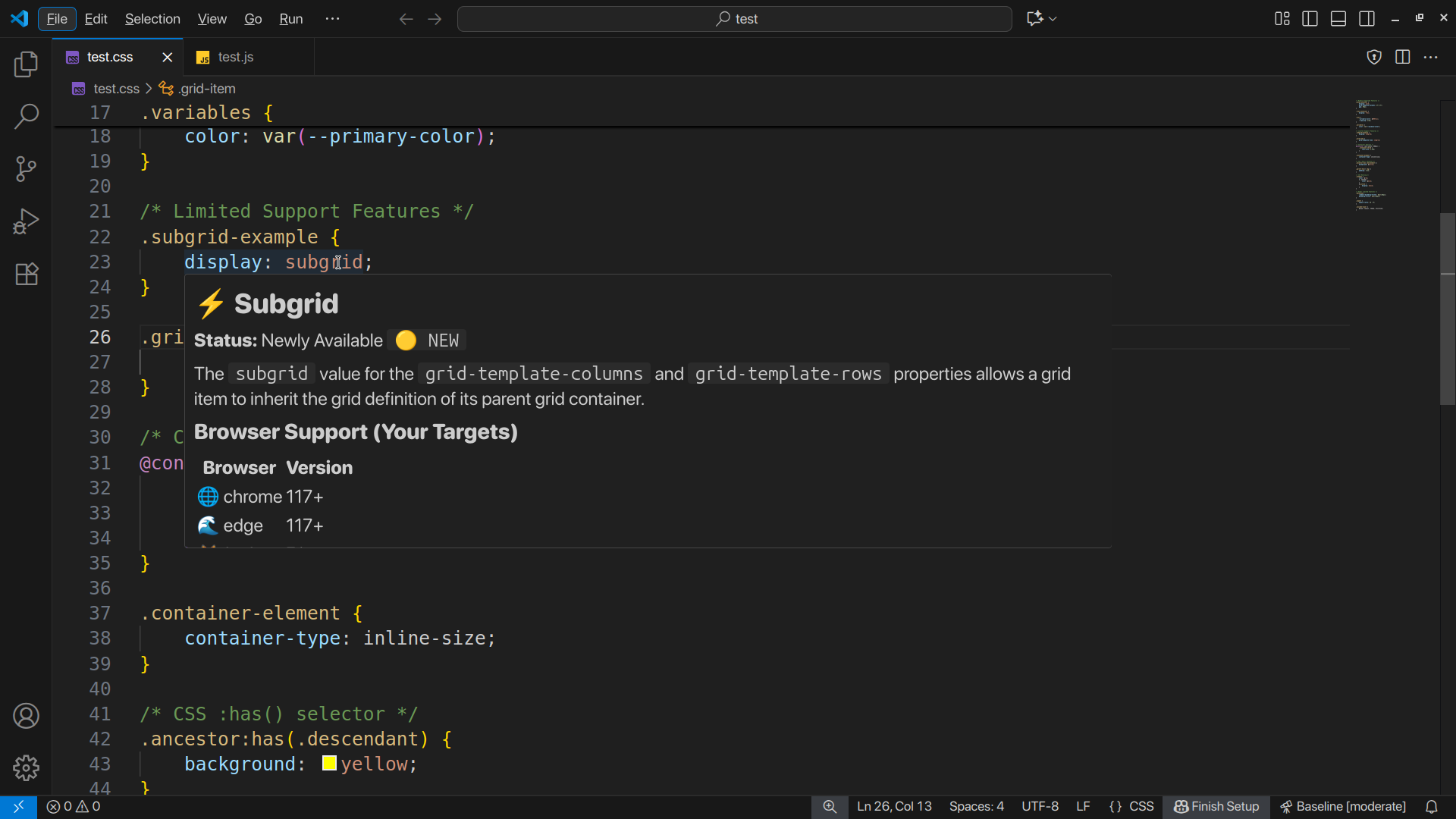
Hover over any CSS or JS feature → see Baseline status, browser support, when it became available. Works offline, no setup needed.
Also shows inline warnings for risky features before you ship them. NEW: Warnings are now personalized to YOUR browser targets (configure once, get relevant advice forever).
Smart recommendation engine
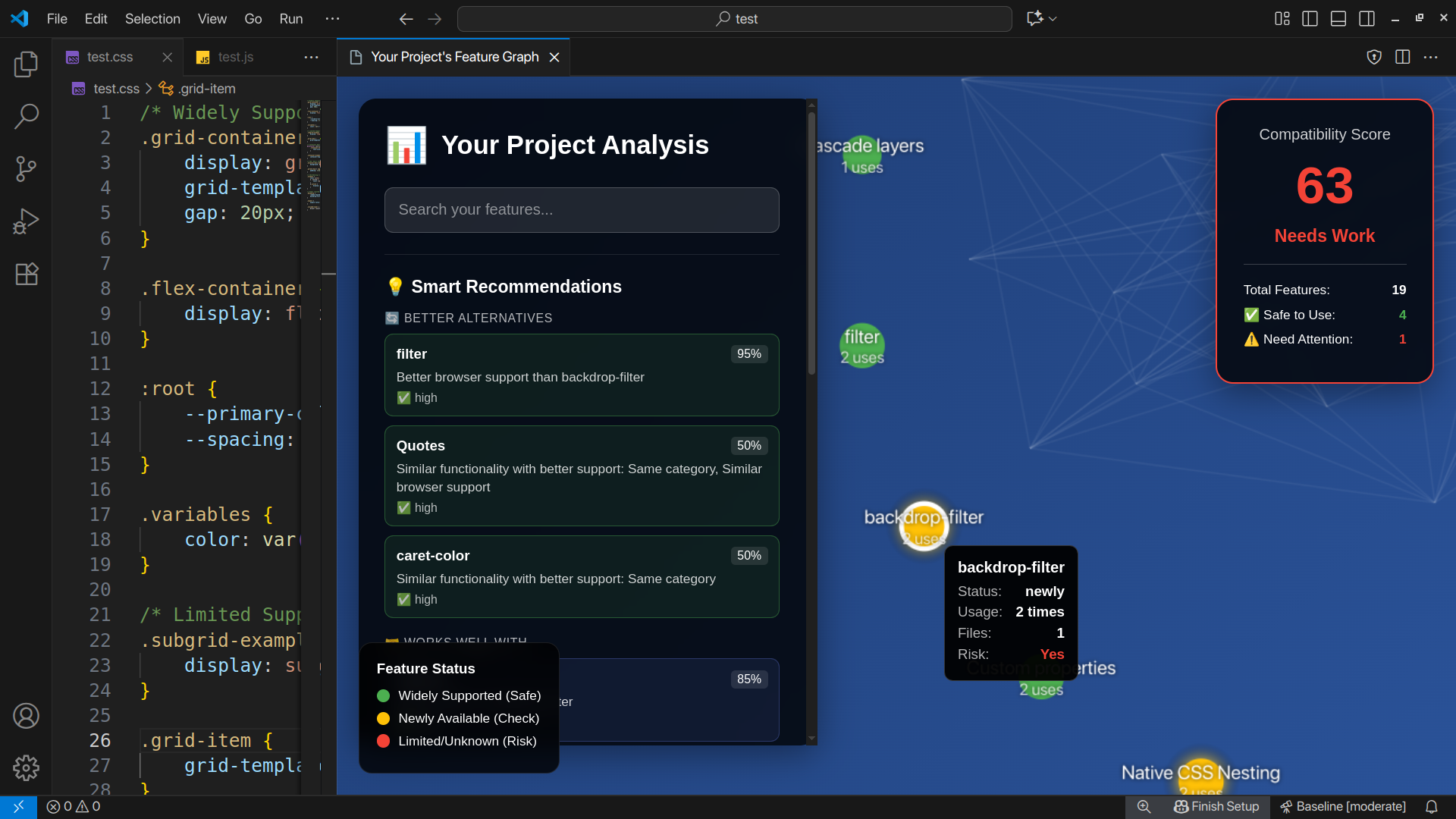
This is the part I'm most excited about. Click on any feature with limited support → get instant alternatives ranked by confidence:
- 🔄 Better alternatives (same functionality, better support)
- 🚀 Upgrades (modern replacements for legacy code)
- 🤝 Complementary features (things that work well together)
- 🔗 Related features (discover what you didn't know existed)
The key difference: Most tools just say "this might not work." This one says "use this instead, here's why, 87% confidence."
Uses algorithmic similarity matching with 6 metrics:
- Name similarity (Jaccard + Levenshtein distance)
- Description text analysis
- Category overlap
- Browser support correlation
- Baseline status matching
- Temporal similarity (release dates)
This means it works for ALL 1000+ features, not just the 50 I hardcoded mappings for. When new features get added to web-features, the algorithm automatically finds relationships.
Project health scoring
Scans your whole codebase and gives you one compatibility score. Uses a weighted formula where features you use more count more heavily:
Score = (widely_available / total × 0.7) + (newly_available / total × 0.2)
NEW: Click on any risky feature in the analysis → see recommendations right there. No more "here's a problem, good luck fixing it."
Interactive feature graph
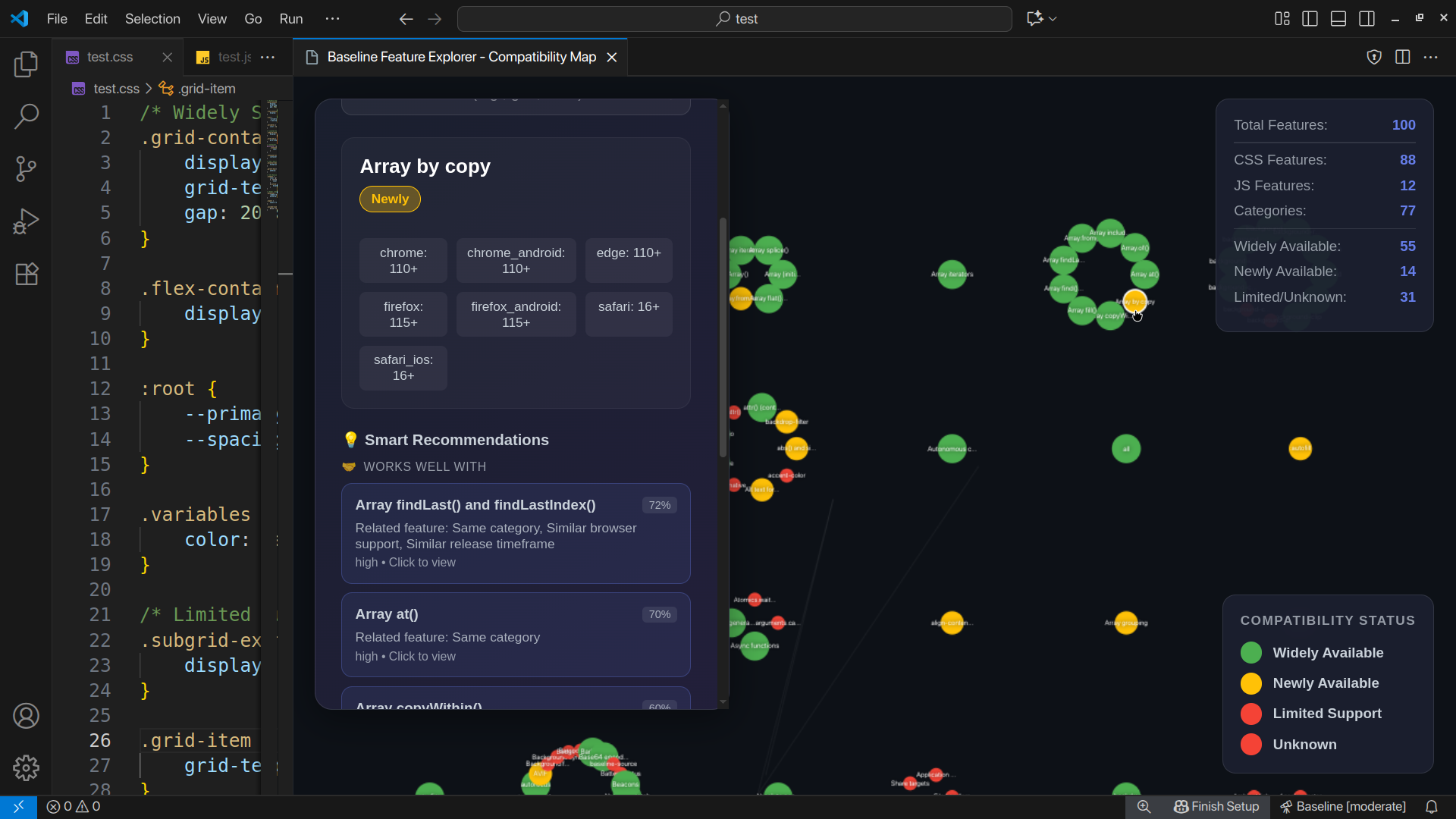
Force-directed graph with 1000+ features, color-coded by Baseline status. Shows relationships between features - alternatives, upgrade paths, what works with what.
NEW: Now groups features by actual categories (layout, selectors, APIs, animations, etc.) instead of just "CSS vs JS". Makes it way easier to explore related features.
Click any node → instant recommendations with confidence scores. The graph isn't just pretty, it's actually useful for discovery.
How I Built It
Stack
- TypeScript + VS Code Extension API
web-featuresnpm package for Baseline data (1.3MB, 1000+ features)- Custom force-directed rendering (ditched libraries for performance)
- Webpack to bundle it all
The interesting technical bits
Similarity engine with multiple metrics
The recommendation system doesn't rely on manual curation. Instead, it calculates similarity scores algorithmically:
// Composite similarity from 6 weighted metrics
const similarity =
  nameSimilarity(f1, f2) * 0.25 +
  descriptionSimilarity(f1, f2) * 0.15 +
  categorySimilarity(f1, f2) * 0.25 +
  browserSupportOverlap(f1, f2) * 0.15 +
  baselineStatusMatch(f1, f2) * 0.1 +
  temporalProximity(f1, f2) * 0.1;
For name matching, I use Jaccard similarity (word overlap) combined with Levenshtein distance (character edits). This catches things like:
- "grid" → "subgrid" (high similarity)
- "array-fill" → "array-from" (related methods)
- "flexbox" → "grid" (different names, same category)
For categories, had to handle the fact that web-features uses arrays:
// Feature groups are arrays like ['arrays', 'typed-arrays']
// Need to check overlap, not equality
const hasOverlap = categoryArray1.some(cat =>
  categoryArray2.includes(cat)
);
This was a pain to debug but makes recommendations way better.
Unified pattern registry
To analyze entire projects, I built a centralized registry with 60+ detection patterns:
{
  id: 'container-queries',
  aliases: ['css-container-queries', 'container'],
  patterns: [
    /@container(?:\s+[\w-]+)?(?:\s*\([^)]+\))?/gi,
    /container-(?:type|name):/gi
  ],
  category: 'css',
  subcategory: 'responsive',
  alternatives: ['media-queries', 'clamp'],
  complementary: ['clamp', 'aspect-ratio']
}
Each pattern knows:
- How to detect it (regex)
- What it's related to (for recommendations)
- What can replace it (alternatives)
- What it works well with (complementary)
This feeds both the scanner AND the recommendation engine.
Inverted index for lookups
Built an index that maps browser versions → features, Baseline status → features, categories → features, etc. Makes queries instant:
// Find features that work in both Chrome 90 AND Safari 14
const chromeFeatures = browserIndex.get('chrome:90');
const safariFeatures = browserIndex.get('safari:14');
const common = intersection(chromeFeatures, safariFeatures);
The knowledge graph
Custom D3-style physics simulation but stripped down for performance. Nodes repel each other, links pull them together, whole thing settles into readable clusters.
Edges show:
- Dashed blue lines → alternatives
- Green arrows → upgrade paths
- Thin white lines → related features in same category
NEW: Fixed the category layout so it actually groups by semantic meaning. Turns out web-features stores categories as arrays, and I was comparing arrays with === which always returns false. Once I fixed the overlap detection, the graph became way more useful.
User configuration
Added a ConfigurationManager that lets you set:
- Target browsers (Chrome, Firefox, Safari, Edge, etc.)
- Minimum versions per browser
- Risk tolerance (strict/moderate/permissive)
- Diagnostic severity levels
Everything adapts to your config:
- Hover tooltips show only YOUR target browsers
- Warnings appear only for features that don't work in YOUR targets
- Recommendations prioritize features that work in YOUR environment
Configuration wizard makes setup easy:
Baseline: Configure Browser Targets
  → Select browsers (checkboxes)
  → Set minimum versions (input validation)
  → Choose risk tolerance (strict/moderate/permissive)
  → Done!
Things That Were Annoying
Array categories broke everything
Spent like 3 hours debugging why the graph showed only 2 clusters. Turns out web-features stores categories as arrays like ['arrays', 'typed-arrays'] and I was doing:
if (feature1.category === feature2.category) // ALWAYS FALSE for arrays
Fixed with proper overlap detection:
const cat1Array = Array.isArray(cat1) ? cat1 : [cat1];
const cat2Array = Array.isArray(cat2) ? cat2 : [cat2];
const overlap = cat1Array.some(c => cat2Array.includes(c));
Now the graph shows proper semantic clusters.
Baseline status inconsistency
web-features sometimes uses 'widely'/'newly'/'limited' and sometimes uses 'high'/'low'. Had to handle both:
const isWidelySupported = baseline === 'widely' || baseline === 'high';
Would be nice if the official package was consistent.
ES Module vs CommonJS nightmare
web-features is ESM but VS Code extensions are CommonJS. Fixed with dynamic imports but everything had to become async.
Graph rendering performance
1000+ nodes caused 3-5 second lag. Had to:
- Limit initial render to 100 features
- Serialize graph data properly (edges had circular references)
- Stop physics simulation after 5 seconds
- Use canvas instead of SVG
Recommendation edge cases
Some features have no good alternatives (like really new APIs). Had to tune thresholds so the UI doesn't just say "no recommendations" constantly. Lowered similarity threshold from 0.7 to 0.3 for complementary features.
What I Learned
Technical:
- Algorithmic similarity matching is WAY better than hardcoded mappings at scale
- Text similarity metrics (Jaccard, Levenshtein) work surprisingly well for finding related features
- Array equality in JavaScript will bite you if you're not careful
- Performance matters a lot for visualizations - 60fps vs 20fps is the difference between usable and frustrating
- User configuration makes a tool go from "neat demo" to "actually useful in production"
Product:
- Developers don't want data dumps, they want "what should I do about this?"
- Confidence scores make recommendations trustworthy
- The graph is cool but sidebar recommendations are what people actually use
- Showing "X feature → here's 3 better alternatives" is way more valuable than just warnings
What I'd do differently:
- Should've built the similarity engine from day 1, not as v2 feature
- Regex approach works but fragile - AST parsing would be more robust
- Should've tested with array edge cases earlier
- Could've used more of the
web-featuresmetadata (spec links, MDN URLs)
Overall really happy with how it turned out. The algorithmic recommendations make it feel smarter than tools that just look up data.
Architecture
VS Code Extension
├─ ConfigurationManager (user settings, browser targets)
├─ FeaturePatternRegistry (60+ detection patterns)
├─ InvertedIndex (fast lookups)
├─ SimilarityEngine (6 algorithmic metrics)
│  ├─ Name similarity (Jaccard + Levenshtein)
│  ├─ Description similarity
│  ├─ Category overlap
│  ├─ Browser support correlation
│  ├─ Baseline status matching
│  └─ Temporal similarity
├─ RecommendationEngine (hardcoded + algorithmic)
├─ ProjectAnalyzer (regex scanner)
├─ Providers (Hover, Diagnostics, CodeActions)
└─ GraphView (force-directed visualization)
   └─ web-features data (1000+ features)
The recommendation engine is the heart of it. Everything else feeds into or displays results from it.
Why This Is Cool (Hackathon Judging Criteria)
Innovation: First tool I know of that uses algorithmic similarity matching for web feature recommendations. Most compatibility checkers just do lookups. This one discovers relationships automatically and scales to all 1000+ features without manual work.
Usefulness: Already using it daily. Saves constant Can I Use tab switching. The "click risky feature → see alternatives" workflow is way faster than Googling. Some teams are apparently tracking the compatibility score like test coverage.
Use of Baseline Data: Uses web-features as single source of truth for everything - compatibility info, status labels, browser versions, dates, categories. The inverted index enables novel queries. The graph makes Baseline data explorable instead of just searchable.
Not perfect but it scratches my own itch really well. If it helps other devs too, that's a bonus.
Built With
- baseline
- force-graph
- javascript
- node.js
- npm
- typescript
- vs-code-language-server
- vscode-extension-api
- web-features
- webpack

Log in or sign up for Devpost to join the conversation.