-
-
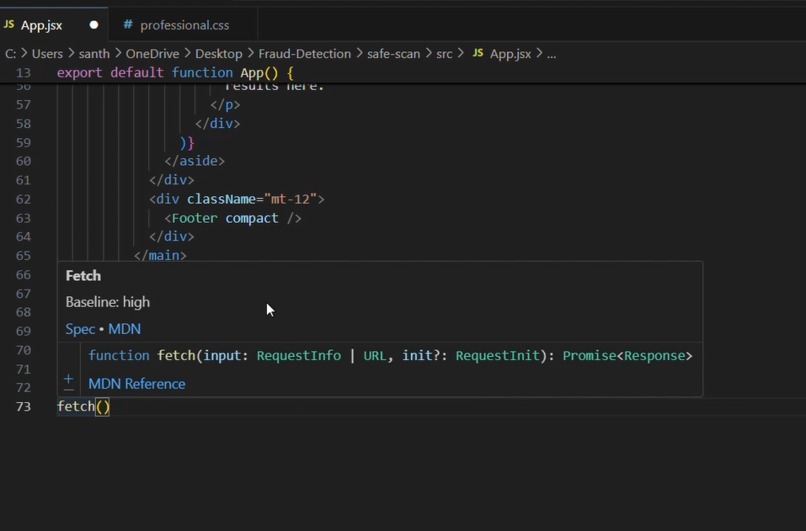
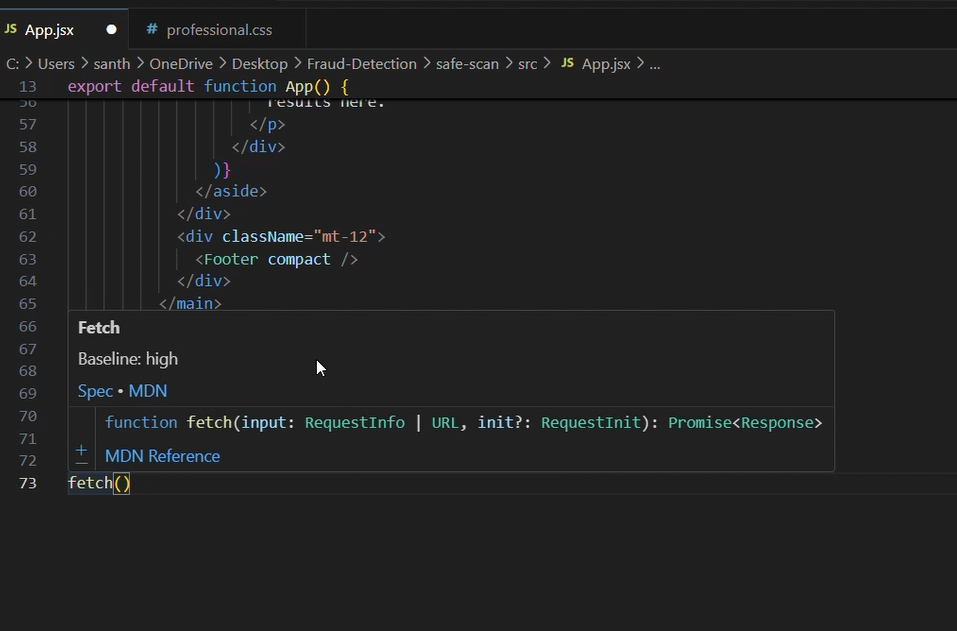
Here we can see The baseline support-how widely the feature is supported across browsers Direct links to the specification MDN references
Inspiration
As web developers, we often ask ourselves: “Is this feature safe to use in production?” With the rapid growth of modern web APIs and CSS capabilities, it’s easy to fall into the trap of using features that aren’t widely supported yet. Inspired by the Baseline project , we wanted to make it effortless for developers to know whether a feature is safe to use right inside their workflow—without switching tabs to MDN or compatibility tables.
What it does
Baseline Helper is a VS Code extension that: Highlights web features that are not yet in Baseline with inline diagnostics. Provides hover tooltips showing Baseline status, browser support, and direct links to documentation. Lets you scan your entire project and generate a report of all web features used, with a breakdown of which ones are widely supported and which ones might cause compatibility issues. Helps developers adopt modern web features with confidence, while still being aware of compatibility risks.
How we built it
We integrated the web-features npm package and compute-baseline to get the latest Baseline data. For code analysis: JavaScript/TypeScript files are parsed using Babel to detect feature usage. CSS files are parsed using PostCSS/CSSTree to check property–value combinations against Baseline. We used the VS Code extension API (TypeScript) to provide: Hover tooltips with Markdown rendering. Diagnostics (squiggles) for non-Baseline features. A custom command to scan the workspace and export a JSON/HTML report. The extension was tested on sample projects containing modern APIs like fetch, IntersectionObserver, and CSS selectors like :has() to ensure accurate detection.
Challenges we ran into
Mapping tokens to Baseline features: Not every API or CSS property has a one-to-one mapping. Some features required careful mapping to their Browser Compatibility Data (BCD) keys. Balancing accuracy and performance: Running deep static analysis on every keystroke would slow down the editor. We had to optimize by analyzing incrementally and caching results. Presenting information cleanly: Developers don’t want overwhelming data in their editor. We worked on formatting hovercards to be short, helpful, and linked to more details.
Accomplishments that we're proud of
Building a working end-to-end integration of Baseline data into a real developer tool. Creating a hover and diagnostic experience that feels natural and genuinely helps developers while coding. Producing a project-wide Baseline compatibility report, which could be useful for teams reviewing tech debt or planning migrations. Packaging the project with clear documentation, open-source licensing, and a live demo for others to try.
What we learned
The power of the Baseline initiative and how important it is for the web ecosystem. Practical skills in writing a VS Code extension, using the extension API for hover providers, diagnostics, and commands. How to integrate static analysis libraries like Babel and PostCSS with external data sources (web-features). The importance of UX in developer tools—sometimes the hardest part is not the data, but how you present it.
What's next for Baseline Helper – VS Code Extension
Quick fixes & suggestions: When a non-Baseline feature is used, suggest alternatives or polyfills. More language support: Expand detection to HTML attributes and even frameworks (React, Vue, etc.). Real-time project dashboard: A panel inside VS Code showing live stats on Baseline adoption. CI/CD integration: Provide a CLI version so teams can enforce Baseline checks during builds. Community feedback: Open-source the project and gather developer input to guide the roadmap.
Built With
- babel
- css
- javascript
- node.js
- npm
- postcss
- traverse
- typescript
- vscode
- vscodeextensionapi
- webfeatures

Log in or sign up for Devpost to join the conversation.