Baseline CLI - Hackathon Submission
Inspiration
As web developers, we've all been there: you find a cool CSS feature or new JavaScript API, get excited to use it, and then spend the next 30 minutes jumping between MDN docs, caniuse.com, and Stack Overflow trying to figure out if it's actually safe to ship to production. This context-switching kills productivity and makes adopting modern web features feel risky.
When we heard about the Baseline initiative solving this exact problem with standardized compatibility data, we knew there was an opportunity to bring that power directly into developers' workflows. We wanted to build something that answers "Is this safe to use?" in seconds, not minutes.
What it does
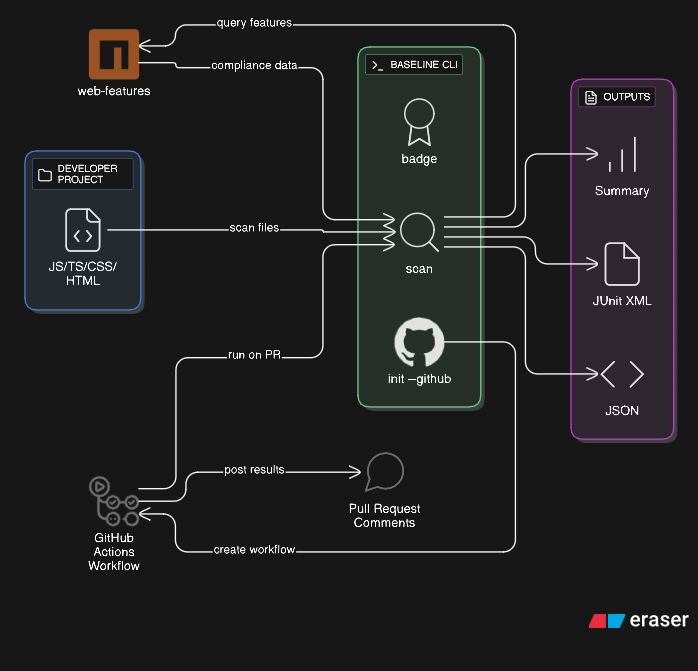
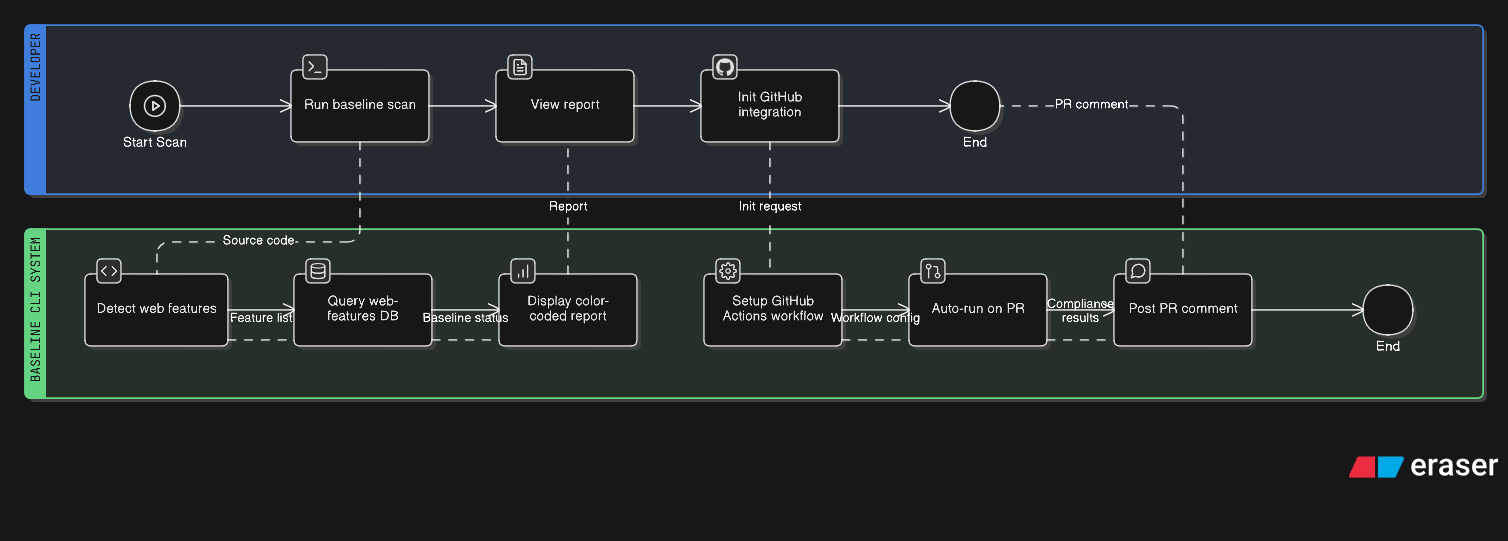
Baseline CLI is a command-line tool that scans your web projects and tells you instantly whether the features you're using are widely supported across browsers. It detects modern JavaScript APIs, CSS properties, and HTML elements in your code, then checks them against the official Baseline web features database.
You get three main commands:
baseline scan- Analyzes your project and generates a compliance report with color-coded status (baseline, limited support, or experimental)baseline init --github- Sets up a GitHub Actions workflow that automatically checks every pull request and posts results as commentsbaseline badge- Generates a README badge showing your project's compliance rate
The tool supports multiple output formats (human-readable summary, JSON for automation, JUnit XML for CI systems) and lets you configure strictness levels. By default, it warns about experimental features without failing builds, but you can enable strict mode if you want.
How we built it
We built Baseline CLI with Node.js and TypeScript for type safety and maintainability. The core architecture has three main pieces:
The file scanner uses fast-glob to recursively find JavaScript, TypeScript, CSS, and HTML files while respecting ignore patterns. Then the feature detector uses regex patterns to identify web API usage - things like fetch(), IntersectionObserver, CSS Grid, container queries, etc. Finally, it queries the official web-features npm package to get each feature's Baseline status and support dates.
For the CLI interface, we used Commander.js to handle subcommands and options cleanly. The output formatter generates reports in different formats depending on whether you're running locally or in CI. And the GitHub Actions integration writes a complete workflow file that users can drop into their repos with zero configuration.
We also spent time on developer experience - clear error messages, helpful warnings, and readable output with emojis and color coding. The goal was making it feel polished, not like a prototype.
Challenges we ran into
The biggest challenge was getting feature detection accuracy right. Web APIs can be referenced in lots of ways - you might see new Map(), Map.prototype.set, or just Map in different contexts. We had to balance being thorough with avoiding false positives.
The web-features package structure wasn't immediately obvious either. We had to dig into the actual data format to understand how Baseline status is represented (high vs. low, baseline dates, etc.) and map our feature IDs correctly.
GitHub Actions permissions caught us by surprise too. The default GITHUB_TOKEN doesn't have write access to pull requests, so our PR commenting feature failed initially. We had to add explicit permissions to the workflow, which wasn't documented clearly in the Actions examples we'd seen.
We also hit some quirks with npm publishing for scoped packages - the package name we wanted was taken, and then we had to figure out the --access public flag and organization creation process.
Accomplishments that we're proud of
We built a complete, production-ready tool that people can actually use today. It's not a demo or proof-of-concept - we published it to npm, wrote comprehensive documentation, and tested it on real projects.
The GitHub Actions integration turned out really well. Going from "I want to check Baseline compliance in CI" to having it working is literally one command (baseline init --github). That's the kind of developer experience we were aiming for.
We're also proud of the detection accuracy. The tool correctly identified 242 features across 172 files in a real Next.js project, with detailed breakdowns by file and feature status. That's genuinely useful information that would take hours to gather manually.
And the package is lean - only 17.9 KB published to npm with 5 runtime dependencies. We kept it focused instead of overengineering.
What we learned
We learned a lot about the Baseline initiative itself and how much thought went into the web-features data structure. Seeing how they categorize features, track browser support, and define "widely available" gave us a deeper appreciation for the problem they're solving.
On the technical side, we got hands-on experience with building CLI tools that feel professional - handling configuration files, multiple output formats, error cases, and making the help text actually helpful. Small details like adding prepublishOnly scripts and .npmignore files matter when you want people to trust your package.
We also learned about GitHub Actions workflows from the inside - not just running them, but generating them programmatically and thinking about what permissions and triggers make sense for different use cases.
What's next for Baseline CLI
There's a lot of room to grow this tool. The most impactful next step would be switching from regex pattern matching to AST parsing with Babel and PostCSS. That would dramatically improve detection accuracy and let us catch features we're currently missing.
We'd love to expand feature coverage too - right now we detect about 30 features, but the web-features package has hundreds. Adding more patterns is straightforward, we just need to prioritize the most commonly used APIs.
IDE integration is another big opportunity. A VS Code extension that shows Baseline status inline as you type would be incredibly useful. Same with ESLint and Webpack plugins that warn you as you're writing code, not after you commit.
For teams, we're thinking about building a web dashboard that tracks compliance over time, shows historical trends, and lets you set team-wide policies. And adding smarter failure modes - like only failing on features that dropped below Baseline recently, or allowing exceptions for specific features you've polyfilled.
We're also considering AI-powered suggestions - if you're using an experimental feature, the tool could recommend stable alternatives or link to polyfills. That would complete the loop from detection to action.
Try it yourself:
npm install -g @edziocodes/baseline-cli
baseline scan
GitHub: https://github.com/gaiborjosue/baseline-cli npm: https://www.npmjs.com/package/@edziocodes/baseline-cli
Built With
- chalk
- commander.js
- fast-glob
- github-actions
- json
- junit-xml
- node.js
- npm-registry
- regular-expressions
- typescript
- web-features-npm-package


Log in or sign up for Devpost to join the conversation.