Inspiration
I discovered the Baseline Web Features project and thought it is a cool tool. I found out about it when I was reading stuff about SEO and related stuff on https://web.dev/ this is my first more hackathon. About the baseline tool the core question that drove this project for the hackathon, is how can I use this tool given an already established project, how can we audit web feature usage and integrate this into continuous improvement cycles?
Building from this concept three main tools that are this project came into fruition,
- Audit existing products to see what web features are being used
- Set browser standards based on user analytic and/or general requirement
- Validate browser compatibility against set standards before deployment
These tools became abstracted into three command line tools (more on that later) called the Baseline Buddy.
What it does
There are three CLI tools that work together to solve web feature compatibility challenges:
let-me-browse (lmb) Feature Detection and Browser Requirements
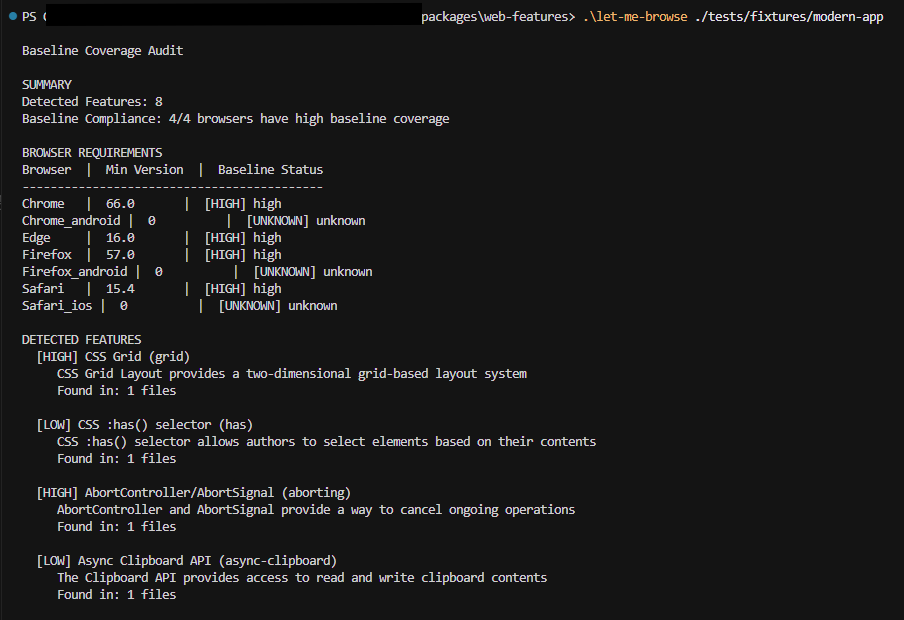
- Scans existing codebases to detect web features in use (e.g., finds CSS Grid, AbortController,). This is to show what features are being used to reduce that surprise compatibility issues in production
- Provides minimum browser version requirements (e.g., "Chrome 66.0+, Firefox 57.0+, Safari 15.4+") with the current features in their project. Like these browsers and their versions or higher will work fine with your current features. Shows baseline compliance status across core browsers (e.g., "4/7 browsers have high baseline coverage") - This helps teams understand if their feature choices align with any set standards
- Outputs feature inventory with descriptions and file locations to make feature refactoring easier
fix-my-browse Compatibility Validation
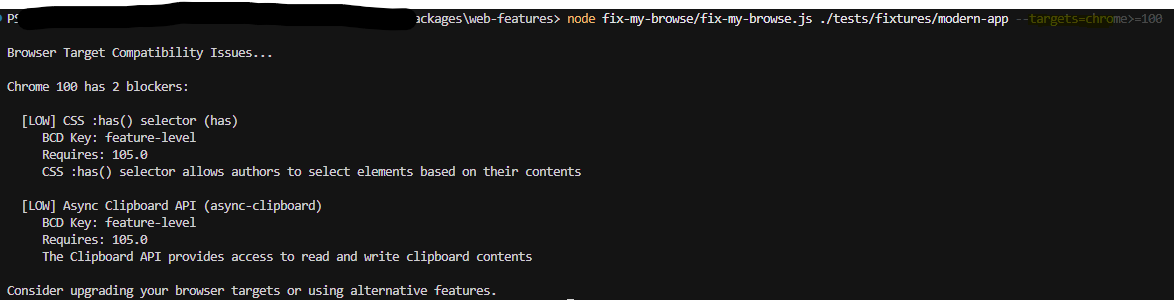
- Validates code against specific browser targets (e.g., --targets="chrome>=100,firefox>=100"). Say a development team wants to place standards on features that this project should be compliant for these following browsers at this version or higher this CLI tool identifies blocking features that need attention (e.g., "CSS :has() selector requires Chrome 105.0, but target is 100.0"). This can streamline production in cases that if a feature is not widely supported for that set target browser it can be addressed before deployment.
- Provides actionable guidance for compatibility issues (e.g., "Upgrade target to Chrome 105.0 or remove CSS :has() usage"). This may help in making the compatibility issues be a faster fix. As it shows which features are causing compatibility blockers vs. which are safe to use.
set-my-browse Policy Compliance Checking
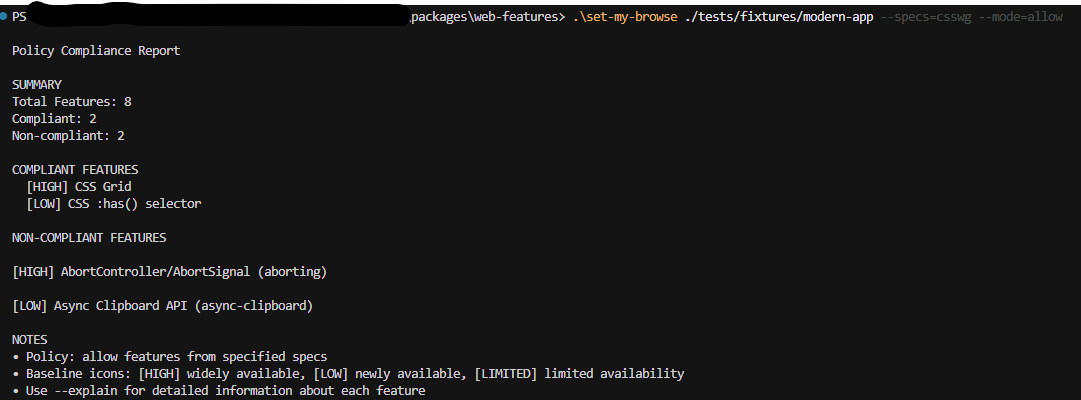
- Developers can set policies for their project like (e.g., "Only use high baseline features" or "Allow newly available features"). This can enforce consistency across teams for their feature usages.
- Helps maintain consistent web feature usage (e.g., flags non-compliant features like AbortController when policy only allows CSS features). This prevents scope creep and keeps projects focused on their intended technology stack
- Provides detailed compliance reports showing which features pass/fail policy requirements so that it will be easier to enable governance and help understand policy impact on their development choices
How it was built
A main principle was leveraging as many as the tools baseline already had built in, so that these concepts can be fully integrated with the project, this made development much easier. I built with these things in mind:
- TypeScript implementation for type safety and maintainability
- YAML-based feature detection using the baseline's existing feature definitions
- Integration with compute-baseline for accurate browser compatibility data
- CLI interface with simple commands and clear, actionable output
- Unit and integration tests
- The tools build detection patterns from the project's feature YAML files, to make sure they stay current with the latest web feature definitions.
Challenges I ran into
- Detection Pattern: discovered that detection patterns that were to be leveraged get stripped from the built package data. A hybrid approach that reads YAML source files directly when needed was created as a work around.
- Windows Compatibility: The compute-baseline package's build process used Unix commands that failed on Windows. This was fixed by updating the package's prepare script to use Node.js file operations.
- Feature Coverage Expectations: Initially expected to detect all possible web features but learned that the built package intentionally includes only stable, complete features. Due to this I adjusted approach to achieve 100% detection rate for available features rather than all possible features.
- TypeScript Compilation Issues: A very little and annoying issues, finally resolved by using the existing compiled JavaScript files and focusing on functionality over TypeScript compilation.
Accomplishments that we're proud of
- 100% Detection Rate - Perfect detection of all available web features in the built package
- Seamless Integration - Tools work with existing codebases without modification
- Professional Output - Clean, actionable reports that developers can immediately use
- Robust Testing - Comprehensive test suite ensuring reliability
- DRY Architecture - Leveraged existing infrastructure instead of rebuilding from scratch
- Cross-Platform Compatibility - Works on Windows, macOS, and Linux
The tools successfully detect features like CSS Grid, AbortController, Async Clipboard API, and CSS :has() selector, providing developers with precise browser requirements and compatibility guidance, doubling down what baseline was intended for.
What we learned
- Don't reinvent the wheel, leverage existing infrastructure, instead of building everything from scratch, better results were achieved by building on top of the existing Baseline Web Features project. Providing better accuracy, maintainability, and alignment with their respective coding standards.
- Developer Experience Matters: The difference between a tool that works and a tool that developers want to use comes down to output quality, error handling, and integrated in their familiar toolset, this was why the CLI commands were chosen and the command abbreviated to lmb, smb and fmb.
What's next for Baseline Buddy
I want this tool to be in the background enabling innovation to happen seamlessly. What's next maybe more autonomy, use LLM to make the necessary changes and hold for approval. Create GitHub Actions or other CI/CD plugins to automatically run compatibility checks on pull requests and deployments.
Built With
- compute-baseline
- cursor
- json
- llm
- node.js
- typescript
- yaml
- yargs

Log in or sign up for Devpost to join the conversation.