About the project
What inspired you?
As a web developer, I was constantly frustrated by the "tax on productivity" that comes with using modern web features. I wasted countless hours asking, "Is this new feature safe to use yet?" and jumping between MDN and Can I Use just to be sure my code wouldn't break on a user's browser. I was inspired to build the tool I wished I had: a smart assistant that could answer that question for me, automatically and instantly.
What you learned
Building Baseline Autopilot was a deep dive into the developer tooling ecosystem. I learned how to create a robust system from the ground up, from parsing code with Abstract Syntax Trees (ASTs) to building a complete, interactive VS Code extension. The biggest challenge was the constant debugging and the realization that a great tool isn't just about fixing code—it's about providing clear, actionable insights that empower the developer. Overcoming the final bugs with the VS Code extension and the server was a lesson in perseverance and the importance of a clean, well-structured project.
How you built your project
Baseline Autopilot is a complete ecosystem built with a focus on professional-grade tooling:
Data-Driven Core: The entire project is powered by the official web-features npm package, ensuring it's always using the correct Baseline data as its source of truth.
JavaScript Engine: For JavaScript files, it uses the acorn library to parse code into an AST. estraverse then walks the tree to find non-baseline features, and escodegen generates the final, fixed code. This is a safe and reliable way to manipulate code without using risky string replacements.
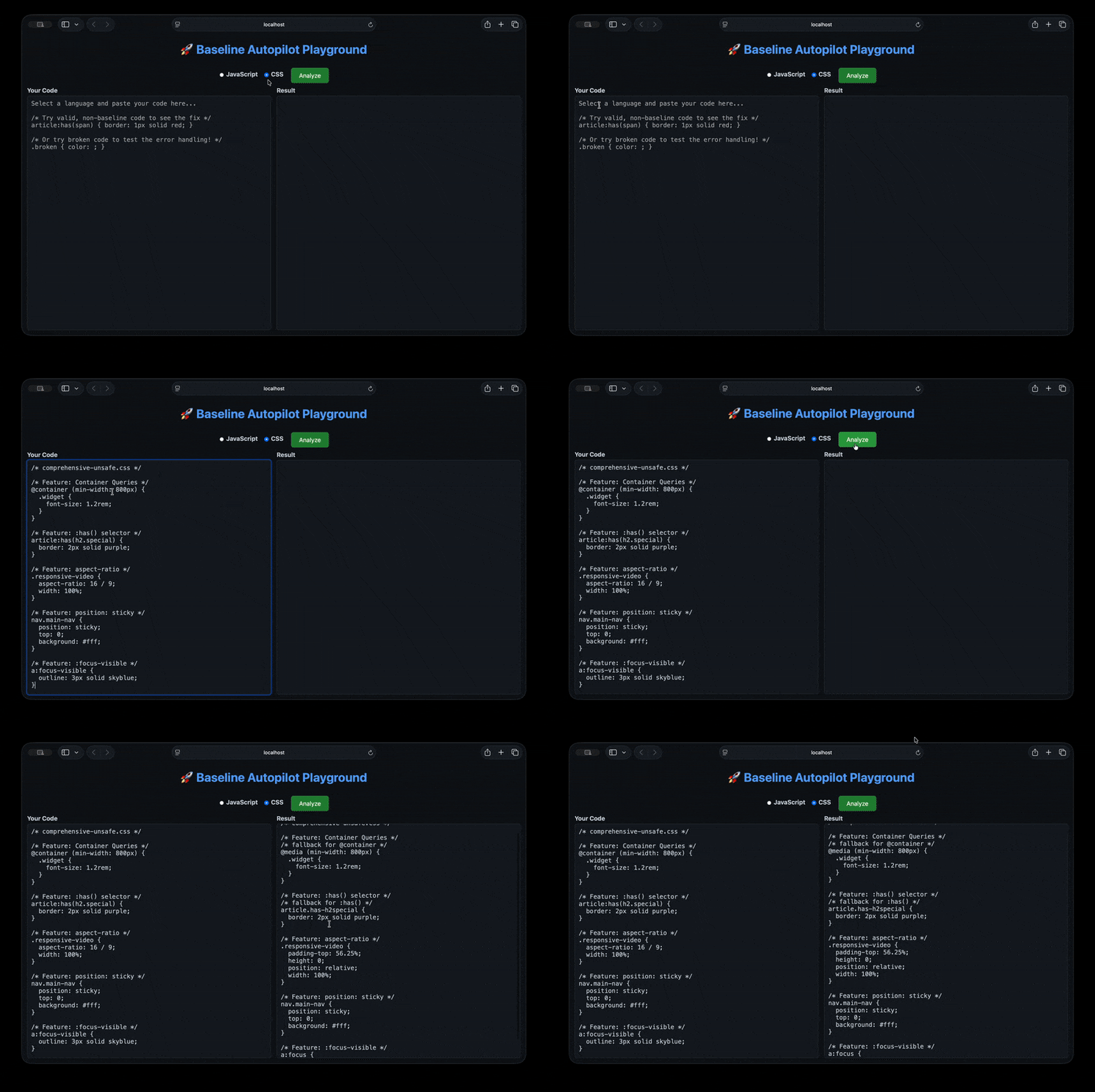
CSS Engine: For CSS, it uses PostCSS and the postcss-scss parser to handle modern syntax. A custom plugin efficiently finds and applies safe fallbacks for features like @container and :has().
Demonstration Tools: The project includes two web-based UIs. The first is a static Premium Scan Report page generated by a Node.js script. The second is a fully interactive Web Playground powered by an Express.js server that exposes the autofixers through a simple API.
You have less than an hour. Here is the final text for your submission. Copy and paste this into the corresponding sections on Devpost and click SUBMIT.
Challenges we ran into
The biggest challenge was the sheer complexity of the developer tooling ecosystem. Initially, my approach was too simple, leading to performance issues and bugs. For example, my first CSS fixer was incredibly slow because it re-parsed the file for every feature, and the initial JavaScript fixer used unreliable regex.
The most difficult challenge was debugging the VS Code extension. I ran into a series of incredibly frustrating environment-specific bugs, from fsevents dependency conflicts to module resolution errors (require is not defined, Cannot find module), and even macOS security permissions blocking the debugger. Overcoming these required a complete re-architecture of the extension to be self-contained and a deep dive into VS Code's launch configurations. It was a true lesson in perseverance.
Accomplishments that we're proud of I'm incredibly proud of building a complete, end-to-end tooling ecosystem in such a short time. This isn't just one tool; it's four, all working together:
A powerful CLI scanner.
A beautiful and insightful Premium Web Report.
A fully interactive Web Playground.
A robust (though not fully demoed) VS Code Extension.
I'm especially proud of the "smart" autofixer engine. Using Abstract Syntax Trees (ASTs) for both CSS and JavaScript was a major accomplishment. It allows the tool to manipulate code safely and reliably, which is what separates a professional tool from a simple script. Finally, building the interactive web playground as an "extra mile" feature was a highlight. It makes the project's power instantly tangible and accessible to anyone.
What we learned
This hackathon was a masterclass in building professional-grade developer tools. I learned:
The Power of ASTs: You can't safely manipulate code with regex. Learning to use postcss and acorn/estraverse/escodegen was a game-changer.
The Importance of a Clean Workflow: The test-originals workflow was a key insight. Separating your master test cases from your temporary test runs is crucial for reliable, repeatable results.
Robust Error Handling: Building the Web Playground taught me how to create a server that can gracefully handle broken or invalid user input without crashing.
Perseverance in Debugging: The VS Code extension issues were incredibly difficult, but they taught me how to systematically debug complex environment and configuration problems.
What's next for baseline-autopilot
The future for Baseline Autopilot is bright. The next steps would be to:
Publish to the World: Publish the CLI tool to npm and the VS Code extension to the official marketplace to get it into the hands of real developers.
Expand the Rule Set: Continuously update the autofixers to cover even more non-baseline features as the web platform evolves.
Deeper IDE Integration: Beyond diagnostics, I would build out more advanced features like code actions that can automatically install necessary polyfills for features that can't be fixed with a simple fallback.
Team-Focused Features: Enhance the GitHub Action with features like automated pull request comments that explain why a build failed and suggest fixes.
Built With
- acorn
- api
- ast
- code
- express.js
- for
- javascript
- manipulation)
- node.js
- npm
- postcss
- vs
- web-features


Log in or sign up for Devpost to join the conversation.