Inspiration
Watching baseball alone can feel quiet — you miss the energy of a great commentator hyping up a home run or breaking down a clutch play. We wanted to bring that experience to every viewer, on demand. What if you could have your own AI commentator sitting next to you, watching the same game, reacting in real time, and even answering your questions mid-play?
With Google's Gemini Live API enabling real-time, bidirectional audio conversations grounded in live video, we saw the perfect opportunity to build something that didn't exist: a personal sports commentator that actually watches the game with you.
What it does
BaseBro AI is a Chrome Extension that gives you a personal AI baseball commentator for any live game. It captures the broadcast video, reads the on-screen scoreboard via OCR, looks up real player stats from the MLB API, and delivers continuous play-by-play and color commentary through natural voice audio — all in real time.
A live AI agent that observes the game and reacts instantly to events through a real-time, reactive 3D avatar — celebrating home runs with fireworks and showing disappointment on strikeouts—just like it’s really watching the game!
You can interrupt at any time to ask questions ("Who's pitching?", "Give me more info about this player", "Explain the strategy team A is using now."), and the commentator pauses, answers using live game data and web search, then seamlessly picks back up.
How we built it
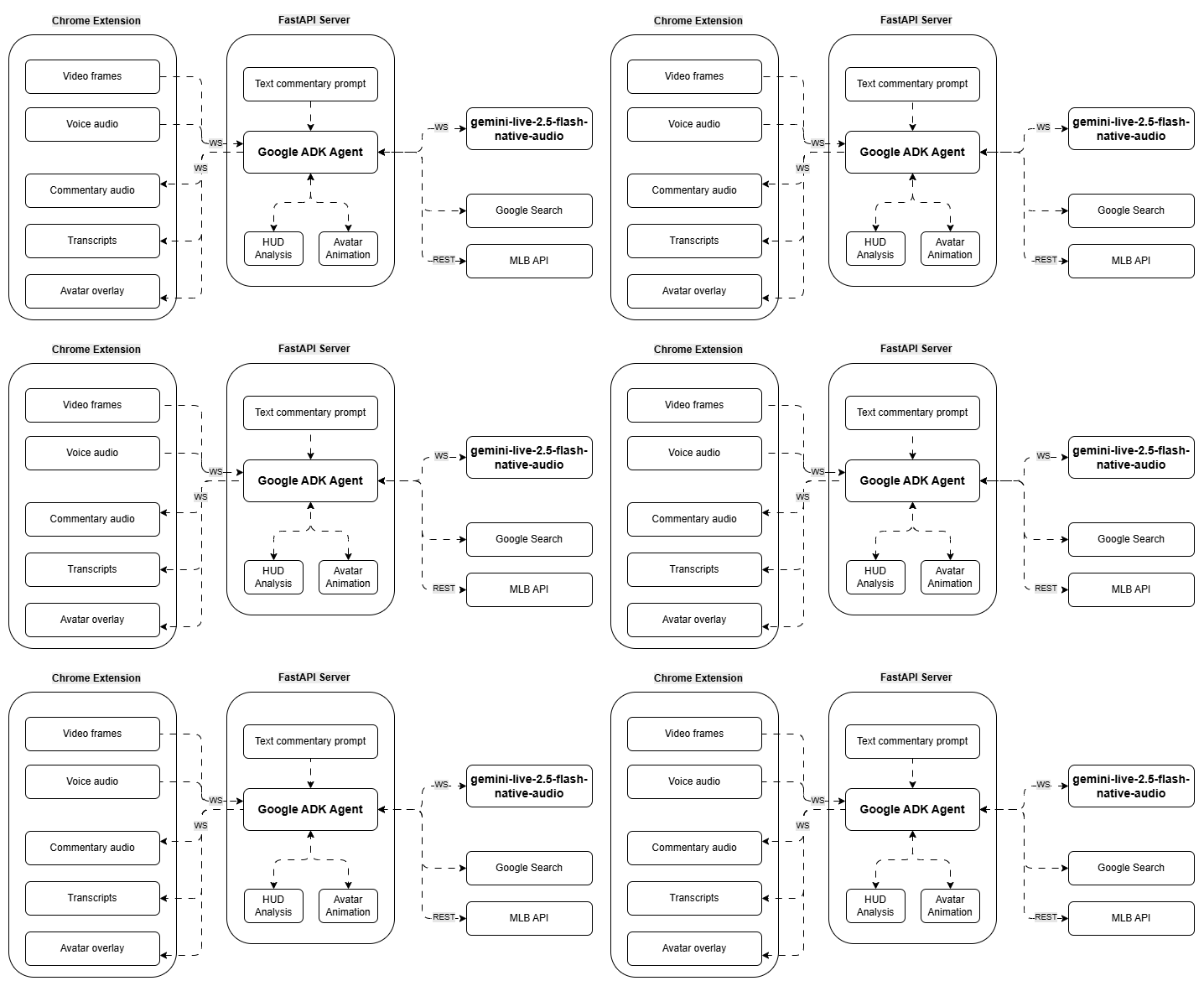
The system is a three-layer architecture:
Google ADK Agent (Gemini Live) — The core intelligence, running
gemini-live-2.5-flash-native-audiovia Vertex AI for native audio input/output. The agent calls a compositeanalyze_gametool that runs HUD OCR analysis and MLB player stat lookups in parallel viaasyncio.gather(), plus Google Search for supplementary context.FastAPI Server — Manages a bidirectional WebSocket connection with three concurrent async tasks: an upstream task queuing video frames and audio to the agent, a downstream task streaming commentary audio and transcripts back to the browser, and a commentary task that periodically prompts the agent to keep talking.
Chrome Extension — Captures video frames at 1 FPS via canvas and user voice audio at 16kHz through an AudioWorklet processor. A VRM 0.x 3D avatar rendered with Three.js overlays the game page inside a Shadow DOM container, with animations synchronized to commentary events.
Key implementation details:
- HUD Analysis uses Tesseract OCR with per-section PSM tuning, image preprocessing (3x upscale, sharpening, binary thresholding), and red-fill pixel detection for outs and base runners.
- Player Info queries the MLB Stats API with date-scoped stats and a three-tier team resolution strategy, with dictionary-based caching.
- Audio pipeline resamples from native sample rate to 16kHz on capture (linear interpolation) and plays back at 24kHz, with interrupt detection that drains the playback queue when the user speaks.
Challenges we ran into
Real-time audio synchronization between browser capture, server relay, and Gemini Live was tricky. Managing 16kHz input vs. 24kHz output, handling user interruptions mid-commentary (detecting speech → draining the playback buffer → letting the agent respond → resuming commentary), and preventing audio artifacts from WebSocket timing jitter required careful AudioWorklet buffering and state coordination.
Keeping the agent talking continuously without explicit user triggers was a novel challenge. We built a commentary loop that waits for each turn to complete, pauses briefly, then sends a follow-up prompt — but balancing prompt timing with natural conversation flow (especially during interruptions) took iteration.
OCR tuning was brutal. Broadcast HUDs vary wildly between networks, and Tesseract needs precise crop windows, preprocessing pipelines, and per-field configurations to reliably read scores, counts, and innings. We spent some time calibrating crop regions as fractional coordinates, applying sharpening + binary thresholding, and setting digit-only whitelists — and even then, the current implementation is tuned specifically for the 2023 WBC YouTube broadcast layout.
VRM avatar compatibility across different model sources required standardizing blend shape names and tuning animation state machines for natural-looking mouth movement, blinking, and eye gaze during speech.
Accomplishments that we're proud of
- It actually feels like watching a game with a real commentator. The voice is natural, the commentary adapts to what's happening on screen, and the interactive Q&A creates a genuinely engaging experience.
- Full bidirectional conversation — you can interrupt the commentator mid-sentence, ask a question, get an answer backed by live data and web search, and have it seamlessly resume.
- End-to-end real-time streaming — from browser screen capture to AI-generated voice commentary playing back in the same browser — with low enough latency to feel responsive.
- The composite tool pattern — combining HUD OCR, player stats, and avatar animation into a single tool call that the agent invokes naturally, keeping the conversation grounded in real game data.
- The 3D avatar overlay reacting to game events in sync with commentary adds a layer of personality that makes the experience feel alive — the home run celebration with fireworks and flames is genuinely fun.
What we learned
- Google ADK's streaming architecture is powerful for building real-time AI experiences — the
LiveRequestQueue+runner.run_live()pattern handles concurrent audio/video/text inputs elegantly, and Gemini Live's native audio output eliminates the need for a separate TTS pipeline. - OCR on broadcast video is a domain unto itself — generic OCR doesn't work; you need broadcast-specific crop calibration, aggressive preprocessing, and per-field Tesseract configuration. A more robust approach would use vision models directly.
- AudioWorklet is essential for low-latency browser audio capture — the older ScriptProcessorNode introduces too much latency for real-time conversation.
- Managing AI conversation state during interruptions is harder than it sounds — you need to coordinate between the browser's audio playback state, the server's commentary loop, and the agent's turn management.
- Shadow DOM is the right call for browser extension overlays — it prevents style conflicts with the host page and keeps the avatar rendering isolated.
What's next for BaseBro AI
- Universal broadcast support — Replace the hard-coded OCR crop windows with a vision-model-based HUD detector that adapts to any broadcast layout automatically.
- Multi-sport expansion — The architecture generalizes beyond baseball; basketball, football, and soccer each have their own HUD patterns and commentary styles.
- Personalized commentary styles — Let users choose between play-by-play, analytical, casual, or homer styles, with adjustable energy levels.
- Multi-language commentary — Leverage Gemini's multilingual capabilities to commentate in the viewer's preferred language.
- Watch parties — Shared sessions where multiple viewers hear the same AI commentator and can all ask questions, creating a virtual watch party experience.
- Mobile support — Bring the experience to mobile browsers or a standalone app for watching games on the go.


Log in or sign up for Devpost to join the conversation.