-
-
Thumbnail
-
Architecture
-
BarPay Demo Site
Inspiration
Many bars, especially in Japan, add a flat cover charge (a table charge, or otoshi) to every bill. It is the same on a dead Tuesday and a packed Saturday, and customers often learn about it only when the bill comes. Visitors from abroad find it confusing. The owner cannot lower it to fill a slow evening or raise it when the room is full. And at the end of the night, everyone queues at the register to leave.
It is for small bars that already run a mobile order system: off-peak hours get a lower price that brings people in, customers see the price before they pay it, and nobody queues to leave.
Bars already use mobile order systems, but those systems take orders; they do not price the cover charge by demand or let a customer just walk out. I wanted to build the missing piece as a module that a bar's existing mobile order system can add, instead of another app the bar has to switch to.
What it does
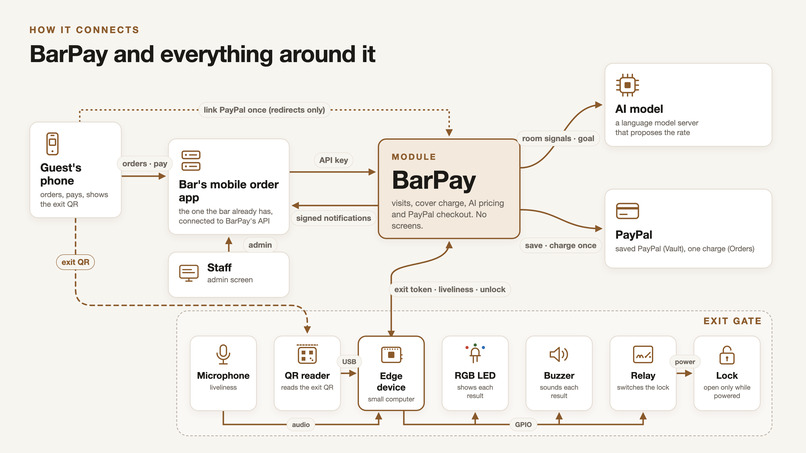
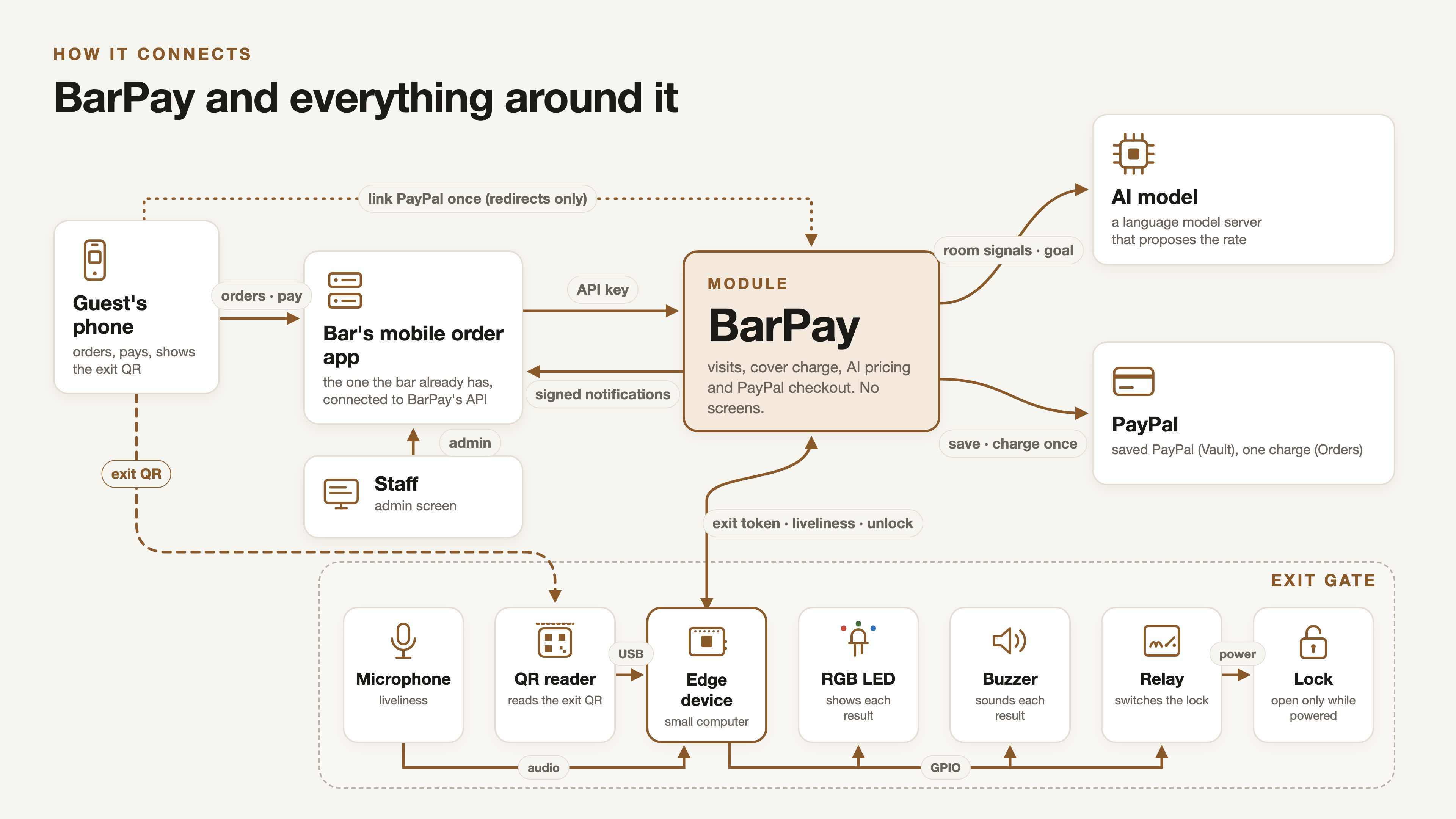
BarPay is a payment and pricing server that a bar's mobile order system (the "store app") calls from its own backend. It has no screens: it offers an HTTP API and signed notifications, and the store app draws everything. The repository includes a sample store app that shows the whole visit.
- A live cover charge. The cover charge is a rate per hour, charged in blocks (10 minutes by default). Each block that ends is charged at the rate published at that moment, so the customer pays for the room as it was while they were in it. The customer's panel shows the rate as a stepped ticker chart since check-in, its latest change, the cover charge so far and the running total.
- An AI pricing agent with guardrails. When the store app asks (the sample app asks every 5 minutes), BarPay gives a local LLM the room's occupancy (checked-in phones divided by capacity), its liveliness (microphone loudness measured at the edge device) and the owner's goal on a scale from "fill the room" to "maximize revenue". The model proposes a rate and explains why. BarPay's own code then clamps the proposal into the owner's floor and ceiling and a maximum change per evaluation, publishes it, and records the decision.
- Rules that protect the customer. The first order does not pause the cover charge (one-drink rule); each later order pauses the cover charge for 30 minutes by default. A cap per visit limits the total cover charge. The pause length and the cap are settings the owner changes from the admin screen.
- Walk-out checkout with PayPal. A member links PayPal once, from their account page, after agreeing to a consent text. BarPay saves their PayPal account with PayPal Vault, without a payment. On every later visit, the member taps Pay, shows an exit QR that changes every 30 seconds at the gate, and BarPay charges the whole visit once with their saved PayPal account. The gate unlocks only after the charge succeeds.
- The register for everyone else. Guests, and members who have not linked PayPal, choose "Pay at the register". BarPay fixes the total, staff take the money and record it on the admin screen, and the exit QR then opens the gate.
- A guest can become a member mid-visit. A guest who signs up or logs in during the visit is shown the visit so far and can keep it on their account. Once they link PayPal, the same visit can be paid at the gate.
- An exit gate on a Raspberry Pi. The edge device reads the exit QR with a USB QR reader, asks BarPay to check out, drives the lock through a relay, and shows each result with an RGB LED and a buzzer (for example, steady green and one short sound for "Thank you", amber and three sounds for "Please pay at the register"). It also measures the room's loudness from a microphone and sends BarPay only a number from 0 to 1; raw audio never leaves the device.
- Tools for staff. The sample app's admin screen lists sessions, shows the rate history with each decision's inputs, the AI's reasoning and the published rate, and handles exceptions: retrying a failed charge, settling outside BarPay, marking a register visit unpaid, opening the gate by hand, and changing settings.
How we built it
BarPay is a solo project. The backend is written in Go with SQLite for storage. The API between the store app and BarPay is specified in OpenAPI (docs/api/openapi.yaml), and a second OpenAPI file (docs/api/edge.yaml) covers the edge device. The requirements, use cases and guarantees were written first in docs/PRD.md, and the code follows them.
PayPal (sandbox). BarPay uses the store's own PayPal REST credentials, so money goes straight to the store's account.
- Linking:
POST /v3/vault/setup-tokenswithusage_type: MERCHANTcreates a setup token, BarPay redirects the member to PayPal to approve it, and once the store app confirms the link,POST /v3/vault/payment-tokenssaves the PayPal account. No money moves. - Check-in:
GET /v3/vault/payment-tokens/{id}confirms PayPal still has the member's saved PayPal account. - Checkout: one merchant-initiated
POST /v2/checkout/orderswith intentCAPTURE, the saved PayPal account'svault_idand a per-sessioninvoice_id, completed without the buyer's approval. - Deleting:
DELETE /v3/vault/payment-tokens/{id}when the member unlinks.
Every PayPal call that saves, charges or deletes carries a PayPal-Request-Id stored before the call. When an answer is lost, BarPay sends the same call again with the same ID instead of starting a new charge, and the invoice_id lets each session's charge succeed only once. I tested these behaviors against the sandbox (repeats, refused charges, deleted saved PayPal accounts) and wrote the results into the PRD.
Notifications. BarPay tells the store app about every result (session started, PayPal linked, closed with a receipt, payment failed, and so on) through notifications signed with HMAC-SHA256, retried for up to 24 hours.
Edge device. The edge software is Python 3.13 on a Raspberry Pi 5 running Ubuntu Server, installed as a systemd service. It reads the QR reader through evdev, drives the lock, LED and buzzer through gpiod, and reads the microphone through ALSA. For development without hardware, cmd/barpay-dev provides a virtual exit gate and a liveliness signal simulator that use the same edge API.
Sample store app. examples/mobile-order is a separate Go module that uses BarPay only through its API and notifications: entrance landing, sign-up, login and guest join, menu and ordering, the panel, the PayPal page, the exit QR, receipts, and the staff admin screen.
Tests and CI. The Go code is tested against a fake PayPal and a fake clock; the edge software is tested against fake devices. GitHub Actions runs the backend, edge, sample app and OpenAPI checks.
Tools and AI
- Model: Qwen3 8B (
qwen3:8b). - Serving: Ollama, running locally, called through its OpenAI-compatible chat API (
POST /chat/completions) with temperature 0 andreasoning_effort: "none", which turns off the model's thinking so it answers within the time limit. No paid AI API is used. The hosted demo runs on my home Kubernetes cluster and reaches the Ollama server over the cluster's internal network. Because BarPay only needs that one API, the same configuration also works with llama.cpp's server, vLLM or LM Studio. - How the agent is used: on each evaluation, a fixed system message describes the role, every input, and the answer format. The user message is JSON with the currency, the current rate, floor, ceiling, max step, rate step, the goal, occupancy and liveliness (
nullwhen no edge device is sending it). The model must answer with exactly one JSON object:rate_per_hour(a whole number in the currency's smallest unit),reason(one short sentence about the room, for staff) andreasoning(how the rate serves the owner's goal, for the decision log). - Guardrails: the model's answer is only a proposal. BarPay parses it strictly, and anything else (prose, missing or extra fields, decimals, negative or absurdly large numbers) is treated as unreadable. A readable proposal is then clamped by deterministic code into the owner's floor and ceiling and to within the max step of the current rate, and rounded to the rate step (5 cents for USD). If the model does not answer within 20 seconds, or its answer cannot be read, the rate stays where it was and the log says why. Evaluations are also at least a minimum interval apart, and only one runs at a time.
- Explanation: the model writes only the reason. BarPay writes the direction, the amount and the new rate from the rate it actually published, because a number the model writes could have been clamped away. For example: "Room is half empty — rate down $0.50 to $11.50/h."
Decision log: every evaluation's inputs, the model's proposal and reasoning, the published rate and the floor and ceiling that applied are stored and readable through the admin API. The sample app's admin screen shows them on the rate history chart. Floor or ceiling changes that move the rate are logged too, with the staff member and an explanation written by BarPay, not the AI.
Development: BarPay was built with Claude Code (Anthropic) as a coding assistant. The design and the PRD are mine, and every change went through review and tests in CI.
Challenges we ran into
- Charging exactly once. A lost answer from PayPal must not become a second charge, and a refused charge must still be retryable by staff. I had to work out, in the sandbox, how PayPal handles a repeated
PayPal-Request-Id, a reusedinvoice_id, and a saved PayPal account that was deleted, and then design for the case where the outcome is still unknown after 30 minutes: BarPay stops and asks staff to check the PayPal dashboard instead of guessing. - Keeping a small model reliable. An 8B model with thinking turned on was too slow for a 20-second limit, and any model can return something unexpected. Turning thinking off, demanding a strict JSON shape, treating every bad answer as an ordinary fallback, and putting the guardrails in code after the model made the price safe whatever the model says.
- A lock that never traps anyone. The lock opens only while powered, through a relay, so a crash, a cut wire or a power loss leaves it locked, and the door must always open from inside. The edge service sets the lock line low after every stop, including a crash.
- Telling results apart at the gate. Each LED and buzzer state differs in pattern or sound, not only color, so a customer who cannot tell red from green can still tell the results apart.
- A guest becoming a member mid-visit without letting a link from someone else attach the wrong account: the store app takes the session only from its own server-side record of that browser's guest check-in.
Accomplishments that we're proud of
- The whole visit works end to end: check in by QR, order, watch the rate move, link PayPal, show the exit QR, and the gate opens after a real sandbox charge.
- The AI decides the price, but code decides what can be charged, and every decision can be read back with its inputs and reasoning.
- The pricing agent runs on a local 8B model with no per-call cost.
- BarPay is a headless module with a written contract (OpenAPI, signed notifications), so an existing mobile order system can adopt it without changing its own screens.
What we learned
- With merchant-initiated charges, idempotency is the core of the design, and it is worth testing PayPal's actual behavior in the sandbox before relying on it.
- An LLM is useful for weighing several signals against a goal and explaining the choice in words, but its output should be a proposal that deterministic code checks, not the final number.
- Writing the use cases and their exceptions first made the hardware and payment edge cases much easier to get right.
What's next
- JPY: the code supports it, but it stays off until a sandbox business account is confirmed to receive JPY.
- Production use of saved PayPal accounts, which needs PayPal's approval for reference transactions.
- Onboarding screens for stores, and using one saved PayPal account across a chain's stores.
- AI suggestions beyond pricing, such as a short summary of the stay on the receipt.
How judges can try it
The hosted demo is the sample store app, "The Copper Fox", running on BarPay with the PayPal sandbox. Use a phone browser for the customer screens.
- Check in. Scan the entrance QR in the gallery with your phone, as a customer would at the bar's door, or open https://barpay-demo.sumire.pink. A phone is best: the exit QR later appears on its screen. The landing shows the cover charge now. Choose Continue as guest, or Sign up to start as a member, and enter.
- Order. On the menu, add a few items and place the order. Order a second time: the panel shows "Cover charge on the house" with the time left, because an additional order pauses the cover charge.
- Watch the rate. The panel leads with the total so far, and shows the rate per hour as a ticker chart since check-in. The rate is re-evaluated every 5 minutes, so stay a little while to see it move, or, signed in as staff, press Update on the admin Pricing page to evaluate it now. In the hosted demo, occupancy comes from real check-ins, while liveliness is simulated: there is no microphone in the room.
- Sign up or link PayPal. If you joined as a guest, open the account page and sign up or log in. You are shown the visit so far; choose Keep this visit. Then open the PayPal page, agree to the consent text and choose Link PayPal, and approve with a PayPal sandbox buyer account: one of the sandbox buyer accounts listed in the testing instructions. Linking charges nothing.
- Exit. Tap Pay and choose PayPal to show the exit QR, which changes every 30 seconds. At the real gate, the reader scans it, BarPay charges the visit once with the saved PayPal account, and the gate unlocks with a green light and one sound. In the hosted demo there is no physical gate: sign in to
https://barpay-demo.sumire.pink/adminwith the demo staff login in the testing instructions, open your visit on the Visits page, choose Check out, then Charge PayPal (left without using the exit gate) and Confirm. BarPay charges your saved PayPal account exactly as the gate would. The video shows the real gate. The receipt then shows the total and the PayPal transaction ID. Without linking PayPal, choose Pay at the register instead.
To see the staff side, sign in to the admin screen at https://barpay-demo.sumire.pink/admin with the demo staff login in the testing instructions. The Pricing page shows each decision's inputs, the AI's reasoning and BarPay's explanation.
To run everything locally, follow the README: BarPay, the sample app, and the development tools that stand in for the gate and the microphone.
Built With
- claudecode
- go
- kubernetes
- ollama
- openapi
- paypal
- python
- qwen3
- raspberry-pi
- sqlite

