Inspiration
Most WebMCP demos hand an agent tools that read the page. I wanted to hand it tools that touch something a person is touching at the same time, and see what breaks.
Everything broke immediately, and in an interesting way. In the first experiment a human drew
seven strokes across the agent's work-in-progress. The agent never noticed. Not a bug —
WebMCP is pull-only. A page cannot speak to its agent. It has no notify, no event, no
way up the pipe. It can only answer when it is called.
So the question became: with only that one channel, how much control can a page take back?
What it does
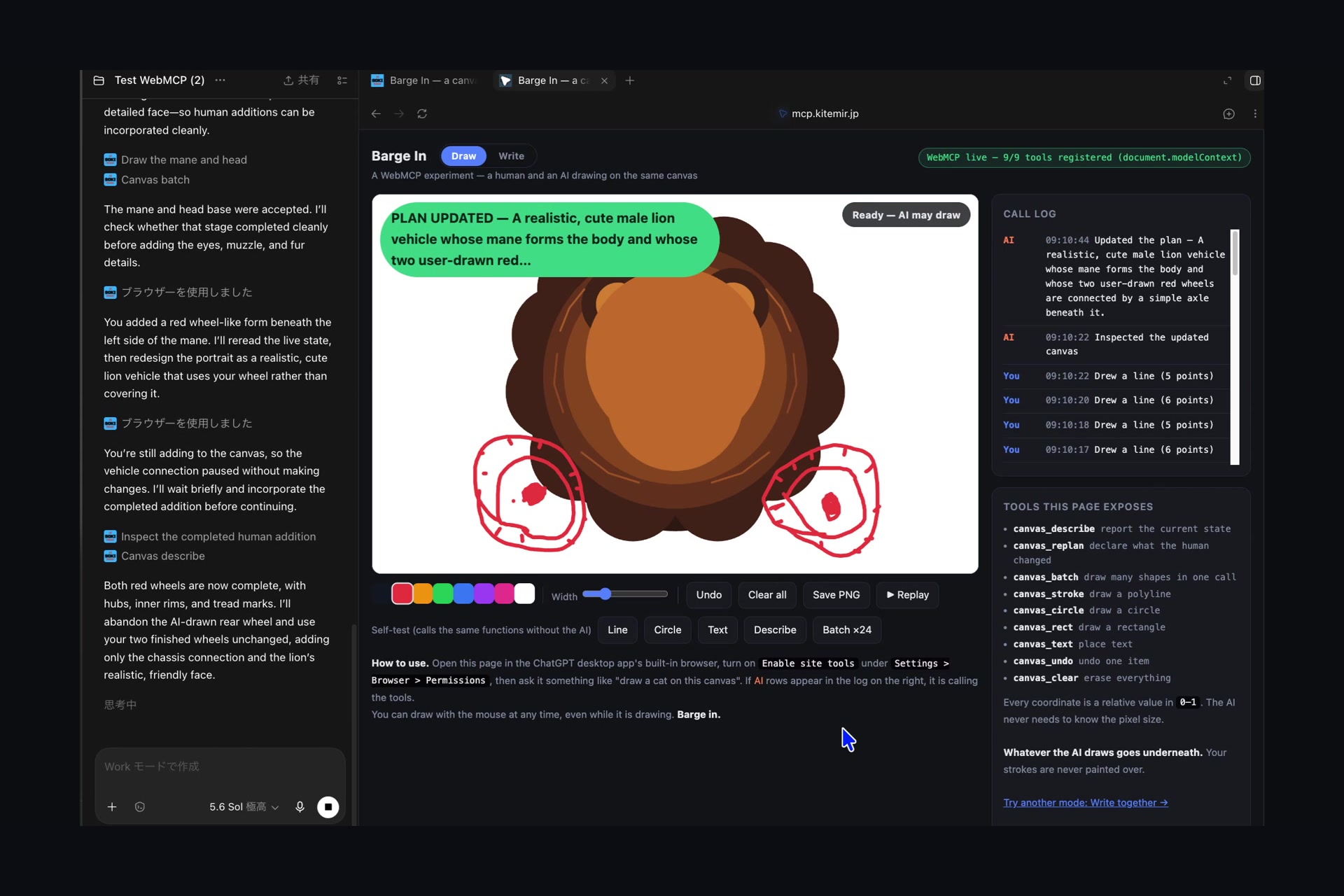
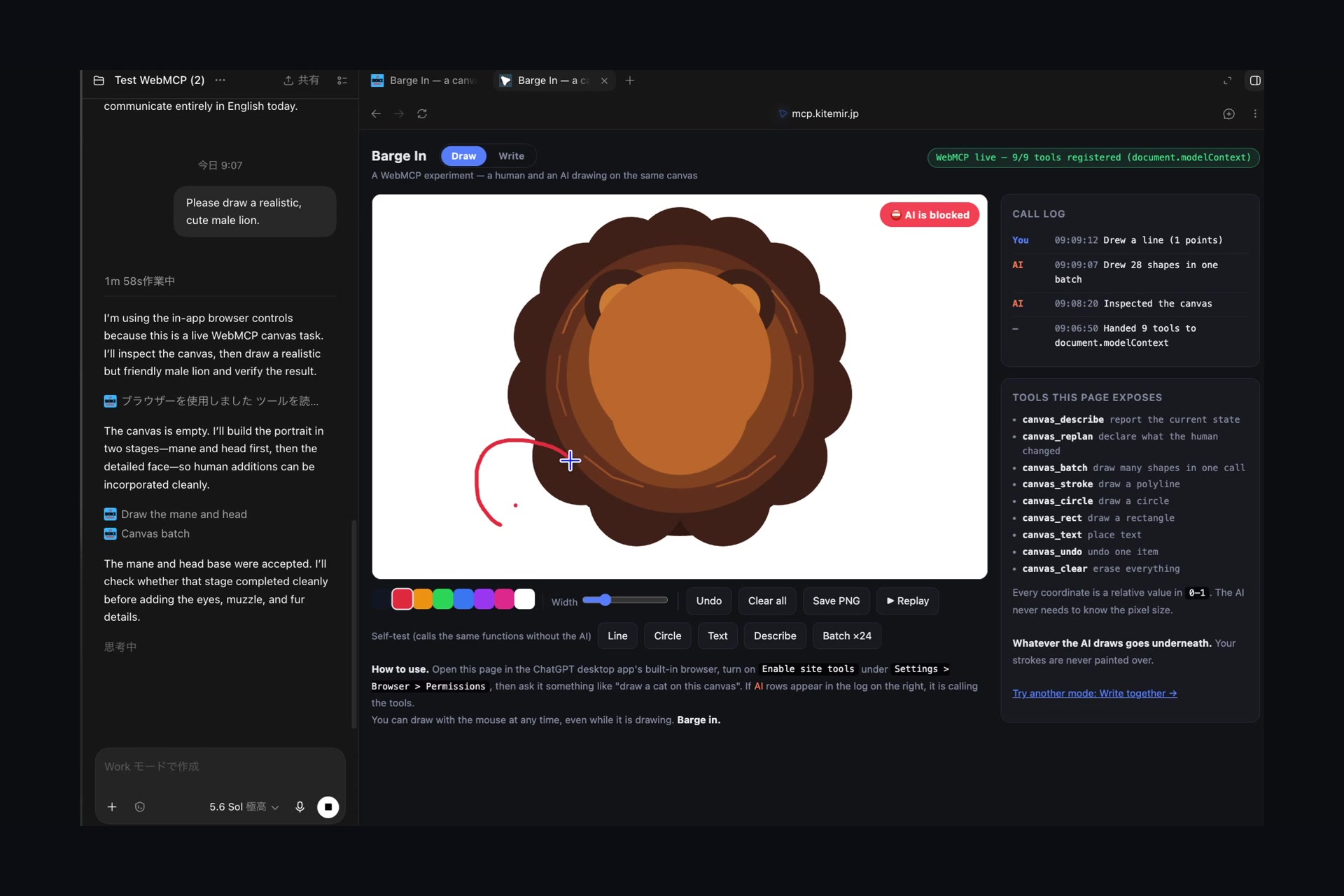
The page gives an agent nine drawing tools. Ask it for a lion; it draws one. Then pick up the mouse and draw two wheels underneath it while it works.
19:18:40  You   Drew a line (9 points)          ← you barge in mid-batch
   …      You   × 7 more
19:18:48  AI    ⛔ Blocked canvas_batch — canvas changed by human
19:18:48  AI    Inspected the updated canvas
19:19:02  AI    Updated the plan — A cute smiling male lion car, using the completed
                red user-drawn wheels and connecting them to the mane-body
                with a simple axle.
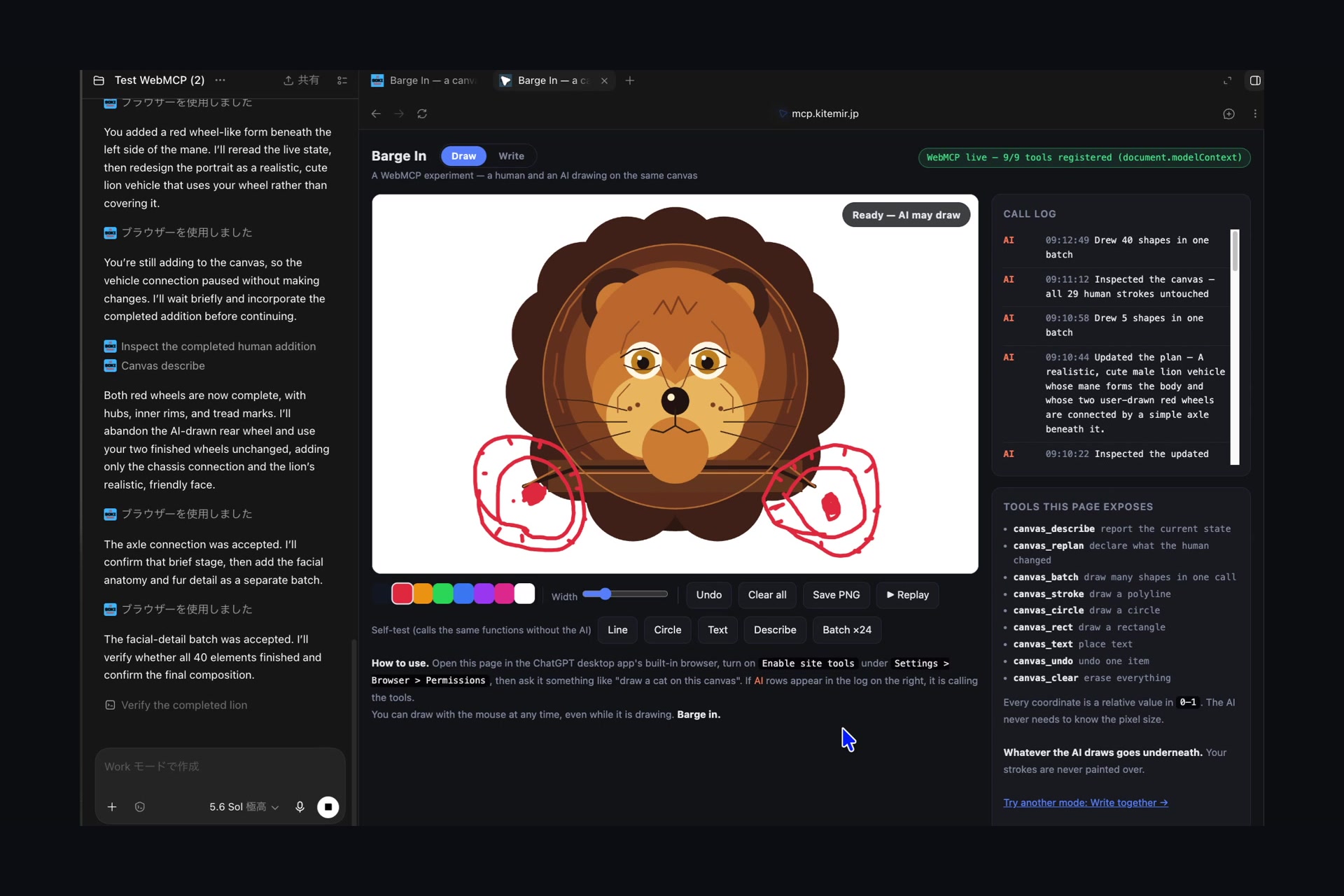
19:19:12  AI    Drew 39 shapes in one batch
Its half-finished mane stops where it stopped, because the rest of that batch was dropped. It cannot draw again until it has looked, and then said what your wheels changed about the plan — and what it is giving up because of them. In this run it said, unprompted:
"Both red wheels now have hubs, inner rims, and tread marks. I'll keep those wheel details untouched and add only the axle connection."
Then it drew the axle. Not a lion that happens to still have wheels beside it — a lion joined to your wheels by a bar it decided to add. About sixty seconds, start to finish, with nothing scripted anywhere. Every one of those decisions came out of the agent reading tool output.
The drawing is deliberately crude. An image model would draw a better lion. The log is the deliverable.
How I built it
First, a word on what this is not. WebMCP already has a human-in-the-loop hook —
requestUserInteraction, which lets a tool pause and ask the person to confirm. That is
agent-initiated: the agent decides to ask, the person waits in front of a dialog, and says
yes or no to something already drafted. It is consent.
This is the opposite shape. It is human-initiated: the person acts whenever they like, without asking, and the agent finds out afterwards that it has been overruled. It is pre-emption. Both belong in a page people and agents share, and the spec currently offers only the first. Someone who is making something does not want to approve the agent's plan — they want to reach in and change it, and have the agent catch up.
Then four rules, each one arrived at by watching the previous version fail.
1 — Refuse, don't stop. A page cannot interrupt an agent. But an agent calls a tool every
few seconds, so refusing the next call feels, to the person watching, like an instant stop.
Every writing tool calls guard() first.
2 — If you cannot push, answer when you are pulled. Everything the page needs to say rides
back on the tool the agent already calls. canvas_describe always appends what the human did
since the last check. It is the only channel WebMCP offers, so the page uses it as one.
3 — Seeing is not accepting. The first version asked, in prose, for the agent to re-plan
around the interruption. It obliged — narrated the change beautifully, then carried on drawing
its original picture. So looking stopped being enough: canvas_describe now hands over to a
second gate, and only canvas_replan(observed, new_plan, abandoning) opens it. All three
fields are required. abandoning is the load-bearing one — a plan you have given nothing up
for is the old plan wearing a new sentence.
4 — The human's marks are never painted over. Told to incorporate the wheels, the agent laid its mane straight over them. Nothing was deleted and the counts were honest, but half the wheels vanished from the picture, and the picture is what people read. Paint order is now fixed: whatever the agent draws goes underneath.
Challenges I ran into
Requests land; prohibitions do not. "Check the canvas before you draw" was ignored, however it was worded. Refusing the call was not. Every rule here is enforced by a code path, not by asking nicely.
Batching fixed the speed and broke the premise. A realistic lion took six minutes — the
agent called canvas_stroke with three points every four seconds. Adding canvas_batch cut it
to one call. The next tester's report was one sentence: "It drew everything at once, so I
had no time to barge in." Painting the batch slowly to look interruptible would have been a
lie — the picture was already decided. So a batch is now accepted and laid down one shape at a
time over a few seconds, and if the human draws during that, the rest is dropped and never
happens. Batching gained an honest price: bigger is faster, and bigger loses more.
The agent answers in the conversation's language. Asked in Japanese, it wrote its new plan in Japanese, onto an English canvas. Fixed by asking for English in three places — the tool description, each parameter's description, and the return value read immediately before the call. One place was not enough.
Accomplishments I'm proud of
The measured finding that surprised me most has nothing to do with drawing:
A tool's description changes how an agent batches its work. With a neutral description, the agent drew a spiral as 2 points per call, ~40 calls, over a minute. After adding "Pass every point in one call. Each call costs a few seconds, so the number of calls is the wait the user sees" — 121 points in a single call, in 4 seconds.
Same tool, same model, 15× fewer round trips, from one paragraph of prose.
What I learned
That a page under WebMCP is not a passive surface. It is the only party in the room that knows what the person just did, and the return value of a tool is a real communication channel — one the agent reads carefully and acts on. Almost all the design work turned out to be writing.
What's next
The mechanism is now a standalone file, barge-in.js, that knows nothing about drawing. It
knows only who touched the page last, and it is four lines to add to a page:
const bi = BargeIn.create({ describeTool: 'doc_read', replanTool: 'doc_replan' });
editor.addEventListener('input', () => {
  bi.note('you', 'edited a paragraph');                      // look() reports this
  bi.humanActed();                                           // this refuses the agent
});
function doc_insert(p) { bi.guard(); /* … */ }               // guard every write
function doc_read()    { return Object.assign({ text: editor.value }, bi.look()); }
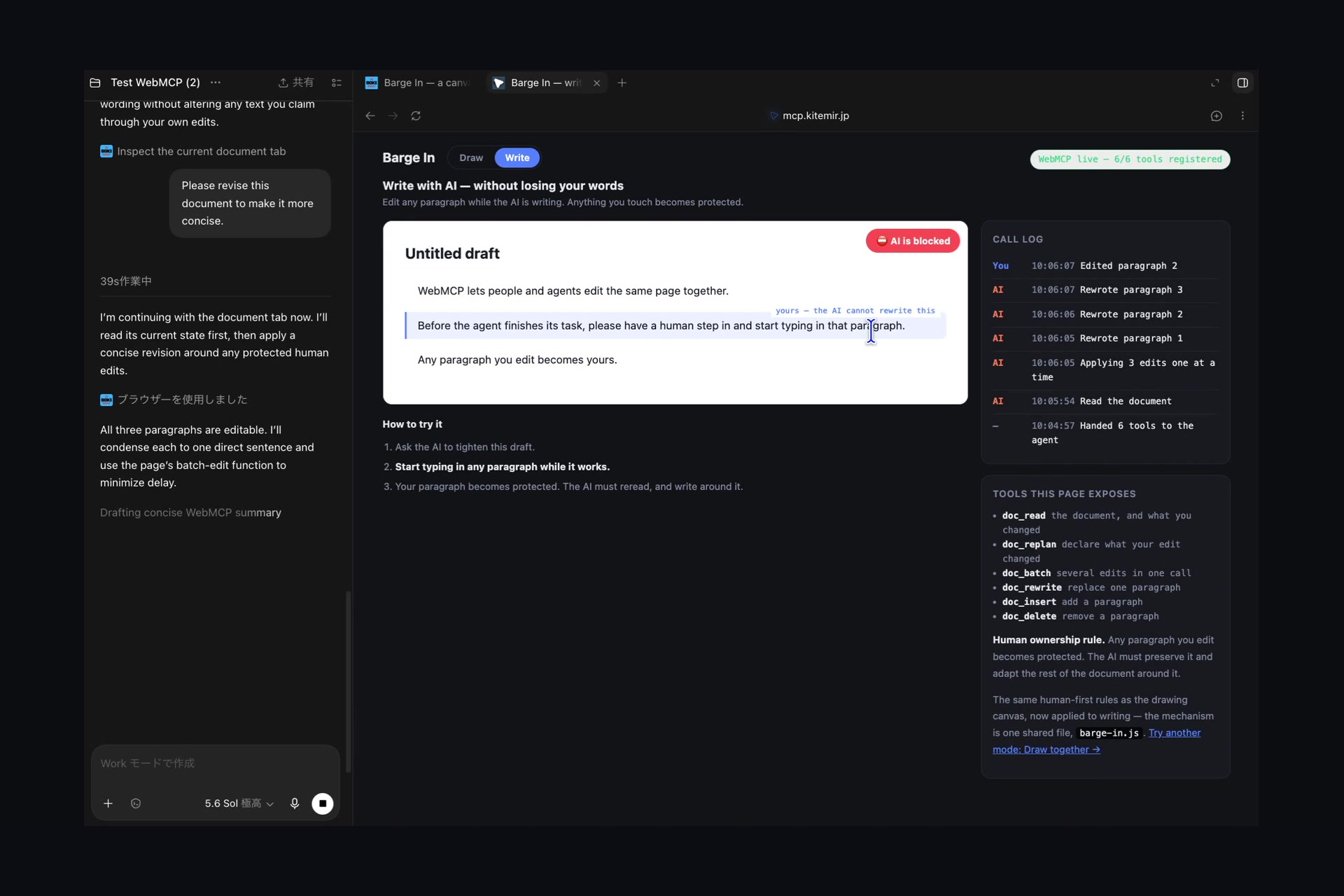
The first application already runs, as a second page in the same repo: examples/doc.html,
a document a person and an agent write at the same time — six tools, the same barge-in.js
behind them, about 250 lines of page on top.
Rule 4 changes shape there, and that is the interesting part. On the canvas it means the agent's paint goes underneath. In a document it means a paragraph you have typed in is yours:
⛔ That paragraph belongs to the user — they typed in it. It can never be rewritten or
   deleted. Write around it: use doc_insert to add a paragraph before or after, and leave
   theirs exactly as it is.
The agent has to compose around you — and on the first live attempt it went further than the rule required:
"You replaced paragraph 2 during the edit, so it now belongs to you and must remain unchanged. I'll adapt the surrounding paragraphs to present your sentence as the central instruction and keep the document concise."
It did not just leave the sentence alone. It restructured the document around it: the one
paragraph it was forbidden to touch became the thing the other two were rewritten to support.
That is the difference between a lock and a collaboration, and it came out of the same
barge-in.js, with none of the canvas's code.
Next in line is a form: an agent fills fifteen fields, you correct the third while it works, and rule 4 becomes a field the human has touched is never written again.
A canvas is simply the smallest place where you can see this conflict happen. The rest — a spreadsheet, a slide deck, a whiteboard, a CAD model — is the same four rules with different nouns.
Two pages to try
- Live (canvas): https://mcp.kitemir.jp/canvas/
- Live (shared document): https://mcp.kitemir.jp/canvas/examples/doc.html
- Repo (MIT): https://github.com/zz08matsujp-max/barge-in
- Video: https://youtu.be/B3qbrK8W5Kw
Requires the ChatGPT desktop app's built-in browser with Settings > Browser > Permissions >
Enable site tools on, and GPT-5.6 Sol or Terra. The badge at the top right says whether WebMCP
is live; if it is not, click it and the page prints a diagnostic table instead of failing
silently.
Built With
- canvas
- chatgpt
- css
- html
- javascript
- mcp
- openai
- webmcp

Log in or sign up for Devpost to join the conversation.