Inspiration
Small pieces of information constantly pull us away from our work: checking whether a local server is running, watching system usage, looking at a Git repository, or setting a focus timer. Each task is simple, but building and maintaining a separate menu bar app for every use case is not.
Bar Tender started with a question: what if anyone could describe the menu bar utility they need and have it created immediately?
What it does
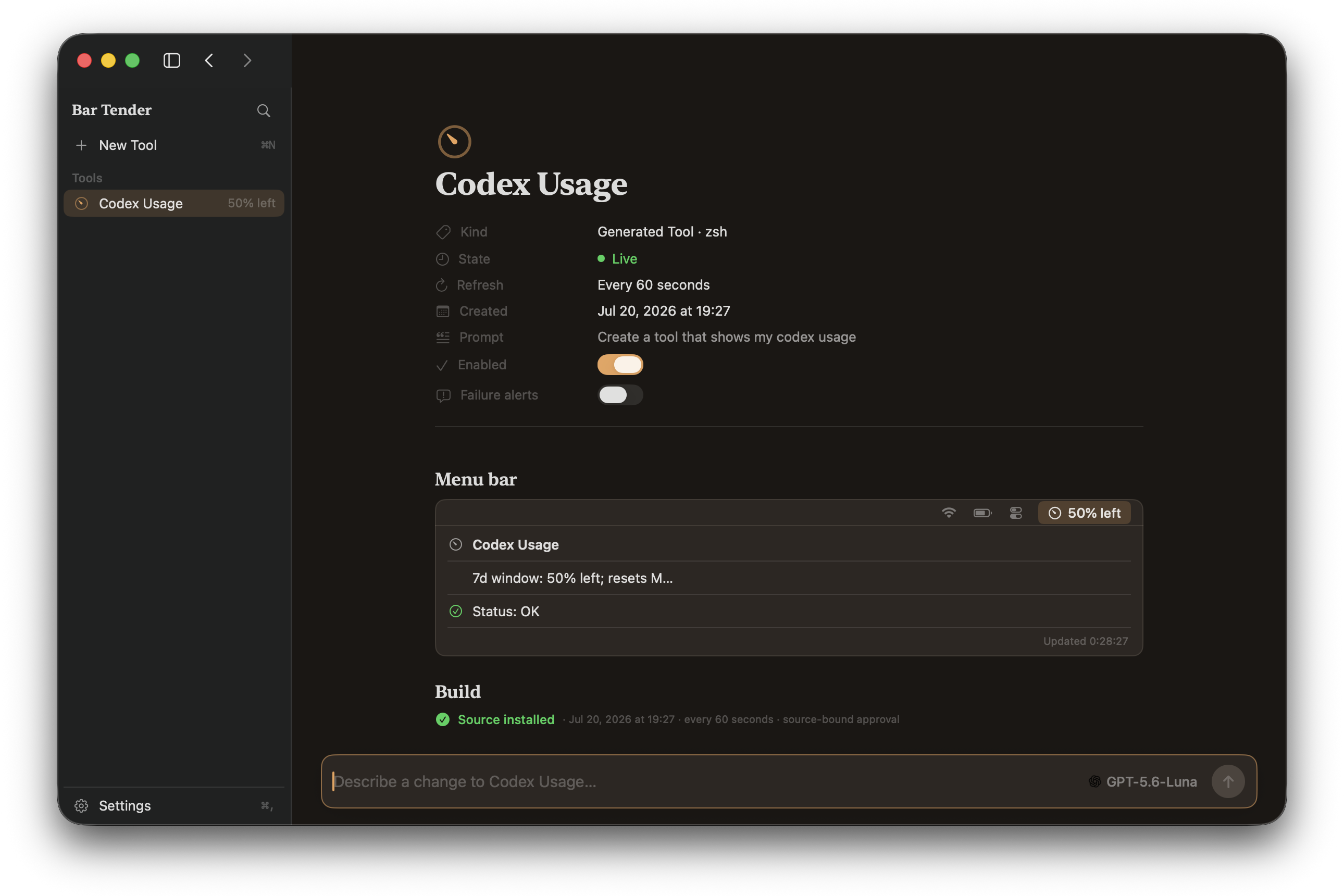
Bar Tender is a native macOS app that turns natural-language requests into live menu bar tools.
For example, you can ask it to:
- “Watch localhost port 3000 and notify me when it goes offline.”
- “Show my current Git branch and changed file count.”
- “Create a 25-minute focus timer.”
- “Display CPU and memory usage.”
Bar Tender uses an already installed and authenticated Codex, Claude, or Grok CLI, so users do not need to copy API keys into the app.
The selected AI provider generates a dedicated, structured zsh tool. Bar Tender validates the result, displays the complete source for review, and keeps it inactive until the user explicitly approves it. Once approved, the tool becomes its own live macOS menu bar item.
Users can also revise a tool through conversation. Bar Tender sends the existing configuration and source back to the provider, replaces the tool in place, and requires approval again whenever its code changes.
How we built it
Bar Tender is a native macOS application built with Swift, SwiftUI, and AppKit.
SwiftUI powers the main workspace, tool library, inspector, settings, generation progress, and live previews. AppKit manages the individual status items that appear in the macOS menu bar.
Codex, Claude, and Grok are integrated through their local command-line interfaces. Provider responses follow a shared JSON schema and pass through a validation and normalization pipeline before anything is installed.
Generated tools return structured information including a title, status, details, health state, and template values. Bar Tender stores them under Application Support and restores validated tools when the app launches.
The app also includes launch at login, library import and export, provider and model selection, diagnostics export, update checks, and universal packaging for Apple silicon and Intel Macs.
Challenges we ran into
The biggest challenge was balancing AI-powered creation with user control.
Generated code must never run simply because a model returned it. We designed an explicit review-before-run workflow in which approval is bound to the exact source code and working directory. Editing either one automatically revokes approval.
Provider behavior was another challenge. Codex, Claude, and Grok have different CLI interfaces and response formats, so we built a common manifest contract, constrained each provider to structured output, and added actionable validation feedback when a response needs repair.
Managing many independent menu bar items also required careful coordination between SwiftUI state and AppKit status items. Tools must appear immediately, update reliably, survive relaunches, and remain manageable without overcrowding the interface.
Accomplishments that we're proud of
- Turning one sentence into a useful, persistent macOS menu bar tool.
- Supporting Codex, Claude, and Grok without requesting API keys.
- Making generated source fully reviewable before its first execution.
- Automatically revoking approval whenever generated code changes.
- Repairing unhealthy generated tools through the same conversational workflow.
- Preserving valid tools even when a stored entry becomes corrupted.
- Building a polished native experience rather than wrapping a web interface.
- Shipping a tested, open-source macOS app with signed and notarized release support.
What we learned
We learned that integrating AI into a desktop application is not only about generating an answer. The surrounding product contract—structured output, validation, progress, cancellation, persistence, error recovery, and explicit user consent—is what turns model output into a dependable feature.
We also learned how well SwiftUI and AppKit can complement each other. SwiftUI made it possible to build a responsive management experience, while AppKit provided the control needed for multiple independent menu bar items.
Most importantly, we learned that local AI tools can be powerful without hiding what they create. Showing the generated source and keeping execution under the user’s control makes the experience more understandable and trustworthy.
What's next for Bar Tender
Next, we want to add a community library of reusable tool templates, richer menu layouts, more structured output types, and additional local AI providers.
We also plan to improve isolation for generated tools, expand accessibility and diagnostics, and make it even easier to share a useful menu bar tool with someone else.
Our long-term goal is for Bar Tender to become a personal workshop for the macOS menu bar: describe the utility you need, inspect it, approve it, and keep it within reach.


Log in or sign up for Devpost to join the conversation.