-
-
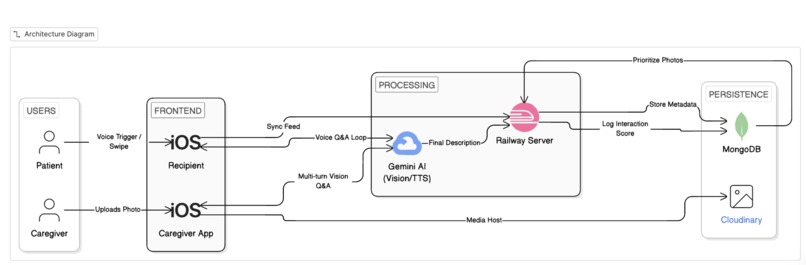
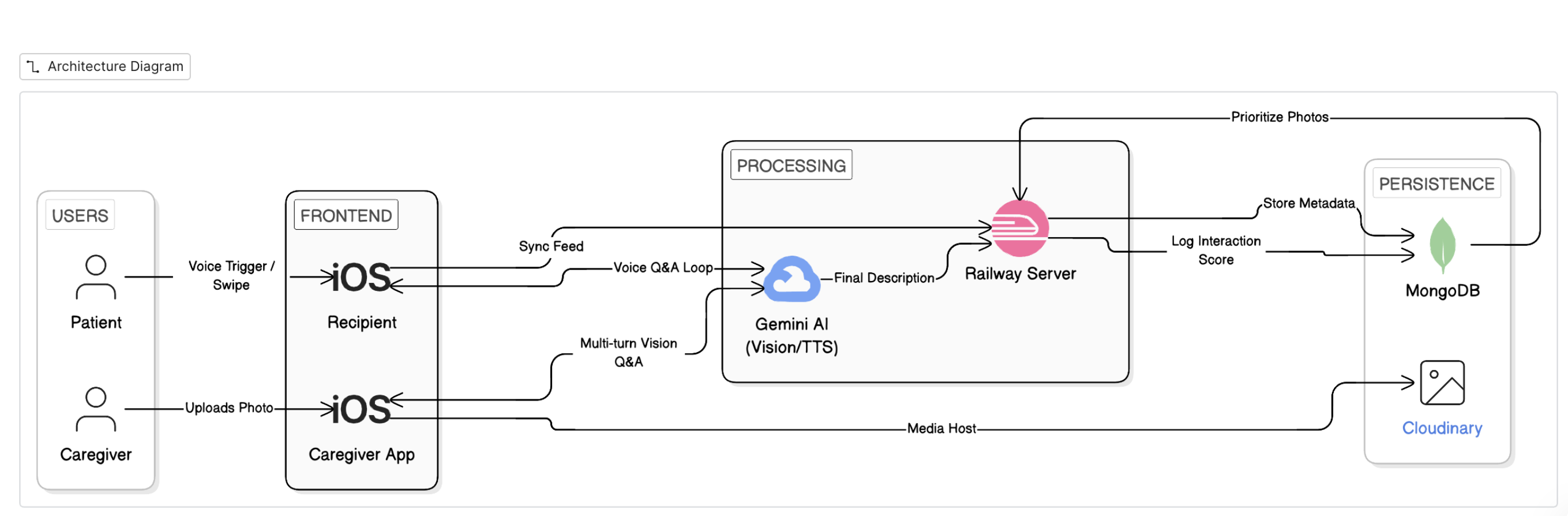
System architecture diagram
Reminisce - Reconnecting Loved Ones Through Memories
An AI-powered reminiscence therapy app designed to connect families and their loved ones living with dementia with a guided therapy companion.
Inspiration
Over a third of people have a family member with dementia. For many of these people it's difficult to stay connected, especially when memory loss starts to set in. It’s heartbreaking to see someone you love struggle to recall the stories that make up their life. We realized that while we have thousands of photos on our phones, they aren't accessible to the seniors who would appreciate them the most. So we wanted to create something that actually helps to unlock the stories behind the photos and makes conversations easier for families and their loved ones.
What it does
Reminisce connects families through two simple interfaces:
- For the Recipient (Senior): A super simple, easy-to-see interface. They just see a stream of memories shared by their family. When they view a photo an AI companion (using Gemini 2.0 Flash) chats with them about it via reminiscence therapy guided questions. It asks gentle questions like "Who is that with you?" or "This looks like a fun party, do you remember the occasion?" to help spark a memory.
- For the Family: A dashboard where children or grandchildren can upload photos, organize albums, and add details (like names or dates). When an image is uploaded an AI assistant asks questions to build context, asking questions to identify names of faces that haven't been seen before or locations..
How we built it
We took a full-stack approach to get everything working together:
- Frontend: We used SwiftUI for the iOS app because we wanted it to feel native and smooth. We used
SwiftDatato keep things saved on the phone so it works fast. - Backend: We set up a Node.js and Express server with MongoDB to handle user accounts and keep track of who is connected to whom.
- Media: We integrated Cloudinary to handle all the photo storage since we didn't want to bog down the app with heavy files.
- AI: The core of the experience is Google's Gemini 2.0 Flash. We spent a lot of time tweaking the system prompts so the AI wouldn't sound like a robot, but more like a patient, curious friend.
Challenges we ran into
- Design is hard: Making an app that looks good but is also usable for someone with limited dexterity or eyesight was a huge balancing act. We had to rethink our buttons and fonts multiple times.
- Taming the AI: At first, the AI would just list objects in the photo ("I see a chair, a dog, a cloud"). We had to work really hard on the prompts to get it to ask meaningful questions instead of just stating facts.
- Connecting the pieces: getting the iOS app, the database, and the image storage to all talk to each other in real-time was tricky, especially when linking the two different types of accounts.
Accomplishments that we're proud of
- The "Recipient" View: It actually looks and feels safe to use. We think it's simple enough that our own grandparents could use it without getting frustrated.
- The Linking System: We built a code-based linking system (like pairing a Bluetooth device) that makes connecting a family member to a recipient really easy.
- The AI Interactions: Seeing the AI correctly identify a wedding photo and ask "Was this a happy day?" felt like a huge win.
- The AI Interactions: Voice Commands. The recipient is able to control photo order and have a conversation that feels like talking to a therapist.
What we learned
- User Experience is everything: You can have the best code in the world, but if the user feels overwhelmed, it doesn't matter. Simplicity takes a lot of effort.
- Multimodal AI is the future: We were surprised by how much context Gemini 2.0 could pull from a single image. It opens up so many possibilities for accessibility apps.
What's next for Reminisce
- Voice Mode: We want to add better analytics and nudges so that family members can be informed about what pictures their loved one interacts with most.
- Video Support: Photos are great, but short video clips could be even more powerful for triggering memories.
- FaceID: Logging in should be zero-effort, so biometrics are next on our list.
Tech Stack
- iOS 18.0+ & SwiftUI
- Node.js / Express / MongoDB
- Google Gemini 2.0 Flash (Generative AI)
- Cloudinary (Media Management)
- SwiftData (Local Persistence)
Quick Setup
1. Run Switch Script
Ensure you are set up for the Google AI implementation.
./switch_to_google_ai.sh
2. Add Package in Xcode
- File → Add Package Dependencies
- URL:
https://github.com/google-gemini/generative-ai-swift - Add google-generativeai package
3. Configure API Key
- Get an API Key from Google AI Studio.
- Copy the key to your
.envfile (create one if it doesn't exist):GOOGLE_AI_API_KEY=your_key_here
4. Build & Run
- Product → Clean Build Folder
- Product → Build
- Run on a Real Device for the best camera and audio experience.
Project Structure
HoyaHacks/
├── Models/                 # SwiftData & API Models
├── Views/
│   ├── Family/            # Family upload & management dashboard
│   ├── Patient/           # Simplified Recipient viewing interface
│   └── Shared/            # Authentication & Onboarding
├── Services/
│   ├── AI/                # Gemini Integration
│   ├── Voice/             # Audio capture & playback
│   └── Storage/           # Media handling
├── Utilities/              # Config & Theme Constants
└── backend/                # Node.js Express Server
Team:
The Baltimore Monkeys. Aditya Jain - '28 JHU, Rayhan Mundra - '28 JHU, Isaac Cissna - '28 JHU, Haruka Suwabe - '28 JHU

Log in or sign up for Devpost to join the conversation.