-
-
Landing Page
-
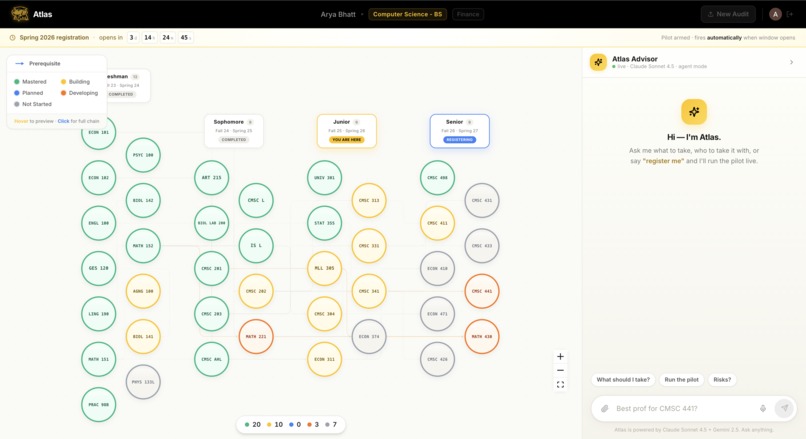
Interactive Map View
-
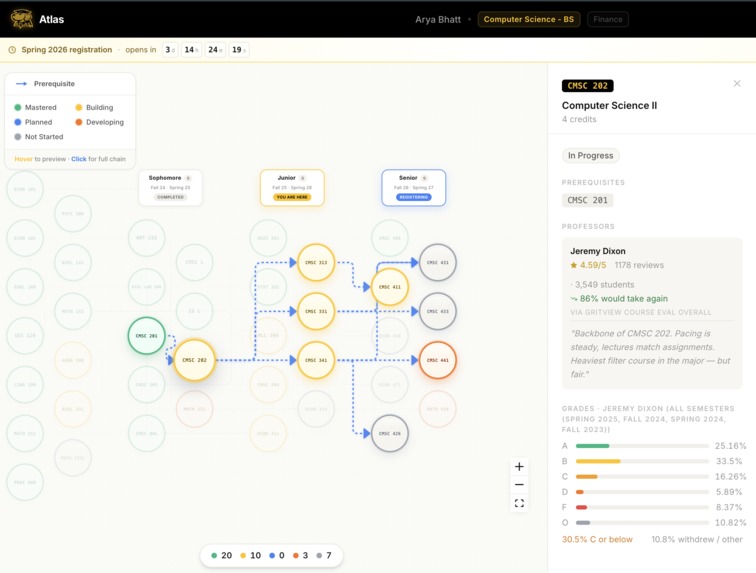
Detailed Pre-Req
-
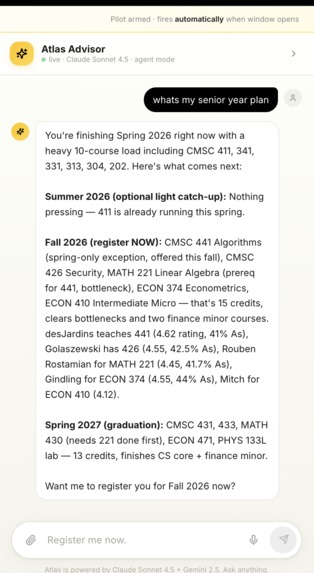
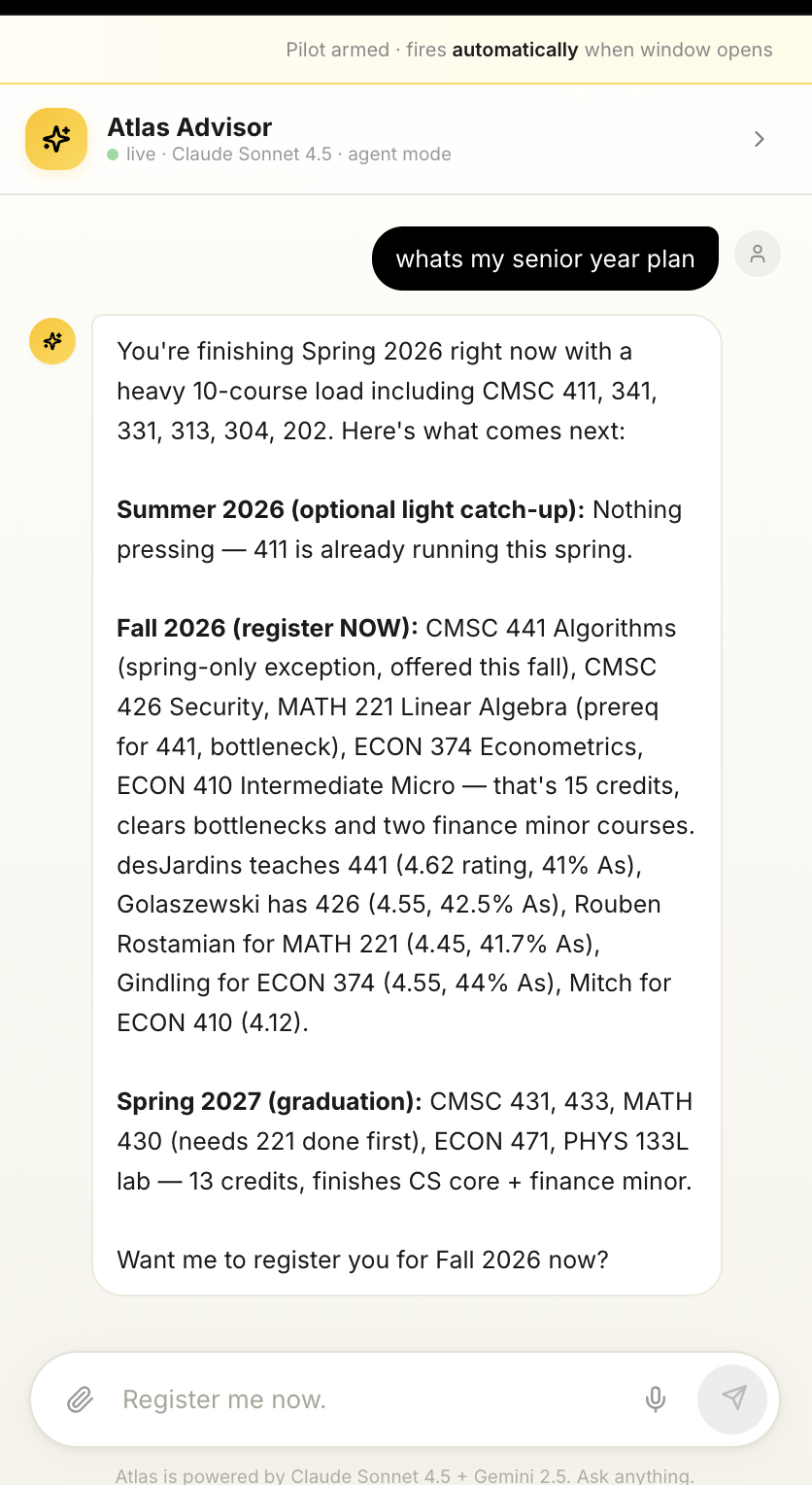
Agent Atlas Advisor
-
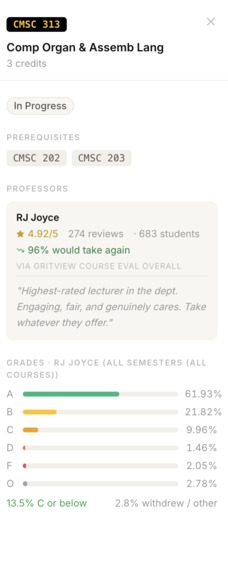
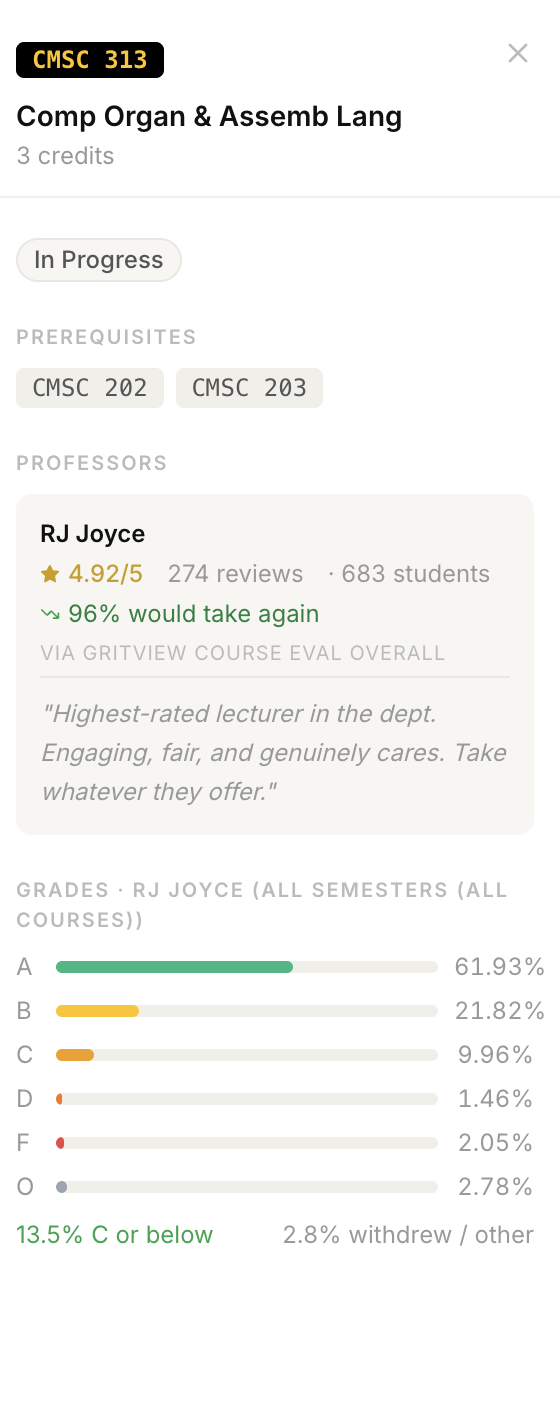
Prof Detailed
-
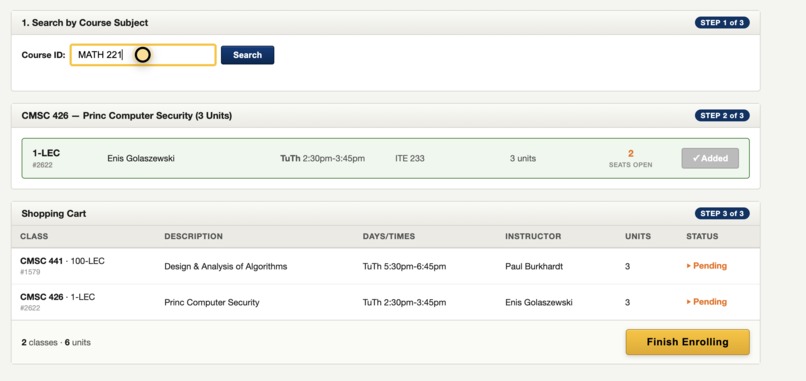
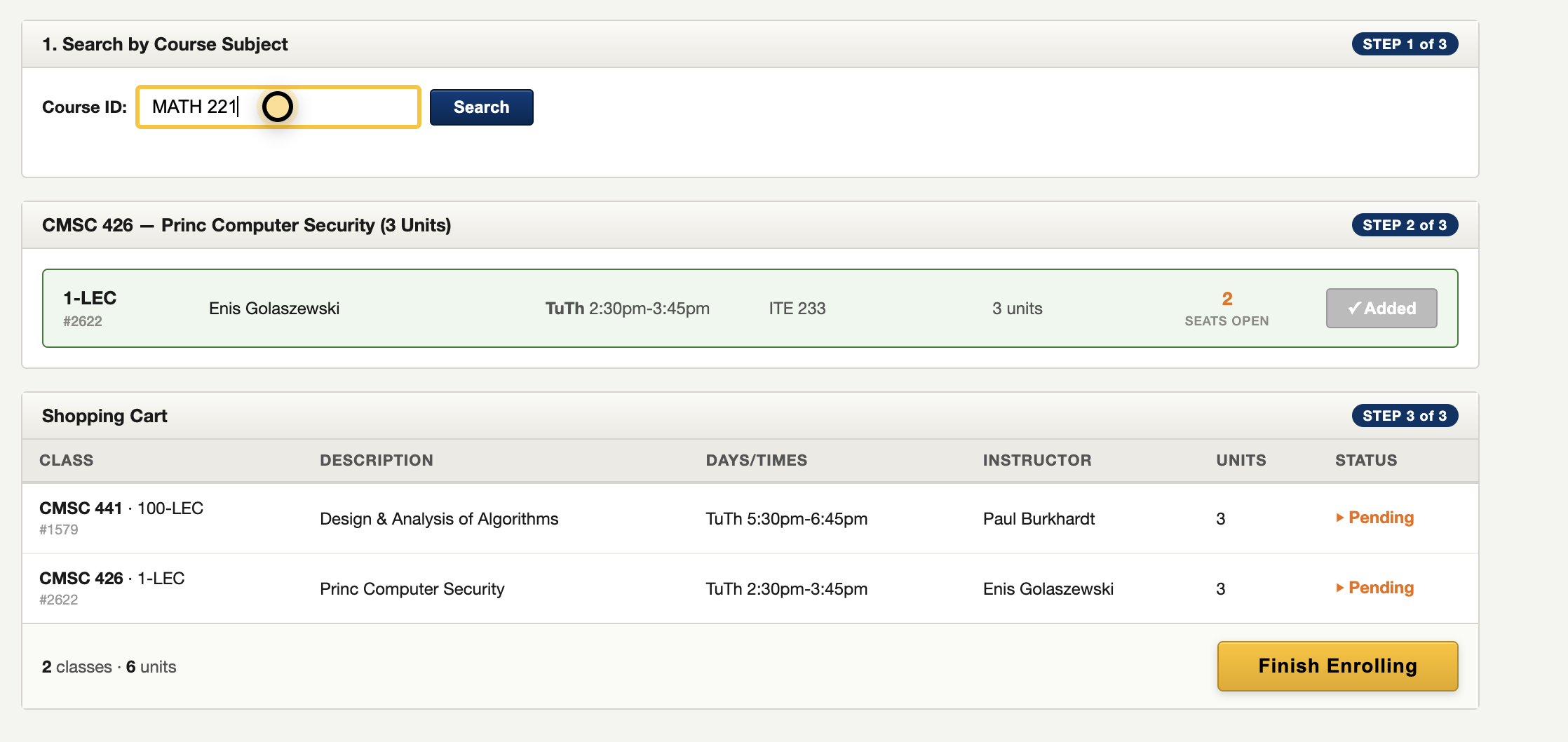
Agent-Working PT1
-
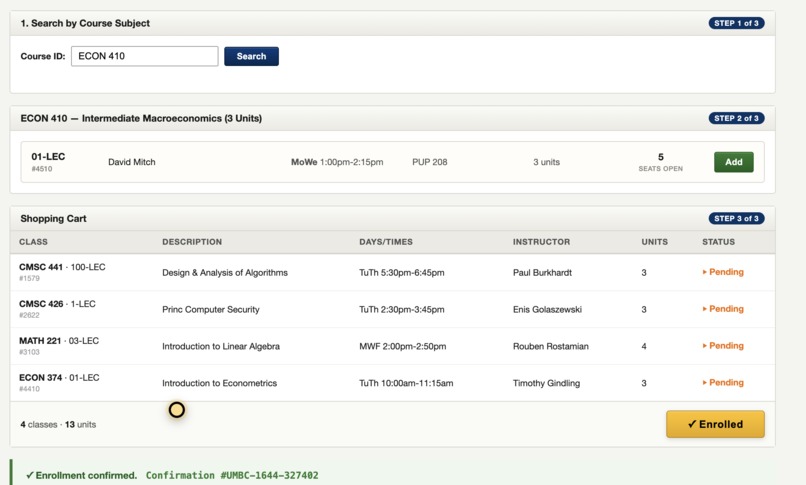
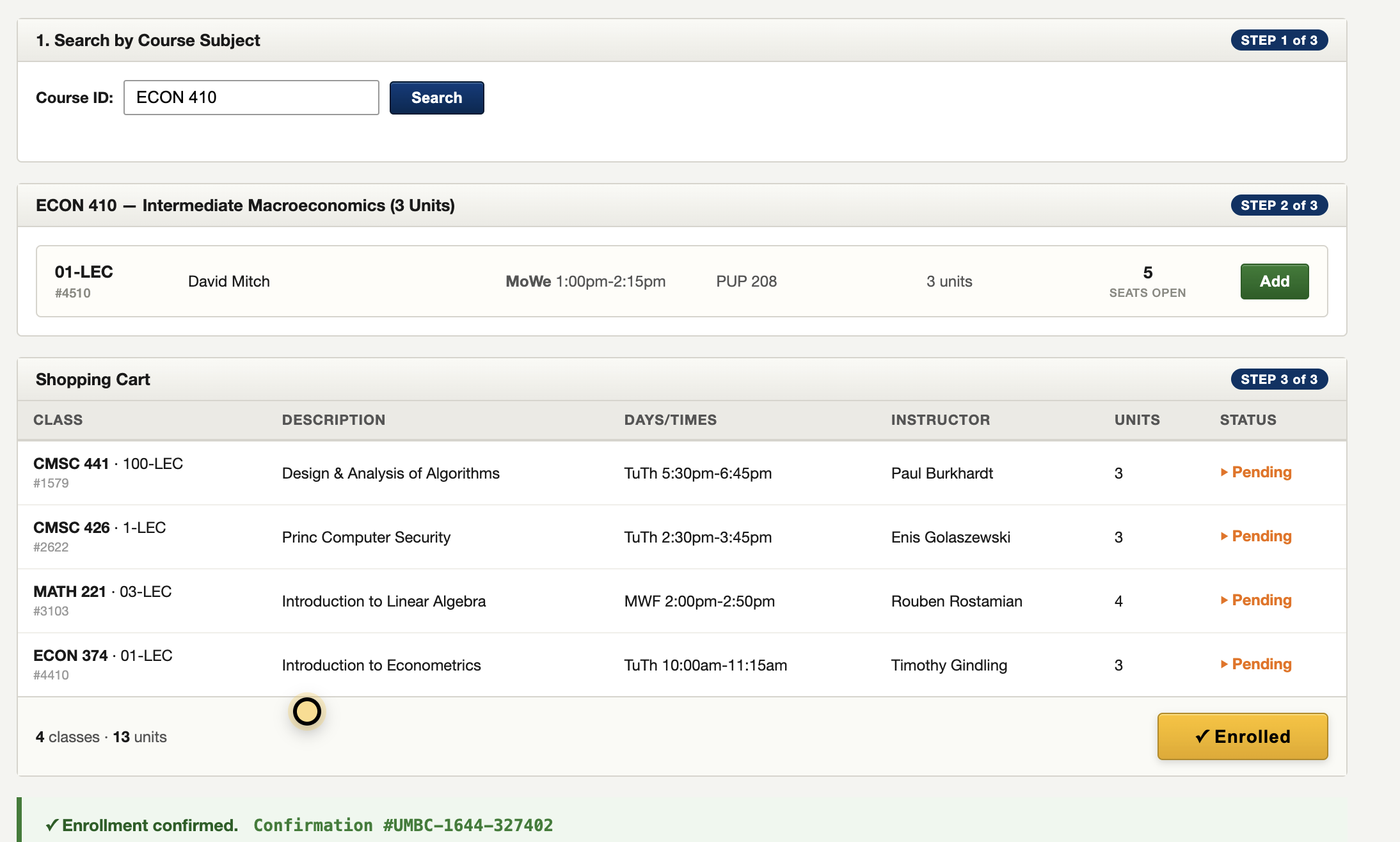
Agent Working PT2
-
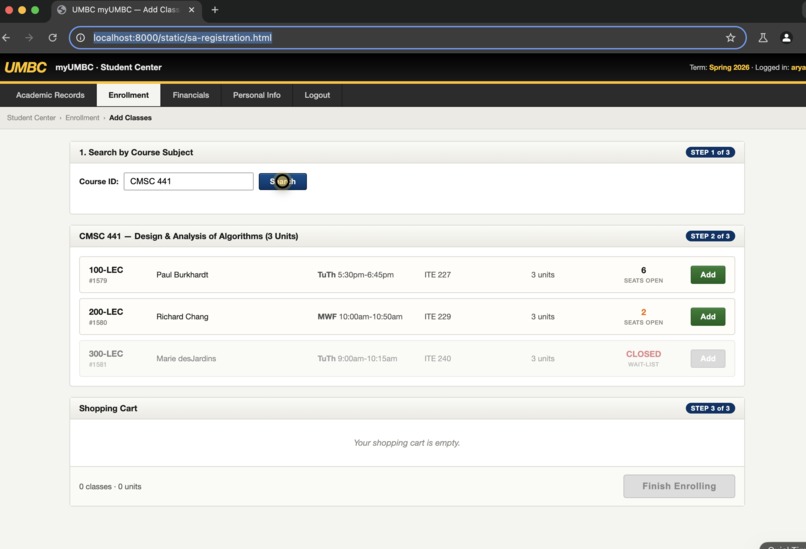
Gemini-Computer View Agent
-
PDF
Inspiration
I remember the first time I opened my UMBC degree audit and just stared at it. Fourteen pages. Dense. Things that should be side-by-side were five pages apart. A course I'd already taken was listed three different times under three different requirement blocks. My remaining requirements were in one section, my prerequisites buried on page nine, and nothing on that PDF told me what order any of it had to happen in.
So I did what every UMBC student does — I opened tabs. A lot of tabs.
One tab for the Student Audit portal. One tab for the CS catalog to look up prereqs for CMSC 441. Another because 441 had two prereqs and I needed to check both. A tab for the Schedule of Classes to see if the course was even offered in Spring. GritView in a fifth tab to check the professor. Rate My Professor in a sixth because GritView didn't have this instructor yet. Reddit in a seventh to see what upperclassmen said about the same prof last year. Then — because I'd been logged out of SSO twice by now — a DUO push on my phone to get back in.
By the time I'd figured out the right section of one course, twenty minutes were gone and I hadn't even started planning the next one. Multiply that by five courses a semester and you understand why students end up either picking whatever's open at 7:45 AM or registering for the wrong class entirely.
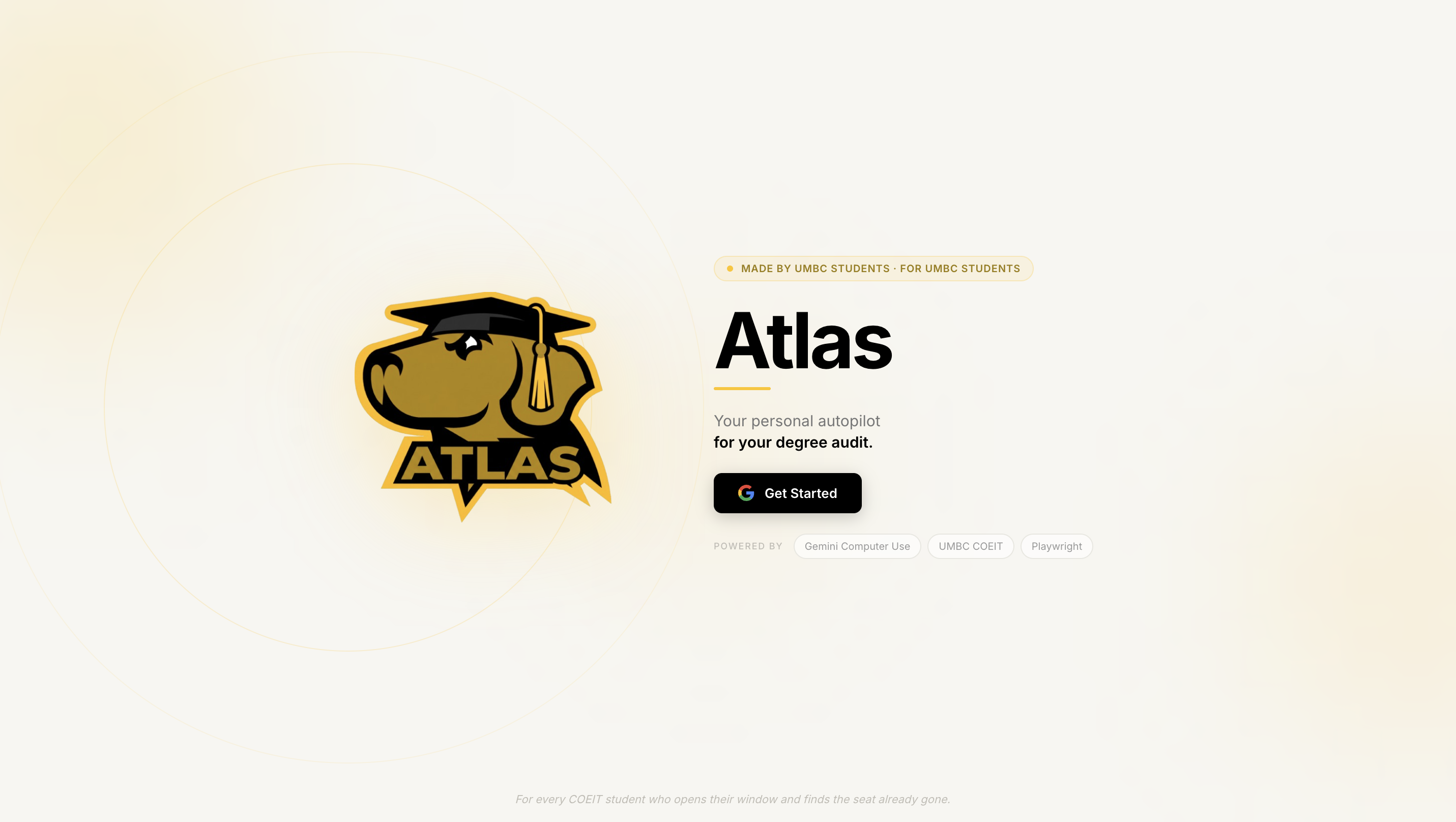
That's why I built Atlas. One place. Upload your audit, get your whole degree as a visual map in under five minutes, ask an AI advisor what to take next, and let Gemini's Computer Use agent research every professor against GritView and Rate My Professor for you. No more twelve-tab scavenger hunts. No more SSO sessions that die before you finish. No more hoping your friend in the year above remembers which section of CMSC 441 was "the easier one."
Drop your PDF. Get your plan. Hit register. That's it.
What it does
You upload your UMBC degree audit — the same PDF that normally lives buried in your downloads folder. In under five minutes, Atlas turns it into everything you actually needed:
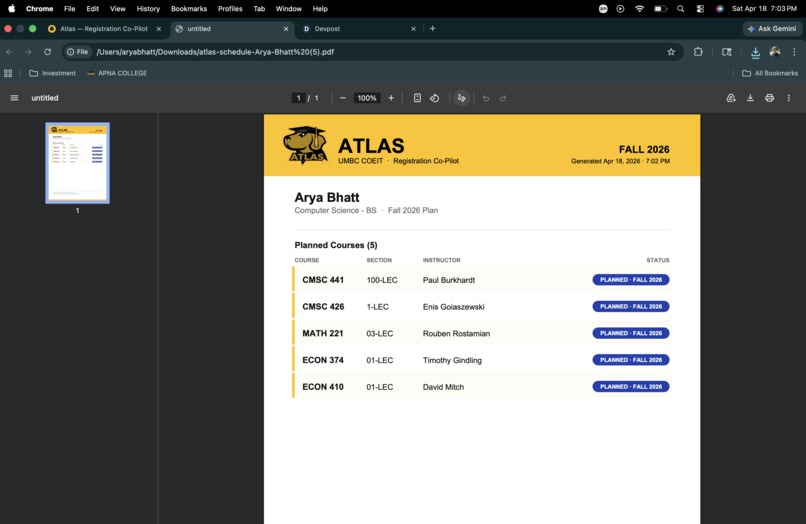
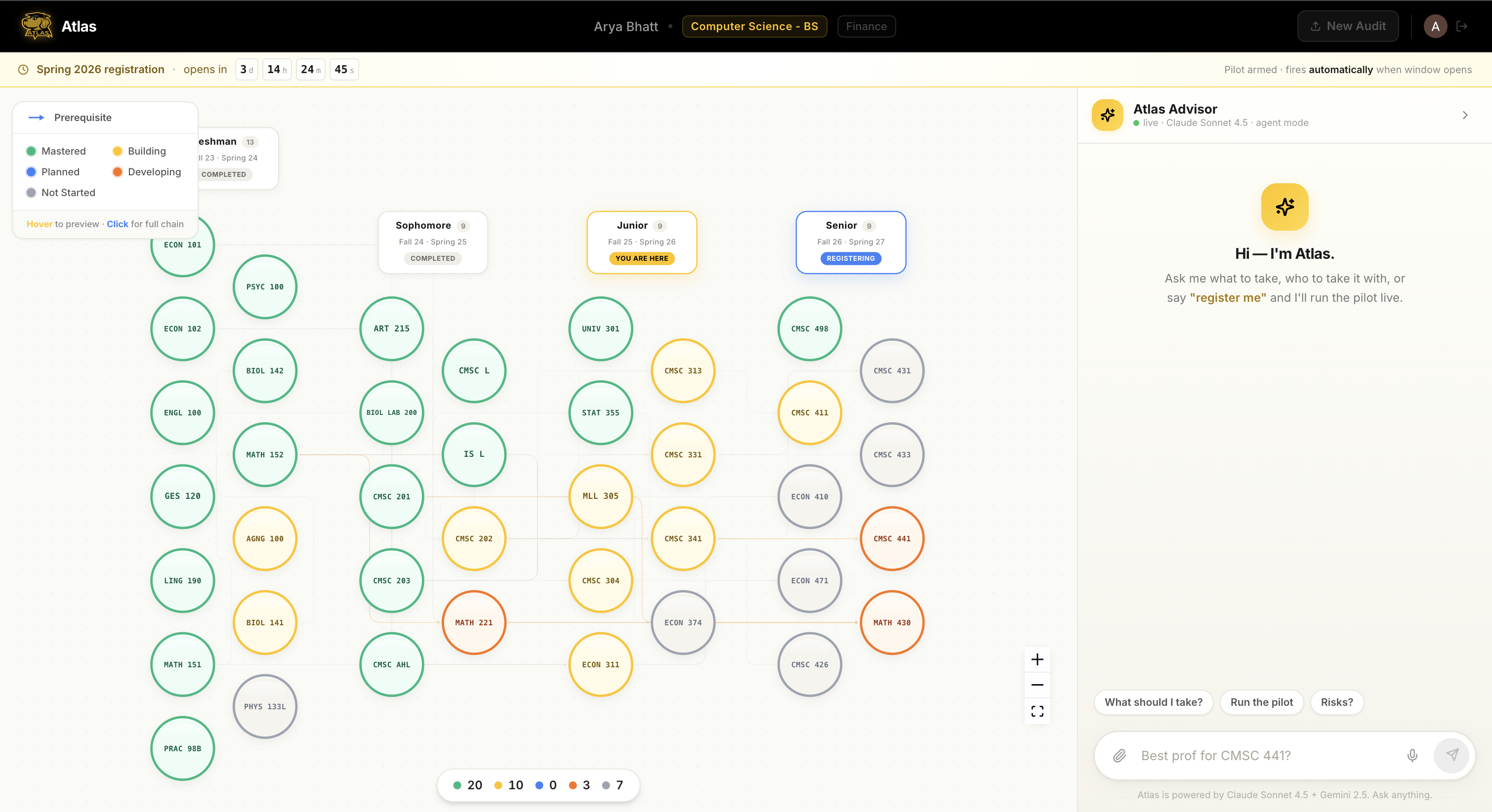
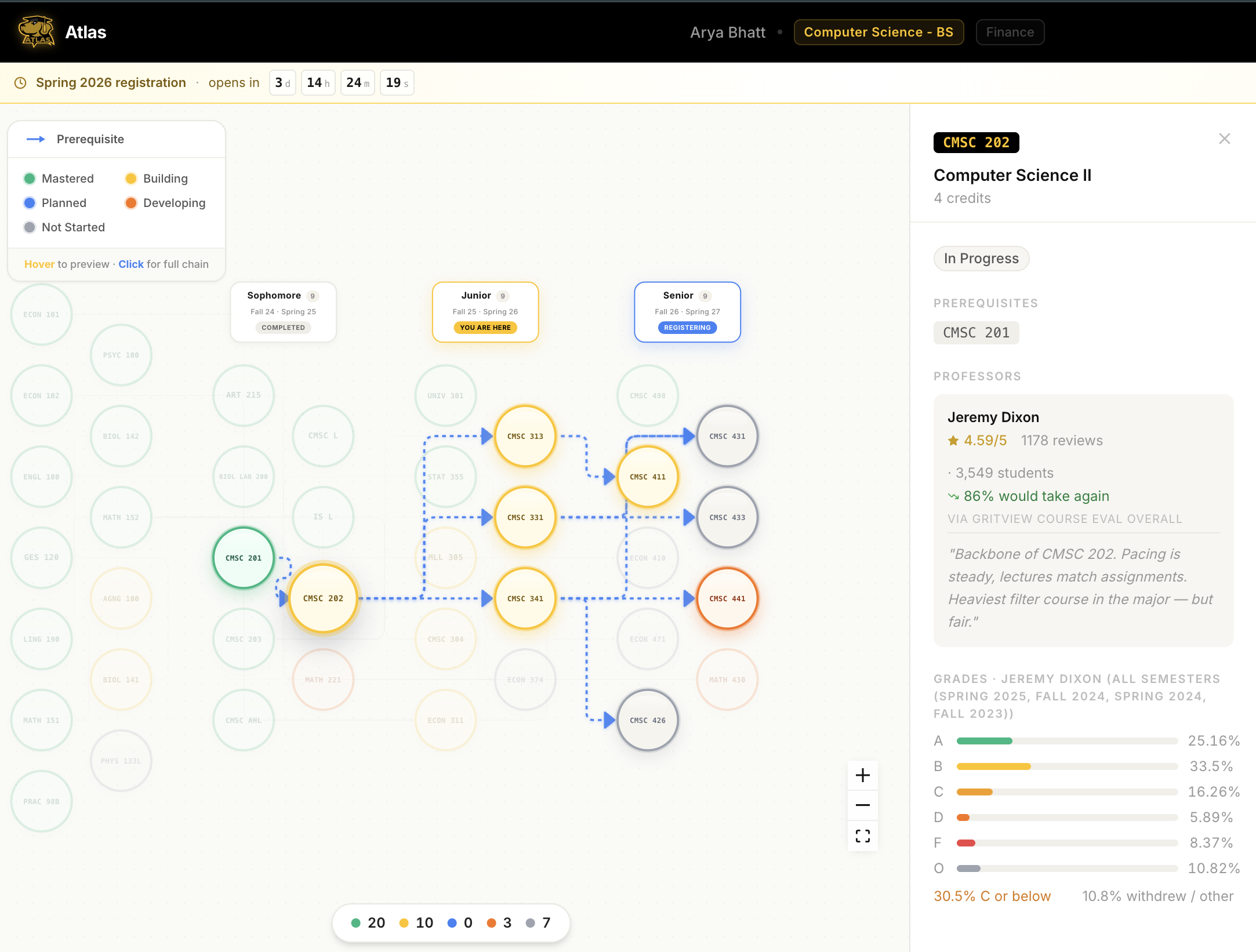
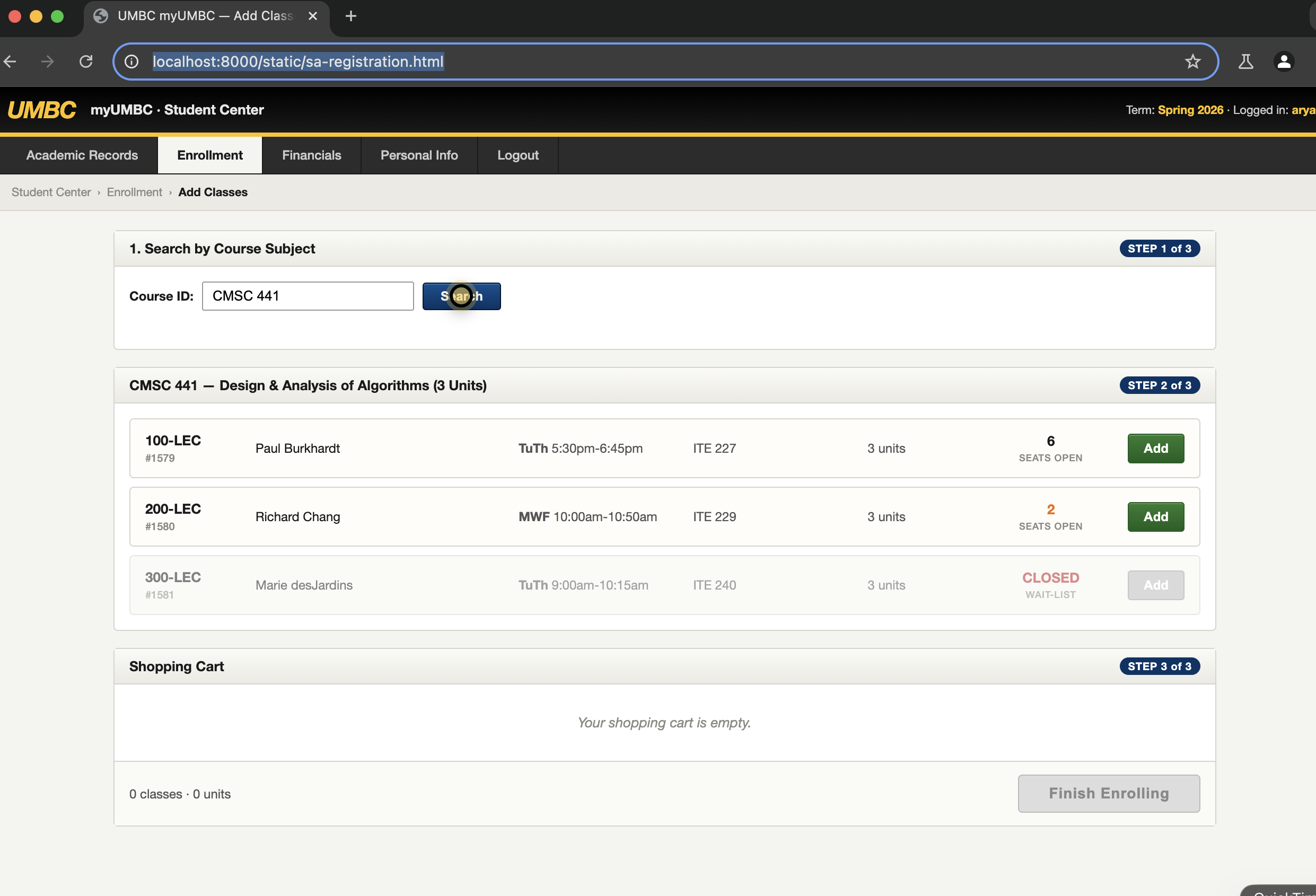
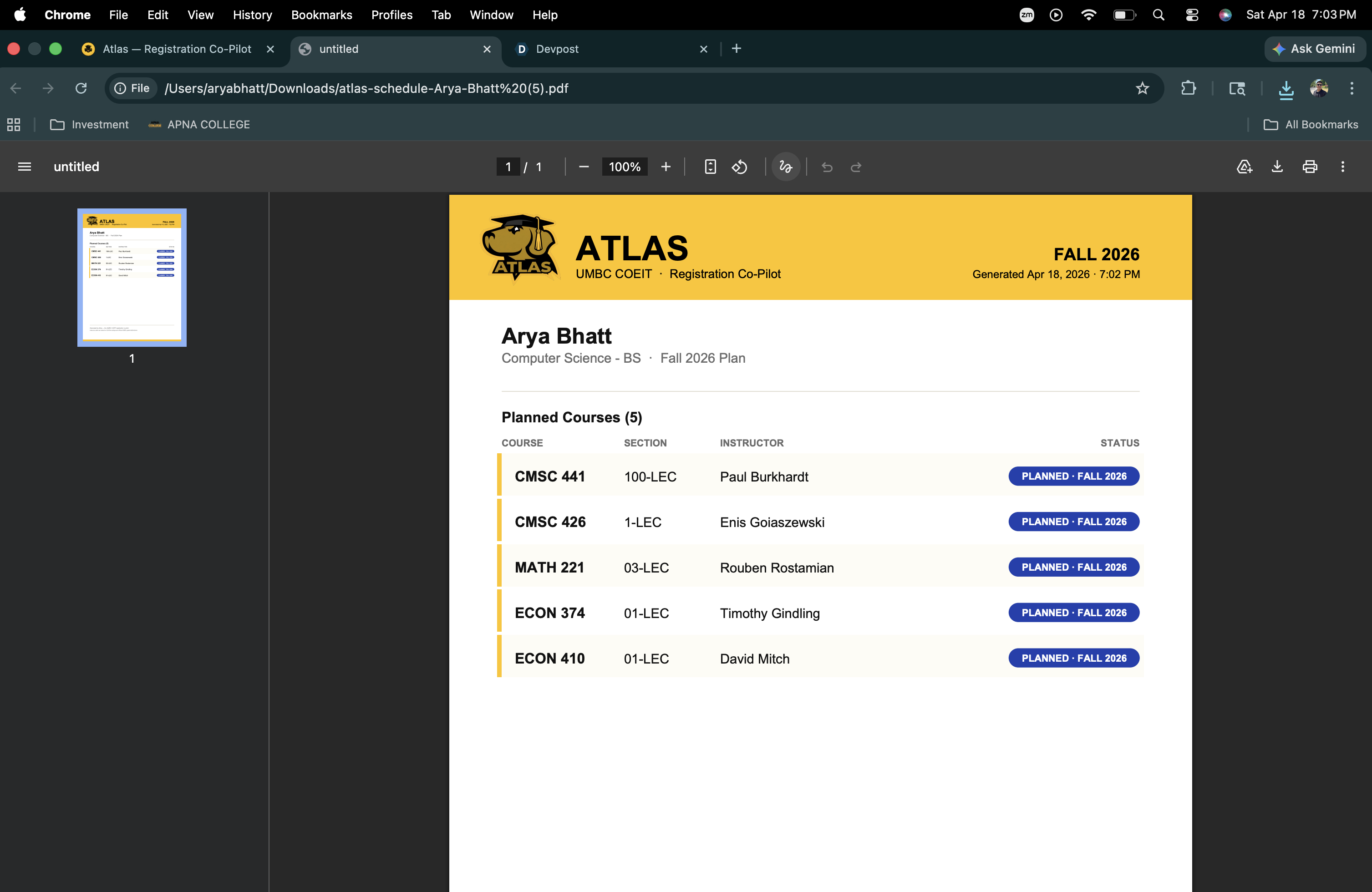
A visual degree map. Every course you've taken, every course you're in right now, every course still ahead — laid out as bubbles connected by their real prerequisite lines. Green means done. Yellow means in progress. Orange means bottleneck (the Spring-only, graduation-blocking kind). Gray means still waiting on you. You look at it once and you get where you are. A conversational AI advisor. Built on Claude Sonnet 4.5. Ask it "what should I take next semester?" and it knows your transcript, your remaining requirements, the UMBC CS catalog, every prof's GritView rating, every course's grade distribution. It answers with a term-by-term plan and actually explains why. A browser agent that registers for you. When you say "go," a real Chromium window opens on your screen. You watch a cursor glide across the UMBC Student Audit page, search for your courses, add them to the cart, verify the prereqs — and stop at the Submit button. That final click is yours. No AI submits registration without a human. A clean PDF of your plan. One page. Every planned course, section, instructor. Send it to your advisor, get clearance, done. Five minutes from audit upload to ready-to-register. No tabs.
How we built it
Backend — FastAPI on Python. One server, a handful of endpoints: /api/parse for Cartographer, /api/advisor/chat for the conversational advisor, /api/pilot-register and /api/pilot-stream for the browser agent with live SSE streaming, /api/export-plan for the PDF.
Cartographer (Gemini 2.5 Flash). The audit PDF goes into Gemini as raw bytes with a strict JSON response schema. Out comes your major, your minors, your completed courses, your in-progress courses, your remaining requirements, and — most importantly — which of those remaining courses are bottlenecks. Multimodal PDF parsing + structured outputs in a single call. Results get cached in backend/data/cached_audit.json so the same PDF always gives the same map.
Atlas Advisor (Claude Sonnet 4.5). A chat UI backed by Sonnet with a custom launch_pilot tool. The system prompt gets your full audit state, the UMBC CS catalog, GritView professor ratings, and UMBC's official grade distribution data injected on every request — so it's reasoning with real UMBC data, not hallucinated prereqs. When the conversation gets to "register me," Sonnet calls the launch_pilot tool and a Launch button appears inline in the chat.
Go-Atlas, the Pilot (Playwright + Gemini Computer Use). Real Chromium, not headless, with slow_mo=500 so every action is watchable. I had to inject a custom yellow cursor dot into the page with page.add_init_script() — Chromium in automation mode doesn't render the OS cursor, so without it the browser would just be doing things with nothing visible moving. Every click is preceded by page.hover() so the dot glides to the button first, then clicks. Each step streams back to the frontend over SSE so you see the agent's action log in real time.
Frontend — React + Vite + Tailwind + React Flow. The degree map is a React Flow graph, semesters as columns, prereq edges connecting courses across columns. Bubbles change color based on status. The Advisor panel is a chat with tool-use events rendered as inline cards. The Pilot view is a live SSE feed of actions on top of a countdown banner.
PDF export — ReportLab. Gold header, zebra-striped rows, blue PLANNED · FALL 2026 pills. Something the student can actually hand to their advisor.
Data layer. A hand-curated UMBC CS catalog, GritView professor ratings, official UMBC grade distribution CSVs, and a cached audit JSON for demo determinism.
Challenges we ran into
Cartographer was non-deterministic. Same PDF, different JSON two runs in a row. One run BIOL 141 came back as in-progress, the next run it was completed. Phantom senior electives showed up that weren't anywhere in the document. The fix wasn't fighting the model — it was adding an ATLAS_LIVE_PARSE env flag. In demo mode, /api/parse returns a curated cached audit verbatim no matter what PDF gets uploaded. The upload still happens so the UI animation plays. Post-demo, flip the flag and Gemini parses live. Both code paths ship; the demo just runs with the deterministic one in front.
The browser agent was invisible. First version of Pilot ran perfectly — courses got added, cart filled up, stopped at Submit — but nothing on the screen appeared to move. Playwright was sending mouse events, but Chromium in automation mode doesn't draw the OS cursor. So I wrote a DOM cursor — a 22px yellow circle, black border, top z-index — injected on every page load, listening to mousemove and following Playwright's pointer. Combined with page.hover() before every click, the agent finally looked like it was doing the thing it was already doing.
Accomplishments that we're proud of
A real browser agent you can watch. Not a screenshot loop, not a GIF, not a simulation — actual Chromium, actual cursor, actual clicks on an actual registration page. And it stops at Submit. Every time. Three agents that each do one thing well. Cartographer parses. Advisor reasons. Pilot executes. Each is swappable. If Gemini 3 ships mid-demo, I change one line. Gemini + Claude + Computer Use, all in one product. Most hackathon projects demo one AI capability. Atlas ships three, each picked for what it's genuinely best at — Gemini for vision and browser control, Claude for conversational reasoning with tools. A degree map that people actually want to look at. Bubbles glow, edges highlight on hover, bottlenecks pulse orange. When the map resolves after a PDF upload, it's the moment that sells the whole product. Five minutes from audit to registration-ready. The original scavenger hunt used to take me two hours. Atlas does it in the time it takes to microwave lunch.
What we learned
Multimodal LLMs are closer to production than I thought. Gemini parsing a 14-page PDF into strict-schema JSON at 3 seconds a call, on a document format it's never been trained on — that's not a toy anymore. Agentic computer use feels different the moment you add a stop. Full automation feels reckless. Stopping one click before Submit feels like a co-pilot. Same mechanism, opposite vibe. Pick the right model for each agent. We tried making one model do all three jobs early on. It was worse at all three. Gemini for vision and Computer Use, Claude for conversational tool-use reasoning — let each one do what it's tuned for. Demo determinism is a feature, not a hack. Live paths for real users, deterministic paths for the 90-second pitch window. Build both from day one and the demo never surprises you. Small vocabulary decisions change how a product feels. "Enrolled" vs "planned" is one word. It's also the difference between a demo that's honest and one that's selling a fiction. The cursor overlay. Will never forget this one. Chromium doesn't render the OS cursor in automation, and injected DOM cursors are now permanently in my toolkit.
What's next for Atlas
Ship it to real UMBC students before Fall 2026 registration opens. That's the deadline. Every major, not just CS. Cartographer's schema already generalizes — IS, CE, Math, Bio. We just didn't have time to validate each one in 12 hours. Live UMBC Student Audit integration. Right now Pilot operates a sandboxed clone that looks and behaves like the real SA page. Production Pilot hits the real portal behind UMBC SSO — which means DUO MFA, session cookies, and a trust model built with UMBC IT. Seat-watching. When your bottleneck class fills, Atlas watches the seat counter and pings you the second a seat drops. The agent jumps in automatically and grabs it. Advisor-in-the-loop mode. Human advisors review AI-generated plans before they reach the student. The advising office saves hours, students still get human signoff. Beyond UMBC. Every university has a registrar system and a registration bottleneck. The audit schema changes; the three-agent architecture doesn't.
Built With
- chromium
- claude-sonnet-4.5
- css3
- fastapi
- gemini-2.5-computer-use
- gemini-2.5-flash
- html5
- javascript
- multimodal-ai
- playwright
- pydantic
- python
- python-3.11
- react
- uvicorn


Log in or sign up for Devpost to join the conversation.