-
-
extension picture 1
-
extension picture 2


Inspiration
Bad wellness and health have been one of the greatest barriers to success in the workplace or school. When one works for too long, one may start to experience stress. If this is a recurring theme of one’s life, then one will eventually be unable to carry on working. Eventually, stress could become serious mental health issues, hindering effective communication, and productivity, and eventually, become a barrier almost impossible to overcome. This is especially true during the pandemic as online learning and remote work became more popular. The line between work and life starts to blur together as everything occurs in the same environment. Work carries on into people’s breaks and eventually wears them off. A survey in Canada has shown that “44 percent of remote workers reported they were logging more hours of work than they were in pre-pandemic times” Improving one’s general health and wellbeing could be the first step to improving one’s mental health, notably stress. This led to our development of the chrome extension that reminds people to take breaks - Balance™ .
How to use
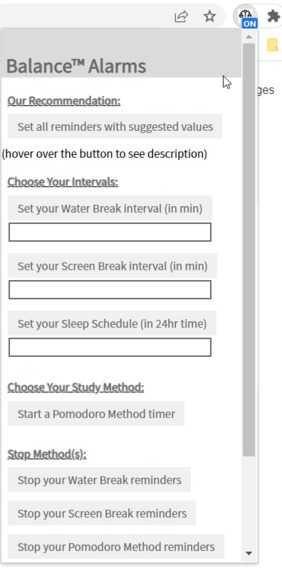
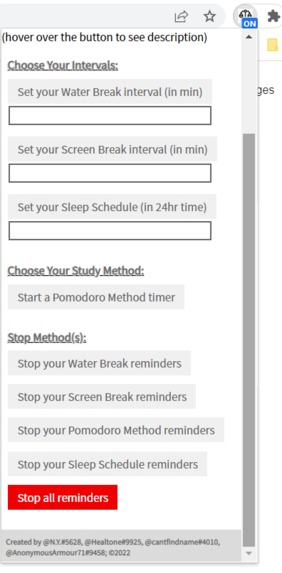
- Enter desired reminder time in minutes into the box below the button of the reminder that you want to set, and then click the button to finish setting the reminder.
- To use the default suggested reminders, click the first button that says "set all reminders with suggested values"
- To set up a customized sleep reminder, enter the time that you want to be reminded in hours (24-hour time)
- To stop a specific reminder, click the button that says "stop your ____ reminder" for the reminder you want to stop
- To stop all reminders, click the red button that says "stop all reminders"
What it does
Balance™ allows users to set up breaks for themselves so that they will not overwork. This chrome extension provides water break reminders, screen time break reminders, sleep reminders, and even supports the Pomodoro method so that users can increase productivity.
How we built it
By using JavaScript, HTML, CSS, and various API from chrome (ex. Alarm API), we were able to code the script that keeps track of the time passed since the user started the timer, and sets off alarms every so often to remind users about breaks.
Challenges we ran into
Originally it was really hard to find ways to keep a timer in the background as the updated chrome Manifest V3 does not allow background script files to run constantly. So we found Alarm API that was capable of running the timer even after the background script became inactive and used it. Another notable challenge that we ran into is connecting the interface with the code because there were a lot of functions sending messages to each other. If one function didn't send the right message the alarm would not work. We solved this problem by printing logs at a lot of places and refactoring the code to a better flow so that it is very easy to see which part went wrong.
Accomplishments that we're proud of
We are very proud that the reminder all went off at the customized times and the default reminder works too. And we are also really proud that we have a relatively simple user interface
What we learned
Creating a chrome extension was a new experience for all of us, so as we developed the extension, we learned a lot. We learned how to use Alarm in the background and how to set up the popup, background scripts, and the manifest of chrome extensions.
What's next for Balance™ Chrome Extension
In the future, we will make Balance able to run after chrome is closed. We will also add in machine learning algorithms that learn the work pattern of an individual and predict how long they will keep working for, and suggest they take breaks off if they are working longer than usual.
Built With
- alarmapi(chrome)
- chrome
- css
- html
- javascript


Log in or sign up for Devpost to join the conversation.