-
-
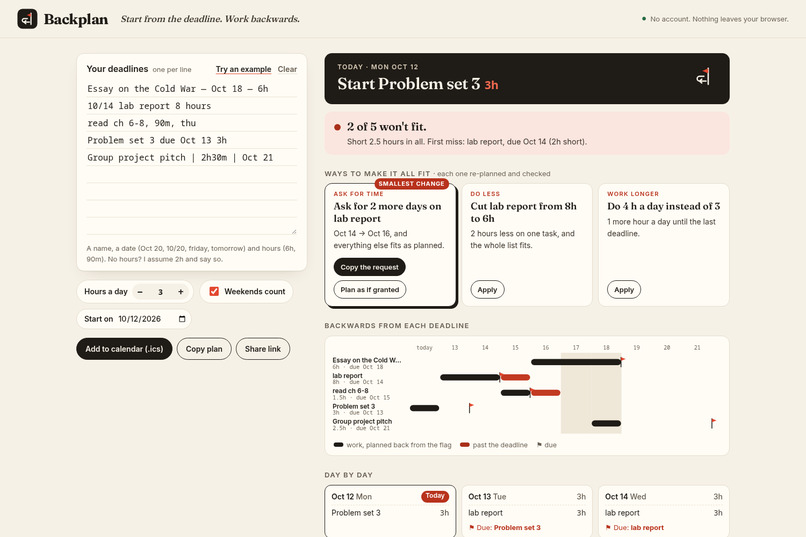
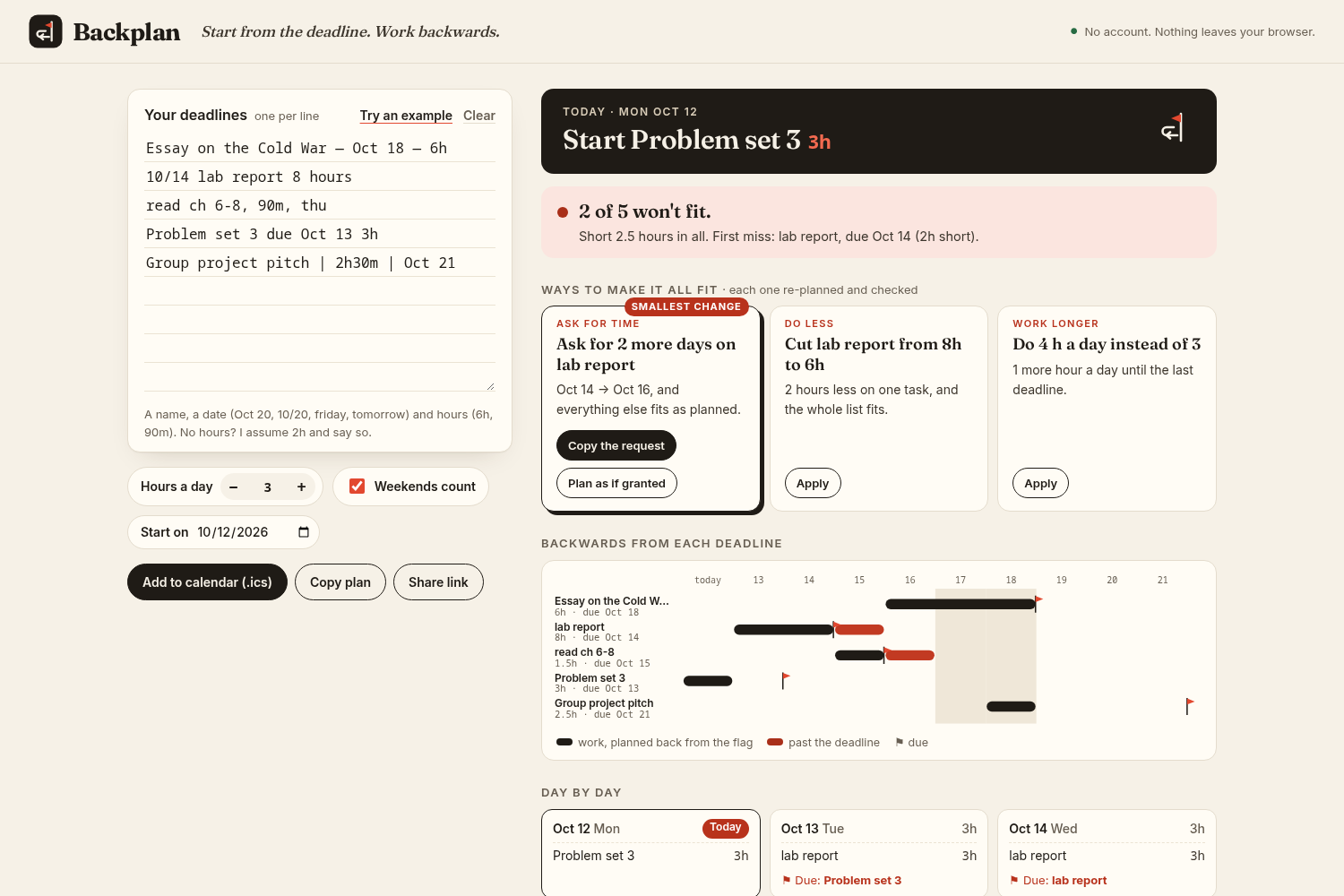
A crunch week: 2 of 5 won't fit, and three ways to make it all fit, each one re-planned and checked
-
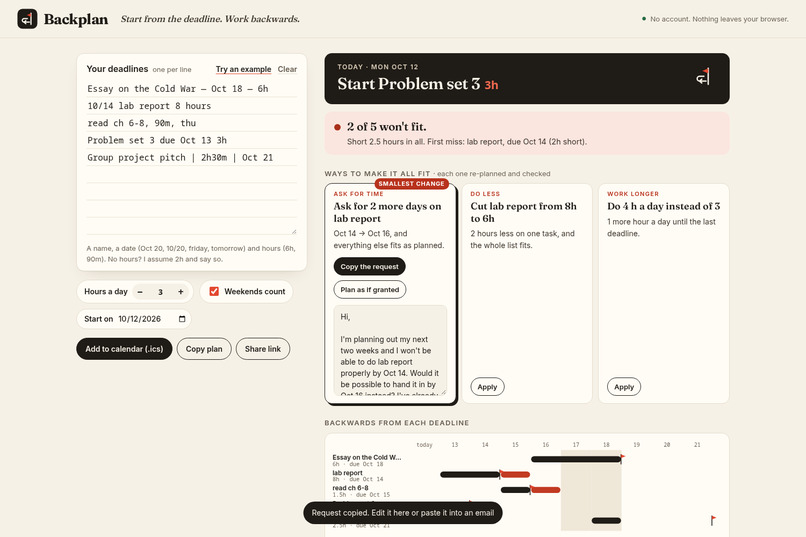
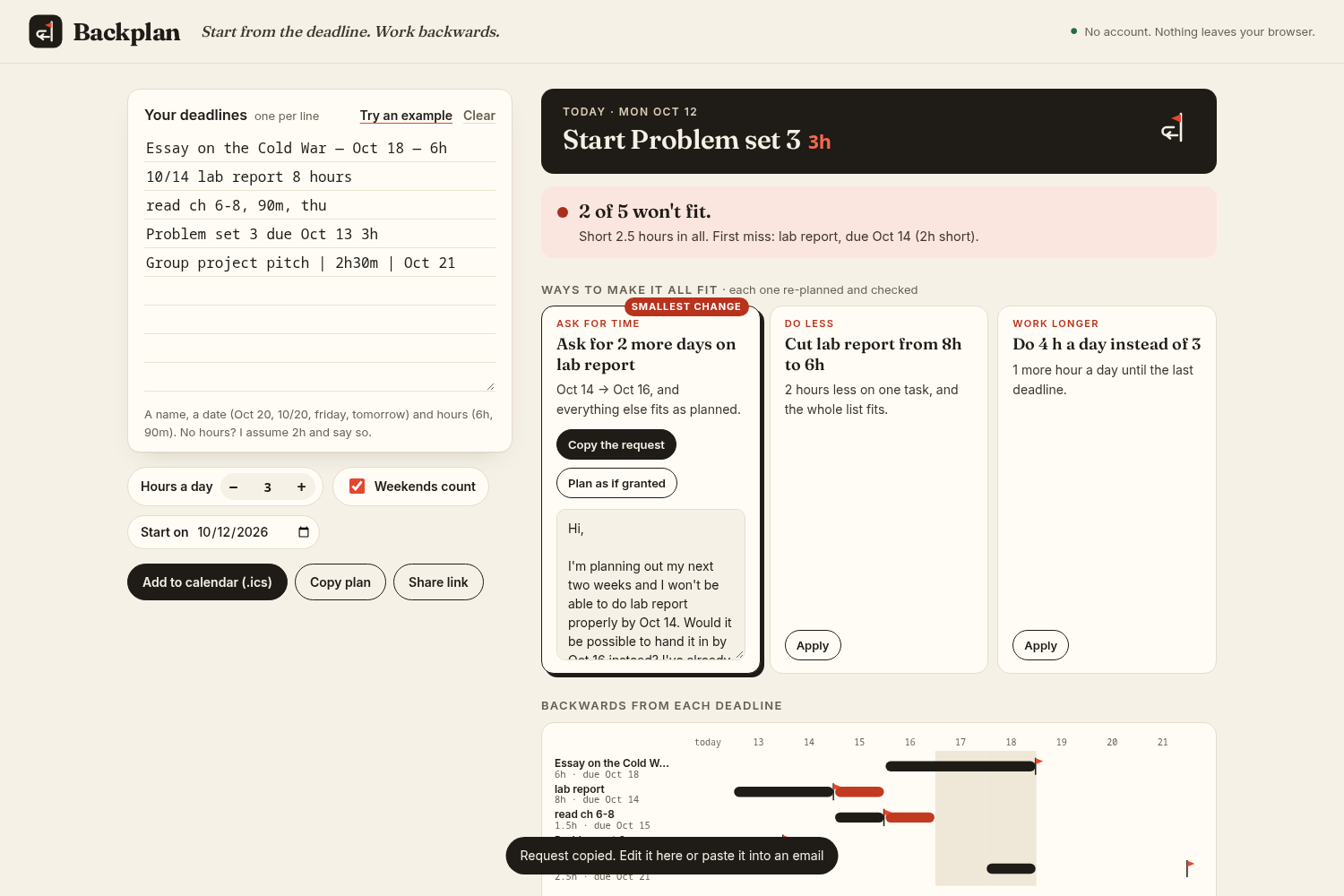
Ask for time: the smallest extension on one deadline, with a polite request you can copy and edit
-
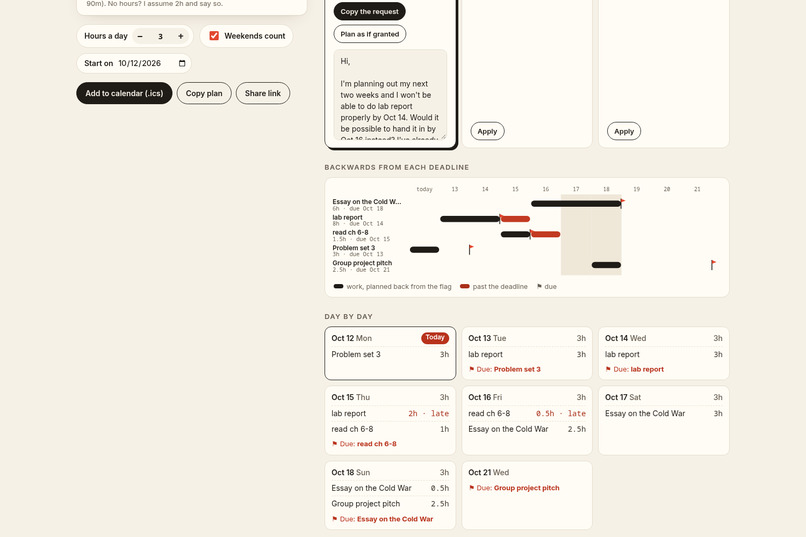
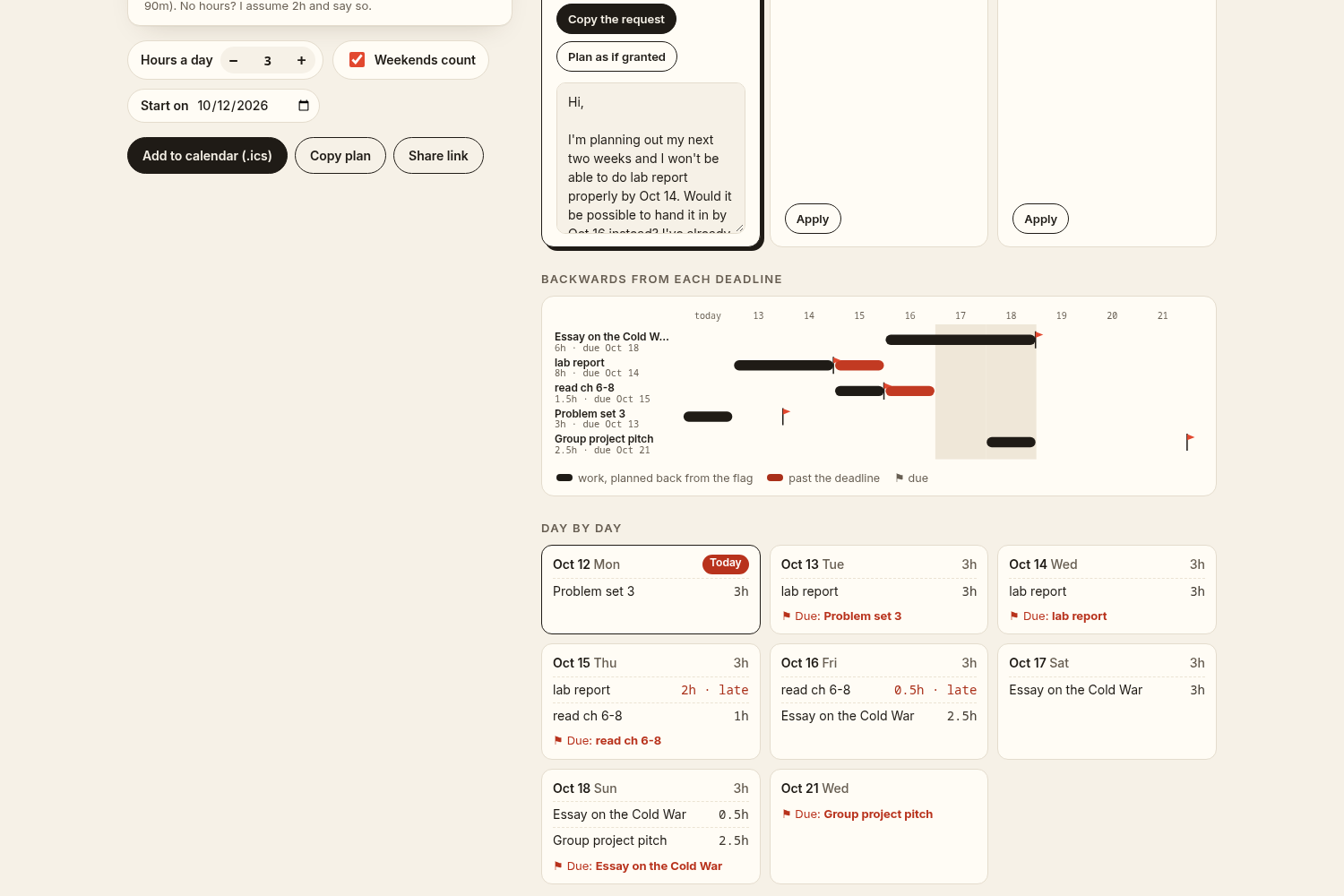
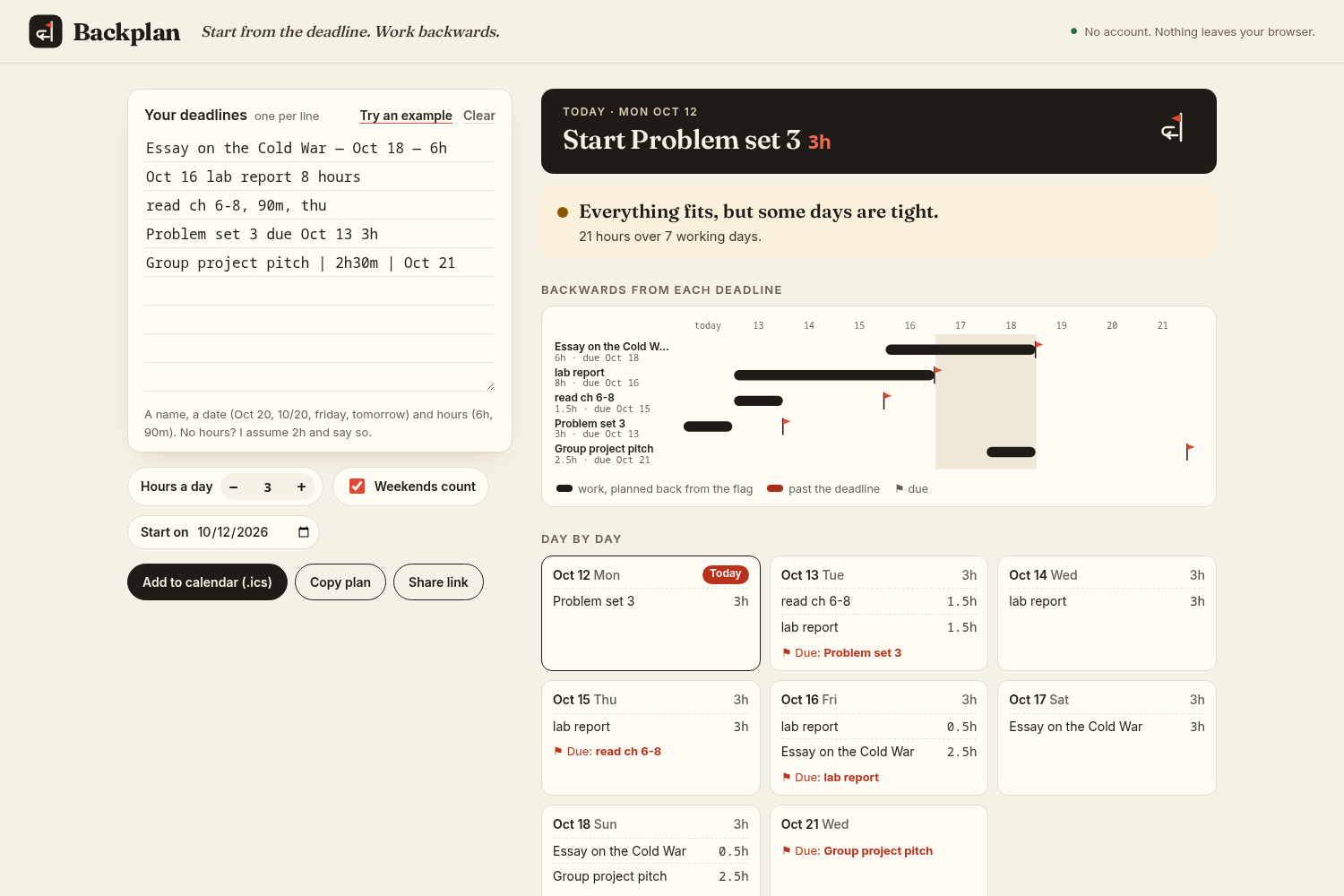
The backwards ribbon: work grows back from each deadline's flag; red is work past the deadline
-
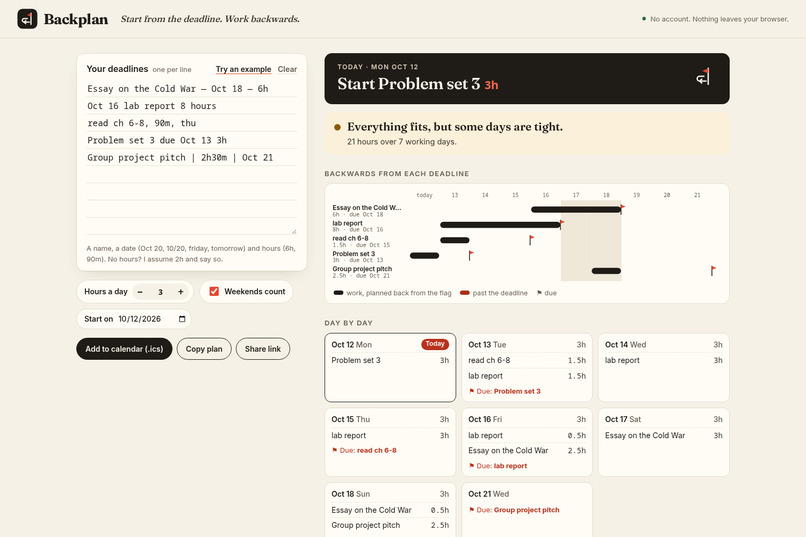
One tap on "Plan as if granted" and everything fits
-
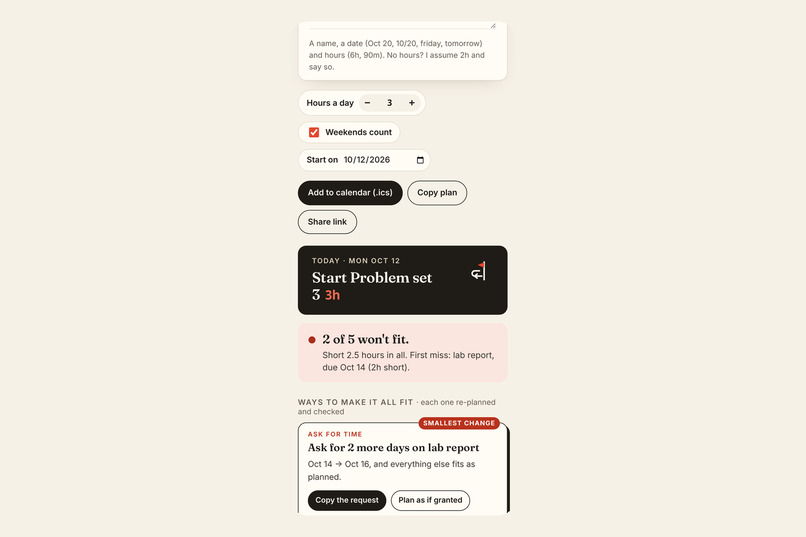
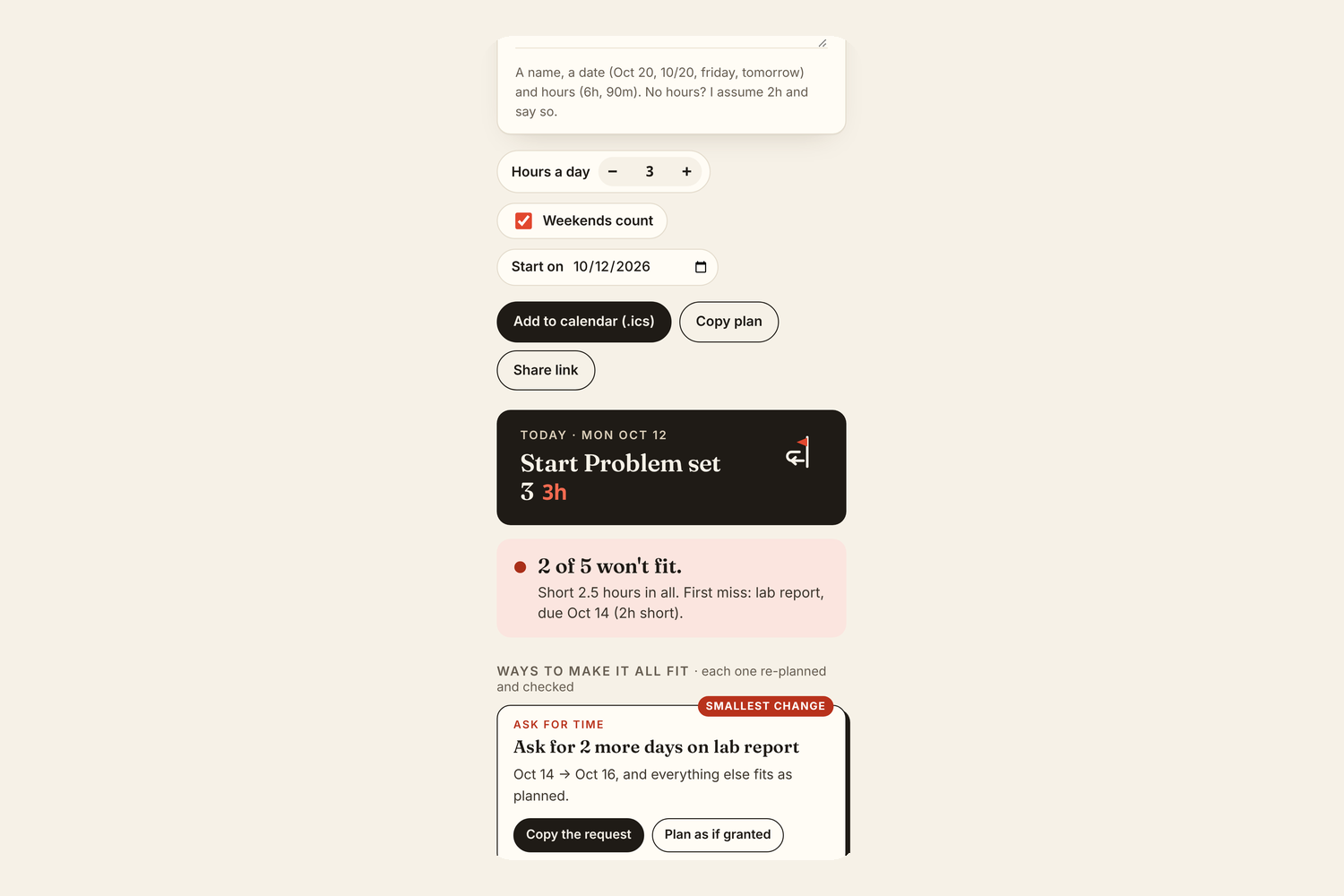
On a phone: today's plan first, then the verdict and the fixes
Inspiration
Most students keep deadlines in a notes app: "essay oct 20", "lab 10/14", "ch 6-8 reading". The list stores the dates, but it never adds up the hours. So the moment you find out the week doesn't fit is usually the night before something is due, when it's too late to fix.
Planners can show you that you're behind. I wanted one that answers the next question too: what is the smallest thing I can change so I'm not?
What it does
Backplan is one page. You paste your deadlines the way you'd write them, one per line (Essay — Oct 20 — 6h, 10/14 lab report 4 hours, read ch 6-8, 90m, friday), say how many hours a day you have, and it plans backwards from every due date.
- Today, first. The top of the plan is the answer to "what do I do now?": today's blocks, with hours.
- The truth, early. Each deadline is on track, tight or won't fit (short by N hours), and the verdict says it in one line: "2 of 5 won't fit. Short 2.5 hours in all. First miss: lab report, due Oct 14 (2h short)."
- Rescue: the smallest change that saves the week. When the week doesn't fit, Backplan shows up to four fixes, each a single change:
- Ask for time: the smallest extension on one deadline ("Ask for 2 more days on lab report"), with a short, polite request you can copy and edit, and "Plan as if granted";
- Do less: the smallest half-hour cut to one task ("Cut lab report from 8h to 6h");
- Work weekends, if they're off and that's enough;
- Work longer: the smallest step up in hours a day ("4 h a day instead of 3").
Every option is found by re-running the planner, so every fix shown is a fix that works. One tap applies it to your list.
- The backwards ribbon. Each deadline is a flag; its work bar grows backwards from the flag to the day you start. Work that lands past the flag is drawn in red.
- Reads messy lists. Dates like
Oct 20,10/20,tomorrow,friday; hours like6h,90m,2h30m. No hours? It assumes 2h and says so. A line it can't read is listed, never silently dropped. - Exports a
.icsfor any calendar app, the plan as text, or a share link. - Private by design. No account, no server, no AI at runtime. Nothing leaves your browser, it's instant, and every number can be explained.
Who it's for
Students, and anyone juggling a handful of dated deliverables who finds out they're behind too late. It turns a pasted list into a plan, and a "won't fit" into a decision, in about ten seconds.
How I built it
With the Devpost Learn skill pack and a coding agent, following the pack's steps in order. The documents are in the repo under devpost/:
- scope.md: the kernel (honest back-planning from a pasted list), who it's for, and what's cut (no accounts, no AI parsing, no notifications).
- prd.md: every behaviour: the date and hour forms the parser reads, the scheduler rules (due = end of the due day; work that won't fit is still placed, never hidden), statuses, the verdict sentence, actions and states.
- spec.md: plain-language architecture, stack (plain HTML/CSS/JS modules; Node only for tests and a tiny static server), data model, failure modes.
- checklist.md: seven small slices, each built, tested and committed on its own. The git history is the checklist.
Round 2 added the rescue. It got its own section in the PRD and the spec, a new module (src/rescue.js) and 9 new tests, including one that applies every option the panel offers and checks that the plan really fits. It also brought a visual identity of its own: paper and ink, a serif face (Fraunces, self-hosted), one tomato-red accent used only for deadlines and the smallest fix, and a mark that is a flag with a backwards arrow.
Quality: 23 unit tests; 19 end-to-end checks in a real browser, run against both the local build and the live site; an accessibility pass with axe-core (16 issues → 0). No dependencies, no build step, MIT licence.
Challenges I ran into
- Making "rescue" trustworthy. An estimated fix ("you need about 2 more hours") can be wrong in subtle ways. Brute force solved it: try each single change in small steps and keep the smallest one the planner accepts. A student list is 3–15 lines, so that's a few thousand planner runs of microseconds each.
- Editing the user's own words. "Apply" rewrites the date or hours inside the line the student typed and leaves the rest alone, so the list stays the one source of truth.
- Lenient parsing without a model: find and remove the date and the hours first, then treat what's left as the name, and make sure "ch 6-8" isn't read as 6 hours.
- .ics details: all-day events end on the next day, lines are CRLF and folded at 75 bytes, and stable UIDs make re-imports update instead of duplicate.
Accomplishments that I'm proud of
The moment in the demo when "2 of 5 won't fit" becomes "Ask for 2 more days on the lab report", with the request already written, and one tap later "Everything fits." That's the whole product in one line, and it works on every list, not just the demo.
What I learned
The best feature came from asking what a person does one second after reading the verdict. "Won't fit" is honest; "here's the smallest change that fixes it" is useful. And writing the rules down first (scope, PRD, spec) kept every part of the code explainable, which is the skill pack's answer to "cognitive debt".
What's next for Backplan
Fixed commitments per day (class times, shifts) instead of one hours-per-day number; marking a task done and re-planning the rest; a minimum block size so an essay isn't split into crumbs; reading a syllabus from a photo.
Built with the Devpost Learn skill pack and a coding agent (AI-assisted planning and code, reviewed and tested). The demo video's narration is AI text-to-speech. No AI runs inside the app.
Built With
- axe-core
- css3
- devpost-learn-skill-pack
- es-modules
- html5
- icalendar
- javascript
- localstorage
- node.js
- playwright
- svg

Log in or sign up for Devpost to join the conversation.