
Inspiration
As students, we often discover what we didn’t understand in a lecture when we sit down to do the assignment. We know the professor covered it. We can even find the slide. What we want to ask is something specific, like “Why did this distance change from 9 to 6?” Replaying the recording gives us the same explanation, and typing the whole graph into a chatbot is more work than asking the question.
We built Lily around three things we wanted in our own courses:
- A weekly view that keeps each lecture beside the materials and assignments that use it.
- A way to point at the exact step we’re stuck on and ask about it in our own words.
- Help that leaves us with something to figure out ourselves.
What it does
- Organizes the course week by week. Students subscribe to a course and open a weekly plan with its recordings, materials, and assignments. They can go straight to the next sheet they need to work on.
- Answers questions about a lecture frame. Press Cmd/Ctrl+K, ask a question out loud, and press Enter to send. Lily uses the paused frame and recent conversation to understand what “that arrow” refers to. Students can also type.
- Draws explanations step by step. When a concept needs a diagram, Lily can build it on a whiteboard and narrate each step as it appears.
- Helps students work through assignments. Students can mark up a worksheet, ask about their attempt, and submit a written answer. In Study mode, Lily can offer a setup and a guiding question. In Exam mode, she asks for an attempt first.
- Gives professors a teaching workspace. Professors can publish sheets, grade named submissions, and leave feedback. A separate anonymous report shows the kinds of help students requested once at least three students have submitted.
How we built it
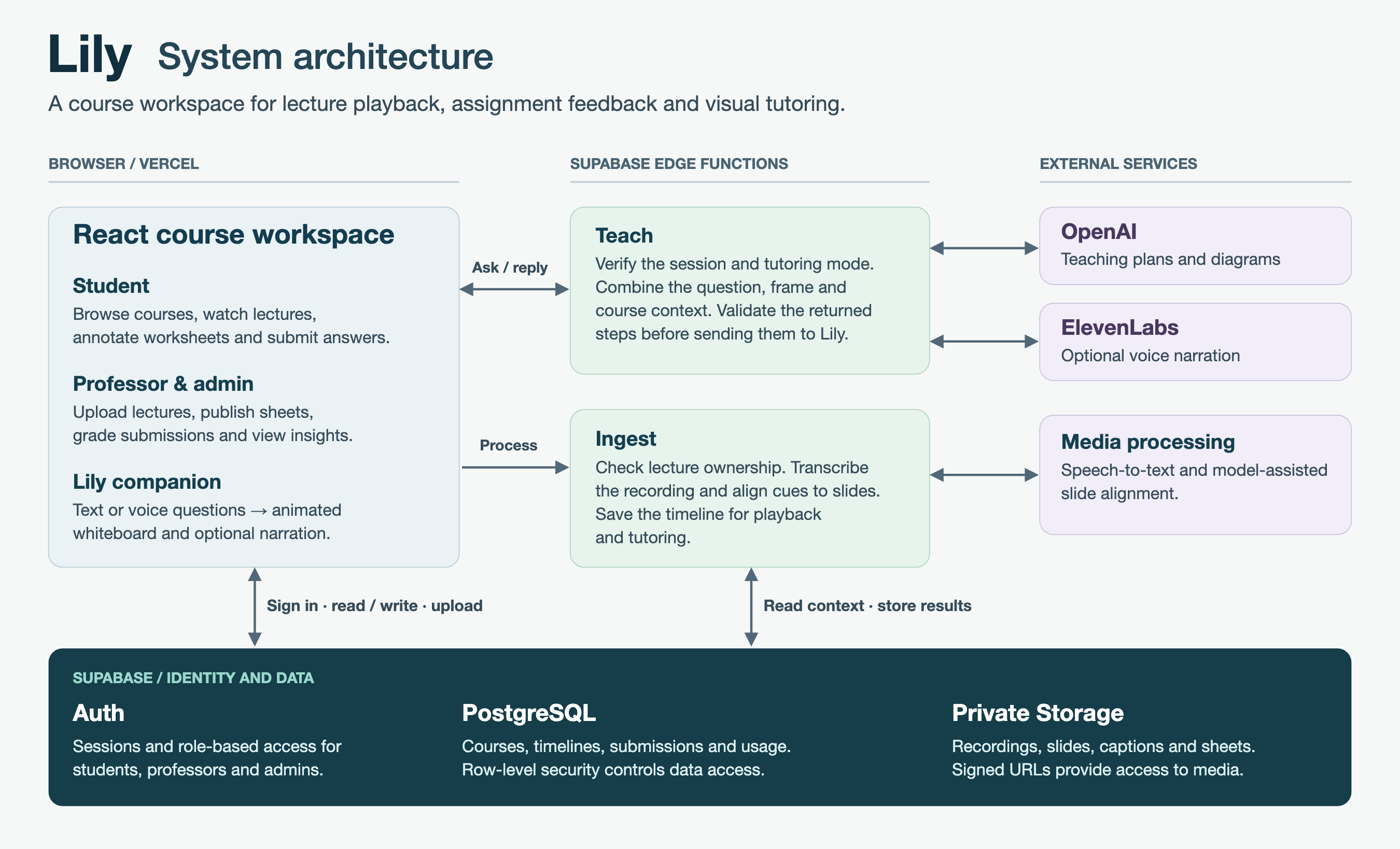
- Course platform. We built the student and professor interfaces with React, Vite, and Radix UI. Supabase handles authentication, PostgreSQL stores courses and submissions, and private storage holds worksheet images.
- Visual tutoring. When a student sends a question, the app captures the paused lecture frame or the worksheet with their annotations. A Supabase Edge Function sends that context to OpenAI and validates the teaching steps it gets back.
- Whiteboard and narration. We use tldraw to render the diagram and ElevenLabs for narration. The player coordinates each spoken step with its drawing, so a student can follow an explanation as it unfolds.
- Assignment controls. The server reads the professor’s chosen tutoring mode from the stored assignment. For the anonymous report, it records the category and level of help requested without storing the conversation in the report.
Challenges we ran into
- Getting the timing right. If Lily says “follow this edge” before the edge appears, the explanation is hard to follow. We coordinated the drawing and narration one step at a time and clear the old explanation when the student seeks to a different frame.
- Sending the whole voice question. A student can press Enter while speech recognition is still finalizing the last few words. We made Enter queue the send until the transcript is ready, while Escape cancels it.
- Keeping tutoring separate from grading. Professors need a name attached to an answer so they can give feedback. They don’t need a named history of every hint a student asked for. We built separate grading and reporting views with different database access rules.
Accomplishments that we're proud of
- A three-word question can be enough. A student can circle an edge on a graph and ask, “Why this one?” Lily receives the mark together with the question.
- The demo follows a whole course workflow. A professor can publish a sheet, a student can work through it with Lily and submit an answer, and the professor can return a grade and feedback.
- We tested the moments where trust matters. Our checks cover canceling a voice question, sending the intended worksheet image, enforcing the stored assignment mode, and keeping usage reports hidden below the submission threshold.
What we learned
- The most useful context can be small. A single frame and a student’s pencil mark can explain a question more precisely than a paragraph of chat history.
- A good hint depends on what the student is doing. Someone seeing a concept for the first time may need a worked setup. Someone checking their own solution may need only a question about one step. That distinction shaped Study and Exam modes.
- Timing is part of the explanation. We spent as much time deciding when an arrow should appear as deciding what Lily should draw.
What's next for Lily
- Connect an assignment to the exact lecture moment. If a student gets stuck on problem three, we want Lily to find the point where their professor worked through a similar example.
- Support questions across a whole course. Students should be able to ask how this week’s concept builds on an earlier one and see which course materials support the answer.
- Pilot Lily in a real class. The question we most want to test is simple: after Lily helps a student with problem three, can they solve problem four on their own?
Built With
- devpost
- elevenlabs
- javascript
- node.js
- openai
- postgresql
- radixui
- react
- supabase
- supabaseauth
- supabaseedgefunctions
- supabasestorage
- tldraw
- vercel
- vite
