-
-
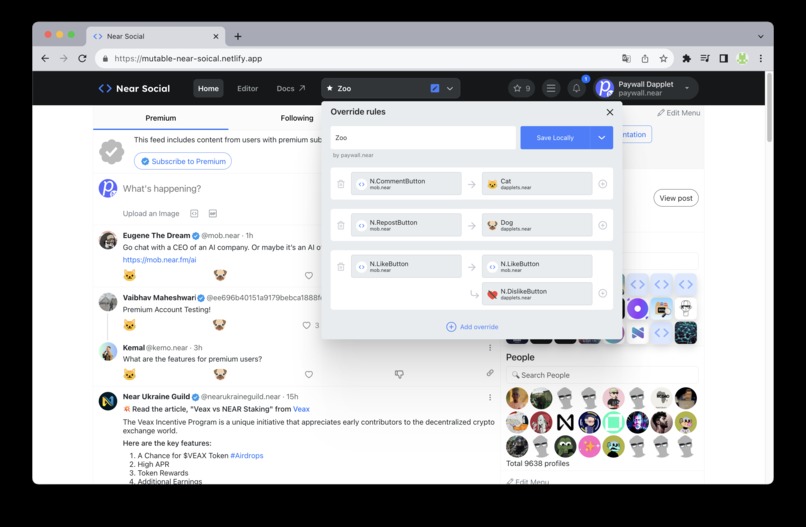
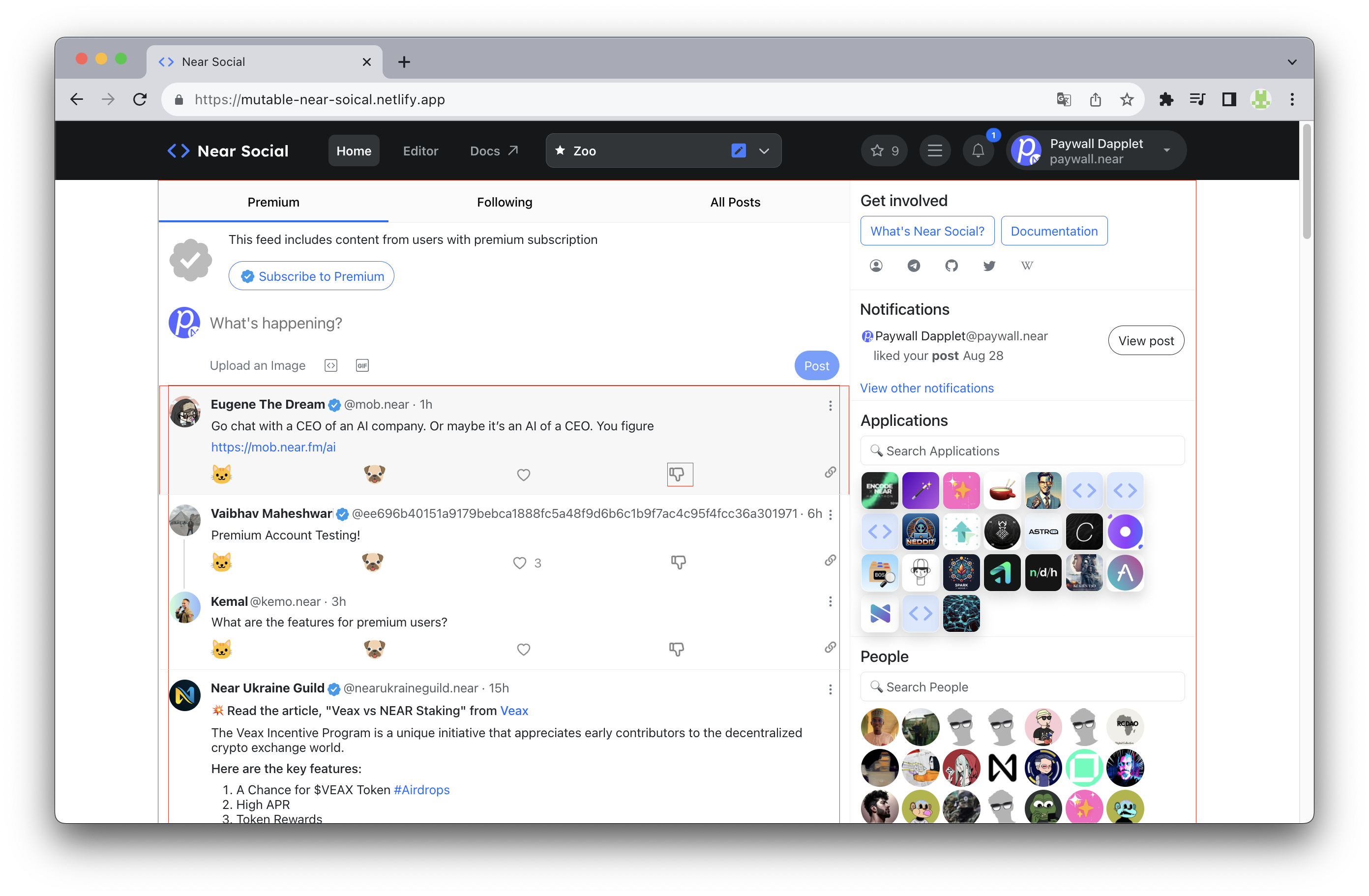
The visual mutations editor
-
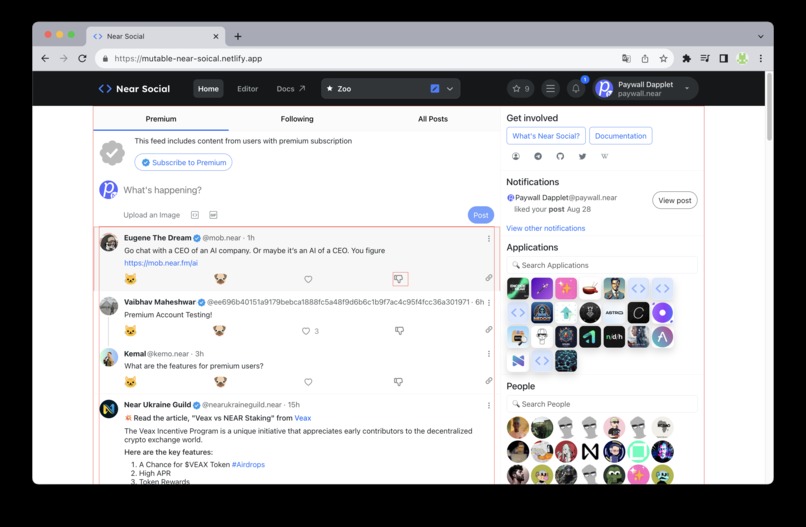
The visual BOS-component picker
-
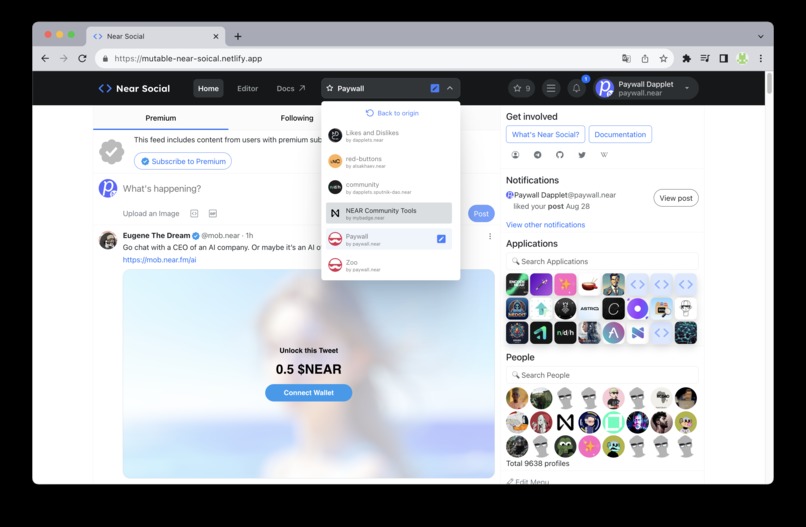
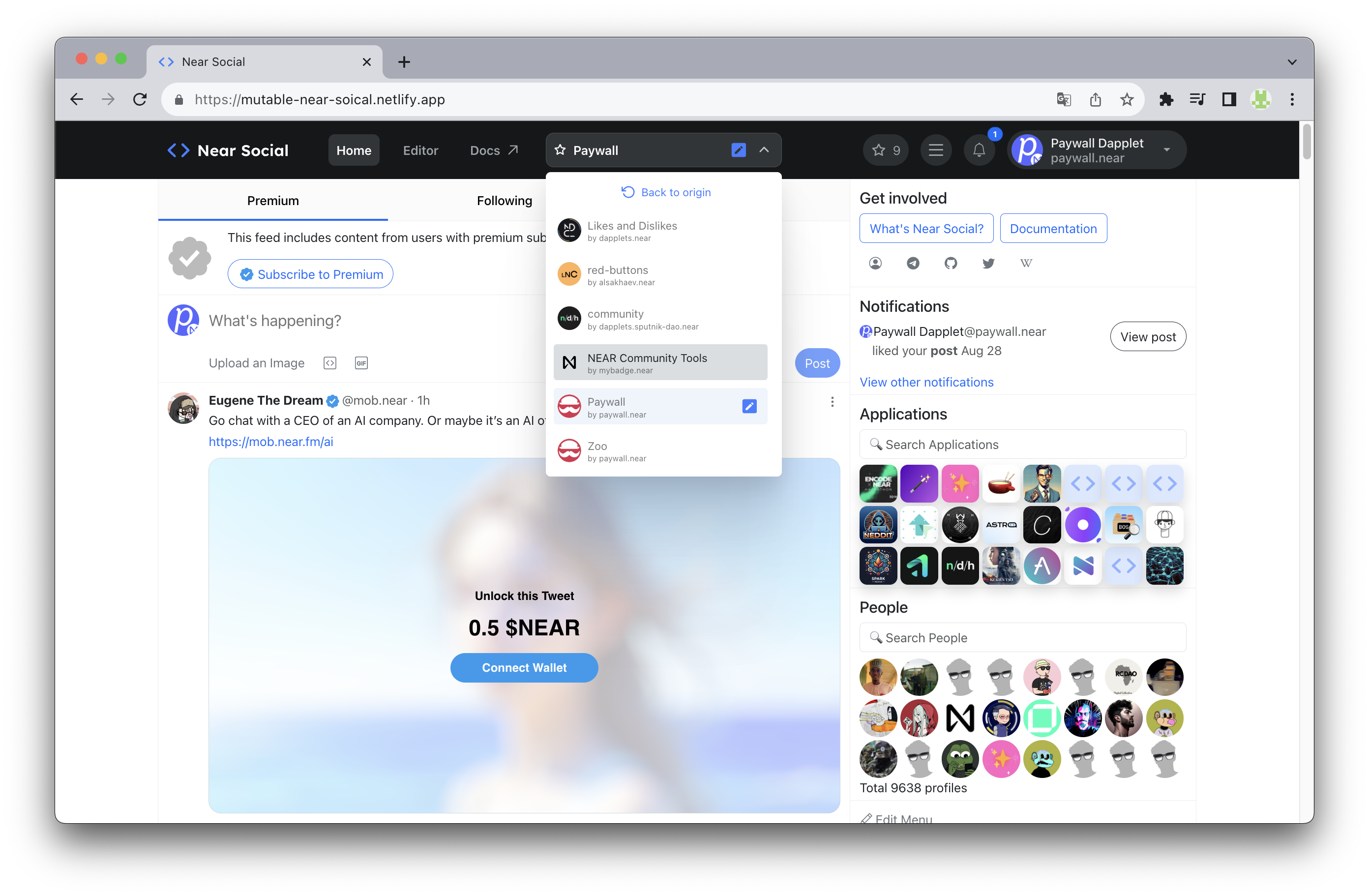
The selector of mutations provided by communities
BOS Mutations Proposal
Inspiration
The web as we know it is the web of owned websites. An Owner has full control over the view on the user's browser. It allows the Owner to control the Community and extract all the value from the community. B.O.S made significant progress in decentralizing web development, but it needed to go further because the Owner still has excessive power over the Users. Furthermore, B.O.S does not apply to the existing web, and this is what we will change.
What it does
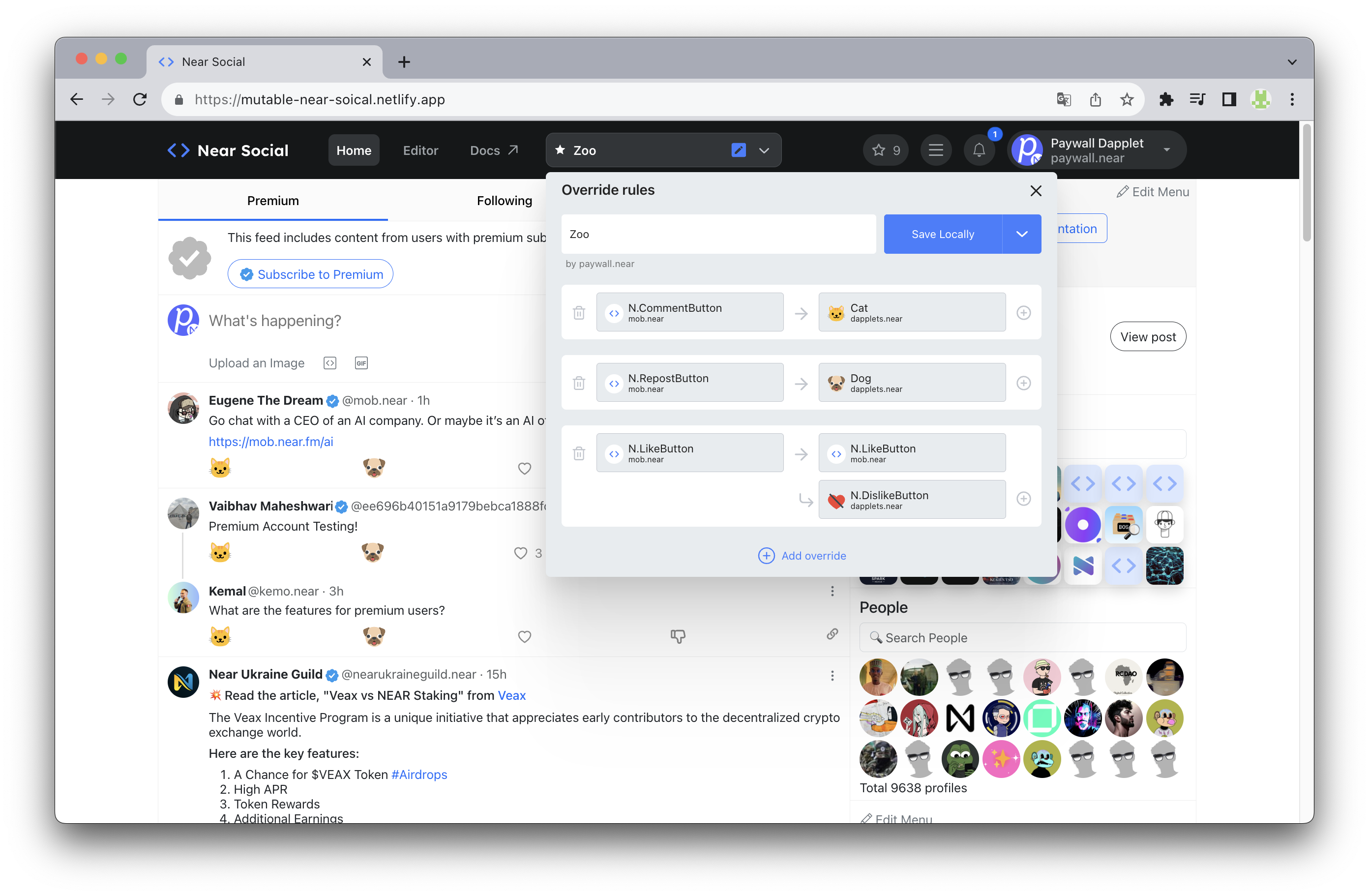
Mutable Web implements a new user-centric web architecture that empowers Communities and limits the Owner's power. It changes the paradigm of the entire web. Communities gain control over the websites they use, no matter who the creator or owner is. Even a small sub-community can customize the website to their needs by creation of a mutation. The Owner can easily select features implemented and thoroughly tested by Communities rather than having to deal with feature requests from them. Communities become resilient, self-sustainable, and able to run their own businesses on top of their websites. The Owner can't extract excessive value from the community, because the community can now escape his pressure. However, the Owner can join the Community as the major token holder and secure his influence and benefits that way. As the major token holder, the Owner has the incentive to transform his legacy business into crypto, in order to raise the evaluation of his token share. This will attract more capital into the token. We believe all this will start a self-sustaining and unstoppable transformation from web2 to web3. In this hackathon, we have implemented a pure B.O.S solution on top of the near.social website, requiring no browser extension, to provide a clear example of how the Mutable Web works.
How we built it
Previously, we made a fork of BOS Virtual Machine to add the ability to override components and add custom attributes for elements in the DOM tree.
At the current hackathon, we forked NEAR Social Gateway and replaced the virtual machine with the previously made fork and added a visual mutation editor so that the end user can mutate the page themselves.
Overrides
We improved overrides in the forked BOS VM to pass custom properties to overwritten components (see the code below).
import { Widget } from "near-social-vm"; // <-- Forked VM

export function BosPage(props) {
    return <Widget
        src={src}
        props={props}
        overrides={{
          // 1 to 1 override
          "mob.near/widget/N.LikeButton": "dapplets.near/widget/N.DislikeButton",

          // 1 to 1 override with custom props forwarding
          "mob.near/widget/N.LikeButton": {
            src: "dapplets.near/widget/N.DislikeButton",
            props: {
              someProp: 'Value that will be forwarded to N.DislikeButton'
            }
          },

          // 1 to N override using LayoutManager
          "mob.near/widget/N.LikeButton": {
            src: "dapplets.near/widget/LayoutManager",
            props: {
              components: [
                  "mob.near/widget/N.LikeButton",
                  "dapplets.near/widget/N.DislikeButton"
              ]
            }
          },
        }}
    />
}
This allows us to implement 1 to N overrides using the LayoutManager BOS component we created. This way we can not only replace components one by one, but also add components side by side without affecting the original ones. Earlier in our projects we called this augmentations.
The LayoutManager renders BOS components by their references in the array property. In the future it can be extended to inject components at different insertion points, so we can implement more complex visual editor UI without modifying the VM.
Visual Editor
The visual editor is built on BOS and React components. We added a separate React context with hooks that implements all the mutation logic, so the original Gateway code was practically untouched.
BOS Component Picker Tool
The visual BOS component picker tool was implemented using a custom data-component attribute from the following PR. We had to optimize it a bit before.
When the user activates it, we apply CSS rules that highlight the root DOM nodes of BOS components with data-component attributes. When the user selects a DOM element, the algorithm traverses the tree from bottom to top to find the closest BOS component.
Decentralization
Mutations can be created both locally (in local storage) and remotely - they are published to the smart contract mutations.dapplets.near, then they become public for all users.
Challenges we ran into
AstroDAO UI does not display proposals created directly in the contract
Initially, we planned to seamlessly integrate the Mutation PR (pull request) into the AstroDAO workflow. But PRs submitted directly into the AstroDAO smart contract don't appear in the AstroDAO UI. We suppose they use some database or indexer as the source of truth instead of their own smart contract.
Here, we have created proposals in AstroDAO dapplets.sputnik-dao.near with IDs 13, 14, 15 (see transaction links at the explorer).
But they don't appear in the AstroDAO' front-end
We reported about this issue in GitHub.
Mutations should consists of Applications
We also planned to implement wrap up overrides into applications and make them available in the Application's section of the near.social. This is because the override is an implementation detail, not the item used by Users. But it was too much work for the time given.
Accomplishments that we're proud of
We are proud that we have realizes how to make the BOS project even better
What we learned
Not everything is as decentralized as it looks like and as it promises to be (AstroDao).
What's next for B.O.S. Mutation Proposal
Integrate AstroDao (or any other DAO engine) to provide a seamless workflow for mutation maintenance by managing DAO.
Hide overrides as an implementation detail and wrap them into the application, available in the B.O.S store. This should provide a familiar UX to the user.
For the larger scope of the Mutable Web project, we will evaluate the creation of an AI-based layer. This layer should provide the live semantic structure of the web pages. It should replace the current algorithmic web page parsing layer.
Built With
- blockchain
- bos
- javascript
- near
- near-protocol
- react
- rust
- scss


Log in or sign up for Devpost to join the conversation.