Inspiration
It happens. You don’t have a computer with you in handy. You probably don’t have an iPad either. Sometimes, you may not even have internet connection. for example, you are on an over-crowded hackathon wifi :(
All you got is your phone, which may not even be a smartphone…but you really need to manage your azure virtual machine ASAP! What do you do?
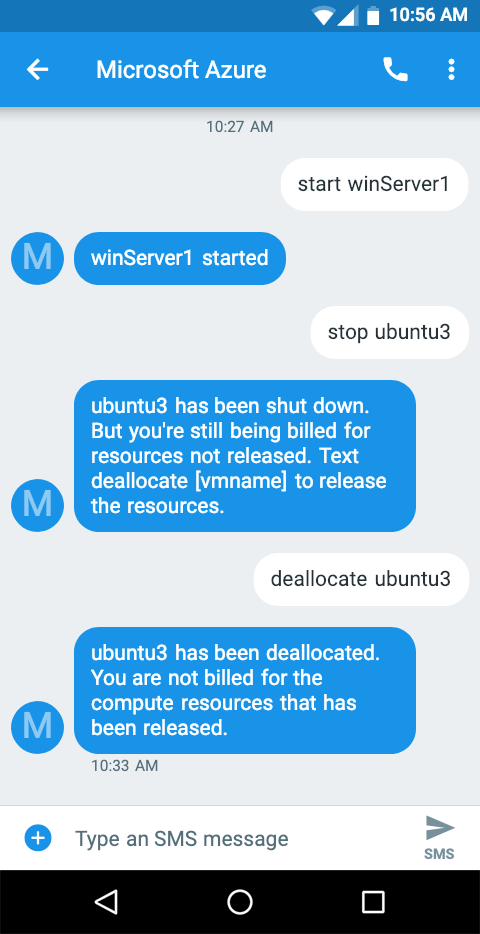
The answer: use SMS-Azure to control your azure virtual machine with SMS!
What it does

How I built it
- Set up a twilio account
- Get azure credentials for authrization
- Use Twilio Programmable SMS to forward incoming message to server running on Microsoft Azure
- Use nodejs script on azure server to interpret and respond to incoming command
Challenges I ran into
At first, I tried to use Java. However, I found it far from the best way to do this. Then, I came to node.js, which is a technology I'm completely new to. I had to started from the very beginning. It took me hours to figure out how to make a HTTP request, then more hours to understand what authentication means with OAuth2.
Accomplishments that I'm proud of
It finally works, yeah! I no longer need to do the tedious process of
- go to portal.azure.com
- log in
- go to the resource group
- select the vm
- choose 'start, stop, ...'
- ... NO MORE!! Now I just SMS!
What I learned
basics of node.js, basics of HTTP requests, Azure API, Authentication with OAuth2.
What's next for AzureViaSMS
make it available for everyone to use easily (that is, fix hard-coded stuff)

Log in or sign up for Devpost to join the conversation.