Inspiration
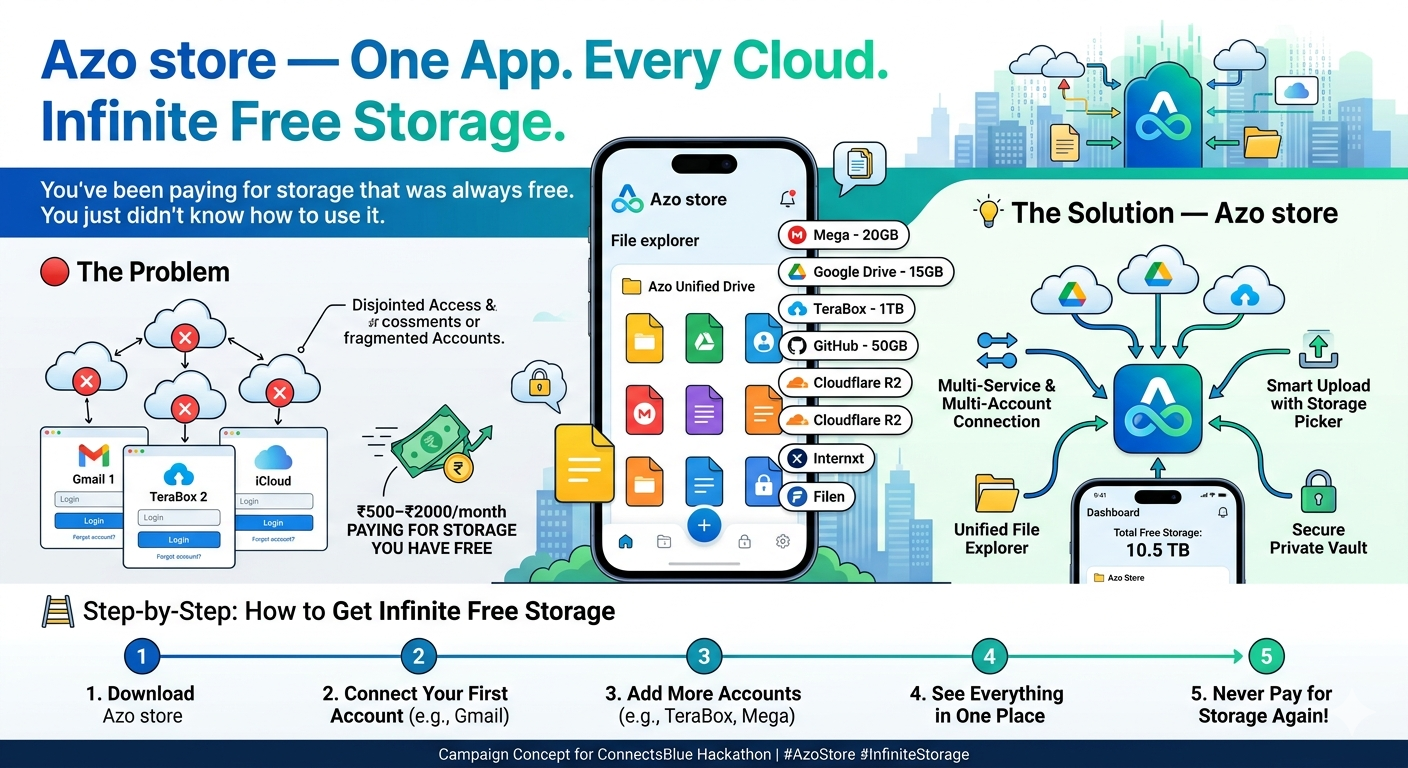
I was helping a friend find storage for a large video file when I realized something — they had a Gmail account, a TeraBox account, a Mega account, and an old GitHub account. Combined, that was over 1 TB of completely free storage sitting unused across different apps. They were about to pay for more storage. That moment made me think — how many people are in the same situation? Paying Nrs130,200,500 every month for cloud storage they don't actually need to pay for — simply because their free storage is scattered and hard to manage.
That frustration is what inspired Azo Store.
What is Azo Store?
Azo Store is a unified cloud storage manager that lets you connect every free cloud service you use — Gmail, TeraBox, GitHub, Mega, Internxt, Cloudflare R2, and more — across "multiple accounts" of each service, all in one place. Instead of opening 10 different apps to find your files, Azo Store gives you one clean file explorer that shows everything — from every account, every service — at once. When you want to save a file, Azo Store shows you all your connected accounts and their available space, and lets you "choose exactly where to store it."
The average person already has access to 3–10 TB of free storage across services they already signed up for. Azo Store makes all of it actually usable.
Key Features
- Multi-account support — Connect unlimited accounts per service
- Unified file explorer — See all files from all accounts in one view
- Smart upload picker — Choose which account stores each file
- Share integration — Use Azo Store as your file picker inside WhatsApp, Gmail, Telegram
- Offline mini apps — Lightweight tools (PDF reader, media player) that work on slow internet
- Private vault — Encrypted storage section for sensitive files
- Storage dashboard — See total free space across all accounts at once
How I Built It
This project started as a research and design problem. I mapped out every major free cloud storage service, studied their free tier limits, and analyzed how a user could practically stack multiple accounts to maximize free storage. then i designed the core user flows:
- How account connection would work across different OAuth systems
- How a unified file index would be maintained locally
- How the smart upload picker would suggest the best destination The key insight in the architecture is that -Azo Store never stores your files on its own servers.-Files go directly between your device and your cloud accounts. Azo Store is purely the interface layer — which also means it can stay free forever.
Challenges
1. Different APIs, different rules Every cloud service has a different API, different authentication method, and different file structure. Building a single interface that works across all of them cleanly is a significant engineering challenge.
2. Multiple accounts per service Most existing apps only allow one account per service. Supporting multiple accounts means managing separate authentication tokens and storage indexes for each — while keeping the user experience simple.
3. Making it work for slow internet users A key target audience is users in South Asia, Africa, and rural areas where internet is slow or expensive. The app needs to be lightweight, fast, and functional even on 2G/3G connections — which shaped every design decision.
4. Trust and privacy Connecting to someone's email and cloud accounts requires serious trust. Designing a system where files never pass through Azo Store's servers — and communicating that clearly to users — was one of the most important challenges to solve.
What I Learned
- The average person has far more free storage available than they realize
- The real barrier to using free storage is not availability — it is fragmentation and inconvenience
- Solving a simple daily frustration (finding a file, picking where to save something) can have massive impact if done right
- The best products don't create new resources — they make existing ones actually accessible
What's Next for Azo Store
- Android app (Phase 1 target)
- Support for 50+ cloud services
- AI-powered file organization — automatically sorts files into folders based on content
- Family sharing mode — manage storage for multiple people in one dashboard
- Browser extension for saving web content directly to your chosen account
You've been paying for storage that was always free. You just didn't know how to use it.
Built With
- canva-(marketing-design)
- figma-(ui-design)
- firebase
- github-api
- google-drive-api
- mega-sdk
- node.js-(planned)
- oauth-2.0
- react-native-(planned)
- terabox-api

Log in or sign up for Devpost to join the conversation.