


Inspiration
My inspiration came from staggering industry reports showing that businesses waste an average of 35% of their cloud spending on underutilized resources. As a AWS users myself, we experienced first-hand how challenging it is to: • Understand complex AWS bills • Identify optimization opportunities • Prioritize cost-saving measures I were inspired to create an AI-powered solution that democratizes cloud cost optimization, making expert-level insights accessible to every AWS user regardless of their technical expertise.
What it does
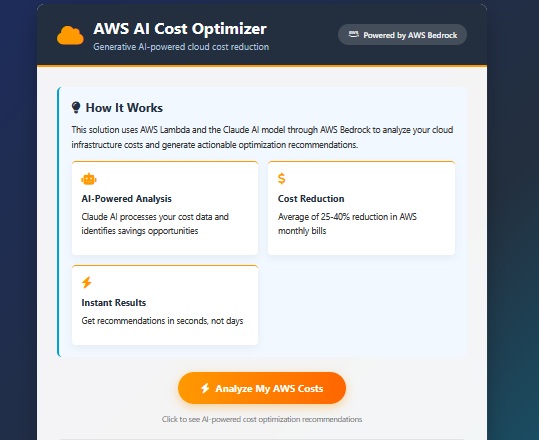
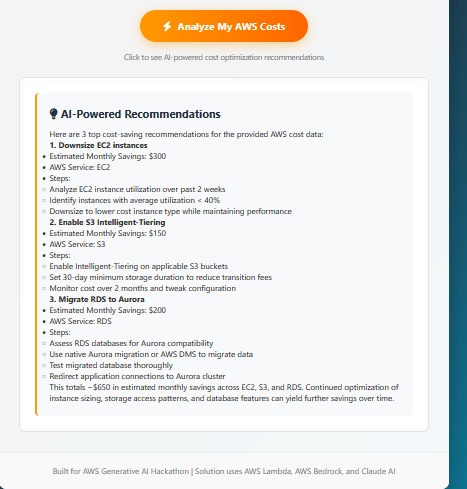
AWS AI Cost Optimizer is fundamentally an AWS Lambda core service application. The AWS AI Cost Optimizer leverages generative AI to analyze AWS usage patterns, providing actionable cost-saving recommendations tailored to your environment. For each optimization, it details projected monthly savings, identifies the specific AWS services involved, outlines step-by-step implementation guidance—including relevant CLI commands—and presents everything in a straightforward markdown format. Key Features:
- Real-time cost monitoring and analysis
- AI-driven, environment-specific recommendations
- Detailed, actionable steps for implementation
- Secure, serverless architecture for streamlined deployment
- Fully mobile-responsive interface for on-the-go access
Essentially, this tool delivers clear, technical insights and practical guidance for efficient AWS cost management. What API Gateway Does in Our Application API Gateway serves as the secure entry point for our application, handling these critical functions: Request Routing: Directs frontend requests to the appropriate Lambda function Protocol Translation: Converts HTTP requests to Lambda events Security Layer: Provides authorization and throttling CORS Management: Handles cross-origin requests from web browsers Traffic Control: Implements rate limiting and quotas Monitoring: Tracks API usage and performance metrics
How we built it
Frontend:
- Stack: HTML, CSS, JavaScript—industry standard for the UI.
- Hosting: AWS Amplify handles deployment and scaling.
- Rendering: Marked.js is leveraged for parsing and displaying AI-generated Markdown.
Backend:
- Execution: AWS Lambda, running Python 3.10, for stateless backend logic.
- AI Integration: Uses AWS Bedrock’s Claude 2.1 for natural language responses.
- Security: All backend access goes through a Lambda Function URL to restrict entry points.
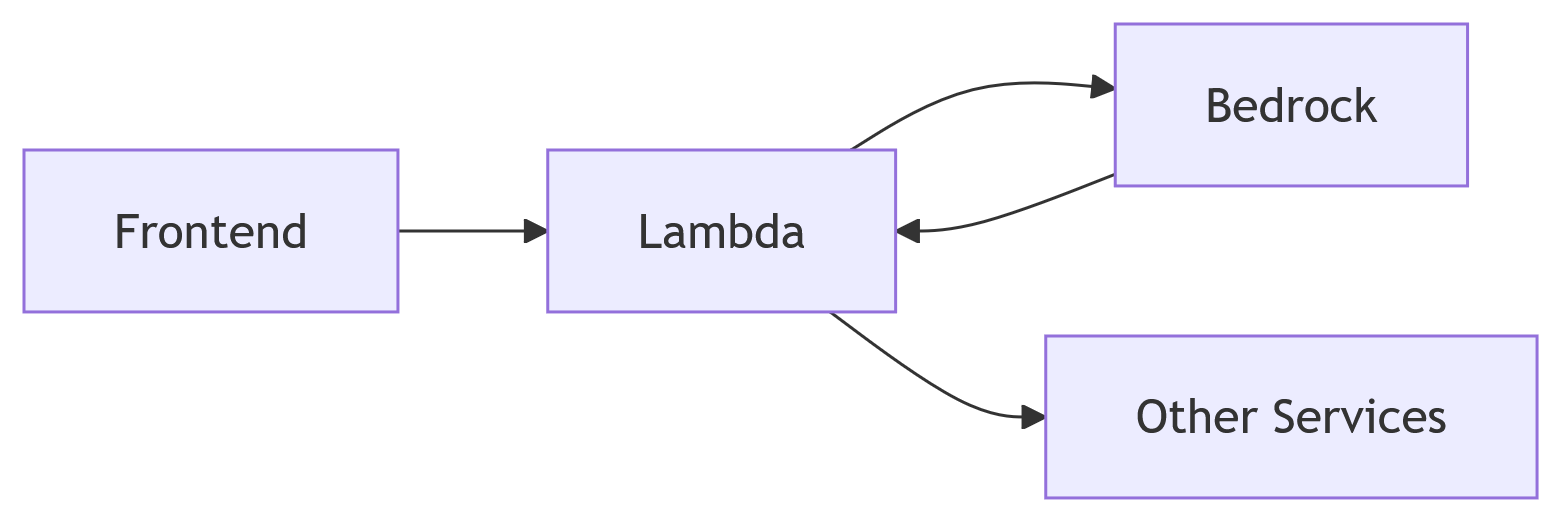
System Flow: User initiates a request → AWS Amplify serves the frontend → Frontend communicates with Lambda Function URL → Lambda calls Bedrock for recommendations → Results return as Markdown → Marked.js renders output in the UI.
Development Lifecycle:
- Initial prototyping of Claude prompts on Bedrock Console.
- Lambda backend developed in Python, optimized for quick cold starts.
- Responsive frontend built with robust error handling.
- CI/CD pipeline automated with AWS Amplify for seamless deployments.
- Comprehensive error recovery implemented for reliability.
Challenges we ran into
- Bedrock Access Management
Lambda couldn’t access Bedrock at all initially—permission errors everywhere. Ended up crafting more precise IAM policies, which finally unlocked things. - Claude Prompt Engineering
Response formatting was all over the place at first. Had to iterate on prompt design, tweaking and testing until the output looked right. Definitely a process of refinement.
- Network Timeouts
Bedrock sometimes timed out, which was frustrating. Adjusted the Lambda timeout setting up to 30 seconds, and that mostly solved the problem.
- CORS Configuration
The frontend kept getting blocked trying to hit Lambda—CORS issues, as usual. Added the correct headers, and the connection started working as expected.
- Error Handling Early builds would crash if Bedrock sent back a bad response. Improved the error handling by adding multiple recovery layers, so the system could handle failures gracefully.
Accomplishments that we're proud of
- Functional AI Solution: Created a working product that delivers real value
- Serverless Architecture: 100% AWS serverless implementation
- Hackathon Milestone: First complete application i will built myself and its work 100%
- User Experience: o Simple one-button interface o Clear progress indicators o Intuitive results presentation
- Technical Achievements: o Successfully integrated Claude 2.1 via Bedrock o Implemented secure Lambda Function URLs o Created self-documenting error system
What we learned
Through this project, i gained:
- AWS Service Integration: • Connecting Lambda to Bedrock • Configuring IAM roles properly • Implementing Function URLs
- Prompt Engineering: • Claude's specific prompt requirements • Structuring requests for optimal responses • Formatting techniques for better outputs
- Error Handling: • Graceful failure recovery • User-friendly error messages • Debugging distributed systems
- Serverless Best Practices: • Cold start mitigation • Proper timeout configuration • Security considerations
What's next for AWS AI COST OPTIMIZER
We plan to evolve this solution into a comprehensive cloud optimization platform: AWS Integration: Connect to Cost Explorer API for real customer data Add support for multiple AWS accounts Implement Cost and Usage Report (CUR) analysis Enhanced AI Capabilities: Multi-model analysis (Claude + Titan) Historical trend analysis Predictive cost forecasting New Features: Savings tracking dashboard Automated implementation scripts Slack/Teams integration for alerts Security compliance checks Enterprise Readiness: Role-based access control SOC 2 compliance Custom recommendation templates Executive reporting Multi-Cloud Expansion: Add support for Azure and GCP Cross-cloud optimization insights Unified cost reporting Long-Term Vision: Become the "Copilot for Cloud Optimization" - an AI assistant that continuously monitors, analyzes, and optimizes cloud infrastructure across providers.
Built With
- 2.1
- 3.10)
- ai
- amazon-web-services
- amplify
- apigateway
- bedrock
- claude
- for
- function
- hosting
- html/css/javascript
- lambda
- marked.js
- model)
- python
- rendering
- responses
- secure
- url


Log in or sign up for Devpost to join the conversation.