-
-
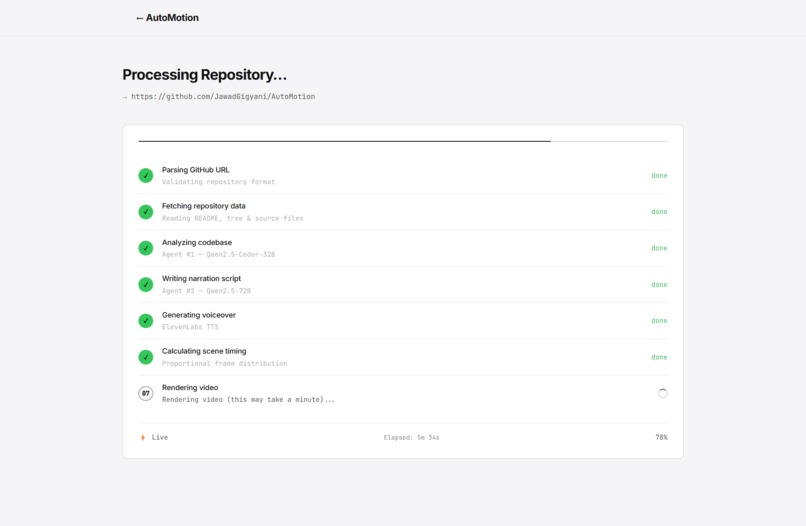
Generate Page
-
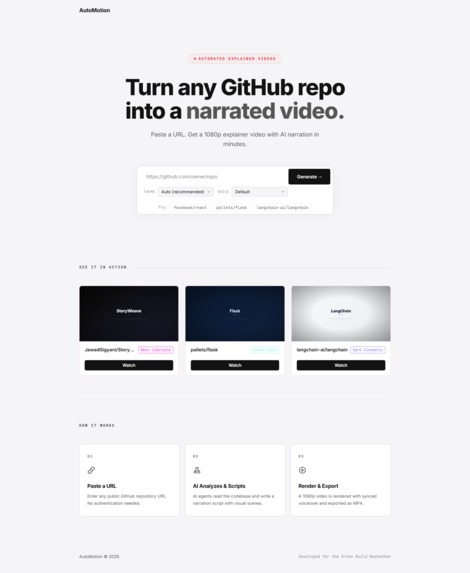
Landing Page
Inspiration
Every open-source project deserves a good explainer, but most developers never make one. Writing documentation is tedious, recording screencasts takes hours, and editing video is a skill most engineers don't have. We asked ourselves: what if you could just paste a GitHub URL and get a polished, narrated explainer video back, no editing, no scripting, no recording?
We were also frustrated by how hard it is to quickly evaluate a repository. You land on a GitHub page, skim the README, maybe click through a few files, and still don't really get what the project does. A 90-second video communicates architecture, features, and purpose faster than any wall of text.
What it does
AutoMotion turns any public GitHub repository into a fully narrated, 1080p explainer video with synced subtitles — automatically.
You paste a GitHub URL, optionally pick a visual theme and narrator voice, and hit Generate. Within minutes, you get a downloadable MP4 that covers:
- What the project is and what problem it solves
- The tech stack and architecture
- Key features and code patterns
- Setup/installation instructions (if the README has them)
- GitHub stats (stars, forks, contributors)
The video has smooth animated transitions, per-scene voiceover, auto-generated WebVTT subtitles, and a thumbnail — all synced to the millisecond. Real-time progress is streamed to the browser via WebSockets so you can watch each pipeline stage complete.
How we built it
AutoMotion is three services working together:
Frontend — Next.js 16 (App Router) with a matte monotone design system. The landing page shows pre-rendered sample videos in a modal player. The generate page connects via WebSocket for real-time progress tracking.
Backend — FastAPI orchestrating a 7-stage LangGraph pipeline:
- Parse and validate the GitHub URL
- Fetch repository data via GitHub REST API (README, file tree, source files)
- Analyze the codebase with a code-specialized LLM (Qwen2.5-Coder-32B via Featherless.ai)
- Write the narration script and scene specifications with a general LLM (Qwen2.5-72B), adapting tone to the selected voice style
- Generate per-scene voiceover with ElevenLabs TTS, concatenate, and measure durations with ffprobe
- Calculate exact frame counts at 30 FPS with transition overlap compensation
- Send everything to the render server
Render Server — Express + Remotion 4 running headless Chromium. It receives scene data and audio, renders each frame as React components, and outputs H.264 + AAC video at 1920×1080. Five visual themes (Dark Cinematic, Neon Cyberpunk, Minimal Light, Terminal Green, Ocean Depth) each have their own layout structure — not just different colors, but different text alignments, card styles, and accent treatments.
All three services are containerized in a single Docker image for deployment on DigitalOcean App Platform.
Challenges we ran into
Frame-audio synchronization was the hardest problem. Each scene's narration has a different length, and Remotion's TransitionSeries overlaps scenes by a fixed number of frames. We had to calculate exact frame durations from ffprobe audio measurements, then compensate for the 12-frame transition overlap per scene boundary. Off-by-one errors here meant audio drifting out of sync by the end of the video.
Remotion in Docker was painful. Headless Chromium needs specific system libraries (libgbm-dev, libatk-bridge2.0-0, etc.), the right --no-sandbox equivalent flags via chromiumOptions, and enableMultiProcessOnLinux for parallel rendering. Each missing library manifested as a cryptic crash with no useful error message.
LLM output consistency — Getting two different LLMs to produce valid, parseable JSON with the exact scene schema we needed was unreliable. We built multi-layer validation, fallback extraction with regex, and graceful degradation to a default analysis when the models returned malformed output.
WebSocket reliability — Keeping the progress connection alive across the full 3-5 minute pipeline required ping/pong keepalives, timeout handling, and a polling fallback for when WebSocket connections dropped.
Accomplishments that we're proud of
- It actually works end-to-end. Paste a URL for any public repo — React, Flask, LangChain — and you get a real, watchable video with accurate narration in under 5 minutes.
- Millisecond-accurate audio sync. The voiceover, subtitles, and scene transitions are perfectly aligned because we measure actual audio durations rather than estimating from word counts.
- Five genuinely distinct themes. Not just color swaps — each theme has its own layout structure (text alignment, card border radius, section label style, accent bar height) so videos look visually different.
- The pipeline is deterministic. LangGraph gives us a strict DAG execution — every stage runs in order, state is typed, and failures are isolated. No prompt-chaining spaghetti.
- Auto-cleanup. Generated videos are purged after 45 minutes. The server doesn't accumulate garbage.
What we learned
- LangGraph is excellent for deterministic AI pipelines. The typed state, explicit node graph, and built-in error boundaries made debugging straightforward compared to chaining raw LLM calls.
- Remotion is incredibly powerful but unforgiving in Docker. The rendering quality is outstanding, but the Chromium dependency makes containerization a multi-day adventure.
- Per-scene TTS is worth the complexity. Generating one audio clip per scene (instead of one long narration) gives you precise timing control and makes the frame calculation math tractable.
- WebSockets need fallbacks. Not every network path supports persistent WebSocket connections cleanly. Our polling fallback saved the UX on flaky connections.
- AI models need guardrails, not trust. Every LLM response goes through validation, JSON extraction, and fallback logic. Treating model output as unreliable input (rather than reliable output) made the system robust.
What's next for AutoMotion
Short-Term (1–3 months)
- User authentication & accounts — Full sign-up/sign-in flow (email + OAuth via GitHub/Google) so users have persistent accounts.
- Video history & dashboard — PostgreSQL-backed storage so users can access, re-download, and manage all their previously generated videos from a personal dashboard
- Custom prompt control — Let users write a prompt describing what the video should focus on (e.g., "only cover the API layer and setup instructions" or "focus on the ML training pipeline").
- Multi-language narration — ElevenLabs supports 29 languages; Let the user decide the language.
- Embeddable player — Provide an
<iframe>embed code so repo owners can add the generated video directly to their README or docs site - Custom branding — Let users upload their own logo, pick fonts, and set brand colors for the generated video
Mid-Term (3–6 months)
- GitLab & Bitbucket integration — Extend beyond GitHub to support GitLab and Bitbucket repositories, covering the three major Git platforms
- Voice cloning — Let users clone their own voice via ElevenLabs and narrate videos in their personal voice.
- Interactive post-generation editor — After a video is generated, let users tweak the narration script, reorder scenes, swap themes, or regenerate individual scenes without re-running the entire pipeline
- Dynamic template engine — Let users describe the video style they want via a prompt (e.g., "retro terminal aesthetic" or "corporate presentation style") and have the AI generate a matching Remotion template on the fly
- Batch generation — Generate videos for all repositories in a GitHub organization with a single click, useful for companies documenting their open-source portfolio
- API access — RESTful API with API keys so developers can programmatically trigger video generation from CI/CD pipelines, documentation tools, or their own apps
Long-Term (6–12 months)
- Data explainer videos — Expand beyond code repositories. Let users upload datasets (CSV, JSON, Parquet) or connect an API endpoint, and generate videos that explain the data with auto-generated charts, distributions, and key insights
- Document & paper explainers — Upload a research paper, technical spec, or documentation PDF and generate a narrated video walkthrough with visual summaries
- Template marketplace — Community-contributed and premium video templates that users can browse, preview, and apply to their generations
- White-label solution — Offer AutoMotion as a white-label product that companies can embed into their own developer platforms, documentation portals, or onboarding flows
- Plugin ecosystem — Let developers build plugins that add new scene types (e.g., live demo recordings, architecture diagrams from Mermaid, test coverage visualizations) to the rendering pipeline
Built With
- Next.js
- React
- FastAPI
- Python
- LangChain
- LangGraph
- Remotion
- ElevenLabs
- Featherless.ai
- FFmpeg
- Docker
- DigitalOcean
- TypeScript
- WebSockets
Team
| Member | Role | Responsibilities |
|---|---|---|
| Muhammad Jawad | AI Engineer & Backend Lead | LangGraph pipeline architecture, Featherless.ai LLM integration (Qwen2.5-Coder-32B + 72B), prompt engineering for repo analysis and script direction, ElevenLabs TTS integration, voice style adaptation, frame-audio synchronization |
| Ali Ahmad | Full-Stack Developer & AI Engineer | Next.js frontend, Remotion video rendering engine, React scene components, AI-driven theme layout system, Docker containerization, DigitalOcean deployment |
| Hamad Khan | AI Engineer & Infrastructure | AI agent prompt tuning, LLM output validation and fallback logic, WebSocket real-time progress system, GitHub API integration, subtitle generation, CI/CD pipeline |
Built With
- chromium
- digitalocean
- docker
- elevenlabs
- fastapi
- featherless.ai
- ffmpeg
- langchain
- langgraph
- next.js
- pydantic
- python
- react
- remotion
- typescript
- websockets


Log in or sign up for Devpost to join the conversation.