-
-
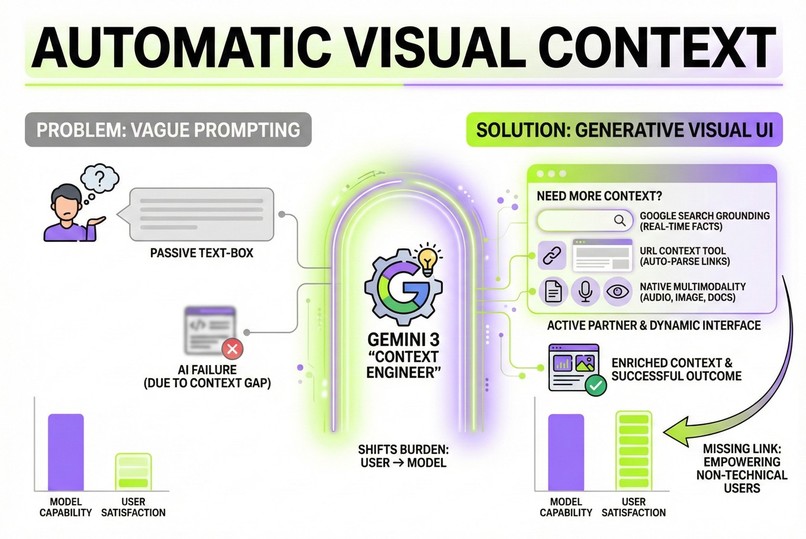
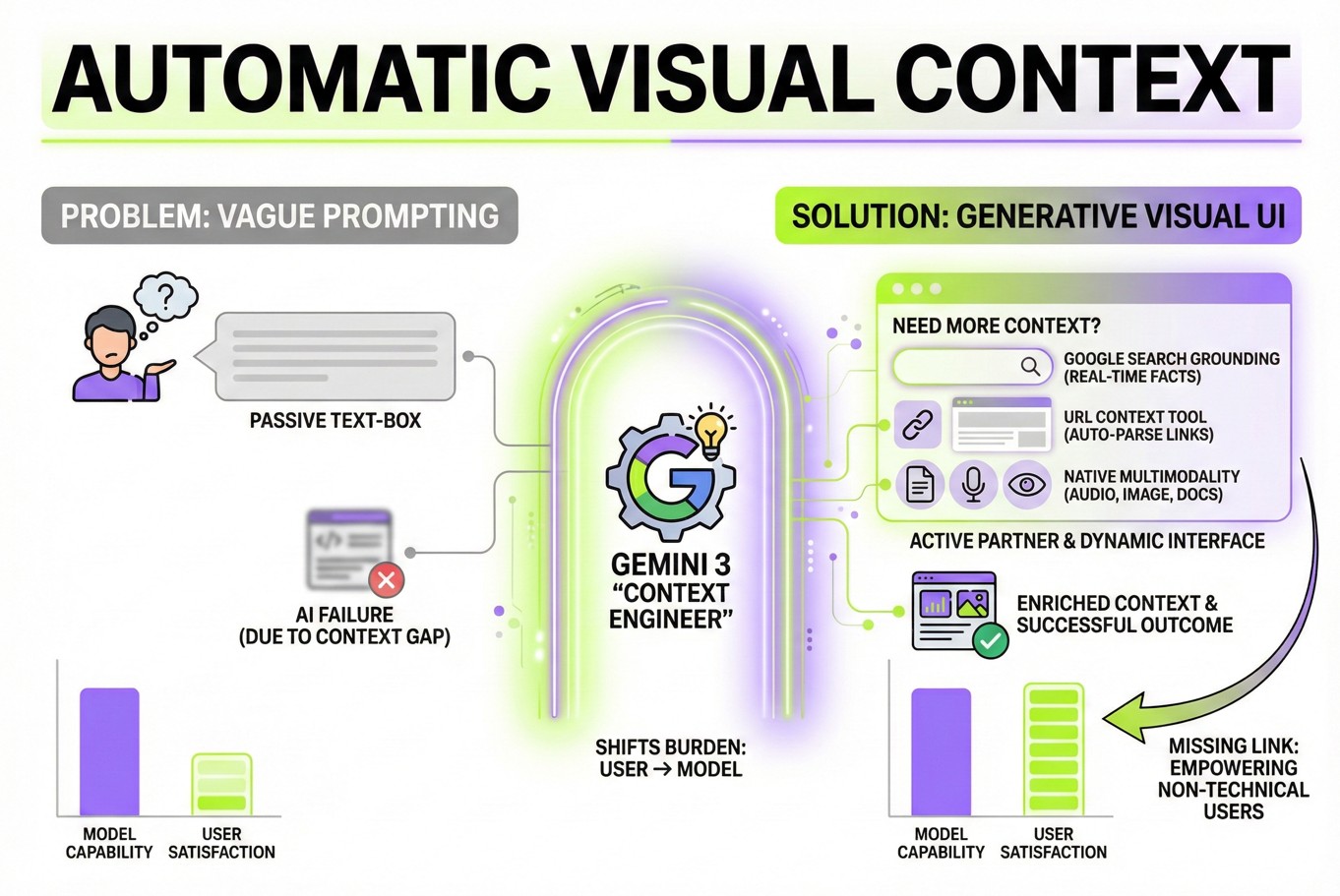
Explanation of Automatic Visual Context App in an Infographic generated by Google Nano Banana Pro
Inspiration
The "Tyranny of the Blank Box"
I was likely one of the first professional Context Engineers in a big German enterprise.
In my daily work I am responsible for a massive internal AI assistant at a major enterprise and I also train thousands of employees on how to use State-of-the-Art Large Language Models like Gemini 3. Every single day, I watch smart professionals struggle with the same problem: The Blank Box.
They stare at the cursor. They type "Help me with this XYZ." And they get a generic, sometimes even hallucinated amswer because they didn't know what valuable specific context the AI model needs to answer much more specific to the user situation.
They walk away thinking, "AI isn't smart enough yet." But I know the truth: The model is almost a genius. We usually just forget to add the right context to the prompt.
I realized we can't train the whole world or every Gemini app user to be expert Prompt Engineers. That is a UX failure. The burden of structuring the prompt should not lie with the user—it should lie with the model.
I built Automatic Visual Context to prove a radical hypothesis: What if Gemini wasn't just a chatbot, but an active partner that gathers its own context using a dynamic user interface to extract the context from the user in a user-friendly UI?
What it does
Automatic Visual Context is a "Generative UI" engine that kills vague prompting. It transforms Gemini 3 from a passive text generator into an active Context Engineer.
- It Reads Minds (Ambiguity Detection): When I type a vague request, Gemini 3 doesn't just guess. It uses Thinking to analyze my intent and realize what's missing.
- It Builds Software (Generative UI): The model instantly codes a custom React interface. If I ask about a rental increase, it doesn't text me back; it renders a custom input field for the rent amount and the city, and a drag-and-drop zone specifically for my rental agreement PDF or the screenshot of it.
- It Sees & Hears (Frictionless Multimodality): I can drag files into these AI-generated slots or use the Dictation Button to explain my situation. The app handles the complex audio buffering and Base64 encoding instantly.
- It Grounds Reality: Once the model is satisfied with the context, it executes the request using Google Search Grounding or URL Context, delivering a personalized, fact-checked answer that feels like magic.
How we built it
This isn't a wrapper; it's a Reasoning Engine. I built the entire stack solo (with the help of Gemini 3 in AI Studio) using React 19 and the Gemini 3 API.
- The Brain (Gemini 3 Flash and Gemini 3 Pro): I treat the model as a Logic Controller. By setting
thinkingLevel: "HIGH"or tothinkingLevel: "MEDIUM"in the case of Flash, I force the model to traverse a "Chain of Thought" before it generates the UI. It acts as a Product Designer in real-time, mapping abstract user needs to concrete UI components (FieldType.TEXTAREA,FieldType.FILE,FieldType.SELECT). - The Eyes & Ears (Gemini 3 Flash): For the Dictation Button and image analysis, I use the fast Gemini 3 Flash. Its blazing-fast speed allows for near-real-time audio transcription and visual perception, creating a seamless loop between the user's world and the model's logic.
- The Physics Engine: I didn't want this to feel like a "form." I implemented a custom Cubic-Bezier physics engine for the scrolling and animation. The UI feels "heavy" and premium, using optimistic updates to make the AI's "thinking time" feel like a purposeful wait.
Challenges we ran into
The "Lazy JSON" Problem
Getting an LLM to output a complex, nested UI schema while maintaining a helpful conversational tone is notoriously difficult. Early tests would break the app with malformed JSON.
The Breakthrough: Gemini 3's native structured output capabilities are a quantum leap forward. By defining a strict State Machine schema (transitioning from COLLECTING to COMPLETE), I created a self-healing loop where the model is aware of its own UI state.
Accomplishments that we're proud of
- Democratizing Context: This tool allows a junior intern to get the same quality output as a Senior Prompt Engineer.
- True Agentic Behavior: The AI decides how to interact with the user. It isn't scripted; it's improvised based on the need.
- Solo Engineering: I built the frontend, the logic, the audio processing, and the AI integration entirely using vibe-coding with Gemini 3, driven by the frustration I see in my industry.
What we learned
My work in enterprise AI taught me that UX and Context are the bottleneck of AI, not model intelligence.
Gemini 3 is smart enough to solve almost anything if it has the right context. The future of AI isn't better answers; it's better questions. By allowing the model to ask those questions visually, I unlocked the full potential of the underlying technology.
What's next for Automatic Visual Context
- Enterprise Connectors: Connecting the "File Upload" zones directly to internal SharePoint or Google Drive APIs.
- Gemini 3 Live: Talking to your App live with the help of Gemini 3 Live will further simplify this context enrichment.
- Dynamic Component Library: Expanding the Generative UI to include date-pickers and map widgets (via Google Maps Grounding once Gemini 3 supports it).
- Getting integrated into Gemini app: Yes, you heard right. Why not ship this as an additional feature improvement of Visual layout? Visual layout presents answers nicely, but does not ask for the right context. Yet. Let's improve the UX of millions of users together!
Built With
- Model: Gemini 3 Pro (Reasoning), Gemini 3 Flash (Perception)
- Frontend: React 19, TypeScript, Vite
- Styling: Tailwind CSS, Custom Physics Animations
- Audio: Web Audio API, MediaStream Recording API
- Grounding: Google Search Tool, URL Context
Built With
- ai-studio
- gemini
- google-cloud
- react
- tailwind
- typescript
- vite

Log in or sign up for Devpost to join the conversation.