Who I Am And The Problem
Hello, my name is Jaxson Slotnick-Paige. I 15 years old and am going into 10th grade. I attending Lejardin Academy on the island of Oahu in Hawaii.
I am apart of my local community's Koʻolaupoko First Robotics Competition (FRC) team, which comprises of multiple high schools in our area. As part of this team I was invited to meet with another STEM activity that happens on campus, the drone racing team. The drone racing team is part of the drone school program, which brings what I believe is vital stem education, hands-on learning, and invaluable real-world experience to hundreds of schools around the country and is a more affordable and entry-level alternative to programs like First Robotics. The program is only a couple of years old and thus has a limited selection of game modes, and the existing few can often feel unrefined and almost rushed. After watching a few of their practice matches, their coach approached me to convey some of the issues and concerns they had noticed while at regional and even national level competitions, specifically with the capture the flag game mode. They hoped that as the programer for the FRC team I would be able to develop a solution to address these concerns.
The capture the flag game mode consists of 10 “beacons'' with each consisting of an Arduino Nano board, 2 LED rings, and an ultrasonic sensor. 5 of them start with blue LEDs, and the other 5 start with red LEDs. 2 teams of 3 drones each race to change each beacon back to their color, blue or red, within 3 minutes or 180 seconds, scoring one point every time they do so. The issue with this was that all of the counting of points was done manually by a judge, who also enforced the rules of the game. That led to many mistakes being made by a judge who has to multitask, causing many disputes over final scores and dissatisfaction among players. With no way to calculate scores accurately in real time, judges would resort to only counting points based on the final colors of the beacons, disregarding all previous color changes along with the hard work and strategy that went into them. There was also no way to see current scores in real time, leading to an unengaging game. With many players and spectators feeling confused and disinterested. The capture the flag game mode seemed very unprofessional, and left players feeling dissatisfied with the results because of the lack of confidence they had in their accuracy, as well as much of their hard work not even being counted. Some teams would even resort to not taking off until the last 30 seconds or so of the game, their feeling being “What's the point? That's all that matters anyway."
All of this combined makes players walk away with a negative experience, which in no way helps grow the drones in the school program. And so I immediately agreed to develop a solution because not only is STEM education, hands-on learning, and real-world experience something that I believe in, and thus I want to do everything I can to help grow a program that encourages and teaches it. But also because I want to give back, and give more people the positive experiences that I was given. Those experiences and the learning that they led to allowed me to create this solution in the first place. By helping to improve this gamemode and grow the program through its positive experience, maybe it will lead to more people in the future being able and willing to give back as I am trying to know, becoming tomorrow's teachers and leaders. These are my main inspirations and motives for creating this project.
Development Processes
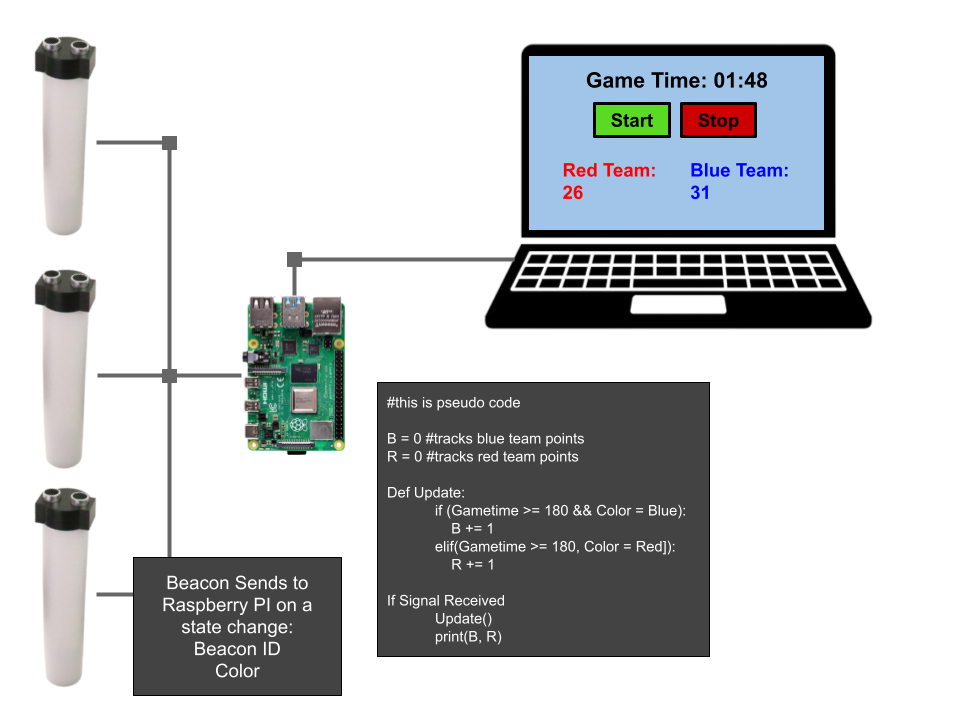
I knew from the beginning that the solution would have to compromise a point tracker and a method of displaying scores, as can be seen from my first concept drawing. Otherwise, it would not be engaging and would rely on judges manually keeping scores. My first concept drawing describes this and can be seen in pictures.
To accomplish this, I would have to modify the code of the Arduino Nano boards inside each beacon so that they would println() the string “blue” or “red” each time the color changed. However, because it is nearly impossible to reverse compile a .hex file, including the one that contains the code for the Arduino, I had to reach out to the executive directory at EDU Everything.inc, the parent company of the drones in the school program, and request the code the “beacons” ship with so that I could modify it. He was kind enough to do so and expressed interest in expanding my solution, assuming its success, beyond just my local team, which I was already considering pursuing expanding it nationwide. I agreed to continue sending routine progress updates.
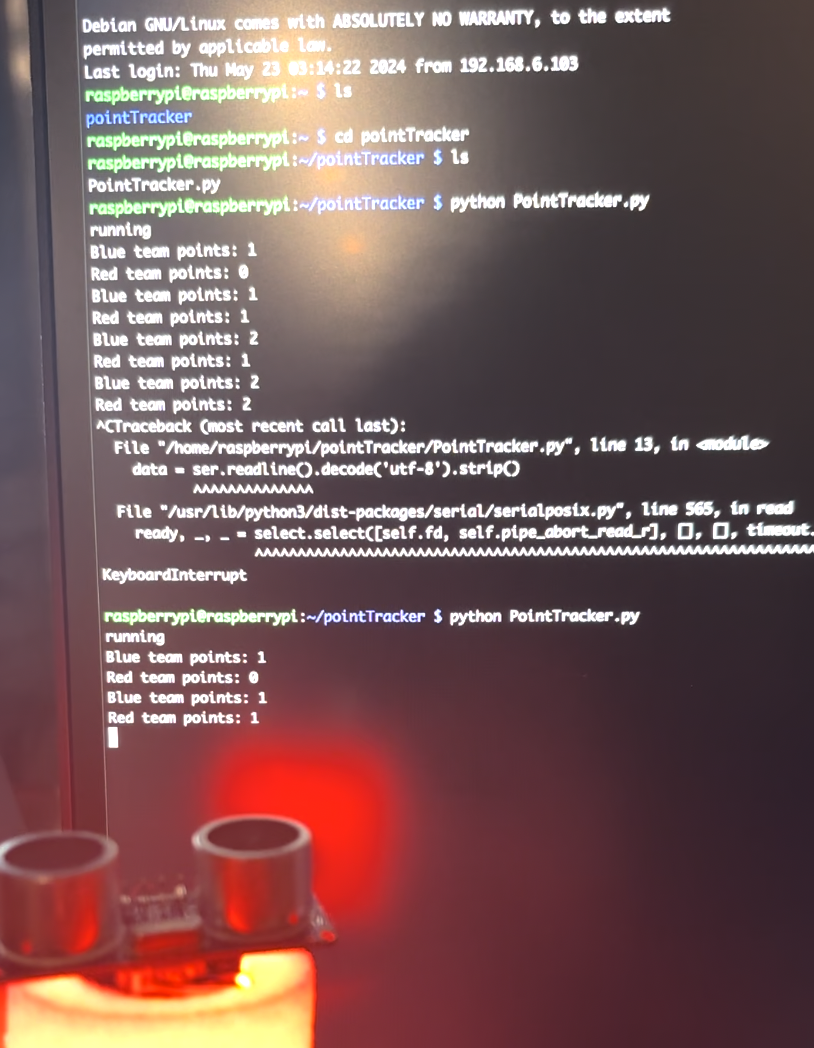
Once modified, I decided on using a Raspberry Pi, specifically a 3B+ model, to open the serial ports of the beacons and track their serial communications. A Python script would then increment variables that keep track of the team's scores, printing them in the terminal output. An early version of this can be seen in the pictures.
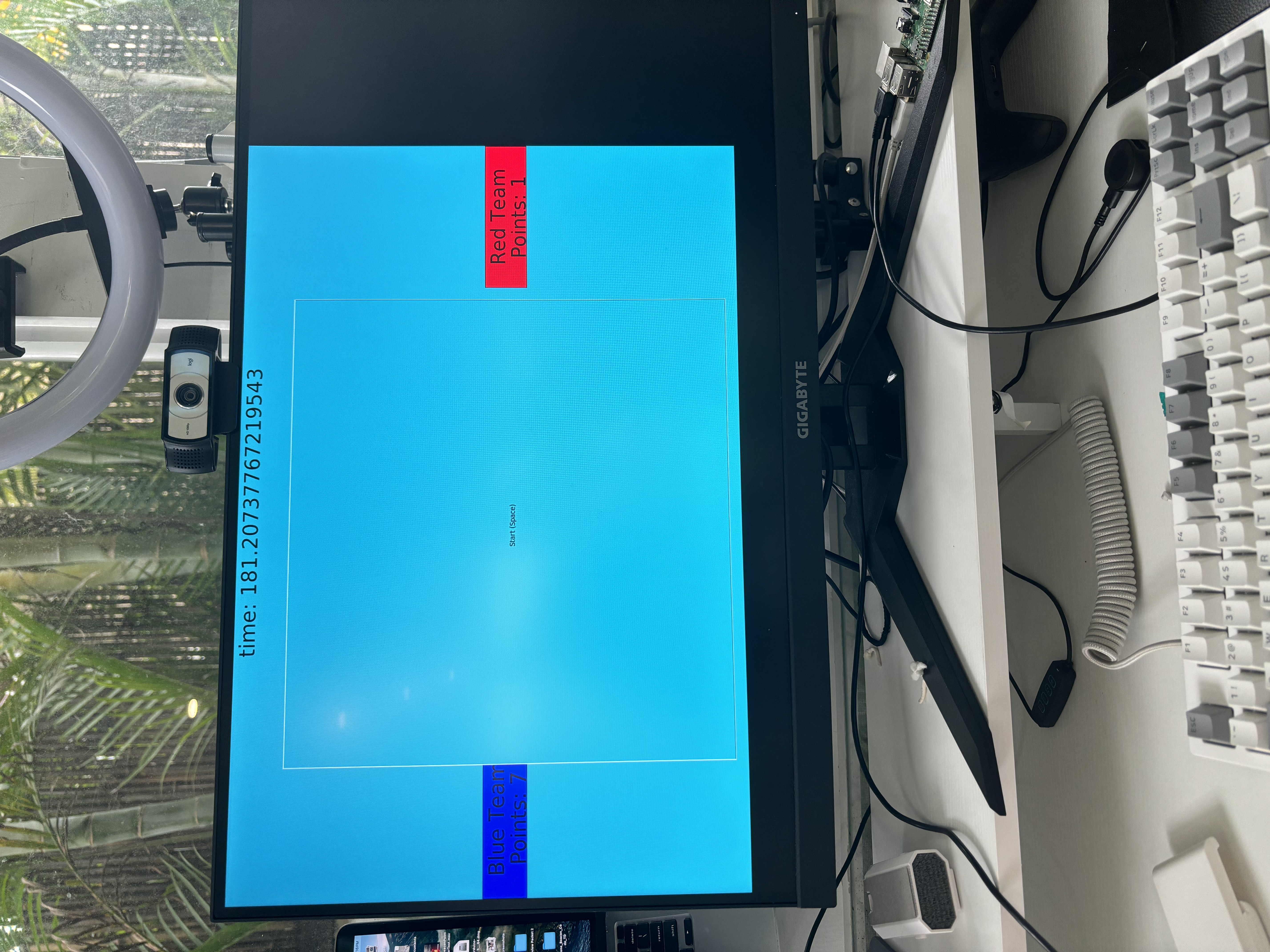
Though I could track points, I was still missing the functionality of starting, stopping, and resetting the game. I also could not display the scores graphically. After meeting with the drone racing team to show my progress and hear feedback, they said that not everyone at drone racing competitions is comfortable reading terminal output, and I agreed, also adding that it would be unprofessional, so graphically displaying points became a priority that I pursued first. I decided to use the Guizero library for this. Early versions of this can be seen in the pictures.
I then met with the drone racing team yet again to show them my progress. They were optimistic about the solution's current state but felt that while live point updates do increase engagement, not everyone can see the points from the stands, the pits, etc. if they are on one display. After I proposed the idea of the Raspberry Pi hosting its own website, allowing any device in the local network to connect, including mobile devices, and see the current scores, they decided that would increase engagement significantly more than just a single display.
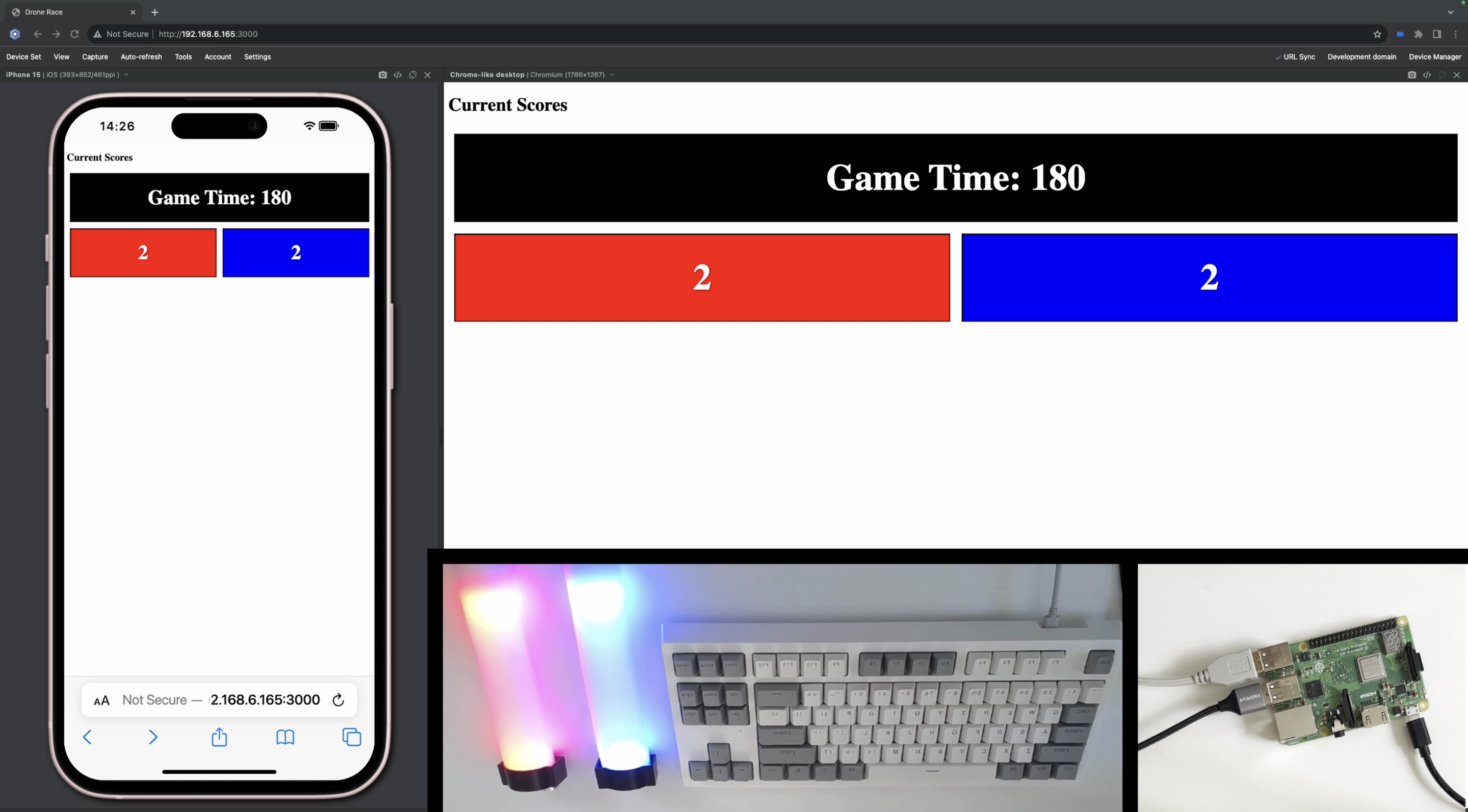
I replaced the Guizero code with HTML and Java script code to host the website and display the scores. The Python script stayed mostly the same, but instead of printing out the scores and updating a GUI, it rights to a json file that the HTML code pulls the scores from. By connecting to http://Raspberry-Pi-IP/3000, where 3000 is the port number, you could view the scores from any device as long as it is connected to the same wifi network as the Raspberry Pi.
Next, I began to work on monitoring keyboard inputs and tracking a game timer. The game timer was calculated by finding the time since the epoch when the game started, this being the start time, and then finding the current time since the epoch, this being the current time (done in a while loop to keep the current time current). The current time minus the start time would equal the game time, representing the elapsed time in seconds since the game started. A game of capture the flag takes 3 minutes or 180 seconds, and if the game time exceeds this, no additional points should be counted. To do this, I had an if statement in the main loop that was true if gameTime > 180 and would close the serial ports, only to be reopened when the game was restarted or reset. I bound the start button to space and the reset button to enter. I monitored for these events by using the keyboard module's is_pressed function. The website also displays the gameTime variable; the python script rights the variable to the same json file as it does points, and the HTML retrieves the gameTime from this file just as it would for the scores.
After demonstrating to the drone racing team my current working solution, and showing them how I established an SSH connection with the Raspberry Pi in order to execute commands like node server.js and sudo python PointTracker.py, they said that to make the solution more viable to be implemented across the country, I should make it more user friendly, I suggested having the crontab file execute the commands to start the point tracker and website on startup, and they agreed. The solution is much more user friendly because event organizers and judges won't have to use the command line.
Main Challenges
Throughout this process I ran into two main recurring problems. The first was a major delay between the graphical score display and the beacons being tripped. This was partially solved by using threading for the guizero version of the solution, and almost fully solved by having and executing separate files that do different parts, when I switched to using a website to graphically display scores. Such as a separate file for hosting the website and tracking the scores. The second major issue was getting keyboard inputs to work. This is because I wanted to have event organizers and judges be able to use the Raspberry Pi in a headless setup, with no monitor just a keyboard plugged in, so it would need to monitor inputs at a very basic level. In short I needed to use the keyboard module, however, Raspbian OS is debian managed, and the keyboard module was not recognized, forcing me to use the --break-system-packages flag to install it and always execute the code using that module as route. The reason this was such an issue was that prior to this I had almost no concept of how package management worked.
My Learning Experience
This coding project has been by far the most educational and ambitious I have ever even attempted. I tried to take every opportunity I could to learn, going down every rabbit hole while researching. If I were looking for a good library to do a GUI through Python I would end up reading about how X11 display servers work. This experience has turned me from being someone who can code in Python and Java without knowing much else to being able to code in Python and Java with basic knowledge of how javascript and html work, as well as understanding how display servers and window managers work. Knowledge that I got from my first iteration of the solution which used a GUI. I also learned the basics of package management and path variables, which I had to become comfortable with and familiar with while using non debian managed packages. I also learned basic web development, understanding how different ports on a network work as well as the HTTP GET method. I learned this by having to learn how to host a website on the local network. Beyond programming I also learned communication skills, presentation skills, and how to self advocate to peers and superiors alike. I learned how to effectively communicate my ideas, progress, and needs to peers in the drone racing club, as well as people such as the Executive Director at EDU everything.inc. I needed to be able to present my solution through Hacktivism as well as to drones in school. And without self advocacy I would never have been able to begin the process of implementing this solution around the country. And for all of that I must say thank you to Hacktivism and all those who helped me throughout the development and implementation process. These skills won't just help me with this project, or future projects, but will serve as building blocks for future careers.
What's next for Automatic Point Tracker and Score Display
After finishing my fully working prototype I promptly scheduled a meeting with my contacts at drones in school including the executive director at EDU everything.inc, the head of event organization at Drones in School, my school's drone racing team coach and its the team captain. At this meeting we discussed the next steps towards implementation and what it would take on both of our ends. We decided to schedule a trial of my solution, to be tested at a game later next week. Assuming all goes well and I am able to implement small suggestions they had such as making the timer count down not up from 180, drones in school will contact their manufacturer, sending them my code and have them change the code the beacons ship with. They also asked me to create instructions on how to configure the Raspberry Pi for use at an event. Such as downloading the code and OS from a git repo to a SD card, configuring the raspberry pi to work on the local network, and how to update the beacon code if you have an older model of beacon that did not come preloaded with my updated code.
My solution also brings with it the possibility of entirely new game modes that function using the existing hardware of the capture the flag game mode. Lowering the cost of entry for schools looking to join drones in school. Most of these new game modes would rely on the principle of bisynchronous communication between the Raspberry Pi and the beacons, as well as all the beacons assigning themselves a GUID. To instruct the beacons on what game mode has been selected, as well as to be able to address beacons individually to perform specific tasks. For example I pitched the idea of a “whack-a-mole” type game where a random number of beacons would flash a different color, the drones would have to rush to change them back, scoring a point when they do so in time. I received a positive response to not only this idea but also to the concept of the same hardware being used for multiple games. The automatic point tracker and score display should be at least partially if not fully implemented at all drones in school competitions starting next season.

Log in or sign up for Devpost to join the conversation.