-
-
Architecture Diagram
Inspiration
In my work as a business researcher and consultant, I often need to gather, structure and evaluate many information in my day to day research task.
My common workflow is first to generate hypothesis solution or answer for our clients, using first principle or other reasoning techniques. Then, these hypothesis will then be validated through primary research and secondary research.
After conducting preliminary search utilizing tools such as Gemini and Gemini Deep Research, at some point, I need to evaluate all the information that have been gathered, both for completeness and for accuracy.
During this information evaluation step, I need structure to be able to easily evaluate the information I've gathered.
The way I usually organize the structure of my fact gathering, is using a tree-like, multiple layers of fact and supporting facts.
Using this tree-like structure it helps to ensure that I've covered required information comprehensively. It also helps to visually the connection between gathered information
After breaking the information in such structure, then I often need to fact-check multiple layer of information, supporting facts, and then supporting information to the supporting information and so on.
What it does
So what I created is a nested information organizer and visualization and automated web search, powered by Gemini API.
It is a custom app to help me systematize my own workflow of organizing research information, on a tree-like structure like we just discussed.
Here I can enter information hypothesis, fact, or statement by adding to an information level. For each I layer, I can continue add supporting information, one layer below it.
And then when I need to gather more fact or evidence to evaluate certain information, I can just press this play button and then automate a search using Gemini API combined tools like search grounding and url context.
The automated search result, will display both supporting fact and counter fact. Also simple text-analytics, that identify the relationship between gathered facts.
How we built it
In this part let's go through how I used Google AI studio.
Because of the tree-like structure I used in my manual workflow, I already have a clear idea of what the app would look like.
Well, basically like the one I used to sketch in my paper notebooks.
With this, I envisioned that I would need a nested JSON data structure, that will be maintained by the app.
So I start by prompting to Google Code assistant in AI Studio to create a nested information visualizer. I also specified the JSON structure that I would like to see. For example I want to have a label, to indicate whether the information is a supporting or counter information.
From there I gradually add more features as I think about it. For example, because I thought I would like be able to download the json and then re-upload the JSON later to continue working on it, I simply asked Google Code Assistant to add download and upload button for the json.
To communicate to my Cloud Run serverless backend, I prompt Google Code assistant to make request to both API Endpoints. I also ask Code Assistant, to make sure to update the app's json structure, once it received data from the api endpoints.
Now let's go through how Cloud run powered the app.
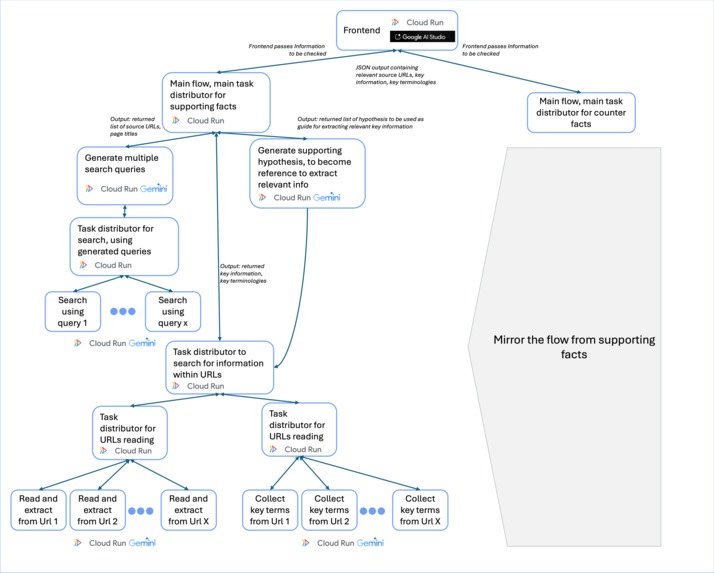
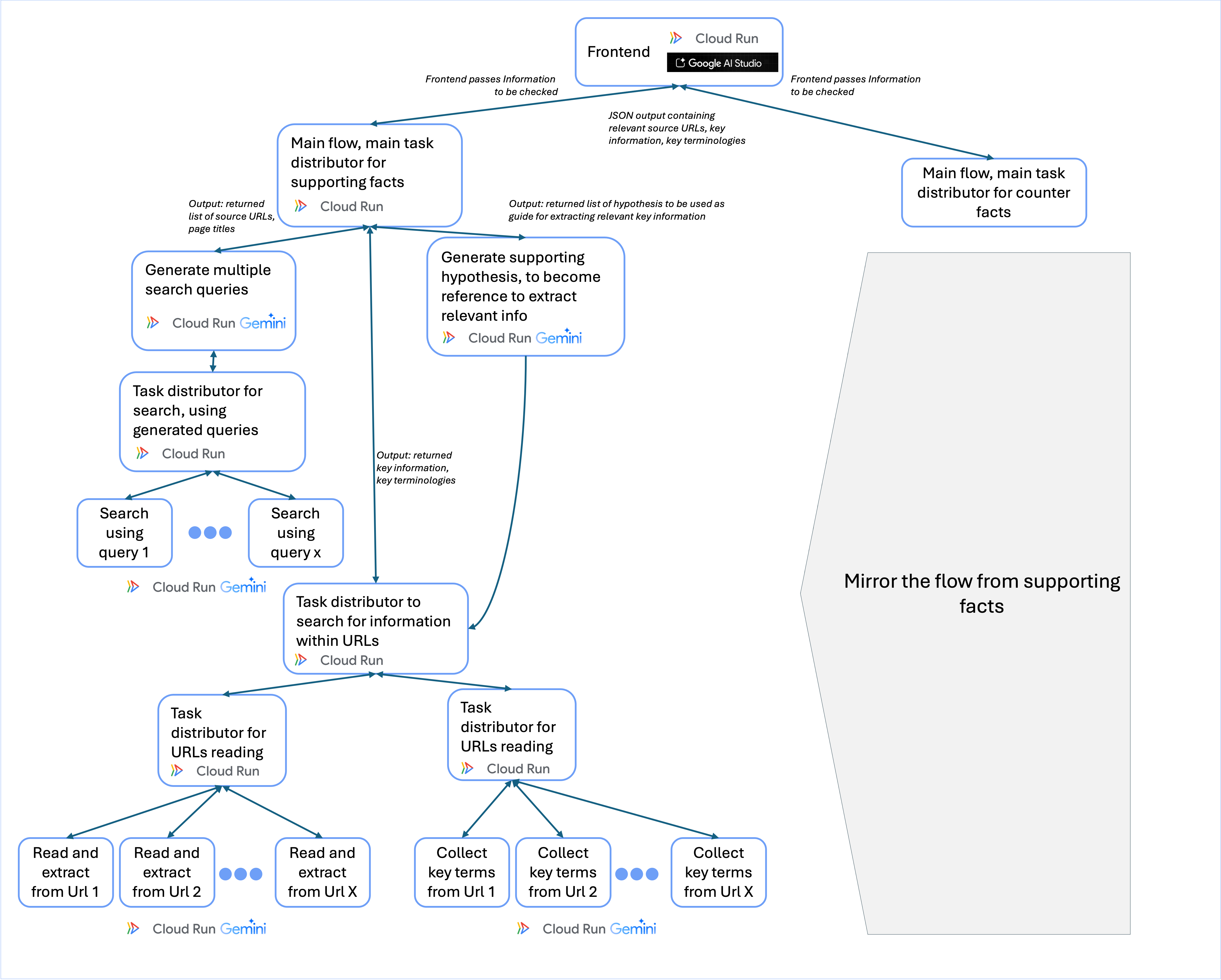
Firstly the frontend will pass the information to be evaluated, to 2 main Cloud Run functions One will focus on finding supporting information, other one will focus on finding counter information. The mechanism of two is same to each other, only the AI prompt will be slightly different to accommodate the different focus of each.
The two main functions, will distribute tasks to separate downstream Google Cloud Run functions. First function is focusing on generating search queries. The generated search queries will then passed to a Task distributor, that will summon multiple Cloud Run functions performing search using Gemini API search grounding tool. We will then extract all URLs layer of google searches, into a long list of URLs
In parallel to generating long-list of URLs, the first main function will also call a Cloud Run function specifically to generate hypothesis regarding what kind of information would be relevant. The generated hypothesis will help our Gemini API in downstream task, to pinpoint what kind of information to extract from the URLs.
After generating long-list of URLs and hypothesis, the main flow will then trigger second task distribution. First, will distribute tasks of reading and extracting key information from the URLs. Second parallel task, is an Auxiliary task to collect key terminologies from the URLs. Again these tasks are distributed among multiple Cloud Run Function instances each.
Finally these last 2 steps will generate output JSON that contains, page url sources, information extracted from those pages, and key terminologies extracted those pages, labeled accordingly whether it is a supporting information, or a counter information.
What we learned
As can be seen, Google cloud run function is crucial for our workflow here. Using Cloud run function, enable us to create multiple instances of computation resource needed flexibly, according to number of search queries generated. it also enable the distribution of Gen-AI tasks to run in parallel, thus speeding up the whole process.
What's next for Automated Information Visualizer and Search
Optimization such refined prompts to increase accuracy, and additional features like advanced text analytics

Log in or sign up for Devpost to join the conversation.