-
-
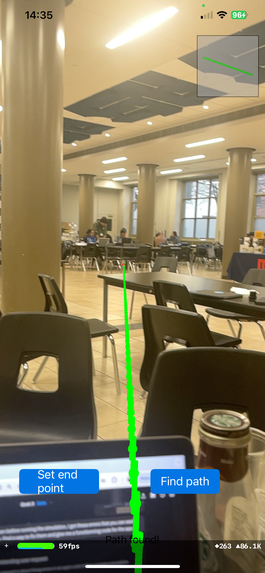
AR app. allows us to set endpoint B. (When going from A to B)
Inspiration
Our first inspiration popped up when we saw the ai-challenge application of Task 2. We thought of recreating the software of an autonomous driving car where we use a camera to map out the road and detect objects on the road. Although we were very interested in using computer vision, we wanted to make sure that our creation serves to solve a bigger problem where it can benefit someone's life. Keeping the idea of object detection, we then thought of our creation to be the eyes of many visually impaired people in the world. We considered how frustrating it must be to have limited mobility, relying on a white cane or another person every time they want to go out. And that is how Autopilot was envisioned.
What it does
Autopilot is a software solution designed to help visually impaired individuals navigate from point A to point B using real-time AI guidance. A handheld camera detects obstacles ahead and provides live voice feedback, alerting the user to adjust their path according to the obstacles around them.
How we built it
We used Yolo for object detection and applied the camera’s focal length to calculate the distance between the user and nearby obstacles. To navigate from point A to B, we developed two different solutions. One approach used ARKit in Swift (Xcode), leveraging the iPhone’s built-in sensors to interpret spatial data and calculate changes in position relative to a central point. This allowed us to visualize the path and endpoint using augmented reality. For user feedback, we integrated the GPT API to provide live voice descriptions of the surroundings, enhancing accessibility and spatial awareness. On the computer vision side, we used Python to detect objects around the camera, enabling real-time obstacle recognition and guidance.
Challenges we ran into
<3D modeling and installing> 3D modeling of the environment was one of our biggest challenges. We realized that creating a 3D spatial model was essential to accurately trace the shortest path. Initially, we attempted to use an existing 3D mapping project called Space LM, which required installing Anaconda on Windows. After hours of setup, we discovered that Space LM relies on Conda packages that require an NVIDIA GPU, something none of our team members had on their laptops. Fortunately, a friend had a compatible laptop, and we attempted to run the Space LM code again. However, we soon found out it was designed for a Linux environment, while the laptop ran Windows. To overcome this, we installed WSL 2 (Windows Subsystem for Linux) and reinstalled Anaconda within it. While one teammate worked through this setup, the rest of us explored an alternative approach to manage the 3D mapping ourselves.
Initially, we struggled to set the endpoint in a 3D space, so we attempted to define it on a 2D plane using the live video feed. However, this approach led to inaccurate distance measurements between the user and surrounding objects. We also experimented with an endpoint-free method by using the classroom walls as reference points to determine the user’s position within the environment. Unfortunately, accurate wall detection proved to be extremely challenging.
Accomplishments that we're proud of
We’re proud that, in the end, we successfully created an accurate endpoint within a 3D live video environment without relying on Anaconda. Using Xcode, we developed a mobile AR app that allowed users to accurately set a destination point. Despite spending countless hours pursuing an initial approach that ultimately didn’t work, we were able to bring to life exactly what we had envisioned during our early brainstorming sessions. After extensive experimentation and prompting on Grok, we were also able to improve distance measurements between the camera and surrounding objects by calculating distances using the camera’s focal length. With all the key features finally brought to life, we’re incredibly proud of the passion and perseverance that kept us going. We did not sleep until we achieved the outcome we envisioned.
What we learned
We learned that even when we’re uncertain about the right direction to take in coding, a clear division of tasks and relentless persistence can guide us toward success—bringing us closer to turning our vision into a nearly finalized product.
What's next for Autolife
This technology has real-world potential to assist visually impaired individuals by allowing them to navigate to their destinations more easily without needing to memorize routes or rely heavily on others for guidance. Autolife empowers them to move independently and confidently. Beyond this use case, Autolife also has applications in autonomous vehicles, such as those with Full Self-Driving (FSD) capabilities like Tesla. Our object detection system, powered by computer vision and AI, can be integrated to enhance safety and spatial awareness. Currently, our AR app (which displays the path line and endpoint) and the object detection and warning system operate as separate programs. However, we envision combining them into a unified system where the AR app serves as the front end and our object detection runs as the backend.

Log in or sign up for Devpost to join the conversation.