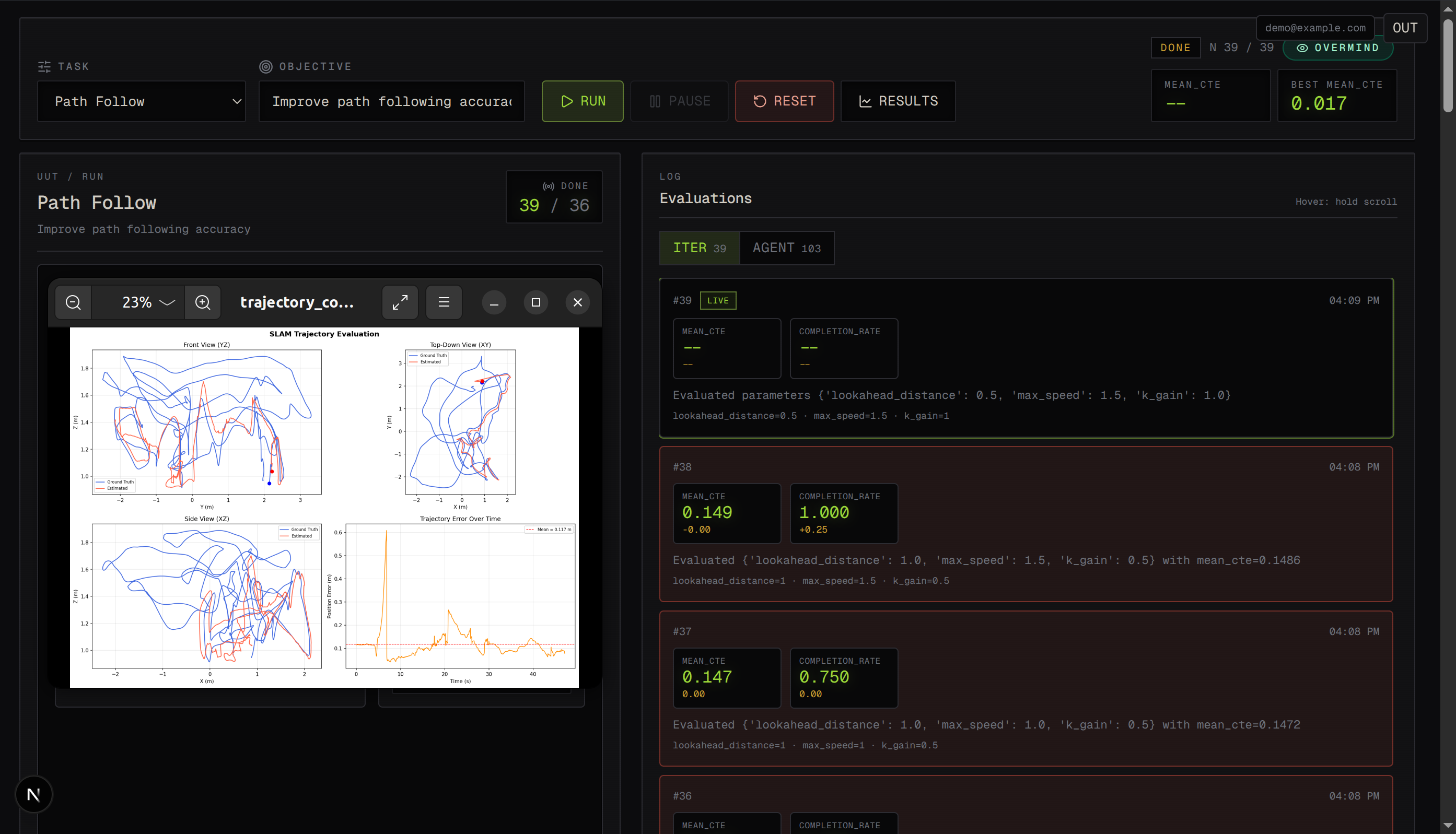
Autolab — A real-time lab bench for tuning robot sims: grid search, live metrics, video, and agent-style logs in one dashboard.
Inspiration
We wanted more than “chat with an LLM” for a deep agents hackathon. Robot sims already give hard numbers (cross-track error, completion rate, etc.)—perfect for agents and humans to see whether a change actually helped. We were inspired by wind-tunnel-style engineering: one authoritative simulation, a parameter sweep, and full visibility into every iteration—so tuning scripts aren’t a black box buried in a terminal.
What it does
Autolab wraps an existing ManiSkill-style tuning stack so you can:
- Pick a task (e.g. path following, room navigation, optional V-SLAM-style eval).
- Start a tuning run from the UI and watch iterations stream in (metrics + charts).
- See live preview frames over WebSocket (binary JPEG, co-located with status events).
- Open an agent activity / logs view—prep for richer LLM tool visibility later.
- Optionally use Auth0 for login and call an LLM chat path wired for a hosted gateway (e.g. TrueFoundry-style observability headers).
The simulation stays the source of truth at the repo root; the backend wraps run.py / tasks/ instead of reimplementing tuning in the browser.
How we built it
- Simulation (Python, repo root):
run.py,tasks/registry,algorithms/,envs/, evaluation + tuning artifacts underresults/. - Backend (FastAPI): REST for tasks, run lifecycle (create / pause / resume / reset / results), WebSockets for iteration + frame + agent-log messages, SQLite by default with optional Postgres for durable agent memory and checkpoints.
- Frontend (Next.js, App Router, TypeScript): Zustand store, dashboard components (controls, simulation panel, agent feed, charts, results), real
fetch+ WS againstNEXT_PUBLIC_API_URL. - Agents:
AGENT_PROMPT.md+ MCP-style tools describe an autonomous loop: list tasks, evaluate, start tuning, poll, read results, read/write memory and checkpoints.
Challenges we ran into
- Integration contracts: UI and API had to use the same parameter keys as
tasks/(lookahead_distance,max_speed, …)—not shorthand—to deserialize runs correctly. - Streaming design: We unified status, metrics, frames, and logs on WebSockets instead of a separate MJPEG HTTP route—powerful, but it required disciplined message types and client handling.
- Reproducibility: Robotics / sim stacks pull heavy deps—we pinned versions and documented a dedicated venv so
pip installdoesn’t silently land in global Python. - Scope honesty: Full OpenAI-style tool-calling loops driving every sim action are partially there (chat + logs + memory tables); the architecture is ready for the next increment without rewriting the core tuner.
Accomplishments we’re proud of
- End-to-end real runs in the UI—not a fake timer—as the main path.
- Single source of truth for tuning logic in Python; the dashboard observes, it doesn’t re-simulate in JS.
- Observable iterations: charts + optional video + agent log channel make the system feel like a real lab instrument.
- Clear roadmap (phases) so judges and contributors see what shipped vs what’s next.
What’s next for Autolab
- Run history, compare runs, and a richer memory panel (Phase 4-style).
- Complete Phase 5: full tool loop from LLM → backend → sim tools with streaming reasoning.
- Phase 6 extras: external agent triggers (e.g. webhook flows), deploy polish, voice—where the product narrative goes after the hackathon vertical slice.
Built with (fill in your stack/links)
- Python · FastAPI · WebSockets · SQLAlchemy (SQLite / Postgres)
- Next.js · TypeScript · Tailwind · Zustand · Recharts
- ManiSkill / sim stack · Auth0 (optional) · LLM gateway integration (optional)
Optional: one-line “math” for improvement (plain text; Devpost may not render LaTeX)
If the form asks how you measure improvement: we compare baseline vs best grid result on the task’s optimize metric; when lower is better, relative gain is (baseline − best) / baseline.
Demo / setup (short)
- Backend:
cd backend && python -m venv venv && source venv/bin/activate && pip install -r requirements.txt && cp .env.example .env→ configure env →uvicorn main:app --reload - Frontend:
cd frontend && npm install→ setNEXT_PUBLIC_API_URL(and Auth if needed) →npm run dev - Open the dashboard, start a run, watch WebSocket updates and frames.
Video script hints (30–90s)
- Problem: tuning sims is opaque in the terminal.
- Autolab: pick task → run → see iterations + chart + optional camera feed + logs.
- Why it matters: agents and humans share the same measurable loop.
- Tech flash: FastAPI + Next.js + real
run.pybackend. - Close: what’s next (history + full agent tools).
Sponsor integrations (one section per sponsor)
Copy each block below into Devpost if the hackathon asks for sponsor-specific write-ups. Plain language for judges.
Auth0 — security and auth for agents
We use Auth0 so real users can sign in before they start expensive simulation runs or talk to the LLM. The Next.js app uses Auth0’s official SDK for login and sessions. The FastAPI backend checks JWTs from Auth0 (who is this? are they allowed?) before it trusts API calls. That way the dashboard and the agent-facing APIs are not wide open on the public internet. Same pattern you would use for any serious agent product: identity at the edge, verified tokens at the API.
Ghost — database for agent memory
By default we use a small SQLite file for a quick demo. For anything that should survive restarts and scale like a real agent product, we point the backend at Postgres backed by Ghost. We store agent memories (notes the agent can search later) and checkpoints (saved state so a long run can resume). Think of it like the durable scratch pad and save games for Claude Code–style agents, but wired to our tuning runs instead of only your laptop.
Overmind — improving the agent loop
Our system is built around a tight loop: run the sim → read metrics → decide what to try next → repeat. Overmind helped us think about that loop like a product: shorter cycles, clearer signals from each iteration, and less “agent thrash.” We used it to stress-test how we improve the agent over many passes—not a one-shot chat, but continuous tuning with visible scores in the UI.
TrueFoundry — LLM gateway (our hosted brain)
We do not paste API keys into the browser. The browser and dashboard call our FastAPI server, and the server calls TrueFoundry’s AI Gateway in an OpenAI-compatible way. That gives us chat completions for summarizing runs, steering the agent, and (in the full loop) tool-style calls where the model asks our backend to start evaluations or fetch results. TrueFoundry also lets us attach logging / metadata headers so requests are traceable when things break—important when agents make many calls.
Macroscope — coding agent and PR workflows
We used Macroscope on the engineering side of the hackathon: a coding agent that can turn ideas into branches, patches, and pull requests, the way you would for a real team shipping fast. Autolab focuses on robot sim tuning and metrics; Macroscope complements that by handling the “now turn this into code and open a PR” step. Our long-term plan (see project roadmap) is to webhook Autolab when a run finishes so Macroscope—or a similar agent—gets a structured summary (task, best parameters, metrics) and can propose code or config changes automatically.
Built With
- auth0
- eslint
- fastapi
- function-calling
- gymnasium
- httpx
- jwt
- lucide-react
- maniskill-3
- mcp-tools
- next.js
- nextjs-auth0
- numpy
- nvidia-nim
- openai-compatible-apis
- orb-slam3
- phosphor-icons
- pillow
- postgresql
- psycopg
- pydantic
- python
- python-jose
- pytorch
- react
- recharts
- request-metadata)-?-nvidia-nim-(via-truefoundry
- ros-2
- sqlalchemy
- sqlite
- tailwind-css
- truefoundry-ai-gateway
- typescript
- uvicorn
- websockets
- x-tfy-logging-config
- zustand


Log in or sign up for Devpost to join the conversation.