Retention Autopsy
YouTube tells you where viewers left. We tell you why.
Inspiration
Every YouTube creator has stared at the same graph in YouTube Studio: a retention curve with a steep, unmistakable drop at some exact timestamp. The platform is happy to tell you where you lost viewers, down to the second. What it will never tell you is why.
Was it a slow intro? A tangent that lost the thread? A repeated point? An ad read at exactly the wrong moment? Right now, creators are left doing forensic guesswork — scrubbing back through their own video, rewatching the exact second where the line goes down, trying to reverse-engineer a decision they made weeks ago during editing.
We'd both felt this ourselves, and it felt like a solvable problem: the information needed to answer "why" already exists — it's sitting right there in the transcript, at that exact timestamp. Nobody had connected the two. So we built the tool that connects them.
What it does
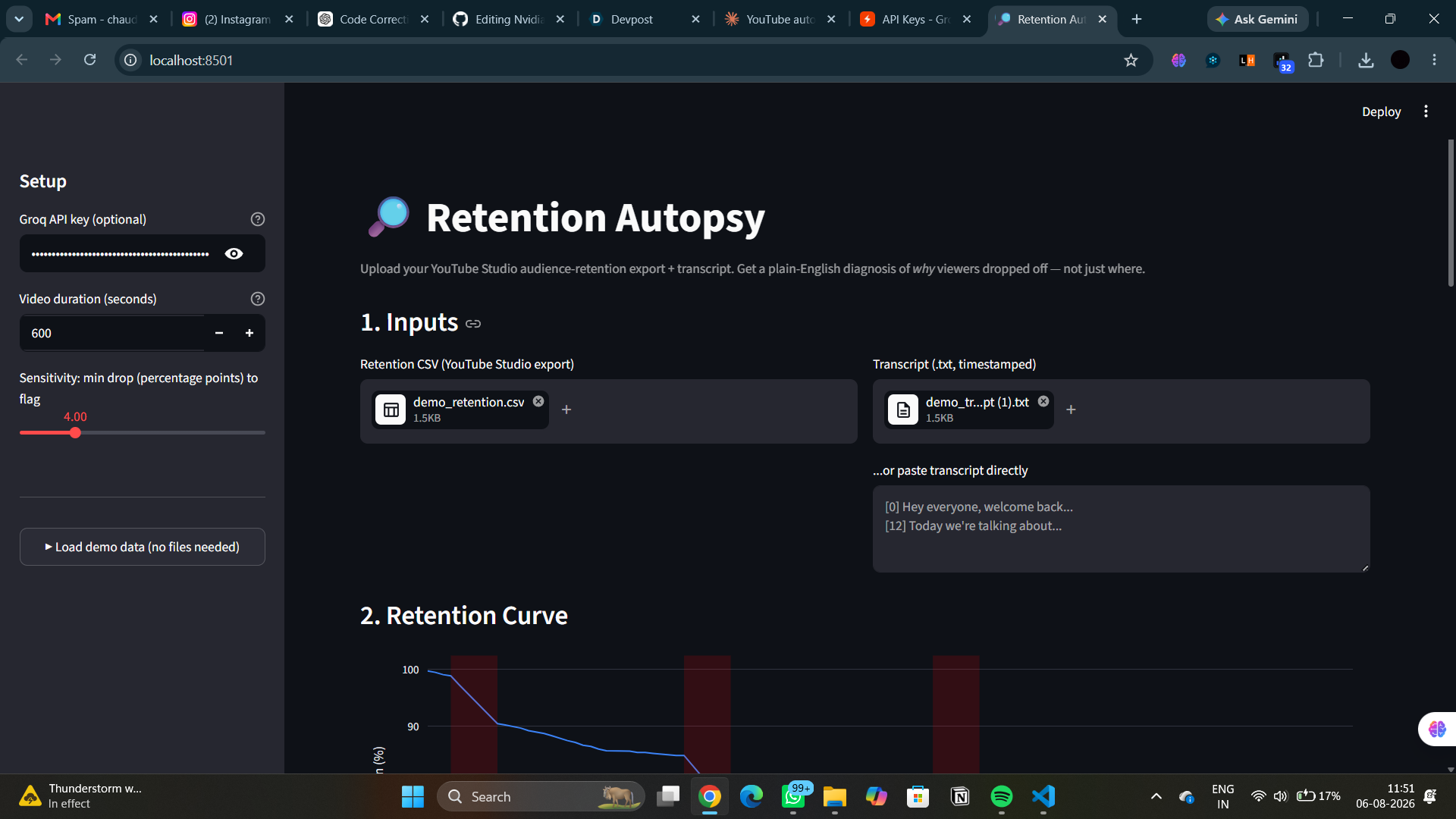
Retention Autopsy takes two things a creator already has — a YouTube Studio retention export and their video's transcript — and produces a plain-English autopsy report:
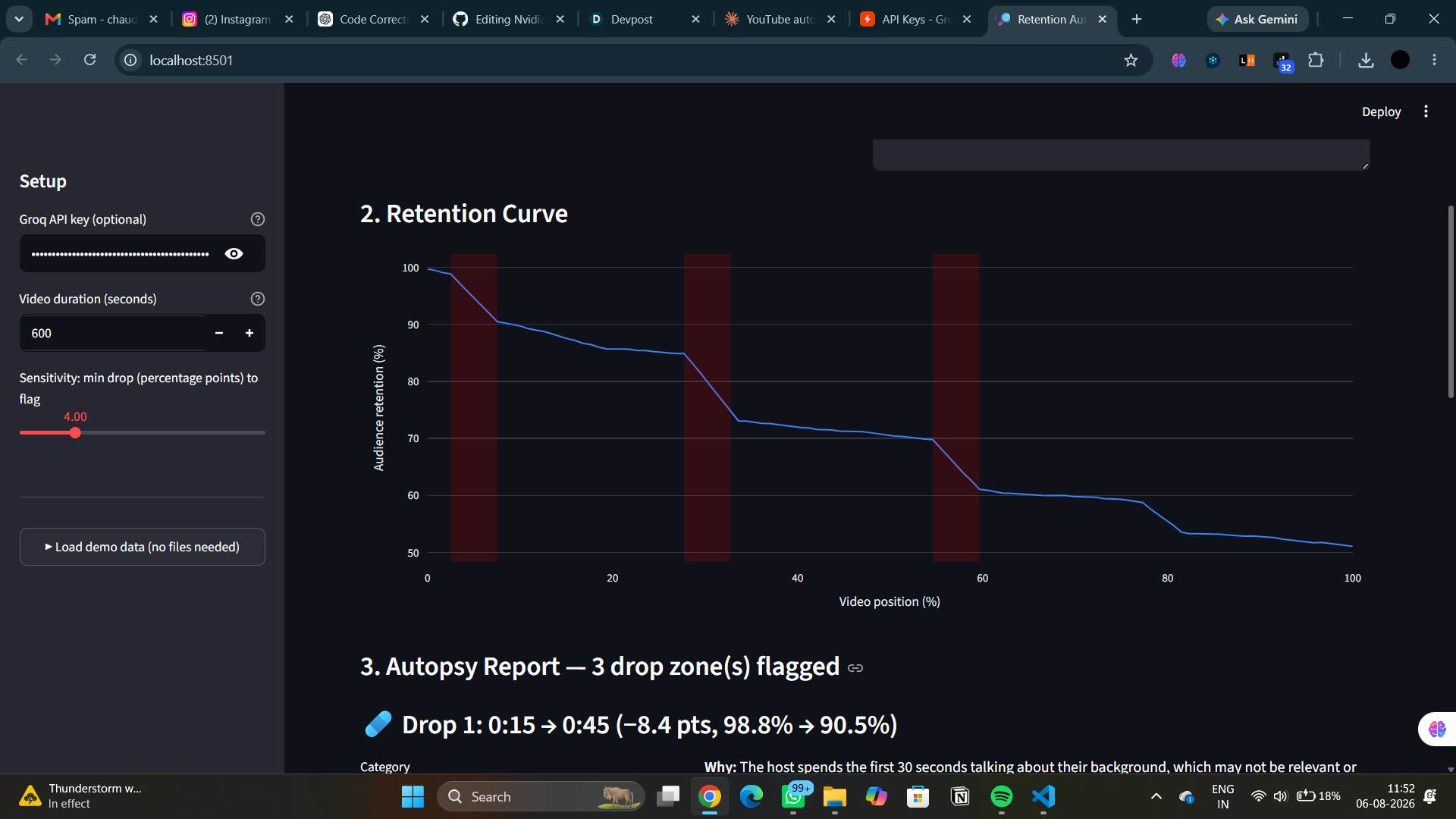
- Automatically detects the steepest drop-off zones on the retention curve
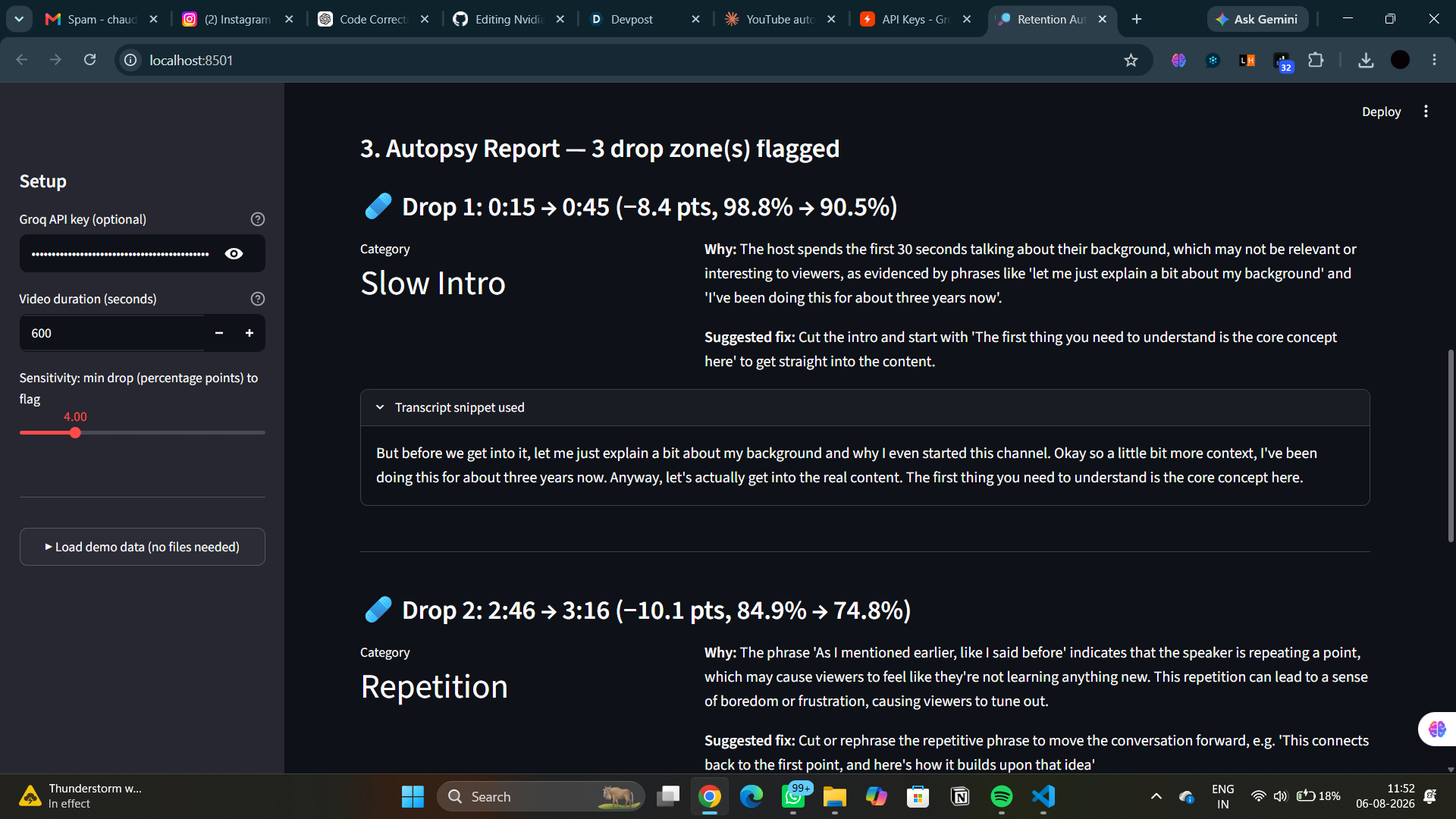
- Aligns each drop zone to the exact transcript text playing at that moment
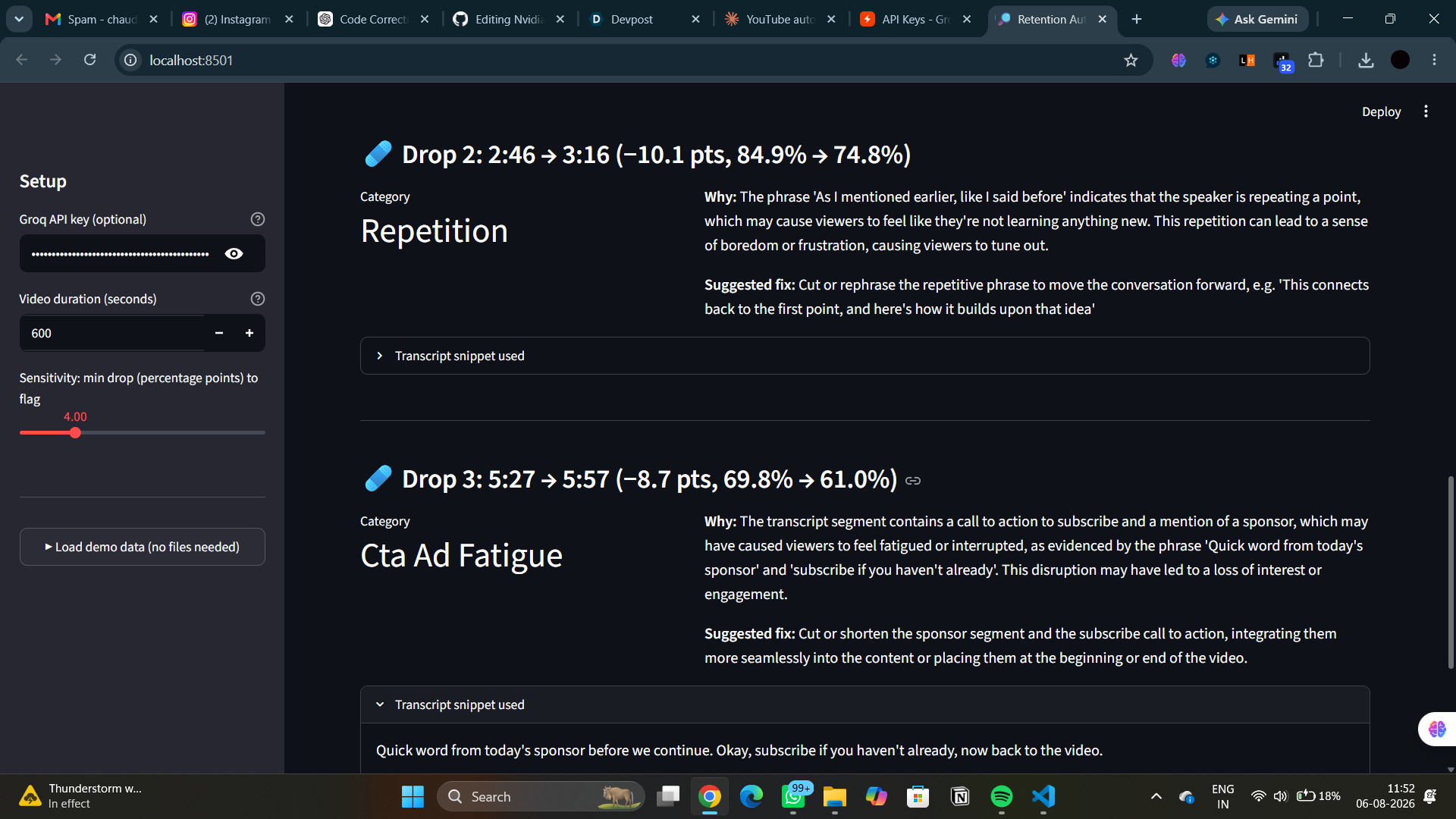
- Sends that evidence to an LLM (Groq, running Llama 3.3 70B) and asks it to diagnose the category of the drop — weak hook, slow intro, tangent, repetition, ad/CTA fatigue, confusing explanation, pacing lull
- Returns a concrete, actionable edit suggestion for each drop (e.g. "Cut 0:15–0:45, this repeats context already covered")
- Visualizes everything on an interactive retention chart with the flagged zones highlighted directly on the curve
No mockup, no fake data required to see it work — we built in a synthetic data generator so anyone can hit "load demo data" and see a full autopsy report immediately, alongside support for real YouTube Studio exports.
How we built it
The pipeline is a straightforward four-stage chain:
- Retention parsing — a YouTube Studio "Audience retention" CSV export
is normalized into a
(position_pct, retention_pct)curve, with mm:ss timestamp formats converted automatically. - Drop detection — a sliding window scans the curve for any span where retention falls more than a configurable threshold (default 4 percentage points). Adjacent flagged windows are merged so the report surfaces a handful of meaningful drops rather than every small wobble in the data.
- Transcript alignment — the transcript (either
youtube-transcript-apistyle[seconds] textlines, or plainmm:sstimestamps) is parsed into segments, and each drop zone is matched to the transcript text playing in a window around that timestamp. - LLM diagnosis — the drop's numbers (before %, after %, points lost, timestamp range) plus the aligned transcript snippet are sent to Groq with a system prompt that forces strict JSON output — a category, a plain English explanation citing the actual transcript text as evidence, and a suggested fix.
Everything is wrapped in a Streamlit app with an interactive Plotly chart of
the retention curve (drop zones highlighted in red) and a per-zone report
card below it, plus a .env-based config so a Groq API key never has to be
hardcoded or committed.
Challenges we ran into
Turning a vague signal into something structured. A retention CSV export is just a list of numbers. The hard part wasn't calling an LLM — it was building a drop-detection algorithm that reliably found the right zones: sensitive enough to catch real drops, but not so sensitive that it flagged every minor fluctuation in a naturally noisy curve. We landed on a sliding window with a merge step for adjacent flagged windows, which took several iterations of tuning against synthetic data with known injected drops before it produced clean, non-redundant zones.
Grounding the LLM in evidence, not vibes. An early version of the prompt produced generic-sounding diagnoses that could have applied to almost any video. We fixed this by explicitly requiring the model to cite specific words or phrases from the transcript snippet in its explanation — forcing it to reason from the actual evidence in front of it rather than pattern-match to a generic "maybe the pacing was slow" answer.
Designing for creators who don't have real export data on hand. Not every creator (or judge!) has a YouTube Studio export sitting around to test with. We built a synthetic data generator that produces a realistic retention curve with deliberately injected drop patterns — a weak hook, a mid-video tangent, a repeated explanation, an ad-read dip — paired with a matching transcript, so the full pipeline can be demoed end-to-end with zero setup.
Making the tool degrade gracefully. LLM API calls can fail — bad key, rate limit, network hiccup. Rather than let a single failed call break the whole report, we built a rule-based heuristic fallback that still produces a reasonable (if less nuanced) diagnosis using simple lexical cues, so the tool never fully dead-ends even without a working API key.
Accomplishments we're proud of
- A pipeline that works end-to-end from real inputs a creator already has, with no dependency on the YouTube Data API and nothing to authenticate
- Diagnoses that are grounded in actual transcript evidence rather than generic LLM filler — the explanations name specific phrases from the video
- A synthetic demo-data path that lets anyone try the full experience instantly, without needing their own YouTube channel's analytics export
What we learned
- How to get structured, reliable JSON out of an LLM using Groq's
response_formatparameter, instead of parsing free text and hoping for the best - That prompt specificity matters more than prompt length — forcing the model to cite evidence produced dramatically more useful diagnoses than a longer, more "thorough"-sounding prompt without that constraint
- How much signal is actually recoverable just from correlating two data sources (retention curve + transcript) that most tools treat as unrelated
What's next for Retention Autopsy
- Pull retention data and captions directly via the official YouTube Data API and OAuth, instead of manual CSV/transcript export
- Auto-generate an EDL/cut list file that imports directly into video editing software, turning each suggested fix into an actual timeline edit
- Aggregate autopsy patterns across a creator's whole channel to surface recurring habits — e.g. "you lose viewers to tangents in 6 of your last 10 videos" — turning a one-video diagnosis into a channel-wide coaching signal

Log in or sign up for Devpost to join the conversation.