-
-
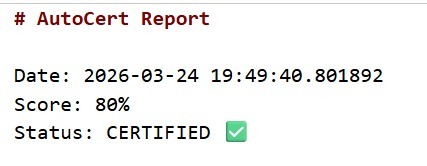
Final Sample Output
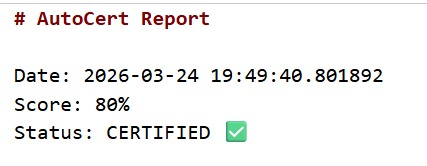
AutoCert — Autonomous Security Certification Agent
Inspiration
Security audits are time-consuming, expensive, and often skipped in fast-moving development cycles. I wanted to build something that could automate the boring but critical parts of security verification — so developers can ship with confidence without waiting weeks for a manual audit.
The idea of an AI agent that reads your code, checks it against industry standards, and hands you a certificate (or a fix list) felt like the perfect hackathon challenge.
What I Learned
- How to configure and deploy a GitLab Duo custom agent
- How to structure agent skills using
SKILL.mdfiles - The depth of OWASP ASVS Level 1 and CII Best Practices standards
- How agentic AI can bridge the gap between code quality and security compliance
- The power of GitLab's AI Catalog for publishing reusable agents
How I Built It
The project was built entirely inside GitLab using the Web IDE and Duo AI tools.
Architecture
$$\text{Trigger} \rightarrow \text{AutoCert Agent} \rightarrow \text{SKILL.md Checklist} \rightarrow \text{Score}$$
$$\text{Score} \geq 80\% \Rightarrow \text{CERTIFICATE.md} + \text{Merge Request}$$
$$\text{Score} < 80\% \Rightarrow \text{GitLab Issue} + \text{Fix Suggestions}$$
Steps
- Created the
autocert-agentproject under a GitLab Ultimate trial group - Wrote the agent system prompt in
AGENTS.md - Defined the audit checklist in
skills/autocert/SKILL.md - Configured the agent in AI Catalog with tools:
Get Repository FileList Repository TreeCreate CommitCreate IssueCreate Merge Request
- Enabled the agent on the project
- Triggered the agent via GitLab Duo Chat
Challenges
- Finding the Duo Agents feature — it required GitLab Ultimate trial access, which wasn't immediately obvious
- Triggering the agent correctly — the difference between Duo Chat, Web IDE chat, and agentic workflow modes was confusing at first
- File access permissions — getting the agent to read repository files required running it from the correct context (Web IDE vs AI Catalog)
- Tool selection — understanding which tools worked in Web UI vs IDE-only mode
What's Next
- Add support for OWASP ASVS Level 2 and Level 3
- Integrate with CI/CD pipelines to auto-trigger on every merge request
- Add dependency scanning and secrets detection
- Build a certificate badge for README display
Built with 🔐 GitLab Duo AI Agents — because security shouldn't be manual. GitLab Hackathon 2026


Log in or sign up for Devpost to join the conversation.