About the project track 1
Inspiration
Let's be real: most "AI CAD" demos talk a big game about designing a robot, then hand you a messy 3D mesh that nobody actually measured. When Syndicate by Maximor set up Track 1, it raised a much better question: can an agent take real tools, face a messy hardware problem, and actually get better at using those tools over time?
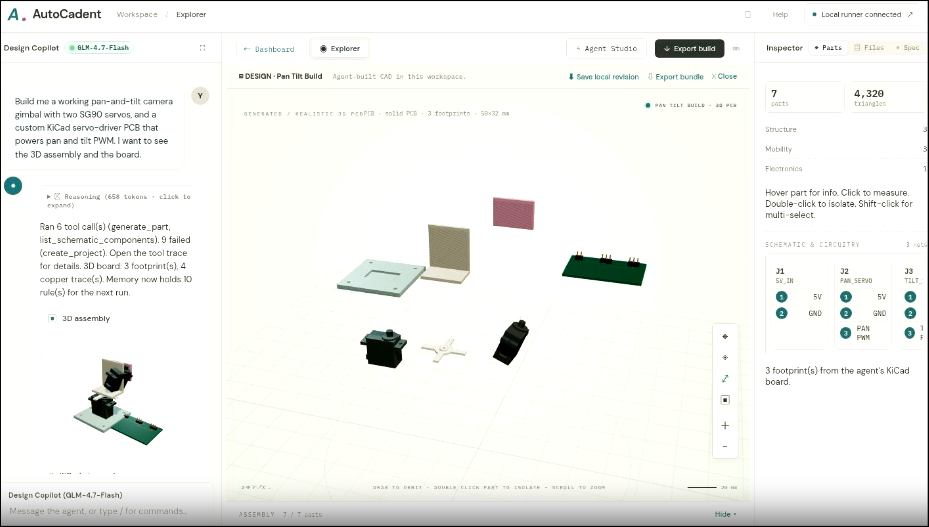
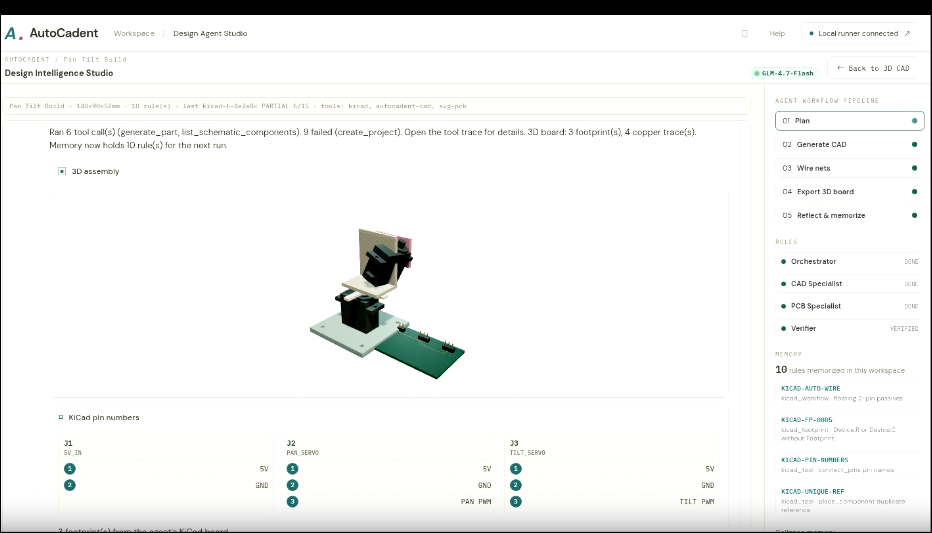
That is why we built AutoCadent. It isn't just another chatbot spitting out screenshots. It is a full studio setup where agents run real CadQuery and KiCad code, fail in public, log their mistakes, and learn not to make the exact same thin wall twice.
What it does
You give it a project brief. Sub agents break it down, write parametric CAD code, set up a basic signal breakout board, and an independent evaluator measures the actual geometry — not whatever idealized spec the model hoped it made.
Because a valid piece of code can still give you a useless part. Here is what happened on our first pass with the educational rover:
| Check | Rev 1 | Required | Rev 2 |
|---|---|---|---|
| Chassis thickness | $1.2\,\text{mm}$ | $\ge 2.4\,\text{mm}$ | $2.4\,\text{mm}$ |
| Tray side walls | $1.2\,\text{mm}$ | $\ge 2.4\,\text{mm}$ | $2.4\,\text{mm}$ |
| Board to wall clearance | $0.1\,\text{mm}$ | $\ge 0.8\,\text{mm}$ | $0.8\,\text{mm}$ |
Our Reflection Synthesizer takes those early mistakes and turns them into lasting rules (RULE-THICKNESS, RULE-WALL, RULE-CLEARANCE). It saves them in a local SQLite database so the next run can pull them up. On a fresh start with no memory, it passed $3/6$ checks. Warm it up with past experience, and it hits $6/6$. You can watch the sub agent graph, track the learning curve, and see the memory bank grow right inside the Explorer UI instead of just taking our word for it.
When you are done, you get real files you can actually use: CadQuery source files, STEP, STL, KiCad PCB layouts, Gerbers, drill maps, BOMs, and a real DRC report straight from KiCad.
How we built it
- Real geometry engines. We use CadQuery $2.6.1$ and OpenCASCADE under the hood to generate actual solids. The evaluator calculates raw bounding boxes, wall offsets, and clearances directly from the geometric model. To make sure the checks stay honest, our unit tests swap out the underlying 3D models while keeping the specs the same.
- Automated repairs. When thickness, wall, or clearance checks fail, the system bumps them up to the required minimum and runs the checks again (up to three times). If a structural problem can't be fixed, it stays marked as a failure.
- Real PCB workflows. We use
pcbnew(KiCad $10.0.5$) to generate.kicad_pcbfiles, Gerbers, drill files, and BOMs. Our test runs showed $0$ DRC violations and $0$ unconnected nets (and we keep the five default ignored checks in the final report so nothing is hidden). - Direct tool usage. Powered by Project MCP, our setup pairs the AutoCadent CAD server with the KiCad MCP server ($0.20.1$, giving access to $\sim 109$ tools). GLM 4.7 Flash running on Tensormux handles tool schemas directly and adapts whenever OpenCASCADE or KiCad throws an error.
- Transparent memory. Everything is logged in SQLite: action traces (tools used, arguments, latencies, token counts, pass/fail status) and learned rules. The UI shows you the exact rule that triggered on any step instead of hiding behind fixed, hardcoded prompts.
- Custom workspace. Built with an engineering-focused interface where you can orbit models, explode assemblies, and test mechanics in native Three.js. Designs are saved locally in your browser, running on a FastAPI / uvicorn backend with support for background workers when you need heavy processing.
The live web demo shows saved results from a real run. Generating new models on the fly requires running the local backend, which the interface clearly points out.
What we learned
- Valid code isn't valid design. A model can generate 18 error-free files that are still completely unmanufacturable. If you aren't measuring actual wall thicknesses on the model itself, you are just making pretty pictures.
- Keep the ruler separate. Separating generation, evaluation, and repair into distinct steps is what makes this system actually work.
- Tool errors build better models. Getting hit with a KiCad clearance error or an OpenCASCADE crash teaches the model way more than tweaking system prompts ever could — as long as those lessons get saved and used next time.
- Keep it honest. Simple shape envelopes represent the wheels, the board handles basic signal routing rather than full power management, and the schematic view comes straight from net connections. It is always better to be clear about what a prototype is than to fake a finished product.
- Memory cuts computing costs. Reusing three basic rules saved us from re-explaining simple design principles on every run. The real win isn't how many tokens you generate; it's how many tokens you don't have to waste repeating yourself.
Challenges
Geometry engines don't care about software demos. Unstable fillet orders, broken boolean cuts, and misaligned components will crash models in ways a chatbot interface can't hide. Instead of deleting broken revisions, we saved them to disk so you can see where things went wrong.
Handling complex toolsets. KiCad has a massive tool surface. One wrong place_component call without a proper footprint ruins the whole revision. Getting the agent to actually read error messages instead of re-sending the same broken call was one of the toughest parts to solve.
Managing local resources. CAD operations are heavy, so we have to run them sequentially with strict timeouts. We also had to make sure our background repair scripts weren't quietly fixing things behind the scenes and taking credit for work the AI didn't do.
Resisting feature creep. It is easy to get distracted trying to add fasteners, electrical checks, or advanced mechanical movement all at once. We deliberately kept the scope focused on an educational rover assembly to make sure the core feedback loop worked smoothly first.
Making the interface look nice wasn't the hard part. The hard part was building a system that could fail measurably, fix its mistakes, and show you the exact paper trail of how it got there.

Log in or sign up for Devpost to join the conversation.