-
-
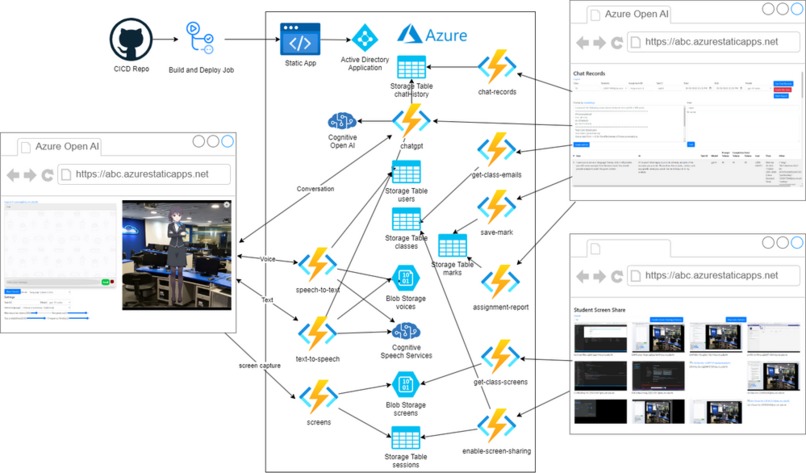
Architecture Diagram
-
-
-
-
-


Inspiration
Nowadays, why teacher need to waste their time grading assignments manually when AI can do it in seconds?
It’s not possible to stop students from using AI tools to answer their assignments. But the key is to ensure that students are working on their assignments on their own and not copying from each other. In fact, it’s nonsensical for teachers to score students’ work manually when all students use AI to prepare their assignments! Hence, the ideal solution is to grade assignments by AI automatically.
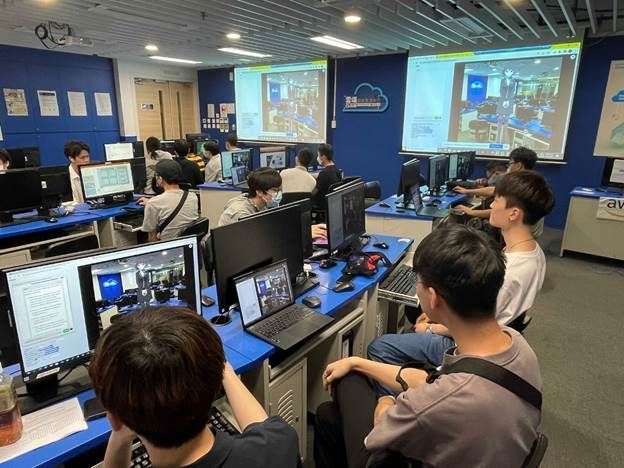
In our institution, the Department of Information Technology, Hong Kong Institute of Vocational Education (Lee Wai Lee), we have created an AI virtual assistant that can help both students and teachers with assignments. The assistant can record chats and/or computer screen activities during tests.
What it does
Explain and Demo: link
Challenges we ran into
However, we are also aware of the environmental and economic challenges of using AI, as it consumes a lot of energy and there is a cost of using the AI Service which students should be aware of as part of Responsible AI.
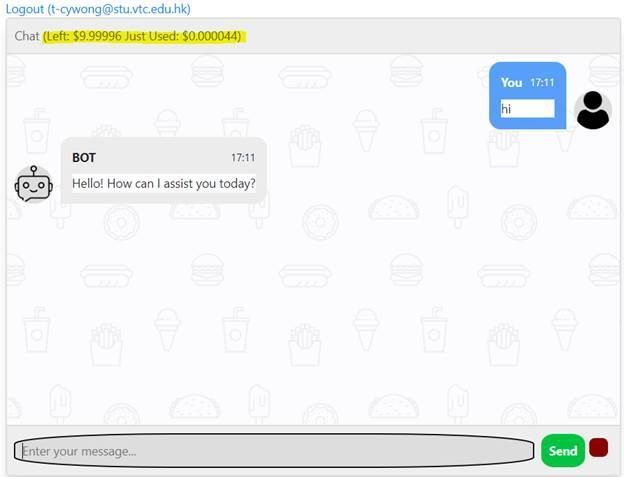
Therefore, we built a solution for our students that not only does the task but displays the cost and token usage for each conversation and limits the daily usage of the system to students to ensure they utilize the services responsibly.
Choosing the right model, parameter and prompt design is essential for students to score well in their assignment. ChatGPT 4 is not always the best option!
How does it work?
This application is just a simple client-side static web with HTML5, CSS3, and JavaScript. We fork and modify Cubism Web Samples from Live2D which is a software technology that allows you to create dynamic expressions that breathe life into an original 2D illustration.
High level overview
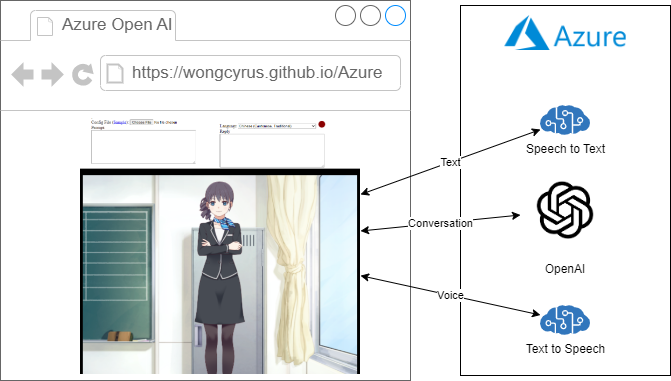
Behind the scene, it is a TypeScript application and we hack the sample to add ajax call when event happens.
For voice input:
When user click on the red dot, it starts capturing mic input with MediaRecorder. When user click on the red dot again, it stops capturing mic input, and call startVoiceConversation method with language and a Blob object in webm format. The startVoiceConversation chains down to different Live2D objects from main.ts, LAppDelegate, to LAppLive2DManager which makes a series of Ajax call to Azure Services through AzureAi class. They are getTextFromSpeech, getOpenAiAnswer, and getSpeechUrl. Since Azure Text-to-Speech for short audio does not support webm format and getTextFromSpeech converts webm to wav format with webm-to-wav-converter. With the wav data from Azure Text-to-Speech, it calls wavFileHandler loadWavFile method which sample the voice and get the voice level. Call the startRandomMotion method of the model object, and it adds lipsync actions according to the voice level. Play the audio right before the parent model update call. For text input, it is very similar, but the trigger event is model on tap and skips step 1 and 2.
There is no Azure Open AI JavaScript SDK at this moment. For speech service, we was tried microsoft-cognitiveservices-speech-sdk but we hits a Webpack problem, then we decide to use REST API for all Azure API call instead.
AzureAi Class
import { LAppPal } from "./lapppal";
import { getWaveBlob } from "webm-to-wav-converter";
import { LANGUAGE_TO_VOICE_MAPPING_LIST } from "./languagetovoicemapping";


export class AzureAi {
  private _openaiurl: string;
  private _openaipikey: string;
  private _ttsapikey: string;
  private _ttsregion: string;

  private _inProgress: boolean;

  constructor() {
    const config = (document.getElementById("config") as any).value;

    if (config !== "") {
      const json = JSON.parse(config);
      this._openaiurl = json.openaiurl;
      this._openaipikey = json.openaipikey;
      this._ttsregion = json.ttsregion;
      this._ttsapikey = json.ttsapikey;
    }

    this._inProgress = false;
  }

  async getOpenAiAnswer(prompt: string) {

    if (this._openaiurl === undefined || this._inProgress || prompt === "") return "";

    this._inProgress = true;

    const conversations = (document.getElementById("conversations") as any).value;
    LAppPal.printMessage(prompt);

    const conversation = conversations + "\n\n## " + prompt
    const m = {
      "prompt": `##${conversation}\n\n`,
      "max_tokens": 300,
      "temperature": 0,
      "frequency_penalty": 0,
      "presence_penalty": 0,
      "top_p": 1,
      "stop": ["#", ";"]
    }

    const repsonse = await fetch(this._openaiurl, {
      method: 'POST',
      headers: {
        'Content-Type': 'application/json',
        'api-key': this._openaipikey,
      },
      body: JSON.stringify(m)
    });
    const json = await repsonse.json();
    const answer: string = json.choices[0].text
    LAppPal.printMessage(answer);
    (document.getElementById("reply") as any).value = answer;
    (document.getElementById("conversations") as any).value = conversations + "\n\n" + answer;

    return answer;
  }

  async getSpeechUrl(language: string, text: string) {

    if (this._ttsregion === undefined) return;

    const requestHeaders: HeadersInit = new Headers();
    requestHeaders.set('Content-Type', 'application/ssml+xml');
    requestHeaders.set('X-Microsoft-OutputFormat', 'riff-8khz-16bit-mono-pcm');
    requestHeaders.set('Ocp-Apim-Subscription-Key', this._ttsapikey);

    const voice = LANGUAGE_TO_VOICE_MAPPING_LIST.find(c => c.voice.startsWith(language) && c.IsMale === false).voice;

    const ssml = `
<speak version=\'1.0\' xml:lang=\'${language}\'>
  <voice xml:lang=\'${language}\' xml:gender=\'Female\' name=\'${voice}\'>
    ${text}
  </voice>
</speak>`;

    const response = await fetch(`https://${this._ttsregion}.tts.speech.microsoft.com/cognitiveservices/v1`, {
      method: 'POST',
      headers: requestHeaders,
      body: ssml
    });

    const blob = await response.blob();

    var url = window.URL.createObjectURL(blob)
    const audio: any = document.getElementById('voice');
    audio.src=url;
    LAppPal.printMessage(`Load Text to Speech url`);
    this._inProgress = false;
    return url;
  }

  async getTextFromSpeech(language: string, data: Blob) {
    if (this._ttsregion === undefined) return "";

    LAppPal.printMessage(language);
    const requestHeaders: HeadersInit = new Headers();
    requestHeaders.set('Accept', 'application/json;text/xml');
    requestHeaders.set('Content-Type', 'audio/wav; codecs=audio/pcm; samplerate=16000');
    requestHeaders.set('Ocp-Apim-Subscription-Key', this._ttsapikey);

    const wav = await getWaveBlob(data, false);

    const response = await fetch(`https://${this._ttsregion}.stt.speech.microsoft.com/speech/recognition/conversation/cognitiveservices/v1?language=${language}`, {
      method: 'POST',
      headers: requestHeaders,
      body: wav
    });
    const json = await response.json();
    return json.DisplayText;
  }
}
LAppLive2DManager startVoiceConversation method
  public startVoiceConversation(language: string, data: Blob) {
    for (let i = 0; i < this._models.getSize(); i++) {
      if (LAppDefine.DebugLogEnable) {
        LAppPal.printMessage(
          `startConversation`
        );
        const azureAi = new AzureAi();

        azureAi.getTextFromSpeech(language, data)
          .then(text => {
            (document.getElementById("prompt") as any).value = text;
            return azureAi.getOpenAiAnswer(text);
          }).then(ans => azureAi.getSpeechUrl(language, ans))
          .then(url => {
            this._models.at(i)._wavFileHandler.loadWavFile(url);
            this._models
              .at(i)
              .startRandomMotion(
                LAppDefine.MotionGroupTapBody,
                LAppDefine.PriorityNormal,
                this._finishedMotion
              );
          });
      }
    }
  }
How we built it
Architecture of the Solution

The virtual assistant application is built with Azure Static Web Apps and Azure Function, and uses Active Directory Application to authenticate users, with their academic email address as their identity.
Each API call is proxied through Azure Function, and before each call, the user's email address is extracted from the request header and checked against the "users" storage table to authorize.
This solution leverages the power of Azure Cognitive Services to provide an optimal user experience. Specifically, it utilizes the Azure OpenAI service to accurately answer student questions and automate the grading of assignments using its advanced LLM capabilities. Additionally, the solution incorporates the Azure Text-to-Speech service to deliver lifelike synthesized responses to users and Speech-to-Text to listen for user input, ensuring a user-friendly and engaging experience. By leveraging these advanced technologies, the solution can enhance productivity, simplify workflows, and improve user satisfaction.
Recording Chat User messages, Chatgpt responses, model, parameters, cost, and tokens usage are stored in the "chatHistory" storage table for future reference.


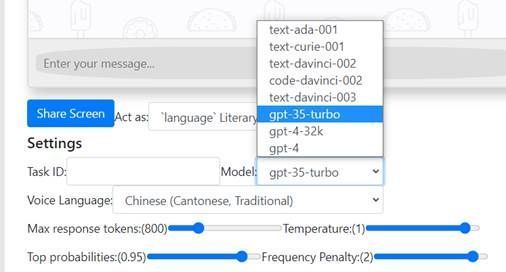
If there are multiple questions or tasks in the assignment, students need to provide a certain Task ID.

The above shows the expenses of the previous conversation and the remaining balance.
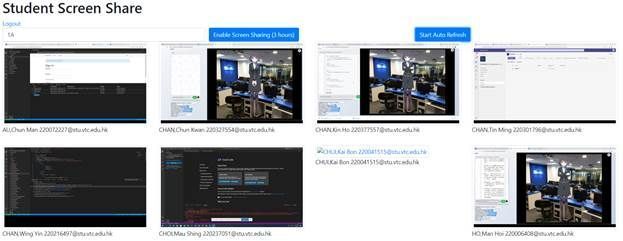
** Recording Screens ** The Role attribute must be set to Teacher to view the teacher share screen panel in users table.

The teacher inputs the class ID and selects the “Enable Screen Sharing (3 hours)” button. The system queries the “classes” storage table and retrieves the list of students.
The Azure function “enable-screen-sharing” creates a new entry in the “sessions” storage table and removes the cached screens from the root level.
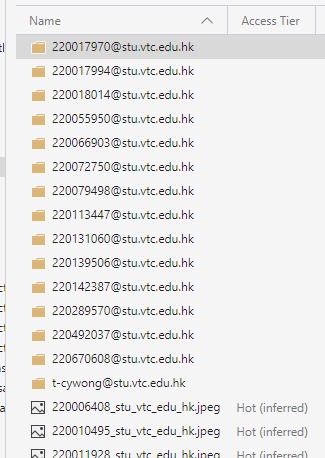
The student clicks on the “Share Screen” button and their chosen view is uploaded to the Azure function “screens” every 5 seconds. This function stores two copies of the screen images.


The images in the folder are deleted after 7 days and the images in the root are always updated to the latest screen.
The “Start Auto Refresh” button triggers the Azure Function “get-class-screens” to fetch the SAS URL of the latest class screen every 5 seconds. If the cached screens are deleted or the students cannot share their screens, the image will not be displayed.

This feature has helped a lot with online teaching during the pandemic period. Otherwise, most students would just join the MS team meeting and then leave. Having this feature we can track student interaction throughout the lecture to ensure they are engaged in the lesson.
Automatic Grading Assignment The process mimics how humans work. Teacher need to create a marking scheme or use ChatGPT to produce one.

(1) The teacher setup filter with date range and an optional Task ID.
(2) Define a marking scheme template.
And, merge with the following JSON by mustache.js template engine.
(3) Click on “Grade with AI” and the generated prompt.
(4) “ChatGPT Grading” Response

(5) By repeating steps 1 – 4 for several students until the marks and comments are satisfactory, it will become the final marking scheme.
(6) To mark all students in the class automatically, click on the “Grade this class” button.
(7) To download the mark report, click on “Mark Report” button.

To help students save cost by choosing a suitable model, we enable all Azure Open AI Services LLM models by default.
Accomplishments that we're proud of
The initial version has won a number of awards and featured in public tech conference:
- The Greater Bay Area STEM Excellence Award 2023 (HK) : Bronze Award
- The Pan-Pearl River Delta Region IT Project Competition 2023 : First Prize
- Guangdong - Hong Kong - Macao Bay Area IT System Development Competition : First Prize
- Cloud conference 2023 - lightning talk
- Project sharing was Featured in the opensource conference in 2023 (One of the largest yearly developer community conferences in HK).
What we learned
This project allows teachers to train and evaluate students’ prompt engineering skills to solve problems. We cannot prevent students from using AI and we should enable them to complete assignments with the help of AI but under a fair and supervised environment.
We need to maintain fairness - the concern arises when some students use AI while others do it manually, but they are graded with the same criteria.
When students use AI to complete an assignment, the educator/teacher should also use AI to assess their work. AI can help educators/teachers save time and focus on other meaningful tasks that improve their teaching quality.
Some educators/teachers may argue that students do not work hard for their assignments and learn nothing after using AI, especially in Asia. However, there are many assignments are designed to search for answers in notes or Google information, and then summarize them. Almost all assignments are testing the reading and writing ability. As a result, students who are good at languages will always have an advantage and the others may sometimes lose motivation to study. We all agree that language courses should not use AI as AI can make anyone a good writer easily.
However, with the help of AI, students who are weak in language can regain their interest and confidence to learn as they can complete assignments with AI assistance. In fact, I can set more challenging assignments now as I assume everyone has AI support and set some tasks that were impossible before.

What's next for Auto Grading with Azure OpenAI Services ChatGPT AI Assistant
AI is essential! Our solution can train and test students effectively with AI and solve problems at a low cost. Lower cost also means less power consumption and more environmental friendliness.
We will explore more LLM model integration to make sure the project can be used in classroom of our institution at the lowest cost.
Built With
- azure
- azure-function
- azure-openai
- blob-storage
- cognitive-ai


Log in or sign up for Devpost to join the conversation.