-
-
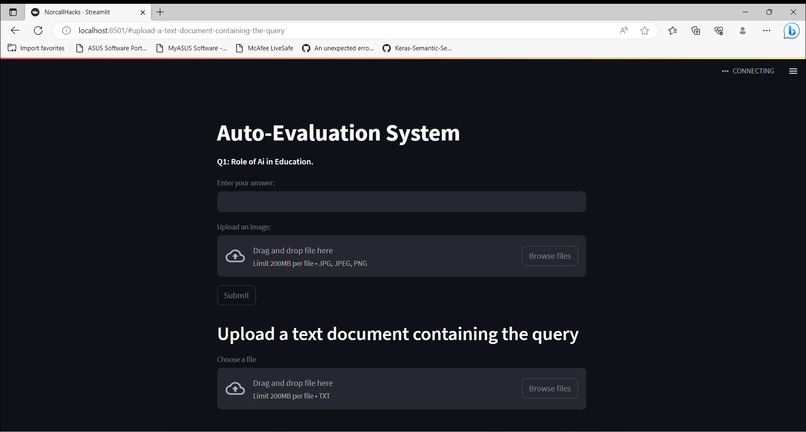
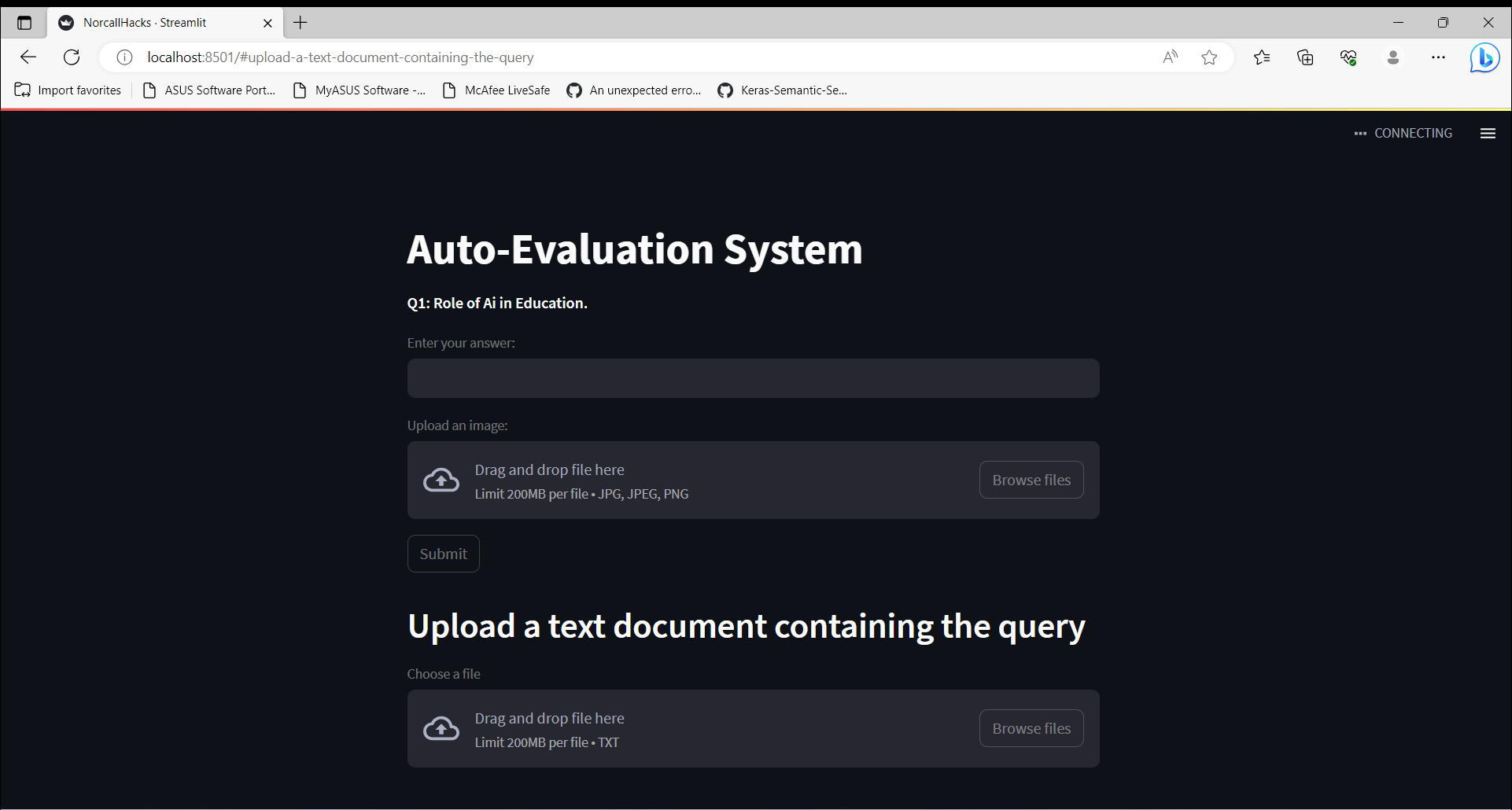
The page loads with a random question that can be answered with text, image, or by uploading a file containing programming or SQL language.
-
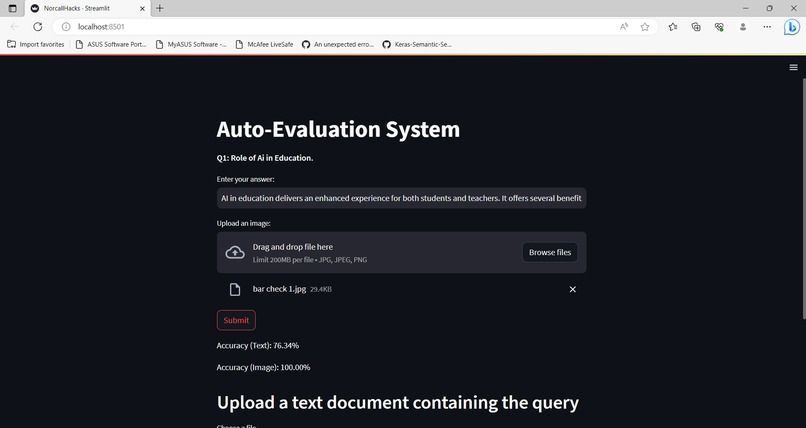
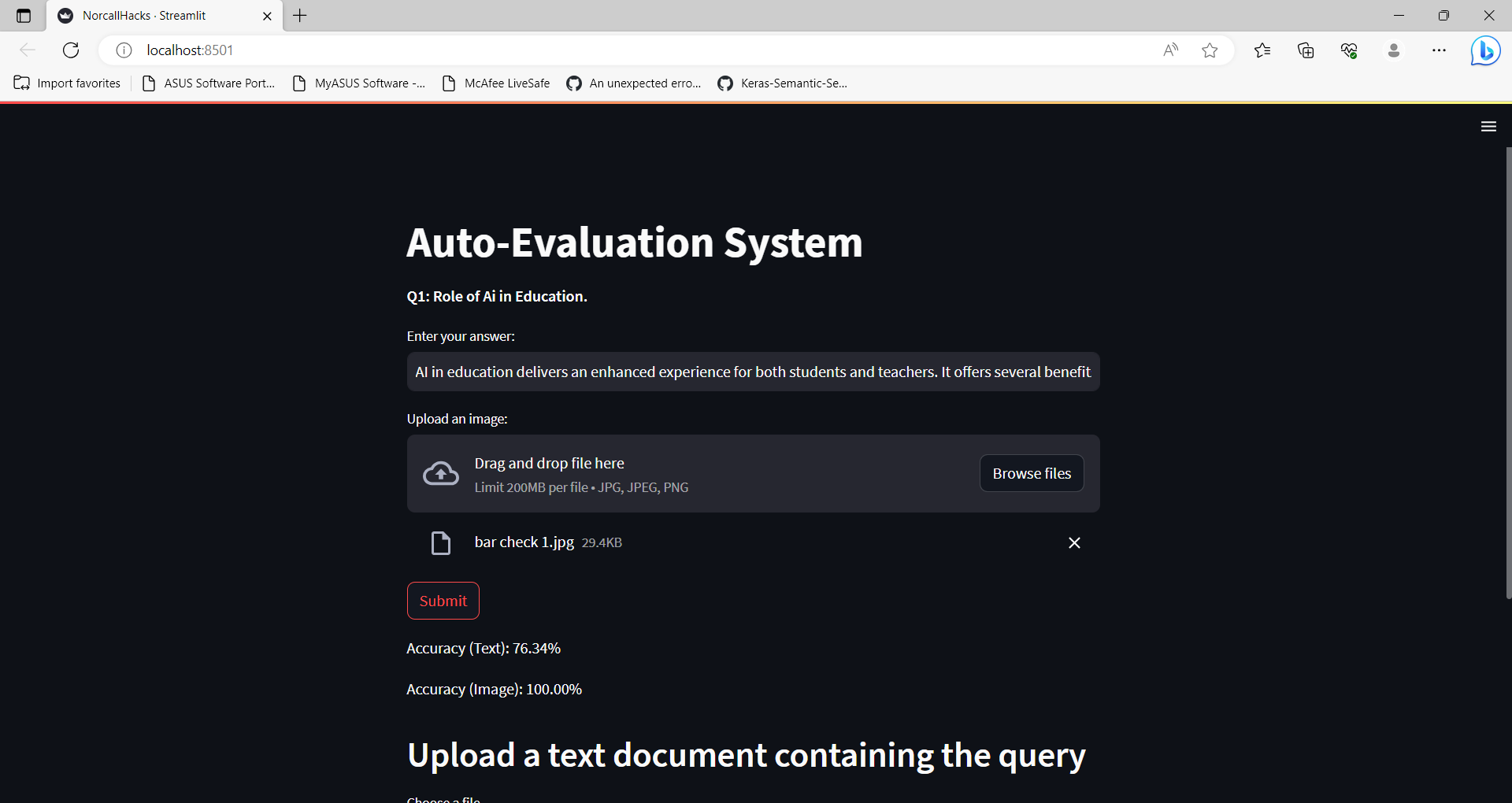
The candidate is evaluated in accordance with the answer scheme if they opt to respond in text or image format.
-
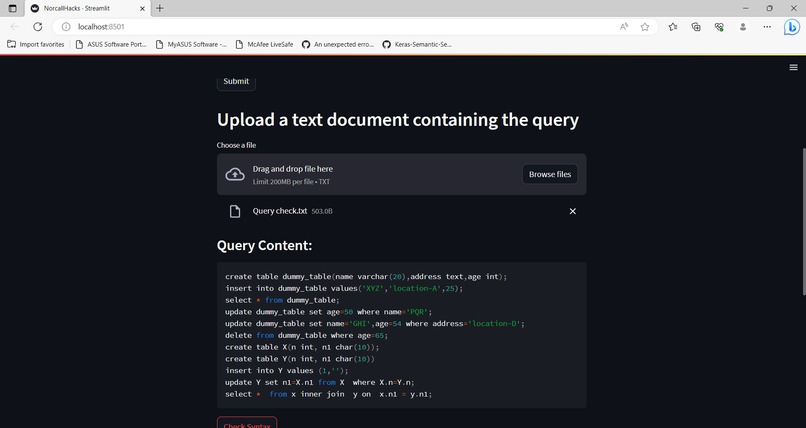
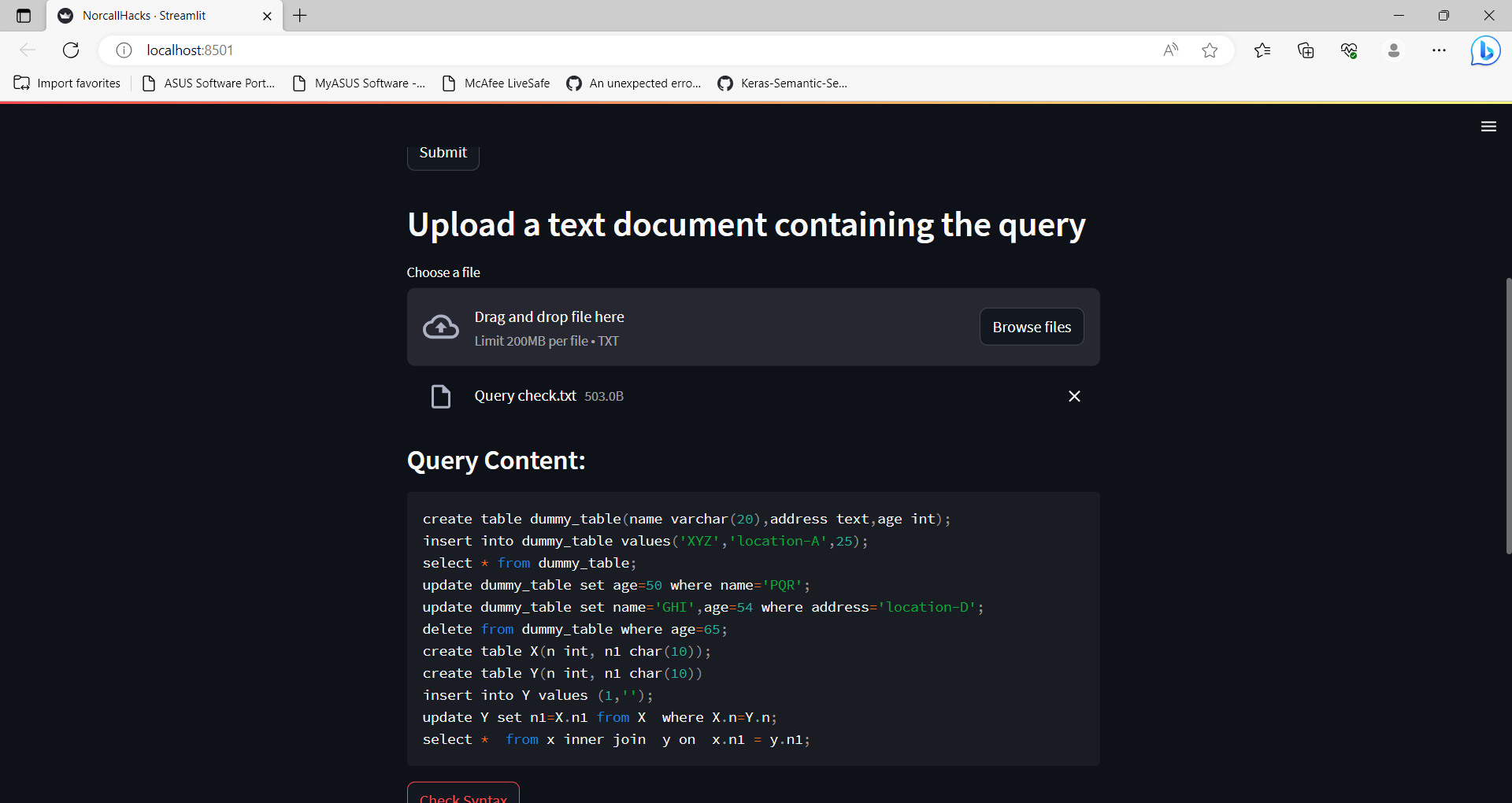
The candidate can submit the material in the appropriate way if he wants to respond using programming or SQL language.
-
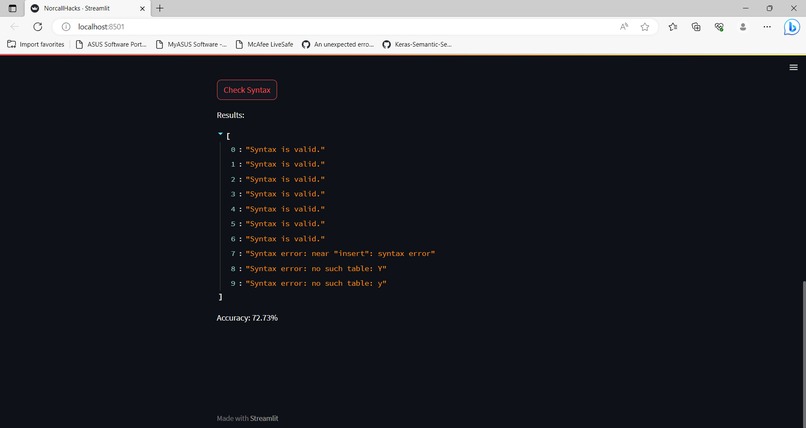
The syntax as well as the logic is being checked and evaluated accordingly.
Inspiration:
The education system is being used by millions of students around the globe. With the aid of an examination, their abilities are evaluated. It still takes a lot of time and laborious effort to examine the answers in an examination; this is still a very lengthy and onerous process. These doubts about the system gave me the idea to create an automated evaluation system that will help save time and require less human interaction.
What it does:
The Auto-Evaluation System is an innovative web application built with Streamlit, a Python library for creating interactive web applications, which empowers users to answer questions and receive instant, automated evaluations for their responses. Designed with versatility in mind, the system incorporates advanced Natural Language Processing (NLP) techniques for text evaluation and utilizes the VGG16 deep learning model for image evaluation The application utilizes SQLite, a lightweight relational database management system, to validate the queries' syntax.
How we built it:
Data Handling: The system reads question data from an Excel file using the Pandas library. Each question is paired with its corresponding text answer and an image path for image-based questions. This data is organized into a dictionary for easy access during the evaluation process.
Streamlit: The user interface of the application is designed using the Streamlit library. Streamlit simplifies the creation of interactive web applications by allowing Python code to directly control web elements, such as buttons, text inputs, and file uploaders.
Text Evaluation: For text-based answers, the system employs the TfidfVectorizer from scikit-learn to convert the user's answer and the original answer into numerical vectors. Cosine similarity is then calculated between these vectors to determine the similarity and accuracy of the text response.
Image Evaluation: For image-based answers, the application uses the VGG16 model from TensorFlow-Keras to extract features from both the user's uploaded image and the original image associated with the question. Cosine similarity is again utilized to compare these image features and compute the similarity score.
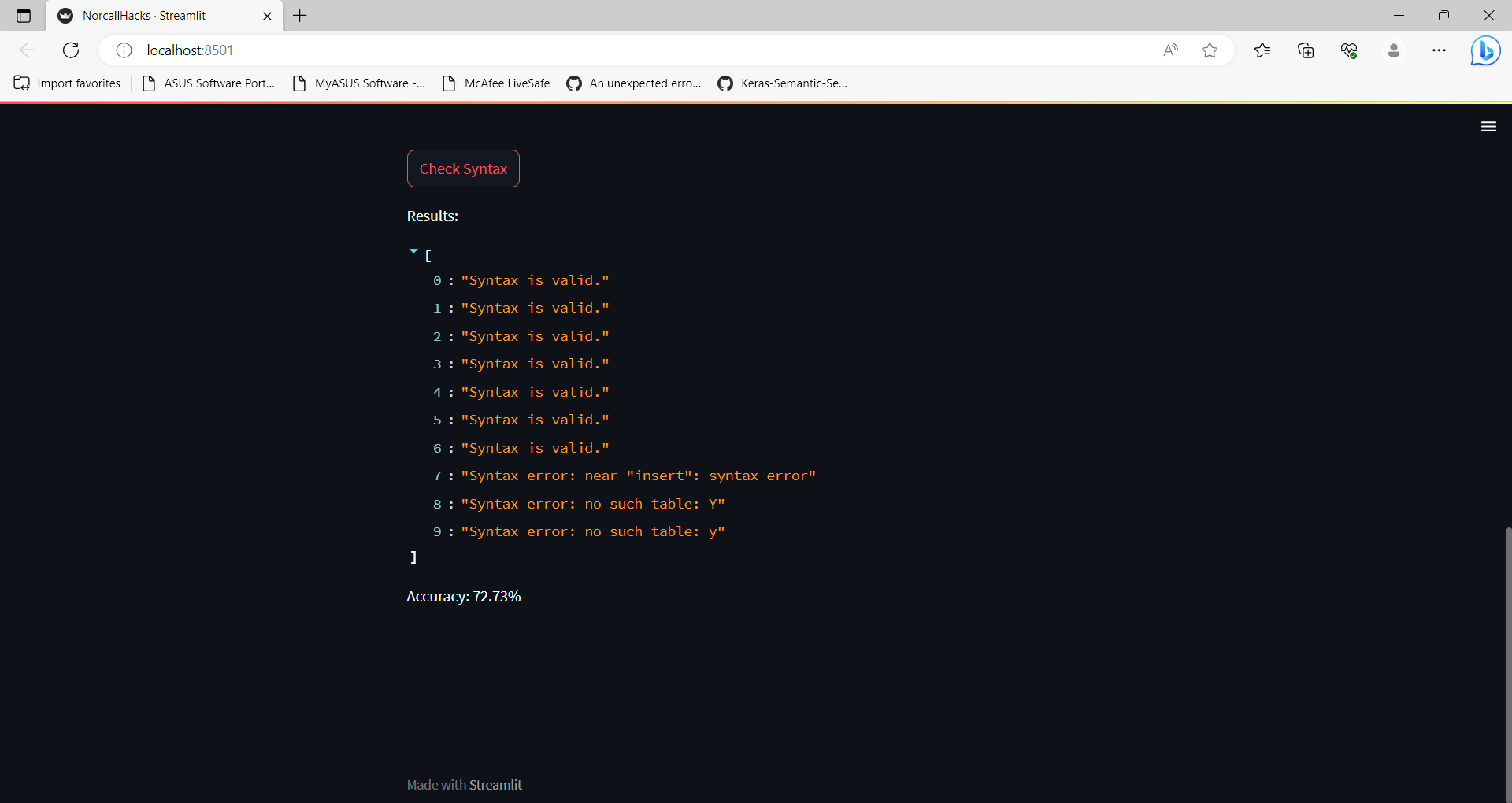
Syntax Checking Function: The core functionality of the application is encapsulated in the "check_query_syntax" function. This function takes the content of the uploaded text file, which contains one or more SQL queries, as input. It then splits the content into individual query statements based on semicolons and evaluates each query statement's syntax using SQLite.
SQLite Integration: The application uses SQLite, a lightweight relational database management system, to create an in-memory database connection. Each query statement is executed within this in-memory database connection to check for syntax errors. If a query statement is valid, it is marked as "Syntax is valid." Otherwise, the specific syntax error is recorded and displayed.
Random Question Selection: To provide a varied user experience, the system randomly selects one question from the dataset to present to the user. This ensures that each user gets different questions for evaluation.
Results Display: The system displays the selected question along with a text input box for the user to enter their text answer. Users can also upload an image as their response if applicable or can upload a text file consisting of queries. Once the user submits their answer, the application computes the accuracy for both text and image-based responses and displays the results.
Challenges we ran into:
There were various difficulties we faced. The most important step was to accept answers as files in whatever format, regardless of if they were in the form of text answers, images answers, or files made up of query languages. The handling of the data, which involved retrieving the questions at random and immediately assigning a score to each response using comparisons, was the next issue. The hardest part of the process was evaluating the text using natural language processing, the photos using openCV, and the query languages using an integration of SQLLite3.
Accomplishments that we're proud of:
Text Answer Evaluation: The system successfully evaluates the accuracy of text answers provided by users. It uses TF-IDF vectorization and cosine similarity to compare user-provided text answers with the original text answers from the dataset. This accomplishment allows users to receive feedback on the similarity of their responses to the correct answers.
Image Answer Evaluation: The system incorporates image processing and computer vision techniques to evaluate the accuracy of image answers. It uses a pre-trained VGG16 model to extract image features and calculates cosine similarity to compare the user-uploaded images with the original images from the dataset. This allows users to receive feedback on how closely their images match the correct ones.
Random Question Generation: The system randomly selects questions from the dataset and presents them to users. This feature provides diversity and unpredictability, making the evaluation process more engaging and challenging.
SQL Query Syntax Checking: The project includes a function that checks the syntax of SQL queries provided in a text document. It uses SQLite to execute the queries and provides feedback on the correctness of the syntax. This feature enables users to verify the accuracy of their SQL queries.
User-Friendly Interface: The project utilizes the Streamlit library to create an interactive and user-friendly web application. Users can easily input their answers, upload images and text documents, and receive feedback on their submissions.
Integration of Multiple Techniques: The project combines natural language processing (NLP) for text evaluation, computer vision for image evaluation, and SQL query syntax checking in a single application. This integration demonstrates the ability to handle diverse types of data and tasks within one system.
Error Handling: The project includes error handling for scenarios such as failed image loading or incorrect file types, ensuring a smooth user experience and preventing potential crashes. Feedback and Accuracy Display: The system displays evaluation accuracy in percentage form for both text and image answers. This accomplishment allows users to understand how well their answers align with the correct ones.
Efficient Processing: The project efficiently processes text and image data, leveraging pre-trained models and techniques to evaluate answers accurately and quickly.
What we learned
Natural Language Processing (NLP): Understanding and implementing NLP techniques for text processing, such as using TF-IDF vectorization and cosine similarity to evaluate the accuracy of text answers.
Computer Vision: Utilizing pre-trained deep learning models (VGG16) to extract image features and using cosine similarity to assess the accuracy of image answers. Streamlit: Learning to use Streamlit, a Python library for creating interactive web applications for data science and machine learning projects.
Data Handling and Manipulation: Working with data from an Excel file, converting it into a dictionary, and displaying random questions.
Machine Learning Models: Employing pre-trained models (VGG16) to extract image features and applying similarity metrics for evaluation purposes.
SQL Query Syntax Checking: Implementing a function to check the syntax of SQL queries using SQLite and handling errors.
File Handling: Allowing users to upload text, image files and process their content.
Web Application Development: Creating a user-friendly web application using Streamlit for the Auto-Evaluation System.
Integration of Different Techniques: Combining NLP, Computer Vision, and SQL query syntax checking to create a cohesive auto-evaluation system.
Error Handling: Dealing with possible errors, such as failed image or file loading. Overall, this project encompasses various topics and techniques, providing a good learning experience for individuals interested in NLP, computer vision, web application development, and data science.
What's next for Auto-Evaluation System:
User Authentication: Implementing user authentication and user profiles can offer personalized experiences, enabling users to track their progress over time and access their historical performance records.
Advanced NLP Techniques: Enhancing the text evaluation component with advanced NLP techniques, such as semantic similarity models or pre-trained language models (e.g., BERT), can lead to more accurate assessments of textual responses. Improved Image Evaluation: Instead of using VGG16 for image feature extraction, incorporating more advanced deep learning models, such as ResNet or EfficientNet, could potentially improve the accuracy of image-based evaluation.
Feedback and Learning Resources: Integrating feedback mechanisms and providing learning resources based on evaluation results can guide users in understanding their mistakes and improving their skills. Question Categories and Difficulty Levels: Categorizing questions based on topics or difficulty levels can provide users with targeted practice and assessment in specific areas of interest.
Performance Analytics: Building data visualization tools to analyze and visualize user performance over time can provide valuable insights into learning trends and areas for improvement. Customizable Evaluation Criteria: Allowing educators and evaluators to define custom evaluation criteria, such as specific keywords or phrases, can tailor the evaluation process to meet specific learning objectives.

Log in or sign up for Devpost to join the conversation.