-
-
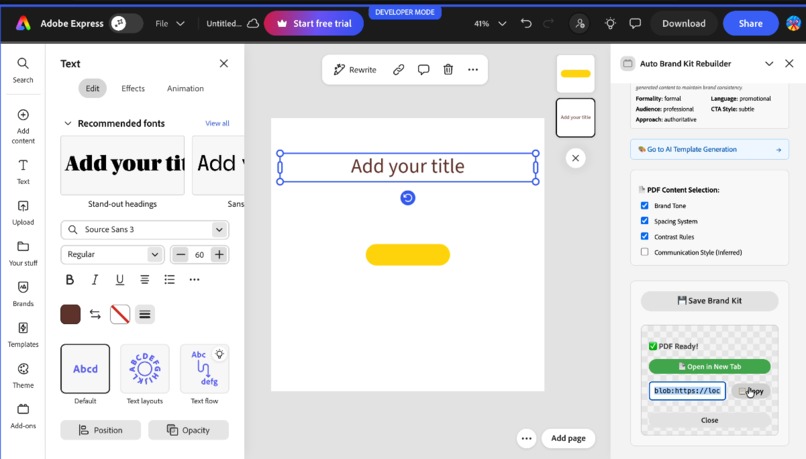
Brand Kit
-
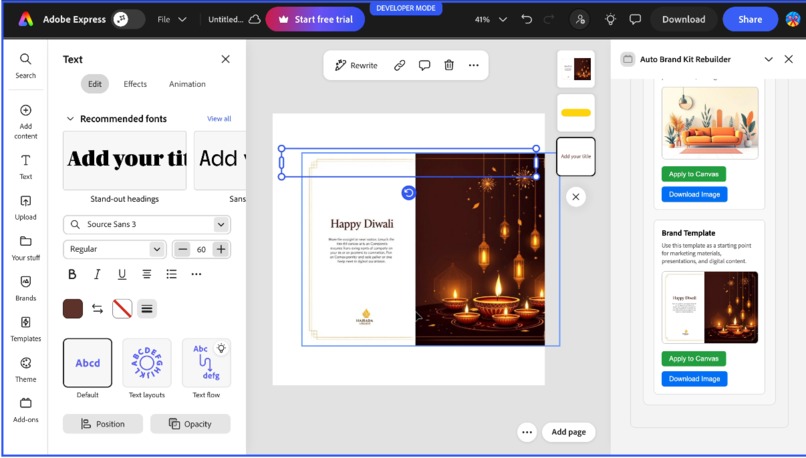
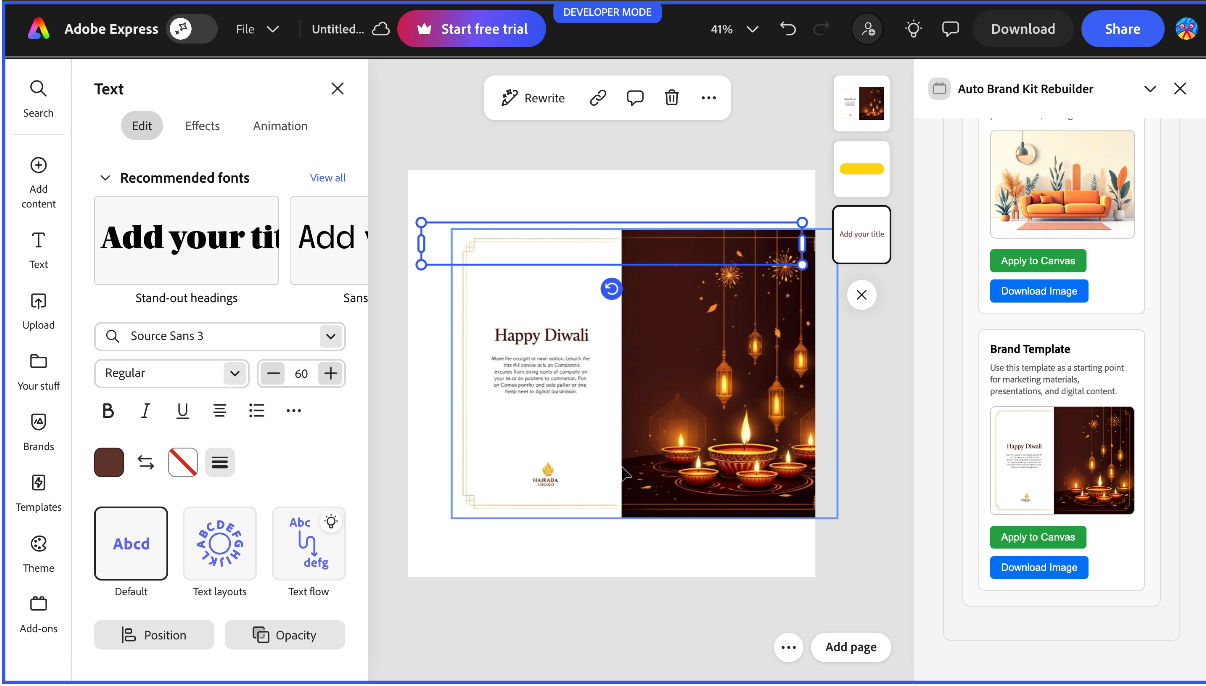
Template Generation
-
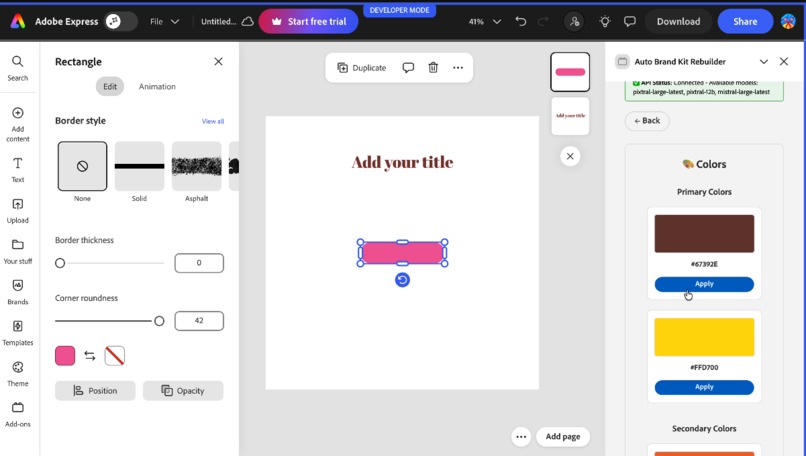
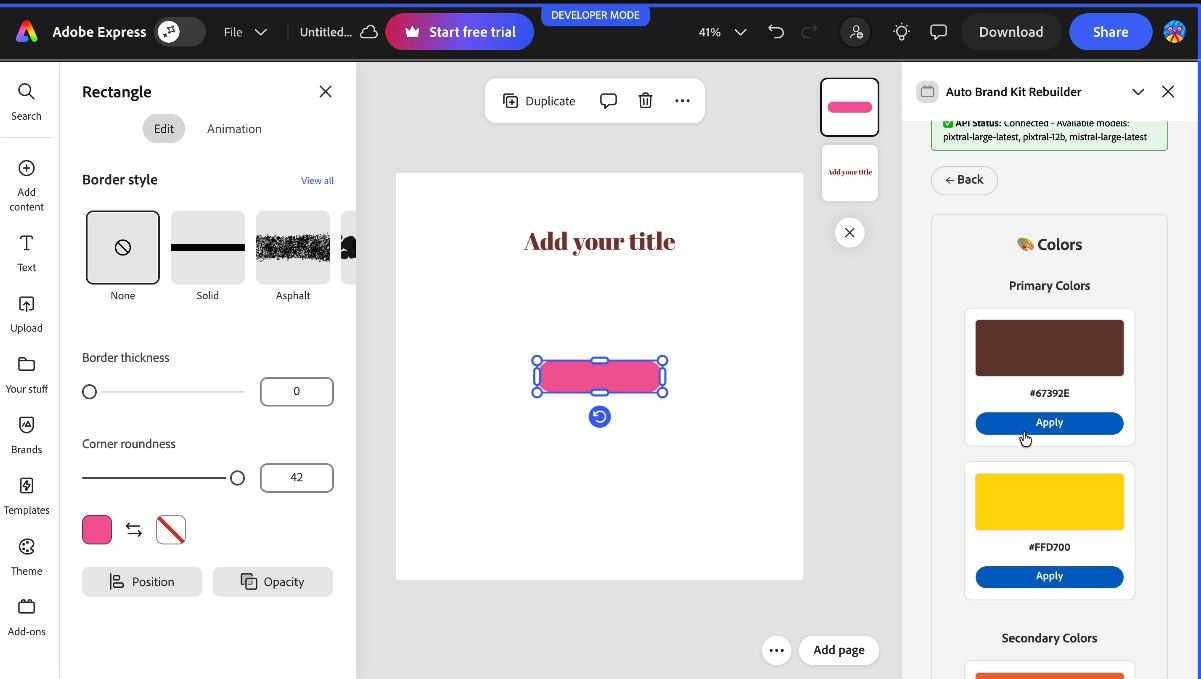
Colour Implementation
-
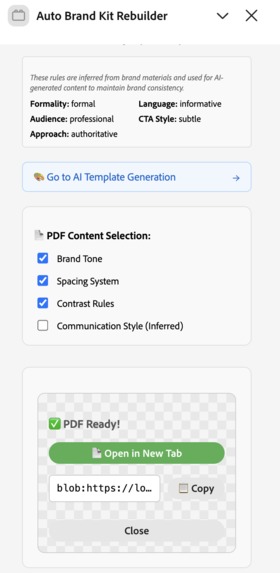
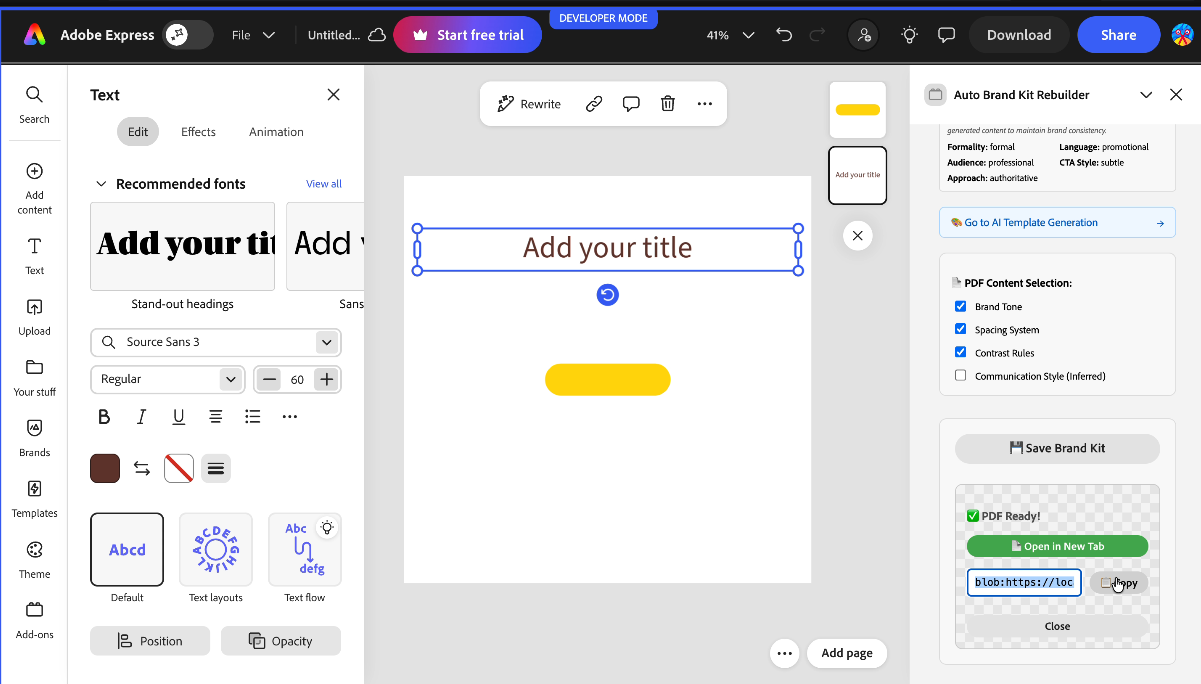
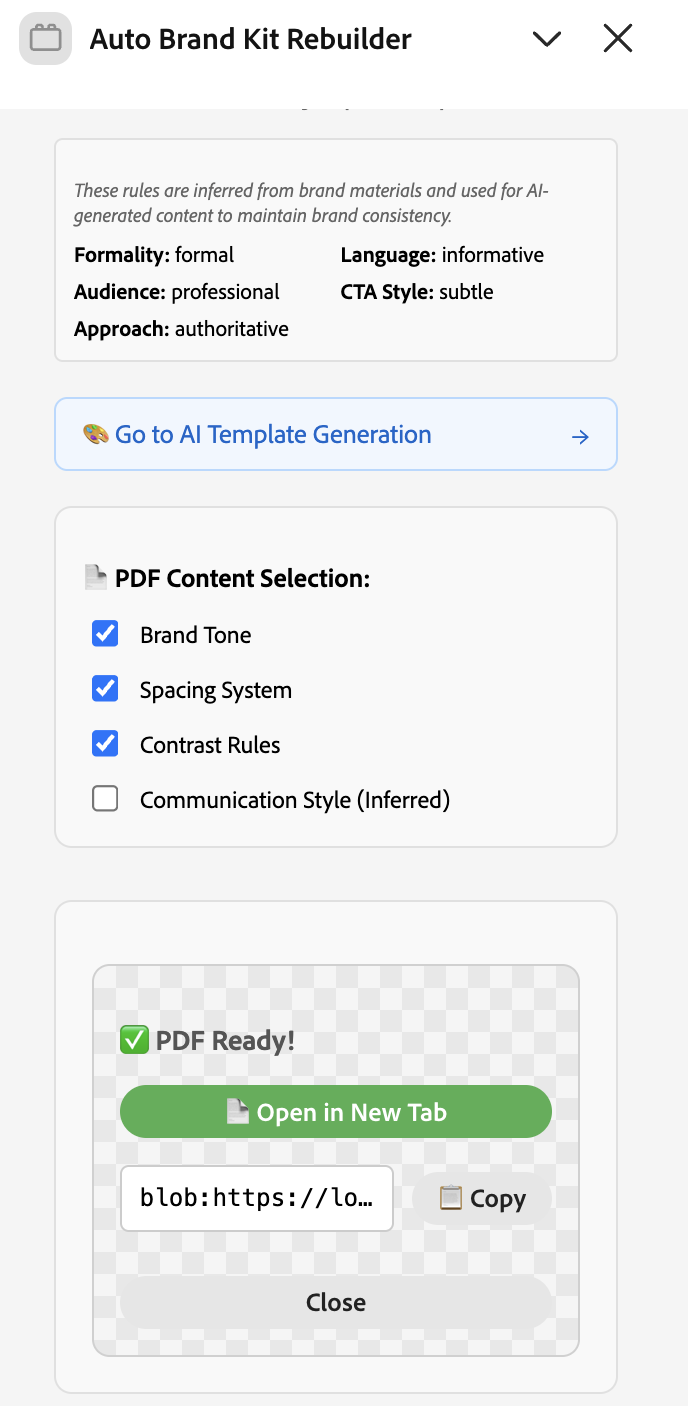
Addon UI on Adobe Express-bottom
-
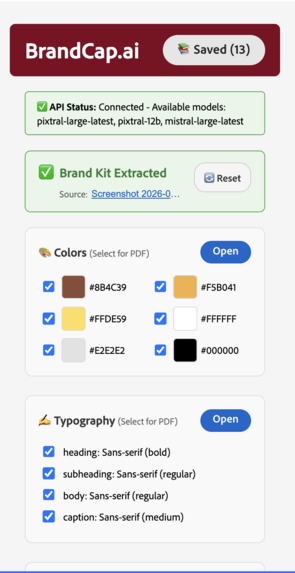
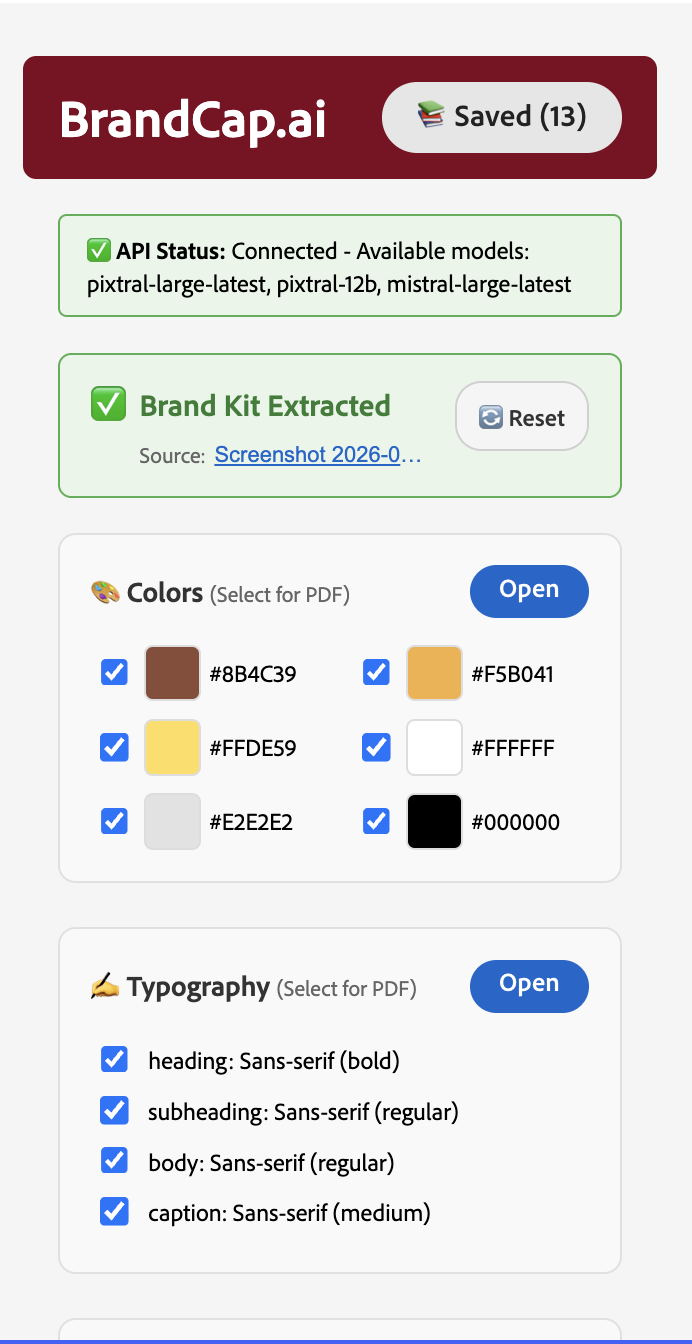
Addon UI on Adobe Express-top
BrandCap.ai - Adobe Express Add-on
Complete Features Documentation
📖 Table of Contents
📋 Overview
BrandCap.ai is an intelligent Adobe Express Add-on that uses advanced AI vision technology to reverse-engineer complete brand kits from screenshots, app UIs, PDFs, or any brand material images. It extracts brand identity elements and provides powerful tools to apply them to Adobe Express documents, generate comprehensive brand guidelines, and create platform-optimized designs.
Key Highlights
- ✅ AI-Powered Extraction - Uses Mistral Pixtral Vision API for accurate brand analysis
- ✅ Real-Time Suggestions - Intelligent color and typography recommendations while designing
- ✅ Seamless Integration - Native Adobe Express document manipulation
- ✅ Professional PDFs - Generate comprehensive brand usage guidelines
- ✅ Template Generation - AI-created templates using your brand kit
- ✅ Storage System - Save and manage multiple brand kits locally
🚀 Core Features
1. AI-Powered Brand Kit Extraction
What It Does
Analyzes uploaded images, screenshots, app UIs, or PDFs to extract comprehensive brand identity information using advanced vision AI.
Extracted Elements
🎨 Colors
- Primary Colors - Main brand colors used for key elements and CTAs
- Secondary Colors - Supporting colors for secondary information
- Accent Colors - Highlight colors used sparingly for emphasis
- Neutral Colors - Backgrounds, borders, and neutral elements
- Each color includes:
- Hex code (e.g.,
#0066CC) - RGB values (0-255 and 0-1 ranges)
- Usage descriptions and recommendations
- Hex code (e.g.,
✍️ Typography
- Heading Styles - Font family, weight, size for main headings
- Subheading Styles - Styles for section headers
- Body Text Styles - Standard text font specifications
- Caption Styles - Font styles for captions and small text
- Each typography entry includes:
- Font family name
- Font weight (light, regular, medium, bold, black)
- Font size in points
- Line height and letter spacing
📐 Spacing System
- Base Unit - Foundation spacing unit for consistent layouts
- Section Gap - Spacing between major sections
- Paragraph Gap - Spacing between paragraphs
- Element Padding - Padding around individual elements
🎯 Contrast Rules
- WCAG-compliant color combinations
- Contrast ratios (AA, AAA standards)
- Usage guidelines for accessible color pairs
- Foreground/background combinations with compliance levels
💬 Communication Style
- Formality Level - Formal, casual, or neutral tone
- Language Style - Promotional, informative, educational, conversational
- Audience Type - Enterprise, consumer, startup, creator, professional
- CTA Style - Aggressive, subtle, or moderate approach
- Communication Approach - Direct, friendly, authoritative, approachable
🎨 Brand Tone
- Descriptive text about the brand's visual personality
- Overall aesthetic description
How It Works
- Image Upload - User uploads an image file (PNG, JPG, PDF)
- AI Analysis - Mistral Pixtral Vision API (
pixtral-large-latestorpixtral-12b) analyzes the image - Structured Extraction - AI extracts brand elements in structured JSON format
- Data Transformation - Raw extraction results are transformed into a structured BrandKit object
- Preview Display - Extracted elements are displayed in the UI for review
Technical Details
- API: Mistral Pixtral Vision API
- Models:
pixtral-large-latestorpixtral-12b - Processing Time: Typically 5-15 seconds per image
- Input Formats: PNG, JPG, JPEG, PDF
- Output: Structured BrandKit object with all extracted elements
2. Real-Time Color Suggestions
What It Does
Monitors your Adobe Express document and provides intelligent color suggestions when text elements don't match your brand kit colors.
Features
- Automatic Detection - Continuously monitors selected text elements
- Color Matching - Compares selected text colors with brand kit colors
- Smart Suggestions - Recommends appropriate brand colors based on text role
- One-Click Apply - Apply suggested colors directly to selected text
- Role-Based Recommendations - Suggests colors based on text hierarchy (headings → primary, body → neutral, etc.)
How It Works
- Document Monitoring - Polls document selection every 2 seconds
- Color Extraction - Extracts color from selected text element
- Brand Kit Comparison - Compares extracted color with brand kit colors
- Suggestion Display - Shows suggestion banner if color doesn't match
- Apply Action - User can apply suggested color or dismiss suggestion
User Experience
- Non-intrusive suggestion banner
- Visual comparison (current color vs. suggested color)
- Clear indication of which brand color role matches
- Dismissible suggestions (won't show again for same element)
3. Real-Time Typography Suggestions
What It Does
Provides intelligent typography suggestions when text elements don't match your brand kit typography specifications.
Features
- Font Family Matching - Detects when text uses non-brand fonts
- Weight & Size Analysis - Checks font weight and size against brand kit
- Role-Based Suggestions - Recommends appropriate typography based on text role
- Hierarchy Detection - Automatically detects heading vs. body text
- One-Click Apply - Apply suggested typography directly to selected text
How It Works
- Font Detection - Identifies font family, weight, and size of selected text
- Role Analysis - Determines if text is heading, subheading, body, or caption
- Brand Kit Comparison - Compares detected typography with brand kit specifications
- Suggestion Display - Shows suggestion if typography doesn't match
- Apply Action - User can apply suggested typography or dismiss
User Experience
- Shows current vs. suggested font details
- Displays font family, weight, and size differences
- Clear indication of typography role (heading, body, etc.)
- Seamless application to selected elements
4. Brand Kit Application to Documents
What It Does
Creates a visual preview of your extracted brand kit directly in the Adobe Express document, making it easy to reference and use brand elements.
Created Elements
Color Swatches
- Visual color rectangles for each color category
- Organized by role (Primary, Secondary, Accent, Neutral)
- Hex code labels below each swatch
- Professional grid layout
Typography Samples
- "Aa" character samples showing font styles
- Font name labels
- Character sets (A-Z, a-z, 0-9, special characters)
- Organized by typography role
Layout Structure
- Clean, organized preview layout
- Section labels and headings
- Proper spacing and alignment
- Ready to use or reference
Technical Implementation
- Uses Adobe Express Document SDK
- Creates native Express elements (text, rectangles)
- Maintains proper positioning and spacing
- Interactive and editable in Express
5. PDF Brand Guidelines Generation
What It Does
Generates a comprehensive, professional PDF document containing complete brand usage guidelines that can be shared with teams, clients, or saved for reference.
PDF Contents
Cover Page
- Brand name and description
- Professional layout with brand colors
- Brand tone description
Color Palette Page
- Visual color swatches organized by category
- Hex codes and RGB values
- Usage guidelines for each color
- Accessible color combinations
Typography Page
- Font samples for each typography role
- Character sets and special characters
- Font weights and sizes
- Typography hierarchy documentation
Design System Page
- Spacing system values and usage
- Contrast rules with WCAG compliance
- Color pair recommendations
- Layout guidelines
Communication Style Page (Optional)
- Brand voice and tone
- Audience targeting
- CTA style guidelines
- Language recommendations
Template Gallery (If Available)
- AI-generated brand templates
- Template usage guidelines
- Visual examples
PDF Features
- Professional Layout - Clean, modern design
- Landscape Orientation - Optimized for presentations
- Customizable - Select which sections to include
- Print-Ready - High-quality output suitable for printing
- Downloadable - Generate and download instantly
Selection Options
Users can choose what to include in the PDF:
- ✅ Colors (select specific colors)
- ✅ Typography (select specific fonts)
- ✅ Spacing System
- ✅ Contrast Rules
- ✅ Communication Style
- ✅ Brand Tone
6. Brand Kit Storage & Management
What It Does
Save, load, and manage multiple brand kits using browser LocalStorage, allowing you to work with different brands in the same session.
Features
Save Brand Kits
- Save extracted brand kits with custom names
- Automatically captures source file name
- Timestamp tracking for organization
Load Saved Kits
- View all saved brand kits in a modal
- See kit names, creation dates, and source files
- Quick preview of brand kit details
Apply Saved Kits
- Load any saved brand kit into current session
- Immediately use for suggestions and PDF generation
- Switch between different brand kits seamlessly
Delete Kits
- Remove unused brand kits
- Storage management (5MB limit)
- Prevent storage overflow
Storage Details
- Uses browser LocalStorage
- 5MB storage limit
- Automatic size checking
- Error handling for storage issues
User Interface
- Save Modal - Name your brand kit before saving
- Saved Kits Modal - Browse and manage all saved kits
- Success Messages - Confirmation when kits are saved/deleted
- Storage Warnings - Alerts when storage limit is reached
7. AI Template Generation
What It Does
Generate professional brand templates using AI that showcase your brand kit elements (colors, typography, layout) in ready-to-use design templates.
Features
Template Types
- Hero - Large banner templates for headers
- Card - Card-based layouts
- Grid - Grid system layouts
- Sidebar - Sidebar navigation layouts
- Fullscreen - Full-page designs
- Magazine - Magazine-style layouts
- Minimal - Clean, minimal designs
AI Generation
- Uses Mistral Agents API with image generation tool
- Creates templates based on brand kit
- Customizable prompts for specific template needs
- Progress tracking during generation
Template Features
- Visual preview images
- Template descriptions
- Usage guidelines
- Ready to add to Express documents
How It Works
- Agent Creation - Creates a Mistral agent with image generation capability
- Prompt Generation - Builds prompts based on brand kit and user instructions
- Image Generation - AI generates template images
- Template Processing - Downloads and processes generated images
- Display & Use - Shows templates in gallery for selection and use
User Experience
- Reference image upload for style guidance
- Custom prompt input for specific requirements
- Progress updates during generation
- Template gallery with visual previews
- One-click add to Express documents
8. Multi-Platform Converter
What It Does
Convert raw designs to platform-optimized versions (Instagram, LinkedIn, YouTube, TikTok, etc.) while maintaining brand consistency.
Platform Support
Social Media Platforms
- Instagram (1080x1080)
- LinkedIn (1200x627)
- YouTube Thumbnails (1280x720)
- TikTok (1080x1920)
- Facebook (1200x630)
- Twitter/X (1200x675)
Document Formats
- Presentation slides
- Posters
- Flyers
- Web banners
Conversion Process
- Brand Kit Application - Apply brand kit to raw design
- Recoloring - Map colors to brand palette
- Typography Refinement - Apply brand fonts
- Spacing Alignment - Adjust to brand spacing system
- Platform Optimization - Resize and optimize for target platform
- Content Adaptation - Adjust copy and layout for platform style
Features
- Automatic Resizing - Platform-specific dimensions
- Safe Zone Detection - Ensures important content is visible
- Platform-Specific Styles - Adapts tone and style for each platform
- Batch Conversion - Convert to multiple platforms at once
- Brand Consistency - Maintains brand identity across all platforms
🏗️ Technical Architecture
Technology Stack
Frontend
- React 18.2.0 - UI framework
- TypeScript - Type safety
- Spectrum Web Components - Adobe design system
- CSS Modules - Styling
AI & APIs
- Mistral Pixtral Vision API - Brand extraction
- Mistral Agents API - Template generation
- Custom backend proxy (optional) - CORS handling
PDF Generation
- jsPDF 2.5.1 - PDF creation
- Custom layout engine
Adobe Integration
- Adobe Express Add-on SDK
- Express Document SDK
- Document Sandbox API
Storage
- Browser LocalStorage - Brand kit persistence
Project Structure
AdobeExpress/
├── src/
│   ├── ui/
│   │   ├── components/
│   │   │   ├── App.tsx          # Main application component
│   │   │   ├── FileUpload.tsx   # File upload component
│   │   │   └── App.css          # Component styles
│   │   ├── index.tsx            # UI entry point
│   │   └── tsconfig.json        # TypeScript config
│   │
│   ├── sandbox/
│   │   ├── code.ts              # Document manipulation code
│   │   └── tsconfig.json        # TypeScript config
│   │
│   ├── services/
│   │   ├── mistralService.ts            # Brand extraction API
│   │   ├── mistralImageGenerationService.ts  # Template generation
│   │   ├── brandKitService.ts           # Data transformation
│   │   ├── brandKitStorageService.ts    # Storage management
│   │   └── pdfService.ts                # PDF generation
│   │
│   ├── models/
│   │   ├── BrandKit.ts                  # Data models
│   │   └── DocumentSandboxApi.ts        # API interfaces
│   │
│   ├── assets/
│   │   └── logo.png                     # Logo image
│   │
│   ├── manifest.json                    # Add-on manifest
│   ├── index.html                       # HTML entry point
│   └── images.d.ts                      # Image type declarations
│
├── backend/                             # Optional backend proxy
│   ├── server.js                        # Express server
│   ├── package.json
│   └── README.md
│
├── dist/                                # Build output
├── webpack.config.js                    # Webpack configuration
├── tsconfig.json                        # Root TypeScript config
├── package.json                         # Dependencies
└── .env                                 # Environment variables (not in git)
Data Flow
User Uploads Image
        ↓
Mistral Vision API Analysis
        ↓
Raw Extraction Result (JSON)
        ↓
Transform to BrandKit Object
        ↓
Display in UI / Store in LocalStorage
        ↓
┌─────────────────┬──────────────────┬─────────────────┐
│                 │                  │                 │
Apply to Document  Real-Time         PDF Generation
                   Suggestions
👥 User Workflows
Workflow 1: Extract Brand Kit from Screenshot
- Launch Add-on - Open BrandCap.ai from Adobe Express Add-ons panel
- Upload Image - Click "Upload Screenshot or PDF" and select brand material
- Wait for Analysis - AI analyzes image (5-15 seconds)
- Review Results - Check extracted colors, typography, and spacing
- Apply to Document - Click "Apply Brand Kit to Document" to create preview
- Start Designing - Use brand kit elements in your design
Workflow 2: Get Real-Time Design Suggestions
- Extract Brand Kit - Complete workflow 1 first
- Create Text Element - Add text to your Express document
- Select Text - Click on text element
- View Suggestions - Color/typography suggestions appear automatically
- Apply Suggestions - Click "Apply" to update element
- Continue Designing - Suggestions work as you design
Workflow 3: Generate Brand Guidelines PDF
- Extract Brand Kit - Complete extraction first
- Open Export Panel - Click "Download Brand Kit"
- Select Sections - Choose what to include in PDF
- Select Colors - Pick specific colors to include
- Select Typography - Choose fonts to document
- Generate PDF - Click "Generate PDF"
- Download - PDF opens in new tab, ready to download
Workflow 4: Save and Manage Multiple Brand Kits
- Extract Brand Kit - Extract first brand kit
- Save Kit - Click "Save Brand Kit" button
- Name Kit - Enter descriptive name (e.g., "Company Brand 2024")
- Confirm Save - Kit is saved to LocalStorage
- View Saved Kits - Click "View Saved Kits" to see all
- Load Kit - Click on saved kit to load it
- Switch Brands - Easily switch between different brand kits
Workflow 5: Generate AI Templates
- Extract Brand Kit - Have brand kit ready
- Open Template Generation - Click template generation section
- Upload Reference - Optionally upload style reference image
- Enter Prompt - Describe desired template (optional)
- Generate - Click "Generate Template"
- Wait for Generation - Monitor progress (30-60 seconds)
- View Templates - Browse generated templates
- Add to Document - Click template to add to Express
🔧 Installation & Setup
Prerequisites
- Node.js version 18 or above (download here)
- Adobe Express Account (sign up here)
- Mistral API Key (get one here)
Installation Steps
Clone Repository
git clone <repository-url>
cd AdobeExpress
Install Dependencies
npm installConfigure API Key (see API Configuration below)
Build Project
npm run buildLoad in Adobe Express
- Open Adobe Express (https://new.express.adobe.com)
- Go to Add-ons panel
- Click "Load unpacked add-on"
- Point to the
distfolder
Development Mode
npm run start
Production Build
npm run build
npm run package
🔑 API Configuration
Mistral API Setup
The add-on uses Mistral Pixtral Vision API for brand extraction and Mistral Agents API for template generation.
Option 1: Environment Variable (Recommended)
Create a
.envfile in the root directory:MISTRAL_API_KEY=your_api_key_here PROXY_URL=http://localhost:3001 # Optional, for backend proxyThe
.envfile is loaded bydotenv-webpackplugin at build time
Option 2: Backend Proxy (For Production)
For production deployments, use the included backend proxy to:
- Keep API keys secure (never expose to client)
- Handle CORS issues
- Add rate limiting and authentication
Backend Setup:
cd backend
npm install
node server.js
The backend runs on http://localhost:3001 by default.
Get API Key
- Visit Mistral Console
- Sign up or log in
- Navigate to API Keys section
- Create new API key
- Copy key to
.envfile
API Endpoints Used
- Brand Extraction:
https://api.mistral.ai/v1/chat/completions - Template Generation:
https://api.mistral.ai/v1/beta/agents - File Downloads:
https://api.mistral.ai/v1/files
📝 Notes & Limitations
Known Limitations
- Logo Extraction - Currently identifies logos but doesn't extract actual logo images (requires image segmentation)
- Font Matching - Approximates font families rather than exact font matching
- Single Image - Processes one image at a time (multi-image support coming soon)
- Storage Limit - LocalStorage has 5MB limit for saved brand kits
- CORS for Template Generation - Template generation requires backend proxy for browser deployment
Browser Compatibility
- Chrome/Edge (Chromium-based) - Fully supported
- Firefox - Supported
- Safari - Supported
- Mobile browsers - Limited support (desktop recommended)
Performance
- Brand Extraction: 5-15 seconds per image
- Template Generation: 30-60 seconds per template
- PDF Generation: 1-3 seconds
- Real-Time Suggestions: Updates every 2 seconds
🎯 Use Cases
For Designers
- Quickly reverse-engineer brand kits from competitor analysis
- Maintain brand consistency across projects
- Generate brand guidelines for clients
- Create templates using brand assets
For Marketers
- Extract brand elements from existing materials
- Ensure brand consistency in campaigns
- Generate multi-platform content
- Create brand-compliant designs quickly
For Agencies
- Onboard new clients faster
- Maintain brand standards across teams
- Generate client deliverables (PDF guidelines)
- Create reusable brand templates
For Brand Managers
- Document brand guidelines
- Ensure consistent brand application
- Share brand kits with team members
- Generate brand compliance documentation
🚀 Future Enhancements
Planned Features
- [ ] Multi-image brand extraction
- [ ] Logo image extraction with segmentation
- [ ] Exact font matching with font detection
- [ ] Cloud storage integration
- [ ] Team collaboration features
- [ ] Version control for brand kits
- [ ] Export to other design tools (Figma, Sketch)
- [ ] Batch processing for multiple images
📄 License
This project is created for an enterprise hackathon. See individual dependencies for their respective licenses.
🤝 Contributing
This is a hackathon MVP. Contributions and feedback welcome!
Built with: React, TypeScript, Adobe Express SDK, Mistral AI, jsPDF
Last Updated: January 2025
Built With
- adobe-express-sdk
- adobe-mcp-server
- cursor
- express.js
- node.js
- react
- typescript
- vision-ai-models

Log in or sign up for Devpost to join the conversation.