-
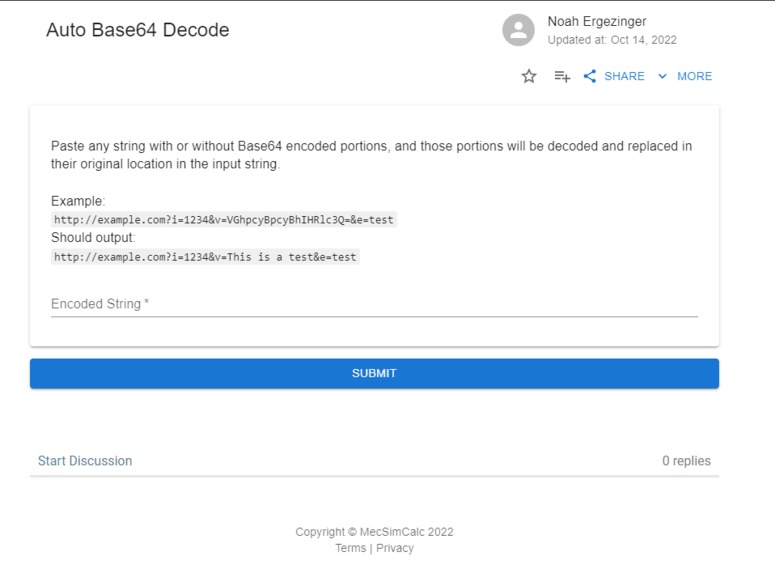
Screenshot of the tool

Inspiration
At work, when debugging network requests that contain base64 encoded query parameters, I often need to paste them into a decoding tool to see if the correct data is being sent. The issue is that this is slightly time-consuming because I need to copy only the encoded portions of the request, which isn't easy to do by eye because base64 encoded strings contain regular letters. This task becomes even more tedious if there are multiple encoded portions, which all need to be decoded separately.
What it does
Auto Base64 Decode parses a string for one or more base64 encoded portions, decodes them, and replaces the original input with the decoded data. It ignores portions that don't decode into text, such as images or binary data. It then recursively checks the decoded string for any more encoded portions, such as a query parameter that decodes into JSON data, which in itself contains encoded strings.
How I built it
The script checks the input string for substrings that, when base64-decoded, only contain ASCII characters.
Challenges I ran into
Initially, I parsed the input for formats commonly containing base64 encoded data, such as URL query strings or JSON. This gave me a dictionary of keys/value pairs, and it was easy to loop through the values to see if any were encoded. However, this meant that the tool could not deal with non-standard input, such as a JSON web token. I then tried testing all substrings that when decoded, contained English words. This method solved the non-standard input problem but didn't work with inputs that decoded into numeric values, single characters, or languages other than English. I finally settled on filtering on whether the decoded string contains only ASCII characters. This method does have an issue where some substrings found in some inputs, such as 'ampl' (part of the word example), are valid base64 and decode to only ASCII characters (in this case, 'jje'). I got around this by requiring decoded strings to have at least a length of four, but this remains a limitation of the tool. Another limitation is that back-to-back encoded strings will be parsed as one encoded string, often leading to only correctly parsing the first encoded string since base64 doesn't indicate when the encoding ends.
Accomplishments that I'm proud of
I'm happy that I ended up with a very general-purpose tool with few limitations. The original scope only covered specific formats, and I ended up with a tool that can parse almost any string for any sections containing base64 encoded text.
What I learned
I knew this would be a complex problem going in, because base64 encoded strings don't indicate when they begin or end, and are made up of typical Latin characters that can appear elsewhere in the input text. Despite this, there were still edge cases that I didn't anticipate, as is common in software development. There's probably a reason sites like base64decode.org only parse raw base64 encoded strings and don't automatically pick out encoded sections.
What's next for Auto Base64 Decode
One improvement could be supporting other encoding formats, such as base86 and URL encoding. Another would be to solve the limitations mentioned previously.

Log in or sign up for Devpost to join the conversation.