-
-
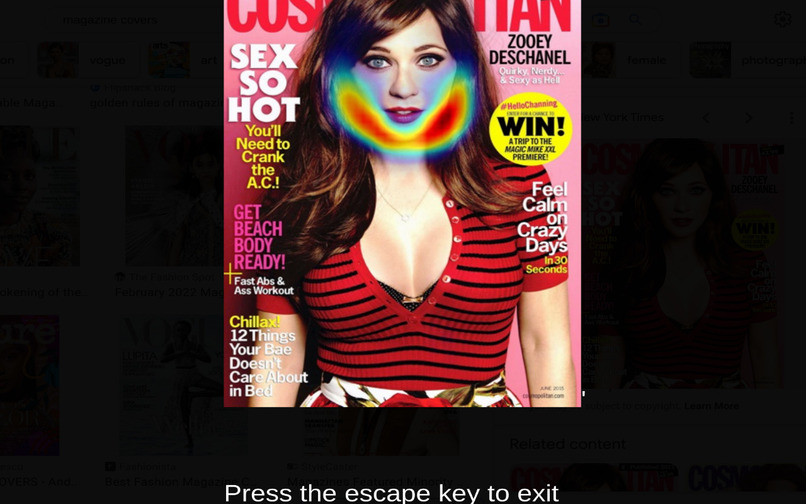
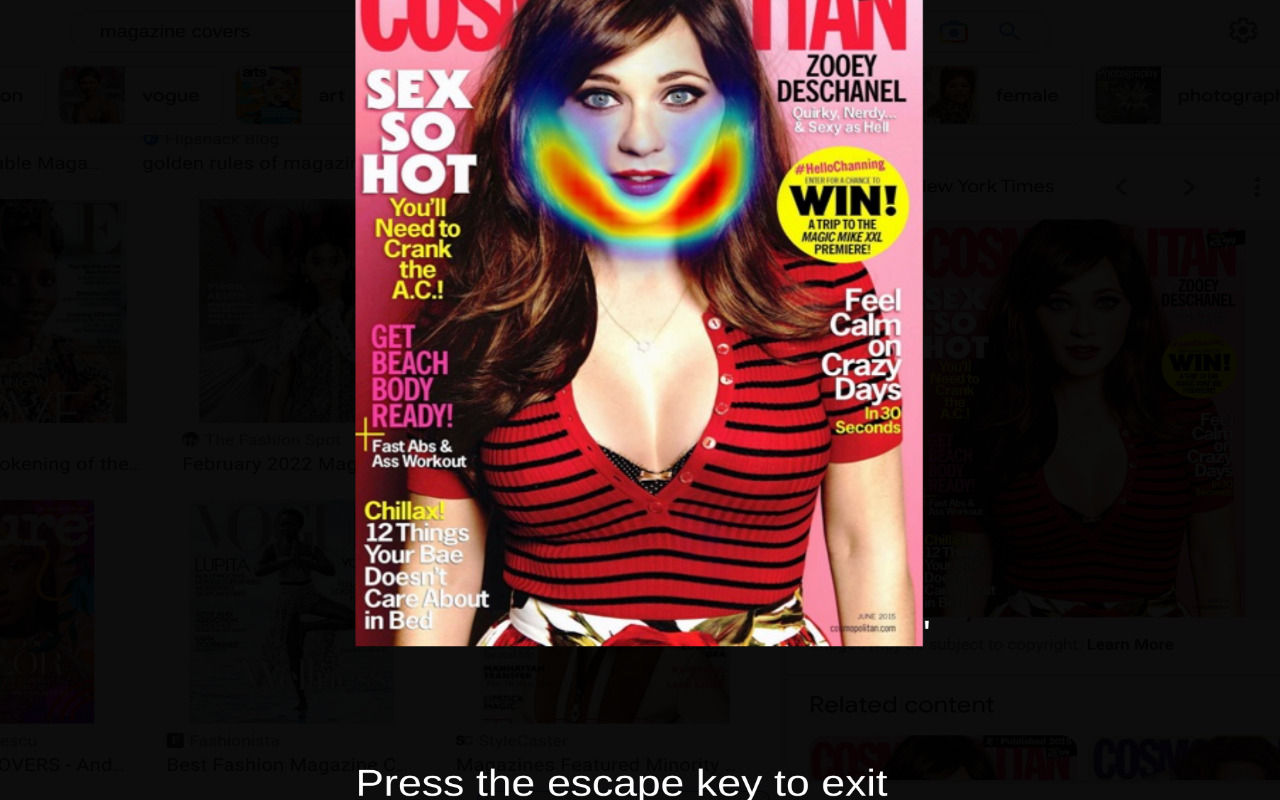
Example Output with Zooey Deschanel
-
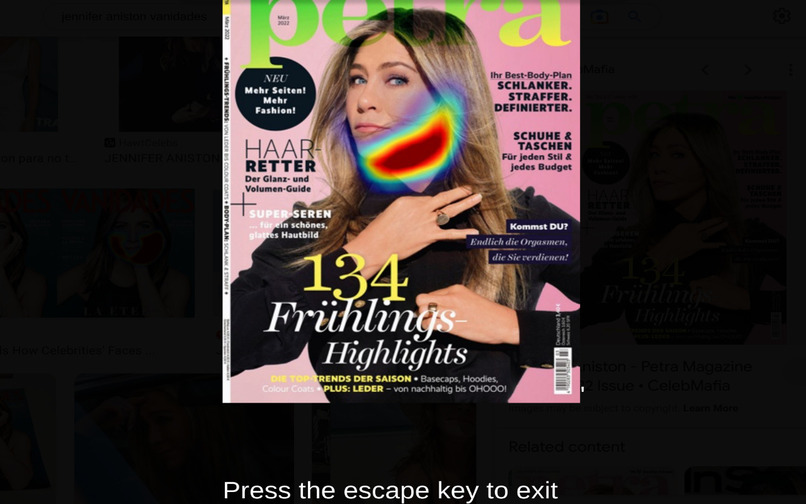
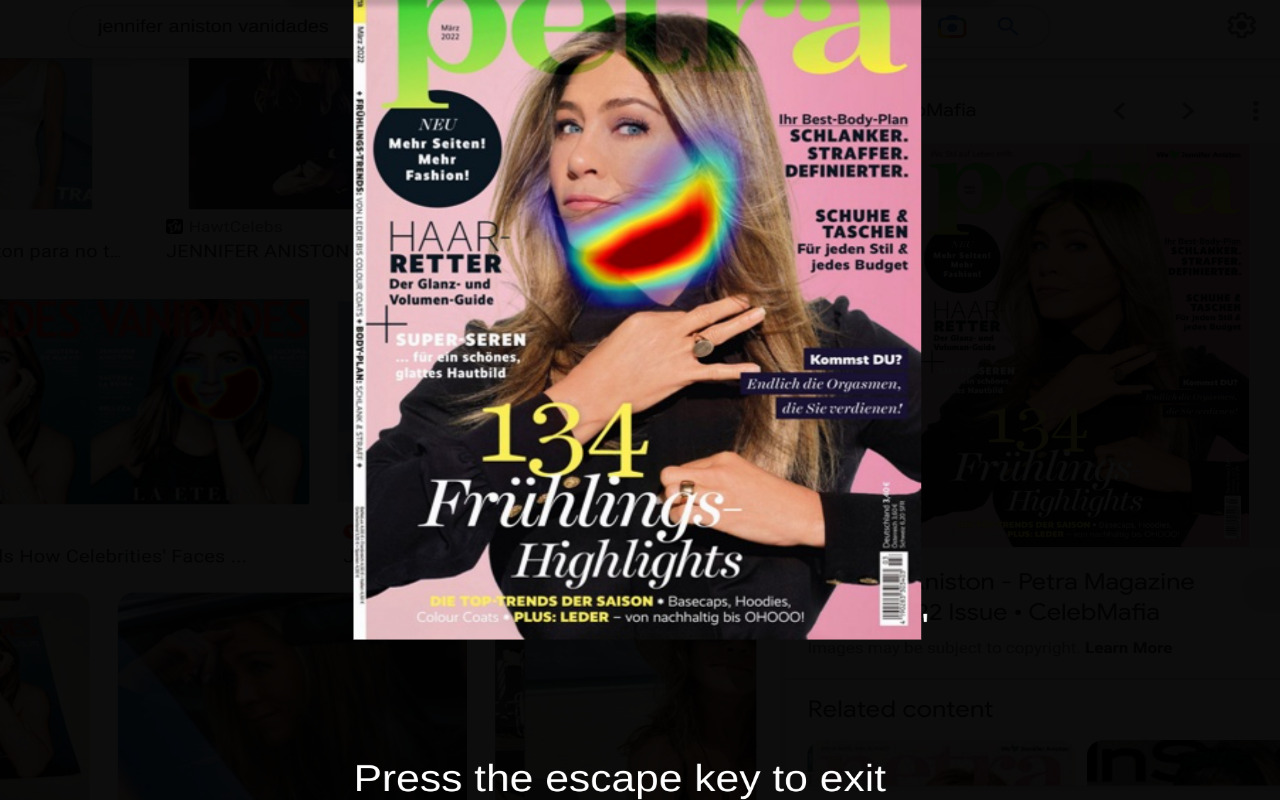
Example Output with Jennifer Aniston
-
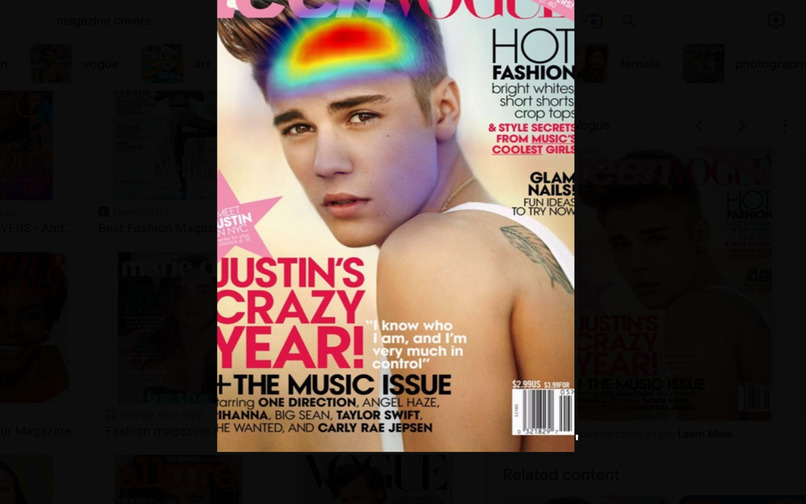
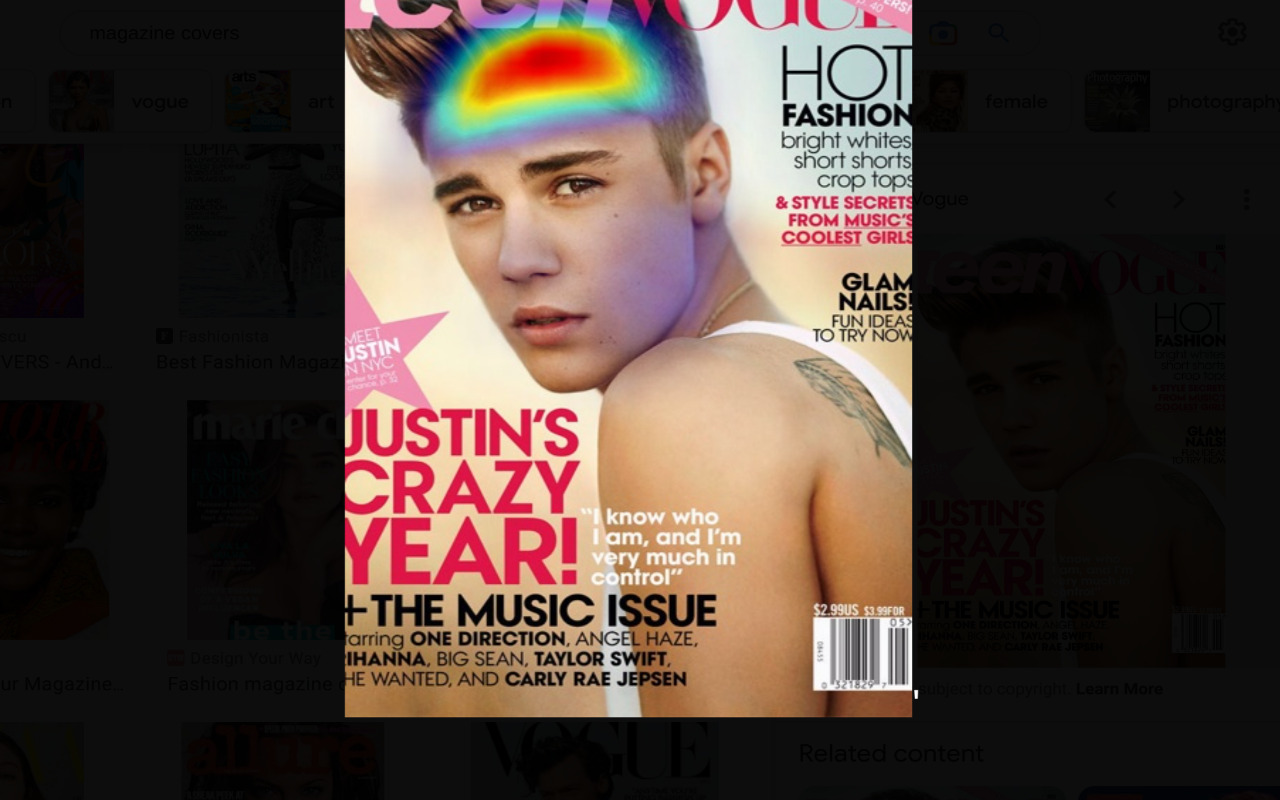
Example Output with Justin Bieber
-
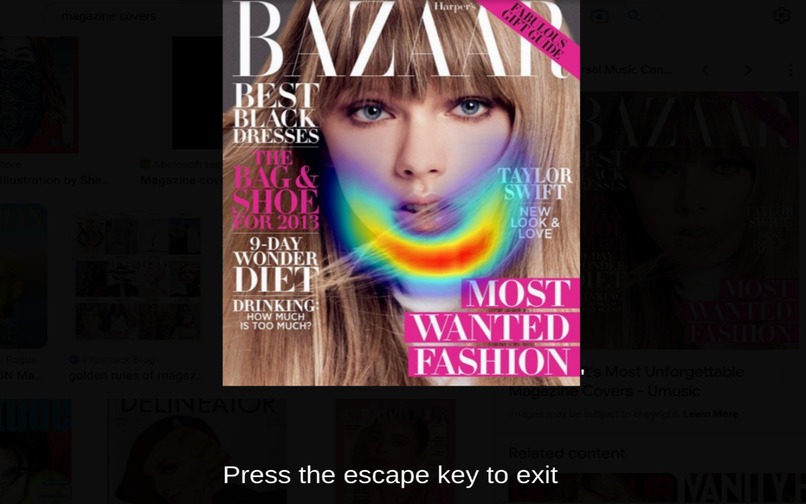
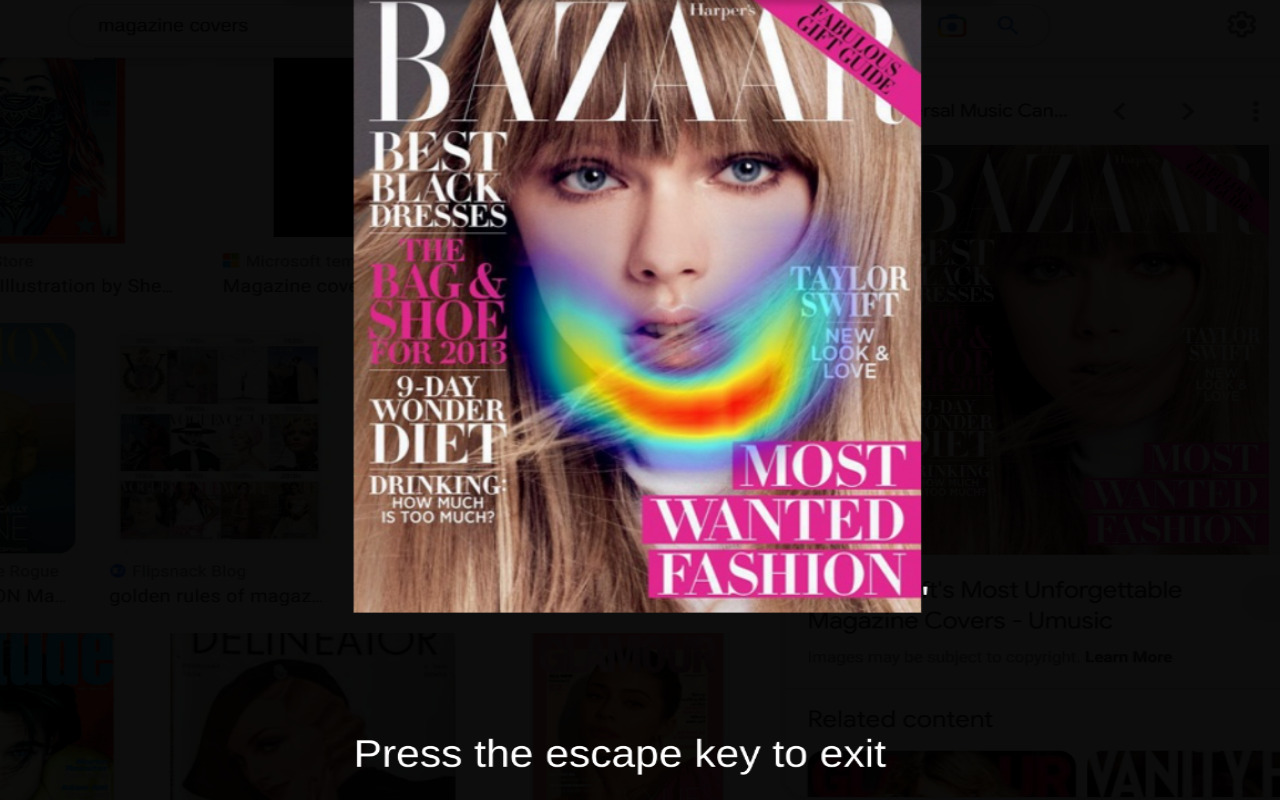
Example Output with Taylor Swift
-
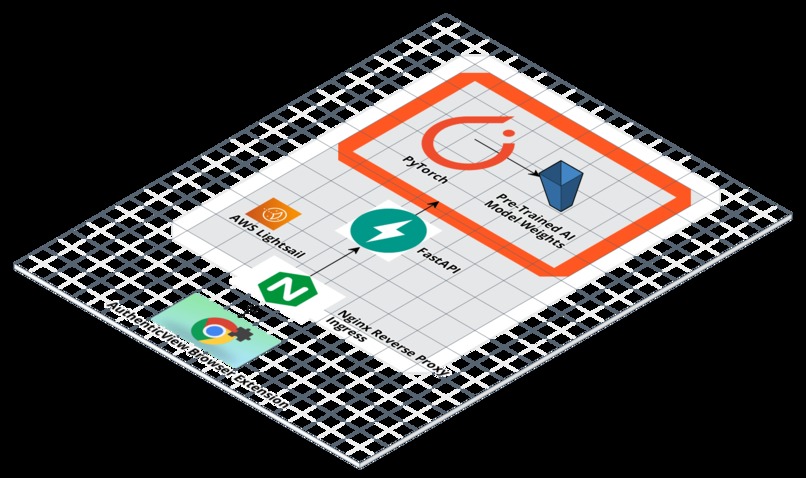
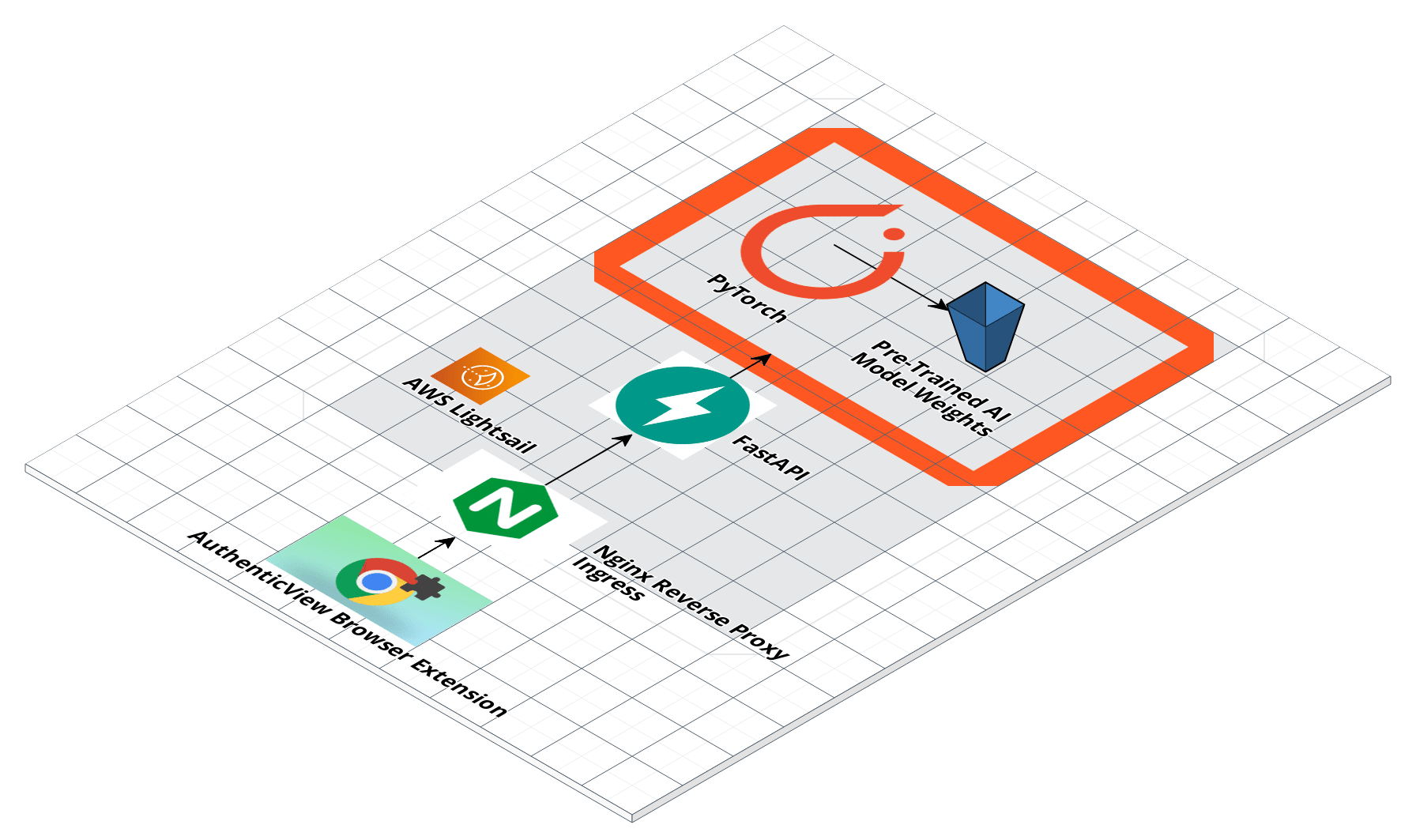
Architectural Diagram
Inspiration
Photoshop, like many other image editing software, can have negative consequences for people with disabilities. This is because the software often perpetuates unrealistic beauty standards that can be harmful to individuals who don't fit these standards. For example, people with disabilities may have physical features or conditions that cannot be easily erased or manipulated with Photoshop, and therefore may feel excluded or marginalized. Moreover, the constant exposure to altered images can make people feel inadequate and insecure, leading to negative mental health outcomes such as anxiety and depression. Additionally, the over-reliance on Photoshop to create perfect images can perpetuate ableist attitudes that prioritize a certain type of physical appearance over others, further marginalizing those with disabilities. Therefore, it is crucial to consider the impact of image editing software on people with disabilities and work towards promoting inclusive and diverse representations in media.
AuthenticView highlights visually where images have been manipulated with Photoshop by passing them through an AI model that looks for signs the image has been touched up. It works in the user’s web browser and is 100% free.
What it does
AuthenticView is both a browser extension that works in Google Chrome as well as a free web API where others can integrate our technology into their own apps. It allows users to upload images from the web and receive in return an image where an AI model has highlighted where the image may have been touched up with a heatmap. The darker red the heatmap is, the more likely this image has been manipulated with an image like Photoshop. Images can be uploaded directly to our servers or users can pass in a direct URL to that image. The image is then presented to the AI model for processing. This model is based on the model presented in “Detecting Photoshopped Faces by Scripting Photoshop” by Wang et al. which can be found here: https://arxiv.org/abs/1906.05856.
How we built it
AuthenticView’s model was pre-trained using the dataset and code from Wang et al., and then the weights from this operation were loaded onto our server hosted by Amazon Web Services. There, we built a REST-ful API using FastAPI around this model that allows users to upload images or provide URLs for the pre-trained model to work with. Since it is pre-trained, this operation is fast and scales well. All code for this module was written in Python, as the original model was built using PyTorch which made wrapping the model with an API that can call its inference code easier if were also written in Python. Uvicorn is the web server that powers our API and in front if it we placed an Nginx reverse proxy to help make the deployment stable, secure, and scalable. FastAPI is self-documenting so developers can easily see how to call our API using the Swagger UI it generated at authenticview.beauty/docs.
The browser extension is written in JavaScript with styling via CSS. It is built for the widest possible range of deployments in the Google Chrome ecosystem, supporting versions all the way back to version 88, the minimum for the latest manifest spec required to submit to their extension store. It grabs the image URL after the user selects it and chooses to analyze the image from a context menu. In this way, we make our extension compatible with those who need alternative methods to use a web browser besides a mouse as this can be navigated with keyboard commands. An overlay is then put over the page and loading text displayed. The image URL is sent via a POST request to our own API. The image is analyzed and the image with the heatmap showing where the image has been photoshopped is returned as a response and displayed. Users can then exit by pressing the escape key. Care has been taken to minimize the permissions requested of users out of concerns for their privacy- no user data is collected by our extension by design.
The browser extension is now proceeding through Google’s moderation process to be published as a public extension in their store, but can be installed today manually by downloading the extension’s files from the release section of our GitHub repository.
Challenges we ran into
AI models are hungry for memory and processing power. Standing up a solution that is inexpensive today but that can scale was a real challenge for us to overcome. We elected to stand up our infrastructure using containers on AWS, with an Nginx container sitting in front of our API container. This will make it simpler to add additional API containers as usage grows. The AWS ecosystem also allows us to select runtimes with various amounts of memory and processing power as we need it.
The evolving browser extension ecosystem posed another challenge. Between major browsers APIs and feature support is different. To solve this problem we elected to first build a Google Chrome extension in order to make our software compatible with the most users. We also carefully wrote our extension code such that the fewest possible changes should be needed in the future to publish for Mozilla Firefox and others.
Accomplishments that we're proud of
Our extension is completely keyboard navigable for disabled users that cannot use a mouse. The response time from our API is fast. We have carefully designed our web service to be as secure as possible, especially since we are handling arbitrary user files. As far as we are aware this is the first browser extension that targets our use case- promoting body positivity with artificial intelligence.
What we learned
One of the biggest findings we encountered as the sheer quantity of images that have been manipulated on the internet. It is not difficult with our extension to discover that most images of celebrities and influencers on search engines have been manipulated in some fashion.
Building a secure API that can scale was one of our biggest learning experiences. Configuring a reverse proxy and writing our code in such a way that we won’t get overwhelmed with a deluge of large images to process was a technical challenge. Handling arbitrary user input that includes binary data is also a security challenge as it is difficult to determine if what you are downloading is really an image. A series of checks and carefully handled permissions in the API containers ensures that our service should not be susceptible to problems with bad input.
There are very few resources online about how to build an accessible browser extension. While were were able to borrow resources written about accessible web design, more documentation and best practices need to be documented in this area. We hope to publish some best practices on our website in the future.
What's next for AuthenticView - AI for Body Positivity
Our browser extension is still undergoing moderation by Google to launch in their extension store. From there we will develop new extensions for additional browsers such as Mozilla Firefox, as well as optimize our extension for mobile use. We would like to pursue having our code and extension audited by a third party accessibility consultant to improve how our application can be used and navigated by those with disabilities. We also plan to translate our work into additional languages beyond English. All of these improvements will help us introduce the software to more people and grow our user base while helping promote more realistic beauty standards.
Built With
- amazon-web-services
- chrome
- fastapi
- javascript
- lightsail
- nginx
- npm
- poetry
- python
- pytorch
- uvicorn

Log in or sign up for Devpost to join the conversation.