Inspiration
The idea for AURORA was born from a simple frustration: why do AI assistants need to send our data to the cloud? In an era where privacy is increasingly precious, I wanted to create an AI companion that was both powerful and respectful of user data. The vision was clear—an assistant that could do everything the big players offer, but entirely on your local machine. Inspired by the potential of local LLMs through Ollama and the growing concern over data privacy, AURORA represents a belief that powerful AI should be accessible, private, and under user control.
What it does
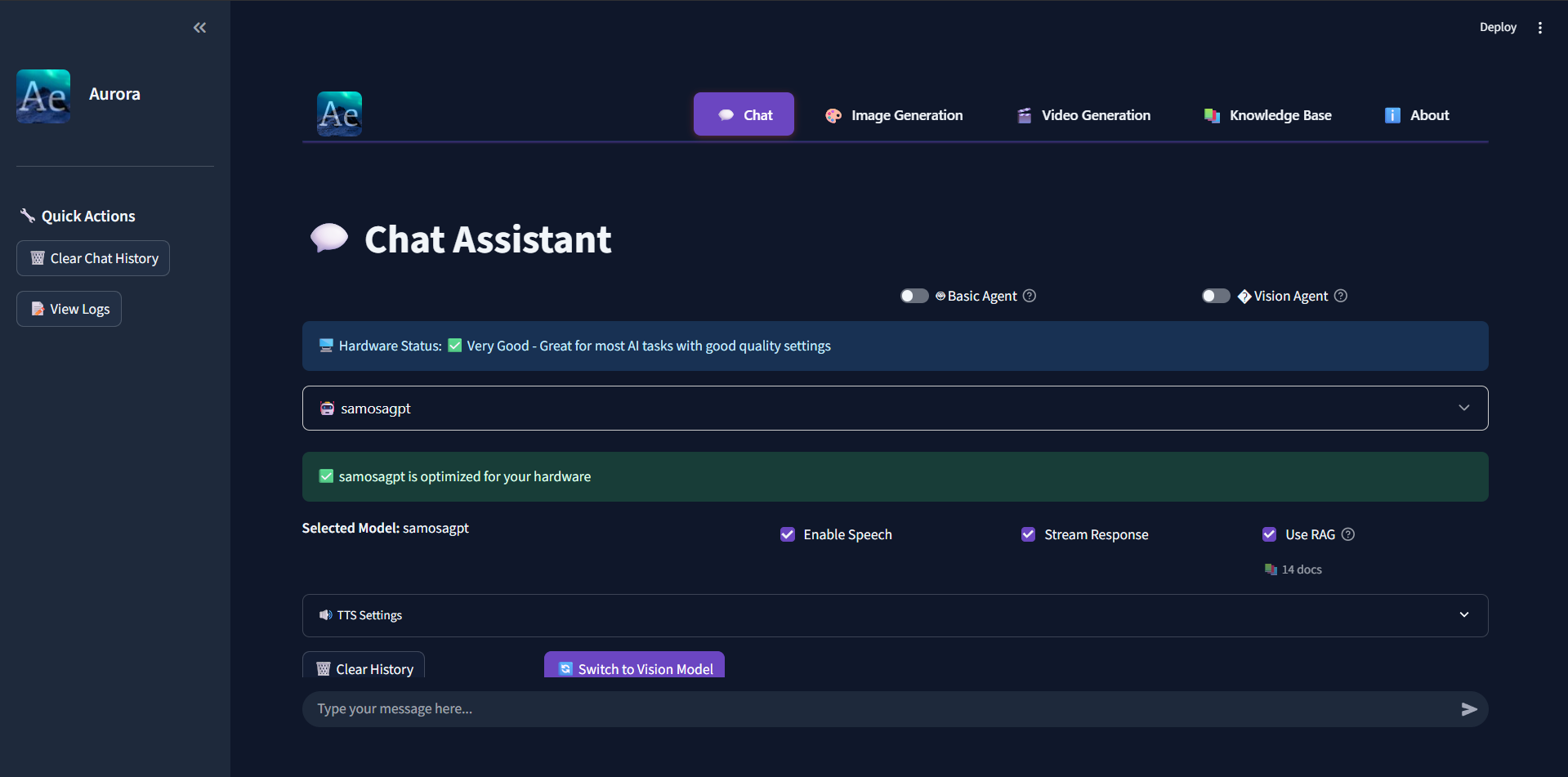
AURORA is an offline-first, privacy-focused AI assistant that combines multiple AI capabilities into one cohesive system:
- 💬 Conversational AI: Natural language conversations powered by local LLMs (Llama, Qwen, etc.)
- 📚 RAG (Retrieval Augmented Generation): Intelligent document retrieval and knowledge base search using semantic embeddings
- 🤖 Autonomous Agents: Desktop automation with vision-based screen understanding and tool orchestration
- 🎨 Image Generation: Create stunning visuals with Stable Diffusion, entirely offline
- 🎬 Video Generation: Generate videos using CogVideoX models
- 🎤 Voice Interface: Offline speech recognition with Whisper and natural text-to-speech with Piper
- 👁️ Vision Capabilities: Analyze images and screenshots using LLaVA and Qwen-VL models
- 🌐 Multiple Interfaces: Beautiful Streamlit web UI and lightweight console interface
All of this runs locally on your machine—no cloud, no data collection, no compromises.
How we built it
AURORA's architecture is built on several key pillars:
Core AI Engine 🧠
- Ollama Integration: Local LLM inference with support for multiple models
- Custom Prompt Routing: Intent classification system to route queries to the appropriate handler
- RAG System: ChromaDB-powered semantic search over personal knowledge bases
Agentic Layer 🤖
- Desktop Automation: PyAutoGUI for mouse/keyboard control
- Vision Models: LLaVA and Qwen-VL for screen understanding and element detection
- Tool Orchestration: Intelligent decision-making for multi-step task execution
Generative Capabilities 🎨
- Image Generation: Stable Diffusion with LoRA support and dynamic model loading
- Video Generation: CogVideoX integration for video synthesis
- Resource Management: Smart model loading/unloading to optimize memory usage
Voice Interface 🎤
- Speech Recognition: Whisper models for accurate offline transcription
- Text-to-Speech: Piper for natural voice output in multiple languages
User Interfaces 💻
- Streamlit Web UI: Modern, responsive interface with dark mode and real-time updates
- Console Interface: Lightweight terminal-based interaction for power users
Tech Stack: Python, Streamlit, Ollama, LangChain, ChromaDB, PyTorch, Transformers, Diffusers, Whisper, PyAutoGUI
Challenges we ran into
1. Resource Management 💾
Running multiple AI models simultaneously on consumer hardware is challenging. Memory requirements scale quickly:
$$M_{total} = M_{llm} + M_{vision} + M_{gen} + M_{overhead}$$
Solution: Implemented intelligent model loading/unloading, quantization support, and hardware detection to optimize performance across different GPU configurations.
2. Agent Reliability 🎯
Building an autonomous agent that can reliably interact with desktop environments required:
- Robust error handling for unpredictable UI states
- Vision model integration for accurate element detection
- Confidence scoring and fallback mechanisms
- Safe execution boundaries to prevent unintended actions
3. RAG Quality 📚
Getting RAG to work effectively involved:
- Optimizing chunk sizes (balancing context vs. precision)
- Fine-tuning embedding models for better semantic search
- Implementing relevance scoring using cosine similarity:
$$similarity(q, d) = \frac{q \cdot d}{|q| |d|}$$
- Designing efficient indexing strategies for large knowledge bases
4. Cross-Platform Compatibility 🌐
Supporting Windows, Linux, and macOS meant dealing with:
- Different path separators and file systems
- OS-specific dependencies for desktop automation
- Hardware detection across diverse GPU configurations (NVIDIA, AMD, CPU-only)
- Shell differences (PowerShell, Bash, Zsh)
5. User Experience ✨
Making a powerful AI system feel intuitive required:
- Designing clear conversation flows and intent routing
- Providing real-time feedback during long operations
- Graceful degradation when models aren't available
- Balancing feature richness with interface simplicity
Accomplishments that we're proud of
- 🔒 Privacy-First: Successfully built a fully functional AI assistant that never sends data to the cloud
- 🚀 Performance: Optimized model loading to run on consumer hardware with limited resources
- 🎨 Multimodal Excellence: Integrated text, vision, image generation, video generation, and voice in one cohesive system
- 🤖 Autonomous Agents: Created working desktop automation with vision-based screen understanding
- 📚 Intelligent RAG: Built a knowledge retrieval system that genuinely enhances AI responses
- 🌍 Open Source: Made everything available for the community to use, learn from, and improve
- ✅ Comprehensive Testing: Established a robust testing infrastructure with unit, integration, and coverage reporting
- 📖 Documentation: Created extensive documentation to help contributors get started
What we learned
- Offline doesn't mean limited: With the right architecture, local AI can rival cloud services in capability
- Resource optimization is key: Quantization, dynamic loading, and hardware detection are essential for accessibility
- RAG transforms LLMs: Retrieval augmented generation dramatically improves response quality and reduces hallucinations
- Agent systems require careful design: Autonomous actions need robust error handling, confidence scoring, and safety boundaries
- User experience matters: Even the most powerful AI is useless if it's hard to use
- Community is everything: Open source collaboration accelerates development and improves quality
- Privacy is achievable: Local AI is not just possible—it's practical and performant
The most valuable lesson: Building AI tools that respect users' privacy while delivering powerful functionality is not only possible but necessary.
What's next for Aurora
AURORA continues to evolve with exciting features on the roadmap:
Near-Term 🎯
- Fine-tuned Models: Custom models optimized for specific domains and use cases
- Enhanced Multi-Agent Collaboration: Multiple agents working together on complex tasks
- Plugin System: Community-driven extensions and integrations
- Improved Voice Interaction: Emotion detection and more natural conversation flow
- Advanced RAG: Support for more document types, better chunking strategies, and hybrid search
Medium-Term 🚀
- Mobile Companion App: Extend AURORA to mobile devices
- Collaborative Features: Multi-user support while maintaining privacy
- Model Training Pipeline: Tools for users to fine-tune their own models
- Advanced Vision Capabilities: Better screen understanding and UI element detection
- Performance Monitoring: Real-time analytics and optimization suggestions
Long-Term 🌟
- Federated Learning: Learn from community usage patterns without compromising privacy
- Hardware Acceleration: Better support for specialized AI accelerators
- Real-Time Collaboration: Multiple agents coordinating in real-time
- Industry-Specific Modules: Pre-configured setups for developers, writers, researchers, etc.
- Self-Improvement Loop: Agents that can learn from their mistakes and improve over time
Join us in building a more private, user-centric AI future! 🚀
Built With
- css
- ollama
- python
- streamlit
- typescript

Log in or sign up for Devpost to join the conversation.